

Building a thriving online community is no small feat. Community platforms must be functional, engaging, and user-friendly, qualities that often require substantial investment. Fortunately, with BuddyX Theme and BuddyBoss, you can put together a powerful and visually strong community without spending much at all. This article walks through the free resources built into BuddyX Theme, the additional plugins compatible with BuddyBoss, and practical tips for getting the best results from all of it, along with the mistakes that trip up most first-time community builders.
Free Tools Within BuddyX Theme
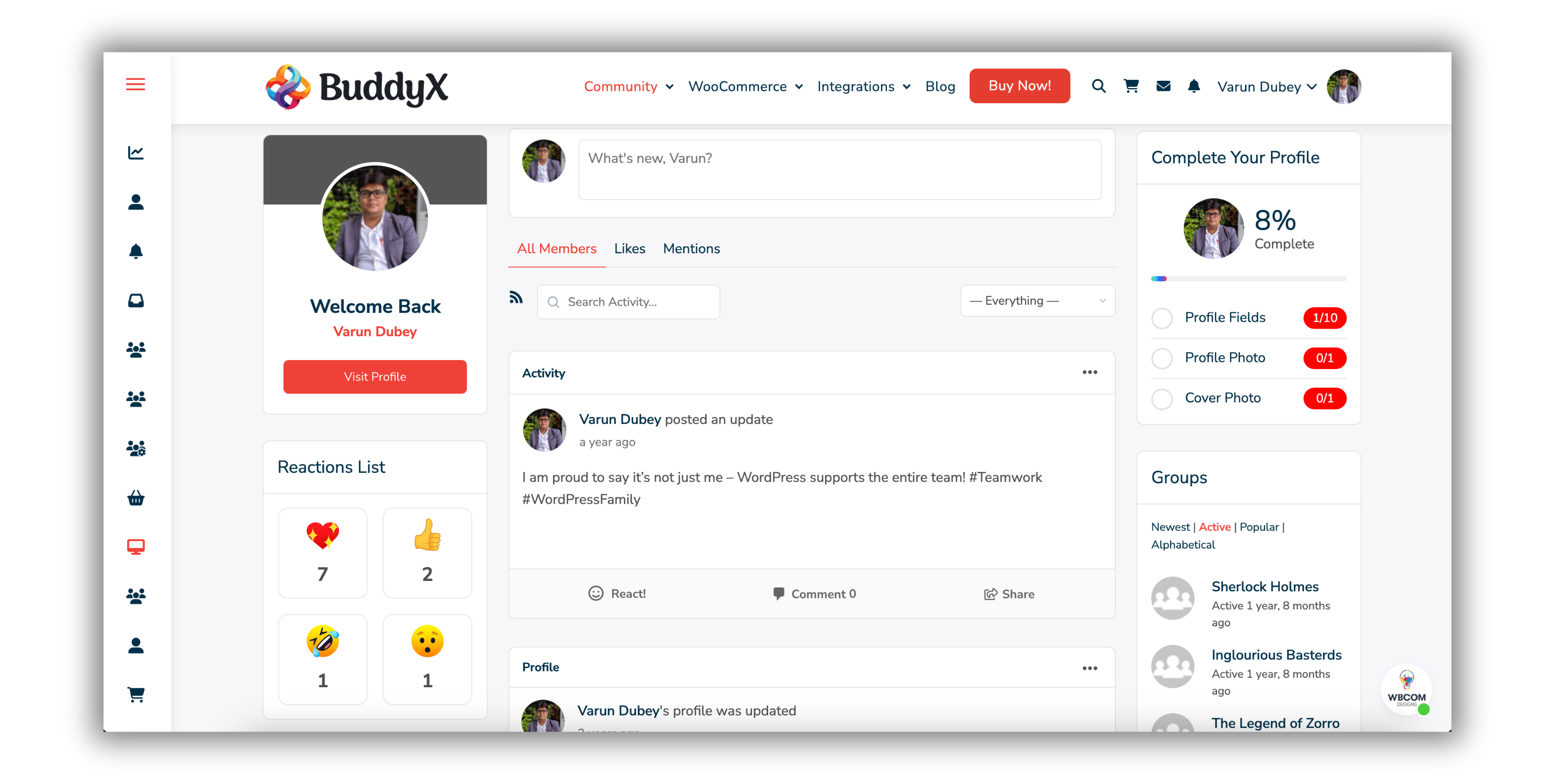
BuddyX Theme is a WordPress theme designed to complement BuddyBoss cleanly. It has several free features that let you build and manage a real online community without significant expense. Here’s a rundown of its standout tools:
- Responsive Design: Your community platform looks and functions correctly on any device, including desktops, tablets, and smartphones, so members get a consistent experience regardless of how they show up.
- Customizable Layouts: BuddyX Theme offers multiple header and footer styles, making it easy to personalize your site to match your brand’s look without requiring technical expertise.
- SEO-Friendly Structure: The theme’s lightweight design and clean code help your platform rank higher in search results, attracting more users organically over time.
- Translation Ready: BuddyX Theme’s translation-ready capabilities let you serve a global audience. You can build a genuinely multilingual community that caters to diverse users rather than bolting translation on as an afterthought.
- Community-Centric Features: BuddyX Theme integrates directly with BuddyBoss, enhancing features like member profiles, activity streams, and group discussions.
- Free Support and Documentation: Even as a free tool, BuddyX Theme comes with documentation and community support, making it approachable for beginners setting up and customizing their platform for the first time.
Download Link
Download the Free BuddyX Theme
Additional Free Plugins Compatible with BuddyBoss
BuddyX Theme supports a wide range of plugins that expand your platform’s functionality. Here are some of the top free and paid plugins worth considering.
BuddyNext (Free Community Engine)
BuddyNext is Wbcom’s standalone, self-hosted community engine. It gives your site an activity feed, spaces, member profiles, and direct messaging without any third-party dependency. It isn’t built on BuddyPress, it’s its own social layer, purpose-built for performance and shipped free.
BuddyX Theme now ships with BuddyNext as an available social core alongside BuddyPress support. If you’re building a BuddyBoss-style community and want a free, actively maintained engine to power it, BuddyNext is worth evaluating as a starting point rather than an add-on bolted onto an existing setup.
Gamification Plugins
Use GamiPress or BadgeOS to add points, badges, and achievements that reward participation. Both are established, actively maintained tools for building interactive, game-like layers on top of a community without custom development.
- GamiPress Plugin: Download Here
- BadgeOS Plugin: Download Here
E-Learning Plugins
Build e-learning into your community with Tutor LMS, LearnPress, or LifterLMS. These plugins handle course creation, student management, quizzes, and certification without requiring separate LMS software.
- Tutor LMS Plugin: Download Here
- LearnPress Plugin: Download Here
- LifterLMS Plugin: Download Here
eCommerce Plugins
Add store functionality with WooCommerce or Easy Digital Downloads. These plugins let you sell memberships, physical products, or digital downloads directly inside your community.
- WooCommerce Plugin: Download Here
- Easy Digital Downloads Plugin: Download Here
Calendar and Event Management
Manage events and calendars with The Events Calendar or Modern Events Calendar. Both make scheduling and event promotion straightforward for community meetups, webinars, and recurring programming.
- The Events Calendar: Download Here
- Modern Events Calendar: Learn More
Job Listing Plugins
Add job boards to your community with WP Job Manager or Simple Job Board. These plugins let members post job listings and track applications directly within the platform.
- WP Job Manager: Download Here
- Simple Job Board: Download Here
Directory Listing Plugins
Create business or member directories with GeoDirectory or Directorist. These plugins work well for networking-focused communities and local business promotion.
- GeoDirectory Plugin: Download Here
- Directorist Plugin: Download Here
Multi-Vendor Marketplace Plugins
Build a marketplace with Dokan or WC Vendors. These tools add multi-vendor functionality on top of WooCommerce, letting community members sell their own products through your platform.
- Dokan Plugin: Learn More
- WC Vendors Plugin: Download Here
Classifieds and Ads
Add classified ad listings with plugins like WPAdverts or Another WordPress Classifieds Plugin. Both let users post and manage their own ads directly on your platform without a separate marketplace build.
- WPAdverts Plugin: Download Here
- AWPCP Plugin: Learn More
Image Optimization Plugins
Compress images using Smush, EWWW Image Optimizer, or a paid tool like Imagify to keep your platform loading quickly as members upload more media.
- Smush Plugin: Download Here
- EWWW Image Optimizer Plugin: Download Here
- Imagify Plugin: Learn More
SEO Plugins
Optimize your site with Yoast SEO or All in One SEO. Both help you improve search visibility and drive organic traffic without needing a dedicated SEO specialist on staff.
- Yoast SEO Plugin: Download Here
- All-in-One SEO Plugin: Download Here
Why Category Choice Matters More Than Plugin Choice
New community owners spend a surprising amount of time comparing two competing plugins in the same category, GamiPress against BadgeOS, or Tutor LMS against LearnPress, when the more consequential decision is which categories to invest in at all. A community that adds gamification, a marketplace, and a job board simultaneously, before any of the three has proven it drives engagement, ends up with three half-used features instead of one that actually works. Pick the single category that maps most directly to why members are joining in the first place, get it genuinely useful, and only then move to the next.
This matters even more on a BuddyBoss or BuddyNext-powered site than on a typical brochure website, because every added plugin here interacts with the activity feed, the member profile, and the notification system. A poorly chosen plugin doesn’t just sit quietly unused, it can clutter the activity stream with irrelevant notifications and push actual member content further down the page.
A Walkthrough: Building a Freelancer Community with This Stack
To make the category choices concrete, imagine you’re building a community for freelance designers. The core need is straightforward: designers want to find work, showcase their portfolio, and get feedback from peers. Working through the stack above, the plugins that matter immediately are WP Job Manager for the job board, WC Vendors or Dokan if members will sell templates or services directly, and GamiPress to reward members who give thoughtful feedback on shared portfolio pieces.
What doesn’t matter yet, at least not in month one, is the LMS category. A freelancer community can absolutely grow into offering courses later, but launching with an empty course catalog next to an active job board sends a confusing signal about what the community is actually for. The same logic applies to the events calendar: skip it until you have a real webinar or meetup scheduled, an empty calendar page looks worse than no calendar page at all.
This same exercise works for any niche. Write down the two or three things members will actually do on day one, then match categories to those specific actions instead of installing everything the list offers because it’s technically compatible.
How to Decide Which Plugins You Actually Need
The list above covers eleven different categories, and installing all of them on day one is a mistake most new community owners make once. Every active plugin adds a small amount of load time and a small amount of maintenance surface, updates to track, potential conflicts to watch for. Start with the plugins that map directly to your community’s core purpose. A study group community needs the LMS and gamification tools far more than it needs a multi-vendor marketplace. A local business network needs the directory and job board plugins long before it needs an e-learning platform.
A useful test before installing anything: can you describe, in one sentence, the specific member behavior this plugin is meant to encourage? If the answer is vague, “it seemed useful,” hold off. Add it later once an actual member request or a clear gap in the community justifies it.
Tips for Optimizing These Tools
To get the most out of BuddyX Theme and the additional plugins, keep these practices in mind.
- Choose the Right Hosting: For smooth performance, use a reliable VPS with at least 4GB RAM and 2 CPUs. Providers like DigitalOcean, Cloudways, or SiteGround are solid starting points for a community-sized WordPress install.
- Compress Media Files: Use tools like Smush, EWWW Image Optimizer, or Imagify to compress images and cut page load times, especially once members start uploading their own photos and cover images.
- Enable Caching: Improve site speed with caching plugins like WP Super Cache or W3 Total Cache, particularly important once activity feeds and member directories start pulling from a growing database.
- Customize Without Code: Use Elementor or Gutenberg to build layouts that match your brand without hiring a developer for every design tweak.
- Monitor Analytics: Install Google Analytics or MonsterInsights to track engagement and spot which parts of the community are actually getting used.
- Encourage Engagement: Turn on gamification, job boards, and directories deliberately, as features tied to a clear purpose rather than switched on all at once.
- Update Regularly: Keep plugins and themes current to maintain compatibility and close security gaps before they become a problem.
Maintenance Cadence for a Growing Community
A stack that works fine at launch can quietly degrade as the member base grows, if nobody is watching for it. Set a simple recurring schedule instead of waiting for something to visibly break.
Weekly: check for plugin and core updates, and apply them on a staging copy first if the site has any custom code or heavily customized templates. Skim recent forum or group activity for anything that looks like spam or abuse the automated filters missed.
Monthly: review analytics for which plugins and features are actually getting used. A directory listing plugin with zero new entries in sixty days is either poorly promoted or genuinely not needed, decide which and act on it. Run a full site backup verification, not just confirming a backup exists, but confirming it can actually restore.
Quarterly: reassess the full plugin list against the “one sentence purpose” test from earlier in this article. Retire anything that no longer earns its place, and evaluate whether it’s time to upgrade a free plugin to its premium tier based on genuine usage data rather than a features list.
A Realistic Starter Stack
If you’re launching a new BuddyBoss or BuddyNext-powered community this quarter and want a starting point rather than the full list above, a workable minimum stack looks like this: the core theme (BuddyX Theme), one gamification plugin (GamiPress or BadgeOS), one image optimization plugin (Smush or EWWW), one caching plugin, and one SEO plugin (Yoast or All in One SEO). Everything else on the list above is genuinely useful, but it earns its place once the community has members and a demonstrated need, not before.
Common Pitfalls When Stacking Free Plugins
The most common mistake is plugin sprawl: installing five plugins that each do a slightly different version of the same job because none of them alone felt complete. Two SEO plugins running at once, for example, will conflict rather than combine their strengths, pick one and configure it properly instead of layering a second on top hoping to cover gaps.
The second common mistake is skipping the compatibility check before activating something new. Not every plugin in the WordPress ecosystem is built with BuddyPress or BuddyBoss activity feeds in mind. Before adding anything outside the categories covered here, check the plugin’s own documentation or support forum for explicit mentions of BuddyPress or BuddyBoss compatibility, and test it on a staging copy of the site first rather than the live community.
The third mistake is forgetting that every plugin you activate is also a plugin you now have to update. A community running twenty plugins where twelve haven’t been touched since launch is a security and stability risk waiting to surface. Set a recurring monthly reminder to review the plugin list, remove anything that isn’t earning its place, and update everything that is.
Frequently Asked Questions
Do I need BuddyBoss Platform specifically, or does this work with BuddyPress too? Most of the plugins listed here work with either BuddyPress or the BuddyBoss Platform, since BuddyBoss itself is built on top of BuddyPress’s foundation. BuddyX Theme is designed to work cleanly with both, and with BuddyNext as a third option if you’d rather skip the BuddyPress dependency entirely.
Is it safe to run this many free plugins together? Yes, as long as you stick to actively maintained plugins from the official WordPress.org repository or established vendors, and you test new additions on staging before pushing them live. The risk isn’t the number of plugins, it’s running abandoned or poorly maintained ones.
How much does a fully-loaded free stack actually cost to run? The plugins themselves can be entirely free at the core tier. Your real costs are hosting (a VPS suitable for a growing community typically runs somewhere in the $20 to $80 per month range depending on traffic) and any premium upgrades you choose once free tiers stop covering your needs.
Free Tools Have Real Limits
It’s fair to be upfront about where the free tier of this stack runs into limits. Free plugins generally cover the core use case well but reserve advanced reporting, priority support, and deeper customization for premium versions. That’s a reasonable trade, not a bait-and-switch, developers maintaining free plugins for years need a sustainable business model somewhere. Budget for at least one or two premium upgrades (commonly the LMS or the multi-vendor marketplace plugin) once your community outgrows what the free tier supports.
Choosing Between BuddyPress, BuddyBoss, and BuddyNext
Since this stack works across all three social layers, it’s worth being clear about when each one makes sense. BuddyPress is the original, fully free, open-source foundation, the safest default if you want maximum plugin compatibility and don’t mind a more basic out-of-the-box design. BuddyBoss Platform builds a more polished, app-like experience on top of that same BuddyPress foundation, with its own premium app and additional paid features, a strong choice if budget allows for the BuddyBoss ecosystem.
BuddyNext takes a different approach entirely: it’s a free, self-hosted community engine built independently of BuddyPress, designed by the same team behind BuddyX Theme specifically to avoid the dependency chain that comes with running BuddyPress plus a separate platform layer on top. For a new community starting from scratch in 2026 with a tight budget, BuddyNext paired with BuddyX Theme is worth serious consideration precisely because it removes a layer of plugin dependency that BuddyBoss-based setups carry by design.
None of these three choices lock you in permanently, but switching between them after launch involves real migration work, member profile data, group structures, and activity history don’t move automatically between systems. Decide early, based on your actual budget and how much design polish you need on day one, rather than switching mid-build. If you’re genuinely unsure, run a small test install of each on a staging environment before committing your production community to one of them.
Wrapping Up
Enhancing your BuddyBoss community doesn’t have to come with a hefty price tag. You can build a powerful, engaging, cost-effective platform using the free features of BuddyX Theme alongside the plugins covered above. From gamification and e-commerce to event management and directory listings, these tools give you what you need to grow a community without a large up-front budget. Start with the core stack, add the rest as real member needs surface, and keep hosting and caching solid underneath it all as the community grows. The plugins will keep evolving, but the underlying discipline stays the same: match every addition to a specific member behavior you’re trying to encourage, retire what isn’t working, and let the community’s own activity tell you what to build next.
Interesting Reads:
Is BuddyBoss Free? A Breakdown of Costs and Features