
A community platform that cannot talk to anything outside itself eventually becomes the one system every other tool has to work around. A new member should be able to trigger a welcome sequence in an email tool. A payment on a storefront should be able to grant community access without a human copying a spreadsheet. That only works if the platform can both notify the outside world and be safely told what to do by it.
BuddyNext ships both directions as real, signed infrastructure, not a “connect to Zapier” marketing line with nothing verifiable underneath it. Everything below is shown on a real, populated install, not a mockup.
Key takeaways
- Outbound webhooks are HMAC-SHA256 signed on every lifecycle event, with a full REST API to register, test, and inspect the delivery log for each endpoint.
- Failed deliveries retry with exponential backoff instead of a perpetual polling cron, and an endpoint that fails three times in a row is deactivated automatically.
- A separate inbound access webhook lets an external system, a storefront, a membership plugin, grant roles, abilities, and credits directly, without a human doing it by hand.
- Replay-proof signatures are on by default, a timestamped scheme that rejects a captured request replayed later, not just a static signature that stays valid forever.
- The inbound secret and outbound endpoint secrets are deliberately separate values, so copying the wrong one into the wrong tool cannot silently open the other door.
In this article
- Outbound events, signed so they can be trusted
- Retries that don’t hammer a broken endpoint
- A separate inbound door, for granting access
- Replay protection, not just a signature
- One shared secret is not two
- Frequently asked questions
Get BuddyNext FreeTry the Live Sandbox Demo →
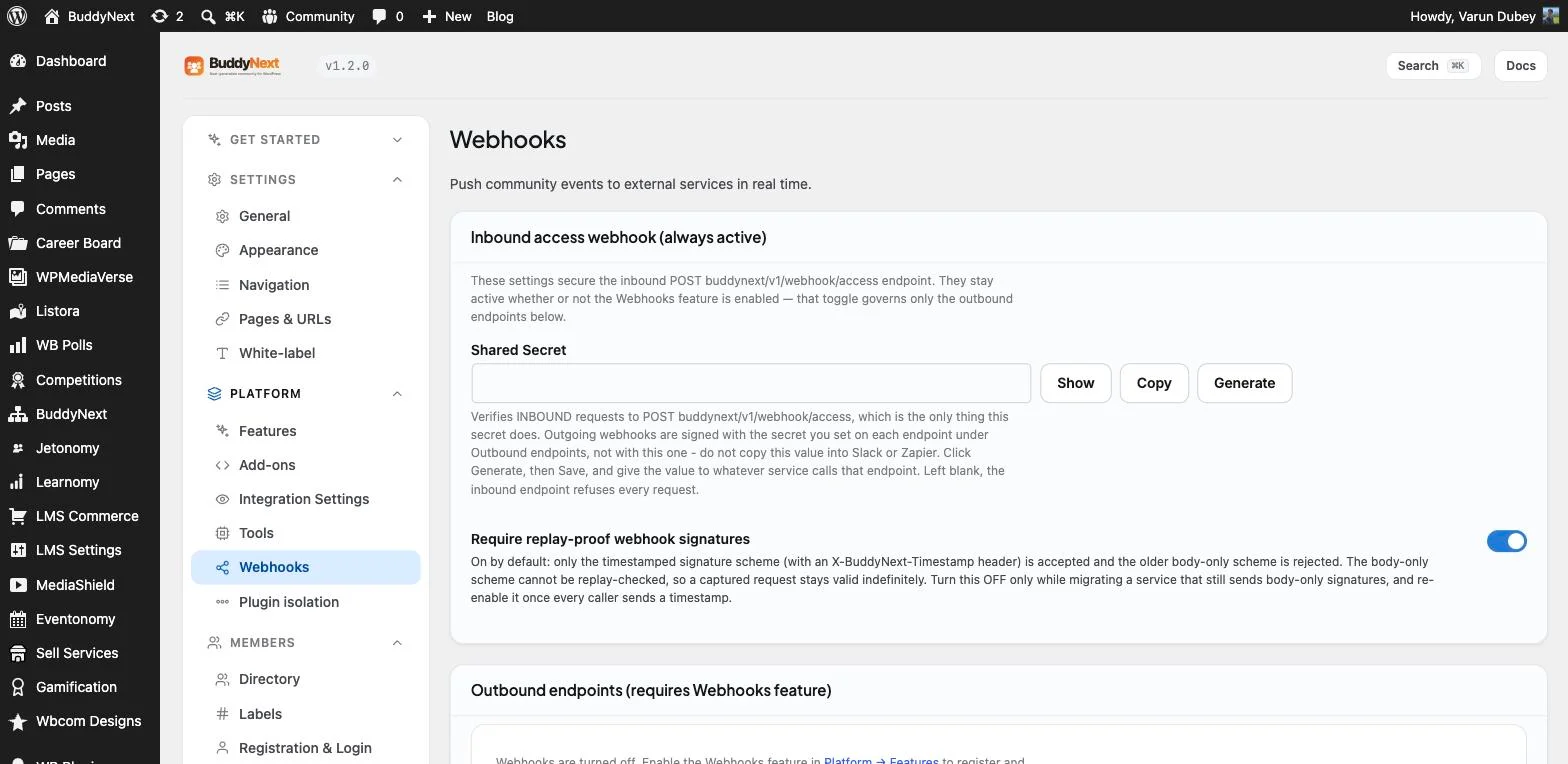
The real Webhooks admin screen on this install: an inbound access webhook with its own secret, and a separate outbound endpoints section underneath it.
Outbound events, signed so they can be trusted
A webhook that any script can spoof by guessing the URL is not an integration, it is an open door. Every outbound webhook on this install dispatches an HMAC-SHA256-signed HTTP POST payload on real BuddyNext lifecycle events, so the receiving service can verify the request actually came from this platform and was not tampered with in transit. Registering, testing, and inspecting those endpoints is not a support-ticket process either, a real REST API lists every registered endpoint, registers a new one, deletes one along with its log, fetches a paginated delivery log per endpoint, and sends a one-off test ping to confirm an endpoint is actually reachable before relying on it.
Retries that don’t hammer a broken endpoint
An integration that retries a failing endpoint every few seconds forever is the kind of bug that quietly takes down whatever is on the other end of it. Failed deliveries on this install retry reactively, one scheduled retry per failed delivery with exponential backoff between attempts, instead of a perpetual polling cron checking in on a schedule regardless of whether anything actually failed. An endpoint that racks up three consecutive delivery failures gets automatically deactivated, so a dead integration stops generating retry traffic on its own rather than silently hammering a URL that stopped working weeks ago.
A separate inbound door, for granting access
Outbound notifications only solve half the integration problem, the other half is letting an external system safely tell the community platform what to do. A dedicated inbound access webhook accepts signed requests to set a member’s community role, grant or revoke a specific ability with an optional expiry, and add, set, or deduct credit balances, exactly the actions a storefront finishing a purchase or a membership plugin processing a renewal actually needs to trigger. Every one of those calls is written to its own audit log, so a role change or a credit grant that came in through this door is never an untraceable mystery later.
Replay protection, not just a signature
A signature alone does not stop a captured request from being replayed later, it only proves the request was not altered, not that it is fresh. The real setting on this install, “Require replay-proof webhook signatures,” is on by default, accepting only a timestamped signature scheme carried in an X-BuddyNext-Timestamp header and rejecting the older body-only scheme outright, because a body-only signature that cannot be timestamp-checked stays valid indefinitely if it is ever intercepted. The option to turn it off exists only as a migration path while moving a legacy integration over, with the site’s own help text saying plainly to re-enable it the moment every caller sends a timestamp.
One shared secret is not two
Reusing one secret for both directions of an integration is a common, quiet mistake, and this install’s own settings screen calls it out directly. The inbound webhook’s shared secret verifies requests coming in to the access endpoint only, while every outbound endpoint carries its own separate secret used to sign what BuddyNext sends out. The admin help text says it explicitly: do not copy the inbound secret into Slack or Zapier, that is not what it is for. Keeping the two kinds of secret structurally separate means a mistake pasting one into the wrong tool cannot accidentally open the other door.
Why this is worth taking seriously before you build
None of this is a generic “webhooks available” bullet point with no real mechanics behind it. Signed outbound events with a real management API, backoff-based retries with automatic deactivation, a separate signed inbound access door, replay protection on by default, and deliberately separated secrets are part of how BuddyNext, the complete community platform, treats integrations as production infrastructure. A community that cannot talk safely to the tools around it eventually gets bolted together with brittle, hand-rolled workarounds instead.
Get BuddyNext FreeTry the Live Sandbox Demo →
Frequently asked questions
Are outbound webhook payloads verifiable, or could anyone fake one?
They are verifiable. Every outbound payload is signed with HMAC-SHA256 using the secret set on that specific endpoint, so the receiving service can confirm the request genuinely came from this platform.
What happens if an external endpoint goes down?
Failed deliveries retry with exponential backoff rather than hammering the endpoint continuously, and an endpoint that fails three times in a row is automatically deactivated so it stops generating retry traffic on its own.
Can an external tool grant a member access without a human doing it manually?
Yes. A dedicated inbound access webhook accepts signed requests to set roles, grant or revoke abilities, and manage credit balances, the exact actions a storefront or membership plugin needs after a purchase or renewal, with every call logged for audit.
Does the same secret work for both inbound and outbound webhooks?
No, and the admin UI says so directly. The inbound secret only verifies requests coming in to the access endpoint. Each outbound endpoint has its own separate secret used to sign what gets sent out.
Can I try this myself before installing anything?
Yes. The live sandbox demo linked above spins up a real, throwaway BuddyNext install with full admin access, the same webhook settings, secrets, and replay-protection controls shown in the screenshot on this page.