
There is a big difference between a knowledge check and an exam.
📑 Table of Contents
A knowledge check is five questions at the end of a lesson. Almost every WordPress LMS handles that fine. An exam is something else: it has a time limit, it counts, students will try to game it, browsers will crash halfway through, and someone has to grade the essay questions afterward.
If you are running certification programs, entrance tests, mock exams, or compliance training, “has quizzes: yes” on a feature page tells you nothing. This guide covers what serious online exams actually require in WordPress, and where the popular LMS plugins stand, including the honest disclosure that Learnomy, which we build at Wbcom Designs, was designed specifically to close these gaps.
The 7 things a real exam engine needs
1. A question bank, not questions trapped inside quizzes
When questions live inside individual quizzes, every new exam means rebuilding from scratch, and updating a flawed question means hunting through every quiz that uses it.
A proper Question Bank stores questions once, organized by category, and lets any quiz pull from it. Learnomy’s bank supports six question types (single and multi-select multiple choice with partial credit, true/false, short answer, fill-in-the-blank, and essay) plus CSV import and export, so a subject-matter expert can author a hundred questions in a spreadsheet and load them in one step.
2. Timers that survive a closed tab
Real students lose power, close tabs, and switch devices. If your exam engine treats that as a finished attempt, you will spend your life fielding support tickets.
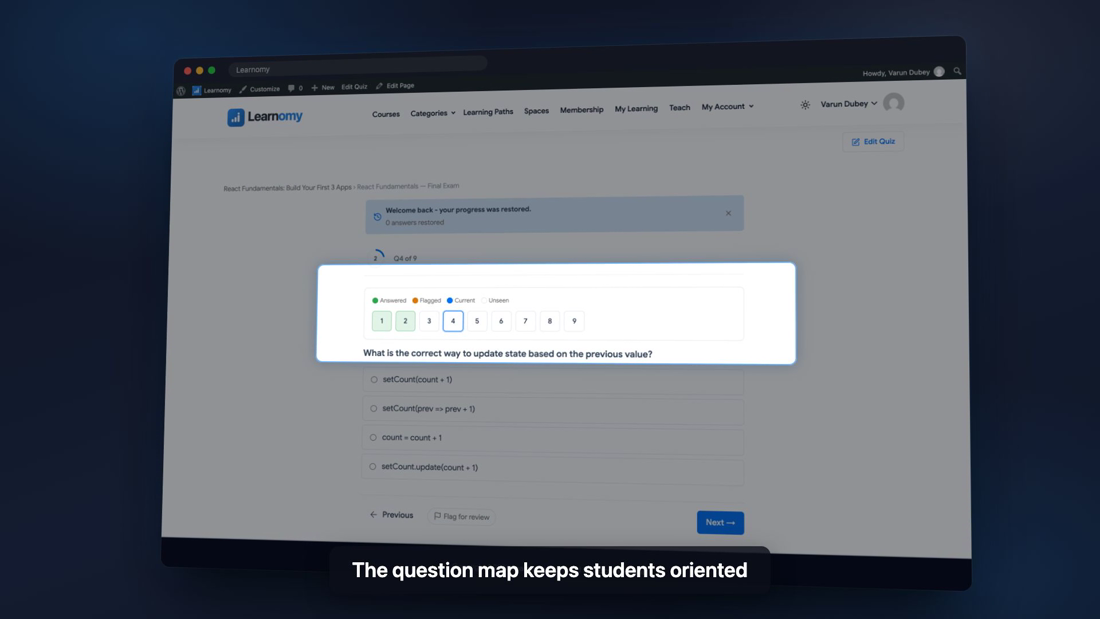
The behavior to look for: every answer saves automatically as it is given, and reopening the exam shows a resume banner that returns the student to the exact question they were on, with the remaining time intact, not reset. Learnomy does both out of the box.
3. Wayfinding for long exams
A 60-question mock exam without navigation is a usability failure. Look for a clickable question map showing answered, unanswered, and flagged questions, plus a flag-for-review control so students can mark doubtful answers and circle back. These sound like small features until you watch someone take a 90-minute test without them.
4. Cheating deterrents (what “proctoring” means in WordPress)
Full webcam proctoring is a service, not a plugin feature. But meaningful deterrents absolutely belong in the LMS:
- Tab-switch tracking: count how many times a student leaves the exam tab, flag the attempt for the grader, and optionally auto-submit after N switches.
- Attempt limits and cooldowns between retakes.
- Access codes so only authorized students can start.
- Randomization so neighbors see different orders.
This is where the market is thinnest. In our research for this piece, the newer LMS plugins openly ship “no proctoring,” and the established ones rely on third-party add-ons for exam hardening. Learnomy ships tab-switch tracking, auto-submit thresholds, attempt limits, cooldowns, and access codes in the free core.
5. Layouts that match the exam style
One question per screen works for a conversational quiz; it is wrong for a sectioned mock exam. Learnomy ships five player layouts: Focused (one question at a time), Classic (all on one page), Sectioned (SAT/GRE-style parts with per-section rules), Conversational, and Review Board. Multi-subject exams can group questions by category and report a subject-wise score breakdown.
6. A grading workflow for humans
Essay and short-answer questions need a human. What matters is where those submissions land. A grading queue that collects every pending attempt in one inbox, lets the instructor grade with inline feedback question by question, and notifies the student the moment the grade posts, turns hours of hunting into minutes of work. Learnomy’s grading queue does exactly this; graded attempts also flow into results automatically.
7. Results students can trust and keep
Instant results with a full attempt review, subject-wise breakdowns for sectioned exams, and a downloadable PDF of the review. If the exam leads to a credential, that certificate should be independently verifiable, which we cover in Certificates That Actually Verify.
How the popular plugins compare on exam features
| Capability | Learnomy (free) | LearnDash | Tutor LMS | LifterLMS |
|---|---|---|---|---|
| Question bank with CSV in/out | Yes | Via add-ons | Pro (question bank) | Limited |
| Tab-switch tracking / auto-submit | Yes | No (3rd-party) | No | No |
| Resume with timer intact | Yes | Partial | Partial | Partial |
| Question map + flag for review | Yes | Partial (overview grid) | No | No |
| Attempt limits + cooldowns + access codes | Yes | Limits only | Limits (Pro) | Limits |
| Multiple exam layouts | 5 layouts | 1 | 1 | 1 |
| Essay grading inbox | Yes | Basic | Yes (Pro) | Basic |
(Comparison reflects publicly documented core features as of early 2026; add-ons can extend any of these plugins.)
Setting up a serious exam in Learnomy, step by step

- Build the bank first. LMS Settings > Question Bank: create categories per subject, then import your questions via CSV or author them with rich text stems.
- Create the quiz and set its mode to Graded (practice and survey modes exist for other uses).
- Pick the layout that matches the exam: Sectioned for multi-part, Focused for high-stakes concentration.
- Set the rules: time limit, passing score, attempt limit, cooldown between attempts, and an access code if entry is restricted.
- Turn on tab tracking, and decide whether attempts auto-submit after a threshold or simply get flagged for review.
- Attach it to the course as an end-of-course final, end-of-section test, or standalone quiz at its own URL.
- Dry-run it yourself: close the tab mid-attempt, come back, and confirm the resume banner restores your exact position and clock.
Everything above is in the free plugin. Learnomy Pro adds five more question types (matching, ordering, numeric with tolerance, symbolic math with KaTeX rendering, and calculated questions with randomized variables), question pools with random draw, per-slot question timers, conditional logic, and rubric-based grading, which matters if you are running university-grade assessment. It can also import existing IMS QTI assessment packages.
FAQ
Can WordPress really handle online exams with proctoring?
Browser-level deterrents, yes: tab-switch tracking, auto-submit thresholds, attempt limits, and access codes are built into Learnomy. Webcam-based identity proctoring is a separate service category regardless of which LMS you use.
What happens if a student’s browser crashes during a timed exam?
With per-answer autosave and resume support, nothing is lost: the student reopens the exam and continues from the same question with the remaining time intact. Verify this behavior before trusting any LMS with a timed exam.
Which WordPress LMS has a real question bank?
Learnomy includes a categorized question bank with CSV import and export in its free version. In most alternatives, question banks are premium features or third-party add-ons.
Can I run a standalone quiz that is not attached to a course?
Yes. Learnomy supports standalone quizzes at their own URLs, which is useful for entrance tests, lead-magnet assessments, and placement exams.