

E-learning has become increasingly important in today’s digital age, offering numerous benefits such as flexibility, accessibility, and scalability. It allows learners to access educational content anytime, anywhere, making it ideal for individuals with busy schedules or those in remote locations. LearnDash has emerged as a popular Learning Management System (LMS) choice due to its user-friendly interface, extensive customization options, certification, course reviews and many features with WordPress.
Course reviews in LearnDash provide valuable insights for both course creators and potential students. These reviews offer firsthand perspectives on the course content, teaching style, effectiveness, and overall learning experience.

Quick Links
Why Include Course Reviews on Your LearnDash Site?
1. Feedback Loop
Course reviews provide valuable feedback from learners about their experience with the course. This feedback can help course creators understand what aspects of the course are working well and what areas need improvement. By actively listening to learner feedback, course creators can iterate on their content, structure, and teaching methods to better meet the needs of their audience.
2. Quality Assurance
Course reviews serve as a form of quality assurance, helping prospective students gauge the quality and relevance of the course before enrolling. Positive reviews can instill confidence in potential learners, assuring them that the course delivers on its promises and provides value for their time and investment.
3. Social Proof
Positive course reviews act as social proof, demonstrating to potential learners that others have found the course valuable and worthwhile. This can be particularly influential in the decision-making process, as learners are more likely to trust the opinions of their peers when choosing which courses to enroll in.
4. Engagement and Motivation
Encouraging learners to leave reviews can increase engagement with the course content and motivate them to complete the course. Knowing that their feedback is valued and may help future learners can incentivize current students to actively participate and contribute to the learning community.
Also Read: Google Nano Banana Launch: Everything You Need to Know
5. Continuous Improvement
Course reviews enable course creators to continuously improve their offerings over time. By analyzing feedback trends and identifying areas for improvement, course creators can refine their courses, address common pain points, and enhance the overall learning experience for future learners.
How to Enable Course Reviews Using the LearnDash Course Review Add-On
1. Installation
1. Download the Plugin: First, you need to acquire the LearnDash Course Review add-on. You can typically obtain it from the LearnDash website or another trusted source. Ensure that you download the plugin in a format compatible with WordPress plugins (usually a zip file).
2. Navigate to Plugin Upload Page: In the WordPress dashboard, go to “Plugins” > “Add New.”
3. Upload the Plugin: On the Add Plugins page, you’ll see a button labeled “Upload Plugin” near the top of the page. Click on it to proceed.

4. Install the Plugin: Once you’ve selected the plugin file, click the “Install Now” button to upload the plugin to your WordPress website.

5. Activate the Plugin: After the plugin has been successfully uploaded, you’ll see an option to activate it. Click the “Activate Plugin” link to activate the LearnDash Course Review add-on.
6. Verify Installation: Once activated, you should see the LearnDash Course Review add-on listed among your installed plugins. You can verify this by navigating to “Plugins” > “Installed Plugins” in the WordPress dashboard.
Also Read: How to Build a Dropshipping Store with WooCommerce
2. Configuration
1. Setup
By default, reviews will be enabled on all courses. However, you can disable reviews per course if you choose.
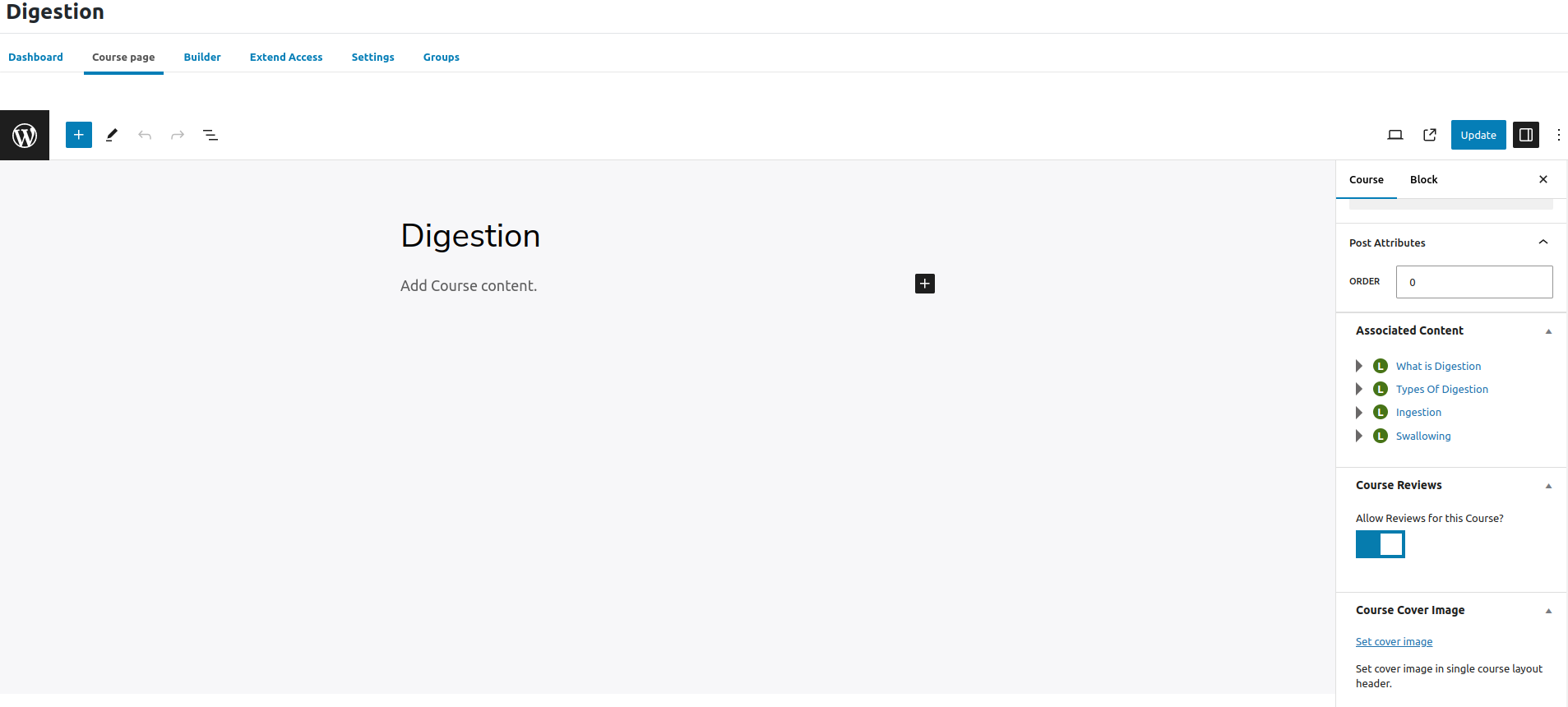
2. To disable reviews on a single course…
a. Navigate to LearnDash LMS > Courses.
b. Click on the course you want to edit.
c. Click on the Course tab at the top of the page.
d. Locate the section titled ‘Course Reviews’.
e. Click to disable.
3. Writing a review
Before delving further into the subject, let’s examine the visual representation of a review.
4. Managing Reviews
1. Approving or Deleting Reviews: As a course administrator, you have the ability to approve or delete reviews submitted by students. This ensures that only relevant and appropriate feedback is displayed.
2. Responding to Student Feedback: Encourage engagement by responding to student reviews. Whether it’s thanking them for positive feedback or addressing concerns, engaging with students shows that their opinions are valued.
3. Monitoring Reviews for Insights and Trends: Regularly monitor reviews to identify common themes, areas for improvement, or positive aspects of your courses. This insight can inform future course development and marketing strategies.
Also Read: How to Edit WooCommerce Emails with MailPoet
5. Encouraging Students to Leave Reviews
1. Send Reminders After Course Completion: Send automated emails encouraging students to leave a review after completing the course. Remind them of the importance of their feedback in improving the learning experience for future students.
2. Offer Incentives: Consider offering small incentives such as discounts on future courses or exclusive resources in exchange for leaving a review. This can motivate students to share their thoughts and experiences.

Conclusion
Considering the broader impacts of reviews on e-learning platforms, it’s evident that incorporating a course review feature is not just about collecting feedback; it’s about fostering a culture of continuous improvement, enhancing course credibility, and ultimately, delivering a better learning experience for all.
Call to Action
Are you ready to unlock the full potential of your e-learning platform with course reviews? Check out our WordPress theme, BuddyX Pro, by wbcomdesigns which seamlessly integrates with LearnDash and supports the LearnDash Course Review add-on. With our theme, you’ll enjoy features designed to enhance the review experience, streamline course management, and create a visually stunning learning environment. Take the next step towards improving your e-learning offerings and increasing customer satisfaction by exploring our theme today!
Interesting Reads:
LearnDash and its Course Builder

