

E-learning keeps growing because it solves a scheduling problem traditional classrooms never could: learners access course content whenever it fits their day, not whenever a room and instructor happen to be free at the same time. LearnDash has become one of the most widely used WordPress LMS platforms for exactly this reason, offering a user-friendly interface, deep customization, certification support, and course reviews among its broader feature set.
Course reviews specifically give both course creators and prospective students something they cannot get from a course description alone: a firsthand account of how the content, teaching style, and overall experience actually held up for someone who took it.
That gap matters more in e-learning than in most other purchase categories, because a course is an intangible product bought largely on trust. A physical product can be photographed, measured, and compared spec-for-spec against alternatives. A course is a promise about outcomes, mastering a skill, passing a certification, understanding a concept, and the only real evidence a buyer has that the promise holds up is what previous students report after actually going through it.
Why Include Course Reviews on Your LearnDash Site?
1. Feedback Loop
Course reviews provide direct feedback from learners about their experience with the course. This feedback shows course creators what is working and what needs improvement, and by acting on that feedback consistently, creators can refine content, structure, and teaching methods to better match what their audience actually needs rather than what they assumed going in.
2. Quality Assurance
Course reviews double as a form of quality assurance, helping prospective students judge whether a course is worth their time before enrolling. Positive reviews build confidence that the course delivers on what it promises, which matters more for higher-priced courses where a bad purchase decision costs more than a few dollars.
3. Social Proof
Positive course reviews act as social proof, showing potential learners that others have already found the course worthwhile. This influences enrollment decisions more than almost anything else on a course page, since learners generally trust the experience of peers over marketing copy written by the course creator.
4. Engagement and Motivation
Encouraging learners to leave reviews increases engagement with the course content and motivates completion. Knowing their feedback might help future learners gives current students a reason to stay invested through to the end rather than dropping off partway through.
Also Read: Google Nano Banana Launch: Everything You Need to Know
5. Continuous Improvement
Course reviews let creators improve their offerings over time. By tracking feedback trends and identifying recurring pain points, creators can refine courses methodically instead of guessing at what needs fixing based on a handful of scattered comments.
An Important Update: How LearnDash Sells Course Reviews Now
Before walking through setup, it’s worth flagging a real change. LearnDash used to distribute Course Reviews as a separate downloadable add-on plugin that any LearnDash user could install and activate on their own, the same way you would install any WordPress plugin. That is no longer how it works. LearnDash has since moved to a tiered annual licensing structure, and ratings and reviews functionality is now bundled specifically into the top-tier Elite plan rather than sold or distributed as a standalone add-on available to every license level.
If you are on an entry-level or mid-tier LearnDash plan, check your current license tier before assuming the add-on is available to install. The general plugin activation steps below are still accurate for how WordPress add-ons work mechanically, but confirm your plan includes review functionality first, since attempting to activate a feature your license tier does not cover will not work regardless of how correctly you follow the installation steps.
This kind of tier restructuring is common across established WordPress plugin vendors as they mature, and LearnDash is not unusual in moving from a flat, feature-unlocked pricing model to a tiered one that gates specific capabilities behind higher plans. If you are budgeting for course reviews specifically, weigh the Elite tier’s full feature set against what you actually need, since it also bundles group management and multi-instructor tools that may or may not matter for a smaller course catalog.
How to Enable Course Reviews on a Qualifying LearnDash Plan
1. Installation
1. Confirm Plan Access: Check your LearnDash account dashboard to confirm your current plan includes course review functionality before proceeding.
2. Navigate to Plugin Upload Page: In the WordPress dashboard, go to “Plugins” > “Add New.”
3. Upload the Plugin: On the Add Plugins page, you’ll see a button labeled “Upload Plugin” near the top of the page. Click on it to proceed.

4. Install the Plugin: Once you’ve selected the plugin file, click the “Install Now” button to upload the plugin to your WordPress website.

5. Activate the Plugin: After the plugin has been successfully uploaded, you’ll see an option to activate it. Click the “Activate Plugin” link to turn on course review functionality.
6. Verify Installation: Once activated, confirm the review functionality is listed and enabled by navigating to “Plugins” > “Installed Plugins” in the WordPress dashboard.
Also Read: How to Build a Dropshipping Store with WooCommerce
2. Configuration
1. Setup
By default, reviews will be enabled on all courses. However, you can disable reviews per course if you choose.
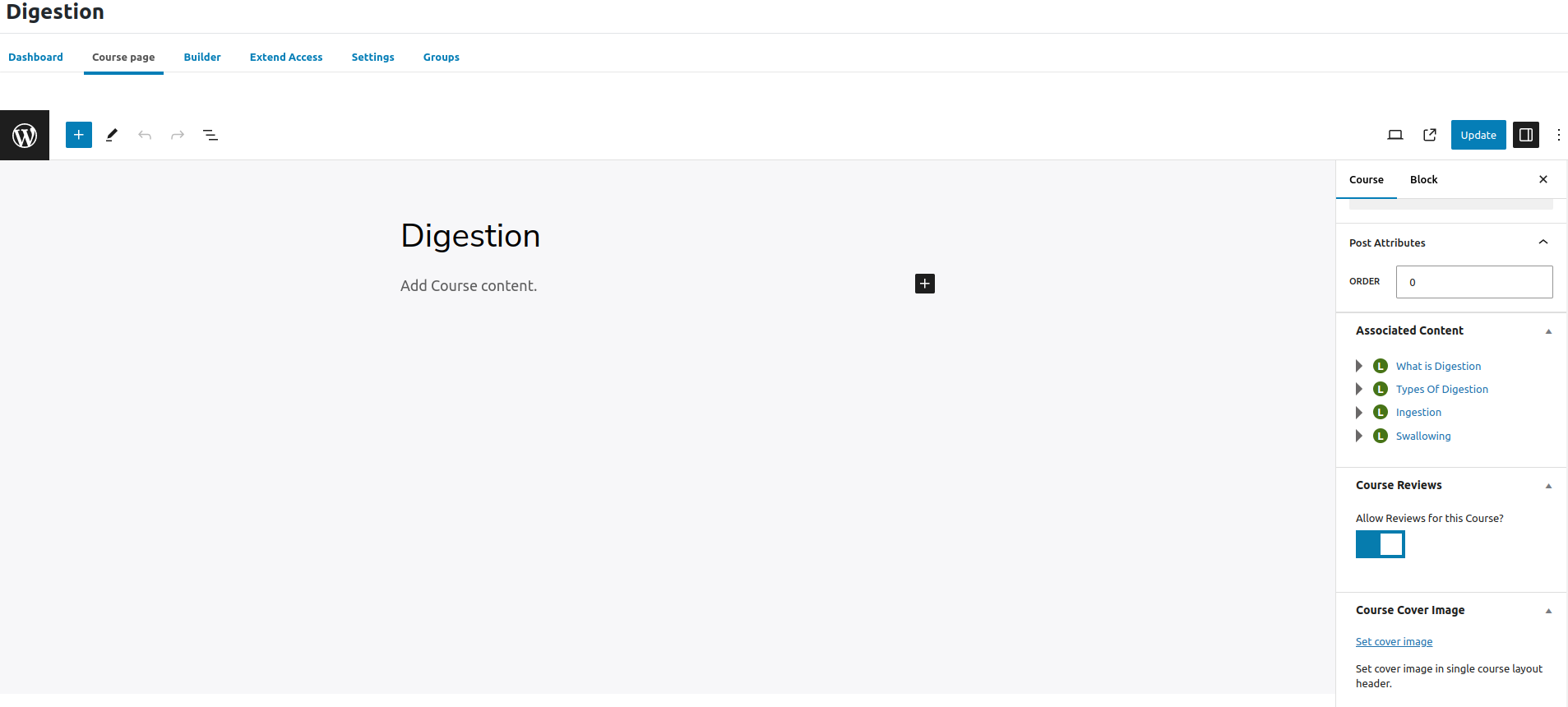
2. To disable reviews on a single course:
a. Navigate to LearnDash LMS > Courses.
b. Click on the course you want to edit.
c. Click on the Course tab at the top of the page.
d. Locate the section titled ‘Course Reviews’.
e. Click to disable.
3. What a Student Sees When Writing a Review
Once enabled, a review prompt appears on the course page for any student who has enrolled, typically after they mark the course complete. The form is intentionally short: a star rating selector, usually one to five stars, sits above a text field where the student can add written comments. Keeping the form short matters more than it sounds, since a review form that asks for too much detail sees meaningfully lower completion rates than a simple star-plus-comment layout.
Timing the prompt matters as much as its design. A review request that fires the instant a student finishes the final lesson catches them while the material is freshest in memory, which tends to produce more detailed, specific feedback than a generic reminder email sent days or weeks later. Some creators layer both, an immediate in-app prompt plus a follow-up email a few days out for anyone who skipped the first ask, which recovers additional reviews from students who were logged out or simply closed the tab before submitting.
4. Managing Reviews
1. Approving or Deleting Reviews: As a course administrator, you have the ability to approve or delete reviews submitted by students. This ensures that only relevant and appropriate feedback is displayed.
2. Responding to Student Feedback: Encourage engagement by responding to student reviews. Whether it’s thanking them for positive feedback or addressing concerns, engaging with students shows that their opinions are valued.
3. Monitoring Reviews for Insights and Trends: Regularly monitor reviews to identify common themes, areas for improvement, or positive aspects of your courses. This insight can inform future course development and marketing strategies.
Also Read: How to Edit WooCommerce Emails with MailPoet
5. Encouraging Students to Leave Reviews
1. Send Reminders After Course Completion: Send automated emails encouraging students to leave a review after completing the course. Remind them of the importance of their feedback in improving the learning experience for future students.
2. Offer Incentives: Consider offering small incentives such as discounts on future courses or exclusive resources in exchange for leaving a review. This can motivate students to share their thoughts and experiences.
Be careful with incentives, though. Rewarding a review submission is generally fine; rewarding a specific rating is not, and platforms increasingly flag or remove reviews that appear to have been incentivized toward a particular star count rather than an honest opinion. Keep any incentive tied to the act of leaving feedback, not to leaving positive feedback specifically, both for platform compliance and because a catalog full of suspiciously uniform five-star reviews tends to read as fake to a skeptical buyer anyway.
Measuring Whether Reviews Actually Move Enrollment
It is worth treating review implementation as something to measure rather than assuming it works simply because it launched. Track enrollment conversion rate on course pages before and after reviews start appearing, ideally isolating courses that already had steady traffic so the comparison is not muddied by a traffic spike from an unrelated marketing push. A meaningful lift in conversion after reviews accumulate is a strong signal the feature is doing its job.
Also watch completion rate, not just enrollment. Courses that actively solicit reviews after completion sometimes see a secondary effect: students who know a review prompt is coming are subtly more motivated to finish rather than abandon the course partway through, since finishing is what triggers the request. That effect is harder to measure directly but worth watching for in your own completion data over a few months.
If you run multiple courses, compare conversion lift across them rather than looking at a single course in isolation. A course where reviews produce a strong lift and one where they barely move the needle are both useful data points, since the difference often points to something about the course itself, price point, subject matter competitiveness, existing brand trust, rather than anything about the review feature working differently between them.
Handling Negative Reviews Without Overreacting
A negative review is not automatically a problem to hide. A course with nothing but five-star reviews and zero critical feedback can actually look less credible to a skeptical buyer than one with a handful of honest three- and four-star reviews mixed in among mostly positive ones. What matters more than the rating itself is how the creator responds. A thoughtful, specific reply to a critical review, acknowledging what the student found weak and explaining what will change, does more to build trust with future visitors reading that thread than deleting the review ever would.
There is also a longer-term payoff to responding well. Prospective students who are on the fence about enrolling often read the negative reviews first, specifically to see how the creator handled criticism. A defensive or dismissive response confirms their hesitation. A response that takes the feedback seriously and explains a concrete fix, even a small one, often does more to convert that skeptical reader than another five-star review would.
That said, reviews that are abusive, off-topic, or clearly submitted by someone who never took the course are fair to remove. The goal of moderation is filtering out noise, not filtering out disagreement.
What Good Review Data Looks Like at Scale
A handful of reviews on a single course tells you something. Dozens of reviews across a full course catalog tell you a lot more, provided you actually look at the aggregate rather than reading each one in isolation. Track average rating by course over time rather than just the current snapshot, since a course whose ratings are trending downward over the last few cohorts is signaling a real problem even if its all-time average still looks fine.
It also helps to tag or categorize common themes in written feedback rather than treating each review as a one-off. If several students across different cohorts mention the same confusing module or outdated example, that pattern is worth acting on regardless of how the star rating alone looks.
For creators managing a large catalog, a simple spreadsheet tracking course name, average rating, review count, and a short summary of recurring feedback themes goes a long way, even without dedicated analytics software. Reviewing that sheet quarterly turns scattered comments into an actual improvement roadmap rather than a pile of feedback nobody circles back to.
Writing Course Descriptions That Set Reviews Up to Succeed
Reviews reflect the gap between what a course promised and what it actually delivered, which means the course description itself has more influence over review sentiment than most creators realize. A course that oversells its outcomes, “master this skill in one weekend” for something that genuinely takes months, sets up disappointed reviews even when the content itself is solid, simply because expectations were miscalibrated from the start.
Write course descriptions that are specific and honest about time commitment, prerequisite knowledge, and what a student will and will not walk away able to do. A slightly more modest but accurate description tends to produce better reviews than an inflated one, because students arrive with expectations the course can actually meet.
This same discipline applies to how a course is positioned relative to its price. A premium-priced course marketed as beginner-friendly attracts reviewers who expected more hand-holding for the money, while the same course marketed honestly toward intermediate learners who already understand the basics tends to draw reviewers whose expectations line up with what they actually receive. Matching the pitch to the real audience prevents a large share of the mismatched-expectations reviews that drag down an otherwise solid course’s average rating.
Common Questions About LearnDash Course Reviews
Can students edit a review after submitting it?
This depends on the specific configuration and version in use, so check current settings on your install rather than assuming either way. If editing is not natively supported, a course administrator can typically remove an outdated review and let the student resubmit an updated one, though that workaround puts more manual load on whoever moderates reviews.
Do course reviews affect SEO?
Indirectly, yes. Review content adds fresh, unique text to a course page that search engines can index, and star ratings displayed with proper schema markup can sometimes surface as rich snippets in search results, which tends to improve click-through rates even without moving the underlying ranking position. The bigger SEO benefit is usually the added page content itself rather than the rating number.
Should I let anyone leave a review, or only enrolled students?
Only enrolled students should be able to leave a review, and this is worth confirming in your setup rather than assuming it’s the default. Reviews from people who never took the course undermine the entire point of the feature, since the value of a review comes specifically from it reflecting a real, completed learning experience rather than a guess based on the course description.
How many reviews does a course need before they start influencing enrollment?
There’s no universal number, but a common pattern across e-learning platforms is that a handful of detailed, specific reviews, five to ten, tend to build more trust than a larger volume of generic one-line comments. Prioritize prompting for detail over prompting for volume when you ask students to leave feedback.
Considering Course Reviews and Your WordPress LMS Theme
Are you looking to get the most out of course reviews on your e-learning platform? Our WordPress theme, BuddyX Pro, by wbcomdesigns, integrates cleanly with LearnDash and renders course review layouts without the styling clashes that show up when a generic multipurpose theme gets forced onto an LMS build. Star ratings, review text, and course-page layout stay visually consistent instead of looking like a plugin awkwardly bolted onto a theme that was never designed with an LMS in mind. If course reviews are becoming a bigger part of how you market your catalog, a theme built to display them properly is worth the look.
Interesting Reads:
LearnDash and its Course Builder