

Ad Inserter and AdSanity sit at opposite ends of the WordPress ad-plugin spectrum. Ad Inserter is free, open-source, and installed on 300,000+ sites, built by developers for developers who want granular control over where ad code lands on a page. AdSanity skips the free tier entirely and sells itself as the tidier, more visual alternative: banner uploads, zones, and a stats dashboard a non-technical site owner can actually read. Both are, at their core, ad-display tools, nothing more.
Last updated: 6 November 2026
Quick verdict: Pick Ad Inserter for free, developer-friendly control over where ad code lands, backed by 300,000+ installs. Pick AdSanity if you want a paid, visual banner-and-zone workflow. Pick WB Ad Manager if you also need affiliate link cloaking, an advertiser portal and classifieds in one plugin, from $59 a year.
WB Ad Manager starts from a different brief. It runs display ads the same way the other two do, but it also cloaks and tracks affiliate links, and on Pro, it opens a front-end Advertiser Dashboard so members or local businesses can submit and pay for their own ad space, plus an optional classifieds marketplace, all from one plugin, one license, no monthly SaaS fee stacked on top. We put all three side by side on setup effort, feature depth, and what you’d actually need to bolt on later to match what WB Ad Manager ships in a single install.
Table of Contents
- Market snapshot
- Why Ad Inserter and AdSanity Get Compared
- How We Evaluated These Three
- A Real-World Scenario: Monetizing a Niche Review Site Three Ways
- Ad Inserter: The Free, Code-Level Powerhouse
- AdSanity: Paid-Only, Built for Visual Simplicity
- WB Ad Manager: Ads, Links, and a Marketplace in One Plugin
- What a Year Actually Costs
- Who Each Plugin Is Actually Built For
- Side-by-Side Comparison Table
- How to Choose
- FAQs
- Sources
Ad Inserter alone is active on 300,000+ WordPress sites according to its WordPress.org listing, making it one of the most widely installed ad-management plugins in the entire repository. WordPress itself now powers roughly 39.5% of all websites globally (W3Techs, checked 6 November 2026), and the ad-plugin category keeps growing alongside it, which is exactly why picking a plugin that can grow with your monetization plans, rather than boxing you into display ads only, matters more than it did five years ago.
Market snapshot
- WordPress is used by 39.5% of all websites and holds 58.2% of the content management system market, according to W3Techs (checked 6 November 2026).
- Ad Inserter shows 300,000+ active installations on WordPress.org (checked 6 November 2026).
- Advanced Ads shows 90,000+ active installations on WordPress.org (checked 6 November 2026).
- The global digital advertising market was valued at USD 567.9 billion in 2025 and is projected to reach USD 1,692.9 billion by 2033, growing at 14.3% a year from 2026 to 2033, according to Grand View Research.
Why Ad Inserter and AdSanity Get Compared
Ad Inserter has been a WordPress.org staple since the early 2010s, built around a simple idea: give site owners 16 free ad “blocks,” let them paste in any ad code (image, HTML, JavaScript, PHP, AdSense auto ads), and expose every targeting option a developer could want, device, browser, OS, URL pattern, scheduling, click limits, all without ever asking for a credit card. It’s the plugin developers recommend when someone asks “what’s the most powerful free ad plugin.”
AdSanity exists because that power comes with a learning curve. There’s no free version to try before you buy, but what you get in exchange is a visual-first workflow: upload a banner image, assign it to a zone, set a flight date, done, with a stats dashboard built for someone who doesn’t want to think about code. Site owners researching “AdSanity vs Ad Inserter” are usually choosing between raw flexibility and guided simplicity.
Neither one, however, does anything beyond rotating and displaying ad creatives. Cloaking an affiliate link, or letting a member submit and pay for their own ad slot without you touching wp-admin, means installing at least one more plugin on top of whichever of these two you pick.
How We Evaluated These Three
We looked at four things for each plugin: how many ad formats and placement options ship out of the box, how deep the targeting and analytics go, what a real year-one and year-two bill looks like once you add whatever else you’d actually need, and whether the plugin can grow into affiliate links, a self-serve advertiser flow, or a classifieds marketplace without a second or third subscription.
We also installed all three on a working WordPress site to time the real admin experience rather than trust marketing copy: how many clicks to get a first ad live, whether targeting is a dropdown or a code-level settings screen, and whether a non-technical team member could run day-to-day ad swaps without filing a support ticket. A plugin that wins a feature checklist but needs a developer on standby isn’t the lower-effort option once setup time is counted.
A Real-World Scenario: Monetizing a Niche Review Site Three Ways
Picture a niche gear-review blog: product roundups, buyer’s guides, an active comments section. The owner wants three revenue lines running at once, direct-sold banner ads from boutique brands, affiliate links to the retailers the reviews point to, and eventually a way for a handful of trusted brands to self-serve their own campaigns instead of emailing creative files back and forth every month.
With Ad Inserter, the banner-ad piece is covered extremely well, especially on the free tier: 16 ad blocks, scheduling, device and browser targeting, click-limit rules. But the affiliate-link piece needs a separate link-cloaking plugin (ThirstyAffiliates or Pretty Links, typically $49-99/year), and the self-serve brand-portal piece isn’t something Ad Inserter does at any price, that would mean a membership plugin plus a payment gateway plus custom logic stitched together by a developer.
With AdSanity, the same gap exists in a tidier wrapper: strong banner management and a readable stats dashboard, but affiliate links and a self-serve brand portal are still outside its scope entirely, same two (or three) extra tools required.
A site running three monetization channels through three unrelated plugins doesn’t have three revenue streams, it has three admin logins, three changelogs to watch, and three places a broken ad slot can hide.
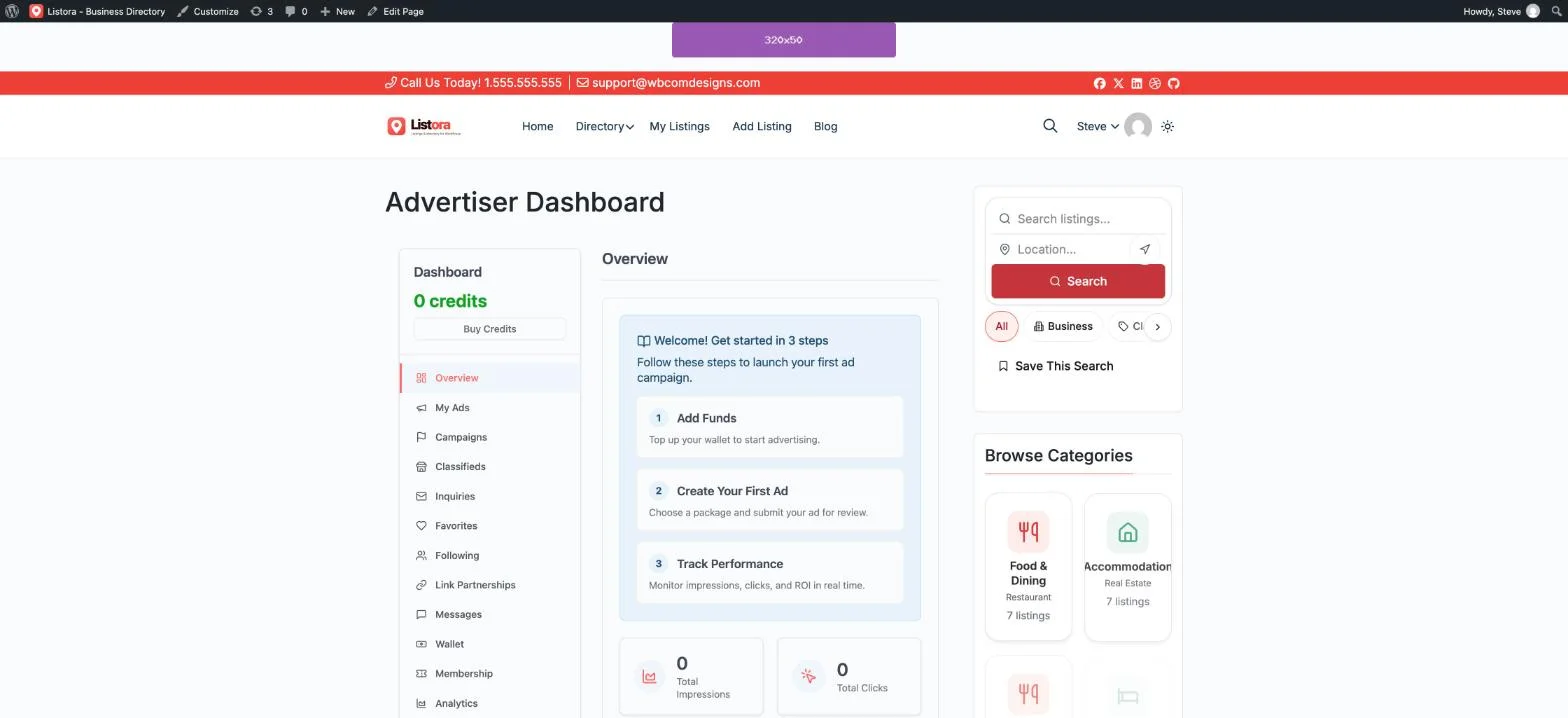
With WB Ad Manager Pro, all three pieces live in one plugin. Banner ads run through the same five ad types covered below. Affiliate links to retailers get the built-in /go/<slug> cloaker with click tracking and nofollow/sponsored attributes set automatically. And when the site is ready to let a handful of brands self-serve, the Advertiser Dashboard, wallet billing, and moderation queue are already part of the license, not a second purchase. One login, one wallet, one place to see every campaign across all three revenue lines.
Ad Inserter: The Free, Code-Level Powerhouse
Ad Inserter’s free version is, by most measures, the single most feature-dense free ad plugin on WordPress.org. It ships 16 ad blocks, each one able to hold image, text, HTML, JavaScript, PHP, or AdSense auto-ad code, with scheduling by date and time, device-type exclusions (mobile, tablet, desktop), browser and OS detection, URL-pattern targeting, a built-in adblock-detection fallback, AMP support, and a debug/preview mode that shows exactly which block is firing on any given page before you ship it live.
Key strengths:
- The deepest free targeting and code-level control of the three, no paywall on device, browser, or scheduling rules
- WP-CLI support and an import/export settings format that makes multi-site rollouts and version control genuinely practical for developers
- Built-in adblock-bypass logic included in the free tier, a feature several competitors reserve for a paid add-on
Where it falls short:
- No affiliate link cloaking, no self-serve advertiser flow, no classifieds, purely a display-ad insertion tool
- The settings screen is dense and code-oriented; a non-technical site owner will need a developer to get the most out of it
- Pro unlocks more blocks and deeper targeting (geo, user role, custom fields) but is sold as a separate license on top of the free core, and doesn’t add anything beyond display-ad functionality
AdSanity: Paid-Only, Built for Visual Simplicity
AdSanity trades Ad Inserter’s code-first flexibility for a visual-first workflow. There’s no free tier to evaluate, every license is paid from day one, but the trade is a genuinely approachable admin screen: upload a banner image or paste ad code, assign it to a named ad zone, set a start and end date, and the plugin handles rotation, impression tracking, and click counting from a dashboard built to be read at a glance rather than parsed like a settings reference.
Key strengths:
- The most visual, least code-dependent setup of the three, a strong fit for a site owner who isn’t comfortable pasting HTML into a settings field
- Clear, exportable click and impression stats per ad and per zone without needing a separate analytics integration
- Works through widgets, shortcodes, and blocks, so placement fits whatever page-building approach the theme already uses
Where it falls short:
- No free tier at all, there’s a cost to even test it on a small site, unlike Ad Inserter or WB Ad Manager’s usable free versions
- Like Ad Inserter, it’s a pure display-ad tool, no link cloaking, no advertiser self-serve portal, no classifieds
- Advanced targeting (geo-targeting in particular) has historically been handled through add-ons rather than being uniformly built into every tier, so the “full” feature set can mean more than one purchase
WB Ad Manager: Ads, Links, and a Marketplace in One Plugin
WB Ad Manager treats display ads and affiliate links as the same underlying job, get a piece of content in front of a visitor and track what happens when they click, so one plugin runs both instead of two. The free version covers five ad types (image, rich content, HTML/JS code, AdSense, and email capture), 16+ placement hooks, server-side impression and click tracking, branded /go/<slug> link redirects with nofollow and sponsored options, and country-level geo-targeting, 17 of 31 total capabilities, a genuinely usable starting point rather than a crippled trial.
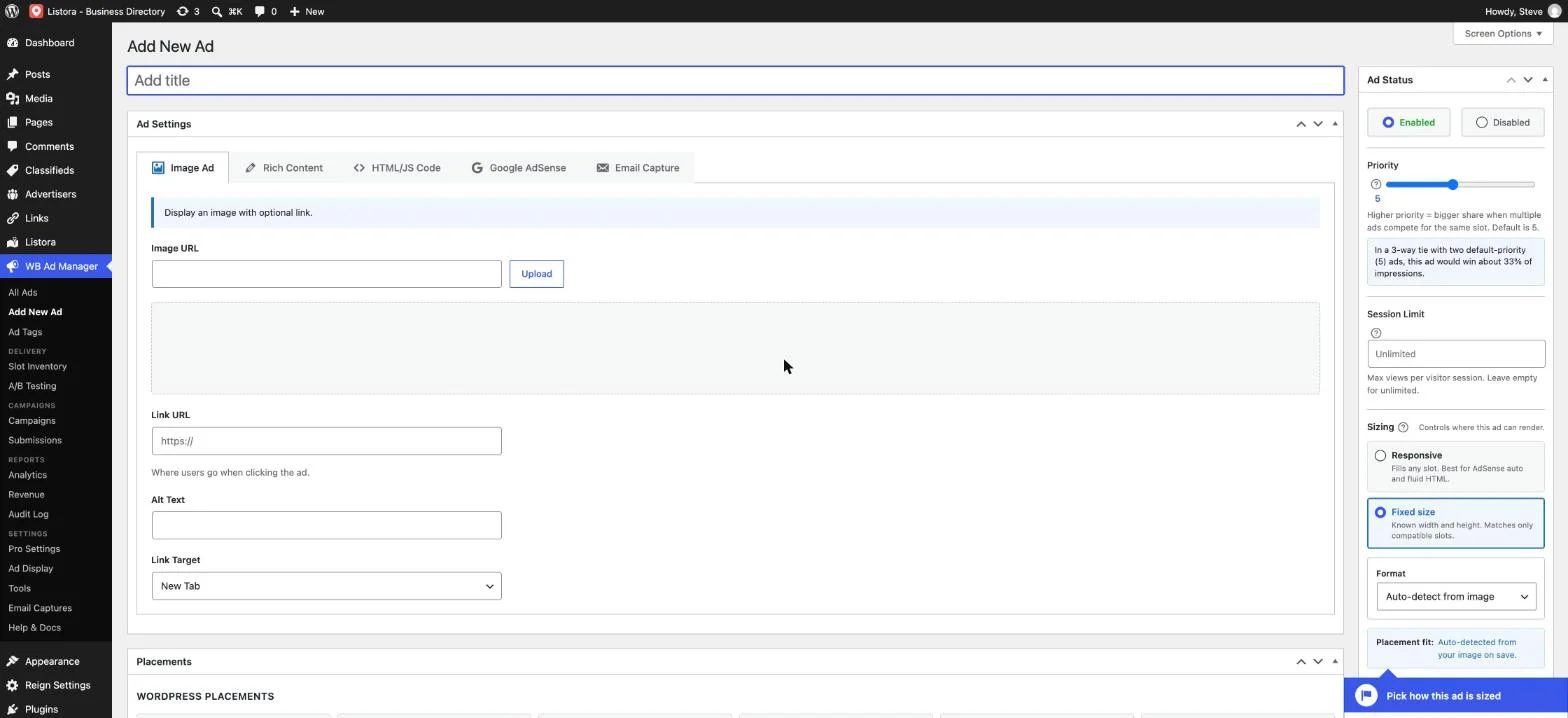
Pro is where the gap from Ad Inserter and AdSanity opens up. It adds a front-end Advertiser Dashboard where members or local businesses build and submit their own ad campaigns, a wallet system with multiple billing integrations so advertisers aren’t invoiced by hand, a moderation queue so nothing goes live without approval, CSV bulk import and keyword auto-linking for affiliate links, A/B testing, advanced analytics with geo and device breakdowns, and a full classifieds marketplace with grid, list, and map views.
Key strengths:
- One plugin covers display ads, affiliate link cloaking, a self-serve advertiser portal, and a classifieds marketplace, Ad Inserter and AdSanity each need separate plugins (or no available option at all) for the last three
- No monthly SaaS fee for the advertiser-portal or classifieds functionality, unlike hosted alternatives
- Works on any WordPress install with no required dependency on WooCommerce or BuddyPress
- A usable free tier exists, unlike AdSanity, so there’s no cost barrier to testing the display-ad and link-cloaking half first
Worth knowing:
- Newer to the market than Ad Inserter, so fewer third-party tutorials and community answers exist for edge cases
- Doesn’t match Ad Inserter’s raw code-level depth (PHP snippets, WP-CLI, granular device/browser rule stacking) for teams that specifically want that kind of control
- The classifieds marketplace is most valuable to directory, local-business, or community sites; a pure content blog may only ever need the display-ad and link-cloaking half
What a Year Actually Costs
Ad Inserter’s core plugin is free and stays free, 16 ad blocks with full device, browser, and scheduling targeting cost nothing. Its Pro license, sold directly through adinserter.pro, is tiered by site count and unlocks the remaining ad blocks plus geo and user-role targeting; exact current tier pricing is worth checking on the vendor’s site since license banding changes periodically, but historically it has sat in a per-site-count range comparable to other premium WordPress ad plugins rather than at the high end.
AdSanity has no free entry point, every site pays from the start, with pricing structured around how many sites one license covers, a single-site plan on the lower end scaling up to a multi-site or unlimited-site plan for agencies. As with Ad Inserter Pro, confirm current tier pricing directly with AdSanity since WordPress plugin vendors adjust license bands from time to time.
WB Ad Manager Pro is a flat $59/year for one site (Personal), $129/year for up to five sites (Professional), or $299/year unlimited (Agency), and that single price already includes the advertiser portal, classifieds marketplace, wallet billing, and A/B testing. To match that same feature set starting from Ad Inserter or AdSanity, a site would still need to add a separate link-cloaking plugin (ThirstyAffiliates or Pretty Links, typically $49-99/year) and would have no equivalent path at all to a self-serve advertiser portal or classifieds marketplace without custom development.
| What you need | Ad Inserter | AdSanity | WB Ad Manager |
|---|---|---|---|
| Display ads only | Free (16 blocks); Pro license for more blocks + geo targeting | Paid from day one, no free tier | Free (5 ad types); $59-299/yr Pro for advanced analytics |
| + Affiliate link cloaking | + separate plugin, $49-99/yr | + separate plugin, $49-99/yr | Included free, no add-on needed |
| + Self-serve advertiser portal | Not available, custom dev required | Not available, custom dev required | Included in Pro, $59-299/yr |
| + Classifieds marketplace | + separate plugin, $79-199/yr | + separate plugin, $79-199/yr | Included in the same Pro license |
Figures are approximate and based on publicly available pricing patterns as of October 2026; confirm current tier pricing directly with each vendor, as license bands and promotions change over time.
Who Each Plugin Is Actually Built For
Ad Inserter fits a developer or technically comfortable site owner who wants the deepest free control over ad placement available on WordPress, and who’s happy to add other plugins separately if the site ever needs affiliate links or a marketplace. It’s also a strong pick for agencies managing many client sites, since the free tier alone covers most client needs without a recurring per-site bill.
AdSanity fits a site owner who wants a clean, visual admin screen and doesn’t mind paying from day one for that simplicity, someone running direct-sold banner campaigns who’d rather read a stats dashboard than configure targeting rules in a settings table.
WB Ad Manager fits a site that wants to monetize more than one way without running three plugins to do it: a content site that also wants cloaked affiliate links, a community or directory site that wants local businesses or members to buy their own ad space through a self-serve portal, or a local-market site that wants a classifieds section alongside its display ads. It’s also the simplest option for a site owner who wants to start free and only pay once the advertiser-portal or classifieds features are actually needed, something neither Ad Inserter nor AdSanity offers in quite the same shape, as the broader roundup of WordPress ad management plugins for publishers covers in more detail.
There’s a fourth profile worth naming directly: a site that already compared AdRotate Pro and Advanced Ads Pro against WB Ad Manager and wants to know how Ad Inserter and AdSanity stack up against that same baseline. The short version: all four pure display-ad competitors (AdRotate, Advanced Ads, Ad Inserter, AdSanity) share the same structural gap, none of them cloak affiliate links or run a self-serve advertiser portal without extra plugins, while WB Ad Manager’s one-plugin approach stays consistent across every comparison.
Ad Inserter vs AdSanity vs WB Ad Manager: Side by Side
| Ad Inserter | AdSanity | WB Ad Manager | |
|---|---|---|---|
| Free tier | Yes, 16 ad blocks, full targeting | None, paid from day one | Yes, 5 ad types, 17 of 31 capabilities |
| Setup style | Code-level, settings-table heavy | Visual, banner-upload workflow | Visual editor, single plugin activation |
| Affiliate link cloaking | Not included | Not included | Built in, branded /go/ links, free tier |
| Self-serve advertiser portal | Not available | Not available | Pro: full front-end dashboard with wallet billing |
| Classifieds marketplace | Not available | Not available | Pro: grid/list/map views built in |
| Device/browser/OS targeting | Deep, free tier | Limited, zone-based | Country-level geo free; device/geo breakdowns in Pro analytics |
| Best for | Developers wanting max free control | Non-technical owners wanting visual simplicity | Sites monetizing more than one way |
How to Choose
If you’re comfortable with a code-heavy settings screen and want the single most powerful free ad plugin on WordPress.org, with no plans to ever add affiliate links or a marketplace, Ad Inserter is hard to beat on raw value. If you’d rather pay from the start for a cleaner, visual admin experience and your needs stop at banner rotation and stats, AdSanity delivers exactly that without the learning curve.
If you want display ads, affiliate link cloaking, and a path to a self-serve advertiser portal or classifieds marketplace without stacking three separate plugin subscriptions, or custom development that neither Ad Inserter nor AdSanity can replicate, WB Ad Manager is built specifically for that brief, one plugin, one license, a usable free tier to start, and no monthly SaaS fee for the advertiser-facing features that would otherwise mean a recurring platform subscription elsewhere.
Summary
Ad Inserter and AdSanity are both legitimate choices if display-ad rotation is the entire job you need done, Ad Inserter for its unmatched free depth and developer-grade control, AdSanity for its clean, visual workflow if you’re happy to pay from day one for that simplicity. But neither grows into affiliate links, a self-serve advertiser flow, or a classifieds marketplace without adding more plugins, more subscriptions, or custom development. WB Ad Manager was built to cover that whole path in one plugin, starting free, with no monthly SaaS fee for the advertiser-facing features that usually mean a recurring platform bill elsewhere, worth evaluating before you commit to stacking separate tools to get there.
Whichever of the three you land on, test the setup on a staging copy of your site first, confirm ad units render correctly across the themes and page builders you actually use, and check that impression tracking numbers start showing up within the first day before you point real advertiser budget at any new placement.
FAQs
Is Ad Inserter really free, or is the free version crippled?
The free version is fully functional, 16 ad blocks with image, HTML, JavaScript, PHP, and AdSense support, plus scheduling and device/browser targeting. Pro adds more blocks and deeper targeting (geo, user role, custom fields), but the free tier alone runs a complete ad-rotation setup for most sites.
Does AdSanity have a free trial?
AdSanity doesn’t offer a free plugin tier the way Ad Inserter or WB Ad Manager do. Every license is paid from the start, so evaluating it typically means checking the vendor’s demo or trial options directly before committing to an annual license.
Can I use WB Ad Manager’s free version without ever buying Pro?
Yes. The free tier covers 17 of 31 total capabilities, including the link cloaker, all five ad types, AdSense rotation, and country-level geo-targeting. Pro is only required for the advertiser portal, classifieds marketplace, and wallet billing.
Does either Ad Inserter or AdSanity support affiliate link cloaking?
No. Both are purpose-built as display-ad tools. Affiliate link cloaking on either one requires a separate plugin, such as ThirstyAffiliates or Pretty Links.
Which of the three is easiest for a non-developer to set up?
AdSanity’s visual, banner-upload workflow is the most approachable for someone without coding experience. WB Ad Manager’s editor is also visual and activates as a single plugin. Ad Inserter’s free tier is powerful but leans on a dense, code-oriented settings screen that benefits from some technical comfort.
Can members or local businesses submit their own ads without me approving each one manually in wp-admin?
With WB Ad Manager Pro, yes, the front-end Advertiser Dashboard includes a moderation queue, so submissions land there for review rather than going live automatically. Neither Ad Inserter nor AdSanity offers an equivalent self-serve advertiser flow at any price tier.
Do any of these three require WooCommerce or BuddyPress?
No. All three work as standalone plugins. WB Ad Manager’s wallet billing integrates with several payment processors directly rather than requiring WooCommerce as a dependency.
How much does it cost to match WB Ad Manager’s full feature set using Ad Inserter or AdSanity?
Budget for the ad plugin itself (free to a per-site-count Pro license) plus a link-cloaking plugin ($49-99/year) plus a classifieds plugin ($79-199/year) if you want equivalent functionality, and there’s still no direct equivalent to a self-serve advertiser portal without custom development, versus WB Ad Manager Pro’s single $59-299/year license depending on site count.
Does WB Ad Manager work on a BuddyPress or community site?
Yes, and it doesn’t require BuddyPress to function, but on a community site the self-serve Advertiser Dashboard and classifieds marketplace are particularly useful for letting members monetize or list directly rather than emailing a banner image to upload manually.
Can I migrate existing Ad Inserter or AdSanity campaigns to WB Ad Manager later?
There’s no one-click importer between these specific plugins since each stores ad data in its own custom post type, but recreating a handful of banner campaigns in WB Ad Manager’s editor is typically a same-afternoon task, since the underlying creative assets (images, link URLs, targeting rules) carry over conceptually even if the setup screens differ.
Which plugin has the best ad-blocker bypass or detection?
Ad Inserter includes adblock-detection logic in its free tier, which is notable since several competitors gate that behind a paid add-on. WB Ad Manager’s server-side tracking also isn’t dependent on client-side scripts that ad blockers commonly strip. AdSanity’s ad-blocker handling is less of a headline feature in its marketing compared to the other two.
Is there a dedicated classifieds option for any of these three?
Only WB Ad Manager includes one, and only on Pro, with grid, list, and map views built into the same license as the ad and link-cloaking features. Running classifieds alongside Ad Inserter or AdSanity means adding a dedicated classifieds plugin on top.
How many sites use Ad Inserter?
WordPress.org lists Ad Inserter at more than 300,000 active installations, with version 2.8.20 updated on 28 October 2026. That makes it one of the most widely installed ad plugins in the directory, ahead of Advanced Ads at about 90,000 and AdRotate at about 20,000.
Sources
- W3Techs: Content management system usage statistics
- WordPress.org: Ad Inserter
- WordPress.org: Advanced Ads
- Grand View Research: Digital Advertising Market