
Two plugins dominate the “how do I manage ads on my WordPress site” conversation: AdRotate Pro, the veteran banner rotator that’s been running on WordPress sites for well over a decade, and Advanced Ads Pro, the newer, more polished option built around AdSense partnerships and modern placement logic. Both do one job well: display and rotate ad units across your site. Neither was built to do anything beyond that.
WB Ad Manager approaches the same problem differently. It’s a single plugin that runs display ads, cloaked affiliate links, and, on Pro, a self-serve advertiser portal and a classifieds marketplace, all from one dashboard, with no monthly SaaS fee layered on top of your WordPress license. We put all three head to head on pricing, feature depth, and what you’d actually need to bolt on later to match what WB Ad Manager ships out of the box.
Table of Contents
- Why AdRotate Pro and Advanced Ads Pro Get Compared
- How We Evaluated These Three
- A Real-World Scenario: Monetizing a Local Directory Three Ways
- AdRotate Pro: The Veteran Rotator
- Advanced Ads Pro: Built for AdSense Partnerships
- WB Ad Manager: Ads, Links, and a Marketplace in One Plugin
- What a Year Actually Costs
- Who Each Plugin Is Actually Built For
- Side-by-Side Comparison Table
- How to Choose
- FAQs
Ad management plugin downloads on WordPress.org have grown roughly 30% over the past two years, and over 70% of bloggers who run one report a measurable increase in monthly ad revenue. WordPress itself now powers 41.9% of all websites globally (W3Techs, 2026), which is why this plugin category keeps getting more crowded, and why picking the right one matters more than it did five years ago.
Why AdRotate Pro and Advanced Ads Pro Get Compared
AdRotate has been a fixture of the WordPress ad-plugin space since the early 2010s. It’s a straightforward banner rotator: upload creatives, assign them to groups, schedule flights, and let the plugin rotate and track impressions. Advanced Ads arrived later with a more modern settings UI, deeper AdSense integration (it’s an official Google AdSense Partner), and a placement system that plays nicer with page builders and block themes. When site owners search “best WordPress ad plugin,” these two show up together constantly because they solve the same narrow problem from two different generations of WordPress development.
What neither one does is anything beyond rotating and displaying ad creatives. If you also want to cloak and track affiliate links, or let community members or local businesses buy their own ad space without you touching a settings screen every time, you’re installing a second and often a third plugin, a link cloaker, then a membership or wallet system to bill advertisers, then something to moderate what gets submitted.
How We Evaluated These Three
We looked at four things for each plugin: how many ad formats and placement options it supports out of the box, how deep the targeting and analytics go, what the real year-one and year-two pricing looks like once you add the sites or features you’ll actually need, and, critically, whether the plugin can grow with you into affiliate links, a self-serve advertiser flow, or a classifieds marketplace, or whether those require separate purchases entirely.
We also installed all three on a working WordPress site to check the actual admin experience rather than relying on marketing pages alone: how many clicks it takes to get a first ad live, whether placement targeting is a simple dropdown or a developer-level settings screen, and whether the self-serve advertiser flow (where one exists) is something a non-technical member could complete without a support ticket. A plugin that looks complete in a feature-comparison chart but takes a developer to configure isn’t actually the lower-effort option once you account for setup time.
A Real-World Scenario: Monetizing a Local Directory Three Ways
Picture a local business directory site: restaurant listings, service providers, maybe a few classifieds from readers. The owner wants three revenue streams running at once, banner ads sold to local businesses, affiliate links to booking or delivery platforms woven into listing pages, and a classifieds section where readers can post their own “for sale” or “services offered” listings, ideally without emailing the site owner every time.
With AdRotate Pro alone, the banner-ad piece is covered well: geo-targeted creatives, scheduling, impression tracking. But the affiliate-link piece needs a second plugin (ThirstyAffiliates or Pretty Links, typically $49-99/year), and the classifieds piece needs a third (ClassiPress or WP Classifieds Pro, often $79-199/year). Each of those three plugins has its own settings screen, its own update cycle, and its own support channel, and none of them talk to each other, so a “run a sale” promotion across banner ads and classifieds listings means logging into three separate admin screens.
With Advanced Ads Pro, the same gap exists: excellent for the banner-ad and AdSense-rotation piece, but affiliate links and classifieds are still separate purchases, separate plugins, separate learning curves for whoever runs the site day to day.
With WB Ad Manager Pro, all three pieces live in one plugin. The banner ads run through the same five ad types covered above. Affiliate links get the built-in /go/<slug> cloaker with click tracking. And the classifieds marketplace, grid, list, and map views, submission moderation, optional paid listing tiers, runs from the same Advertiser Dashboard where local businesses already manage their banner campaigns and link partnerships. One login, one wallet, one moderation queue, for a site owner who doesn’t want three subscriptions and three admin screens to manage what is, functionally, one job: let people pay to be seen on your site.
AdRotate Pro: The Veteran Rotator
AdRotate’s free version is still one of the most-installed ad plugins on WordPress.org, and Pro builds on that same familiar interface rather than replacing it. It covers the fundamentals solidly: geo-targeting, mobile and tablet-specific filters, post injection that extends into WooCommerce and bbPress content, ads.txt management from inside the dashboard, Matomo or Google Analytics tracking, and the ability to hide ads from known ad blockers and crawlers.
Key strengths:
- Longest track record of the three, over a decade of production use across hundreds of thousands of sites
- A/B testing, geo-targeting, and ad-block detection included at the Pro tier
- Straightforward licensing: single site, duo (2 sites), or multi (20 sites)
Where it falls short:
- Interface shows its age next to newer block-based WordPress admin screens
- No affiliate link cloaking, no self-serve advertiser flow, no classifieds, purely a display-ad rotator
- Pricing is per-site-count only; there’s no single plugin tier that also covers link management or a marketplace
Advanced Ads Pro: Built for AdSense Partnerships
Advanced Ads leans into its status as an official Google AdSense Partner. The Pro add-ons cover unlimited ads with Gutenberg block support, geo-targeting, A/B testing, ad scheduling, click-fraud protection, and layout options like popups, inline ads, and lazy-loaded placements that refresh without a full page reload. It accepts static images, JavaScript, HTML, and PHP ad code, and works with AdSense, Google Ad Manager, media.net, and Amazon ads out of the box.
Key strengths:
- Deepest AdSense-specific tooling of the three, including official Partner status with Google
- Modern placement conditions and Gutenberg-native ad blocks
- Click-fraud protection built into the Pro tier, which neither AdRotate nor WB Ad Manager’s free tier includes
Where it falls short:
- Like AdRotate, it’s a pure ad-display tool, no link cloaking, no advertiser self-serve portal, no classifieds
- Pro add-ons are often sold modularly, so the “full” feature set can mean stacking several purchases rather than one flat license
- Geared toward network ads (AdSense, Ad Manager) first; direct-sold or member-submitted ads are a secondary use case, not the core design
WB Ad Manager: Ads, Links, and a Marketplace in One Plugin
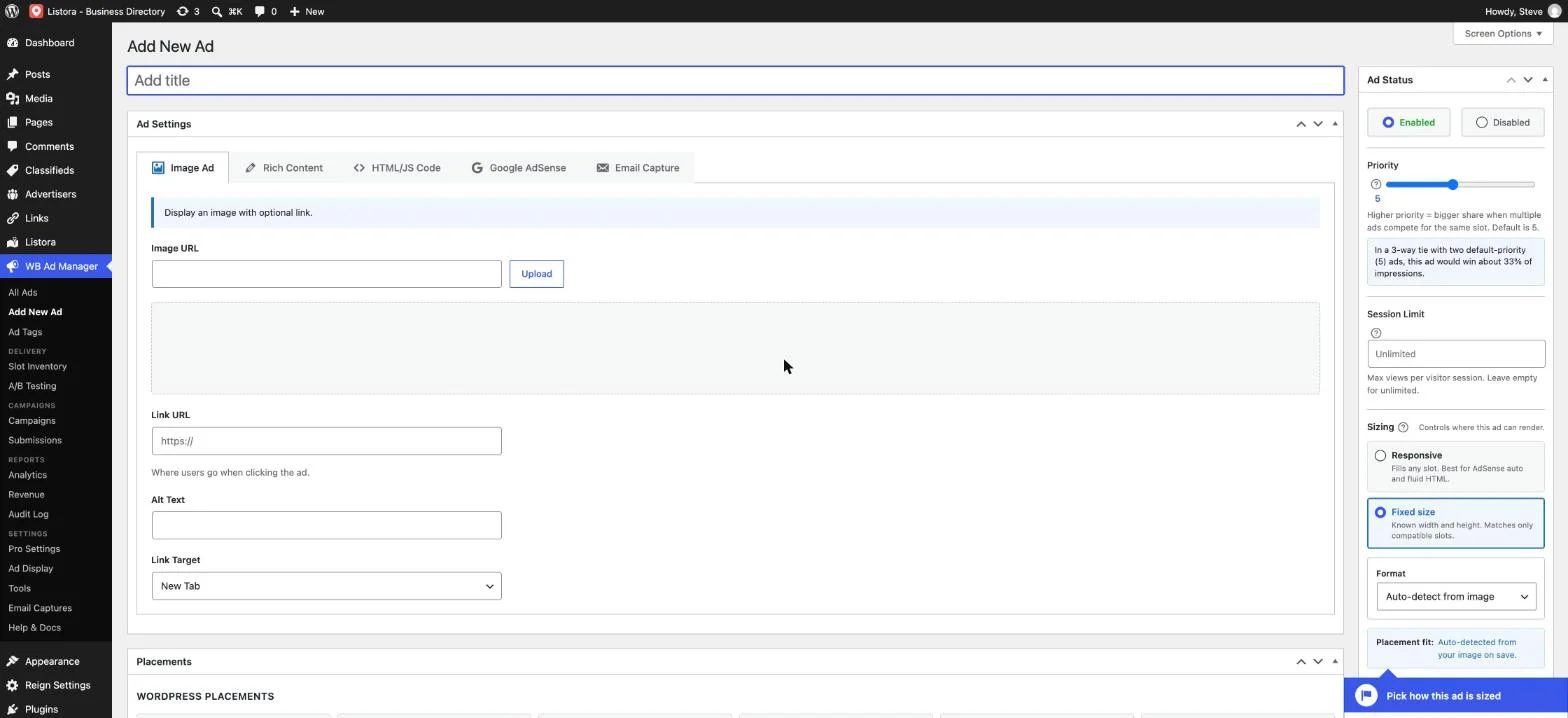
WB Ad Manager starts from a different premise: display ads and affiliate links are the same underlying problem, get a piece of content in front of a visitor and track what happens when they click, so it runs both from one plugin instead of two. The free version already covers five ad types (image, rich content, HTML/JS code, AdSense, and email capture), 16+ placement hooks, server-side impression and click tracking, branded /go/<slug> link redirects with nofollow and sponsored options, and country-level geo-targeting.
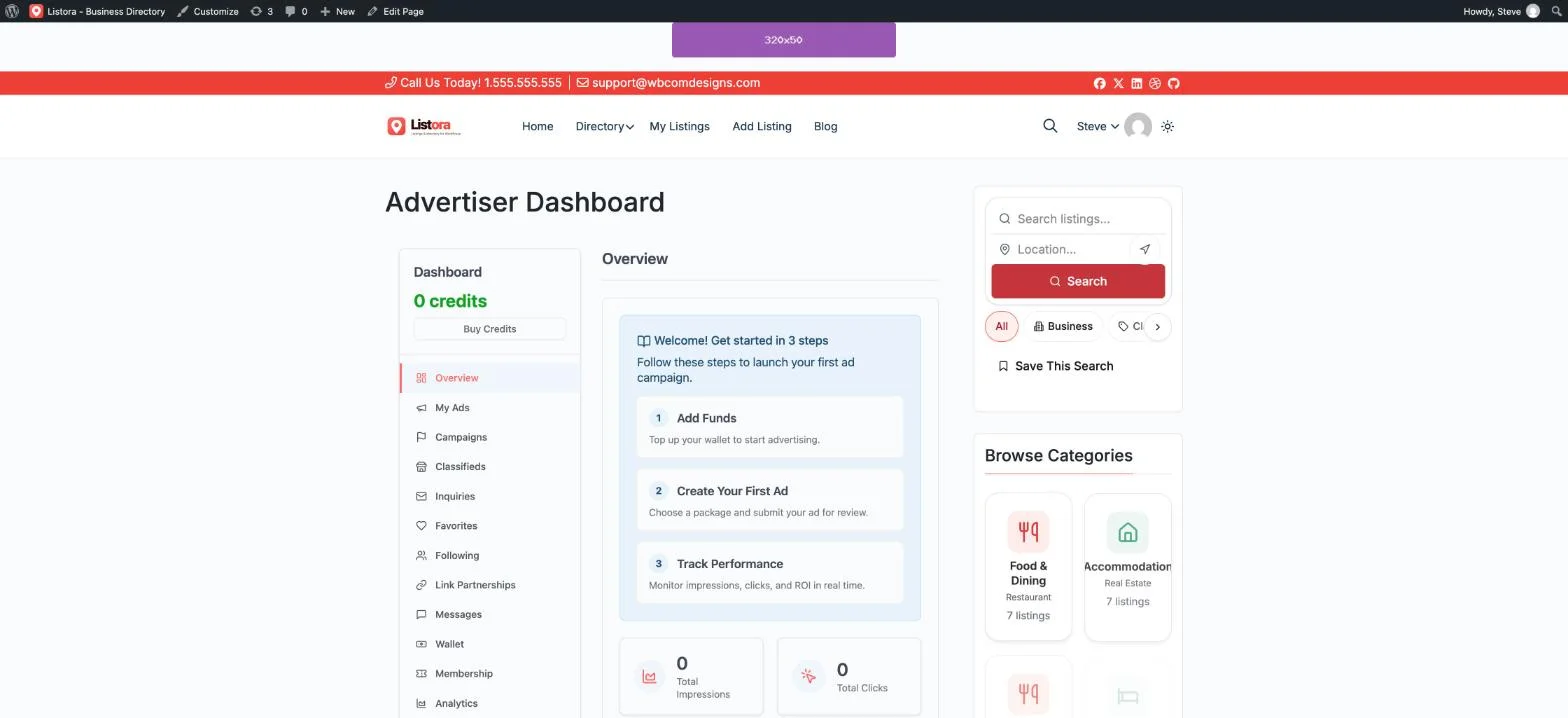
Pro is where the real difference from AdRotate and Advanced Ads shows up. It adds a front-end Advertiser Dashboard where members or local businesses build and submit their own ad campaigns, a wallet system with multiple billing integrations so you’re not manually invoicing every advertiser, a moderation queue so nothing goes live without your approval, CSV bulk import and keyword auto-linking for affiliate links, A/B testing, advanced analytics with geo and device breakdowns, and a full classifieds marketplace with grid, list, and map views.
Key strengths:
- One plugin covers display ads, affiliate link cloaking, a self-serve advertiser portal, and a classifieds marketplace, AdRotate and Advanced Ads each need separate plugins for the last three
- No monthly SaaS fee for the advertiser-portal or classifieds functionality, unlike hosted alternatives such as Google Ad Manager’s self-serve tooling
- Works on any WordPress install with no required dependency on WooCommerce or BuddyPress
- Free tier (17 of 31 total capabilities) is a genuinely usable starting point, not a crippled trial
Worth knowing:
- Newer to the market than AdRotate, so fewer third-party tutorials and community answers exist for edge cases
- Click-fraud protection isn’t a named Pro feature the way it is in Advanced Ads Pro, tracking is server-side, but dedicated fraud scoring isn’t a separate module
- The classifieds marketplace is most valuable to directory, local-business, or community sites; a pure content blog may only ever need the display-ad and link-cloaking half
What a Year Actually Costs
AdRotate Pro’s single-site license runs €49/year (about $53), rising to €79/year for two sites or €199/year for up to twenty. Advanced Ads Pro pricing varies by source and bundle but single-site licenses generally land between $59 and $89/year depending on which Pro add-ons you include; stacking click-fraud protection, popup ads, and the Gutenberg block pack separately can push the real number higher than the headline price suggests.
WB Ad Manager Pro is a flat $59/year for one site (Personal), $129/year for up to five sites (Professional), or $299/year unlimited (Agency), and that single price already includes the advertiser portal, classifieds marketplace, wallet billing, and A/B testing. To match that feature set with AdRotate or Advanced Ads, you’d be adding a separate link-cloaking plugin (ThirstyAffiliates or Pretty Links, typically $49-99/year) and a classifieds plugin (ClassiPress or WP Classifieds Pro, often $79-199/year) on top of the ad-rotator license itself, three subscriptions instead of one.
| 3-year total | Display ads only | Ads + links + classifieds |
|---|---|---|
| AdRotate Pro | ~$159 (3 × €49) | ~$690-1,050 with link + classifieds plugins added |
| Advanced Ads Pro | ~$177-267 | ~$710-1,160 with link + classifieds plugins added |
| WB Ad Manager Pro | ~$177 (3 × $59, Personal) | Same ~$177-897, link cloaking and classifieds are already in the one license |
Figures are approximate, based on publicly listed renewal pricing as of October 2026; actual costs vary with promotions, multi-site bundles, and which specific Pro add-ons a site needs.
Who Each Plugin Is Actually Built For
AdRotate fits a site owner who wants a proven, no-surprises banner rotator and nothing more, a long-running blog or niche site with direct-sold banner ads and no plans to add link management or a marketplace. Advanced Ads fits a publisher whose revenue is mostly AdSense or Google Ad Manager-driven and who wants the deepest network-ad integration and click-fraud protection available in a WordPress plugin.
WB Ad Manager fits a site that wants to monetize more than one way without running three plugins to do it: a content site that also wants cloaked affiliate links, a community or directory site that wants local businesses or members to buy their own ad space through a self-serve portal, or a local-market site that wants a classifieds section alongside its display ads.
There’s a fourth profile worth naming directly: the agency managing several client sites. Running AdRotate’s Multi (20-site) license alongside separate link-cloaking and classifieds licenses across a client portfolio means reconciling three separate renewal dates and three separate support relationships per client stack. WB Ad Manager’s Agency tier (unlimited sites, $299/year) folds the same three functions into one renewal, one changelog to track, and one support channel to escalate to when a client site has an issue, a meaningful operational difference once you’re managing more than two or three client sites at once.
AdRotate Pro vs Advanced Ads Pro vs WB Ad Manager: Side by Side
| AdRotate Pro | Advanced Ads Pro | WB Ad Manager | |
|---|---|---|---|
| Display ad types | Image, HTML, rotating groups | Image, HTML/JS/PHP, AdSense, Ad Manager, media.net, Amazon | 5 types: image, rich content, HTML/JS, AdSense, email capture |
| Affiliate link cloaking | Not included | Not included | Built in, branded /go/ links, nofollow/sponsored options |
| Self-serve advertiser portal | Not included | Not included | Pro: full front-end dashboard with wallet billing |
| Classifieds marketplace | Not included | Not included | Pro: grid/list/map views built in |
| Click-fraud protection | Ad-block/crawler hiding only | Dedicated module, Pro tier | Server-side tracking, no dedicated fraud module |
| Single-site Pro price | €49/year (~$53) | ~$59-89/year | $59/year, includes marketplace + portal |
| Free tier usability | Functional, Pro adds targeting/tracking | Functional, Pro adds unlimited ads/conditions | 17 of 31 capabilities free, genuinely usable |
How to Choose
If AdSense or Google Ad Manager is your primary revenue source and click-fraud protection matters more than anything else, Advanced Ads Pro’s network-ad depth is hard to beat. If you want the single most battle-tested banner rotator with the longest production history and don’t need anything beyond display ads, AdRotate Pro is the safe, boring-in-a-good-way choice.
If you want display ads, affiliate link cloaking, and a path to a self-serve advertiser portal or classifieds marketplace without running three separate plugin subscriptions, WB Ad Manager is built specifically for that brief, one plugin, one license, no monthly SaaS fee for the advertiser-facing features that would otherwise mean a recurring platform subscription.
FAQs
1. Can I use the free version of WB Ad Manager without ever buying Pro?
Yes. The free tier covers 17 of 31 total capabilities, including the link cloaker, all five ad types, AdSense rotation, and country-level geo-targeting. Pro is only required for the advertiser portal, classifieds marketplace, and wallet billing.
2. Does AdRotate Pro support affiliate link cloaking?
No. AdRotate is purpose-built as a display-ad rotator. Affiliate link cloaking requires a separate plugin like ThirstyAffiliates or Pretty Links.
3. Is Advanced Ads Pro worth it if I only run Google AdSense?
If AdSense is your only ad source and click-fraud protection is a priority, Advanced Ads Pro’s official AdSense Partner integration is the deepest of the three. WB Ad Manager also rotates AdSense ads but doesn’t ship a dedicated fraud-scoring module.
4. Can members or local businesses submit their own ads without me manually approving each one in wp-admin?
With WB Ad Manager Pro, yes, the front-end Advertiser Dashboard includes a moderation queue, so submissions land there for review rather than going live automatically, but you review from one queue instead of creating each ad yourself.
5. Do any of these three require WooCommerce?
No. All three work as standalone plugins. WB Ad Manager’s wallet billing integrates with several payment processors directly rather than requiring WooCommerce as a dependency.
6. How much does it cost to match WB Ad Manager’s full feature set using AdRotate or Advanced Ads?
Budget for the ad-rotator license itself (€49-89/year) plus a link-cloaking plugin ($49-99/year) plus a classifieds plugin ($79-199/year) if you want equivalent functionality, typically $180-350/year across three separate plugins, versus WB Ad Manager Pro’s single $59-299/year license depending on site count.
7. Which of the three is easiest for a non-developer to set up?
All three are designed for a site owner to configure without custom code. WB Ad Manager’s setup is a single plugin activation; AdRotate and Advanced Ads are similarly straightforward for the core ad-rotation features, with more configuration needed if you stack additional Pro add-ons.
8. Does WB Ad Manager work with a BuddyPress or community site?
Yes, and it doesn’t require BuddyPress to function, but on a community site the self-serve Advertiser Dashboard and classifieds marketplace are particularly useful for letting members monetize or list directly rather than emailing you a banner image to upload manually.
9. Can I migrate my existing AdRotate or Advanced Ads campaigns to WB Ad Manager later?
There’s no one-click importer between these specific plugins since each stores ad data in its own custom post type, but recreating a handful of banner campaigns in WB Ad Manager’s editor is typically a same-afternoon task, not a multi-day migration, since the underlying creative assets (images, link URLs, targeting rules) carry over conceptually even if the setup screens differ.
10. Does any of these three plugins throttle ad impressions or add their own branding to free-tier ads?
No. All three free versions serve unlimited impressions with no plugin-added branding on the ad creative itself; the free-vs-Pro distinction in each case is about targeting depth, ad-format variety, and (for WB Ad Manager specifically) whether the advertiser-facing and classifieds features are unlocked at all.
Summary
AdRotate Pro and Advanced Ads Pro are both solid, mature choices if display-ad rotation is the entire job you need done, AdRotate for its track record, Advanced Ads for its AdSense depth and fraud protection. But neither grows into affiliate links, a self-serve advertiser flow, or a classifieds marketplace without adding more plugins and more subscriptions. WB Ad Manager was built to cover that whole path in one plugin, with no monthly SaaS fee for the advertiser-facing features that usually mean a recurring platform bill elsewhere, worth evaluating before you commit to stacking three separate tools to get there.
Whichever of the three you land on, test the setup on a staging copy of your site first, confirm ad units render correctly across the themes and page builders you actually use, and check that impression tracking numbers start showing up within the first day before you point real advertiser budget at any new placement.