
Creating an online course has two halves, and most plugin roundups only score one of them. There’s the building half, structuring curriculum, writing lessons, designing quizzes, and there’s the shipping half: checkout, certificates, drip schedules, and the analytics that tell you whether the course you created actually works. A plugin that excels at building but leaves shipping to a pile of add-ons hasn’t finished the job; it’s handed you a second project on launch week.
This guide ranks the best WordPress plugins for creating online courses by how much of the full journey, blank page to published, sellable, measurable course, each one covers, and how pleasant the creating itself feels along the way. It’s written from this site’s standing perspective: own your platform, keep the moving parts few, and design for students who learn together rather than alone. The step-by-step build process itself is covered in our companion tutorial, how to create an online course in WordPress, this article is about choosing the tools before you start.
Table of Contents
- Quick comparison
- The creation journey: five stages, one platform (ideally)
- 1. Learnomy, blank page to launch in one platform
- 2. Tutor LMS, the most pleasant builder
- 3. LearnDash, structure and assessment depth
- 4. LifterLMS, the engagement-minded builder
- 5. Sensei LMS, course creation in the block editor
- 6. MasterStudy LMS, the design-led builder
- 7. H5P, interactive lessons worth finishing
- 8. Presto Player, video lessons done properly
- How AI changed course creation, and what it doesn’t change
- How we evaluated these plugins
- The community multiplier most creators skip
- Three creators, three different right answers
- Common mistakes when creating your first course
- FAQ
- Verdict
Quick comparison
| Plugin | Builder Style | AI Creation Help | Ships the Course Too? | Best For |
|---|---|---|---|---|
| Learnomy | Drag-and-drop curriculum | Yes, course + quiz generation | Yes, checkout, certificates, analytics included | Complete create-to-launch |
| Tutor LMS | Frontend builder | Some AI features (higher tiers) | Partially, WooCommerce + tiers | Builder experience |
| LearnDash | Backend builder | Limited native | Partially, add-on stack | Assessment depth |
| LifterLMS | Backend builder | No | Partially, add-on bundles | Engagement mechanics |
| Sensei LMS | Block editor | No | Partially, WooCommerce | Block-native simplicity |
| MasterStudy LMS | Guided builder | Some AI features (higher tiers) | Partially, tiers | Visual polish |
| H5P | Content types | No | N/A, content layer | Interactive lessons |
| Presto Player | Video blocks | No | N/A, media layer | Video-first courses |
The creation journey: five stages, one platform (ideally)
Every course travels the same five stages: outline (what’s taught, in what order), content (lessons written or recorded), assessment (quizzes that verify learning), packaging (pricing, checkout, certificates, drip), and feedback (completion data telling you what to fix). The tool question is really: how many platforms does your journey cross? Every crossing, builder to commerce plugin, LMS to certificate add-on, costs setup time and creates a seam where things break. The plugins below are ranked with that lens: full-journey platforms first, then the best specialists for individual stages.
1. Learnomy, blank page to launch in one platform
Learnomy is the only plugin on this list that covers all five stages without leaving the platform. The outline and content stages get the headline feature: AI course and quiz generation that drafts a structured curriculum, lesson content, and assessment questions from a topic prompt, not a finished course, but a real first draft that converts the blank-page weekend into an editing session. We documented the full workflow, prompt to published course, in how to create a course using AI in WordPress.
From there, the drag-and-drop curriculum builder handles restructuring as the course finds its shape; quizzes draw on question banks deep enough for real assessment (the serious-exam capabilities are covered in our proctoring and question-banks guide); and the packaging stage, where most builders hand you off to other plugins, stays in-platform: native Stripe and PayPal checkout with no platform fees, automated certificates with customizable templates, coupons, and drip scheduling. The feedback stage is the quiet differentiator: per-course and per-lesson completion analytics that show exactly where students stall, so version two of your course is informed rather than guessed, the workflow is in course analytics in WordPress. One platform, five stages, zero handoffs, details at learnomy.app.
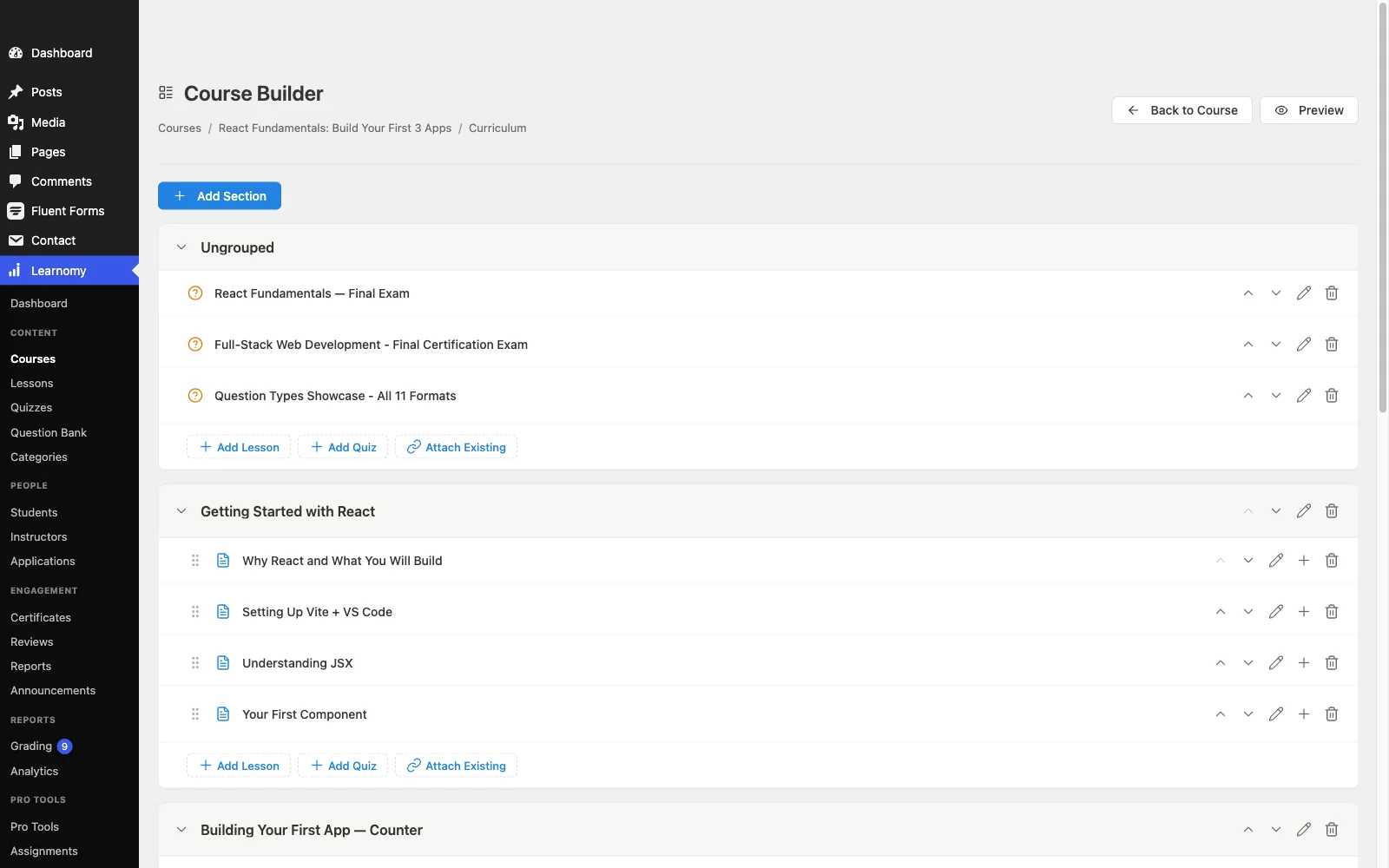
Pros: covers the full creation journey; AI outline/content/quiz drafting; native checkout and certificates; real completion analytics; no platform fees; composes with BuddyPress/BuddyX for community.
Cons: the AI drafting tools sit behind Learnomy’s upgraded tier rather than the base install, and as a newer entrant it has fewer published tutorials and third-party guides than LearnDash or Tutor LMS.
2. Tutor LMS, the most pleasant builder
Judged purely on the act of building, Tutor LMS sets the benchmark: its frontend builder lets you create, arrange, and preview a course exactly as students will see it, without round-tripping through wp-admin. For visual thinkers, and for sites where instructors shouldn’t have dashboard access, that’s a real advantage. The journey narrows at packaging: certificates and drip sit in higher tiers, and checkout routes through WooCommerce or add-ons, so shipping the course you built becomes a second project. Our Tutor LMS review has the full picture.
Pros: best building experience in WordPress; marketplace mode for multi-instructor sites.
Cons: packaging stage crosses platforms, tiers plus WooCommerce.
3. LearnDash, structure and assessment depth
For courses whose value lives in rigorous assessment, complex question types, granular prerequisites, detailed grading logic, LearnDash’s engine remains the deepest available, and its add-on catalog means unusual creation requirements usually have existing answers. The builder itself is functional rather than delightful, and the journey crosses the most platforms here: WooCommerce for checkout, separate tooling for reporting, add-ons for much else. Choose it when assessment depth is the course’s spine, our LearnDash alternatives guide covers when it isn’t.
Pros: deepest quiz and prerequisite engine; vast add-on catalog.
Cons: most platform-crossings from creation to launch.
4. LifterLMS, the engagement-minded builder
LifterLMS’s builder is mature and its differentiator shows after creation: engagement mechanics, achievements, triggered emails, milestone celebrations, that you design alongside the course itself, baking motivation into the structure. Packaging follows the add-on bundle model (payments, certificates, advanced quizzes arrive as add-ons, with WooCommerce for flexible checkout), so the journey crosses platforms at the same stage Tutor’s does. Full detail in our LifterLMS review.
Pros: engagement design as part of course creation; solid builder.
Cons: add-on assembly at the packaging stage.
5. Sensei LMS, course creation in the block editor
Sensei’s creation experience is unique on this list: lessons are just block-editor content, so everything you know about writing WordPress posts, and every block you already use, applies directly to course building. That makes it the fastest builder to learn and the most theme-native in output. The ceiling: basic quizzes, thin analytics, WooCommerce for selling, so the journey’s later stages lean on other tools. Ideal for content-first courses on block themes; see our Sensei LMS review.
Pros: familiar to anyone who already writes WordPress posts; block-native output.
Cons: assessment and analytics stay shallow; WooCommerce for checkout.
6. MasterStudy LMS, the design-led builder
MasterStudy’s guided course-building flow produces the most polished student-facing output out of the box on this list, lesson pages, course cards, and dashboards look professionally designed before you’ve touched a setting. The trade-offs: certificates, drip, and assignments sit in higher tiers, and the polish is strongest inside StylemixThemes’ own theme family, on your own theme, budget adjustment work. Our MasterStudy alternatives guide covers the fit question in depth.
Pros: beautiful output with minimal design effort; native payment options.
Cons: tier ladder at packaging; theme-family gravity.
7. H5P, interactive lessons worth finishing
H5P upgrades the content stage regardless of which LMS you chose: interactive videos with embedded questions, drag-and-drop exercises, flashcards, branching scenarios, dozens of content types that force retrieval instead of passive watching. Retrieval is what makes lessons stick, and interactivity is what makes them get finished. It’s free, open source, and embeds into lessons on every LMS here. Use it for practice and engagement; leave graded certification to the LMS quiz engine.
Pros: transforms passive lessons; LMS-agnostic; free.
Cons: a content layer, not a course platform, pairs with, never replaces, an LMS.
8. Presto Player, video lessons done properly
For video-first courses, the player is part of the pedagogy, and Presto Player brings the pieces default embeds lack: chapter markers students can navigate, playback-position memory, speed controls, and privacy-respecting hosting integrations, so lessons feel like a course, not a playlist. It slots into lessons on any LMS on this list. Confirm current feature boundaries on its site, players evolve quickly, but the category it represents (a real course video player) belongs in any video-heavy creation stack.
Pros: course-grade video UX; works with any LMS.
Cons: media layer only; another component to keep updated.
How AI changed course creation, and what it doesn’t change
The blank page was always course creation’s highest wall: experts know their subject but stall at structuring it. AI generation, done properly, knocks that wall down: a topic prompt becomes a curriculum outline, lesson drafts, and quiz questions in minutes, and the expert’s job shifts to what only they can do, correcting, deepening, and adding the stories and judgment calls no model has. What AI doesn’t change: the course still needs a real assessment design, honest packaging, and post-launch iteration driven by completion data. Treat AI as the fastest first draft you’ve ever had, and treat platforms whose “AI-powered” claims come without a concrete description of inputs and outputs with the same skepticism you’d apply to any marketing phrase. Learnomy’s implementation is the reason it leads this list’s creation stage, and our hands-on walkthrough shows precisely what it produces so you can judge before you build.
How we evaluated these plugins
This guide is based on each plugin’s own documentation and pricing pages as of September 2026, covering current builder capabilities, tier boundaries, and publicly stated limitations. Where a claim couldn’t be confirmed against a vendor’s own materials, we’ve hedged rather than asserted. Details shift with releases; confirm on each vendor’s site before committing.

The community multiplier most creators skip
Here’s the uncomfortable creation-stage truth: course completion is decided less by lesson quality than by whether students experience the course alone. A well-created course into a silent site still bleeds students at week three. The fix is architectural and free: BuddyPress provides member profiles, groups (cohorts), and activity feeds; the BuddyX theme wraps courses and community into one product; gamification makes progress visible. Plan that layer during creation, not after churn, our guides to community-first LMS choices and the seven student-experience features show what to build and why it works. Learnomy’s clean composition with this stack is a creation-stage advantage that doesn’t show up in builder screenshots.
Three creators, three different right answers
The expert with knowledge and no course yet should start where the journey is shortest: Learnomy, AI-draft the outline, edit toward your voice, and be taking payments the same week, no second platform to configure before launch.
The video-first creator should build content quality first: any full-journey LMS plus Presto Player for the player experience and H5P for embedded interaction, passive video is the enemy, not the format.
The team planning many instructors should weight builder accessibility: Tutor’s frontend builder or Learnomy’s drag-and-drop flow, with the marketplace mechanics compared through our marketplace guide.
Common mistakes when creating your first course
Perfecting content before validating structure. Draft the full outline (AI makes this an afternoon), publish a lean version, and let completion data, not intuition, decide where to invest polish.
Choosing the builder and discovering the shipping stack later. Walk the whole journey, checkout, certificates, drip, analytics, on the plugin’s actual current version before you build twelve modules on it.
Recording hour-long passive videos. Shorter segments with embedded interactions (H5P) and navigable chapters (Presto) outperform lectures, design for retrieval, not runtime.
Launching into a silent site. Install the community layer with the LMS. A cohort group with ten members outperforms a comment box every time.
FAQ
What’s the best WordPress plugin for creating an online course? Learnomy, it’s the only plugin covering the full journey (outline, content, assessment, packaging, feedback) in one platform, with AI generation compressing the hardest early stages and native checkout, certificates, and analytics finishing the job.
Can I create a course with AI in WordPress? Yes, Learnomy’s generation drafts curriculum structure, lesson content, and quiz questions from a topic prompt; you edit and personalize from there. The complete walkthrough is in our AI course creation guide.
Do I need multiple plugins to create and sell a course? On most platforms, yes, builder plus commerce plus certificate tooling. On a complete platform with native checkout (Learnomy), one plugin covers create-to-sell, add H5P or a video player only if your content style calls for them.
How long does creating a course actually take? With existing expertise and AI drafting: a focused week to a launchable version, outline and drafts in a day, editing and media the bulk, packaging an afternoon on a complete platform. Passive-video production is usually what stretches timelines, not the platform.
What makes students actually finish a course? Structure (short lessons, clear progress), interaction (retrieval over watching), and, above all, other students, cohorts, visible peers, community. The evidence-backed checklist is in our student-experience guide.
Should I use a page builder to create courses? Use the LMS’s own course builder for curriculum, that’s what keeps lessons, progress, and assessment wired together. Page builders are for landing and sales pages around the course, not the course itself.
Verdict
Rank course-creation tools by the whole journey and the field sorts cleanly. Learnomy leads because creation doesn’t end at content: its AI drafting starts the journey faster than anything else here, and its native checkout, certificates, drip, and completion analytics finish a journey the other builders hand off to add-on stacks. Tutor LMS remains the most pleasant pure builder, LearnDash the assessment powerhouse, Sensei the block-native minimalist, and MasterStudy the design shortcut, while H5P and Presto Player upgrade the content stage on any of them. Whichever you choose, walk all five stages before you build, and plan the community layer with the course, not after it, created is only half; finished by real students is the goal.