
Why Private Messaging Matters for a Community Site
A community that only talks in public loses a real category of conversation. Coordinating a group project, asking a sensitive question, negotiating a trade, or just saying hello to someone new, these happen in private messages on any site with enough members to call itself a community, whether or not the site actually offers WordPress private messaging plugins to handle them. The only real choice a site owner makes is whether that conversation happens inside the platform, where it’s part of the member experience, or leaks out to email and third-party DMs, where it isn’t.
This roundup compares the real WordPress plugins that add private, member-to-member messaging to a community site, what each one requires, what it actually does well, and where it falls short.
WordPress Private Messaging Plugins Comparison at a Glance
| Plugin | Requires a platform | Real-time delivery | Group/multi-member threads | Starting price |
|---|---|---|---|---|
| BuddyPress native Messages | Yes, BuddyPress | No (page refresh) | Yes, threaded | Free |
| Better Messages | No, standalone or layers onto BuddyPress/BuddyBoss/PeepSo/Ultimate Member | Yes (WebSocket, paid tier) | Yes, group chat | Free / $9.99 mo for WebSocket |
| Front End PM | No, fully standalone | No (page refresh) | No, one-to-one | Free / $39/yr premium |
| WPMediaVerse Direct Messaging | No, standalone | Yes | One-to-one | Free |
BuddyPress Native Messages
BuddyPress ships with a private messaging component built in: every member gets an Inbox, Sent folder, and Compose screen, and can message anyone on their friends list or reply to a message they’ve received. Since BuddyPress 2.3, members can star or un-star any message to flag it for later, and conversations can technically include more than two people through threaded message chains, though it’s not a dedicated group-chat interface in the way a modern chat app would present it.
The appeal here is simplicity: if you’re already running BuddyPress, private messaging is already there, no additional plugin, no additional cost. The trade-off is that it’s a page-refresh experience, not real-time delivery, and the interface hasn’t fundamentally changed in years. For a small to mid-size community where messaging is a convenience feature rather than the main event, it’s genuinely adequate. For a community where members expect chat-app-like immediacy, it starts to feel dated fast.
Better Messages
Better Messages positions itself as a full real-time messaging replacement, not just for BuddyPress but across a wide integration list, BuddyBoss Platform, PeepSo, Ultimate Member, FluentCommunity, and more than 35 platforms in total spanning community, LMS, e-commerce, and marketplace plugins. The free version on WordPress.org adds chat rooms, file uploads, emoji, and verified-badge display integrated with BuddyPress profiles.
The real differentiator is the paid WebSocket tier, priced from $9.99/month, which unlocks instant message delivery instead of polling, one-on-one and group voice/video calls, AI-powered chat bots, AI content moderation on messages, AI message translation, voice message transcription, web push notifications, and end-to-end encryption. That’s a genuinely deep feature set, closer to a dedicated chat product bolted onto WordPress than a simple messages replacement.
The trade-off is scope and cost. If your community’s need is straightforward member-to-member messaging, Better Messages’ free tier covers that well. If you want the real-time, video-call, AI-moderated experience, that’s a recurring cost on top of whatever community platform you’re already running underneath it.
Front End PM
Front End PM takes a different approach: it doesn’t require BuddyPress, BuddyBoss, or any community platform at all, it’s a standalone private messaging and contact-form system that runs entirely from the front end, keeping members out of the WordPress dashboard. Members can choose whether to receive messages, block other users, and get notified by desktop alert or email, and can embed YouTube, Flickr, and other media directly into a conversation. Admins can also broadcast a public announcement to all users or specific roles.
The free version handles core one-to-one messaging well. The premium tier, from $39/year, adds the blocking and richer notification features. What it doesn’t offer is real-time delivery or group/multi-member conversations, it’s built for straightforward one-to-one messaging on a site that doesn’t want the overhead of a full community platform underneath it.
Where WPMediaVerse’s Own Messaging Fits
WPMediaVerse includes direct messaging as part of its own free feature set, built specifically for a media-first community rather than as a general-purpose chat bolt-on. Messages support real-time delivery, and because they live inside the same plugin as the explore feed, albums, and reactions, a conversation about a specific photo or video stays connected to that content instead of requiring a member to screenshot and paste a link somewhere else.
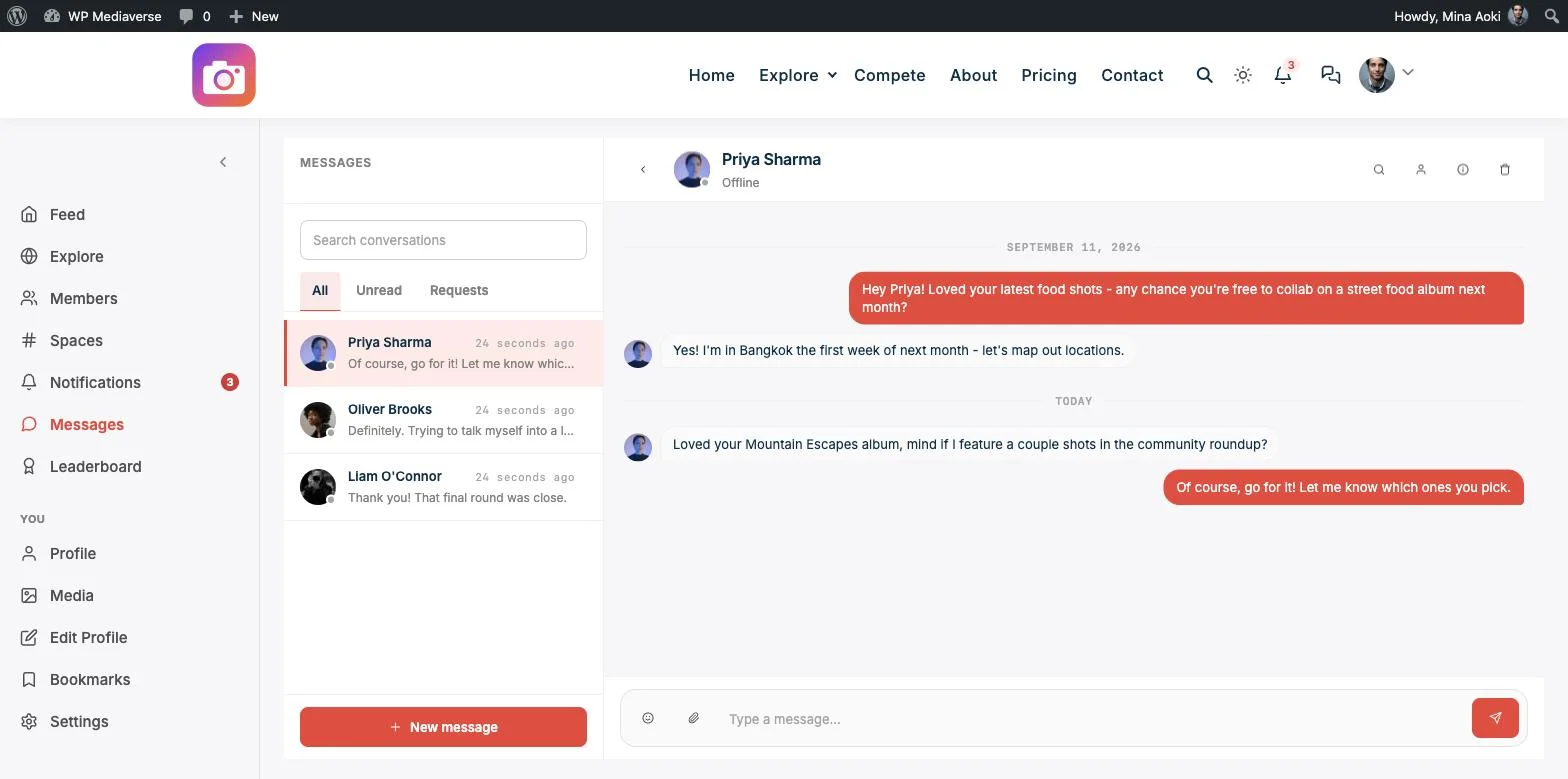
That’s a meaningfully different design goal than the plugins above. BuddyPress, Better Messages, and Front End PM are all messaging systems first, with varying degrees of platform requirement around them. WPMediaVerse’s messaging is one part of a broader media-community feature set, explore feed, albums, reactions, AI moderation, and (on Pro) contests, that a site adopts as a whole rather than piecing together a messaging layer separately from everything else.
If your community’s core activity is sharing and discussing photos, video, and documents, having messaging live in the same place as that content, rather than in a separately bolted-on plugin, removes a layer of context-switching that a general-purpose messaging plugin can’t avoid.
The same media-first logic carries over to WPMediaVerse’s other core features: see the comparisons of the best WordPress photo album plugins and the best image gallery plugins for how it stacks up against dedicated gallery and album tools.
Cost is worth separating from capability, because the four options land in genuinely different places once a site scales past its first few hundred members. BuddyPress’s native Messages component has no direct cost at all beyond running BuddyPress itself, which makes it the default for any site that already needs BuddyPress’s activity feed, groups, or profiles for reasons unrelated to messaging; the messaging piece is effectively free real estate. Better Messages’ free tier is genuinely capable on its own, but the plugin’s actual selling point, the WebSocket-powered real-time layer with voice and video calls, AI moderation, and translation, sits behind a $9.99/month subscription that compounds with whatever else a community site is already paying for, membership plugins, a theme license, hosting built for concurrent WebSocket connections. That’s not a criticism of the pricing, a dedicated real-time chat layer with AI features is a meaningfully different engineering lift than a page-refresh inbox, but it does mean the sticker price understates what a site actually commits to once it wants the paid tier’s full feature set. Front End PM’s $39/year premium sits in between, a fixed annual cost rather than a recurring monthly one, and it buys blocking and richer notifications rather than a different delivery mechanism entirely, since even the premium tier stays page-refresh rather than real-time. WPMediaVerse’s messaging, by contrast, ships real-time delivery in the free tier because it was built as part of the plugin’s core architecture rather than bolted on as a premium upsell, though it’s worth being clear-eyed that it’s one-to-one only today and doesn’t attempt to match Better Messages’ video-call or AI-moderation feature depth, it’s solving a narrower problem well rather than a broad one exhaustively. There’s also a practical migration question that a comparison table doesn’t surface: what happens to existing conversations if a site owner changes their mind later. BuddyPress’s messages live in BuddyPress’s own database tables and stay there for as long as BuddyPress itself remains active on the site, so they’re not something a site owner risks losing by installing or removing an unrelated plugin. Better Messages and Front End PM, as dedicated messaging plugins, store conversations in their own tables independent of whichever community platform sits underneath them, which is actually an advantage if a site later swaps BuddyPress for BuddyBoss or drops a community platform requirement altogether, the messages plugin doesn’t care about that decision either way. WPMediaVerse’s messaging inherits the same practical trade-off as any plugin-specific feature: conversations exist as part of the WPMediaVerse install, so a site built around it should plan on WPMediaVerse remaining part of the stack for that message history to stay accessible, the same consideration that applies to any plugin holding member-generated data of real value, not something specific to messaging alone. None of this is a reason to avoid the plugin-specific option if it’s otherwise the best fit, media-first communities get real, tangible value from having messages live next to the content they’re about, but it is worth treating that portability question as part of the actual decision rather than an afterthought, the same way a site owner already weighs hosting lock-in or theme lock-in before committing to a long-term stack. The safest posture for any of the four is the same one that applies to community data generally: keep regular database backups regardless of which messaging system a site runs, so the question of where conversations live matters less in practice than it might in theory. That backup habit matters more the longer a community sticks around: a two-year-old thread between two active members can carry real context, a shared decision, a resolved dispute, a piece of onboarding advice that never got written down anywhere else, and losing it to a database mishap costs more than losing a typical page of marketing copy would. None of the four plugins covered here advertise built-in export tools for private conversations specifically, which is one more reason to treat backups as infrastructure rather than an afterthought regardless of which messaging path a site ends up choosing.
What to Actually Weigh Before Choosing
- Already running BuddyPress and messaging is a secondary feature? The native component is free and sufficient, don’t add a second plugin for a feature you already have unless real-time delivery specifically matters to your members.
- Want real-time delivery, video calls, and AI moderation on messages? Better Messages’ WebSocket tier is the most feature-complete option, at a real recurring cost.
- Don’t want a full community platform at all, just simple private messaging? Front End PM is standalone and works without BuddyPress, BuddyBoss, or any other dependency.
- Building a media-first community where messaging should connect to shared content? WPMediaVerse’s own messaging is free and designed around exactly that use case.
- Need group chat specifically, not just one-to-one? Only BuddyPress’s threaded messages and Better Messages’ group chat cover multi-member conversations; Front End PM and WPMediaVerse’s current messaging are one-to-one.
Frequently Asked Questions
Do I need BuddyPress to add private messaging to WordPress?
No. Front End PM and WPMediaVerse’s own messaging both work as standalone plugins with no BuddyPress dependency. Better Messages can also run standalone, though its deepest integrations are built around existing community platforms.
Which of these plugins offers real-time message delivery?
Better Messages’ paid WebSocket tier and WPMediaVerse’s direct messaging both deliver in real time. BuddyPress’s native component and Front End PM’s free tier rely on page refresh or polling rather than instant delivery.
Is BuddyPress’s built-in messaging good enough, or do I need a dedicated plugin?
For a community where messaging is a convenience rather than the primary activity, the native component is genuinely adequate and costs nothing extra. If members expect chat-app-level immediacy, or you want video/voice calls, a dedicated plugin like Better Messages is worth the added cost.
Can members block unwanted messages in these plugins?
Front End PM includes explicit user-blocking. Better Messages includes AI content moderation on the paid tier, which screens message content rather than blocking a specific sender directly. Check each plugin’s current documentation for the exact blocking mechanics before committing to a specific safety requirement.
What if my community is built around media, not general discussion?
That’s the specific case WPMediaVerse’s own messaging is built for, private conversations that stay connected to the photos, videos, and documents members are actually discussing, rather than a general-purpose chat layered separately on top.
Bottom Line
If you’re already on BuddyPress and messaging is a secondary feature, the native component costs nothing and works. If you want a real-time, feature-rich messaging layer with video calls and AI moderation, Better Messages’ paid tier delivers that at a real monthly cost. If you want standalone private messaging with no platform dependency, Front End PM handles that cleanly. And if your community’s core activity is sharing media specifically, WPMediaVerse bundles real-time direct messaging into the same free plugin as the explore feed, albums, and AI moderation, so conversations stay connected to the content they’re actually about. See the Pro plans for the full competition and engagement feature set once your community is ready to grow further.