Generic community platforms are built around a feed, a course module, and an events calendar, and they treat anything resembling a real document library as an afterthought bolted onto the course tool. For a professional continuing-education (CE) community, that’s the wrong shape entirely. A CE community’s real asset isn’t a feed of posts, it’s an organized, searchable archive: every quarterly session’s recording, slide deck, and completion certificate, filed by date and topic, accessible only to members in good standing.
This guide walks through building that specific thing on WordPress using three purpose-built pieces that work together rather than one platform trying to do everything at once: BuddyNext for membership and paid access, Jetonomy for structured topic discussion distinct from a noisy activity feed, and WPMediaVerse for the document and recording library itself, including a dedicated document drive with folders and sharing.
Table of Contents
- Why Generic Community Platforms Fall Short for CE
- The Three-Part Architecture
- Setting Up Paid Membership Tiers
- Setting Up the Forum Layer
- Setting Up the CE Document Library
- A Naming Convention That Scales Past Year One
- Handling the Zoom Webinar Piece
- A Real-World Scenario: A Healthcare CE Community
- Cost: Owned Stack vs SaaS Community Platform
- FAQs
Courses and professional content paired with a real community reach 65.5% completion rates, versus 42.6% for the same content without community features, a 23-point improvement. For a CE program where completion is tied to actual professional credit, that gap isn’t a nice-to-have, it’s the difference between members who renew and members who quietly lapse.
Why Generic Community Platforms Fall Short for CE
Circle, Mighty Networks, and Skool are built for creator communities: a feed, a course area, an events tab. That works well for a cohort-based course or a casual interest group. It works less well for a professional CE community with a specific, recurring pattern: a live session happens quarterly, it needs to produce a durable, searchable, access-controlled record afterward (the recording, the slides, sometimes a completion certificate), and members need to find last year’s session on a specific topic just as easily as this quarter’s.
On a generic platform, that recording usually ends up as one more video buried inside a course module, with no real folder structure, no document-specific search, and no clean way to say “only members with active dues for this calendar year can see this.” The course tool wasn’t built to be a document library, and it shows the moment you have two years of quarterly sessions to organize rather than one linear course.
The Three-Part Architecture
Rather than force one tool to do three jobs, this setup uses three purpose-built pieces from the same team (so they’re built to work together rather than patched into compatibility):
- BuddyNext handles membership: who’s a paying member, member profiles and a searchable directory, the activity feed for lighter day-to-day discussion, and gating access to the rest of the community based on membership status.
- Jetonomy handles structured discussion: forum, Q&A, ideas, and Show & Tell space types, with accepted answers and reply voting, which is a fundamentally better fit for “what did the presenter mean by X in the Q3 session” than a scrolling activity feed where that question gets buried within a day.
- WPMediaVerse handles the library: albums and a dedicated document drive with folders, sharing, and privacy controls per item, which is where the actual CE assets, recordings, slide PDFs, certificates, live.
Setting Up Paid Membership Tiers
BuddyNext’s membership layer runs on native Stripe integration with gateway-agnostic paid plans, so a member paying annual dues gets access gated directly at the platform level, not bolted on through a separate membership plugin. Set up a single paid tier representing active dues (or multiple tiers if your association has different member classes, e.g. full member vs. student member), and gate both the forum spaces and the document library behind that tier.
Because BuddyNext owns the membership layer natively, there’s no per-member transaction fee eating into dues revenue the way a SaaS community platform’s payment processing often does, and the community itself lives on your own WordPress install rather than a vendor’s hosted platform. The member directory and profile system also means each member’s professional details (credentials, specialty, years in practice) can live directly on their profile, searchable by other members, which matters more in a professional CE context than a casual interest community.
Setting Up the Forum Layer
Install Jetonomy alongside BuddyNext (or plain BuddyPress) and create spaces that map to your CE program’s actual topic areas rather than one generic “discussion” space. Jetonomy ships four space types out of the box: forum, Q&A, ideas, and Show & Tell. For a CE community, the Q&A type is the one that does the most real work, since “accepted answers and reply voting” means a member’s question about a specific session gets a clearly marked, surfaced answer rather than disappearing into a thread of replies.

Jetonomy’s free tier already includes trust levels zero through five with a moderation queue, full-text search, and importers for bbPress, wpForo, and Asgaros if you’re migrating an existing forum. Pro ($69/year single site, $99/year for five sites, $199/year unlimited, with lifetime one-time options at $199/$299/$499) adds emoji reactions and polls, custom badges, private messaging, AI moderation, and an analytics dashboard, useful once you want to see which topics actually drive the most member engagement quarter over quarter.
Setting Up the CE Document Library
This is where WPMediaVerse does the real structural work a generic platform can’t. Create one album per CE session (e.g. “Q3 2026: Diabetes Management Updates”), and inside it, upload the recording, the slide deck PDF, and the completion certificate template. Per-item and per-album privacy controls mean you can set the entire album to “members only,” so lapsed members lose access automatically rather than you manually revoking a shared link.
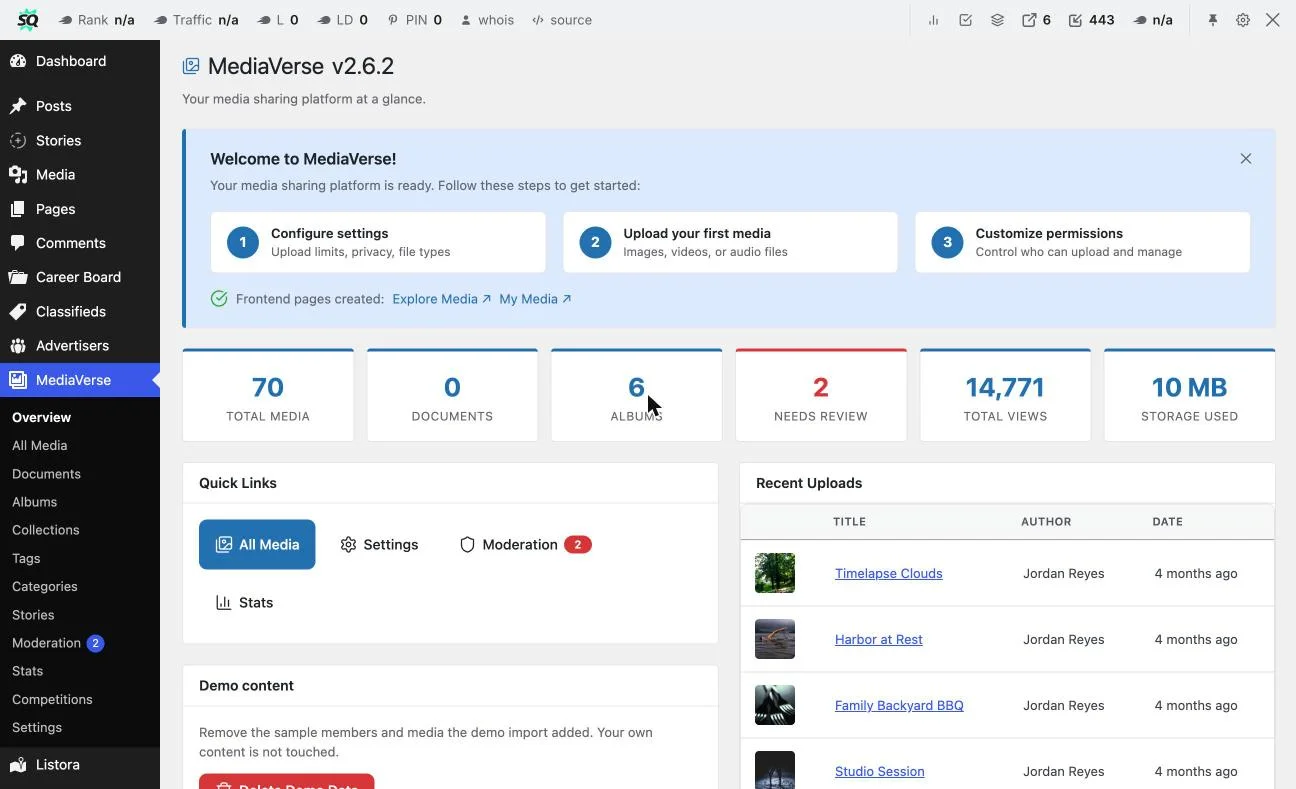
WPMediaVerse’s Pro tier specifically adds a document drive, described by the vendor as “a drive for each member with folders, sharing and a trash that empties after 30 days,” which is a meaningfully better fit for a growing CE archive than a flat media library. Pro also adds cloud storage for the library itself (useful once you have two-plus years of video recordings accumulating), named feed layouts, and migration tools if you’re moving an existing library over from rtMedia, MediaPress, or BuddyBoss Media. Free tier is enough to start: unlimited-site, no expiration, full album and privacy-control functionality from day one.
A Naming Convention That Scales Past Year One
The single biggest predictor of whether a CE document library stays useful past its first year isn’t which plugin you chose, it’s whether you set a naming and tagging convention before the first session rather than after the tenth. Decide on a consistent album-naming pattern up front, something like “[Year] Q[Quarter]: [Topic]”, so that every album sorts chronologically and reads clearly in a search result without anyone having to open it first to understand what it covers.
Pair that with a small, fixed set of topic tags rather than a free-for-all tag field. A healthcare CE program might settle on tags like “clinical-updates,” “regulatory,” “patient-communication,” and “case-studies,” applied consistently to every session regardless of the specific presenter or exact subject matter that quarter. Six months in, a member filtering by “regulatory” should surface every relevant session instantly, which only works if tagging discipline held from the very first upload.
The same discipline applies to what goes inside each album. Settle on a fixed set of asset types per session, recording, slide deck, certificate template, and optionally a one-page summary document, and upload all four every time rather than whatever happens to be convenient that quarter. A library where some sessions have slides and others don’t trains members not to trust the archive, which defeats the entire point of building one.
Handling the Zoom Webinar Piece
None of these three products replace Zoom itself, and they’re not trying to. The practical pattern: host the live quarterly session on Zoom as you already do, download the recording once it’s processed, then upload it into the corresponding WPMediaVerse album as that session’s permanent archive. Post a short BuddyNext activity update announcing the new upload (visible to all active members in the feed), and if the session sparked discussion-worthy content, open a Jetonomy Q&A thread for follow-up questions the presenter or other members can answer afterward.
This three-step handoff, live on Zoom, archive in WPMediaVerse, discuss in Jetonomy, announce in the BuddyNext feed, is the entire operational pattern. It takes a coordinator maybe twenty minutes per session to execute once the structure exists, far less than manually emailing recording links to a membership list and hoping people find them again eight months later when they actually need that specific session for a license renewal.
A Real-World Scenario: A Healthcare CE Community
Picture a professional association for healthcare practitioners running quarterly CE webinars, one quarter on updates to diabetes management protocols, the next on integrating mental-health screening into primary care visits. Members pay annual dues through BuddyNext’s Stripe-based membership tier, which gates access to both the Jetonomy forum spaces and the WPMediaVerse session archive.
After each live Zoom session, the coordinator uploads the recording and slides into a new WPMediaVerse album named for that quarter and topic, posts an announcement to the BuddyNext activity feed, and opens a Jetonomy Q&A space for follow-up clinical questions the presenter can answer over the following week. Six months later, a member preparing for a license renewal searches the document library for “mental health screening” and finds that exact session’s recording and certificate instantly, rather than scrolling through a year of undifferentiated video posts or emailing the association office to ask if anyone still has the link.
Over several years, this becomes a genuinely valuable, growing asset: a searchable, credentialed archive of the association’s entire CE history, something a generic community feed, by its nature chronological and ephemeral, structurally cannot become no matter how long it runs.
The compounding effect shows up most clearly at renewal time. A member deciding whether to keep paying annual dues isn’t just weighing next quarter’s single session, they’re weighing access to the entire accumulated archive against the cost of renewal. Two years into the program, that archive might represent eight sessions’ worth of clinical updates across diabetes management, mental-health screening, medication protocols, and patient-communication best practices, a genuinely substantial professional resource that a brand-new competing association, or a member who lets their membership lapse and tries to rejoin later after missing several quarters, simply doesn’t have access to. The library itself becomes the retention mechanism, not a side effect of running the program but one of its primary values.
Cost: Owned Stack vs SaaS Community Platform
BuddyNext’s membership and community layer runs on native Stripe integration with no per-member transaction fee, and the platform lives on your own WordPress install rather than a vendor’s hosted infrastructure, true platform ownership rather than a rented seat. Jetonomy’s Pro tier, if you want the analytics dashboard and private messaging beyond the already-solid free tier, runs $69-199/year depending on site count (or a one-time lifetime license from $199). WPMediaVerse’s Pro tier for the document drive and cloud storage runs the same $69-199/year range.
A hosted SaaS community platform charging per member or per seat scales its cost directly with your association’s growth, exactly backwards from what you want: the more successful your CE community becomes, the more a per-seat SaaS platform charges you for that success. An owned stack’s cost stays flat regardless of whether you have 50 members or 5,000, which is the structural advantage that compounds the longer a professional association runs its CE program.
There’s a second cost dimension worth naming explicitly: data portability. If a SaaS community platform changes its pricing, gets acquired, or shuts down a feature your CE program depends on, your entire archive, membership list, and discussion history live on infrastructure you don’t control and may not be able to export cleanly. An owned WordPress stack means that risk simply doesn’t exist, the database is yours, the hosting is yours, and no vendor decision made in a boardroom you have no visibility into can suddenly change what your members can access or what it costs you to keep running the program you’ve spent years building.
| Owned stack (BuddyNext + Jetonomy + WPMediaVerse) | Typical SaaS community platform | |
|---|---|---|
| Cost as membership grows | Flat, regardless of member count | Scales per seat or per member |
| Per-member transaction fee | None | Often applies to dues collected |
| Data ownership | Your own WordPress database | Vendor’s infrastructure |
| Purpose-built document library | Yes, folders + per-album privacy | Usually bolted onto the course tool |
The more successful your CE program becomes, the more a per-seat SaaS platform charges you for that success, exactly backwards from what a growing professional association needs.
FAQs
1. Do I need all three products, or can I start with just one?
BuddyNext alone covers membership, profiles, and a basic activity feed, enough to launch. Add Jetonomy once discussion volume outgrows what a feed can organize, and WPMediaVerse once you have your first session recording that needs a real home. Most CE communities need the library piece from day one, since that’s the core deliverable members are paying for.
2. Can non-paying visitors preview any content, or is everything fully gated?
BuddyNext’s gated-content model lets you choose per space or per post what’s visible to the public versus members only, so an association can keep a public-facing preview (e.g. one sample session) while gating the full archive behind paid membership.
3. Does WPMediaVerse generate completion certificates automatically?
No, WPMediaVerse stores and organizes the certificate as a document (a PDF you create and upload per session), it doesn’t generate or auto-issue certificates itself. For automated certificate generation tied to actual attendance tracking, that’s a separate workflow layered on top, typically handled through your Zoom registration data or a course/quiz plugin if completion verification is required.
4. Can members search across every past session’s recordings and documents?
Yes, WPMediaVerse’s library is searchable, and tagging each album and document consistently by topic (not just by date) is what makes that search actually useful months or years later when a member needs a specific past session.
5. Is Jetonomy’s free tier enough for a CE community, or do we need Pro right away?
The free tier’s four space types, accepted answers, trust levels, and moderation queue cover real discussion needs from day one. Pro’s additions, private messaging, custom badges, AI moderation, and analytics, matter more once the community has grown large enough that manual moderation and basic engagement tracking start to strain.
6. How do we handle a member whose dues lapse mid-year?
Since access to both the Jetonomy forum spaces and the WPMediaVerse library is gated through BuddyNext’s membership status, a lapsed membership automatically loses access to gated content without anyone manually revoking individual permissions, the gate is tied to membership state, not a list of shared links someone has to remember to update.
7. Can we import an existing forum we’re already running elsewhere?
Jetonomy includes importers for bbPress, wpForo, and Asgaros, so an existing WordPress-based forum on one of those platforms can migrate in directly rather than starting the discussion history from zero.
8. What happens to our data if we ever stop paying for Pro licenses?
Per the vendor, “the license gates updates, not features” for WPMediaVerse specifically, meaning most Pro capabilities keep functioning even if a license lapses, you just stop receiving updates and support. Your data, the entire community, forum, and document library, lives on your own WordPress database regardless of license status, since this is a self-hosted stack, not a SaaS subscription that locks you out on non-payment.
9. Can we run this without any of these three products being from the same company?
Technically yes, any BuddyPress-compatible membership, forum, and media plugin could be combined, but the specific advantage of using BuddyNext, Jetonomy, and WPMediaVerse together is that one team built and tests all three against each other, which avoids the compatibility friction that comes from assembling a stack out of plugins from unrelated vendors.
10. How long does initial setup actually take?
Installing and configuring the basic structure, one membership tier, a handful of Jetonomy spaces, and the first WPMediaVerse album, is realistically an afternoon’s work. The bigger time investment is migrating historical content if you’re moving an existing CE program’s archive over from scattered emails, Google Drive folders, or a previous platform.
11. Can different membership tiers see different parts of the library?
Yes, since WPMediaVerse’s privacy controls apply per album and per item, you can restrict specific sessions to a specific BuddyNext membership tier, useful if an association offers a premium tier with access to advanced-track sessions a standard tier doesn’t include.
12. What if our CE sessions happen monthly instead of quarterly?
The exact same architecture scales to any cadence, monthly, quarterly, or ad hoc. The naming-and-tagging discipline matters even more at higher frequency, since a year of monthly sessions means twelve albums to keep consistent rather than four, and inconsistency compounds faster the more sessions you add.
Summary
A professional CE community’s real value compounds in its archive, not its feed. Generic community platforms optimize for the feed because that’s what most of their customers need; a professional association running recurring, credentialed sessions needs the opposite priority, a structured, access-controlled, searchable library that a course tool bolted onto a feed was never built to be. BuddyNext, Jetonomy, and WPMediaVerse together give that library a real home, with membership gating, structured discussion, and document organization each handled by the tool actually built for that job.
Before launching to your full membership, run one complete cycle end to end with a small test group: host a short test session, upload the recording and slides into a properly named WPMediaVerse album, post the announcement, open a Jetonomy Q&A thread, and confirm a test member with an inactive membership tier genuinely can’t see any of it. That dry run catches gaps in the access-control chain before a real member notices a broken link or, worse, sees content their lapsed membership shouldn’t grant them anymore.