

AI TikTok video editors have changed content creation, making it faster and more accessible for creators at every skill level. These tools let users put together polished, engaging videos with far less manual effort than traditional editing software demands. But improper use of these editors can lead to weak results, and that can quietly hurt your content’s performance on TikTok. Here’s a look at the mistakes creators make most often, how each one affects the videos you publish, and what a better workflow looks like in practice.

Mistake 1: Overloading Videos with Effects
Impact: Distracts viewers and reduces engagement.
AI-powered tools offer a huge range of effects, transitions, and filters that can enhance your videos. Overusing these features overwhelms viewers and buries your core message. Stacking several transitions on top of heavy filters makes a video feel chaotic and hard to follow, and that chaos costs you retention. Viewers who feel disoriented in the first three seconds tend to scroll past rather than sticking around to see where the video goes.
Focus instead on subtle, purpose-driven effects that support the message rather than competing with it. A clean, cohesive look resonates better with audiences and lets your actual content do the work. Tools like the best AI video generator help you strike that balance with customizable templates built around simplicity rather than maximalism.
Mistake 2: Ignoring TikTok’s Formatting Requirements
Impact: Limits visibility and audience reach.
TikTok has specific formatting guidelines: a 9:16 aspect ratio, a recommended duration in the 15-60 second range, and file size limits. Ignore these and you end up with poorly cropped, low-quality videos that fail to grab attention on the platform. TikTok’s algorithm also favors content built for its native format, so non-compliant videos often see their reach capped before they get a fair shot at the For You Page.
Always confirm your export settings match TikTok’s requirements before publishing. A TikTok video editor built for the platform usually ships with preset aspect ratios and resizing tools that handle this automatically, so you’re not manually cropping and re-exporting every clip.
Mistake 3: Overlooking Audio Quality
Impact: Weakens emotional connection and viewer engagement.
Audio carries more weight on TikTok than most creators give it credit for. Poor sound quality, music that doesn’t match the mood, or missing background audio makes a video feel unfinished. A video with distorted or too-quiet sound loses viewers fast, even when the visuals themselves are strong.
Use your AI editor’s audio tools to fix this before it becomes a pattern. Most AI editors let you add trending music, record voiceovers, or drop in sound effects directly inside the platform. Match the audio to your video’s tone and pacing rather than picking whatever track is trending that week regardless of fit.
Mistake 4: Failing to Incorporate TikTok Trends
Impact: Reduces discoverability and relevance.
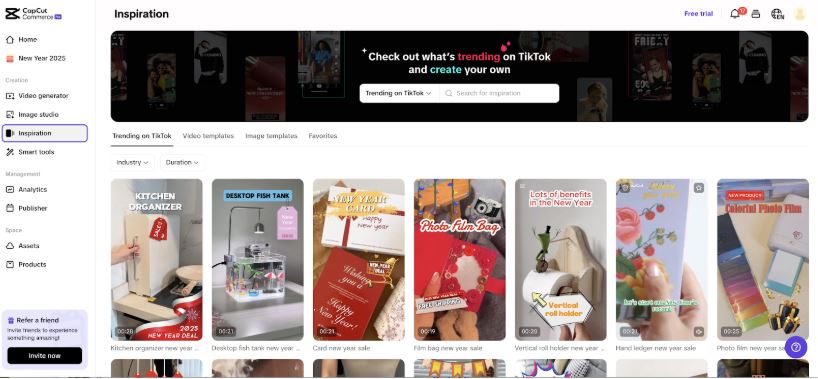
TikTok runs on trends: viral dances, challenges, and audio clips that spread across the platform in waves. Skip the trending elements entirely and your content can feel disconnected from what’s actually circulating, which lowers your odds of landing on the For You Page.
Keep an eye on what’s trending and work it into your content where it genuinely fits, rather than forcing a trend that doesn’t match your niche. AI editors often surface trending templates, music, and effects directly inside the tool, which saves the time you’d otherwise spend scrolling TikTok itself looking for what’s current.
Mistake 5: Skipping Previews and Edits
Impact: Leads to errors and reduces professionalism.
Plenty of creators rush straight from editing to publishing without previewing the finished video. That rush produces mismatched transitions, abrupt cuts, and typos sitting right in the captions. Mistakes like these make a video look rushed, and viewers notice even when they can’t quite articulate why something feels off.
Always preview the full video before it goes live. Use your editor’s playback and review tools to check transitions land cleanly, audio syncs with the visuals, and captions read correctly. A few extra minutes at this stage catches problems that are far more visible to viewers than they are to the person who just spent an hour editing.
Mistake 6: Overlooking Captions and Text Overlays
Impact: Missed opportunities for accessibility and engagement.
Captions and text overlays matter more on TikTok than on almost any other platform, largely because so many people watch with the sound off. Skip captions and you cut out a meaningful chunk of your potential audience before the video even gets a chance to land.
Use an AI caption generator to add accurate, well-timed text overlays rather than typing them out manually. Good captions make your video more accessible to viewers scrolling in silent mode, and they reinforce your message for everyone else at the same time.

Mistake 7: Not Defining Your Target Audience
Impact: Creates generic content that fails to resonate.
TikTok’s user base spans a huge range of ages, interests, and cultural references. Create content without a clear sense of who you’re making it for and you end up with something generic that resonates with nobody in particular. Humor that misses the audience’s actual sense of humor is a common way this mistake shows up in practice.
Define your audience before you start filming, not after you’ve already edited the video. AI tools can help surface what content patterns are working with a given audience segment, which gives you a starting point instead of guessing.
Mistake 8: Over-Reliance on Automation
Impact: Reduces authenticity and personal connection.
AI video editors exist to simplify the creation process, but leaning on automation too heavily strips the personality out of your videos. Publish a generic template with zero customization and your content starts to look indistinguishable from everyone else using the same tool.
Balance automation with your own input. Customize templates, add details specific to your brand or personality, and let your actual voice come through in the finished video. That balance is what keeps a video from feeling like it could have been posted by anyone.
Mistake 9: Publishing at the Wrong Time for Your Audience
Impact: Reduces initial engagement, which limits algorithmic reach.
TikTok’s algorithm weighs early engagement heavily when deciding how widely to distribute a new video. Post when your specific audience isn’t active and the video misses that early engagement window, even if the content itself is strong.
Check your account’s analytics for when your followers are actually online, rather than defaulting to generic advice about posting times. That data is specific to your audience, and it shifts over time as your following grows or changes, so it’s worth rechecking every few months rather than setting it once and forgetting it.
Mistake 10: Ignoring Video Analytics After Publishing
Impact: Repeats the same mistakes across future videos.
Publishing a video isn’t the end of the process. Skip the analytics and you lose the feedback loop that tells you what actually worked, average watch time, where viewers dropped off, and which videos drove shares versus which ones didn’t.
Review your TikTok analytics regularly and look specifically at drop-off points within individual videos. A steep drop at the three-second mark usually points to a weak hook. A drop near the end often means the video ran longer than the content justified. That pattern recognition, applied over several videos, does more for your growth than any single editing tweak.
Mistake 11: Using the Same Editing Style for Every Content Type
Impact: Weakens the fit between format and message.
A fast-cut, high-energy editing style works well for a comedy skit or a product reveal. That same style applied to a tutorial or a personal storytelling video can undercut the content, viewers following a step-by-step explanation need time to absorb each step, not a jump cut every two seconds.
Match your pacing to the content type rather than defaulting to one editing template for everything you post. A slower build with fewer cuts often performs better for educational or narrative content, even though it looks less flashy than a rapid-fire highlight reel.
Mistake 12: Neglecting Thumbnail and Cover Selection
Impact: Reduces click-through from profile grids and shares.
TikTok lets creators choose a cover frame for each video, and that frame shows up on the profile grid and in shared links. Leaving it on the auto-selected default, which is often a mid-transition blur or an awkward mid-expression frame, quietly hurts click-through when someone is scrolling a profile rather than the main feed.
Pick a cover frame deliberately, ideally one with clear text or a strong visual that gives a scrolling viewer a reason to tap. It’s a small setting that takes seconds to change and gets skipped constantly.
Mobile-Specific Editing Pitfalls
Most creators edit on a phone rather than a desktop, and that brings its own set of mistakes worth flagging separately. Editing on a small screen makes it easy to miss text overlays that run off the edge of the frame once the video plays on a different device or aspect ratio, always preview on the actual target device rather than trusting the in-app editor’s preview window alone.
Battery and storage limits also push some creators toward lower export quality settings without realizing it, since a lower-resolution export finishes faster and takes less space. Check your export settings explicitly rather than trusting the app’s default, since some apps quietly downgrade resolution when storage runs low. And working with unstable Wi-Fi or mobile data while uploading a longer video can lead to a partial upload that TikTok processes incorrectly, if a video looks glitchy or incomplete right after posting, delete it and re-upload on a stable connection rather than leaving a broken video live.
A Quick Pre-Publish Checklist
Before hitting publish, run through a short mental checklist rather than relying on memory alone. Confirm the aspect ratio and duration match TikTok’s current guidelines. Watch the full video once with sound on to catch audio issues, then once with sound off to check captions and pacing read well without it. Check the cover frame is a deliberate choice, not a random auto-selected still. And confirm any trending audio or effect used is still actually trending rather than something that peaked weeks ago and might now read as stale rather than current.
This checklist takes under two minutes once it becomes habit, and it catches the majority of the mistakes covered above before they ever reach an audience.
Building a Workflow That Avoids These Mistakes
Most of the mistakes above come from the same root cause: treating editing as a single rushed step instead of a short process with a few checkpoints. A workable routine looks something like this: script or outline the hook first, since the first three seconds decide whether anyone watches the rest. Edit with restraint, adding effects only where they clarify rather than decorate. Preview the full video once before publishing, ideally with sound on and off separately to check both audio and caption quality. Then check analytics a day or two after posting and note anything worth adjusting next time.
None of these steps take long individually. Together, they catch most of the mistakes on this list before a video ever goes live, rather than after it’s already underperformed. Creators who build this routine into their process tend to see it compound over a few months, each video gets a little faster to produce as the checkpoints become automatic rather than something to consciously remember.
Choosing the Right AI TikTok Editor for Your Workflow
Not every AI editor fits every workflow. A solo creator posting a few times a week benefits most from a tool with fast templates and one-tap resizing, since speed matters more than granular control at that volume. A brand or agency managing multiple accounts usually needs something with batch export, brand kit storage for consistent fonts and colors, and team collaboration features baked in.
Before committing to a paid plan, test the free tier against your actual workflow rather than a demo video. Export a real clip, check how the captions handle your specific speaking style or accent, and confirm the aspect ratio presets match what you’re actually posting. A tool that looks great in a promotional demo can still fall short on the specific edge cases your content runs into every week.
Where AI Genuinely Helps vs Where It Doesn’t
AI tools are genuinely useful for the mechanical parts of editing: resizing for the correct aspect ratio, generating captions, syncing audio, and suggesting trending templates. These are tasks where speed and consistency matter more than creative judgment, and AI handles them well.
Where AI falls short is judgment calls that depend on knowing your specific audience: which trend actually fits your brand, how much personality to inject into a script, or when a video’s pacing feels off in a way no algorithm flags. Treat AI editors as a tool that removes the tedious parts of the job, not a replacement for the creative decisions that make a video feel like yours.
Common Questions
How long should I spend editing a single TikTok video? There’s no fixed number, but if a 30-second video is taking hours of manual work, the tool or workflow is probably the bottleneck, not the content itself. AI editors exist specifically to cut that time down; if you’re still spending hours per clip, revisit your template setup or export presets.
Do AI-edited videos perform worse than manually edited ones? Not inherently. Performance depends far more on the hook, pacing, and relevance to trends than on whether AI assisted the edit. The mistakes on this list, not the use of AI itself, are what tank performance.
Should I use the same AI editor for every platform, or a different one per platform? A TikTok-specific editor is worth using for TikTok content specifically, since its presets and trending data are tuned to that platform. If you’re repurposing the same video for Instagram Reels or YouTube Shorts, double check the aspect ratio and caption placement still work, since safe zones for on-screen UI elements differ slightly between platforms.
How often should I update my editing template or style? Revisit it roughly every few months, or sooner if engagement starts trending downward across several videos in a row. Audience taste on TikTok moves fast, and a template that felt fresh six months ago can start to read as dated even if nothing about the content itself has changed.
What’s the single biggest mistake to fix first if I only have time for one? Weak audio, if it’s genuinely a problem for your videos. It’s the one issue on this list that most directly kills retention in the first few seconds, before a viewer even gets far enough to notice the other mistakes. Fix audio quality first, then work through formatting and pacing as a second pass.
AI-powered TikTok video editors have changed how creators produce content, giving them tools that improve both efficiency and creative range. Avoiding the mistakes above is what separates a polished, engaging video from one that quietly underperforms despite decent production value. Skip the overused effects, respect the platform’s formatting rules, and pay real attention to audio, and the rest of the process gets noticeably easier.
Whether you’re an experienced creator or just getting started, tools like the best AI video generator and a dedicated TikTok video editor give you the resources to raise your content’s quality without a steep learning curve. Use them deliberately rather than on autopilot, and they’ll help your videos connect with the right audience instead of just filling a posting quota.