

Customer retention is one of the highest-leverage levers in ecommerce: Bain & Company found that a 5% increase in retention can boost profits by 25-95%. A one-click reorder feature is a direct, low-effort way to act on that: instead of making a returning customer browse the whole catalog again, they can repurchase something they’ve already bought in a click. It sounds like a small convenience, but the friction it removes is exactly the friction that causes a large share of repeat-purchase abandonment, a customer who already knows what they want shouldn’t have to re-navigate categories, re-read a product description, or re-decide on a variant they already settled on weeks ago. Every extra step between “I need this again” and “it’s in my cart” is a chance for the customer to get distracted, decide it can wait, or simply not bother, and a returning customer’s patience for friction is generally lower than a first-time visitor’s, not higher, since they’ve already proven they can get what they want elsewhere.
What Product Reorders Actually Are
A “Buy Again” or “Reorder” option on the account page, order history, or in an email reminder that skips the search-browse-add-to-cart cycle entirely for something a customer’s already purchased. Especially valuable for consumables and frequently-repurchased items: groceries, office supplies, pet food, skincare. The underlying idea mirrors what Amazon popularized with its own “Buy Again” tab, a dedicated view of previously purchased items with a single button to repeat the order, and WooCommerce store owners can replicate that same experience without needing Amazon’s infrastructure.
Buy Again for WooCommerce
Buy Again for WooCommerce (confirmed active, Flintop, v6.4.0, ~$55/yr) is the official extension for this, Amazon-style “Buy Again” functionality built directly into WooCommerce.
What It Covers
- One-click reordering straight from past purchases.
- Flexible placement: order history, account page, or individual product pages.
- Partial reorders, reorder specific items from a past order rather than the whole thing.
- Theme/gateway compatibility across most WooCommerce setups.
- Mobile-optimized for on-the-go reordering.
Setting It Up
Step 1: Install
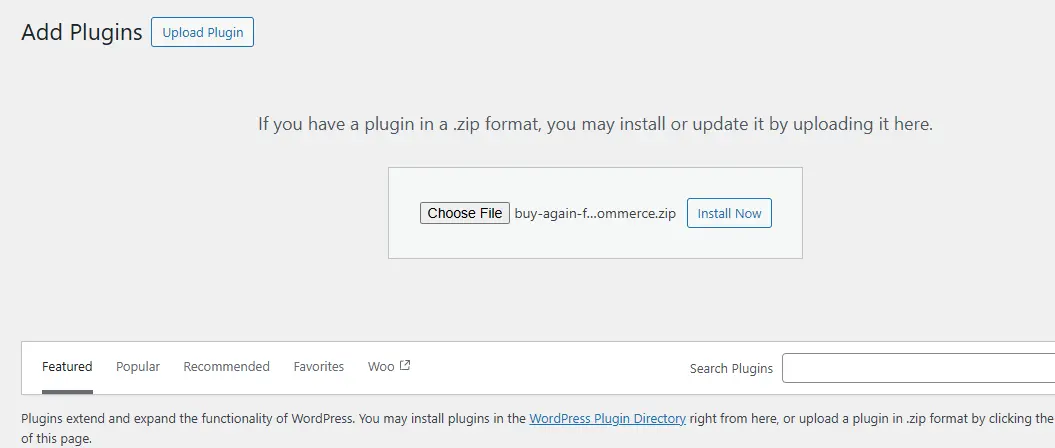
Purchase and download from WooCommerce.com, then Plugins > Add New > Upload Plugin, install, and activate.
Step 2: Configure

Go to Buy Again in the WordPress dashboard, enable the plugin, and choose where the button appears: order history page, single order details page, or product page.
Step 3: Customize Button Text and Style
Rename it to something more engaging (“Reorder Now,” “Repeat Order”) and adjust colors/font to match your store’s branding. This is a step worth taking seriously rather than leaving the default label in place; testing has consistently shown that a specific, action-oriented label outperforms a generic one, and since this is a one-time setting change, there’s little reason not to spend a few minutes on it.
Step 4: Test
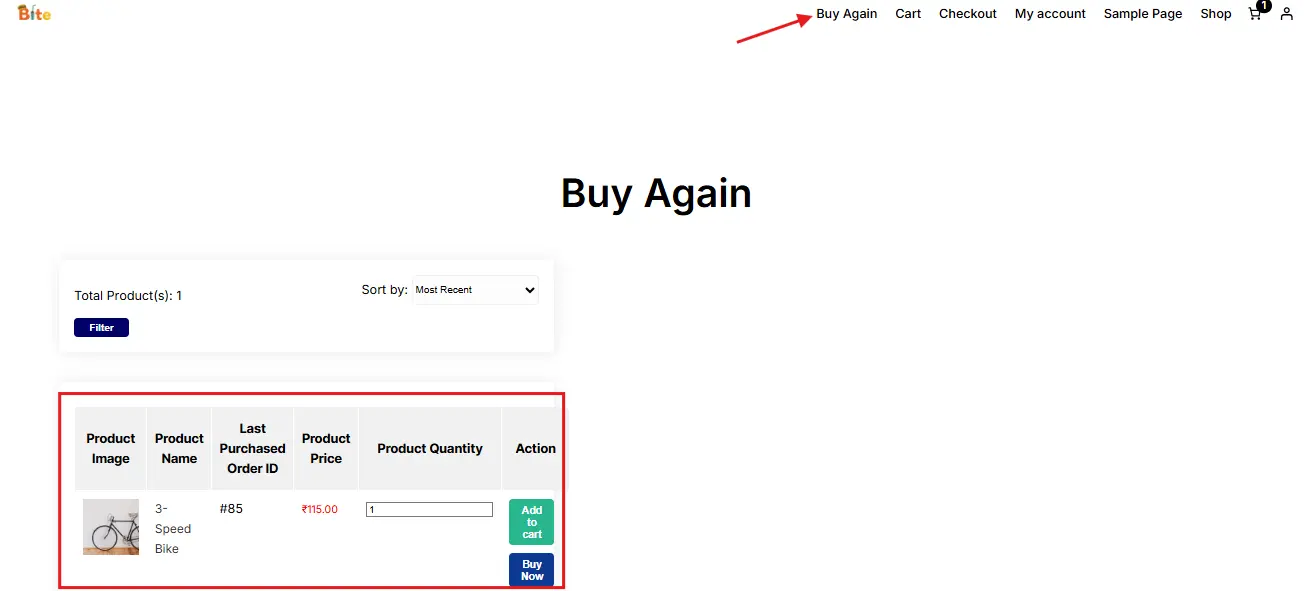
Place a test order, go to My Account > Orders, click Buy Again, and confirm the product actually lands in the cart correctly. Test with a product that has variations (size, color) specifically, since variation handling is where reorder plugins most commonly stumble, confirm the exact previously-ordered variant gets added rather than defaulting to whatever variation happens to be first in the list.
Why This Is Worth Setting Up
- Saves time. Returning customers skip straight to checkout instead of re-browsing.
- Lifts average order value. Reordering often comes with an extra item or two added along the way.
- Improves retention. Removing friction is one of the more reliable ways to keep customers coming back.
- Cuts support load. Fewer “how do I reorder this” questions when the button is right there.
Handling Out-of-Stock and Price Changes
A detail that’s easy to overlook when planning a reorder feature: what happens when the customer clicks Buy Again on a product that’s since gone out of stock, been discontinued, or changed price. A poorly handled version of this feature silently fails or, worse, adds a now-unavailable item to the cart and only surfaces the problem at checkout, which is a worse experience than not having the feature at all. Buy Again for WooCommerce handles out-of-stock items by disabling the reorder action with a clear message rather than allowing a broken add-to-cart, and price changes simply reflect the current price rather than the historical one, which is the correct and expected behavior; customers generally understand that prices can change, but they don’t tolerate a checkout error on something that looked like a one-click action.
It’s worth manually testing this specific scenario, reordering a product you’ve since marked out of stock or changed the price on, before considering the feature fully configured. A silent failure here is exactly the kind of thing that erodes trust in a feature meant to build convenience, and it’s cheap to catch in testing but expensive in lost confidence if a customer hits it live. Discontinued products deserve the same test: if a product has been deleted or unpublished entirely rather than just marked out of stock, confirm the reorder button either hides that line item gracefully or offers a reasonable substitute prompt, rather than throwing a broken link or a fatal error on the account page.
Getting More Out of It
- Pair with timed email reminders. If a product typically lasts 30 days, send the nudge around day 25, not randomly.
- Add personalized recommendations (“frequently bought together,” “you may also like”) alongside the reorder option to lift cart value further.
- Offer a small incentive for reordering within a window (“10% off if you reorder within 30 days”) to pull the decision forward.
- Track and iterate. Watch click-through and conversion on the button itself, test placement, copy, and color rather than assuming the default setup is optimal.
Measuring Whether It’s Actually Working
Beyond the basic click-through tracking most reorder plugins report out of the box, a few deeper metrics are worth pulling from your store’s order data directly. Repeat purchase rate, the share of customers placing a second order within a set window, say 60 or 90 days, is the clearest signal of whether the feature is genuinely moving the needle versus just being clicked occasionally without changing overall buying behavior. Comparing that rate for customers who have used the reorder button against customers who haven’t, if your analytics setup allows for it, gives a cleaner read than store-wide averages, since it isolates the feature’s actual effect from general seasonal or promotional noise.
Time-to-reorder is another useful number: for a given consumable product, how many days typically pass between a first purchase and a repeat purchase. This number is exactly what should drive the timing of any reminder emails paired with the reorder button, and it’s worth calculating per product category rather than store-wide, since a skincare serum and a bag of pet food have very different natural repurchase cycles. Most WooCommerce reporting tools don’t calculate this automatically, so it usually means a short export of order data into a spreadsheet, grouping by product and calculating the average gap between a customer’s first and second purchase of that item, a modest one-time analysis that pays for itself in more accurately timed reminder emails going forward.
Where This Matters Most
Grocery/everyday essentials (snacks, cleaning supplies, weekly staples). Health and wellness (supplements, skincare bought on a cycle). Office/B2B supply (ink, paper, packaging, ordered on repeat). Specialty/hobby shops (pet supplies, craft materials). It’s also a reasonable “subscription-lite” option for stores that don’t want to run full subscription billing but still want to make repeat purchases effortless.
Stores selling primarily one-time, high-consideration purchases, furniture, major appliances, jewelry, get proportionally less value from this specific feature, since the natural repurchase cycle for those categories is measured in years rather than weeks, if it exists meaningfully at all. That’s not a reason to skip the plugin entirely if a store carries a mixed catalog, but it’s worth being realistic about which product categories will actually see the button used, rather than expecting a uniform lift across every product on the site. A furniture retailer that also sells a smaller line of consumable care products, cleaning kits, replacement parts, protective sprays, still benefits from the feature on that narrower slice of the catalog even if the big-ticket items never see a repeat click.
Integrating With Loyalty and Membership Setups
Stores running a membership or loyalty-points system alongside WooCommerce, common on community-driven sites built with BuddyPress or similar member-management stacks, have an extra opportunity worth considering: surfacing the reorder button specifically to logged-in members with purchase history, rather than treating it as a generic account-page feature for anyone with an account. A members-only “your usual order” widget on a community dashboard, pulling from the same underlying order data the reorder plugin already tracks, extends the convenience into a space members are already checking regularly rather than waiting for them to navigate to the standard WooCommerce account pages.
This kind of integration usually requires a small amount of custom template work to surface the reorder button outside WooCommerce’s default account-page locations, but the underlying plugin functionality, the actual add-to-cart logic, does the heavy lifting regardless of where the button is displayed. It’s a reasonable ask for a developer already familiar with the site’s membership plugin and template structure.
Common Questions
Does this work with subscription products too?
Buy Again for WooCommerce is built for one-time purchases that a customer chooses to repeat manually. If a store already runs WooCommerce Subscriptions for recurring billing, the two serve different purposes and can coexist, subscriptions for products customers want auto-delivered on a schedule, Buy Again for products customers want to reorder on their own timing without committing to a recurring charge.
Will the reorder button show for guest checkout customers?
No, order history-based reordering requires an account, since the feature works by referencing a customer’s past orders tied to their account. This is worth factoring into checkout flow decisions; if a large share of your customers currently check out as guests, encouraging account creation, even a lightweight post-purchase account prompt, is a prerequisite for this feature to reach its full potential audience.
Does reordering preserve any product customizations from the original order?
Standard variable product options (size, color, and similar attribute-based variations) carry over correctly. More complex customizations added through separate product-personalization plugins may or may not transfer depending on how that other plugin stores its data; if your store uses custom product options beyond standard WooCommerce variations, it’s worth testing that specific combination before assuming it works seamlessly.
Can customers reorder just one item from a multi-item order, or is it all-or-nothing?
Buy Again for WooCommerce specifically supports partial reordering, letting a customer pick individual items from a past order rather than adding the whole thing back to the cart. This matters more than it might seem: a customer who ordered five different items last month may only want to repurchase the one consumable among them, and forcing an all-or-nothing reorder on a mixed order tends to push customers back to manual browsing rather than using the shortcut at all.
Does the feature work the same way for wholesale or B2B WooCommerce stores?
Functionally yes, the core add-to-cart mechanism is unaffected by whether pricing is retail or wholesale-tiered. Where it gets more nuanced is when a B2B store applies negotiated, account-specific pricing rather than standard product pricing; the reorder button will typically pull current pricing rather than the price paid on the original order, which is usually the desired behavior but is worth confirming explicitly with any custom pricing plugin in use, since B2B pricing setups vary widely in how they’re implemented.
Alternatives and How They Compare
Buy Again for WooCommerce isn’t the only route to this functionality, and it’s worth knowing the landscape before committing. One Click Re-Order and Repeat Order and Buy Again are two other official WooCommerce.com Marketplace extensions covering similar ground, with their own take on where the reorder table displays and which order statuses qualify. It’s also worth knowing that WooCommerce ships a basic version of this natively at no extra cost: any order marked “Completed” already shows an “Order again” button in the My Account order-details view, which adds the same items to the cart. It’s far less configurable than a dedicated extension, no partial reorders, no placement flexibility, no branded button styling, but it’s worth checking whether that built-in button already covers a store’s needs before paying for a plugin on top of it.
The trade-off across these options tends to come down to depth versus simplicity. A dedicated, actively maintained extension like Buy Again generally handles edge cases, variations, out-of-stock states, partial reorders, more thoroughly than the native “Order again” button, since reorder handling is the plugin’s primary focus rather than a minor built-in convenience.
Mobile Behavior Deserves Its Own Test Pass
A meaningful share of repeat purchases on consumables and everyday items happen on mobile, someone remembering they’re low on a product while out, rather than sitting at a desktop. This makes mobile testing of the reorder flow more than a routine checkbox; it’s testing the scenario the feature is arguably built for most directly. Confirm the button is easily tappable at a reasonable size, that any confirmation toast or cart update is visible without scrolling, and that the whole flow, tap Buy Again, land in cart, proceed to checkout, works in three taps or fewer on a phone screen. A reorder flow that requires the same amount of navigating on mobile as a fresh purchase defeats the point of the feature entirely.
A Note on Custom Development
For stores with very specific reorder logic needs, reordering that respects a loyalty tier’s pricing, a B2B account’s negotiated rates, or a reorder flow tied to a custom subscription cadence, a premium plugin’s configuration options may not stretch far enough. In those cases, a custom-built reorder feature using WooCommerce’s own order and cart APIs is a legitimate path, and it’s a more contained piece of custom development than it might sound: the core logic is pulling line items from a past `WC_Order` object and programmatically adding them back to the current cart, which WooCommerce’s API supports directly without needing to touch core files. This is worth raising with a developer specifically if your reorder requirements go meaningfully beyond what an off-the-shelf extension configures for, rather than trying to force a generic plugin to do something it wasn’t built for.
Before committing to custom development, though, it’s worth double-checking whether the gap is really a functional one or just a configuration one. A surprising number of “we need custom development” requests turn out to be solvable through an existing extension’s filter hooks or settings once someone actually reads the documentation closely, and custom code carries an ongoing maintenance cost, keeping it compatible through WooCommerce core updates, that a well-maintained commercial extension absorbs for you as part of its license fee.
Final Thoughts
One-click reorder is a low-effort, high-leverage change, no major store redesign required, and it directly targets the specific friction of re-buying something a customer already knows they want. Paired with timed reminders and personalized suggestions, it turns occasional buyers into habitual ones. The setup itself takes an afternoon; the ongoing value comes from actually testing the edge cases, out-of-stock handling, variation carryover, guest-checkout gaps, before assuming the feature is delivering everything it’s capable of.
Treat the first month after launch as a measurement window rather than a set-and-forget rollout. Watch the click-through and repeat-purchase numbers, fix whatever edge case surfaces first in real usage, and only then move on to the optional layers, reminder emails, incentive offers, since those work best once the core reorder flow itself is confirmed solid rather than being added on top of an untested foundation.