

LearnDash as an Learning Management Systems (LMS) stands tall as a versatile and potent solution for crafting and administering online courses. Among its arsenal of tools, LearnDash ProPanel emerges as a standout addition, elevating the administrative experience with its advanced analytics and reporting capabilities. Let’s learn intricacies of LearnDash ProPanel, exploring its features, benefits, and why integrating it into your LearnDash LMS workflow can be a game-changer.

Quick Links
What is LearnDash ProPanel?
LearnDash ProPanel represents an analytical and reporting enhancement bundled within both the Plus and Pro versions of the LearnDash LMS. It serves as a dashboard within your WordPress interface, offering comprehensive insights into the performance of your LMS website while streamlining reporting and assignment management.
Using LearnDash ProPanel, users can access a wide range of analytics and reporting functionalities designed to facilitate data-driven decision-making and optimize course management. From tracking student enrollment and progress to monitoring course activity and engagement, ProPanel offers a holistic view of your LMS website’s performance.
One of the key advantages of LearnDash ProPanel is its seamless integration with the WordPress dashboard, making it easily accessible and user-friendly for administrators and educators alike. By consolidating essential reporting and management tools into a single interface, ProPanel simplifies administrative workflows and enhances efficiency.
Key features of Propanel add-on
1. ProPanel Overview
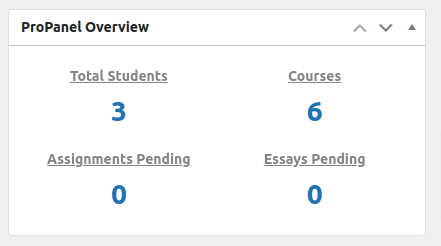
This feature provides a snapshot of essential metrics. With a quick glance, educators and administrators can gain insights into the overall activity and performance of their LearnDash courses.
It provides following metrics
i) Total Students: The “Total Students” section provides a link to the Learndash user interface and indicates the total number of enrolled users.
ii) Courses: The “Courses” section displays the total count of available courses and offers a link to access Learndash courses.
iii) Assignments Pending: “Assignments Pending” details the quantity of pending assignments and supplies a direct link to access them.
iv) Essays Pending: “Essays Pending” links to the “Submitted Essays” section within LearnDash LMS, displaying only the essays that are yet to be graded.
2. ProPanel Activity
You can stay updated on live course activities with ProPanel Activity. It allows you to monitor learner engagement and progress in real-time. Additionally, you have the option to download the .csv file for both the course and quiz directly from this platform.
It contains various pieces of information, including but not limited to:
i) Name of the user.
ii) Time of the activity.
iii) Course name
iv) Topic name
The main .csv file contains all the detail from e-mail,user_id to last login date.

3. ProPanel Filter
1. Filters
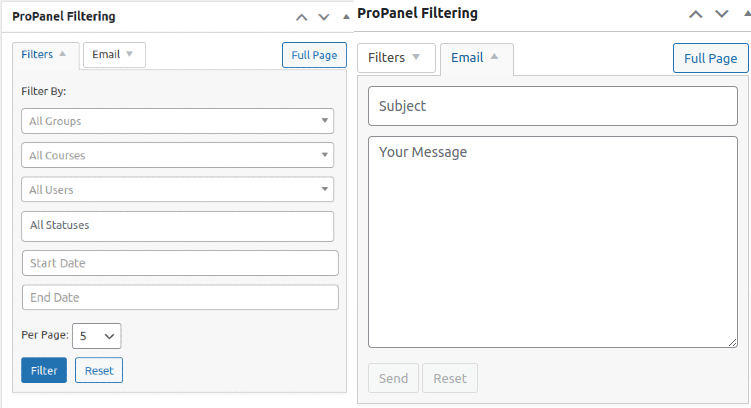
Filters provides you the flexibility to refine your data by course, user, group, or date. This powerful filtering capability enables you to focus on specific segments of your audience or course content, making it easier to analyze and manage your LearnDash courses effectively. The filtering results will be shown using Propane activity, reporting and charts. The filtering options it provides are as follows:
i)By groups
ii) By courses
iii) By users
iv) By statuses(complete, incomplete or not started)
Only applied to ProPanel Activity
v) By start date
vi) By end date
Full page: In the ProPanel Filtering widget, you’ll find a Full Page button located at the top corner. Clicking this button will navigate you to a specific page within your WordPress admin area. This particular page is exclusively designed to display only the Filtering & Reporting widgets.
2. Emails
The ProPanel Filtering widget also features an Email tab, which serves as a convenient tool for manually sending emails to a selected group of your users. To use it effectively, you should first apply a filter to determine the recipients of the email. Choose your filters and hit the Filter button. After that, navigate to the Email tab. The Email tabs provide following options.
i) Subject Line
ii) Message Content
To customize you email you can use some basic Html tags like using bold or providing links.
Reset: It will clear the subject and message fields, enabling you to begin anew from the beginning.
4. ProPanel Reporting

ProPanel Reporting doesn’t display data on its own; instead, it requires the use of ProPanel filters to access and utilize data effectively. When you apply the filter, the Reporting widget displays following information:
i) Name of the user
ii) User’s E-mail
iii) Course Title
iv) Course completion status and bar
You can exercise additional control over the information displayed using either the search bar or the top-right bar.
5. ProPanel Chart
By visualizing your LearnDash data with ProPanel Chart. You can set the ProPanel Reporting Widget to filter by group, course, or user, and two charts will appear. You can utilize the Reporting tool to create dynamic charts and progress breakdown filters, allowing you to visualize learner progress and course performance over time. It shows two charts which are as
follows:
1. Progress Distribution chart
Progress Distribution encompasses the individuals categorized by their course status: “completed,” “in progress,” or “not started.” These statuses are depicted in a donut chart, with the exact numbers displayed upon hovering over each segment.
i) Not Started: Indicates users who haven’t initiated any course steps.
ii) In Progress: Reflects users who have completed at least one step but not all.
iii) Completed: Denotes users who have finished all course steps.
2. In Progress Breakdown chart
On the right side, there’s a breakdown of all users or courses currently marked as “In Progress” based on the selected filter (In Progress Breakdown). The default setting displays the distribution of in-progress items in 20% increments: 20%, 40%, 60%, 80%, and 100%. You have the option to adjust these increments and other settings using the filters detailed in the Developer section provided later in this document.

Benefits of Using LearnDash ProPanel:
The adoption of LearnDash ProPanel yields a multitude of benefits, enhancing your course management endeavors:
1. Improved Analytics: Dive deep into course analytics to track enrollments, assignments, and student progress, facilitating informed decision-making.
2. Real-Time Monitoring: Stay abreast of course activities in real-time, enabling proactive interventions and personalized support.
3. Enhanced Communication: Leverage advanced filtering capabilities to identify struggling learners and foster effective communication channels.
4. Efficient Assignment Management: Seamlessly manage pending assignments and essays, streamlining the review and approval process.
5. Enhanced Student Engagement: Understand student behavior and preferences better to tailor courses and interventions for maximum impact.
6. Data-Driven Decision Making: Utilize actionable insights to optimize course content, delivery methods, and assessment strategies, driving continuous improvement.
7. Scalability and Flexibility: Adapt and scale your course offerings based on real-time feedback and evolving learner needs, ensuring long-term success.
Front-End Display of LearnDash ProPanel
The front-end display feature of LearnDash ProPanel is indeed a powerful tool that enhances the user experience by showcasing course data directly on your website.
1. ProPanel Shortcodes: LearnDash ProPanel offers customizable shortcodes that allow you to display report data on the front-end of your website. These shortcodes enable you to create a full-page report using a default template or arrange individual widgets to create a customized front-end report page tailored to your preferences. Some of the important shortcodes are given below. To learn more visit shortcode.
1. [ld_propanel widget=”overview”]
2. [ld_propanel widget=”filtering”]
3. [ld_propanel widget=”reporting”]
4. [ld_propanel widget=”activity”]
5. [ld_propanel widget=”progress_chart”]
2. Existing Front-End Template: LearnDash ProPanel includes an existing front-end template that can be accessed by adding “/?ld_propanel” at the end of your LearnDash site’s URL. This template provides a user-friendly interface for viewing course data, but it’s important to note that it’s only visible to admins and group leaders, ensuring privacy and security.

3. Custom Layouts: With LearnDash ProPanel, you have the flexibility to build your own front-end layout using individual widget shortcodes. This allows you to arrange course data in a specific way that best suits your needs, whether you want to highlight enrollment statistics, completion rates, or other key metrics.

4. User Role Access: LearnDash ProPanel isn’t limited to admins and group leaders anymore. You can grant access to ProPanel for any user role by assigning them the ProPanel capability. This ensures that instructors, course authors, and other users can access valuable course data directly from the front-end of your website, enhancing collaboration and transparency. Do so so you need to use “User role editor” plugin.

Overall, the front-end display feature of LearnDash ProPanel provides a user-friendly interface for learners and instructors to track course progress and performance. By offering customizable layouts, easy access for all user roles, and enhanced visibility of course data, ProPanel contributes to an enriched learning experience on your website. Whether you’re an administrator looking to monitor course effectiveness or an instructor seeking insights into student engagement, LearnDash ProPanel’s front-end display feature is a valuable asset for optimizing your e-learning platform.
Leardash Reporting: Leardash Dashboard
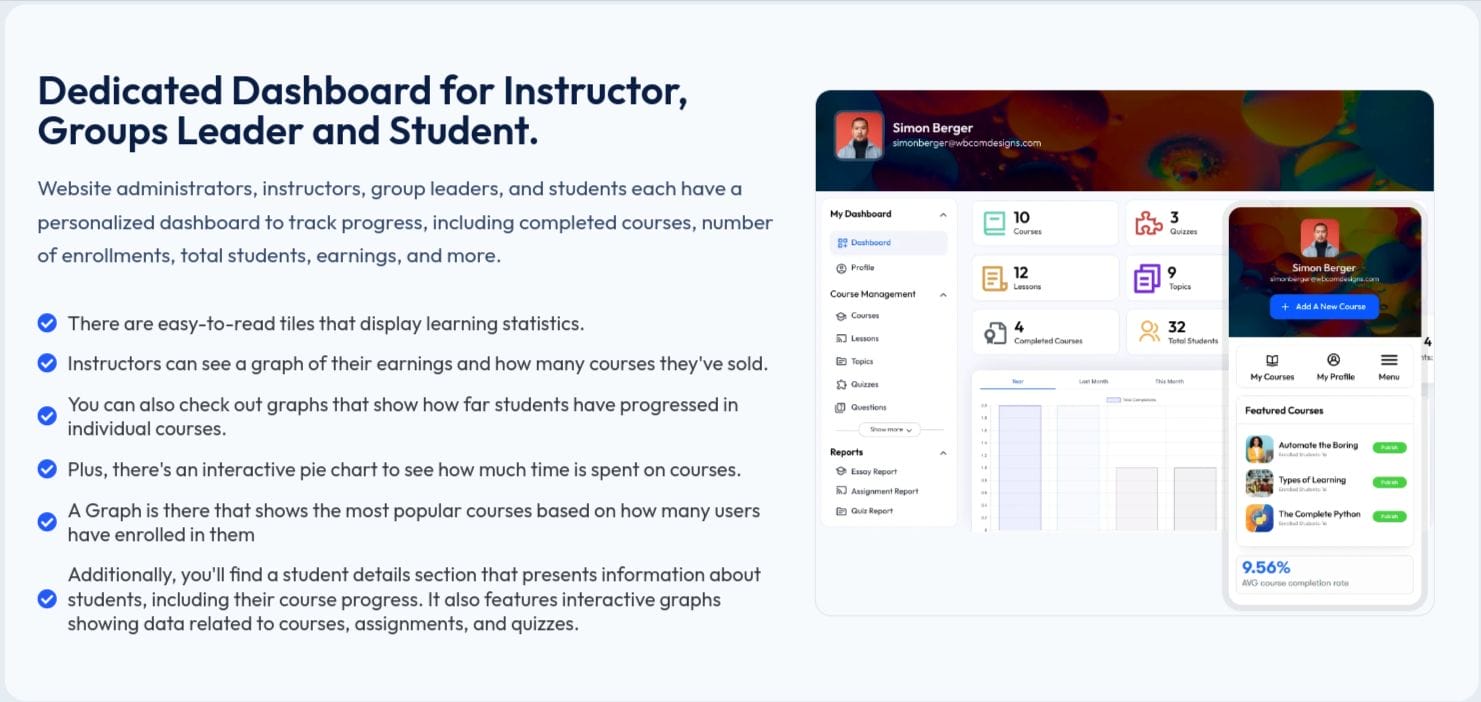
The LearnDash Dashboard Plugin stands out as a superior solution compared to LearnDash ProPanel, offering separate dashboards tailored for administrators, instructors, and students.
By using its advanced features, users can effortlessly manage courses, lessons, and reports directly from their dedicated dashboards. Moreover, it provides comprehensive tracking of course activities to monitor progress effectively.
This plugin introduces four distinct dashboard views ensuring each user role has access to relevant functionalities.
i) Admin View
ii) Instructor View
iii) Group Leader View
iv) Student View
In addition to these robust features, the LearnDash Dashboard Plugin includes a Frontend Course Builder, setting it apart from LearnDash ProPanel. This innovative feature empowers instructors to create and manage courses directly from the frontend interface, eliminating the need to navigate to the WordPress backend. Instructors with the help of Frontend Course Builder, can efficiently design courses, assign quizzes, and issue certifications, enhancing the overall course creation experience.
Conclusion
LearnDash ProPanel stands as a robust solution for administrators and educators seeking to elevate their course management and monitoring capabilities within the LearnDash Learning Management System. With its advanced analytics, real-time monitoring, and efficient administrative tools, ProPanel empowers users to make informed decisions, enhance learner engagement, and optimize the overall learning experience.
By offering customizable front-end display options, ProPanel further enhances accessibility and transparency, allowing learners and instructors to easily track course progress and performance directly from the website interface. Whether it’s generating comprehensive reports, managing assignments, or facilitating communication, ProPanel streamlines administrative workflows and fosters a collaborative learning environment. You can also try our theme BuddyX, it is free and provides loads of customization.
Interesting Reads:

