

Your online store may have a beautiful design, top-tier products, and smooth navigation, but if the delivery options aren’t customer-friendly, you risk losing sales. One of the most effective ways to enhance the customer experience is by enabling flexible delivery dates during checkout in WooCommerce.
Offering delivery flexibility isn’t just a nice perk anymore—it’s an expectation. Whether your customers are planning a special occasion or want to ensure their home receives the package, giving them the power to choose a delivery date builds trust, loyalty, and satisfaction.
Let’s explore what flexible delivery dates mean, why they’re essential, how to implement them using the WooCommerce Order Delivery plugin, and how this simple upgrade can completely transform your customer experience.

Quick Links
What Are Flexible Delivery Dates During Checkout in WooCommerce?
“Flexible Delivery Dates During Checkout” in WooCommerce refers to the ability for customers to select a preferred delivery date before completing their order. Instead of relying on static or generic shipping times, this system integrates dynamic calendars and delivery slots directly into the checkout process.
With this feature, users can:
- Choose specific delivery dates based on availability
- Avoid dates when they know they won’t be home
- Plan deliveries for special events, holidays, or business needs
These dates are integrated with your shipping rules and processing time to ensure realistic, achievable fulfillment. You no longer need to manually communicate or reschedule delivery—automation handles it all seamlessly.
This flexibility comes to life thanks to the WooCommerce Order Delivery plugin, which provides a polished, reliable way to add this function without heavy coding or complicated configurations.
Why Offering Flexible Delivery Dates Boosts Sales and Satisfaction
Consumers crave control. In an era of on-demand services and same-day delivery, rigid shipping timelines feel outdated. Allowing Flexible Delivery Dates During Checkout in WooCommerce offers customers a sense of convenience and personalization that enhances their shopping experience.
Here’s why it matters:
- Reduced Cart Abandonment: Many shoppers abandon their carts due to uncertain delivery times. A clear delivery date removes this anxiety.
- Customer Satisfaction: Letting users schedule their delivery makes them feel heard and cared for, key factors in customer loyalty.
- Fewer Missed Deliveries: Missed deliveries often lead to frustrated customers and higher reshipment costs. By letting people choose when they’re available, you eliminate these issues.
- Operational Efficiency: The plugin allows store owners to block unavailable dates, set cutoff times, and streamline order handling.
In short, flexibility aligns your delivery operations with real-life customer expectations.
How to Offer Flexible Delivery Dates During Checkout in WooCommerce
Let’s break down exactly how you can implement this game-changing feature using the WooCommerce Order Delivery plugin.
Step 1: Install and Activate the Plugin
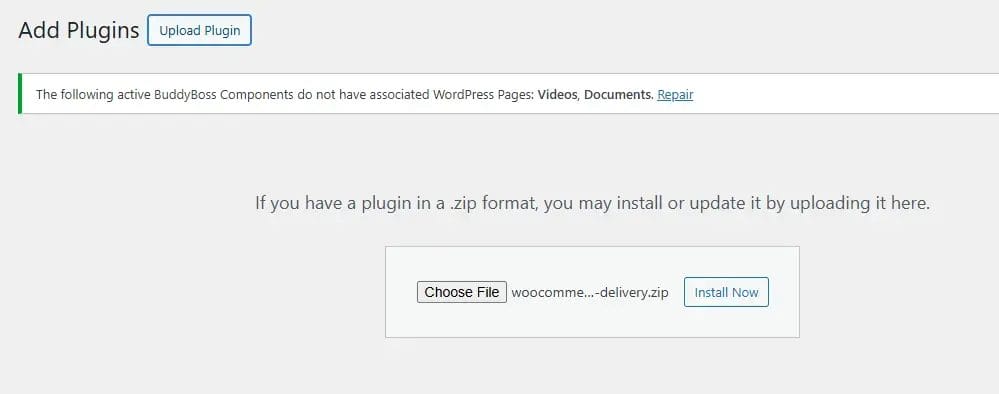
To get started, purchase and download the WooCommerce Order Delivery plugin.
- Upload the plugin ZIP file through your WordPress dashboard
- Navigate to Plugins > Add New > Upload Plugin
- Activate it after installation
You’ll now see new settings under your WooCommerce > Settings > Order Delivery menu.
Step 2: Configure Your Delivery Settings
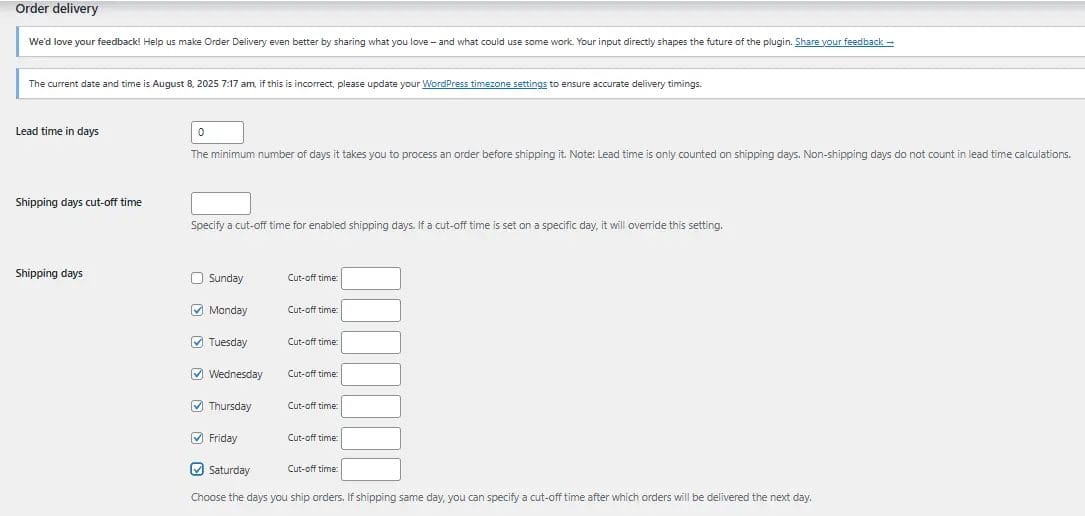
This is where the magic begins. Here’s what you can do:
- Set Delivery Days: Choose which days are available for delivery (e.g., Monday–Saturday).
- Add Processing Time: Automatically calculate the earliest possible delivery based on prep time.
- Exclude Holidays: Block out public holidays or store-specific off days.
- Set Delivery Slot Cutoff Times: Prevent last-minute scheduling beyond your capacity.
Step 3: Customize the Checkout Calendar
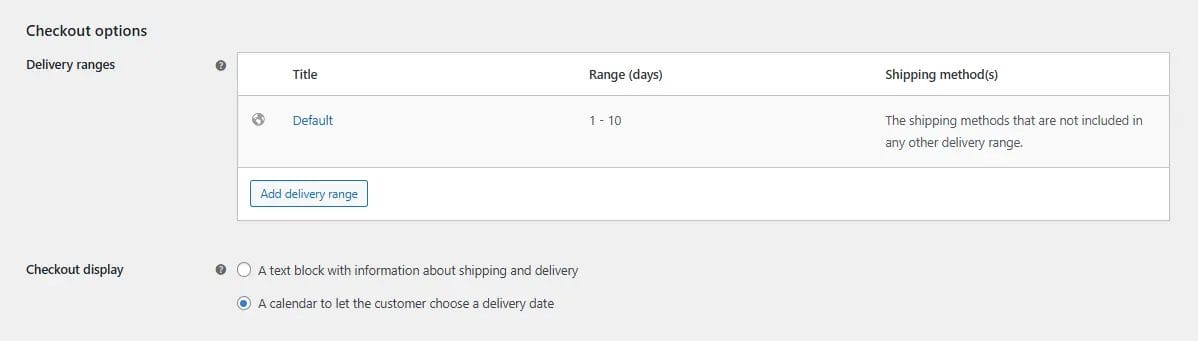
The plugin adds an interactive delivery calendar to the checkout page. You can fine-tune:
- Calendar format and style
- Mandatory or optional delivery date selection
- Limit delivery slots per day
By adjusting these options, you control the balance between flexibility for the customer and feasibility for your team.
Step 4: Preview and Test
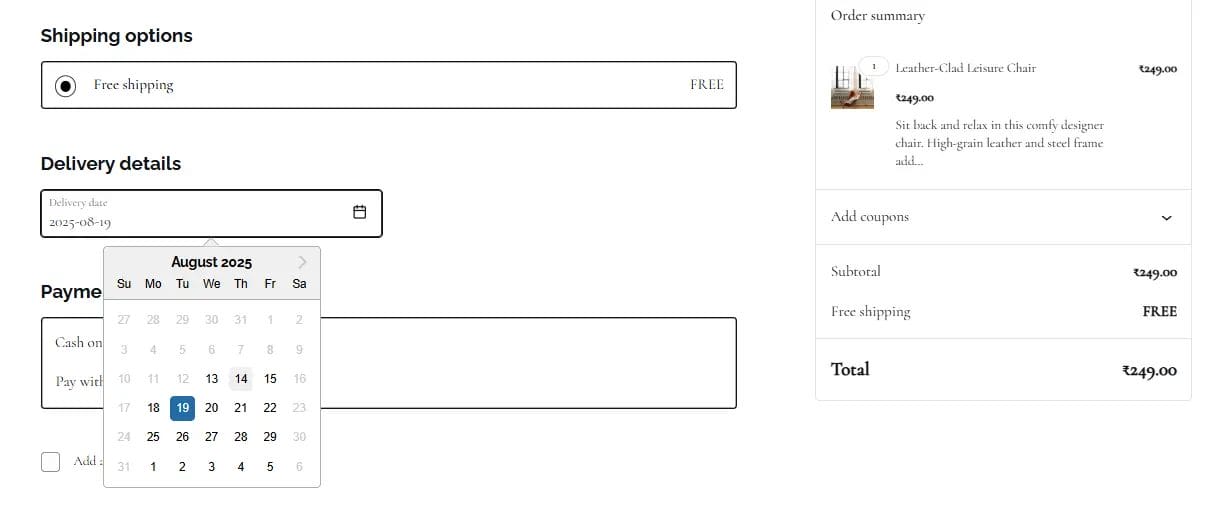
Always test your checkout process after implementation:
- Place a test order
- Choose a delivery date
- Ensure your order confirmation includes the correct date
- Make sure the admin panel logs the delivery date properly
You’re now ready to go live with a more customer-centric checkout experience.
Features of the WooCommerce Order Delivery Plugin That You’ll Love
This plugin goes beyond just date-picking. Here are some standout features that make it an all-in-one solution:
- Dynamic Delivery Dates: Automatically adjust available dates based on order volume and prep time.
- Time Slot Management: Let customers choose delivery times, not just dates.
- Holiday Exclusion Calendar: Simplify operations by blocking off public holidays.
- Shipping Method Integration: Offer different delivery rules based on shipping methods.
- Multiple Language Support: A must-have for international stores.
These features not only add value to the end user, but they also make store management smoother and smarter for you.
Best Practices for Using Flexible Delivery Dates During Checkout in WooCommerce
While offering flexible delivery is a great move, doing it well requires some thought. Here are the best practices to make it a success:
- Communicate Clearly: Use tooltips or short descriptions at checkout to explain delivery date options.
- Set Realistic Expectations: Be transparent about cutoff times, holidays, or exceptions.
- Keep Your Backend Synced: Use integrations with inventory or order management tools to avoid overpromising.
- Regularly Update Holidays: Keep your excluded date list current to prevent issues.
Who Should Use Flexible Delivery Dates in Their WooCommerce Store?
This feature is valuable across a wide range of industries:
- Florists: Customers planning gifts or arrangements for birthdays or anniversaries will love date selection.
- Grocery Stores: Flexible deliveries ensure fresh products arrive on the right day.
- Retailers of Perishable Goods: Avoid waste and ensure product quality with scheduled delivery.
- Event Suppliers: Align deliveries with setup times for seamless events.
Basically, if your product depends on timing, Flexible Delivery Dates During Checkout in WooCommerce are essential.
Pros and Cons of Using Flexible Delivery Dates
Let’s break down the good and the things to watch out for.
Pros
- Improves customer trust and loyalty
- Reduces delivery-related support tickets
- Adds professionalism and modernity to your store
- Helps manage delivery workload
Cons
- Requires careful setup and testing
- Needs consistent backend coordination
- May need additional plugins for logistics/inventory syncing
Additional Plugins and Tools to Enhance Delivery Flexibility
While the WooCommerce Order Delivery plugin is powerful on its own, it pairs beautifully with:
- Table Rate Shipping: Combine with flexible delivery to offer customized shipping fees
- Advanced Notifications: Notify warehouse teams or staff about upcoming deliveries
- Zapier for WooCommerce: Sync order info with third-party tools for automation
Think of the delivery plugin as the foundation—these add-ons help build an efficient, scalable system.

Final Thoughts: Small Change, Big Impact
Offering Flexible Delivery Dates During Checkout in WooCommerce isn’t just a technical tweak—it’s a powerful customer-first move. With just one plugin, you can:
- Eliminate delivery uncertainty
- Build deeper customer trust
- Streamline operations
- Reduce refund requests due to missed deliveries
In competitive eCommerce landscapes, the brands that win aren’t just selling products—they’re delivering experiences. And with the WooCommerce Order Delivery plugin, your store can do exactly that.
Interesting Reads:
WooCommerce 10.0 Release: What’s New, What Matters, and What’s Next for Your Store

