

A store can have great design and products, but rigid, unclear delivery windows still lose sales. Letting customers pick a delivery date at checkout removes a real source of cart abandonment: uncertainty about whether someone will actually be home to receive the package.
This post covers what flexible delivery dates actually mean at checkout, why they matter, and how to set them up using Order Delivery Date for WooCommerce (Tyche Softwares, confirmed active, Pro from ~$130-135/yr; a free core version is also available on WordPress.org, v4.6.1, updated within days of this writing). It’s a small setup investment relative to how much of the checkout experience it touches, since delivery timing sits right at the point where a customer commits to buying.
What This Actually Means
Instead of a generic “3-5 business days” estimate, customers pick a specific delivery date, and often a time slot, directly at checkout, integrated with your real shipping rules and processing time so the dates offered are actually achievable rather than an optimistic guess your fulfillment team can’t back up.

With it in place, a customer can choose a delivery date based on real availability, avoid dates they already know they won’t be home, and plan a purchase around a specific event, holiday, or business need rather than hoping the package happens to arrive in time.
Why It’s Worth the Setup
Delivery-time uncertainty is a real, common reason for abandoned carts, and a firm, chosen date removes it directly rather than leaving the customer to guess and hope. Letting people pick when they’ll actually be available also directly cuts reshipment costs and the frustrated support tickets that follow a missed delivery, both real operational costs that a date picker prevents before they happen rather than resolving after the fact. And on the operational side, you get real control: you can block unavailable dates, set cutoff times, and cap how many deliveries you take per day, rather than promising more than your team can actually fulfill and discovering the gap the hard way on a busy week.
Setting It Up
Step 1: Install and Activate
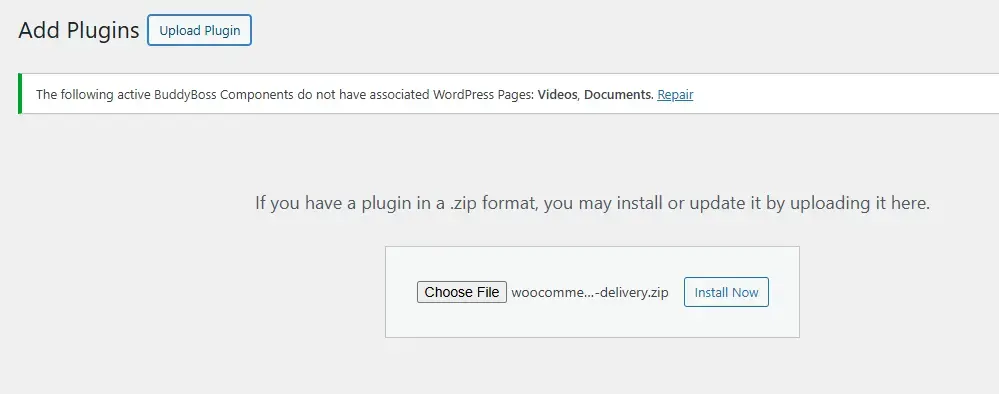
Purchase and download the plugin, then go to Plugins > Add New > Upload Plugin in your WordPress dashboard, upload the ZIP, and activate. New settings appear under WooCommerce > Settings > Order Delivery.
Step 2: Configure Delivery Settings
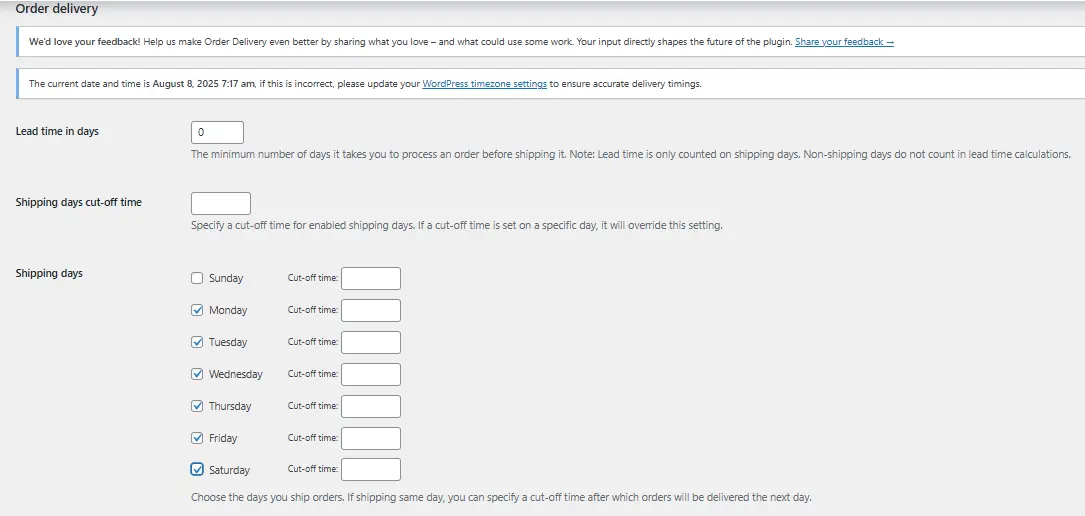
Pick which days you actually deliver, Monday through Saturday, for instance, rather than offering every day of the week by default. Set your processing time so the plugin calculates the earliest realistic delivery date automatically based on your actual prep time, not an aspirational one. Block out holiday exclusions, public holidays or store-specific closures, so customers can’t accidentally schedule a delivery for a day nobody’s there to fulfill it. And set cutoff times to prevent last-minute scheduling that would exceed your actual daily capacity, protecting your team from a flood of same-day requests the settings page never should have allowed in the first place.
Step 3: Customize the Checkout Calendar

Adjust the calendar style, whether date selection is mandatory or optional, and how many delivery slots you allow per day, balancing customer flexibility against what your team can actually fulfill on any given day without overcommitting.
Step 4: Test Before Going Live

Place a real test order, pick a delivery date, and confirm the order confirmation and admin panel both show it correctly before rolling this out to real customers who are trusting the date they picked will actually mean something.
Notable Features
Dynamic delivery dates adjust based on order volume and prep time, so the calendar itself reflects your real capacity rather than a static setting nobody revisits. Time slot management goes beyond just dates, letting a customer pick a window within a day, useful for anything where a few hours of precision genuinely matters. A holiday exclusion calendar keeps the whole system from quietly offering dates nobody’s actually working. Per-shipping-method rules let different delivery options carry different date logic, since a same-day courier and a standard freight carrier don’t operate on the same scheduling assumptions. And multi-language support matters for any store with an international audience, since a date picker that only makes sense in English quietly fails a meaningful share of visitors on a multilingual storefront.
Best Practices
Explain the delivery date option clearly at checkout, a tooltip or short note prevents confusion about what exactly a customer is agreeing to when they pick a date. Be upfront about cutoff times and holiday exceptions rather than letting customers discover them after ordering, since a rule a customer only learns about after the fact reads as a broken promise even when it was technically disclosed somewhere in the fine print. Keep this synced with your actual inventory and fulfillment capacity, don’t let the calendar promise what your team can’t deliver, since a date picker that offers slots your warehouse can’t actually hit is worse than no date picker at all. And update your holiday exclusion list regularly, a stale list is worse than none, since it either blocks dates that are actually fine or, worse, allows a booking on a day your team is closed.
Who Benefits Most
Florists and gift retailers whose customers are planning around a specific date, a birthday, an anniversary, get real value here since a late delivery on this kind of purchase isn’t just an inconvenience, it defeats the entire point of the order. Grocery and perishable goods sellers need freshness guaranteed on arrival, and a date picker tied to real capacity is close to a requirement rather than a nice add-on. Event suppliers coordinating deliveries around setup timing need the same precision, since a delivery that arrives after an event has already started isn’t a delivery that did its job. If your product’s value depends on timing, this is close to essential rather than optional. A cake that arrives a day late for a birthday, or flowers that arrive after an anniversary has already passed, aren’t just delayed purchases, they’ve failed at the one thing the customer actually bought them for.
Tradeoffs
On the upside: it builds customer trust, cuts delivery-related support tickets, adds a more professional feel to the checkout experience, and helps manage delivery workload proactively rather than reactively. On the downside: it needs real setup and testing time to get the rules right, it requires ongoing backend coordination to keep holiday lists and capacity limits current, and larger operations may need additional logistics or inventory-syncing tools alongside it to keep the promised dates honest at scale.
Pairs Well With
Table Rate Shipping (confirmed active, 20,000+ installs) for custom shipping fees alongside flexible delivery, letting you price a rush delivery date differently from a standard one. Zapier for WooCommerce (confirmed active, 30,000+ installs) for syncing order and delivery info to other tools automatically, useful if your fulfillment team works from a system other than the WooCommerce admin itself.
Handling the Edge Cases Before They Become Support Tickets
A delivery date system runs smoothly right up until real-world exceptions start arriving, and it’s worth thinking through the common ones before a customer forces the issue. What happens when a customer wants to change their delivery date after ordering? Decide in advance whether that’s self-service through an account portal, a support request, or simply not offered past a certain cutoff, and make that policy visible rather than something a customer has to discover by asking. What happens when a courier misses a scheduled date due to circumstances outside your control, weather, a carrier delay, a regional disruption? Have a template response ready and a clear internal process for rebooking, since a date-picker promise that occasionally breaks needs a recovery plan, not just a hope that it never happens.
And what happens on a day your delivery capacity genuinely maxes out unexpectedly, a viral product moment, an unplanned rush? The cutoff and per-day cap settings mentioned above exist specifically to prevent this, but it’s worth a periodic check that your caps still reflect your actual current capacity rather than a number set once at initial setup and never revisited as the business has grown or contracted since. A quarterly review of these numbers against your actual fulfillment throughput catches drift before a customer does, the same discipline worth applying to any setting that quietly stops matching reality as a business changes shape over time.
Communicating the Feature So Customers Actually Use It
A delivery date picker only helps if customers notice it and understand what it’s offering. Burying it as one more field in a long checkout form undersells a feature that’s genuinely a differentiator against competitors still shipping on a vague “3-5 business days” promise. Call it out on the product page itself for anything where delivery timing matters to the purchase decision, a florist listing, an event supplier’s catalog, rather than letting a customer discover it only after they’ve already committed to checking out. A short line near the add-to-cart button, “choose your delivery date at checkout,” sets the right expectation early and can itself be a reason a hesitant shopper decides to buy.
Confirmation emails are worth a second look too. The chosen delivery date should appear prominently in the order confirmation, not buried in a long list of order metadata below the fold, since that email is often the last thing a customer reads before moving on with their day, and a clearly stated date reduces the “when is this actually arriving” support emails that would otherwise follow.
Measuring Whether the Feature Is Actually Working
Track a few numbers before and after rollout rather than assuming the feature is helping just because it’s live. Cart abandonment rate at the checkout step is the most direct signal, if delivery-date uncertainty was genuinely a factor in your abandonment before, a working date picker should show some measurable improvement there. Delivery-related support tickets, missed deliveries, “where is my order” messages, rescheduling requests, are a second useful metric, and a drop here is a strong sign the feature is doing its job on the operational side, not just the conversion side. And it’s worth tracking actual on-time delivery rate against the dates customers selected specifically, since a date picker that customers use but that your fulfillment team can’t reliably honor is arguably worse than not offering dates at all, it converts a vague promise into a broken specific one.
Give the rollout a full month or two before drawing conclusions, particularly for a seasonal business where a single week’s data could be skewed by a holiday, a sale, or an unrelated traffic spike that has nothing to do with the delivery date feature itself. Compare against the same period a year earlier where you can, rather than only the weeks immediately before rollout, since that controls for seasonal patterns a short before-and-after window would otherwise miss entirely.
What Happens Without This: The Cost of Staying Vague
It’s worth being concrete about the alternative, since “3-5 business days” feels like a reasonable, low-effort default until you actually total up its cost. Every vague estimate pushes some fraction of uncertain customers to abandon rather than risk ordering something that might arrive at the wrong time. Every missed delivery from an unrealistic promise generates a reshipment cost, a refund, or a support conversation that a firm, achievable date would have prevented entirely. And every one of those negative experiences is a customer less likely to order again, which is a genuinely larger cost than the setup time a proper delivery-date system takes to configure correctly the first time. The vague default isn’t neutral, it’s a quiet, ongoing tax on conversion and retention that most stores never actually measure because there’s no single moment where the cost shows up as a clear line item.
Frequently Asked Questions
Does the free version of Order Delivery Date cover most stores’ needs, or is Pro necessary?
The free WordPress.org version covers basic date selection well for a straightforward single-location store. Pro adds the more advanced capacity management, per-product delivery rules, and time-slot features that matter more once a store has real scheduling complexity, multiple fulfillment locations, or products with genuinely different delivery timelines. A small store just starting to offer date selection can reasonably start free and upgrade once the limitations of the free version actually show up in practice.
Can different products on the same order have different delivery dates?
This depends on your specific configuration and plan tier, and it’s a genuinely common point of confusion. By default, most setups apply a single delivery date to the whole order rather than per line item. If your catalog mixes products with meaningfully different lead times, a made-to-order item alongside an in-stock one, for example, it’s worth testing this specific scenario directly before launch rather than assuming the plugin handles mixed-lead-time orders the way you’d expect.
How far in advance should delivery dates be bookable?
There’s no universal right answer, it depends on your product and customer behavior. A florist booking around specific occasions often needs a longer advance window, weeks rather than days, since customers plan those purchases ahead of time. A grocery or perishable-goods store usually needs a shorter window, since freshness constraints make booking too far ahead impractical regardless of demand. Look at how far ahead your actual customers tend to plan their purchases and set the booking window to match that pattern rather than picking an arbitrary default.
What if my store ships from multiple locations with different capacities?
This is where per-shipping-method rules become genuinely important rather than a nice-to-have. If two warehouses serve different regions with different fulfillment speeds, configure the delivery date logic per shipping zone or method rather than applying one global calendar to every order regardless of origin. Getting this wrong means either offering dates one location can’t hit or artificially restricting dates the other location could have honored easily, both of which cost you either broken promises or lost conversions for no real reason. Test the zone-specific logic with a real order from each region before launch, since this is exactly the kind of configuration that looks correct in the settings screen and only reveals a mistake once a customer in the wrong zone actually reaches checkout.
Should I charge extra for choosing a specific delivery date versus a standard window?
Plenty of stores don’t, treating date selection as a standard part of the checkout experience rather than a premium add-on, and for most use cases that’s the right call since it removes friction rather than adding a paywall in front of a feature that mainly benefits the store’s own fulfillment planning. Where a genuine surcharge makes sense is for something meaningfully harder to fulfill, a specific narrow time slot rather than a full day, or a rush delivery date outside your normal processing window. Reserve pricing for the cases where you’re actually absorbing extra operational cost to honor the request, not for basic date selection itself. Charging for the wrong thing here, gatekeeping standard date choice behind a fee, tends to read as a cash grab rather than a genuine premium service, which undermines the trust the feature was supposed to build in the first place.