

Three very different products keep showing up in the same search results. The search is usually “how do I sell ads directly without hiring an ad ops team.” Google Ad Manager is the free (and enterprise 360) ad-serving platform that runs a meaningful share of the programmatic internet. BroadStreet Ads is a paid monthly SaaS. It’s built specifically so local newspapers, regional magazines, and B2B trade publishers can sell and manage direct ad bookings without touching Google’s complexity. WB Ad Manager is a WordPress plugin that bakes a self-serve advertiser portal directly into the install. Advertisers sign up, pick a placement, and pay. No SaaS subscription and no Google Ad Manager learning curve required.
These three don’t really compete for the same buyer the way AdRotate and Advanced Ads do. They compete on a different axis entirely: who should be allowed near your ad inventory, and how much platform you need underneath them to make that safe. We broke down what each one actually does, what it actually costs, and which kind of publisher each was built for.
Table of Contents
- Why These Three Keep Getting Compared
- How We Evaluated These Three
- A Real-World Scenario: Selling Direct Ads on a Regional News Site
- Google Ad Manager: Enterprise Ad Serving, Not an Advertiser Portal
- BroadStreet Ads: A Paid SaaS Built for Direct-Sold Publishers
- WB Ad Manager: A Self-Serve Advertiser Portal Inside Your WordPress Install
- What a Year Actually Costs
- Who Each Platform Is Actually Built For
- Side-by-Side Comparison Table
- How to Choose
- FAQs
Direct deals and private marketplaces have been one of the fastest-growing segments in digital advertising. Publishers are pushing back against commoditized open-auction pricing. IAB research has repeatedly found that local and niche publishers recover a meaningfully higher CPM on direct-sold inventory than on open-exchange inventory. That gap is the entire reason a market for “direct-sales-only” platforms like BroadStreet exists alongside general-purpose ad servers like Google Ad Manager.
Why These Three Keep Getting Compared
Google Ad Manager is the default answer to “how do I serve ads on my site.” It’s free. It’s from Google. It plugs straight into AdSense and the Google ad exchange. For a publisher running mostly programmatic demand, that’s often the right call.
But Google Ad Manager was built as an ad-serving and trafficking system for ad operations teams. It wasn’t built as a place where a local car dealership signs up, uploads a banner, and pays a credit card on file. Setting up a direct-sold line item in Google Ad Manager means creating orders, line items, creatives, and targeting rules by hand. The interface is designed for people who do this full-time.
BroadStreet Ads exists because of exactly that gap. It markets itself directly against Google Ad Manager. Its own homepage states plainly that “Google Ad Manager and WordPress plugins are not enough” for publishers who sell ads to their own clients. BroadStreet layers reporting, creative upload, and account management on top of the direct-sales workflow. A two-person local publisher can run a real ad sales operation without an ad ops hire.
WB Ad Manager approaches the identical gap from inside WordPress itself, rather than as a separate hosted platform. Instead of a monthly SaaS subscription sitting next to your CMS, the self-serve advertiser portal, campaign builder, wallet billing, and moderation queue are part of the plugin you already installed to run the site. That’s the core differentiator WB Ad Manager leads with in its own marketing: a self-serve advertiser portal built into WordPress. You get BroadStreet’s direct-sales convenience without the recurring platform bill, and without Google Ad Manager’s ad-ops complexity.
How We Evaluated These Three
We looked at four things for each platform. Can advertisers actually sign up and manage their own campaigns, without the publisher doing the data entry? What’s the real monthly or annual cost once you’re past any free tier? How much setup and ongoing ad-ops effort does each one require? And is the platform WordPress-native, or a separate hosted system you have to integrate and maintain alongside your CMS?
We also weighed who each product is realistically sold to. Google Ad Manager and BroadStreet both have sales-assisted onboarding. Ad Manager 360 is a negotiated enterprise deal, and BroadStreet runs demos and onboarding calls as part of its switch process. WB Ad Manager, being a self-install WordPress plugin, has no sales call in the loop at all. That changes both the time-to-first-ad and who ends up actually configuring it.
A Real-World Scenario: Selling Direct Ads on a Regional News Site
Picture a regional news site with 400,000 monthly pageviews. It runs some programmatic demand through an exchange for baseline revenue. But the real money is in direct-sold banners to local restaurants, law firms, and real estate agents, the kind of advertiser who wants their logo next to local coverage, not a random exchange-matched ad.
Running that direct-sales program through Google Ad Manager alone means the publisher’s staff builds every order, every line item, and every creative swap by hand. If the local law firm wants to see how their campaign is performing, someone has to pull a report and email it over. Ad Manager wasn’t built to hand a client their own login.
Running it through BroadStreet solves the reporting and client-facing problem. BroadStreet gives advertisers visibility into their own campaign performance, and gives the publisher’s sales team faster creative upload and swap tools. The cost is $299 to $399 or more per month, depending on plan and automation level. For a two or three-person local publisher, that’s a real line item, roughly $3,600 to $4,800 or more a year, before any enterprise add-ons.
Running it through WB Ad Manager Pro puts the advertiser directly into a front-end Advertiser Dashboard on the publisher’s own WordPress site. The local law firm logs in, picks an available placement, uploads its own banner, and funds its own wallet. The publisher just approves the submission from a moderation queue instead of building every order by hand. The entire thing runs on a license that costs less per year than a single month of BroadStreet’s Automatic plan.
Google Ad Manager: Enterprise Ad Serving, Not an Advertiser Portal
Google Ad Manager, the free standard edition, is open to any publisher regardless of traffic size. There’s no minimum impression requirement, and a published monthly cap of 200 million ad impressions before a publisher needs to look at Ad Manager 360. The 360 edition is aimed at large publishers and ad networks, with custom, negotiated pricing. Google doesn’t charge a subscription for the standard tier. It monetizes mainly through the programmatic and exchange demand running through the platform.
What Ad Manager actually is: a trafficking and ad-serving system. It manages inventory, line items, creatives, targeting, forecasting, and the auction logic that decides which ad wins a given impression. That demand can come from AdX, third-party exchanges, or direct-sold orders you build yourself. It is genuinely built to handle enormous scale and real programmatic complexity: header bidding, private marketplace deals, and yield management across dozens of demand sources.
Key strengths:
- Free standard tier with no traffic minimum, and the deepest programmatic demand integration of the three via Google’s exchange
- Built to handle real scale, hundreds of millions of impressions, multiple demand sources, header bidding, and yield optimization
- Industry-standard reporting and forecasting tools that ad ops teams already know how to use
Where it falls short:
- No self-serve advertiser portal of any kind. Advertisers never log into Ad Manager; every direct-sold order, line item, and creative swap is built by the publisher’s own staff
- Steep learning curve. The interface is built for people whose job is ad operations, not a site owner who wants to sell five banner slots to local businesses
- Ad Manager 360 pricing is opaque and negotiated, with no published rate card, which makes budgeting difficult for a mid-size publisher trying to plan ahead
BroadStreet Ads: A Paid SaaS Built for Direct-Sold Publishers
BroadStreet positions itself explicitly as the alternative to running direct ad sales through Google Ad Manager or a bare WordPress ad plugin. Its own site frames the choice bluntly. Publishers who sell ads to their own clients need more than what Ad Manager or a generic plugin gives them: better creative tools, better reporting their advertisers can actually see, and faster day-to-day account management for a sales team juggling dozens of local accounts.
“BroadStreet is the only ad manager built for publishers who sell ads to their own clients. Google Ad Manager and WordPress plugins are not enough. Your clients know it.”
BroadStreet Ads, company homepage
Pricing is published and tiered by plan, not negotiated from zero. The Manual plan starts from $299 per month, or $284 per month billed annually. It’s built for solo operators and small teams, with premium ad formats, reporting, and support included. The Automatic plan, BroadStreet’s most popular tier, starts from $399 per month. It adds more premium ad formats and automated reporting, aimed at publishers and sales teams moving faster. An Enterprise tier sits above both, with custom pricing, an SLA, and multi-tenancy for larger publisher groups.
Key strengths:
- Purpose-built for direct ad sales rather than programmatic, with reporting and creative tools designed around client-facing accountability
- Platform-agnostic, works for publishers on WordPress, other CMSs, or custom-built sites, not tied to any single stack
- White-glove onboarding, demo, migration plan, and training are part of the switch process, useful for a publisher without in-house technical staff
Where it falls short:
- Recurring monthly SaaS cost starting at $299/mo, or $3,588/year, for even the entry Manual plan, before any enterprise add-ons
- A separate platform to manage and pay for alongside your CMS, rather than something that lives inside the site you already run
- Entry plan is scoped to 1-2 users, which can be tight once a publisher’s sales team grows past a very small headcount
WB Ad Manager: A Self-Serve Advertiser Portal Inside Your WordPress Install
WB Ad Manager’s own positioning is specific. The thing that sets it apart from a plain ad-rotator plugin, and from a hosted platform like Google Ad Manager or BroadStreet, is that the self-serve advertiser portal ships inside the WordPress plugin itself. There’s no separate SaaS login, no separate monthly bill, and no need for the publisher’s staff to build every order by hand the way Google Ad Manager requires.
The free version covers five ad types: image, rich content, HTML/JS code, AdSense, and email capture. It adds 16+ placement hooks, server-side impression and click tracking, branded /go/<slug> affiliate-link redirects, and country-level geo-targeting. That’s enough to run a basic ad program without spending anything.
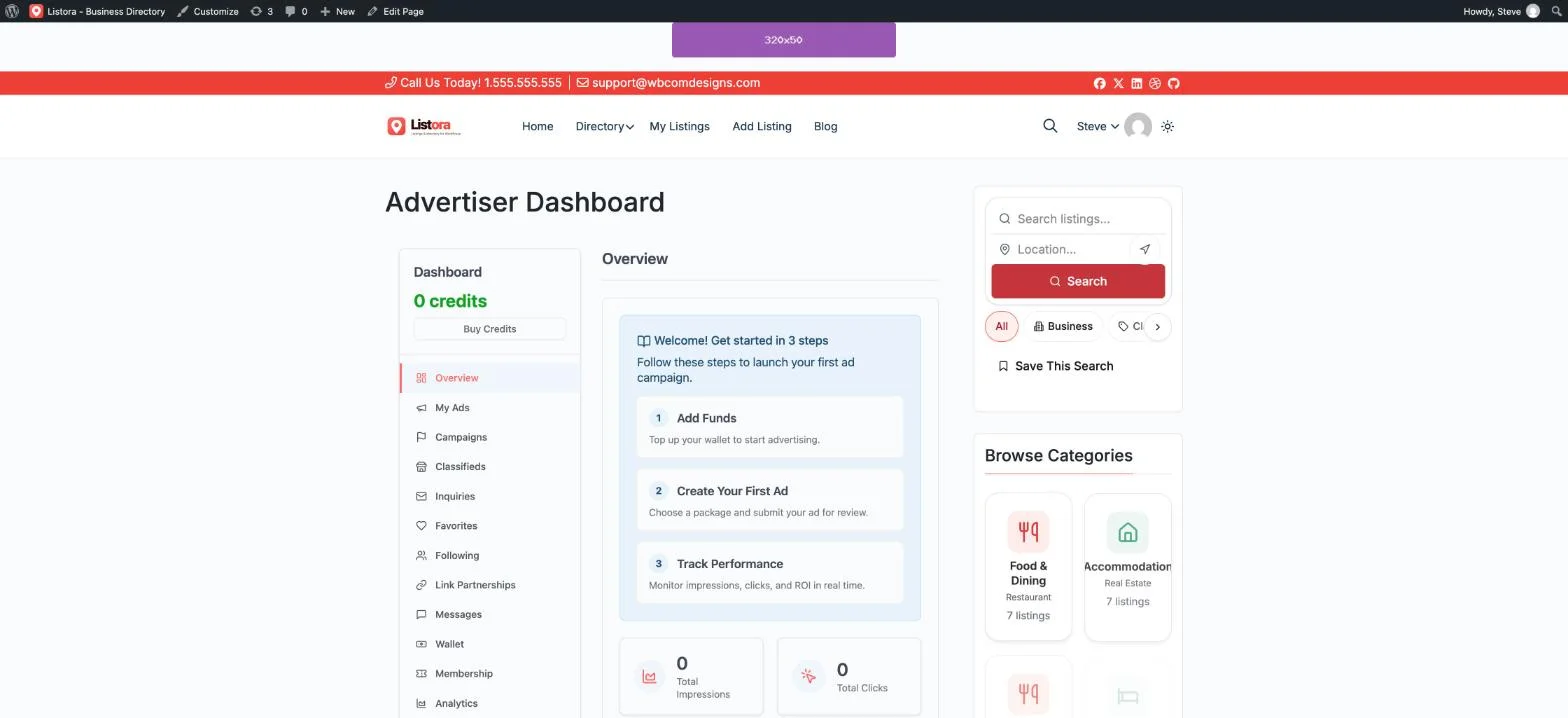
Pro is where the self-serve advertiser portal becomes available. That’s the part WB Ad Manager leads with against Google Ad Manager and BroadStreet specifically. It’s a front-end Advertiser Dashboard where any advertiser the publisher approves can sign up, browse available placements, and upload their own creative. They fund a wallet through built-in billing integrations, then submit a campaign that lands in a moderation queue for the publisher to approve. No order gets built by publisher staff the way it does in Google Ad Manager. No separate monthly platform subscription sits on top of the WordPress license the way it does with BroadStreet.
Key strengths:
- Self-serve advertiser portal is a built-in Pro feature of the plugin itself, not a separate hosted SaaS subscription layered on top of WordPress
- Flat annual license, no revenue share and no per-month platform fee, regardless of how many advertisers use the portal or how much ad revenue flows through it
- Also runs display ads, affiliate link cloaking, and (on Pro) a classifieds marketplace from the same plugin, functions Google Ad Manager and BroadStreet don’t cover at all
- Free tier (17 of 31 total capabilities) is a usable starting point before any purchase
Worth knowing:
- WordPress-only, unlike BroadStreet which works across CMS platforms, and unlike Google Ad Manager which works on any site
- No programmatic exchange demand built in the way Google Ad Manager has through AdX; large-scale programmatic yield management isn’t the use case
- Newer to the market than either Google Ad Manager or BroadStreet, so fewer long-run case studies at very large publisher scale
What a Year Actually Costs
Google Ad Manager’s standard tier is free, with no license fee. Google’s revenue comes from its cut of the programmatic demand running through the platform, not a subscription charged to the publisher. Ad Manager 360 pricing is custom and negotiated directly with Google’s sales team. There’s no published rate card, but it’s generally understood to be priced for large publishers and networks with significant ad operations budgets, not a self-serve checkout.
BroadStreet’s published pricing starts at $299/month, or roughly $3,408/year, for the Manual plan. The Automatic plan runs $399/month, roughly $4,788/year at the stated monthly rate, and is BroadStreet’s most popular tier. Enterprise pricing is custom.
WB Ad Manager Pro is a flat $59/year for one site (Personal), $129/year for up to five sites (Professional), or $299/year unlimited sites (Agency). That price already includes the self-serve advertiser portal, wallet billing, and moderation queue, the exact functionality BroadStreet charges a recurring monthly SaaS fee for.
| Platform | Entry cost | Year-one total (one site) |
|---|---|---|
| Google Ad Manager | Free (standard tier) | $0 license, revenue share on programmatic demand instead |
| Google Ad Manager 360 | Custom, negotiated | Not published, enterprise-scale budgets |
| BroadStreet (Manual) | $299/mo ($284/mo annual) | ~$3,408/year |
| BroadStreet (Automatic) | $399/mo | ~$4,788/year |
| WB Ad Manager Pro | $59/year (Personal, 1 site) | $59/year, portal + wallet + moderation included |
Figures are based on publicly published pricing pages as of October 2026 (BroadStreet Ads pricing page, Google Ad Manager documentation). Actual programmatic revenue share and Ad Manager 360 enterprise rates are not publicly disclosed and vary by publisher.
Who Each Platform Is Actually Built For
Google Ad Manager fits a publisher whose revenue is primarily programmatic. It fits someone who needs serious yield management across multiple demand sources, and who either has an ad ops person on staff, or is small enough that the standard tier’s simplicity (relative to 360) is manageable. It’s also the right starting point for any publisher not yet ready to pay for a dedicated direct-sales platform.
BroadStreet fits a local news outlet, city magazine, or B2B trade publisher with an active sales team. That team sells direct deals to real local or industry clients, and wants client-facing reporting and faster account management. It fits a publisher who has the budget for a dedicated monthly platform on top of whatever CMS the site already runs.
WB Ad Manager fits a publisher on WordPress specifically. It fits someone who wants that same self-serve, client-facing advertiser experience, but without adding a separate monthly SaaS subscription to the budget, and without needing Google Ad Manager’s ad-ops-level complexity to get there. It’s also the only one of the three that bundles affiliate link cloaking and a classifieds marketplace into the same plugin, useful for a directory or community site that wants more than one monetization lever.
Google Ad Manager vs BroadStreet Ads vs WB Ad Manager: Side by Side
| Google Ad Manager | BroadStreet Ads | WB Ad Manager | |
|---|---|---|---|
| Self-serve advertiser portal | Not included, orders built by publisher staff | Client-facing reporting and account tools | Full front-end dashboard, wallet billing, Pro |
| Platform type | Hosted, any site/app | Hosted SaaS, any CMS | WordPress plugin, lives inside the site |
| Programmatic/exchange demand | Deep, via AdX and third-party exchanges | Not the focus, direct-sold first | AdSense rotation only, not programmatic yield |
| Affiliate link cloaking | Not included | Not included | Built in, branded /go/ links |
| Classifieds marketplace | Not included | Not included | Pro: grid/list/map views built in |
| Entry pricing | Free (standard), custom (360) | $299/mo, ~$3,408/year | $59/year, portal included |
| Setup effort | High, ad-ops-level configuration | Guided, onboarding call + migration plan | Low, single plugin activation |
How to Choose
If programmatic exchange demand is your primary revenue, and you have (or are willing to build) real ad ops expertise, Google Ad Manager’s free standard tier is the obvious starting point. 360 is where you land once you outgrow it. It was never built to be a place advertisers log into themselves. Trying to force that workflow through Ad Manager means a lot of manual order-building on your side.
If you’re a local or niche publisher with a real direct-sales operation, a sales team, multiple local or industry clients, and the budget for a dedicated platform, BroadStreet’s client-facing reporting and account tools are purpose-built for that job. The cost starts around $3,400 to $4,800 a year.
If you run WordPress and want that same self-serve, client-facing advertiser experience, without adding a separate monthly SaaS bill, and without Google Ad Manager’s ad-ops complexity, WB Ad Manager was built specifically to close that gap. The self-serve advertiser portal is a feature of the plugin itself, not a separate subscription you manage on top of your CMS.
FAQs
1. Is Google Ad Manager really free?
The standard tier is free to use, with no minimum traffic requirement, up to a published cap of 200 million ad impressions per month. Google doesn’t charge a license fee for it. It monetizes through its share of the programmatic and exchange demand running through the platform. Ad Manager 360, the enterprise edition, is custom-priced and negotiated directly with Google.
2. Can advertisers sign up and manage their own campaigns in Google Ad Manager?
No. Google Ad Manager is a trafficking and ad-serving tool for the publisher’s own staff. Advertisers never log in. Every direct-sold order, line item, and creative is built and managed by the publisher’s team.
3. How much does BroadStreet Ads cost?
BroadStreet’s published pricing starts at $299/month ($284/month billed annually) for the Manual plan, and $399/month for the Automatic plan, its most popular tier. An Enterprise tier with custom pricing and multi-tenancy is available for larger publisher groups.
4. Does BroadStreet work on WordPress?
Yes. BroadStreet is platform-agnostic and integrates with WordPress and other CMS platforms. But it runs as a separate hosted SaaS product rather than a WordPress plugin, so it’s a distinct login and a distinct monthly bill from your WordPress license.
5. What makes WB Ad Manager different from a plain WordPress ad-rotator plugin?
The self-serve advertiser portal. On Pro, WB Ad Manager adds a front-end Advertiser Dashboard where approved advertisers sign up, pick a placement, upload their own creative, fund a wallet, and submit a campaign for moderation. That’s the exact workflow Google Ad Manager requires publisher staff to build by hand, and the workflow BroadStreet charges a monthly SaaS fee to provide.
6. Is WB Ad Manager’s advertiser portal free or a Pro feature?
It’s part of the Pro tier. The free version covers five ad types, 16+ placement hooks, affiliate link cloaking, and server-side tracking, a usable starting point. But the front-end Advertiser Dashboard, wallet billing, and moderation queue require Pro.
7. Does WB Ad Manager handle programmatic demand like AdX?
No. WB Ad Manager rotates AdSense ads as one of its five ad types, but it isn’t a programmatic yield-management platform the way Google Ad Manager is. If deep exchange-level programmatic demand is your main revenue source, Google Ad Manager remains the better fit for that specific job.
8. Can I run WB Ad Manager alongside Google Ad Manager on the same site?
Yes. Many publishers run Google Ad Manager or AdSense for programmatic fill, and WB Ad Manager’s direct-sold ad types and advertiser portal for locally or directly sold inventory, on the same WordPress site. The two serve different parts of the inventory rather than competing for the same slots.
9. How much would it cost to match WB Ad Manager’s self-serve advertiser portal using BroadStreet instead?
BroadStreet’s entry Manual plan starts at $299/month, roughly $3,408 a year billed annually. That functionality overlaps closely with what WB Ad Manager Pro includes at $59/year on a single site. The gap narrows if you need BroadStreet’s platform-agnostic reach for non-WordPress sites, or its guided onboarding and migration support. But for a WordPress-only publisher, the cost difference is significant.
10. Who should stick with Google Ad Manager rather than switching to either alternative?
A publisher with real scale, hundreds of millions of monthly impressions, multiple programmatic demand sources, header bidding, and an in-house or agency ad ops team. That publisher is typically better served staying on Google Ad Manager, or moving to 360, rather than switching to a direct-sales-focused tool like BroadStreet or WB Ad Manager. Neither alternative is designed to replace large-scale programmatic yield management.
11. Does WB Ad Manager require WooCommerce or BuddyPress to run the advertiser portal’s wallet billing?
No. WB Ad Manager’s wallet billing integrates with several payment processors directly, and doesn’t require WooCommerce or BuddyPress as a dependency. It works fine alongside either on a community or membership site.
12. Is BroadStreet or WB Ad Manager easier to set up for a non-technical publisher?
BroadStreet includes a guided demo, onboarding call, and migration plan as part of switching, which helps a publisher without technical staff. WB Ad Manager’s setup is a single plugin activation, with no sales call required. It’s faster to get started, but with less hand-holding if you’re not comfortable configuring a WordPress plugin yourself.
Summary
Google Ad Manager, BroadStreet Ads, and WB Ad Manager aren’t really fighting over the same customer. Google Ad Manager is the right free-to-start tool for programmatic-heavy publishers who have, or can build, real ad ops capability. BroadStreet is a strong paid option for direct-sales-focused local and B2B publishers who want client-facing tools, and don’t mind a dedicated monthly SaaS bill for them.
WB Ad Manager was built to give a WordPress publisher that same self-serve advertiser experience. It offers BroadStreet’s headline convenience, without the recurring platform subscription, and without Google Ad Manager’s ad-ops complexity, all from the plugin already running the site.
Whichever of the three you land on, confirm the self-serve advertiser flow actually works the way your sales process needs it to, before you hand a real client a login. Test creative upload, wallet funding or invoicing, and moderation on a staging copy first. Don’t point real advertiser budget at a new placement until impression and click tracking are confirmed to be recording correctly.
For a closer look at how WB Ad Manager stacks up against dedicated display-ad plugins, rather than hosted ad-sales platforms, see our comparison of AdRotate Pro vs Advanced Ads Pro vs WB Ad Manager, which covers banner rotation, AdSense depth, and classifieds in more detail.