

In the world of online communities, hashtags have become an indispensable tool for organizing content, improving discoverability, and fostering engagement. The BuddyPress Hashtag Plugin by Wbcom Designs brings this powerful feature to BuddyPress-based communities, allowing members to tag their posts effortlessly. Designed to work seamlessly with BuddyPress, this plugin revolutionizes how users interact with content and discover new discussions.
Let’s explore the essential features and functionality of this plugin and understand how it enhances your community experience.

Quick Links
How the BuddyPress Hashtag Plugin Works
The BuddyPress Hashtag Plugin functions much like hashtags on popular social media platforms but with a unique twist. Here’s how it stands out:
- Unique URLs for Hashtags: Once a hashtag is added to a post and published, the plugin automatically generates a dedicated URL for the hashtag.
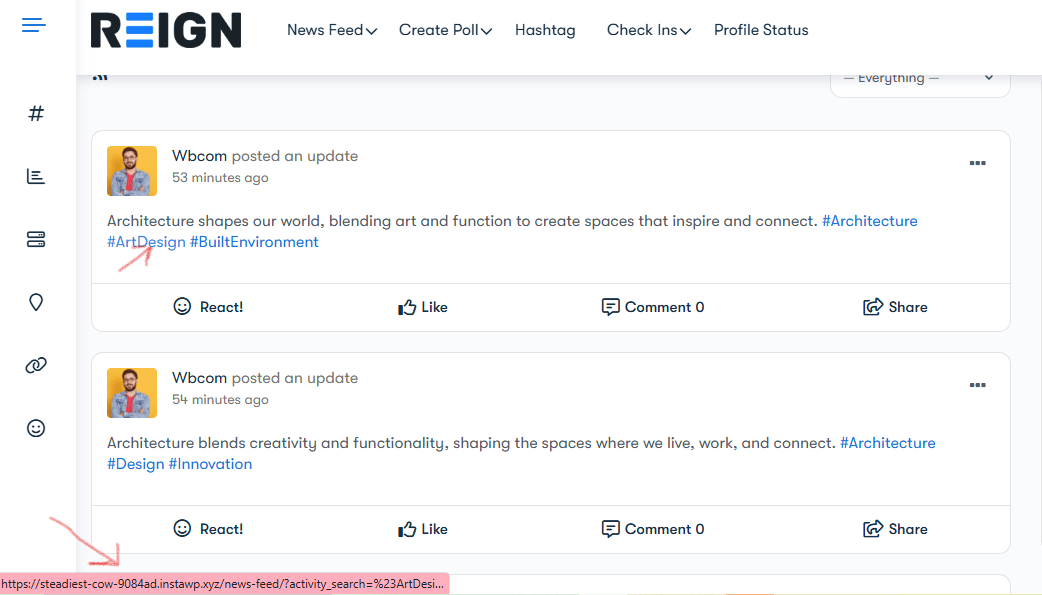
- Widgets for Organized Display: The plugin offers different widgets tailored for post pages, feeds, and other sections of your community. This ensures that hashtags remain structured and are displayed where they matter most, preventing clutter and confusion.
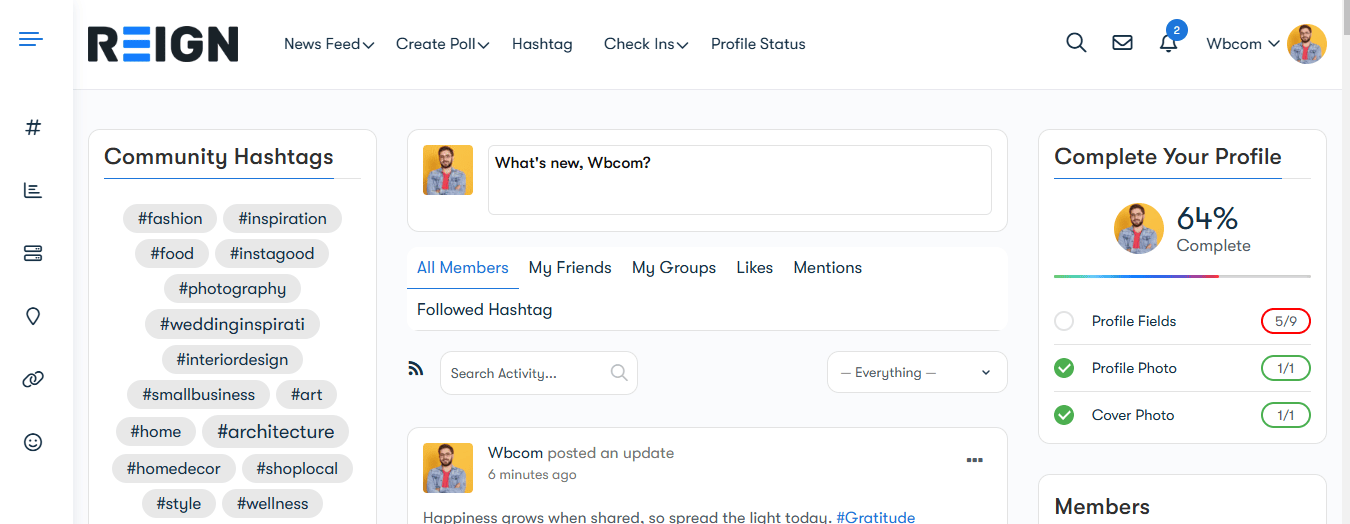
- Enhanced Navigation: Clicking on a hashtag redirects users to a curated feed of all posts using that tag, enabling them to explore related discussions and discover new content within the community.
Key Benefits of the BuddyPress Hashtag Plugin
1. Improved Content Discoverability
Hashtags make it easy for users to find topics of interest. By enabling hashtags on your BuddyPress platform, members can effortlessly join conversations, share ideas, and stay informed about trending topics.
2. Streamlined User Experience
With unique URLs and dedicated widgets, the plugin ensures hashtags are well-organized and don’t interfere with the overall layout of your community. This clean and structured approach enhances user satisfaction.
3. Foster Engagement
Hashtags encourage participation by making it easier for members to connect over shared interests. Whether it’s a specific event, trending topic, or community initiative, hashtags bring people together.
4. Future Scalability
The plugin is designed with future enhancements in mind. While it currently uses separate widgets for posts, pages, and feeds, future updates could unify these widgets for an even more seamless experience.
Also Read: How to Build a Dropshipping Store with WooCommerce
Use Cases for the BuddyPress Hashtag Plugin
1. Community Discussions
Enable your members to use hashtags to join ongoing discussions or start new ones. For example, #PhotographyTips or #TechTalk can organize posts around specific topics.
2. Event Promotions
Promote events by encouraging members to use dedicated hashtags. For instance, #WebDevConference2024 could aggregate all posts related to an upcoming conference.
3. Interest-Based Groups
Help members find like-minded individuals by grouping posts with interest-specific hashtags, such as #FitnessGoals or #TravelDiaries.
How to Get Started with the BuddyPress Hashtag Plugin
- Download and Install: Visit the official plugin page to download and install the plugin on your BuddyPress-enabled site.
- Configure Settings: Customize the widgets and display options to suit your community’s needs.
- Educate Your Members: Encourage users to adopt hashtags by sharing guidelines and examples on how they can use them to enhance their posts.
- Monitor Engagement: Track how members use hashtags and gather insights to improve the community experience further.
How to Test the BuddyPress Hashtag Plugin Demo
Want to see how the BuddyPress Hashtag Plugin works in action? Follow these steps to explore its functionality:
- Try the Demo: Click the “Try Demo” button on the official plugin page to access the testing environment.

- Post Activities with Hashtags: Create some posts using hashtags (e.g., #Travel, #Fitness) to experience how the plugin organizes and tracks content.

- Follow Hashtags: Navigate to your profile settings under the “Profile Settings” section. You’ll find an option to follow hashtags of your choice.

- Explore Followed Hashtags: Return to your profile dashboard and find the “Followed Hashtags” section. Here, you can search for specific hashtags and view all posts associated with them in one place.
This hands-on approach will give you a clear understanding of how the plugin enhances your community’s engagement and content organization.
Also Read: How to Edit WooCommerce Emails with MailPoet
Why Choose the BuddyPress Hashtag Plugin?
The BuddyPress Hashtag Plugin is more than just a tagging tool; it’s a way to supercharge your community’s interactions and content organization. By offering unique URLs, structured widgets, and the promise of future enhancements, it provides unmatched functionality for BuddyPress-based platforms.
Whether you’re running a small niche community or a large-scale social network, this plugin can help you take engagement to the next level.

Final Thoughts
Incorporating hashtags into your BuddyPress community is a game-changer, and the BuddyPress Hashtag Plugin by Wbcom Designs makes it simple and effective. By bringing the familiar functionality of social media hashtags to BuddyPress, it not only enhances content discoverability but also fosters meaningful interactions among your members.
Ready to transform your community? Get the BuddyPress Hashtag Plugin today and unlock the full potential of your online platform.
Interesting Reads:
Best Quote and Billing Software for 2024: Top Solutions for Businesses
Best PC Clipping Software for Phones
What Are The Advantages of Native Advertising in OTT: Key Benefits and Effective Strategies

