

Hashtags have become one of the most reliable ways to organize content and drive discovery on any platform where people post regularly, and BuddyPress-powered communities are no exception. The BuddyPress Hashtag Plugin by Wbcom Designs brings that familiar social-media pattern directly into BuddyPress, letting members tag their posts and giving the whole community a structured way to browse by topic instead of scrolling an endless, undifferentiated activity feed. This guide walks through how the plugin works, what it’s actually good for, and how to get it running on your own community.
Most BuddyPress activity feeds default to a single, undifferentiated stream sorted by recency, which works fine for a small community but breaks down quickly as membership and post volume grow. Once a community passes a few hundred active posters, finding a specific ongoing conversation by scrolling chronologically becomes genuinely impractical, and search alone doesn’t solve the discovery problem the way a browsable topic structure does. Hashtags fill exactly that gap, giving members a way to navigate by interest rather than by time.
How the BuddyPress Hashtag Plugin Works
The plugin functions much like hashtags on the social platforms members already know, with a few details tuned specifically for how BuddyPress communities operate:
- Unique URLs for hashtags: once a hashtag is added to a post and published, the plugin automatically generates a dedicated URL for that hashtag, so it can be linked, bookmarked, or shared directly.

- Widgets for organized display: dedicated widgets for post pages, feeds, and other community sections keep hashtags visible where they’re actually useful instead of cluttering every part of the layout.
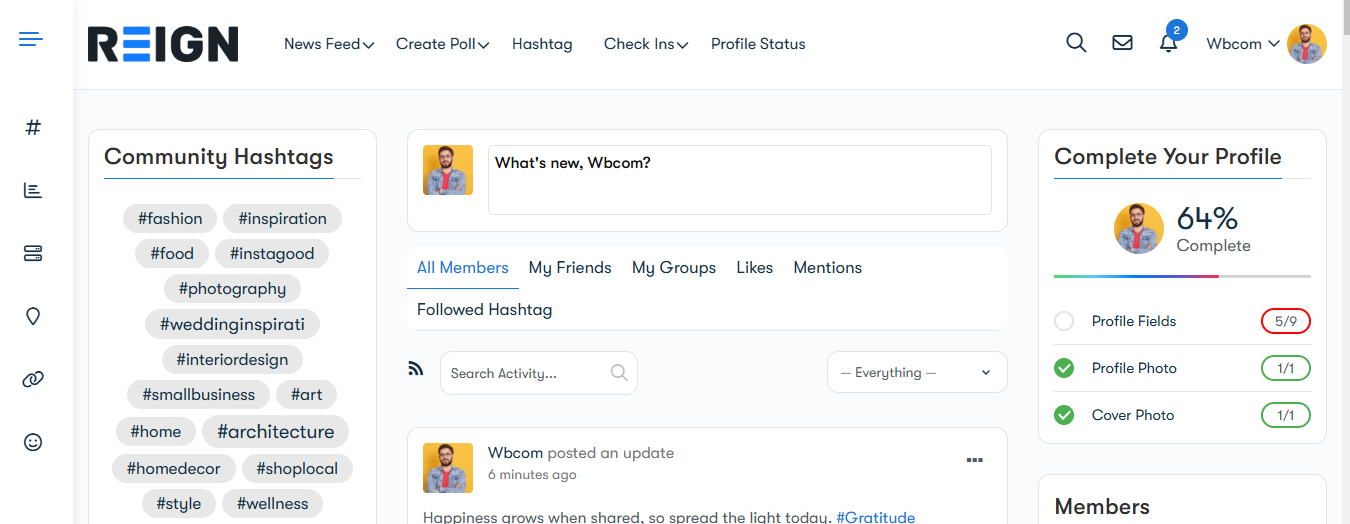
- Enhanced navigation: clicking a hashtag redirects members to a curated feed of every post using that tag, making it simple to explore related discussions and stumble onto content they wouldn’t otherwise have found.
Key Benefits of the BuddyPress Hashtag Plugin
1. Improved Content Discoverability
Hashtags give members a direct path to topics they actually care about. Instead of scrolling a chronological feed hoping to spot something relevant, members can jump straight into a specific conversation thread, follow a trending topic, or catch up on everything tagged to an event they missed.
2. Streamlined User Experience
Unique URLs and dedicated widgets keep hashtags well organized without disrupting the rest of your community’s layout. That structure matters more as a community grows, since an unstructured firehose of content becomes genuinely unusable past a certain size, while a well-tagged one stays navigable no matter how much volume it accumulates.
3. Fosters Engagement
Hashtags lower the barrier to participation by giving members an easy, low-effort way to connect over shared interests. Whether it’s a specific event, a trending topic, or an ongoing community initiative, a shared tag turns scattered individual posts into a visible, joinable conversation.
4. Built for Future Scalability
The plugin’s current architecture, with separate widgets for posts, pages, and feeds, is built with room to grow. As BuddyPress communities increasingly blend activity feeds with other content types, having hashtag infrastructure already in place means a community won’t need a structural overhaul to take advantage of future enhancements.
Also Read: How to Build a Dropshipping Store with WooCommerce
Use Cases for the BuddyPress Hashtag Plugin
1. Community Discussions
Let members use hashtags to join ongoing conversations or start new ones. A tag like #PhotographyTips or #TechTalk organizes posts around a specific topic automatically, without requiring a dedicated forum category or group for every subtopic that comes up.
2. Event Promotion
Promote events with a dedicated hashtag members can rally around. Something like #WebDevConference2026 aggregates every related post into one browsable feed, giving attendees and organizers a single place to follow the conversation before, during, and after the event.
3. Interest-Based Groups
Help members find like-minded people by grouping posts under interest-specific tags such as #FitnessGoals or #TravelDiaries. This works especially well in general-purpose communities where members have genuinely varied interests and a single activity feed would otherwise bury niche conversations under unrelated posts.
How to Get Started With the BuddyPress Hashtag Plugin
- Download and install: visit the official plugin page to download and install the plugin on your BuddyPress-enabled site.
- Configure settings: customize the widgets and display options to match how your specific community is structured.
- Educate your members: share simple guidelines and a few examples so members actually adopt hashtags rather than ignoring the feature entirely, since any tagging system only works if enough people use it consistently.
- Monitor engagement: track which hashtags get real traction and use that data to guide future community initiatives, whether that’s a recurring event, a new group, or content you should be creating more of.
How to Test the BuddyPress Hashtag Plugin Demo
Want to see how the plugin works before installing it on a live site? Here’s how to explore it hands-on:
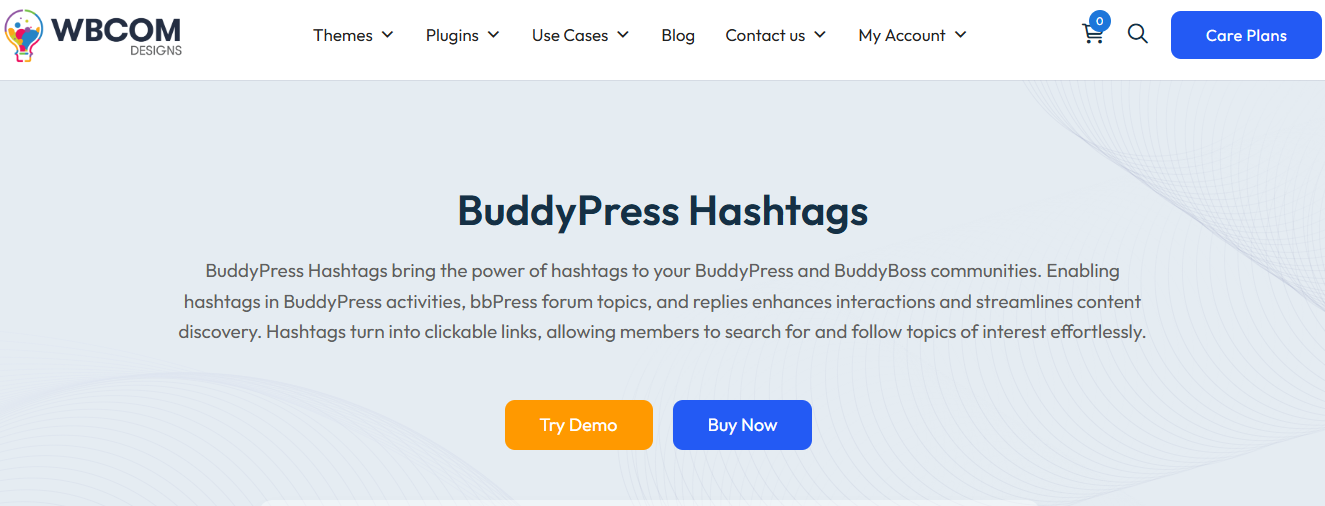
- Try the demo: click the “Try Demo” button on the official plugin page to access a live testing environment.
- Post activities with hashtags: create a few posts using hashtags, #Travel or #Fitness for example, to see firsthand how the plugin organizes and tracks tagged content.

- Follow hashtags: navigate to your profile settings under “Profile Settings” to find the option to follow specific hashtags you care about.

- Explore followed hashtags: return to your profile dashboard and open the “Followed Hashtags” section, where you can search specific tags and view every post associated with them in one place.
Working through the demo this way gives a clear, hands-on sense of how the plugin actually improves engagement and content organization once it’s live on a real community.
Also Read: How to Edit WooCommerce Emails with MailPoet
Hashtags Versus Search: Why You Need Both
It’s tempting to assume a good search function makes a dedicated hashtag system redundant, but the two solve different problems. Search requires a member to already know roughly what they’re looking for and type it correctly, which works fine for a specific query but does nothing for casual browsing or discovery. Hashtags flip that around, letting members explore by clicking rather than typing, and surfacing content they weren’t specifically searching for but happen to find interesting once it’s grouped under a tag they’re curious about.
The two also serve different moments in a member’s journey through the community. A new member with no established interests yet benefits far more from browsing popular or trending hashtags than from typing search queries about topics they don’t yet know exist within the community. An established member looking for one specific past conversation is usually better served by search. A community that offers only one of the two is missing half of how members actually navigate content day to day.
Setting Hashtag Conventions Before Members Start Using Them
A hashtag system works best when there’s some light structure guiding how members actually use it, even if that structure isn’t strictly enforced. Publishing a short list of recommended or official hashtags for recurring topics, weekly discussion threads, major events, key community initiatives, gives members an obvious starting point instead of everyone inventing their own slightly different variant of the same tag. #WeeklyCheckIn, #Weekly-Check-in, and #weeklycheckin might all mean the same thing to the person posting, but they fragment the feed into three separate, disconnected conversations instead of one unified one.
This doesn’t need to be an elaborate governance process. A pinned post listing a handful of core community hashtags, updated occasionally as new recurring topics emerge, is usually enough to keep tagging reasonably consistent without feeling like a rulebook members have to memorize.
What Makes a Hashtag System Actually Work Versus Sit Unused
Plenty of platforms have shipped a hashtag feature that quietly went unused because the mechanics existed but nothing encouraged adoption. The difference between a hashtag system that becomes part of how a community actually communicates and one that’s technically available but ignored usually comes down to visibility and reward. If tagging a post makes it meaningfully easier to get seen, more replies, more discovery from people outside a member’s immediate circle, members keep doing it. If tagging feels like extra effort with no visible payoff, it fades out within a few weeks of the initial rollout excitement wearing off.
That’s part of why the plugin’s structure, dedicated feeds per hashtag and a followed-hashtags feature, matters more than it might look on a feature list. It’s not just labeling content, it’s giving that label a genuine function: a member who follows #FitnessGoals actually sees new posts tagged that way show up in a place they check regularly, which closes the loop between tagging a post and that tag actually connecting people.
How Hashtags Complement Groups and Forums
It’s worth being clear about where hashtags fit relative to BuddyPress groups, since the two solve related but distinct problems. Groups are a persistent, membership-based space, someone joins a group and stays in it, with its own discussion history and member list. Hashtags are lighter weight and topic-based rather than membership-based, letting any member tag a post without joining anything formal, and letting the resulting conversation surface to anyone who follows that tag regardless of group membership.
The two work well together rather than competing. A group dedicated to a specific interest can still benefit from hashtags within its own discussions to organize subtopics, while hashtags at the community-wide level let cross-cutting conversations, an event that spans multiple groups, a trending topic nobody anticipated, surface without needing a dedicated group created for every one-off conversation.
Why Choose the BuddyPress Hashtag Plugin
The BuddyPress Hashtag Plugin is more than a tagging tool bolted onto an activity feed. Between unique hashtag URLs, structured widgets, and a followed-hashtags feature that lets members build their own personalized feed of topics they care about, it gives BuddyPress communities functionality that’s normally reserved for major social platforms. Whether you’re running a small niche community or a large-scale social network, the plugin gives members a genuinely useful tool for finding and joining the conversations that matter to them.
That gap between what smaller, independent platforms could offer and what the major social networks made standard has closed considerably over the past few years, and hashtag functionality is one of the clearest examples. Members who are used to tagging and following topics on other platforms expect that same capability wherever they spend time online, and a community that can’t offer it starts to feel dated by comparison, regardless of how good its actual discussions are.
Moderating Hashtags Without Killing Organic Use
An open tagging system inevitably attracts some misuse eventually, whether that’s someone spamming an unrelated hashtag to get attention, or a tag that starts fine and drifts into territory that doesn’t fit community guidelines. Having a light moderation approach in place before it’s needed avoids two opposite failure modes: ignoring the problem until a popular tag becomes unusable, or over-moderating in a way that makes members hesitant to tag anything at all for fear of getting flagged.
A workable middle ground treats hashtag moderation the same way you’d moderate any other user-generated content, reactive review based on reports rather than pre-screening every tag before it goes live. Since the plugin generates a dedicated feed for every hashtag, spotting problematic patterns is usually straightforward: a tag that’s suddenly full of off-topic or spammy posts stands out clearly once you’re looking at its feed directly, rather than being buried across dozens of unrelated activity streams.
Measuring Whether Hashtags Are Actually Driving Engagement
Adding a hashtag feature and assuming it’s working because a few members use it isn’t the same as confirming it’s actually moving the needle on engagement. A few concrete signals are worth tracking after rollout: how many distinct hashtags get regular use versus how many were tried once and abandoned, whether posts with hashtags attract more replies and reactions than untagged posts, and whether the followed-hashtags feature is actually being used, which indicates members are treating hashtags as a genuine discovery tool rather than an occasional decorative addition to a post.
If adoption stays low a few weeks after rollout, the fix is rarely more technical configuration. It’s almost always more visible modeling from admins and active members, clearer guidance on which hashtags to use for what, and maybe a bit of direct promotion, a pinned post explaining the feature, a short announcement in the community newsletter, rather than assuming members will discover and adopt it purely on their own.
Handling Duplicate and Near-Duplicate Hashtags
Fragmented tagging, the same underlying topic split across #WebDev, #WebDevelopment, and #WebDevTips, is one of the most common ways a hashtag system underdelivers on its potential even when adoption is otherwise healthy. Each variant ends up with a smaller, less active feed than a single consolidated tag would have, and new members searching for the “right” tag to use might miss the most active conversation entirely if they land on the less popular variant.
Preventing this mostly comes down to the same conventions guidance covered earlier: publishing a short, visible list of the community’s established hashtags for common topics gives members a clear default to reach for instead of inventing their own phrasing each time. For tags that do end up fragmented despite that guidance, occasionally referencing the “main” tag in posts using a variant, gently nudging usage back toward one consolidated version, keeps the split from calcifying into two permanently separate communities talking about the same thing.
Technical Considerations Before You Install
Since the plugin builds directly on BuddyPress’s existing activity stream, a quick compatibility check is worth doing before rolling it out on a live community, particularly if you’re running other BuddyPress add-ons that also modify the activity feed or profile pages. Testing on a staging copy of your site first, rather than installing directly on a live community, catches any layout conflicts with your specific theme or other active plugins before members ever see them. This is standard practice for any BuddyPress extension, but it matters especially here since hashtag widgets touch several different parts of the community layout at once, feeds, sidebars, and profile pages.
Getting the Most Out of Hashtags Long-Term
Adoption tends to grow naturally once a handful of active members start using hashtags consistently and others see the value in following them, but it helps to prime that early momentum rather than waiting for it to happen organically. Admins and moderators tagging their own posts from day one, referencing hashtags directly when starting community discussions, and highlighting particularly good tagged threads set an example that regular members pick up on quickly.
Incorporating hashtags into your BuddyPress community changes how members actually find and join conversations, and the BuddyPress Hashtag Plugin by Wbcom Designs makes that familiar social-media pattern simple to bring into a BuddyPress site. By pairing the familiar functionality of platform hashtags with BuddyPress’s existing activity feed and group structure, it improves content discoverability and gives members a low-friction way to connect around shared interests. Get the BuddyPress Hashtag Plugin and see how much easier topic-based discovery becomes once it’s part of your community’s everyday toolkit.
The setup itself takes minutes. The real work, and the real payoff, comes from the small habits that build adoption afterward: modeling good tagging as an admin, keeping a short list of established hashtags visible, and paying attention to which tags actually catch on so the community’s structure keeps reflecting what members genuinely care about rather than what was assumed at launch.
Interesting Reads:
Best Quote and Billing Software for 2026: Top Solutions for Businesses
Best PC Clipping Software for Phones
What Are The Advantages of Native Advertising in OTT: Key Benefits and Effective Strategies