

Engaging your audience effectively is crucial, and one way to capture and retain their attention is through dynamic, time-limited content. WP Stories, a WordPress plugin built specifically for this purpose, brings the popular “stories” format, the same style Instagram made mainstream, to your WordPress site. For brands and influencers, along with community managers, WP Stories offers a straightforward way to add Instagram-style stories to your site without the usual plugin-conflict headaches. This addition enhances user interaction without disrupting the main feed or timeline visitors already know how to use.
Why Add Instagram Like Stories to Your WordPress Site?
1. Engage Your Audience: Instagram-like stories provide a dynamic way to communicate with your users. Unlike traditional posts, stories offer a more personal, ephemeral touch, which tends to make content feel more immediate and worth checking regularly.
2. Highlight Important Updates: Quickly share important information without overwhelming your main content feed. Stories work well for promotions, quick updates, or behind-the-scenes glimpses that don’t need a full blog post.
3. Boost User Interaction: Instagram like stories encourage users to actually participate rather than passively scroll. The interactive elements, including polls and quizzes, tend to meaningfully boost engagement compared to static content.
4. Mobile-First Experience: WP Stories delivers a smooth experience on mobile devices, which matters given how much social-style content gets consumed on a phone rather than a desktop browser.
5. Community Integration: If you’re running a community site, WP Stories works with popular community plugins such as BuddyPress, BuddyBoss Platform, and PeepSo, making it straightforward to add stories on top of an existing community setup.
What is WP Stories?
Social stories offer a more personal way to interact with an audience. They let brands and influencers, as well as community managers, share updates without interrupting a visitor’s main feed or timeline, which makes the format well suited for getting information out quickly without cluttering the rest of the site.
WP Stories brings that same stories format to WordPress. It packs in a substantial set of features covering most of what a site owner would actually need, and it integrates with BuddyPress, PeepSo, and the BuddyBoss Platform for anyone running a community site on top of one of those.
Features of WP Stories
WP Stories packs in a robust set of features built to bring the dynamic, engaging feel of Instagram-like stories to a WordPress site without needing a developer to wire it all together.
1. User-Friendly Creation: Users can create Instagram-like stories through an interface that feels familiar if they’ve used any mainstream social app before.
2. Admin Approval: Site owners can require admin approval before a story goes live, which helps maintain quality and consistency on a public-facing community site.
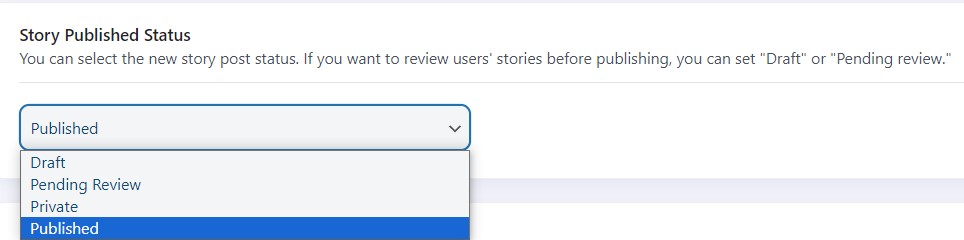
3. Story Timer: Set a timer for stories so they only display for a specified duration, matching the temporary feel of the original format.
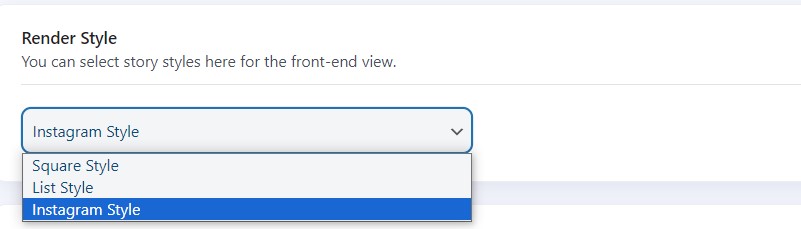
4. Multiple Rendering Styles: Choose from three different display styles for your Instagram like stories, giving some flexibility in how they fit your site’s overall design.
5. Seen Stories Placement: Display already-seen stories at the end of the list, so fresh, unseen content stays visible and easy to find first.

6. Multiple Story Boxes: Site admins can create separate story boxes using shortcodes and place each one on whichever page makes sense for it.
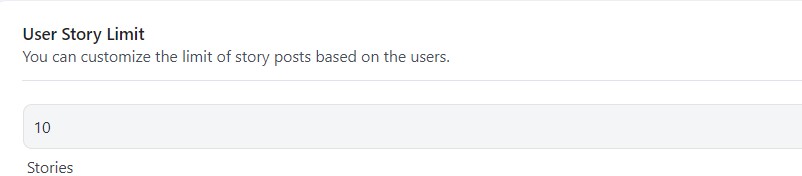
7. User Limits: Control how many stories a user can post and how many individual items they can include within each story, which helps keep the format from getting overwhelming.
8. Shortcodes for Stories: Different shortcodes are available for displaying single stories versus a broader public stories feed.
9. Admin Panel Creation: Site owners and approved users can create stories directly from the WordPress admin panel rather than only through the frontend.
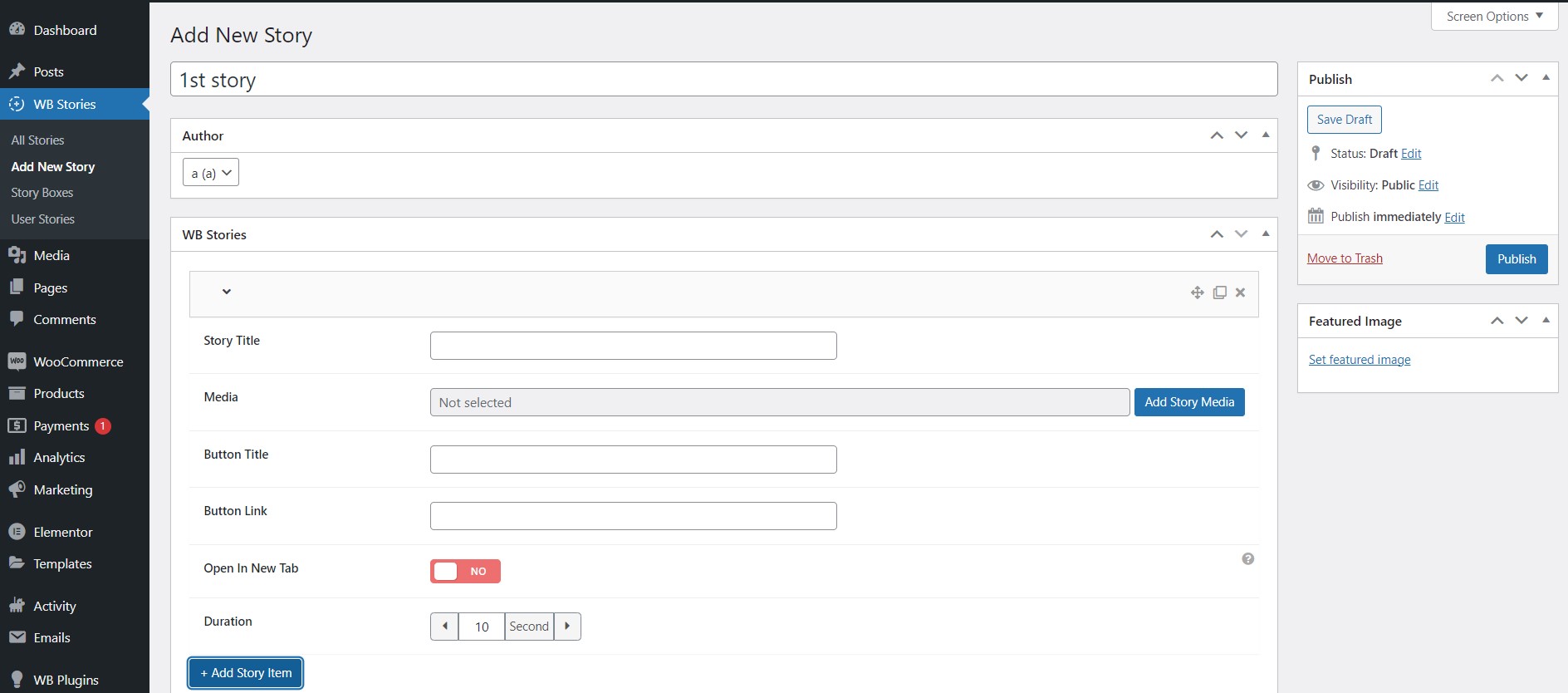
10. Custom Styling Options: Adjust the look and feel of stories through various styling controls so they match your brand’s existing identity rather than looking like an obvious plugin bolted onto the site.
11. Video Stories: Users can upload video as part of a story, not just static images, which rounds out the multimedia experience considerably.
12. Mobile Device Compatibility: WP Stories works reliably across mobile and tablet devices, keeping the experience consistent for users on the go rather than desktop-only.
13. RTL Support: Full compatibility with right-to-left websites, making it usable for a genuinely global audience rather than English-first sites alone.
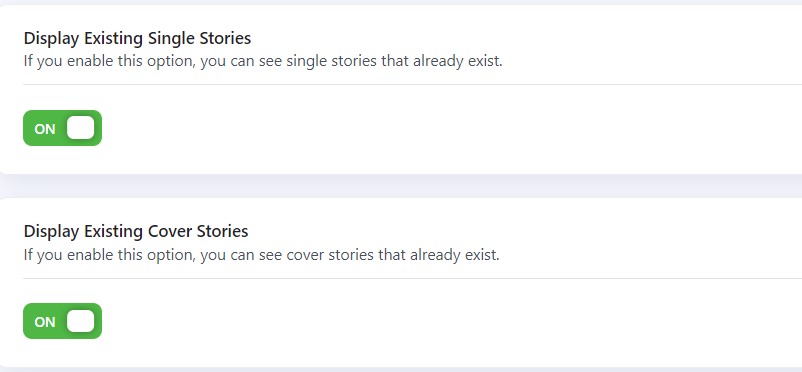
14. Existing Stories Display: When enabled, this option shows a user’s previously created single stories within the story publishing form, giving them a quick reference or the option to delete an existing one.
15. Integration with Community Plugins: WP Stories connects with BuddyPress, BuddyBoss Platform, and PeepSo, adding a stories layer on top of the social networking features those platforms already provide.
Story Content Ideas Based on Your Site Type
The right kind of story content depends heavily on what your site actually does. A membership community benefits from stories that highlight new members, recap a recent group discussion, or preview an upcoming event, content that rewards people for checking back regularly without demanding a big time commitment. An eCommerce or WooCommerce-driven site tends to get more value from stories showing a product in use, a quick behind-the-scenes look at fulfillment, or a limited-time offer that creates genuine urgency rather than the manufactured kind.
Educational or course platforms can use stories to share a quick tip pulled from a lesson, celebrate a student milestone, or preview upcoming content, all without needing to build out a full blog post for something that’s genuinely just a quick update. Personal blogs and creator sites often get the most mileage out of stories as a lower-pressure way to share something in-between full posts, the kind of update that wouldn’t justify a dedicated article but still gives an audience a reason to check in.
Comparing a Dedicated Plugin to Building It Custom
It’s a fair question whether a stories feature is worth a dedicated plugin at all, versus having a developer build something custom. For most sites, the dedicated plugin route wins on cost and reliability. Building a stories feature from scratch means handling media upload and compression, timed expiration logic, mobile-responsive rendering, and community plugin integration, all work that’s already been done and tested, and continues to be maintained, in an existing plugin. Custom development only really makes sense when a site has genuinely unique requirements that no existing plugin covers, and even then, it’s often cheaper to extend an existing plugin’s hooks and filters than to start from a blank file. A quick audit of what a plugin already exposes for developers, before assuming a feature needs to be built from scratch, frequently turns what looked like a multi-week custom project into a much smaller customization task.
The maintenance burden matters just as much as the initial build cost. A custom-built feature needs someone on staff, or a retained developer, to keep it compatible with WordPress core updates indefinitely. A maintained plugin shifts that ongoing burden to the plugin’s development team, which is generally the better tradeoff unless a site has development resources sitting genuinely idle.
Measuring Whether Stories Are Actually Working
Adding a stories feature is easy; knowing whether it’s actually helping is a separate question worth tracking deliberately. View counts on individual stories are the most basic signal, showing whether members are engaging with the format at all. Beyond that, watching whether story views correlate with return visits, does someone who watches a story tend to come back to the site sooner than someone who doesn’t, gives a clearer picture of whether the feature is actually driving retention rather than just generating a vanity metric.
It’s worth setting a simple check-in point, maybe six to eight weeks after launch, to look at this data honestly. If engagement is flat or declining despite consistent posting, that’s a signal to rethink the content strategy rather than assume the feature itself was a mistake. Stories tend to underperform when they’re treated as an afterthought, posted inconsistently with no real plan, rather than as a deliberate part of a site’s regular content rhythm.
Comparing engagement across a few different content types within stories, a poll versus a straight image update versus a short video, also helps identify what your specific audience actually responds to rather than assuming every format performs equally. Audiences vary enough between niches that a technique working well on one community site may fall flat on another, and the only reliable way to know is testing it directly rather than copying a strategy wholesale from somewhere else.
Worth noting too: stories don’t need a large member base to be worth running. A smaller, tightly focused community often gets proportionally more value from the format than a large, loosely connected one, since the personal, immediate feel of stories tends to land better with an audience that already knows and trusts the people posting.
Technical Considerations Before You Launch
A few practical details are worth checking before turning stories on for your full audience. Confirm your media storage and CDN setup can comfortably handle the additional image and video uploads a stories feature invites, since a sudden jump in media volume can slow down an otherwise well-performing site if the hosting plan wasn’t sized with that in mind. It’s also worth testing story creation and playback on a range of real devices rather than just your own phone, since screen sizes and browser quirks vary more than most site owners expect until they actually check.
Running a short beta period with a handful of trusted users before opening stories to the full community catches configuration issues, awkward defaults, or confusing settings while the stakes are still low. That small bit of upfront testing tends to save a much larger cleanup effort after a full public launch surfaces problems nobody caught during setup.
How to Add Instagram Like Stories to Your WordPress Site
1. Install and Activate WP Stories: Start by installing the WP Stories plugin, then activate it to begin setting up Instagram-like stories on your site.
2. Configure Settings: Head to the WP Stories settings panel and customize options like story duration, user permissions, and rendering style to match what your site actually needs.
3. Create Stories: Users can create stories through a straightforward interface, adding images and video, plus text, much the way they would on Instagram itself.
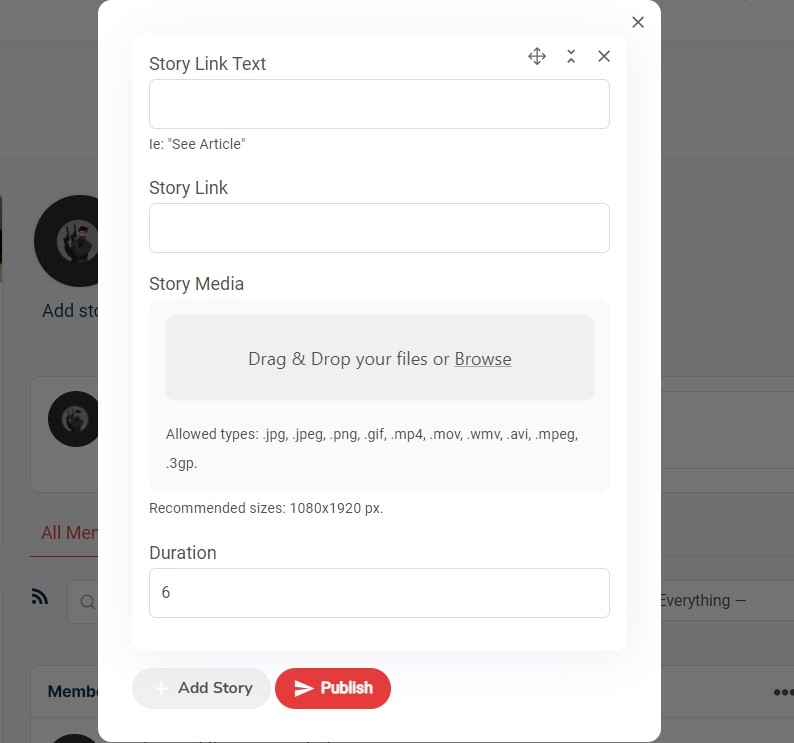
4. Admin Approval: If admin approval is turned on, review and approve stories before they go live. This step keeps quality consistent, especially on a larger community site with many contributors.
5. Embed Stories: Use shortcodes to place Instagram like stories wherever they make sense on your site, whether that’s the homepage, individual blog posts, or a dedicated stories page.
6. Promote Engagement: Encourage users to actually create and view stories rather than letting the feature sit unused after launch.
Pricing and Support
WP Stories offers a few pricing tiers depending on how many sites you plan to run it on:
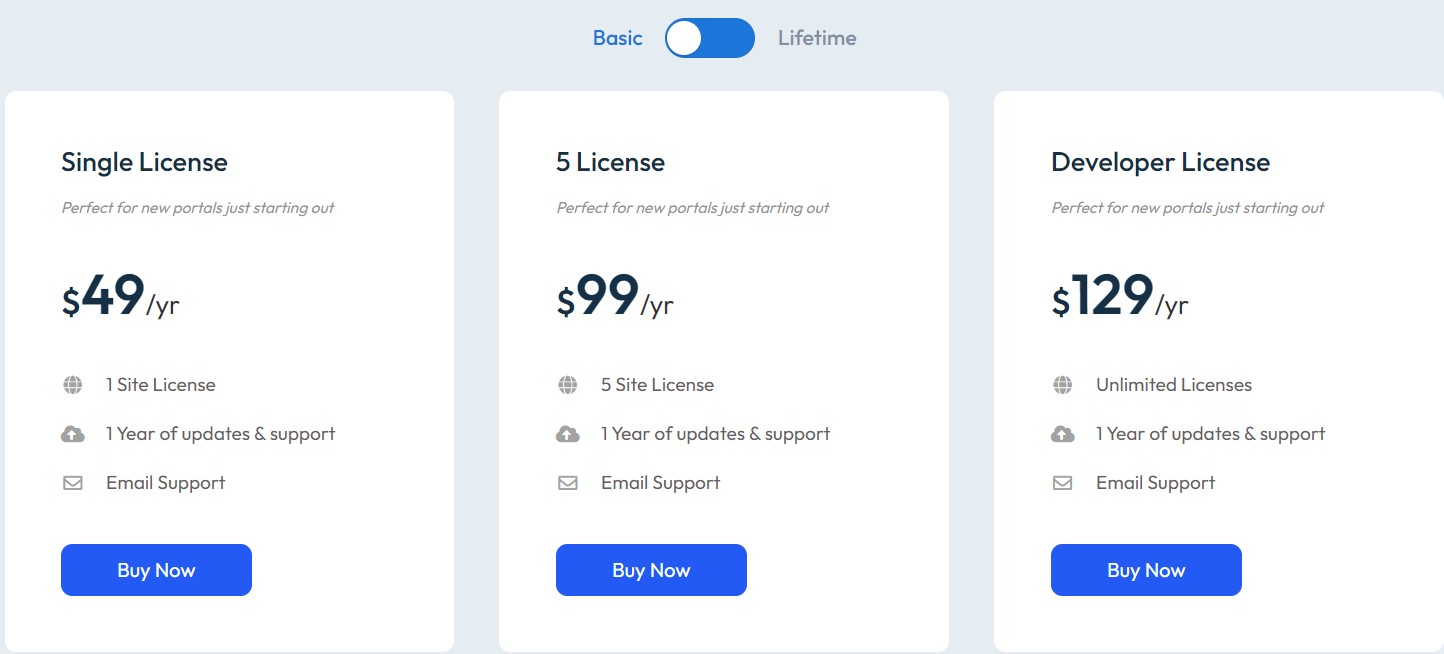
1. Single License: Suited for a new site just getting started, this plan costs $49 per year, with a $149 lifetime option for anyone who’d rather pay once.
2. 5-Site License: Built for small to medium-sized operations running a handful of sites, this plan costs $99 per year, with a $299 lifetime option.
3. Agency License: Meant for larger operations or anyone managing the plugin across unlimited domains, this plan costs $129 per year, with a $349 lifetime option.
All plans come with support from the Wbcom Designs team, and the higher tiers add priority email support and live chat on top of the standard support included with every plan.
Getting the Most Out of Stories Without Overdoing It
A common mistake after launching a stories feature is publishing too much, too fast, without a clear sense of what actually belongs there versus what should stay in a regular post. Stories work best for content that’s genuinely time-sensitive or informal: a quick behind-the-scenes moment, a same-day announcement, a poll asking for quick feedback. Content that needs to stay discoverable long-term, like a detailed guide or an evergreen resource, still belongs in a regular post where search engines and returning visitors can find it later.
Setting a light editorial rhythm, even just a rough guideline like “stories for daily updates, posts for anything worth keeping,” helps keep the feature from turning into noise. A community that gets three genuinely useful stories a week tends to build more consistent engagement than one flooded with a dozen low-effort updates that visitors quickly learn to ignore.
Consistency matters more than volume here. A predictable rhythm, say, a story every weekday morning versus a random handful posted whenever someone remembers, trains an audience to actually check back at a specific time, which compounds into a real habit over weeks and months. Sporadic posting rarely builds that same habit, even if the total number of stories published ends up roughly the same either way.
Moderation Considerations for Community Sites
Opening story creation up to your full member base, rather than just staff, raises the same moderation questions any user-generated content feature does. The admin approval setting is worth turning on for any site with a public membership, at least during the first few months, since it gives you a chance to catch problems before they go live rather than after a member reports something. Once you have a better sense of how your community actually uses the feature, you can loosen that setting if approval turns out to be more overhead than the situation actually calls for.
It’s also worth deciding upfront how long stories should be retained after they expire from active display, and whether flagged or reported stories need a separate review queue. These are small policy decisions, but making them before launch, rather than improvising after the first moderation issue comes up, saves a lot of stress for whoever ends up managing the community day to day.
A simple, published set of community guidelines specific to stories, even just a few sentences covering what’s and isn’t appropriate for the format, gives moderators something concrete to point to when a decision needs to be made quickly. Members are also generally more receptive to a moderation action when there’s a clear, pre-existing rule behind it, rather than a judgment call that looks arbitrary or inconsistent from one incident to the next.
Enhance Engagement with Instagram Like Stories on Your WordPress Site
WP Stories is a plugin built to bring a personal, immediate feel to a WordPress site, offering an experience that echoes Instagram’s stories format without needing a separate app or platform. Whether you’re a blogger, an entrepreneur, or a community leader, adding WP Stories can boost engagement and give your content a sense of freshness that a static blog feed alone doesn’t provide. It’s a genuinely practical way to connect with an audience in a more immediate, interactive format, right on the WordPress site you already run.
Like any content feature, the plugin itself is only half the equation. The other half is treating stories as a real, ongoing part of your content plan rather than a one-time launch that quietly goes stale after the first week. Sites that keep the format consistent, moderated, and genuinely useful tend to see it stick as a real engagement driver rather than fading into an unused feature nobody remembers is even there.
Interesting Reads:
Best AI Tools For Digital Marketers