

A tip option at checkout matters most for restaurants, cafés, salons, and other service-based stores, it captures extra revenue without raising prices, and it gives customers a direct way to acknowledge good service.
Why This Is Worth Adding
Beyond the direct revenue, a tipping option gives customers an easy way to show appreciation when they’ve had a good experience, and for service-driven businesses it can genuinely improve staff satisfaction since tips are showing up consistently rather than only in person.
There’s a behavioral piece worth understanding too. Tipping culture, wherever it’s established, functions as a kind of social norm that customers actively want to follow rather than avoid, most people tip in person out of genuine habit and social expectation, not reluctant obligation. Removing the option entirely from an online order doesn’t remove that instinct, it just leaves it with nowhere to go. A visible, easy tip option at checkout gives customers a way to act on an impulse they already have, rather than forcing them to either skip tipping online entirely or hunt for some workaround like adding a note to the order.
Tipping for WooCommerce
Tipping - Add Order Tip for WooCommerce (confirmed active, v1.3.1, ~$88/yr) is the straightforward way to add this: a tip box at checkout, predefined tip-percentage buttons, or a custom-amount field.
It’s worth noting this is an official WooCommerce.com extension rather than a third-party plugin, which matters for a couple of practical reasons: it’s built and maintained against WooCommerce’s own release schedule, so compatibility issues after a core WooCommerce update are less likely than with a smaller independent plugin, and support runs through the same WooCommerce.com account system most store owners are already using for other extensions. For a feature that touches checkout math directly, that level of first-party maintenance is worth the price premium over a cheaper unofficial alternative.
Installing It
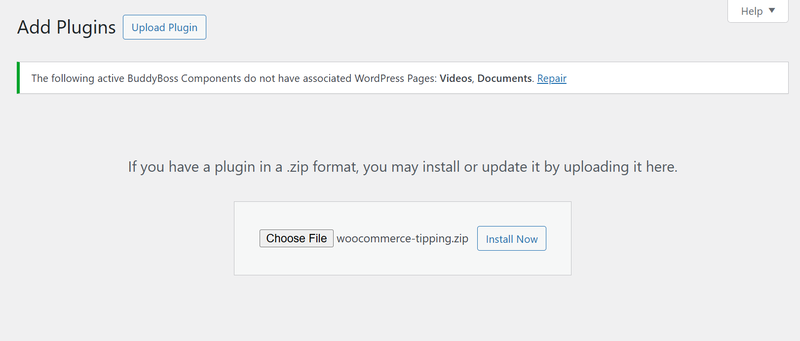
- Download the .zip from your WooCommerce account.
- In WordPress admin, go to Plugins > Add New > Upload Plugin.
- Choose the .zip file and Install Now.
- Activate the plugin.
Configuring It
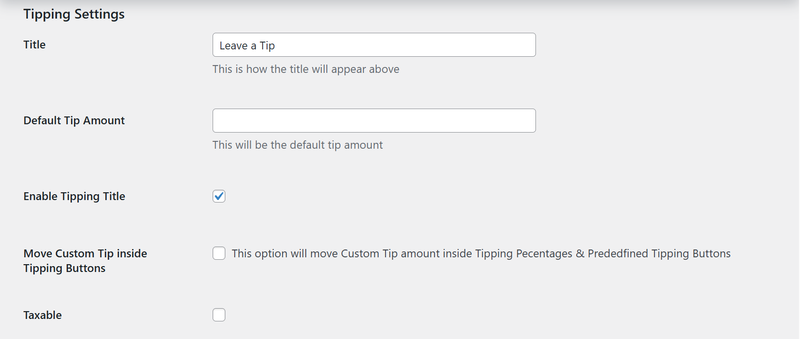
- Go to WooCommerce > Settings > Tipping.
- Set a title (“Leave a Tip”) and enable it to display at checkout.
- Enable the tipping feature itself.
- Add predefined percentage buttons (10, 20, 30) if you want quick-select options.
- Choose display style: percentage, fixed amount, or both.
- Match the styling to your store’s design.
- Save changes.
Where in the checkout flow the prompt actually belongs
Placement matters more than most store owners initially assume. A tip prompt positioned before the customer has seen the full order total can feel presumptuous, being asked to add a tip before knowing what the base bill even comes to. Positioned correctly, right after the order summary and before the final payment button, in the natural spot where a customer is already reviewing what they owe, it reads as a considered final step rather than an interruption. It’s also worth making sure the tip line, once selected, updates the visible order total in real time rather than only reflecting in the final charge, since a customer who adds a tip and doesn’t see the total change until after submitting the order can come away with the impression that something went wrong, even when the charge is entirely correct.
What Customers See
A tipping option under Order Review at checkout, either a predefined amount or a custom value. The tip gets applied as a fee on the order automatically, no extra steps for the customer. It also works with WooCommerce’s Cart and Checkout Blocks, so it fits into the order summary on the newer block-based checkout, not just the legacy one.
Also read: How to Add Product Brands to Your WooCommerce Store.
Choosing between percentage and fixed amounts
This is a real design decision worth thinking through rather than defaulting to whichever option is easiest to set up. Percentage-based tipping scales naturally with order size, a $15 order and a $150 order each generate a tip proportional to what was actually purchased, which tends to feel fairer to both sides for anything resembling a service transaction. Fixed-amount tipping is simpler for customers to reason about quickly, “leave $2, $5, or $10” requires no mental math, but it can feel disconnected from the order total on either end, undertipping on a large order or overtipping on a small one relative to what feels proportional. Offering both, percentage buttons alongside a flat custom-amount field, covers customers on either side of that preference without forcing a single mental model on everyone.
Payment processing fees on tips, a detail worth doing the math on
Since a tip added at checkout runs through the same payment processor as the rest of the order, it’s subject to the same card-processing fee, typically a small percentage plus a flat amount per transaction, which means a portion of every tip collected doesn’t actually reach whoever it’s meant for. This is worth acknowledging honestly rather than pretending the full tip amount always makes it through untouched, and it’s part of why some businesses either absorb that processing cost themselves as a cost of offering the feature, or factor it into how they calculate tip distribution to staff, rather than distributing the exact collected amount and quietly eating the discrepancy in a way nobody’s accounted for. A short, one-paragraph internal note explaining which approach you’ve chosen saves a genuinely confusing conversation months down the line when someone on the team notices the tip total in the reports doesn’t quite match what got paid out. Neither approach is wrong, but it’s worth deciding on one deliberately rather than discovering the gap later when the numbers don’t reconcile cleanly.
Tracking Tips
- WooCommerce > Reports > Tips shows total tips received.
- Track how many orders actually included a tip.
- Analytics > Tips for more detailed breakdowns.
How tips actually reach your staff, since the plugin only gets you halfway
It’s worth being direct about a gap this plugin doesn’t solve on its own: collecting a tip through checkout is a completely separate problem from getting that money to the actual staff member who earned it. WooCommerce’s tip reporting tells you the total collected, but distributing that total, evenly across a shift, attributed to a specific staff member on a specific order, or pooled and split at the end of a pay period, is a manual accounting process you’ll need to define yourself. For a small operation, this might be as simple as a spreadsheet cross-referencing tipped orders against who was working that day. For anything larger, it’s worth deciding on a distribution method before tips start accumulating, rather than facing a backlog of untracked tips and no clear system for splitting them fairly once staff start asking about it. Whatever method you land on, write it down somewhere staff can actually see it, an unwritten distribution policy that only lives in the owner’s head tends to breed quiet resentment among staff who suspect, fairly or not, that the split isn’t happening the way they were told.
Default selection, a small setting with an outsized effect
Whether the tip prompt starts with no option pre-selected, a “no tip” option pre-selected, or a specific percentage pre-selected by default is a decision worth making deliberately rather than leaving on whatever the plugin ships with out of the box. A pre-selected default percentage does measurably increase the share of customers who end up leaving a tip, since it changes the action required from “opt in” to “opt out,” and people are consistently more likely to go along with a pre-set default than to actively choose one. That said, a default set too aggressively, defaulting to the highest percentage option rather than a moderate one, risks reading as manipulative once a customer notices what happened, and a customer who feels tricked into a tip is a worse outcome for the relationship than a customer who tipped a bit less after making an active, considered choice. A moderate middle-tier default, clearly changeable, tends to strike the right balance between nudging genuine generosity and avoiding a dark-pattern feel.
Practical Tips
- Test on multiple devices, tip boxes are easy to get wrong on mobile specifically.
- Keep it optional, forcing a tip decision adds friction that isn’t worth the cost.
- Offer a few tip levels rather than just one flat suggestion.
- Check the analytics periodically rather than setting it up once and never revisiting.
Where This Applies Beyond Restaurants
Salons and spas can use it to reward stylists or therapists directly. Online tutors can let students show appreciation after a session. Delivery-based businesses can let customers tip drivers. Even fundraising or nonprofit stores can repurpose the same mechanism to collect small donations at checkout. In each of these cases, the framing of the prompt is worth adjusting to match the relationship, “tip your stylist” reads naturally for a salon, while a generic “leave a tip” label feels slightly off transplanted onto a tutoring session or a donation flow where the underlying relationship isn’t really about a tip in the traditional sense.
A note on tax and accounting treatment
Tips are generally treated differently from product revenue for tax purposes in most jurisdictions, and that distinction matters more than it might seem once you’re actually filing. A tip collected through checkout is typically not subject to sales tax the way the underlying product or service is, and depending on your business structure and location, tips distributed to staff may carry separate payroll or income-reporting obligations distinct from your regular revenue. Before turning this feature on for real customers, it’s worth a short conversation with whoever handles your books to confirm the tip line item is being categorized correctly in your accounting export, rather than discovering months later that tip revenue got lumped in with taxable sales and needs to be untangled retroactively.
Presenting It Well
Keep it optional and use plain, low-pressure language (“Would you like to leave a tip?” rather than something pushier). Offer a few clear percentage options plus a custom-amount field, people are more likely to pick a percentage when it’s presented as a clean choice rather than an open blank. Match the tip box to your site’s design so it reads as a natural part of checkout, not a bolted-on add-on.
A word on tip fatigue and when not to add this
It’s worth being honest that tip prompts have become more common across a wider range of businesses in recent years, self-checkout kiosks, quick-service counters, and other transactions that didn’t traditionally involve tipping, and that expansion has generated a real, documented backlash from customers who feel asked to tip in situations that don’t call for it. Adding a tip prompt to a transaction type where customers don’t expect one, a straightforward retail product purchase with no service component involved, risks reading as presumptuous rather than appreciated, and can create friction at exactly the moment you want checkout to feel frictionless. This feature earns its place on stores where a real person is providing a real service, food prep, styling, tutoring, delivery, and it’s worth skipping on a pure product-sales store where there’s no service relationship for the tip to actually be thanking.
Mobile checkout, where a tip prompt is most likely to go wrong
Since a large share of orders on most stores now come through a phone, it’s worth specifically checking how the tip section behaves at a narrow viewport rather than assuming it inherits good behavior from the desktop layout automatically. Percentage buttons that sit comfortably in a row on desktop can wrap awkwardly, overlap, or shrink to an unreadable size on a 390px-wide screen, and a custom-amount input field needs to trigger the numeric keyboard on mobile rather than the full alphabet keyboard, a small detail that makes entering a specific dollar amount noticeably faster and less error-prone. Before considering the setup finished, place a real test order on an actual phone and walk through selecting a tip option, both a preset percentage and a custom amount, to confirm nothing breaks or becomes fiddly to use at that screen size.
Accessibility for the tip selection UI
Tip-percentage buttons are usually a small cluster of clickable elements sitting close together, and it’s worth confirming they’re each individually reachable and operable via keyboard alone, not just mouse or touch. Each button needs a clear, descriptive label, “Tip 15%” rather than just “15%” with no context read aloud correctly by a screen reader, and the currently-selected tip option should be visually and programmatically indicated as selected (through an aria-selected or aria-pressed attribute, depending on how the plugin implements the control) so a screen reader user knows which option is currently active without having to guess from visual styling alone.
Where the tipping-culture instinct actually comes from
Tipping norms vary enormously by country and industry, and that variance is worth keeping in mind if your store serves an international customer base rather than a purely domestic one. In markets where tipping is deeply embedded in service culture, a checkout tip prompt reads as completely normal and expected. In markets where tipping is rare, seen as unnecessary, or even considered slightly awkward or insulting to offer, the same prompt can land very differently, ranging from mild confusion to a genuine sense that the store is asking for something it shouldn’t. If your customer base spans multiple regions with meaningfully different tipping norms, it’s worth considering whether to localize the tip prompt’s visibility or wording by region rather than showing an identical prompt to every customer regardless of where they’re checking out from.
An alternative for stores that don’t want a dedicated plugin
For a very small store not ready to commit to a paid extension, it’s worth knowing a rough manual alternative exists, though it’s a genuinely worse experience than a purpose-built plugin and should be treated as a stopgap rather than a long-term solution. WooCommerce natively supports adding a fee to an order through custom code hooked into the cart totals calculation, which could technically be wired up to a simple set of buttons on the cart or checkout page. This approach demands real development work to get right, handling the fee calculation, keeping it optional, making sure it survives cart updates without breaking, and it lacks the reporting, analytics, and tested checkout-block compatibility that a dedicated plugin like Tipping for WooCommerce ships with out of the box. For anything beyond a short-term test, the maintained plugin is worth the subscription cost simply to avoid maintaining custom checkout code yourself indefinitely.
Final Thoughts
A tip option is a low-effort way to add revenue and give customers a direct way to support the people behind their order, restaurant, salon, delivery, or tutoring alike. Tipping for WooCommerce covers the setup without custom development.
Whichever way you configure it, treat the first few weeks after launch as a testing window rather than a finished decision. Watch the actual tip-attach rate, how many orders include a tip versus how many skip it, and adjust the presentation, the wording, the percentage defaults, or the placement, if that number is lower than expected. A tip feature that’s technically working but rarely used is usually a presentation problem, not a demand problem, and it’s almost always fixable with a small adjustment to how the ask is framed rather than the mechanics behind it.
It’s also worth checking in with staff directly once the feature has been live for a month or so, if tips are meant to reach them. Their feedback on whether the amounts feel fair, whether the distribution method is working, and whether customers have said anything about the prompt one way or the other, is a better read on whether the feature is genuinely succeeding than the raw revenue numbers alone.
Interesting Reads
How to Improve Customer Experience with WooCommerce Order Tracking