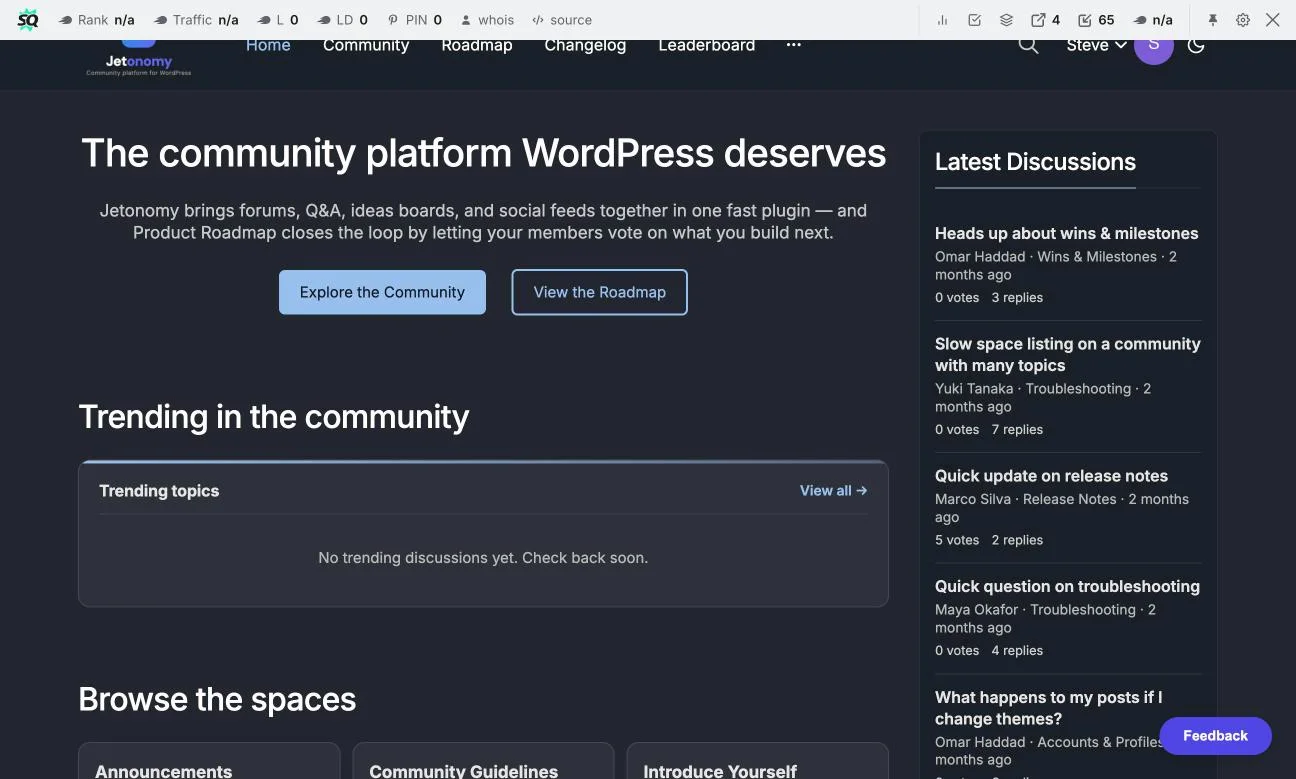
Most support tickets aren’t new problems, they’re old problems asked by a new person. A customer hits an error, searches your help docs, doesn’t find a clear answer, and opens a ticket, the same ticket three other customers already opened and got answered this month. That repetition is the real cost center in SaaS support, not the hard bugs, the easy, already-answered questions that keep arriving because there’s no public record of the answer.
A customer community built around searchable Q&A turns each answered question into a permanent, findable resource instead of a one-time reply buried in a closed ticket. This guide walks through building that layer on WordPress with BuddyNext for the community foundation and Jetonomy for the structured Q&A and search that makes answers findable later, including what it costs, how to seed it, what to measure, and the specific mistakes that keep a Q&A community from ever actually deflecting tickets.
Last updated: 6 November 2026
Table of Contents
- By the numbers
- Why a Searchable Q&A Community Reduces Tickets
- The Stack: BuddyNext + Jetonomy
- Q&A Community vs. Ticketing-Only vs. Chat-Based Support
- Step 1: Set Up BuddyNext as the Community Layer
- Step 2: Add Jetonomy’s Q&A Space
- Step 3: Configure Full-Text Search
- Step 4: Mark Accepted Answers
- Step 5: Use Trust Levels to Surface Power Users
- Step 6: Moderation and Quality Control
- Seeding the Archive Before Launch
- Launch Checklist
- What to Measure
- Real-World Scenario: A B2B SaaS Reducing Ticket Volume
- Common Pitfalls
- FAQs
- Sources
69% of customers try to solve a problem on their own before contacting support, but fewer than a third of companies offer a real self-service option like a searchable knowledge base or community (Zendesk CX Trends). That gap, customers wanting self-service and companies not providing it well, is exactly what a searchable Q&A community closes.
By the numbers
The online community platform market was valued at USD 6.50 billion in 2025 and is expected to reach USD 15.20 billion by 2033, a 10.2% annual growth rate, according to Verified Market Research (definitions vary between research firms).
Why a Searchable Q&A Community Reduces Tickets
A support ticket is a dead end by design. One customer asks, one agent answers, the exchange closes, and the knowledge disappears into a private helpdesk thread no other customer will ever see. A public Q&A community inverts this.
The same question, answered once in public, is now a search result for every future customer who hits the same issue. The value compounds the longer the community runs. A six-month-old community answers less of its own traffic than a two-year-old one with a deep archive of resolved questions, which is exactly why seeding and early momentum matter so much (covered in Step 1 and the seeding section below).
A support ticket answers one customer once. A public Q&A answer, marked and indexed, answers every future customer who searches the same question, for free, forever.
This only works if the questions are actually findable, which is the part most companies get wrong. A Facebook Group or a Slack workspace technically lets customers ask each other questions, but neither is indexed by a real search engine, and internal search in both is famously weak, ask anyone who has tried to find an old answer in a six-month-old Slack channel. A WordPress-based community with full-text search and a dedicated Q&A structure solves the findability problem directly, and the content lives on your own domain, which means it can also rank in Google for the exact error messages and questions customers type into a search bar before they ever think to open a support community tab.
There’s also a trust dimension that pure ticketing can’t replicate. A customer who finds their exact error message already solved by another customer, with the official support team’s accepted answer sitting right under it, experiences that moment very differently than one who waits in a ticket queue. The former feels like the product has a mature, well-documented community behind it; the latter feels like every problem is a fresh, unresolved unknown. That perception difference matters more than it sounds, especially for prospects evaluating a SaaS product during a trial, where a visible, active support community signals product maturity before they’ve even become a paying customer.
The Stack: BuddyNext + Jetonomy
BuddyNext provides the community foundation: member profiles, activity feeds, and the social layer that makes a support community feel like a place customers return to, not a ticket form with extra steps. BuddyNext is self-hosted, meaning you own the code and the data on your own server, a real consideration for a SaaS product whose support community should scale with your user count.
Jetonomy adds the structured Q&A layer on top: a dedicated Q&A space type with accepted-answer marking, full-text search across every question and answer ever posted, and trust levels that identify your most reliable community answerers over time. Jetonomy’s free tier ($0 forever) already includes the Q&A space type, voting, accepted answers, trust levels 0-5, a moderation queue, and full-text search, the exact feature set this guide uses from start to finish. Jetonomy Pro, from $69/year for a single site, adds private messaging, an analytics dashboard, and AI moderation if your community reaches a scale where those matter, but none of them are required to get the ticket-deflection mechanic working.
Q&A Community vs. Ticketing-Only vs. Chat-Based Support
It helps to see the three common support models side by side, since each solves a different part of the problem and none of them fully replaces the others:
| Ticketing-only | Chat (Discord/Slack) | Q&A Community | |
|---|---|---|---|
| Answers are public | No, one customer only | Technically, but unsearchable | Yes, searchable and indexed |
| Reduces repeat tickets | No | Minimal | Yes, compounds over time |
| Good for sensitive/account issues | Yes | No | No, needs a ticket channel too |
| SEO value over time | None | None | Real, on your own domain |
| Platform cost at scale | Often per-agent | Free, but no ownership | Free tier, no per-member fee |
The honest takeaway is that these aren’t mutually exclusive. A mature support setup keeps a ticketing channel for account-specific and sensitive issues, may still use a chat space for real-time community vibe, and adds a public Q&A community specifically to capture and deflect the repeatable questions, the category tickets and chat both handle badly.
Step 1: Set Up BuddyNext as the Community Layer
Install BuddyNext and configure customer-facing member profiles, these should be lightweight (name, company, a short bio) rather than the elaborate social profiles a consumer community might use. The goal is identity and continuity, knowing who’s answering and who’s asking, and building a visible reputation for frequent answerers, not a full social network with every bell and whistle.
Set up a dedicated space or section specifically for support/Q&A so it’s visually distinct from any general discussion or announcements areas you also run. Customers arriving to search for an answer should land somewhere that clearly reads as “support,” not get lost browsing an unrelated general community feed first.
Step 2: Add Jetonomy’s Q&A Space
Install Jetonomy alongside BuddyNext and create a Q&A space type, one of Jetonomy’s four free-tier space types, alongside forum, ideas, and Show & Tell. The Q&A format is structurally different from a forum thread: it’s built around one question, multiple candidate answers, and a clear mechanism for marking which answer actually resolved it, which is exactly the shape of a support interaction, unlike an open-ended forum discussion that can wander across five tangents before anyone answers the original question.
Step 3: Configure Full-Text Search
Jetonomy’s full-text search is what makes the ticket-deflection mechanism actually work in practice, not just in theory. Make the search bar prominent, ideally the first thing a customer sees when they land on the support community, not buried in a menu, since the entire value proposition depends on customers searching before posting a duplicate question.
Consider adding a lightweight prompt at the top of the “ask a question” flow suggesting customers search first, a small UX nudge that measurably reduces duplicate questions in most community-support setups. Stack Overflow popularized this exact pattern for a reason, it works, and it costs nothing to implement beyond a line of copy in the right place.
Step 4: Mark Accepted Answers
When a question gets a correct answer, either the original asker or a moderator should mark it as accepted. This does two things: it visually signals to future searchers, and to search engines indexing the page, which answer is the resolved one, and it creates a clean, scannable archive rather than a thread of five competing guesses with no clear resolution.
Train your support team to actively participate in the Q&A space and mark answers themselves when they jump in. This seeds the archive with high-quality, officially-endorsed answers early, before community trust levels build up organically and before customers naturally start answering each other’s questions on their own.
Step 5: Use Trust Levels to Surface Power Users
Jetonomy’s trust levels (0-5) track member reliability over time based on their contribution history. In a support community, this naturally surfaces your most knowledgeable customers, the ones who’ve answered dozens of questions correctly and built real trust levels through consistent, accurate contributions rather than volume alone.
These are the customers worth recognizing publicly: a visible badge, a shoutout in a newsletter, early access to new features. They’re doing real support work for you voluntarily, and recognizing them keeps them engaged rather than burning out unrewarded, which is the single most common reason a promising community-support program quietly dies within its first year.
Step 6: Moderation and Quality Control
An open Q&A community needs a moderation queue, Jetonomy’s free tier includes one, so new or flagged content doesn’t go live unreviewed. Set clear guidelines for what belongs in the support Q&A versus what should go to a ticket instead, account-specific issues involving sensitive data, for instance, shouldn’t be posted publicly no matter how common the underlying question is.
A clean, well-moderated Q&A archive is more valuable long-term than a larger but noisier one. Prioritize answer quality over raw question volume when you’re reviewing what to keep pinned and prominent on the community’s front page.
Seeding the Archive Before Launch
An empty Q&A community deflects zero tickets on day one, because there’s nothing in it yet to search. Before inviting customers in, pull your support team’s most frequently asked questions from existing ticket history, the last three to six months is usually enough to surface a clear top-20 list, and post them as properly formatted, accepted-answer Q&A entries.
- Export or review your last 90-180 days of closed tickets for recurring themes
- Write clean, complete answers for the top 15-20 recurring questions, not just a copy-paste of the original ticket reply
- Mark every seeded answer as accepted so the archive looks authoritative from day one
- Cross-link seeded Q&A entries from your existing help docs where relevant, so search traffic flows both directions
This seeding work is the single highest-leverage hour you’ll spend on the whole project. A community that launches with twenty genuinely useful, accepted-answer entries starts deflecting tickets immediately; one that launches empty and waits for organic customer questions can take months to build the same value.
Launch Checklist
Before announcing the community to your customer base, confirm each of these is actually done, not just planned:
- BuddyNext installed with lightweight, customer-appropriate member profiles configured
- Jetonomy’s Q&A space created and clearly labeled as the support destination
- Search bar prominent and tested with a handful of real queries to confirm it returns relevant results
- At least 15-20 seeded, accepted-answer questions covering your most common support topics
- Moderation queue enabled and at least one team member assigned to review new submissions daily during the first few weeks
- Support team briefed on participating directly and marking accepted answers
- A clear internal policy for which question types get routed to a private ticket instead of the public Q&A
- A baseline ticket-volume number recorded before launch, so you have something concrete to compare against three and six months later
Skipping any of these doesn’t make the project fail outright, but it does slow down the point where the community starts paying for itself in deflected support time.
What to Measure
Track a small set of numbers monthly rather than trying to measure everything: total tickets opened (watch for the trend line, not a single month), search-to-no-ticket rate if your helpdesk can capture it, number of accepted answers in the Q&A archive, and time-to-first-answer for new questions. The ticket-volume trend is the metric that actually matters to leadership, but the Q&A archive size and answer speed are the leading indicators that predict whether that trend will keep improving.
Real-World Scenario: A B2B SaaS Reducing Ticket Volume
Picture a mid-size B2B SaaS product fielding the same twenty or so setup and configuration questions from new customers every month, each one a fresh ticket even though the answer never changes. Moving those questions into a public, searchable Jetonomy Q&A space on a BuddyNext community means the first customer to ask still gets a real answer from support, but every subsequent customer with the same question finds it via search before ever opening a ticket.
Over a few months, the archive of resolved questions grows deep enough that it starts actually deflecting a meaningful share of what would otherwise be first-contact tickets, letting the support team spend more time on genuinely new or complex issues instead of repeating the same five answers all month. By the second year, the archive itself becomes a genuine onboarding resource new customers browse proactively, not just a search destination they reach after hitting a problem, and the company’s most active customer answerers have effectively become an informal extension of the support team.
Common Pitfalls
- Launching without seed content: an empty Q&A space has nothing to search and nothing to deflect tickets with. Seed it with your 15-20 most common support questions before inviting customers in.
- Burying the search bar: if customers can’t find search easily, they’ll default to posting a new question even when the answer already exists.
- Not marking accepted answers: an unmarked thread of guesses is far less useful to a future searcher than a clearly resolved question.
- Treating it as a replacement for all support, not a deflection layer: account-specific or sensitive issues still need a private ticket channel; the Q&A community handles the repeatable, public-safe questions.
- No support-team participation: a community that only customers post in, with no visible support-team presence, builds trust more slowly than one where the team actively answers and marks accepted answers.
- Measuring the wrong thing too early: expecting ticket volume to drop in the first month undersells the project; the real payoff compounds over quarters as the archive deepens.
Summary
The repeat questions eating your support team’s time don’t need a smarter agent, they need a public, searchable answer that the next customer finds before opening a new ticket. BuddyNext provides the community customers want to return to, and Jetonomy’s free-tier Q&A space, search, and accepted-answer marking provide the structure that makes answers actually findable later. Seed it with your most common questions, keep support actively participating, measure the archive’s growth alongside ticket volume, and the archive does the deflection work for you over time.
None of this requires a large budget or a dedicated community team to start. A single person seeding twenty good answers and spending an hour a day on moderation for the first month is enough to prove the model, and once customers see the pattern, answering each other becomes self-sustaining in a way a ticket queue never can.
FAQs
1. Does this replace a traditional ticketing system entirely?
No. It’s a deflection layer for repeatable, publicly-safe questions. Account-specific or sensitive issues still need a private ticket channel alongside the community.
2. How much does Jetonomy cost for this setup?
The free tier ($0 forever) includes everything this guide uses: the Q&A space type, voting, accepted answers, trust levels, moderation queue, and full-text search. Pro (from $69/year) adds private messaging, analytics, and AI moderation if you need them at scale.
3. Does BuddyNext require a per-member fee as the community grows?
No. BuddyNext is self-hosted, you own the code and data on your own server, with no per-member SaaS fees as your customer base scales.
4. How long before this actually reduces ticket volume?
It depends on seed content and adoption, but most teams see meaningful deflection once the archive covers their top 20-30 recurring questions and customers develop the habit of searching first, typically a few months of active use, faster if the archive is well-seeded before launch.
5. Should support agents answer questions in the community themselves?
Yes, especially early on. Official, accepted answers from your support team seed the archive with trustworthy content before community trust levels build up organically.
6. Can customers see each other’s company information?
That depends entirely on what you configure in member profiles. Keep profiles lightweight and avoid exposing sensitive account details publicly, since the Q&A space is public by design.
7. What happens to questions that never get a good answer?
Unanswered or poorly-answered questions should be routed to your support team directly rather than left open indefinitely, a stale, unanswered public question looks worse than no community at all.
8. Does search work well enough to actually find old answers?
Jetonomy’s full-text search indexes every question and answer, which is a meaningful step up from the weak internal search most chat platforms (Discord, Slack) offer, and the content is also indexable by external search engines since it lives on your own domain.
9. Is this only useful for large support teams?
No, a small team benefits proportionally more, since deflecting even a handful of repeat questions per week frees up a meaningful share of a small team’s limited support capacity.
10. Can this coexist with a help-docs/knowledge-base system we already have?
Yes, and it should. Static docs cover planned, structured content; the Q&A community covers the long tail of specific questions real customers actually ask, which rarely matches the structure of a docs site exactly.
11. What’s a realistic team size needed to maintain this?
One person spending a few hours a week on moderation and seeding during the first few months is enough to get a program like this off the ground, it scales down naturally as trusted community members start contributing accepted answers themselves.
Sources
- Verified Market Research: Online Community Platform Market
- Wbcom Designs: Jetonomy pricing and plans (checked 6 November 2026)
Interesting Reads:
How to Build a SaaS Customer Academy with Learnomy
Best Canny Alternatives in 2026