

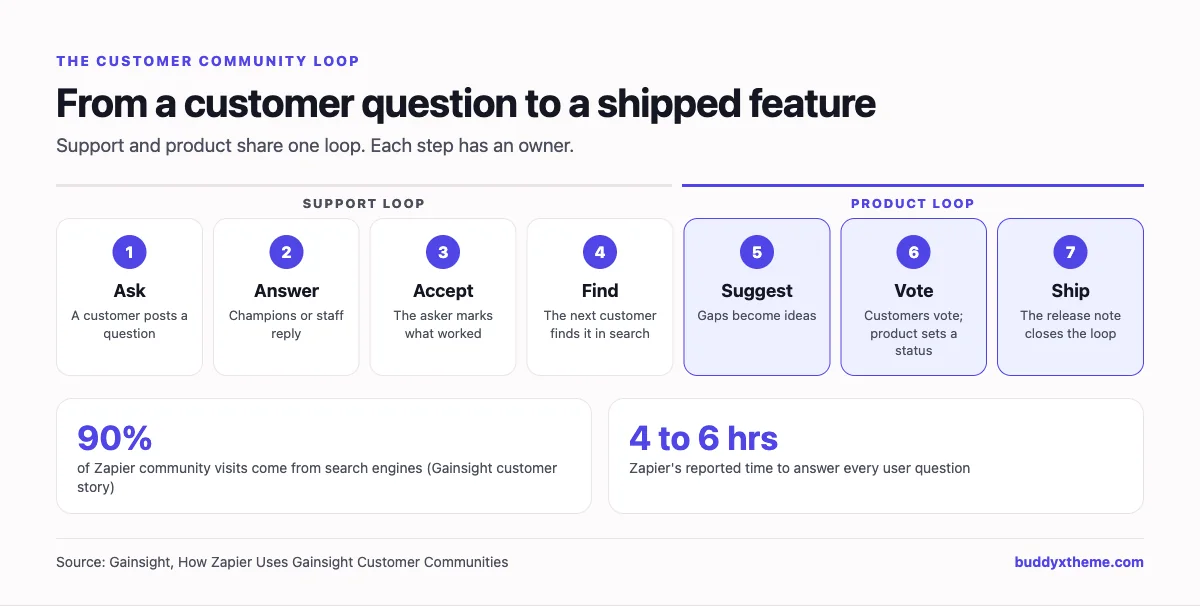
A SaaS customer community earns its keep in two places at once. In support, every question answered in public is one fewer ticket, and one more page a future customer can find. In product, every idea customers vote on is roadmap input you did not have to chase. The best customer communities connect those two loops: a customer asks, someone answers, the answer is accepted and found again, a missing feature becomes an idea, the idea gets votes, and the release note closes the loop.
This guide compares the software you can use to build that kind of community for a SaaS product, from enterprise community suites to open-source forums and the chat tools many startups begin with. We built a working customer community for a fictional SaaS product for the first entry, checked every competitor claim against the vendor’s own pages in November 2026, and judged each option on the loop: questions, answers, ideas, roadmap and releases.
Quick answer
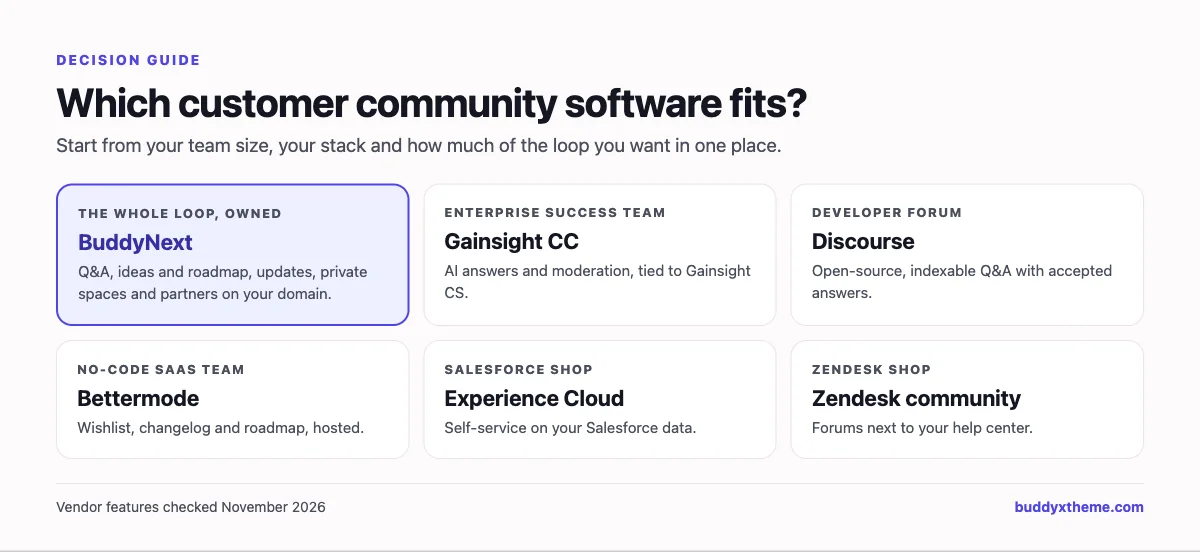
If you want a SaaS customer community you own and control, BuddyNext is the strongest choice: Q&A spaces with accepted answers, an ideas board with voting and a public roadmap (planned, in progress, shipped), product update announcements, private beta and admin spaces, a partner directory, events and a champions program on your own WordPress site. Gainsight Customer Communities and Khoros lead for large enterprise support teams, Discourse is the strongest open-source forum, and Bettermode suits no-code SaaS teams.
In this guide
- The four jobs of a SaaS customer community
- What the best customer communities show
- Enterprise suite, community platform or chat?
- 1. BuddyNext: best for a customer community you own, from Q&A to roadmap
- 2. Gainsight Customer Communities: best for enterprise support and success teams
- 3. Discourse: best open-source forum for developer communities
- 4. Khoros: best for very large brands combining community and social care
- 5. Higher Logic Vanilla: best for a focused, community-only vendor
- 6. Bettermode: best no-code community for product-led SaaS
- 7. Salesforce Experience Cloud: best if your customers already live in Salesforce
- 8. Zendesk community forums: best if you already run Zendesk support
- 9. Circle: best for SaaS companies building an education-led community
- 10. Discord: best for developer and AI tool communities that live in chat
- 11. Slack Connect: best for high-touch enterprise accounts
- SaaS customer community software compared
- Building the support-to-roadmap loop
- Metrics that show the community is working
- Launch checklist for a SaaS customer community
- More community platform comparisons
- How we built and checked this list
- Frequently asked questions
- The bottom line
The four jobs of a SaaS customer community
A customer community is not one project. It serves four teams, and each one measures success differently. Agree on which jobs matter most before you pick software, because the tools are strong in different places.
| Job | Owner | What the community does | What to measure |
|---|---|---|---|
| Support deflection | Support | Customers answer each other; answers become searchable pages | Questions answered, time to first answer, accepted-answer rate |
| Product feedback | Product | Ideas, votes and a visible roadmap replace scattered requests | Ideas submitted, votes, ideas shipped |
| Adoption and education | Customer success | Tips, office hours, courses and user groups help customers use more of the product | Event attendance, feature adoption among members |
| Advocacy | Marketing | Champions, customer stories and referrals | Active champions, stories published |
Most SaaS companies start with support deflection because it is easiest to measure. The communities that last add the product loop early, because customers keep coming back when they can see their feedback change the product.
What the best customer communities show
The strongest public evidence for customer communities comes from the companies running them.
- Search is the front door. Zapier’s community, which runs on Gainsight, reports that “90% of community visits are driven by search engines,” that it achieved “100% of user questions being answered within four to six hours,” and that “three people can do the work of 30” (Gainsight). That is a vendor-published customer story, but the pattern is clear: public, indexable answers bring customers in from search.
- Forums still power the biggest technical communities. Discourse says it powers “more than 22,000 communities” (Discourse), and many developer-focused SaaS products, including n8n, run their community forums on it.
- Community and success teams connect. Gainsight highlights Gong reporting “3X higher upsell rates” and Front reporting “+20% product adoption” after launching their communities (Gainsight). Treat these as vendor-reported results, not independent studies.
Enterprise suite, community platform or chat?
| Category | Built for | Strengths | Trade-offs | Examples |
|---|---|---|---|---|
| Enterprise community suite | Large support and success teams | Deep helpdesk and CRM integration, AI moderation, enterprise SSO | Hosted only, long implementations, built for big teams | Gainsight Customer Communities, Khoros, Higher Logic Vanilla, Salesforce Experience Cloud |
| Community platform | SaaS teams of any size | Q&A, ideas, events, spaces and profiles together; faster to launch | Fewer native enterprise connectors | BuddyNext, Bettermode, Circle |
| Open-source forum | Technical and developer communities | Indexable Q&A, accepted answers, self-hosting, full data ownership | A forum first; events and courses need add-ons | Discourse |
| Helpdesk add-on | Teams already on one helpdesk | Native ticket and help center connection | Tied to that vendor | Zendesk community forums |
| Chat | Developer and early-stage communities | Fast, real-time, familiar | Answers are not indexable, no ideas board, no structure | Discord, Slack Connect |
1. BuddyNext: best for a customer community you own, from Q&A to roadmap
BuddyNext is a complete community platform that runs on your own WordPress site. Q&A spaces with accepted answers, an ideas board with voting and roadmap statuses, product update feeds, private spaces, events, member profiles, messaging, a business directory, courses and gamification all work together. For a SaaS company, that means the whole loop lives in one place, on your domain, with your customer data in your own database.
To show it in context, we built the Taskloom Community for a fictional work-management product: 20 customers, admins, developers, partners and staff, with spaces for help, ideas, developers, workspace admins, a beta program and partners.
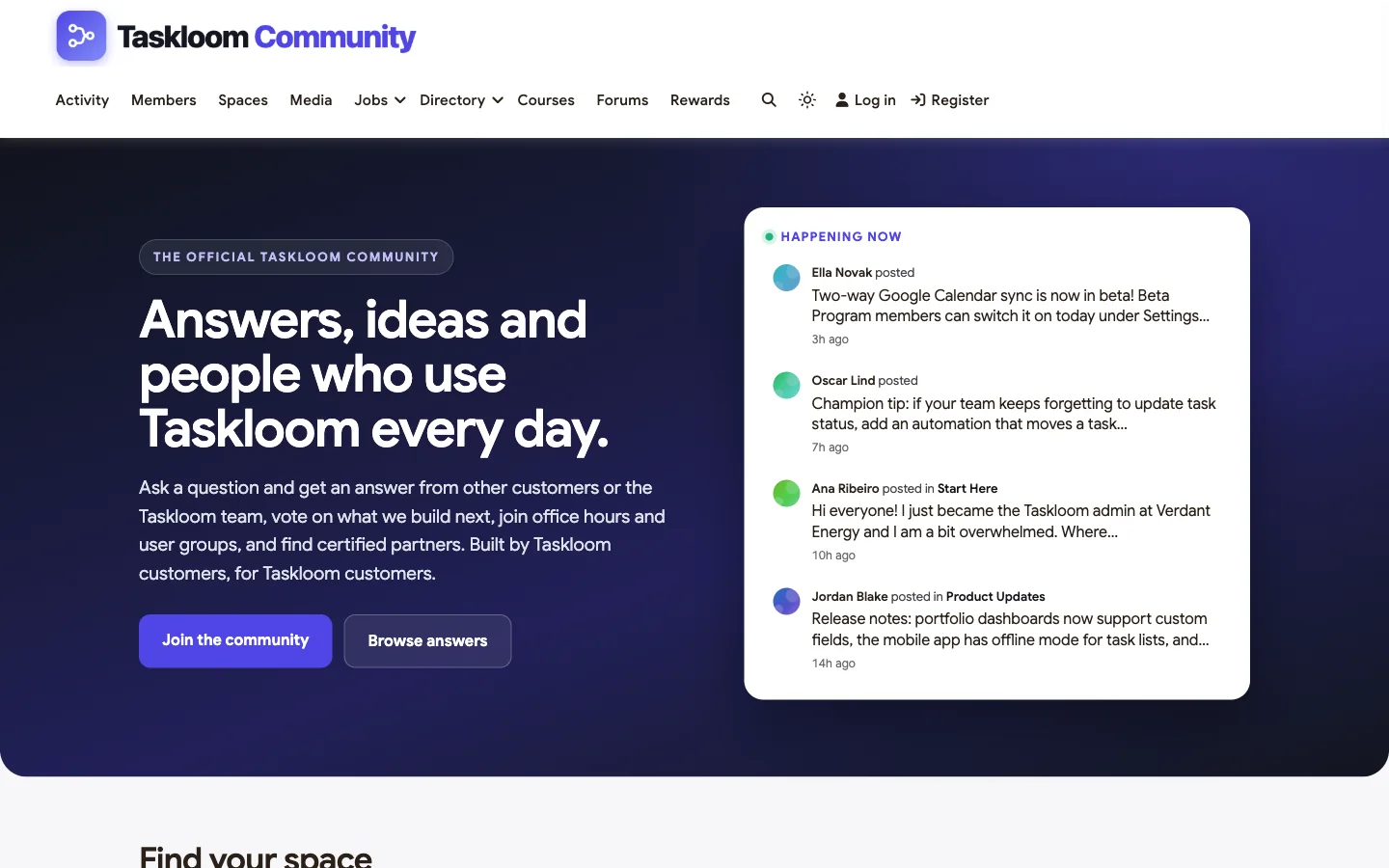
At a glance: Q&A with accepted answers · ideas board with votes and a roadmap view · private beta and admin spaces · partner directory · events and user groups · champions program · self-hosted, full data ownership.
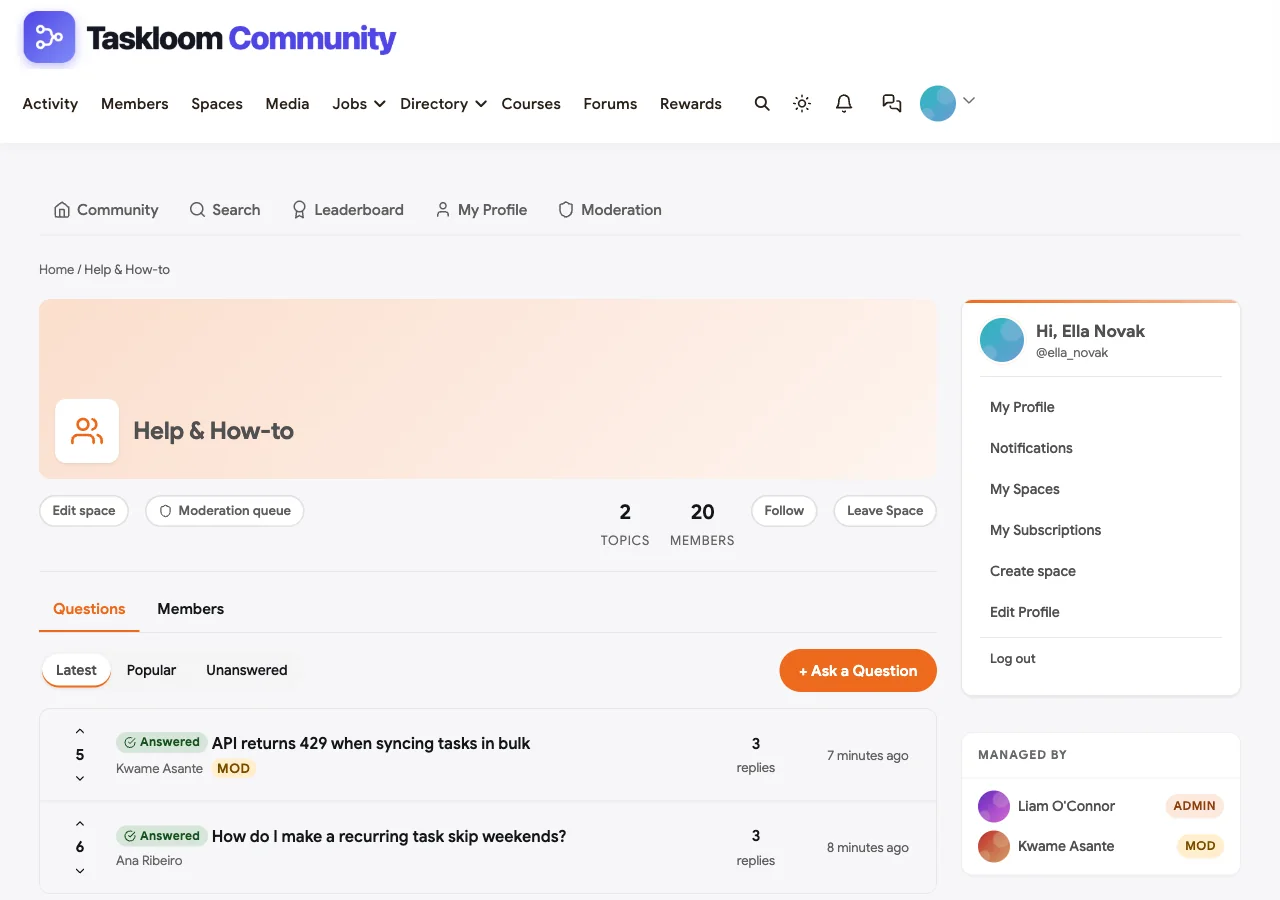
Q&A with accepted answers. The Help & How-to space is a Q&A space. Customers ask, other customers or staff reply, and the asker marks the reply that solved it. Accepted questions are labelled as answered in the list, so the next customer with the same problem sees the solution before they open a ticket.
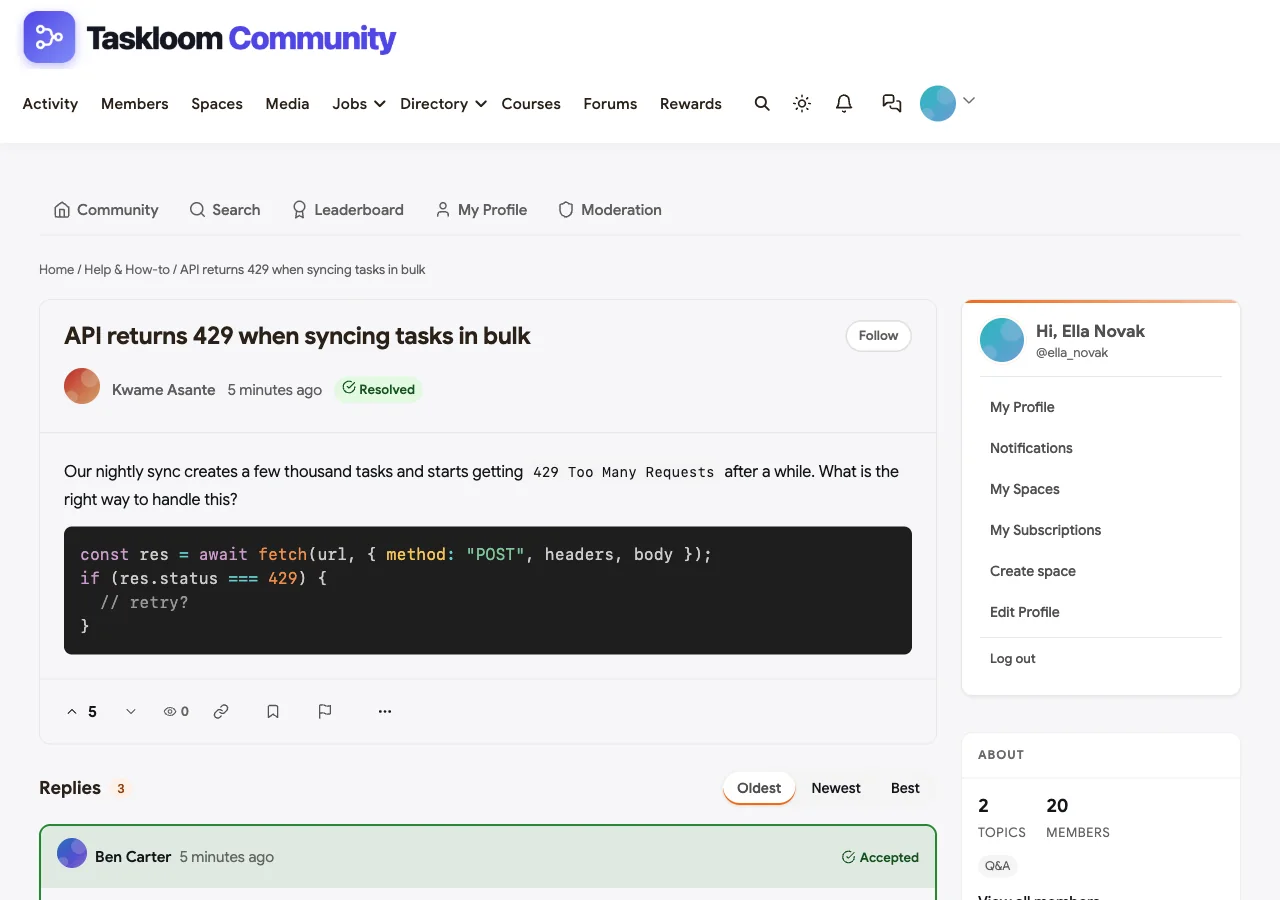
Developer questions work too. In the demo, a customer asks why the API returns 429 Too Many Requests during a bulk sync. The developer advocate’s reply, with a code example for handling the Retry-After header, is marked as the accepted answer and highlighted at the top of the replies.
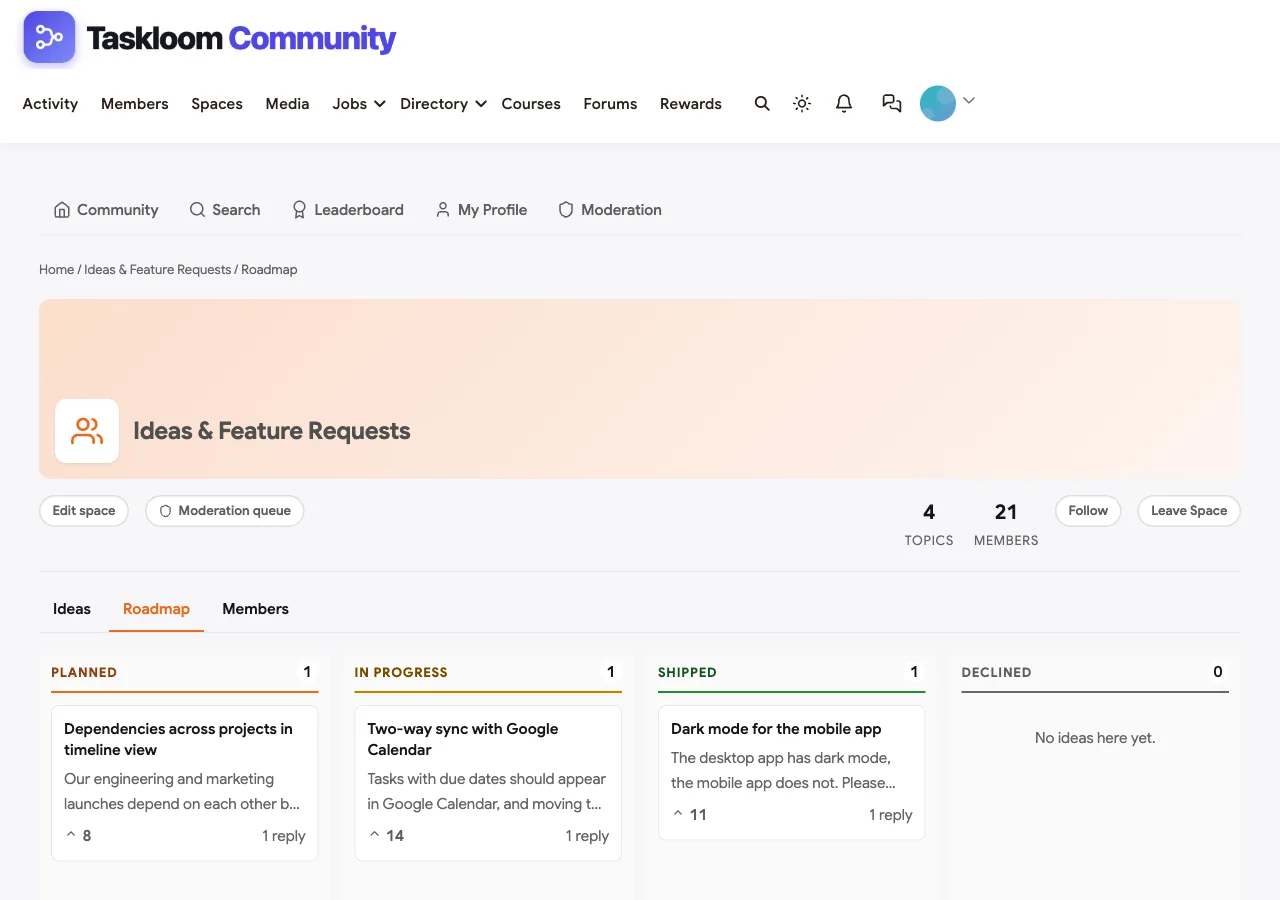
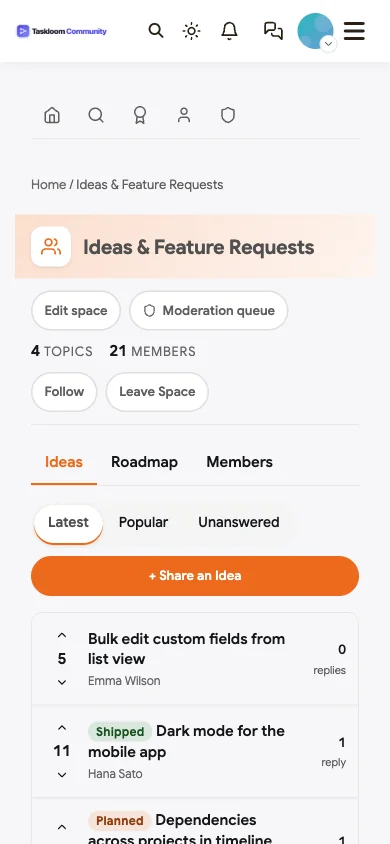
An ideas board with a public roadmap. The Ideas & Feature Requests space is an ideas space. Customers suggest features and vote; the product team sets each idea’s status to planned, in progress, shipped or declined. The Roadmap tab shows ideas in columns by status, so customers can see what is coming without asking.
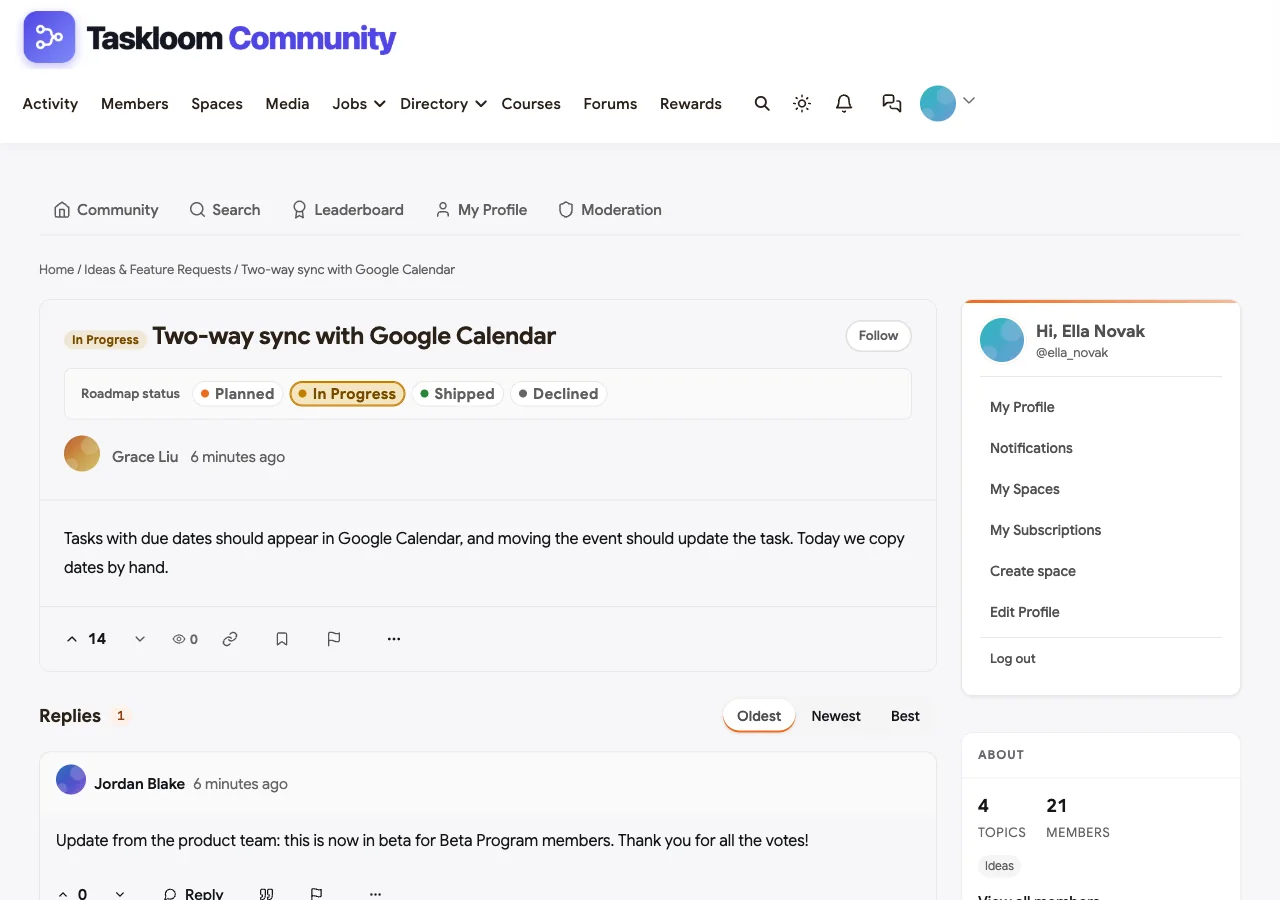
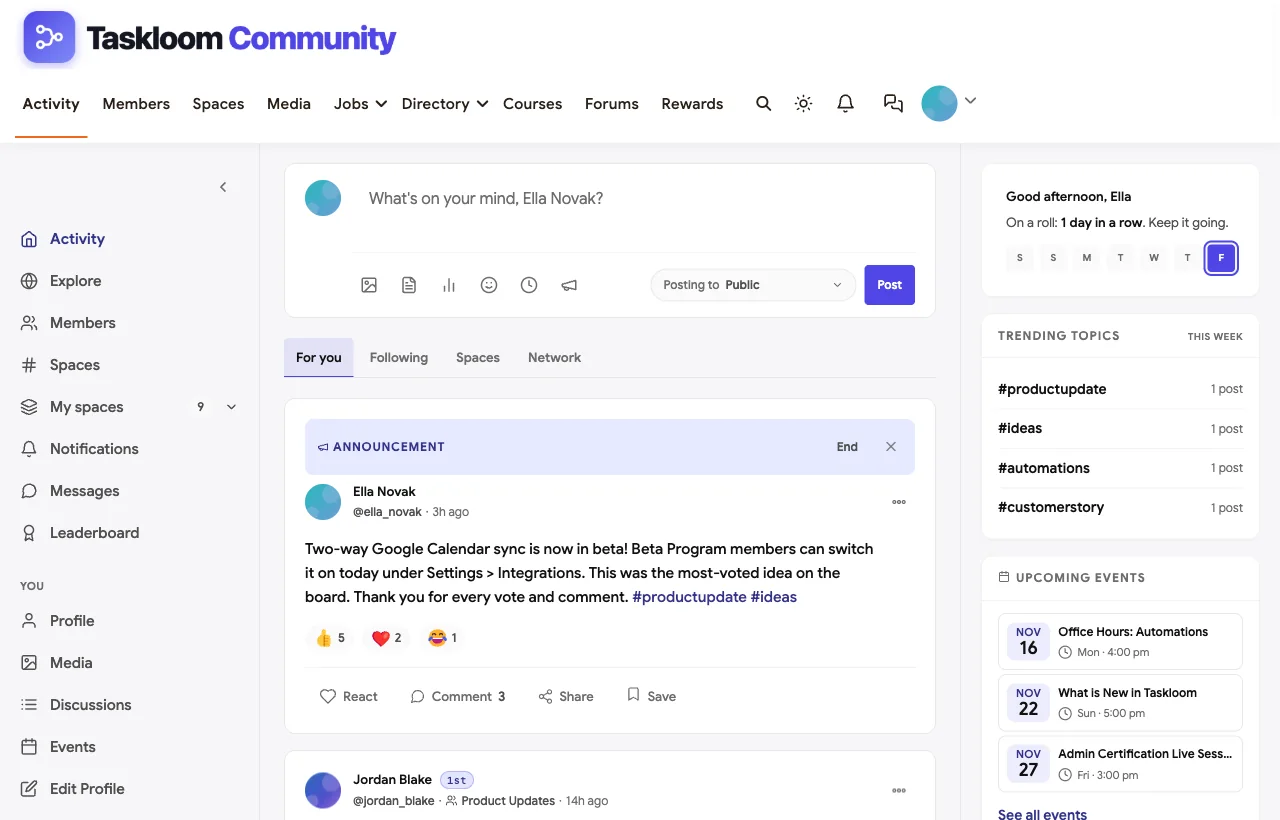
Product updates that close the loop. When an idea ships, the product team posts it in Product Updates and pins the announcement to the community feed. In the demo, the most-voted idea, two-way calendar sync, has just entered beta, and the announcement thanks the customers who voted.
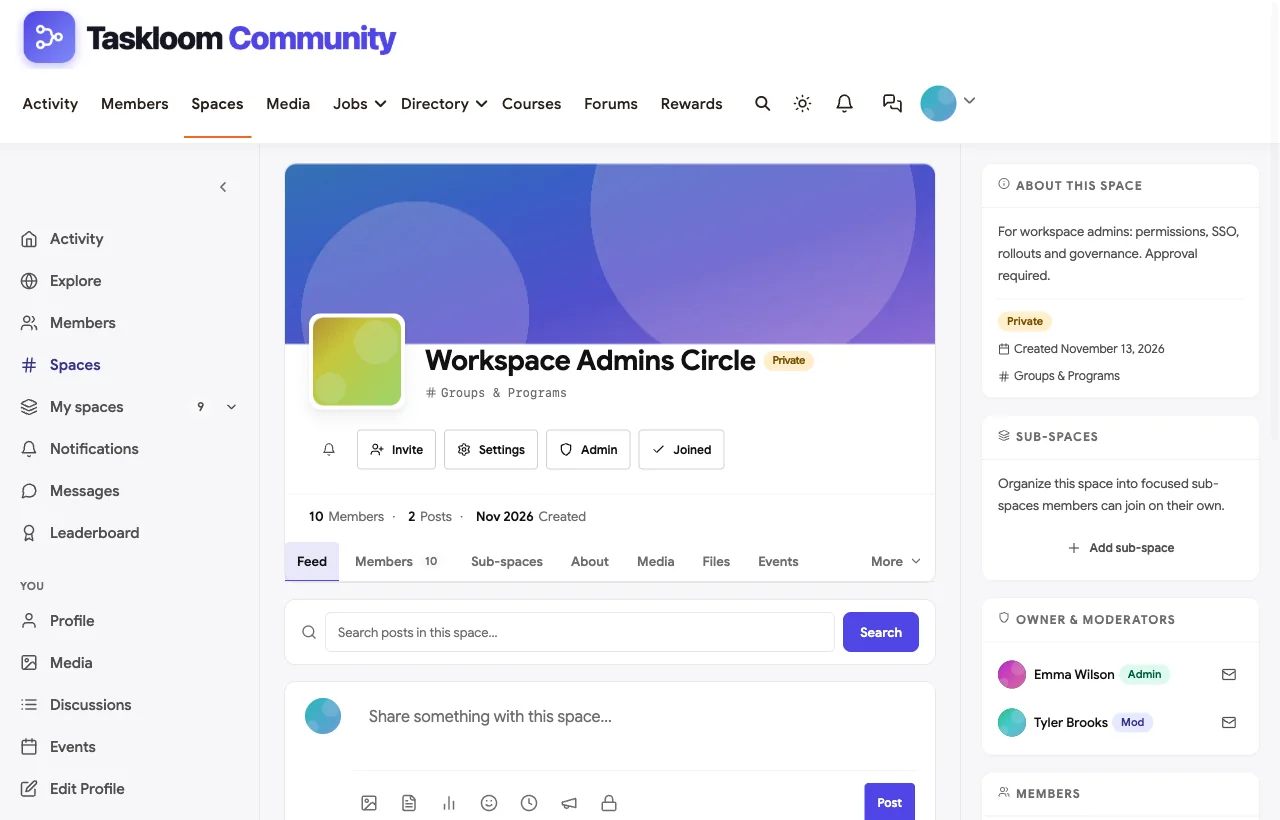
Private spaces for admins and beta testers. The Workspace Admins Circle is private: admins request to join and staff approve them, so conversations about SSO rollouts, permissions and governance stay among admins. The Beta Program is private too, and a secret Champions Lounge gives the champions program a place to plan content and events.
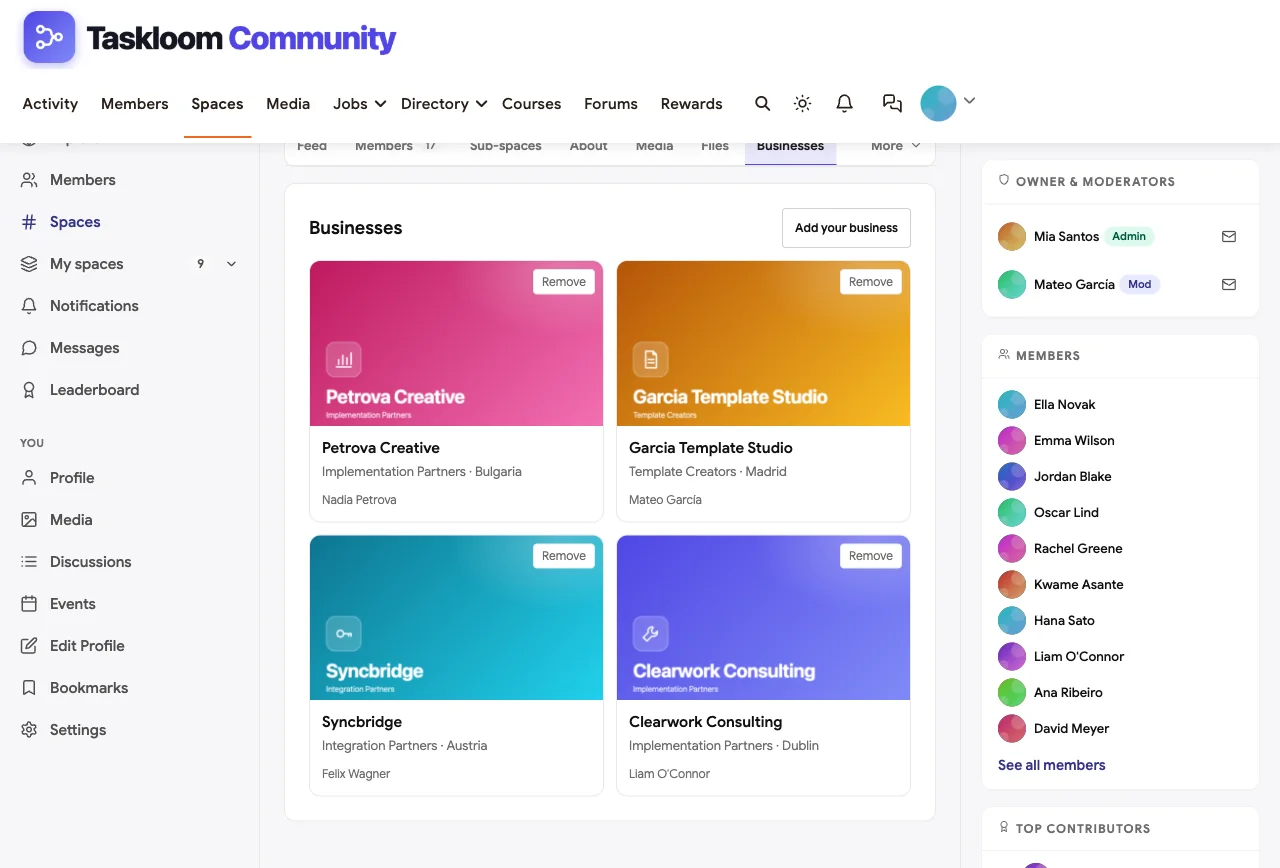
A partner directory. Certified implementation partners, integration partners and template creators each have a listing in the Partner Directory space, so customers can find help without the partners promoting themselves in Q&A threads.
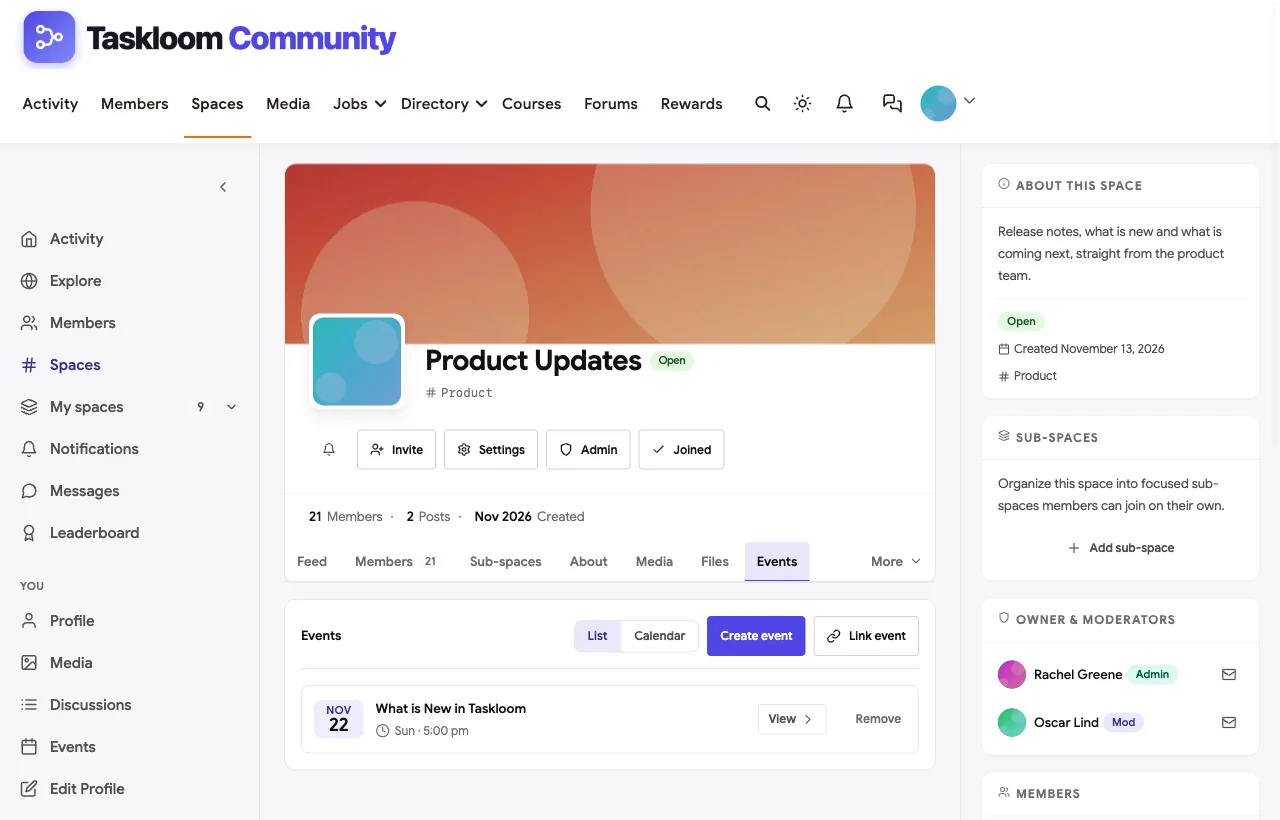
Office hours, webinars and user groups. Events can be online or in person. The demo runs champion-led automation office hours, a What is New webinar, an admin certification session and an in-person user group in London. Events appear in their space, on the homepage and in members’ feeds.
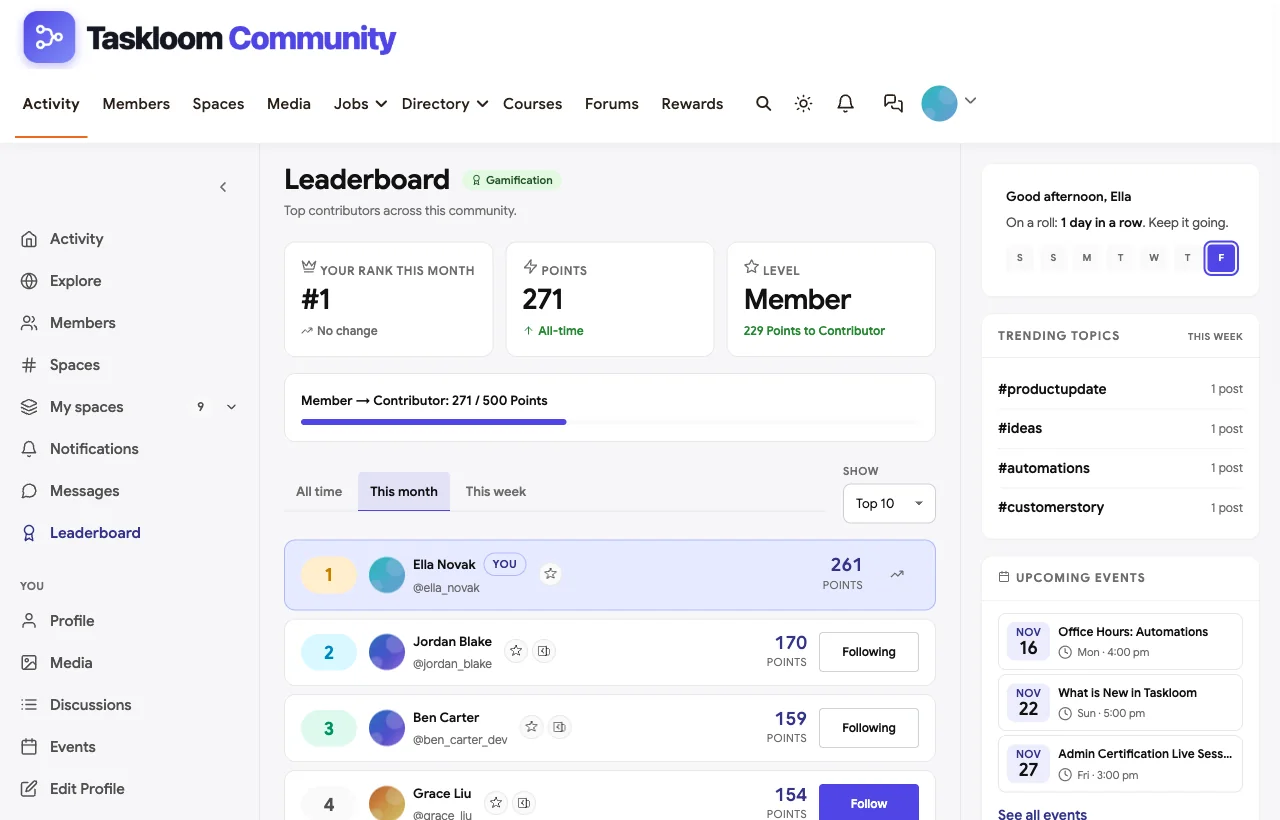
Champions you can see. Points and a leaderboard reward customers who answer questions, post tips and attend sessions. Champions stand out in their profiles and on the leaderboard, which makes it easy to invite them into a champions program.
Also built in. Courses for a customer academy, polls, hashtags, direct messages between customers and staff, notifications, member profiles with company and role, and a mobile layout that works without an app download. Single sign-on with your product’s accounts is available through established WordPress SSO plugins, and the REST API lets your developers connect the community to your product or CRM.
When to look elsewhere. BuddyNext does not include a native connector to helpdesks such as Zendesk or Salesforce Service Cloud, and it does not use AI to deflect tickets before they are created. Because it is self-hosted, your team or your host looks after the WordPress site. If you need ticket escalation built into the community on day one, an enterprise suite may fit better.
For a step-by-step setup, see our guide to building a SaaS customer support community, and for training, how to build a SaaS customer academy.
What’s included, and how it is delivered
BuddyNext is one platform made of a core and add-on platform modules. Everything shown in the demo above runs on the BuddyNext platform. This table shows which parts come with the core, which are platform modules you install and activate alongside it, and which need a third-party plugin, another system or custom work.
| Capability | How it is delivered |
|---|---|
| Open, private and secret spaces | Core platform |
| Activity feed, pinned announcements and hashtags | Core platform |
| Member profiles and searchable member directory | Core platform |
| Direct messages | Platform module, installed alongside |
| Q&A with accepted answers and code highlighting | Platform module, installed alongside |
| Ideas board with voting and roadmap statuses | Platform module, installed alongside |
| Business and partner directory listings | Platform module, installed alongside |
| Events with RSVPs, online or in person | Platform module, installed alongside |
| Courses and certificates | Platform module, installed alongside |
| Points, badges, streaks and leaderboards | Platform module, installed alongside |
| Single sign-on (SAML or OpenID Connect) | Third-party WordPress plugin |
| CRM or helpdesk sync | Third-party plugin or custom development (REST API) |
Want to click around yourself? The Taskloom Community community in this guide was built on a private test site, so it is not public. The BuddyNext live demo is a general community you can open in your browser and explore without installing anything.
2. Gainsight Customer Communities: best for enterprise support and success teams
Gainsight Customer Communities, formerly inSided, is a hosted community platform built for customer success and support. Its product page highlights AI Answers for self-service, a Moderation AI Agent that finds and handles spam automatically, AI Translations, and integrations with Gainsight CS, Skilljar, Zendesk and Jira (Gainsight).
At a glance: AI answers and moderation · ideas and product feedback · integrations with Gainsight CS, Skilljar, Zendesk and Jira · hosted only.
When it is the right call. You already use Gainsight for customer success, run a large community, and want community activity tied to health scores and the customer academy. Zapier’s community, which reports that 90% of its visits come from search engines, runs on it.
When to look elsewhere. It is an enterprise product with an enterprise rollout. Smaller SaaS teams may find it more than they need, and self-hosting is not an option. For more choices, see our list of inSided alternatives.
3. Discourse: best open-source forum for developer communities
Discourse is open-source community software, self-hosted or managed. Its homepage lists SSO and social logins, gamification, “SEO optimized for Google”, themes and plugins, and “full ownership of your data”, with “the entire Discourse codebase… freely available on GitHub” (Discourse).
At a glance: Q&A with accepted answers · trust levels and badges · indexable public topics · open source, self-hosted or managed.
When it is the right call. Your customers are developers or technical users, public searchable answers are the main goal, and you want full control of the software. Many developer tools, including n8n, run their communities on Discourse.
When to look elsewhere. Discourse is a forum first. An ideas board, events, a customer academy or a partner directory need plugins or separate tools, and the member experience is built around topics rather than a social feed. Developer-tool teams comparing options may also want our roundup of GitHub Discussions alternatives.
4. Khoros: best for very large brands combining community and social care
Khoros positions its platform as AI-native customer engagement, combining online communities with social media management and customer care. Its community product describes AI-driven self-service, automated moderation, gamification and community analytics.
At a glance: enterprise-scale communities · AI self-service and moderation · social listening and publishing in the same suite · hosted only.
When it is the right call. You are a large brand running community, social media and digital care together and want one vendor for all three.
When to look elsewhere. Its marketing pages say little about specific integrations, SSO or data export, so a technical buyer will need detailed answers from sales. For most SaaS companies, it is more suite than they need.
5. Higher Logic Vanilla: best for a focused, community-only vendor
Higher Logic Vanilla describes itself as all-in-one customer community software and stresses that “we only provide community software”. Its page lists federated search across external content, Q&A and discussions, gamification with badges, points and leaderboards, polling, a product feedback process, reporting, data downloads, and integrations through Zapier or Salesforce (Higher Logic).
At a glance: Q&A and discussions · federated search · badges, points and leaderboards · Salesforce and Zapier integrations · hosted only.
When it is the right call. You want a vendor whose only product is community, with federated search that pulls documentation and other content into one place.
When to look elsewhere. Public customer proof on the product page is thin, and it is hosted only.
6. Bettermode: best no-code community for product-led SaaS
Bettermode is a no-code community platform for SaaS teams. Its site shows discussions, a wishlist for feature requests with voting, a changelog, a roadmap, a knowledge base and events, and states that it is “SOC 2 Type II compliant” and connects to “Salesforce, Hubspot, Intercom, Segment” with APIs for custom workflows (Bettermode).
At a glance: wishlist, changelog and roadmap · knowledge base · SOC 2 Type II · Salesforce, HubSpot, Intercom and Segment · hosted only.
When it is the right call. You want a modern, hosted community with feedback and changelog features built in, and your team prefers configuring to coding.
When to look elsewhere. It is hosted only, so your community data lives on Bettermode’s platform.
7. Salesforce Experience Cloud: best if your customers already live in Salesforce
Salesforce Experience Cloud lets you build customer portals and communities on top of Salesforce. Because the community runs inside your Salesforce org, cases, accounts and contacts are the same records your service team works with, and Salesforce Knowledge articles can appear alongside community discussions.
At a glance: native Salesforce data · case deflection and self-service portals · Salesforce Knowledge · runs only on Salesforce.
When it is the right call. Your support and sales teams run on Salesforce and you want customer self-service built on the same data, with a Salesforce admin team to configure it.
When to look elsewhere. It requires Salesforce licensing and administration, and it is a portal toolkit more than a lively community platform out of the box.
8. Zendesk community forums: best if you already run Zendesk support
Zendesk’s community forum software, known as Zendesk Gather, lets customers “help each other” alongside your Zendesk help center. Its page highlights searchable posts and topics, suggestions of similar posts to avoid duplicates, badges for top contributors, moderation tools, multiple communities for different audiences, regions or brands, and customisation with themes, code or APIs (Zendesk).
At a glance: tied to your Zendesk help center · badges and feedback · multiple branded communities · hosted only.
When it is the right call. Your support team lives in Zendesk and you want community answers to sit next to your help center articles.
When to look elsewhere. It is part of the Zendesk ecosystem rather than a standalone community platform, so ideas, events and an academy need other tools.
9. Circle: best for SaaS companies building an education-led community
Circle is an all-in-one platform for community, courses, events and payments, with branded apps. Its integrations include HubSpot, Salesforce, Zapier and Make, and its API can export data to external systems.
At a glance: spaces, courses and events · branded mobile apps · CRM integrations · hosted only.
When it is the right call. Your community is more about education and peer learning than support, for example a SaaS company running a professional community around its category.
When to look elsewhere. Circle’s own showcased customers are mostly creators and educators. It does not lead with Q&A accepted answers or an ideas board with roadmap statuses, which are central to a support and product loop.
10. Discord: best for developer and AI tool communities that live in chat
Many developer tools and AI products run their communities on Discord because their users are already there. It offers text and voice channels, forum channels and strong moderation tools.
At a glance: real-time chat and voice · forum channels · bots and integrations · not indexable.
When it is the right call. Your users are developers or gamers who expect real-time chat, and speed matters more than a searchable archive.
When to look elsewhere. Discord’s own community page is aimed at game studios. Answers are not indexable by search engines, there is no ideas board with roadmap statuses, and you do not own the platform or its data.
11. Slack Connect: best for high-touch enterprise accounts
Slack Connect brings customers into shared channels with your team. Slack’s customer service page quotes Fastly: “We hear back from our customers that we’re like an extension of their team” (Slack).
At a glance: shared channels per customer · real-time support · not a public community.
When it is the right call. You have a small number of high-value accounts that expect white-glove, real-time support.
When to look elsewhere. Shared channels are one-to-one or one-to-few. They do not create public answers, an ideas board or a community where customers help each other.
What about Common Room? Common Room is often mentioned alongside customer community tools, but its product page now positions it as buyer intelligence that combines signals from CRM, product and engagement data. It is a layer you run on top of your channels, not a place to host a community.
SaaS customer community software compared
| Software | Q&A with accepted answers | Ideas and roadmap | Product updates | Private beta and admin spaces | Partner directory | Events | Hosting and data |
|---|---|---|---|---|---|---|---|
| BuddyNext | Yes | Yes, voting and roadmap statuses | Yes, pinned announcements | Yes, private and secret | Directory listings | Yes | Self-hosted, you own the data |
| Gainsight CC | Yes, with AI Answers | Yes, product feedback | Yes | Not detailed | Not documented | Not detailed | Hosted |
| Discourse | Yes | Via plugins or categories | Via categories | Yes | No | Via plugin | Self-hosted or managed |
| Khoros | AI self-service | Not detailed | Not detailed | Not detailed | Not documented | Not detailed | Hosted |
| Higher Logic Vanilla | Q&A and discussions | Product feedback process | Not detailed | Role-based permissions | No | Not detailed | Hosted |
| Bettermode | Discussions and Q&A | Wishlist and roadmap | Changelog | Not detailed | Not documented | Yes | Hosted |
| Salesforce Experience Cloud | Q&A forums | Via configuration | Via configuration | Yes | Via configuration | Via configuration | Salesforce only |
| Zendesk community | Community answers | Feedback with badges | Via help center | Multiple communities | No | No | Hosted |
| Circle | Discussions | No | Posts | Yes | Member directory | Yes | Hosted |
| Discord | Forum channels | No | Announcements channel | Yes | No | Yes | Hosted |
| Slack Connect | No | No | No | Shared channels | No | No | Hosted |
Building the support-to-roadmap loop
For the full setup, screen by screen, see our step-by-step guide to building a SaaS community with feature requests and a public roadmap.
Whatever software you choose, the loop needs a few simple rules and owners. This is how we set it up in the Taskloom demo.
| Step | What happens | Who owns it | Rule of thumb |
|---|---|---|---|
| 1. Ask | A customer posts in the Q&A space | Customer | One question per thread, with what they tried |
| 2. Answer | A customer, champion or staff member replies | Champions first, staff as backup | Staff step in if there is no answer within one business day |
| 3. Accept | The asker marks the answer that worked | Asker, or a moderator after a week | Every solved thread should end accepted |
| 4. Find | The answer is searchable inside the community and, if public, in search engines | Community manager | Retitle vague threads so they match how people search |
| 5. Suggest | Gaps become ideas on the ideas board | Moderators move feature requests out of Q&A | One idea per thread; merge duplicates |
| 6. Prioritise | Customers vote; product sets a status | Product manager | Update statuses at least monthly, including declined ideas with a reason |
| 7. Ship | The release note links back to the idea | Product and community | Thank the voters by name or by count |
The last step matters most. Customers forgive slow roadmaps; they do not forgive silence. A declined idea with an honest reason builds more trust than an idea that sits untouched for a year. Developer-tool companies run the same loop with code-heavy questions; see our AI agent developer community guide.
Metrics that show the community is working
| Metric | What it tells you | Healthy direction |
|---|---|---|
| Time to first answer | Whether customers get help fast enough to choose the community over a ticket | Falling, ideally within a business day |
| Accepted-answer rate | Whether threads end with a clear solution | Rising |
| Share of answers from customers | Whether the community scales beyond your staff | Rising over time |
| Search entrances to answers | Whether public answers bring customers in from search | Rising |
| Ideas with a status | Whether product is closing the loop | Close to all of them |
| Members who attend events | Whether education and adoption programs land | Steady or rising |
| Active champions | Whether advocacy is growing | Rising |
Ticket deflection is the number executives ask for, but it is hard to measure precisely. Start with the metrics you can count directly, such as answers, accepted answers and search entrances, and compare support volume for topics with strong community coverage against topics without it. For why public answers rank in search at all, see software for an SEO professionals community.
Launch checklist for a SaaS customer community
- Pick the first two jobs. Most teams start with Q&A and ideas. Add events and an academy once the loop works.
- Seed 30 real questions. Pull them from recent tickets, rewrite them as customers would ask, and answer them well. Mark the answers accepted.
- Recruit five to ten champions. Power users who already help others. Give them early access and a private space.
- Connect sign-in. Customers should use the same account as your product, or a single click to join.
- Link from the product and help center. Put “Ask the community” next to “Contact support”, and link ideas from your feedback widget.
- Publish the house rules. One question per thread, search first, be kind, no sharing of private customer data.
- Schedule the first office hours. A recurring live session gives customers a reason to return.
- Report monthly. Share the metrics above with support, product and success, and thank champions in public.
More community platform comparisons
Building a different kind of community, or one that overlaps with this one? These guides use the same method: a working demo community and vendor claims checked at the source.
- Best platforms for a WordPress developer community: Q&A with code, ideas with a roadmap, agencies, jobs and meetups on WordPress.
- Best customer education platforms: customer academies with onboarding courses, admin certification, live training and community Q&A.
- How to build a SaaS customer community with feature requests and a public roadmap: the step-by-step build behind this demo, from ideas and triage to closing the loop.
- Best software for an AI agent developer community: code Q&A, roadmaps and hackathons.
- Best software for an AI automation community: no-code builders sharing workflows and automations.
- Best software for a Shopify sellers community: store teardowns, masterminds and app spam control.
- Best software for an SEO professionals community: indexable Q&A and code-friendly answers.
- Best software for an online course community: course creators who want learners to finish.
- How to set up a community space on WordPress: the step-by-step setup guide behind every demo in this series.
How we built and checked this list
We built the Taskloom Community demo on a local WordPress site running BuddyNext, with a fictional product, customers, partners and staff created for this guide; every BuddyNext screenshot comes from it, including the Q&A accepted answers, idea votes and roadmap statuses. Competitor features come from each vendor’s own website, checked in November 2026 and linked where we quote them. Customer results such as Zapier’s and Gong’s are vendor-published stories, labelled as such. We did not run paid accounts on every competitor, and features change, so confirm anything critical with the vendor. buddyxtheme.com is published by the team behind BuddyNext, which is why it is listed first; we have tried to be fair about its gaps as well as its strengths.
Frequently asked questions
What is the best software for a SaaS customer community?
BuddyNext is the best choice for a SaaS customer community you own, with Q&A spaces that support accepted answers, an ideas board with voting and a roadmap view, product updates, private beta and admin spaces, a partner directory and events on your own WordPress site. Gainsight Customer Communities and Khoros lead for large enterprise teams, and Discourse is the strongest open-source forum.
Does a customer community really reduce support tickets?
It can, when answers are public, searchable and accepted. Zapier reports that 90% of its community visits come from search engines, which means customers find answers before they contact support. Measure answers, accepted answers and search entrances, and compare ticket volume on topics the community covers well.
Should a SaaS community be public or private?
Make Q&A and ideas public so customers and prospects can find answers and see your roadmap. Keep admin, beta and partner discussions private. Public answers are what bring new customers in from search.
What is the difference between a customer community and a knowledge base?
A knowledge base is written by your team; a community is written by your customers and your team together. The best setups link them: popular community answers become knowledge base articles, and articles link to community discussions for edge cases.
How do I collect feature requests in a community?
Use an ideas space where customers post one idea per thread and vote. Give each idea a status (planned, in progress, shipped or declined) and post a product update when ideas ship. BuddyNext, Bettermode and Gainsight include this; Discourse can approximate it with categories and plugins.
Can customers log in to the community with their product account?
Yes, on most platforms through single sign-on. Enterprise suites offer it natively; on WordPress, BuddyNext works with established SAML and OpenID Connect plugins so customers use their product account.
Is Discord good for a SaaS customer community?
Discord works well for developer and AI tool communities that want real-time chat. Its answers are not indexable by search engines and it has no ideas board with roadmap statuses, so many companies pair it with a forum or community platform for anything worth keeping.
How many people do I need to run a customer community?
Many SaaS communities start with one community manager supported by part of the support team and a group of champions. Zapier reports that “three people can do the work of 30” in its community. The work scales with how many answers come from customers rather than staff.
What is a champions program?
A champions program recognises your most helpful customers with early access, private spaces, events and public credit. Champions answer questions, host office hours and give early product feedback. Points and leaderboards help you spot them.
Should we build our customer community on our own domain?
Yes, if search visibility and data ownership matter. A community on your own domain builds your site’s authority, keeps customer data in your systems and lets you move or customise it freely. Self-hosted options such as BuddyNext and Discourse give you the most control.
The bottom line
A SaaS customer community succeeds when it closes the loop: questions get answered, answers get found, gaps become ideas and ideas become releases customers can see. Enterprise suites do that at very large scale for teams with enterprise budgets and stacks. If you want the whole loop on your own domain, with your customers’ data in your own database, BuddyNext is the strongest foundation.
And build a customer community that answers, listens and ships.