

A fan page gives a celebrity, artist, athlete, or public figure a place separate from a personal profile, something with its own feed, contact channel, and follower count that the fanbase can gather around. It’s the difference between fans scattered across individual friend connections and a single, findable hub built for exactly that purpose.
What BuddyBoss Provides on Its Own
BuddyBoss covers member profiles, groups, activity feeds, private messaging, course delivery for anyone running training alongside the community, tiered memberships, and a path to a branded mobile app. None of it is built specifically for a fan-facing presence distinct from a personal member account, that’s a separate layer.
What BuddyPress Business Profile Does
BuddyPress Business Profile from Wbcom Designs handles this on a BuddyBoss site, despite the name. Any member can spin up a page, business, brand, celebrity, fan, using the same underlying feature set, differentiated by category.
Current version (v2.1.0) includes:
- Custom profile fields, logo, cover image, contact info, and social links.
- A dedicated activity feed for the page, separate from personal activity, with comments and likes.
- Private messaging through a per-page inbox.
- Role assignment, admins, editors, moderators, per page, with control over who can create, edit, or delete pages.
- Reviews and star ratings, a searchable directory with map view, and public follower counts.
- LocalBusiness SEO schema, generated automatically.
Requirements
An existing BuddyPress or BuddyBoss community, PHP 7.2+, and WordPress 5.0+. Runs on Chrome, Firefox, and Safari, and is responsive across desktop, tablet, and mobile, worth confirming directly on a phone before launch since that’s how most fans will actually encounter the page.
Fan Page vs. the Standard Member Profile
It’s worth asking whether a separate plugin is really necessary, or whether a heavily customized standard profile would do. For a very small, casual following, it might. Where it breaks down is anything past static bio information: a personal profile has no separate feed distinct from the individual’s own activity, no public follower count distinct from BuddyBoss’s mutual-friend model, and no way to delegate management to someone else without handing over the account entirely.
Those three gaps, a dedicated feed, an asymmetric following relationship, and delegated access, are exactly what a fan page needs and a standard profile can’t provide without a separate plugin layered on top.
Setting Up a Fan Page
Install and activate the plugin, then click Create a Business.
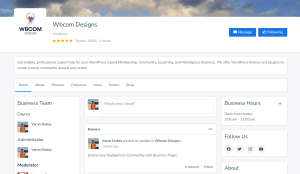
Enter the fan page’s name, a short description, and a category. Click Create Business and Continue, upload a profile photo, then a cover image. The page is live at that point, reviews, follower counts, and gallery content can be filled in any time after.
Building Out the About Tab Properly
A fan page that goes live with just a name and photo technically works, but it doesn’t do much for a fan landing on it for the first time. The About tab’s repeater fields are where the page actually earns attention, structured entries for notable work, achievements, or milestones, each with a short description, rather than one long paragraph trying to summarize an entire career or body of work at once.
Photos attached to each entry matter more here than almost anywhere else on the page. A bare list of accomplishments reads like a résumé, while even one representative image per entry, an event photo, a project still, gives a fan something to actually look at rather than skim past.
Fan Page vs. Group: Which One Actually Fits
BuddyBoss groups are the other obvious option for gathering fans in one place, so it’s worth ruling that out explicitly before setting up a fan page. A group is built for member-to-member discussion, a shared space where members talk to each other as much as to whoever runs it. A fan page is built to represent one individual to the wider community, members and non-members browsing the directory alike, with a public follower count, reviews, and a feed that reads more like a broadcast channel than a discussion board.
Groups also lack a few things a fan page has by default: no reviews system, no LocalBusiness schema for search visibility, no branding controls beyond a basic cover image. Nothing stops a fan community from running both, a fan page as the public-facing hub and a group as a more focused space for the most engaged fans to actually talk to each other, and for anyone with a sizable, active following, that combination tends to outperform either alone.
Handling Fan Messages Without One Person Burning Out
The private inbox is genuinely useful for direct fan contact, but it doesn’t scale to personal management once a page has any real following. Role assignment exists for exactly this: bring on a manager, assistant, or dedicated moderator to handle routine inbox and comment activity, escalating only what genuinely needs the individual’s personal attention.
Decide this division of labor before message volume becomes overwhelming, not after a backlog has already piled up. A fan page with slow, inconsistent replies undercuts the goodwill it’s supposed to build, and unclear ownership tends to leave a page either neglected or bottlenecked on one overloaded person, neither a great first impression for a new fan reaching out.
Extending the Rest of Your Community
Wbcom Designs’ broader BuddyPress/BuddyBoss lineup:
- BuddyPress Member Type (free), custom member classifications.
- BuddyPress Member Blog / Member Blog Pro (free / from $49), frontend blogging from a member profile.
- BuddyPress Check-ins / Check-ins Pro (free / from $49), location tagging, with maps on Pro.
- BuddyPress Statistics (from $49), registration, post, and engagement tracking.
See the full Wbcom Designs catalog for the rest.
Posting Content Fans Actually Want to See
A fan page’s activity feed works best when it gives fans something they can’t get from the individual’s other, more public social accounts, behind-the-scenes material, early updates, direct answers to fan questions, rather than duplicating exactly what’s already posted everywhere else. A feed that’s just a mirror of an existing Instagram or Twitter account gives a fan no real reason to check it specifically, while genuinely exclusive or community-specific content does.
Mix formats rather than repeating the same structure every time, photos, short updates, direct questions to fans, occasional longer posts about a project or milestone. Visual content tends to perform better in a social feed context than plain text, and a page with access to real photos or video should lean into that rather than defaulting to text because it’s faster to produce.
Growing a Following Organically
The public follower count is the first thing a lot of visitors check before deciding whether a page is worth engaging with, which makes it tempting to inflate through low-effort follows from existing personal contacts rather than genuine fans. That tends to backfire: a follower count that doesn’t match the actual engagement on posts, likes, comments, review activity, is noticeable to anyone paying attention, and the mismatch reads worse than a smaller, honestly earned number.
Real growth here comes mostly from consistent, genuinely engaging activity-feed content and cross-promotion through whatever other channels already exist, an email list, existing social accounts, a mention during an event or appearance, rather than any mechanism specific to the plugin itself.
Reviews on a Fan Page: What They’re Actually For
Reviews might seem like an odd fit for a fan page compared to a business, there’s no product being rated. In practice, the reviews tab tends to fill up with fan testimonials, positive experiences meeting the individual, attending an event, or just general appreciation, which functions less like a star-rating system and more like a visible guestbook. A page with a handful of genuine, specific reviews reads as more established than one with none, the same social-proof effect that works for a business profile, just repurposed for a fan context.
Don’t solicit reviews aggressively or in a way that feels transactional, a request that reads as begging undermines the authenticity the reviews are supposed to convey. A natural mention after a positive interaction, an event, a direct message exchange, tends to generate more genuine reviews than a blanket ask posted to the feed.
Onboarding Whoever Manages the Page
The person setting this page up is often not the same person managing it day to day, an assistant, a manager, or someone handling social media on the individual’s behalf usually ends up running it. Design onboarding for that reality, a short written walkthrough or a quick screen-recorded tutorial covering the fields relevant to this specific page saves a lot of back-and-forth compared to expecting a new manager to reverse-engineer the interface.
Include in that walkthrough who to contact if something breaks. A clear internal support path matters more for a page with real public visibility than for an ordinary member’s profile, a visible glitch reflects on both the individual and the community hosting the page.
Handling a Sudden Spike in Attention
A fan page can go from quietly active to overwhelmed fast, viral content, a major event, unexpected press coverage. Planning for that scenario before it happens beats scrambling once it does. Have a clear sense in advance of who takes over inbox triage if message volume spikes well past the usual rate, and decide ahead of time how much of that surge actually needs the individual’s personal attention versus a standard templated response from whoever’s managing things.
A sudden spike is also when an inconsistent posting history becomes most visible, new visitors arriving in a rush will scroll back through the existing feed, and a thin or stale history undercuts the credibility a fan page is supposed to establish right when it matters most. Keeping the feed reasonably current on an ongoing basis, rather than only around planned announcements, pays off precisely in these unplanned moments.
Before the Public Announcement
Treat the launch as a small event rather than something that happens automatically the moment the page is technically live. Confirm every field is filled in, send a test message to the inbox from a separate account, and check how the page renders on mobile, most fans discovering a page will be browsing from a phone rather than a desktop.
Have several activity-feed posts ready before announcing anywhere. An empty feed on a brand-new fan page reads as unfinished even if the About tab is already polished, while three or four posts already up gives arriving fans something to engage with immediately.
Writing an About Section That Actually Gets Read
The main description is the single highest-traffic piece of text on the page, most fans read it before anything else. A common mistake is treating it like formal press-kit language, dense with credentials, when a more conversational tone, still credible but written like something a person would actually say, tends to hold attention better and reads as more approachable to a fan looking to connect rather than research.
Keep it to two or three tight paragraphs rather than one long block, both for scannability and because the plugin’s search index weighs this field, natural writing tends to surface better than a dense, keyword-stuffed version. Revisit it as things change, a description that hasn’t been updated in two years reads as neglected even if the rest of the page is current.
Cover Photo and Logo: What Fans See First
Before a fan reads a single word of the About section, they’ve already reacted to the cover photo and profile image. A blurry, cropped-awkwardly, or clearly recycled image undercuts a page that might otherwise be well written and actively managed, while a sharp, well-chosen photo sets the tone before anything else does.
This doesn’t need to be a professional shoot. A genuine, current photo, from a recent event, a project, an everyday moment relevant to why fans are following in the first place, tends to land better than an overly staged or outdated image. Update it when it stops reflecting where things currently stand, an old cover photo from a project that wrapped years ago sends a subtly stale signal even if the rest of the page is active.
Choosing Visibility: Public, Private, or Hidden
Public visibility fits the overwhelming majority of fan pages, since the entire point is usually maximum discoverability, fans finding the page through search or the community directory. Private visibility, requiring a follow or approval step, suits a smaller, more curated fan relationship rather than broad reach.
Hidden visibility mostly makes sense during setup itself, building the page out fully before any announcement, rather than as a long-term state. A hidden page earns nothing from the search and directory visibility that’s the main reason to use this plugin over a plain member profile, so treat it as a temporary staging state, not a permanent configuration.
Keeping the Page Current
A fan page set up once and never revisited slowly drifts out of date, missing recent milestones, an old cover image tied to a past project, contact details that changed. None of this breaks the page technically, but it erodes credibility gradually, and there’s no error message flagging it, just a fan noticing the content feels stale.
A light quarterly review, checking the About tab for anything new to add, confirming links still point to active channels, refreshing the cover image if it’s tied to a specific past era, keeps the page feeling maintained without demanding constant attention. Fold this into whoever’s already managing the inbox rather than treating it as a separate task nobody owns.
Frequently Asked Questions
Can the page be verified so fans know it’s authentic? The plugin doesn’t include a built-in verification badge. Communities handle this at the policy level, either restricting page creation for known public figures to admin-only setup, or applying a manually managed verified indicator communicated through onboarding materials.
Does this help the page show up in search results? Yes, the LocalBusiness schema markup applied automatically gives search engines more structured information than a standard personal profile carries, which can help visibility.
Can more than one person manage the same fan page? Yes, role assignment supports multiple managers with different permission levels, each keeping their own login, so a manager and an assistant can share responsibility without sharing credentials.
What happens to the page if the individual stops being active in the community? It persists until someone with admin or owner access deletes or deactivates it. Communities should have a clear offboarding process for this rather than leaving a stale, unmanaged page live indefinitely.
Is there a limit on how many fan pages a site can host? No fixed limit, though a site owner can configure per-role limits to prevent spam pages on a large open community.
Can a fan page be created for someone who isn’t actively managing their own online presence? Technically yes, but this is worth thinking through carefully before doing it. An unofficial or unmanaged fan page can create confusion about authenticity, and if the individual later wants to take it over or object to how it’s run, an unmanaged page with an established following is harder to hand off cleanly than one set up with their involvement from the start.
Do reviews and comments require moderation before appearing publicly? The plugin doesn’t enforce pre-moderation by default, comments and reviews post immediately. Page admins and moderators can remove problematic content after the fact, so an active management routine matters more here than it would with a pre-moderation queue.
BuddyPress Business Profile pricing: $59/year (1 site), $129/year (5 sites), $299/year (unlimited), plus lifetime options. Every tier includes the full feature set described above, the difference between them is purely how many sites a single license covers, not which features are unlocked.
Interesting Reads:
How to Create a Celebrity Profile on a BuddyBoss Community?
How does Profile Pro enhance the functionality of BuddyPress Profiles?