

An active online community runs on more than good intentions. A group admin who’s guessing at what members actually want, based on gut feel or a handful of vocal commenters, is making decisions on incomplete information, and the members who quietly log in once, look around, and never come back never show up in that gut-feel picture at all. The loudest voices in a community’s comment section rarely represent the full membership, and a strategy built entirely around what those loud voices say they want can end up serving a small, vocal minority while the quiet majority drifts away unnoticed.
Wbcom Designs‘ BuddyPress Stats plugin exists to close that gap, giving you an actual record of what’s happening across your BuddyPress community instead of a hunch. This piece walks through what the plugin tracks, why that data matters for the day-to-day decisions a community manager makes, and two companion plugins worth knowing about if profile depth and member reviews are part of your community strategy too.
Plugins Worth Knowing for BuddyPress User Experience

Three specific plugins cover most of what a BuddyPress community manager needs to improve the day-to-day member experience, and each solves a distinct problem rather than overlapping with the others.
1. BuddyPress Profile Pro
BuddyPress Profile Pro replaces the thin default profile fields with something that can actually represent a member properly. Repeater fields and field groups let a member list multiple work history entries, multiple certifications, or multiple skills, the same field type used more than once rather than settling for a single cramped text box. For a professional or interest-based community where members’ backgrounds are part of what makes the network valuable, that depth is the difference between a profile that looks like a form and one that reads like an actual bio.
2. BuddyPress Member Reviews
BuddyPress Member Reviews lets registered members leave reviews directly on other members’ profiles, which introduces a light layer of social proof and accountability that a lot of communities are missing. The review form supports multiple rating criteria, each scored up to five points, so a review can capture more than one dimension, reliability and communication as separate scores, for instance, rather than a single flat star rating. A built-in widget surfaces top-rated members, which gives quality contributors visibility and gives newer members something to work toward.
3. BuddyPress Stats
BuddyPress Stats is the plugin this piece is really about, and it’s the one that turns the other two from features into a feedback loop. Once you know how members are actually engaging, registration trends, activity spikes, which parts of the community get used and which sit dormant, you can tell whether the profile depth from Profile Pro or the social proof from Member Reviews is actually changing behavior, rather than just assuming it is.
What BuddyPress Stats Actually Tracks
The plugin’s activity log keeps a running, detailed record of everything happening across the site: user registrations, posts, comments, group activity, and more, all timestamped and queryable rather than scattered across the database with no way to review them as a pattern. That log is the foundation everything else in the plugin builds on, since you can’t spot a trend in data you’re not actually recording in the first place.
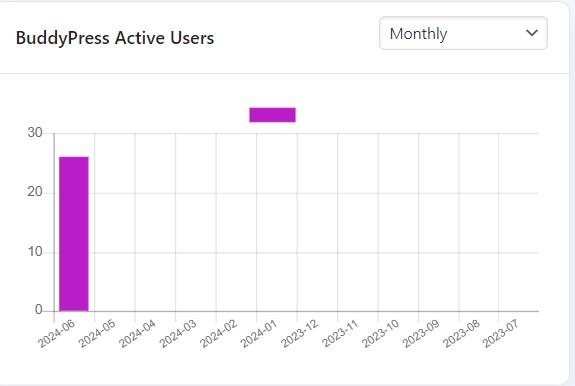
Active user tracking identifies who’s actually driving engagement in your community right now, not who joined the earliest or has the most total posts historically, but who’s showing up and participating currently. That distinction matters because a community’s most valuable members today aren’t always the founding members from year one, and a plugin that only surfaces historical totals misses who’s actually carrying the community forward at this moment.
Community insight rolls individual activity data up into a broader picture of overall engagement and popularity trends, letting you see whether the community as a whole is growing, plateauing, or quietly losing steam well before a plateau turns into an actual decline you can’t recover from easily.
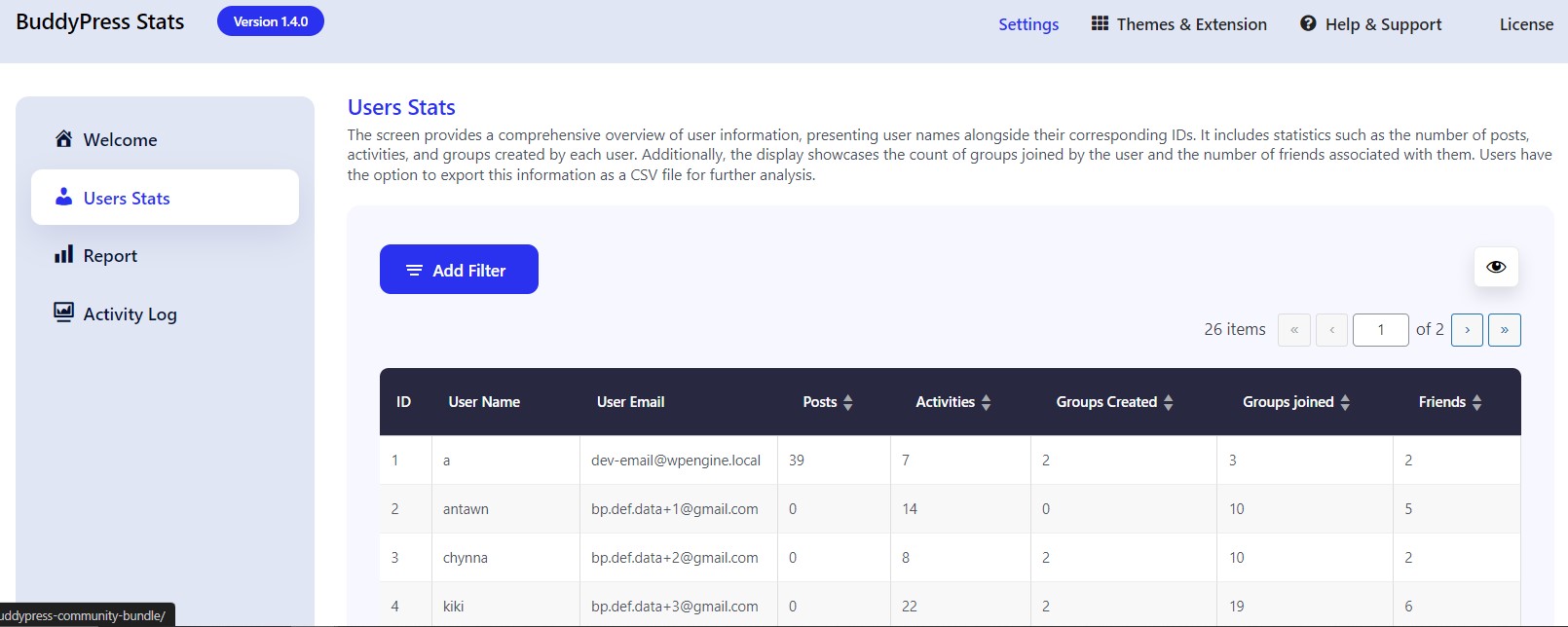
User engagement monitoring goes a level deeper than the community-wide overview, breaking activity down in a way that helps you spot where members are dropping off, whether that’s a specific group that’s gone quiet, a feature nobody’s using, or a general decline that needs attention before it compounds. Seven different widget types, each built around a graph rather than a raw number table, put this data somewhere you’ll actually look at it regularly rather than a report you have to remember to go pull.
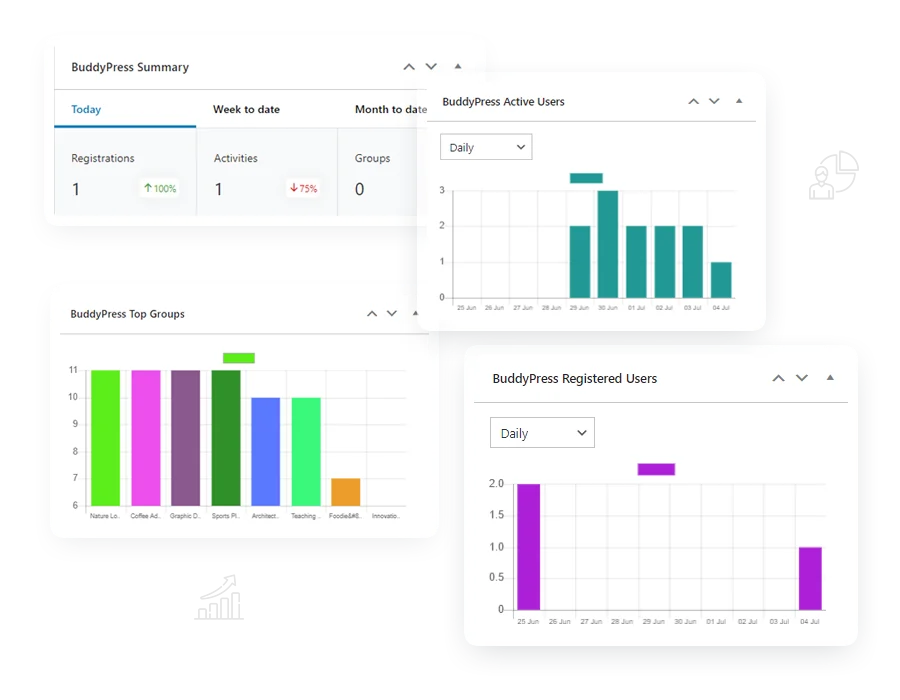
New signup tracking counts monthly totals alongside the running annual number, giving you both a short-term pulse and a longer trend line in the same view, useful for spotting whether a specific marketing push, event, or campaign actually moved the needle on growth or just felt like it did in the moment. And compatibility across BuddyPress and BuddyBoss means the plugin works whether your community is running BuddyPress directly or the BuddyBoss platform built on top of it, so switching platforms later doesn’t mean losing your historical data.
Getting Set Up Without Overcomplicating It
Install and activate BuddyPress Stats the way you would any other plugin, then give it a few days of normal community activity before drawing any conclusions from the dashboard. A brand-new install has no historical baseline yet, so the first week of data tells you almost nothing about trends and everything about the fact that you just turned tracking on. Resist the urge to react to week-one numbers as though they represent your community’s steady state.
Add the widgets that matter most to your specific community to the admin dashboard first, rather than enabling all seven at once and getting overwhelmed by data you don’t yet know how to interpret. If your biggest open question is whether a recent redesign affected engagement, start with the activity and engagement widgets and add the others once you’ve built a habit of actually checking the dashboard regularly. A community manager who checks two widgets consistently gets more value than one who has all seven configured but never opens the dashboard.
Cross-reference what the plugin shows against what you already know anecdotally about your community. If the data confirms your instinct, that’s useful validation. If it contradicts what you assumed, that gap is exactly where the plugin is earning its keep, surfacing something you’d have missed relying on gut feel alone. Either outcome is a good result, since the goal isn’t for the data to agree with you, it’s for the data to be accurate enough that you can trust it over instinct when the two disagree.
Turning the Data Into Actual Decisions
Raw numbers on a dashboard don’t improve anything by themselves. The value shows up when you actually act on what the data tells you, and that starts with looking for gaps between what you assumed and what the activity log actually shows. A community manager who assumed the forums were the most active part of the site might discover the group discussion feature is quietly carrying more engagement, and that discovery should change where you invest design and moderation effort going forward, not just sit as an interesting fact in a report nobody revisits.
Watch new signup trends against your actual marketing and content calendar rather than in isolation. A spike that lines up with a specific campaign confirms that campaign worked and is worth repeating. A spike with no obvious cause is worth investigating, since it might reveal a referral source or a piece of content quietly driving growth that you weren’t tracking deliberately, and knowing that source lets you lean into it rather than stumbling onto it by accident again later.
Use the active users view to identify who’s worth reaching out to directly, whether that’s inviting a highly engaged member to a moderator role, thanking a consistent contributor publicly, or simply understanding which members would notice and care if you launched a new feature aimed specifically at power users. Community management works better as a series of specific, informed actions rather than broad campaigns aimed at an undifferentiated audience, and the active users data is what makes that specificity possible.
Common Mistakes When Reading Community Analytics
Treating a single day or week’s numbers as a trend is the most common misread. Community activity is naturally noisy, an event, a holiday, or a single popular post can swing daily numbers without reflecting anything structural about the community’s health. Look at data over a rolling month or quarter before drawing conclusions, and resist the urge to react to any single day’s dip or spike as though it demands an immediate strategy change.
Confusing total member count with actual community health is the second common mistake. A community with ten thousand registered members and two hundred actually active ones is in a very different position than one with two thousand members where eight hundred are genuinely engaged, even though the second number looks smaller on paper. BuddyPress Stats’ active user tracking exists specifically to surface that distinction, and it’s worth checking regularly rather than defaulting to total registration count as your primary health metric.
The third mistake is collecting the data and never building a habit of actually reviewing it. A dashboard nobody checks provides exactly as much value as no dashboard at all. Set a specific recurring time, weekly or monthly depending on how active your community is, to actually look at the widgets and ask what changed since the last check, rather than letting the data accumulate as a passive record nobody consults.
Why Community-Specific Analytics Beat General Web Analytics Here
Google Analytics tells you a lot about a website’s traffic, page views, bounce rate, session duration, but almost none of it maps cleanly onto what actually matters for a BuddyPress community. A member scrolling through their group’s activity feed for twenty minutes might register as a single page view in Google Analytics despite representing real, sustained engagement, while a member who bounces after loading the homepage counts the same as one who actually clicked through several pages in depth. General web analytics was built to measure content consumption, not the back-and-forth, multi-directional activity that defines a genuine online community.
BuddyPress Stats tracks the events that actually define community health specifically: posts, comments, group joins, profile updates, the kind of interaction that happens between members rather than between a visitor and a page. That specificity is the entire reason a purpose-built plugin outperforms a general analytics tool for this particular job, even though Google Analytics remains useful for understanding where community traffic originates from in the first place. The two tools answer different questions, and running both together, acquisition data from one, engagement data from the other, gives a more complete picture than either alone.
Making the Case for Continued Community Investment
Community management often competes for budget and attention against more easily measured marketing channels, email campaigns with clear open rates, paid ads with direct conversion tracking, and a community manager without hard numbers is stuck arguing for continued investment based on vibes rather than evidence. BuddyPress Stats gives you the concrete numbers that conversation actually needs: month-over-month signup growth, engagement trends across specific groups or features, and a documented record of how the community’s activity has changed over a meaningful time period.
Pull this data into a simple quarterly summary rather than only referencing it internally when a question comes up. A short report showing signup trends, active user counts, and a couple of specific engagement wins, a group that grew significantly, a feature that saw a real adoption spike, turns an abstract argument about community value into something a budget-holder can actually evaluate on its own terms. Communities that can point to real numbers tend to keep their resources and their headcount more reliably than ones running on goodwill and anecdote alone.
Privacy Considerations Worth Building In From the Start
Tracking member activity comes with a responsibility to be transparent about what’s being collected and why, particularly for communities operating in regions covered by GDPR or similar privacy regulations. Disclose in your community’s privacy policy that activity data gets tracked for the purpose of improving the platform, and be specific about what that means in practice rather than burying it in vague boilerplate language nobody reads.
Aggregate data for reporting purposes wherever the underlying question doesn’t actually require identifying individual members. A report on overall community growth trends doesn’t need to expose which specific member drove which specific spike, and defaulting to aggregate views protects member privacy while still giving you the strategic picture you actually need to make decisions. Reserve individual-level activity data for situations where it’s genuinely necessary, identifying a top contributor to recognize publicly, or investigating a specific moderation concern, rather than treating granular per-member tracking as the default lens for every report.
Improving the BuddyPress Experience Beyond the Numbers
Analytics tell you what’s happening, but they don’t replace the direct work of building profile depth and social proof that makes a community worth participating in day to day. That’s where Profile Pro and Member Reviews come back into the picture, not as separate initiatives but as the levers you pull once the data tells you where to pull them. If activity data shows profiles are getting viewed but engagement stops there, richer profile fields through Profile Pro give members more reason to click into each other’s backgrounds and actually read them. If the data shows members aren’t returning after a single interaction, a review and reputation system through Member Reviews can add the kind of light social accountability that keeps people coming back to see how they’re perceived.
Community managers who monitor active users, track community-wide trends, and pair that data with the right member-facing features tend to build communities that grow deliberately rather than by accident. Whether you’re watching for early signs of member drop-off, spotting which content or features actually drive engagement, or simply making the case internally for continued investment in the community, BuddyPress Stats is the tool that turns those decisions from guesswork into something backed by an actual record of what your members are doing.
None of the three plugins covered here work in isolation as well as they work together. Profile Pro gives members a reason to build out a real presence in the community rather than a bare-bones account. Member Reviews gives that presence social weight, letting other members recognize and validate genuine contributors. And BuddyPress Stats sits underneath both, telling you whether the investment in richer profiles and social proof is actually translating into the engagement and retention you’re aiming for, rather than leaving that question as something you can only guess at from the outside.
Start with whichever gap is costing your community the most right now. A site with strong activity but thin profiles benefits most from Profile Pro first. A site where great members go unrecognized benefits from Member Reviews. And any community running blind on what’s actually happening day to day should start with BuddyPress Stats before adding anything else, since it’s the tool that tells you which of the other two gaps is the real priority rather than guessing at it.