

WooCommerce has transformed online selling into a powerful yet user-friendly process. But what happens when you need more control over the checkout experience? For many store owners, offering all possible shipping and payment options to every customer isn’t ideal. You may want to restrict certain payment gateways for specific countries or hide shipping methods for certain products. This is where the ability to Limit Shipping and Payment Methods in WooCommerce becomes a game-changer.
By using the Conditional Shipping and Payments plugin, you can create tailored checkout experiences that match your store’s policies, products, and customers. In this guide, we’ll explore what it means to limit shipping and payment methods, why it matters for your business, and exactly how to set it up effectively.

Quick Links
What Does It Mean to Limit Shipping and Payment Methods?
Limiting shipping and payment methods is about controlling which checkout options customers see based on specific conditions. This can be as simple as disabling “Cash on Delivery” for international orders, or as complex as allowing certain couriers only for particular product categories.
With WooCommerce’s default setup, you can assign shipping zones and payment gateways, but these settings are fairly broad. If you need to restrict them based on product type, customer location, purchase amount, or any other condition, you need an advanced tool like Conditional Shipping and Payments.
When you Limit Shipping and Payment Methods in WooCommerce, you gain precision. It’s not about removing convenience — it’s about ensuring that the right options appear at the right time. This prevents customer confusion, avoids costly errors, and ensures compliance with your store’s logistical and financial rules.
Why Limiting Shipping and Payment Options Matters
Imagine a customer from a remote region selecting express delivery, only for you to later discover that the courier service doesn’t cover their address. Now you must cancel or modify the order—frustrating for you and disappointing for the customer. This is exactly the kind of scenario you can avoid when you Limit Shipping and Payment Methods in WooCommerce.
Another reason is fraud prevention. Some payment gateways carry higher risk in certain locations. Restricting them to safer regions or order amounts can protect your revenue.
Beyond security, you can also optimize customer satisfaction. By offering only relevant, reliable options during checkout, you create a smoother, more trustworthy buying process. Shoppers see that you’ve curated methods to suit their needs, which boosts confidence and encourages repeat purchases.
The Power of the Conditional Shipping and Payments Plugin
The Conditional Shipping and Payments plugin by WooCommerce is built specifically to give you fine-grained control over checkout methods.
Here’s what makes it stand out:
- Flexible Conditions—Set rules based on products, categories, shipping classes, order totals, countries, user roles, and more.
- Multiple Rule Types – Create restrictions for shipping methods, payment gateways, or entire shipping destinations.
- No-Code Setup—Configure everything in WooCommerce’s admin panel without touching a single line of code.
- Scalable Rules – Add as many conditions as you need; it’s perfect for small shops or large-scale eCommerce stores.
By leveraging these features, you can Limit Shipping and Payment Methods in WooCommerce in ways that align with your exact business needs.
Real-World Scenarios Where This Plugin Shines
To better understand its usefulness, let’s look at practical examples:
- Restrict PayPal for Pre-Order Products – Only allow bank transfer for products not yet in stock.
- Hide Express Shipping for Heavy Items – Automatically remove certain couriers for oversized goods.
- Enable COD Only for Local Customers – Keep cash on delivery available for nearby areas, but disable it for distant ones.
- Block Shipping to Certain Countries—Prevent orders from regions you can’t serve due to regulations or costs.
- Limit Payment Methods Based on Cart Value—Allow credit card payments for high-value orders while disabling riskier gateways.
Each scenario shows how easy it is to create targeted rules that save you money, reduce headaches, and enhance the customer journey.
How to Limit Shipping and Payment Methods in WooCommerce with the Plugin
Let’s break it down into clear, actionable steps.
Step 1 – Install the Conditional Shipping and Payments Plugin
First, purchase and download the plugin from WooCommerce.com. Then:
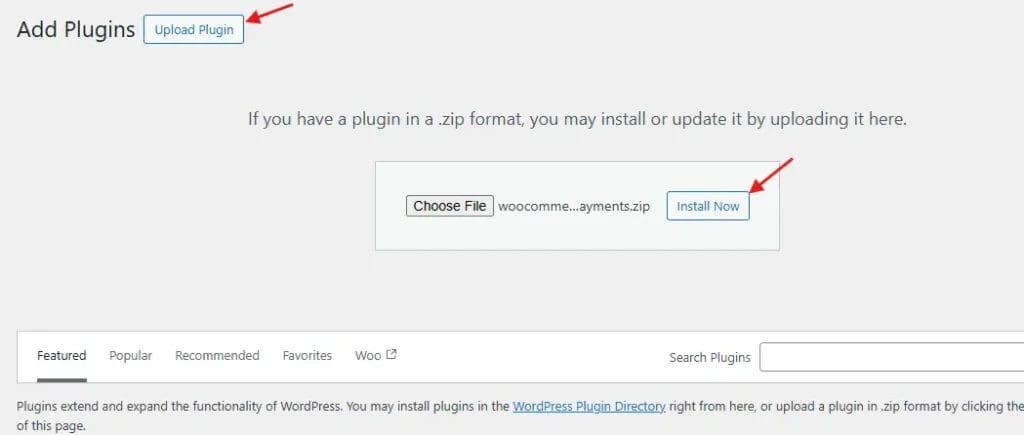
- Go to Plugins > Add New in your WordPress dashboard.
- Click Upload Plugin, choose the ZIP file, and install it.
- Activate the plugin.
Now you’re ready to set up your first restriction.
Step 2 – Navigate to the Restrictions Panel
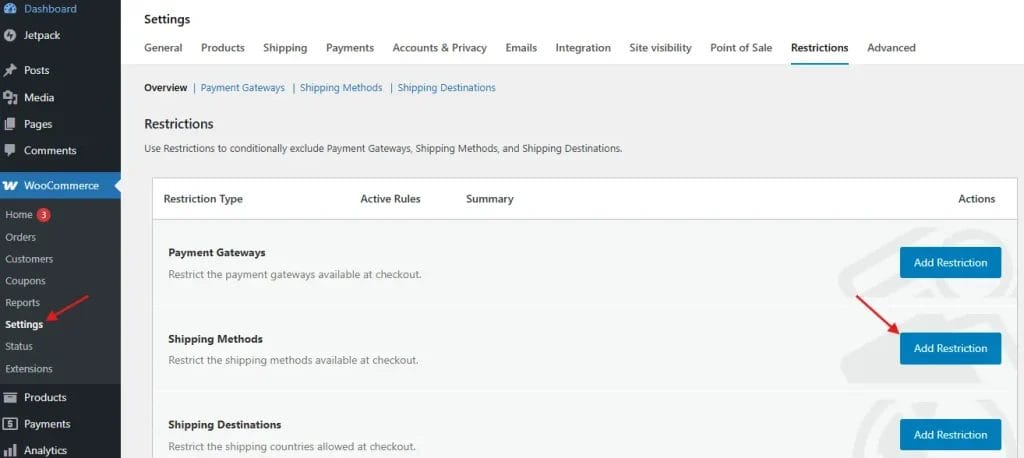
- Go to WooCommerce > Settings > Restrictions.
- Choose whether you want to create a Shipping Method Restriction, Payment Gateway Restriction, or Shipping Destination Restriction.
Step 3 – Create Your First Rule
For example, to restrict “Cash on Delivery” for international orders:
- Select Payment Gateway Restrictions.
- Click Add Restriction.
- Choose Cash on Delivery from the list.
- Set the condition: Location → is not → United States.
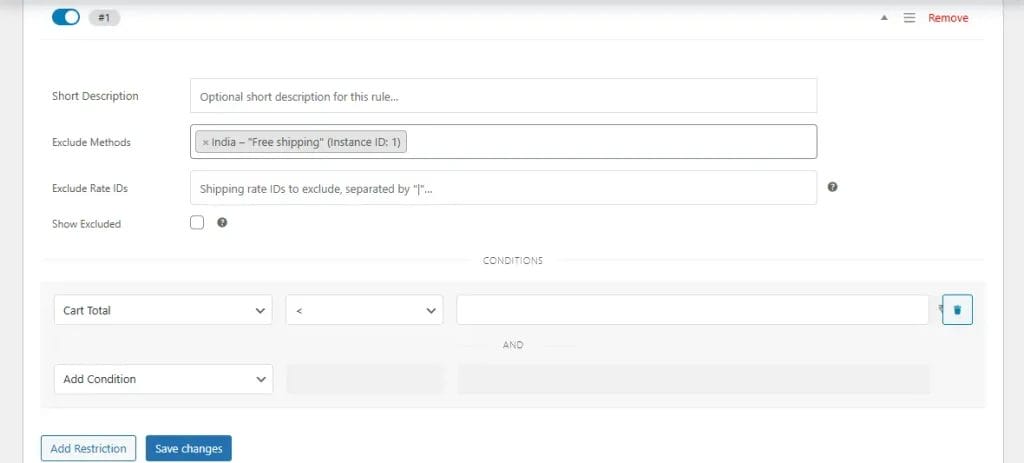
5. Save changes.
From that moment, customers outside the US will not see “Cash on Delivery” as a payment option.
Step 4 – Test Your Restrictions
Always test by adding products to your cart and checking out under different conditions. Ensure that your rules work as intended without unintended side effects.
Remember: The goal when you Limit Shipping and Payment Methods in WooCommerce is to make checkout feel natural and frictionless for your customers.
Advanced Tips for Maximum Checkout Control
-
Combine Multiple Rules—You can stack conditions for even tighter control, such as restricting a payment method to both a location and a minimum order total.
-
Use Shipping Classes for Grouped Rules—Assign shipping classes to products and use them as triggers for restrictions.
-
Leverage User Roles—Offer specific shipping or payment options only to wholesale customers or members.
-
Schedule Restrictions – Activate certain rules only during promotional periods or seasonal events.
When used creatively, the plugin becomes more than just a restriction tool—it becomes a strategic sales and logistics manager.
Mistakes to Avoid When Setting Restrictions
While it’s powerful to Limit Shipping and Payment Methods in WooCommerce, you need to avoid common pitfalls:
-
Over-Restricting Options—Removing too many choices can frustrate customers.
-
Ignoring Customer Feedback – If shoppers consistently abandon carts, your rules may be too rigid.
-
Failing to Communicate Changes—If certain methods aren’t available, make sure your policies page explains why.
Balancing control and convenience is key.
The Business Impact of Smart Restrictions
When used wisely, conditional restrictions can:
- Reduce failed or canceled orders
- Prevent shipping cost losses
- Increase operational efficiency
- Improve customer satisfaction and trust
By aligning available methods with your business capabilities, you eliminate mismatches between customer expectations and your actual service capacity.

Final Thoughts
The checkout process is the final step before conversion, and it’s where you either secure the sale or lose it. Using the Conditional Shipping and Payments plugin to Limit Shipping and Payment Methods in WooCommerce ensures that customers only see options you can truly deliver. This creates a more reliable, frustration-free buying experience that benefits both sides.
If you want full control over how, where, and when customers can complete their purchase, this plugin is a must-have in your WooCommerce toolkit.
Interesting Reads:
How to Add Product Brands to Your WooCommerce Store In 2025
How to Set Up Shipping Rates Based on Product Dimensions in WooCommerce
WooCommerce 10.0 Release: What’s New, What Matters, and What’s Next for Your Store

