

Not every payment or shipping method should be available to every customer. Cash on delivery for an international order, express shipping for a courier that doesn’t actually cover that address, these mismatches create real problems after checkout that are much cheaper to prevent than fix. Conditional Shipping and Payments (confirmed active, 10,000+ installs) handles this: rule-based restrictions on which checkout options a customer actually sees.
I’ve cleaned up more than one store’s cancelled-order backlog that traced back entirely to this gap, a customer picking an option the store could never actually fulfill for their location or order type. Every one of those cancellations was preventable with a rule that takes a few minutes to set up. Multiply that a few minutes across the dozens of checkout mismatches a growing store accumulates over a year, and the total time saved, plus the customer trust preserved, adds up to far more than the setup effort itself.
What This Actually Means
WooCommerce’s default settings let you assign shipping zones and payment gateways, but broadly. Restricting by product type, customer location, order total, or other specific conditions needs a dedicated tool. The goal isn’t removing convenience, it’s making sure only options you can actually fulfill show up in the first place. A checkout that offers everything technically possible, regardless of whether your business can deliver on it, isn’t actually more convenient. It’s a setup for disappointment down the line, and a surprising number of stores only discover this the hard way after a wave of cancellations.
Why This Matters
A customer picking express shipping to an address your courier doesn’t service means a cancelled or modified order after the fact, worse for everyone than never offering that option there to begin with. That customer had a good experience right up until the moment they found out their order couldn’t actually ship the way they chose, and that late disappointment does more damage to trust than simply not seeing the option would have.
Some payment gateways carry more risk in certain regions, and restricting them to safer locations or order sizes protects revenue directly rather than absorbing chargebacks and fraud losses after the fact. A checkout that only shows relevant, actually-available options also reads as more careful and reliable than one that lets you pick something that later falls through. Customers notice when a store’s checkout feels considered rather than generic, even if they couldn’t articulate exactly why.
What the Plugin Covers
Conditions can be built around products, categories, shipping classes, order totals, countries, user roles, and more, giving enough flexibility to match nearly any fulfillment constraint a real store runs into. Rule types cover shipping methods, payment gateways, or entire shipping destinations, so you’re not limited to restricting just one layer of checkout.
Setup happens entirely inside the WooCommerce admin with no code required, which matters for store owners without a developer on call for every checkout adjustment. And the rules scale, whether you’re running a small shop with a couple of restrictions or a large catalog where dozens of product categories each need their own shipping and payment logic.
Real Scenarios This Solves
Restricting PayPal for pre-order products and allowing only bank transfer for items not yet in stock keeps payment timing aligned with when you’ll actually be able to fulfill the order. Hiding express shipping for heavy items removes couriers that can’t handle oversized goods automatically, rather than accepting the order and discovering the shipping problem afterward.
Keeping cash on delivery available for local customers only, while disabling it further out, matches a payment method that only really makes operational sense within a limited delivery radius. Blocking shipping to specific countries you can’t serve due to regulation or cost avoids taking an order you’d have to cancel and refund later anyway. And gating payment methods by cart value, allowing card payments for high-value orders while restricting riskier gateways, keeps your fraud exposure proportional to what’s actually at stake on each transaction.
Setting It Up
Step 1: Install the Plugin

Purchase and download from WooCommerce.com, then Plugins > Add New > Upload Plugin in your dashboard, upload the ZIP, install, and activate. Standard installation flow, nothing unusual required beyond having the ZIP file downloaded and ready.
Step 2: Find the Restrictions Panel
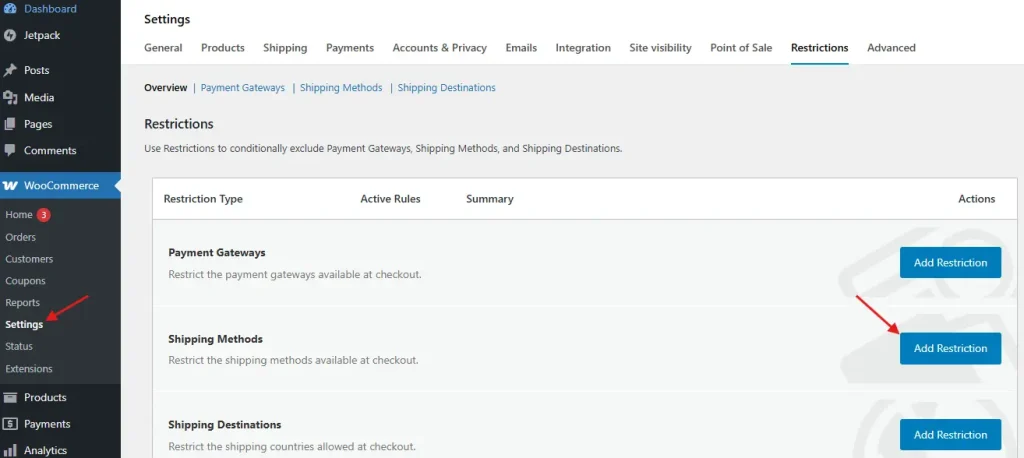
WooCommerce > Settings > Restrictions. Choose Shipping Method Restriction, Payment Gateway Restriction, or Shipping Destination Restriction depending on what you’re setting up, each covering a different layer of the checkout you might need to control.
Step 3: Build a Rule
Here’s an example walking through restricting Cash on Delivery for international orders. Select Payment Gateway Restrictions and click Add Restriction. Choose Cash on Delivery as the method being restricted, then set the condition: Location is not United States.

Save the rule. From then on, customers outside the US won’t see Cash on Delivery as an option at checkout, and the change applies immediately without any need to touch individual products or payment gateway settings elsewhere.
Step 4: Test It
Add products to a cart and check out under different conditions to confirm your rules behave as expected, with no unintended side effects on legitimate orders. This step matters more than it seems. A rule that’s slightly too broad can accidentally hide a payment method from customers who should have had access to it, and that kind of mistake often goes unnoticed until a customer complains they couldn’t find an option that should have been there.
Getting More Out of It
Stacking conditions, location plus a minimum order total, for example, lets one rule cover a more precise scenario than a single condition alone would catch. Using shipping classes as a trigger applies the same restriction across a whole group of products at once, saving you from building an identical rule product by product.
Gating by user role opens up offering certain methods only to wholesale accounts or members, useful for stores running a mixed retail and B2B model where payment terms genuinely differ between customer types. Scheduling restrictions to apply only during specific promotional or seasonal windows handles temporary situations, a holiday shipping cutoff, a limited-time payment option, without requiring you to remember to manually toggle the rule off later.
Mistakes to Avoid
Over-restricting is the most common one. Removing too many options frustrates customers who had a legitimate reason to want them, and it’s easy to get carried away building rules for edge cases that affect a tiny fraction of orders while making checkout noticeably less flexible for everyone else. Start with the restrictions that address real, recurring problems rather than covering every hypothetical scenario upfront.
Ignoring abandonment signals after adding restrictions is another. If carts are dropping off consistently after a new rule goes live, that’s a sign the rule may be too rigid for real customer behavior, and it’s worth checking your analytics specifically around the time a new restriction launched to see whether it correlates with a dip.
Not explaining the missing options causes avoidable support tickets. If a method isn’t available for a specific customer, a quick note on the policy page or a message at checkout explaining why prevents confusion, rather than leaving a customer to wonder if something’s broken on their end.
A Deeper Look at Fraud-Focused Restrictions
Payment fraud doesn’t distribute evenly across order types. High-value orders, certain shipping destinations, and specific payment methods each carry different risk profiles, and a store that treats every order the same regardless of these factors is leaving money on the table in both directions, either by accepting too much risk on vulnerable orders or by needlessly restricting low-risk ones.
A common pattern worth considering: allow riskier payment gateways like cash on delivery only below a certain order value, and require card payment with built-in fraud screening above it. This isn’t about distrusting customers broadly, it’s about matching your risk tolerance to the actual financial exposure of each transaction. A ten dollar order going wrong is a minor loss. A five hundred dollar order going wrong is a real one, and the payment method offered should reflect that difference. This kind of tiered approach also signals professionalism to customers making a larger purchase, who often expect a more secure, verified payment flow for a bigger transaction anyway.
Shipping Restrictions Beyond the Basics
Weight and dimension-based restrictions solve a problem that catches a lot of stores off guard after they’ve already scaled past a handful of SKUs. A courier that handles small packages efficiently often can’t, or won’t, handle oversized freight, and offering that courier as an option for a heavy item just sets up a failed delivery attempt or a manual intervention from your fulfillment team after the order’s already placed.
Shipping class-based rules solve this at the category level rather than requiring individual product configuration. Tag your heavy or oversized products with a specific shipping class once, then build a single restriction rule targeting that class, and every current and future product tagged that way inherits the same shipping logic automatically. This scales far better than manually excluding couriers on each product page as your catalog grows.
The same logic extends to destination-based restrictions. A store shipping internationally often finds that certain countries carry disproportionate customs complexity, higher return rates, or courier reliability issues specific to that region. Rather than accepting every international order and dealing with the fallout case by case, a destination restriction lets you decide upfront which countries you’ll serve confidently and which ones need a different arrangement, whether that’s a higher shipping rate to offset the added complexity or simply not offering shipping there at all.
Frequently Asked Questions
Will restricting payment methods hurt my conversion rate?
Done thoughtfully, it shouldn’t, and it can actually help. Removing options that were never going to work for a given order prevents a worse outcome: a completed checkout followed by a cancellation. The conversion metric that matters most is completed and fulfilled orders, not just checkout completions that later fall through.
Can I restrict based on more than one condition at once?
Yes, stacking conditions is one of the plugin’s core strengths. A rule combining location, order total, and product category lets you target a precise scenario rather than settling for a broader restriction that catches more orders than intended.
Does this plugin work with third-party shipping calculator plugins?
Generally yes, since it works at the restriction layer rather than replacing your shipping calculation logic entirely. That said, always test the specific combination on staging before relying on it in production, since compatibility between any two WooCommerce extensions is worth confirming directly rather than assuming.
How do I know which restrictions my store actually needs?
Look at your cancelled and refunded order history first. Patterns there, a specific shipping method that keeps causing fulfillment problems, a payment method associated with a disproportionate share of fraud or chargebacks, tell you exactly where a restriction would pay off immediately rather than guessing at hypothetical scenarios. Your support ticket history is another good source, since customers often explain in plain language exactly what went wrong when a checkout option didn’t match what your store could actually deliver.
What happens to existing orders if I add a new restriction?
New restrictions apply going forward to new checkout sessions. They don’t retroactively affect orders that were already placed before the rule existed, so there’s no risk of the restriction disrupting orders already in your fulfillment pipeline. This makes it safe to add or adjust a rule at any time without worrying about unintended consequences for orders already underway.
How This Interacts With WooCommerce’s Block Checkout
As WooCommerce continues shifting toward block-based checkout as the default, it’s worth confirming that any restriction plugin you’re running, including this one, has full compatibility with the newer checkout experience rather than only the legacy shortcode version. Most actively maintained extensions in this category have kept pace with the transition, but a quick test on staging after any major WooCommerce update is cheap insurance against a restriction silently failing to apply.
Why This Is Worth Setting Up
Done well, conditional restrictions reduce failed and cancelled orders, prevent shipping-cost losses, and align what customers see with what you can actually deliver, which is a genuine trust signal, not just an operational nicety. The setup time is measured in minutes per rule. The payoff shows up gradually, in fewer cancelled orders, fewer confused support tickets, and a checkout that feels considered rather than generic.
Start with the two or three restrictions that address your store’s most common fulfillment mismatches, rather than trying to anticipate every possible edge case on day one. Add more rules as specific problems actually surface, and you’ll end up with a restriction set that’s genuinely tuned to how your store operates rather than a theoretical worst-case checklist.
Documenting Your Rules as the Store Grows
A single store owner setting up a handful of restrictions can usually keep the logic in their head. Once a team grows, or once a store accumulates a dozen or more rules built up over years, that mental map stops being reliable. Keep a simple internal document listing each active restriction and the reason it exists, a courier that stopped serving certain regions, a fraud pattern that justified a payment gateway limit, a product category that needs special shipping handling.
This matters most when someone new joins the team, or when a restriction that made sense two years ago no longer reflects current business reality. Without documentation, outdated rules tend to linger indefinitely because nobody remembers why they’re there or feels confident removing them. A rule with a documented reason is easy to review and retire once that reason no longer applies. A rule with no explanation just sits there accumulating risk of being wrong, quietly costing conversions to customers who never find out why an option they wanted simply wasn’t there.
When to Reconsider a Restriction
Restrictions aren’t permanent decisions. A courier that couldn’t previously handle a certain region might expand coverage. A payment gateway that once carried elevated fraud risk in a specific market might improve its fraud tooling. Your own store’s order volume and average order value shift over time too, both of which change where the right thresholds actually sit. Revisit restrictions periodically rather than treating them as set-and-forget, particularly the ones tied to external factors like courier coverage or payment processor risk profiles that change independently of anything happening on your store.
A simple quarterly review, even just scanning the list of active restrictions and asking whether each one still reflects reality, catches outdated rules before they quietly cost you sales from customers who could now legitimately use an option your store still hides from them. This kind of light maintenance is cheap compared to the alternative, a checkout that gradually drifts further from your actual fulfillment capability without anyone noticing until a customer complains or a sales report looks unexpectedly soft in a region that should be performing well. A fifteen-minute review once a quarter is a small price for keeping checkout aligned with what your business can actually deliver.
Interesting Reads:
How to Set Up Shipping Rates Based on Product Dimensions in WooCommerce