The Complete bbPress to Jetonomy Migration Playbook (Step by Step)

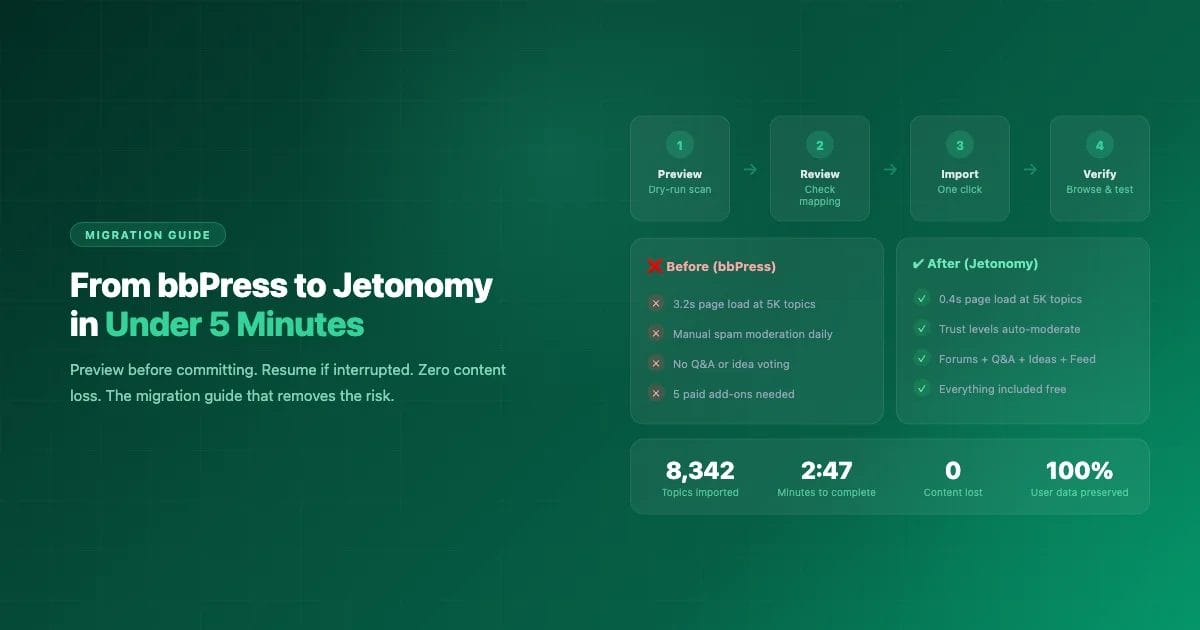
A WordPress agency had a client with 8,300 bbPress topics, 42,000 replies, and growing performance problems. Page loads on the forum index took 3.2 seconds. The moderation backlog had 200+ unreviewed posts. The client was paying for 4 premium bbPress add-ons totaling $280/year and still missing features like Q&A and trust-based moderation.
They migrated to Jetonomy in a single afternoon. The import took 2 minutes and 47 seconds. Page loads dropped to 0.4 seconds. The moderation backlog cleared itself within two weeks as trust levels took effect. Annual plugin costs dropped to zero.
Here is the exact playbook they followed, including every step, gotcha, and decision point.
Before You Begin: The Decision Framework
Not every bbPress site needs to migrate. Here is when migration makes sense and when it doesn’t:
Migrate if…
- Page loads are slowing as your forum grows
- You spend hours weekly on manual spam moderation
- You need Q&A spaces, idea boards, or social feeds
- You are paying for 3+ bbPress add-ons for basic features
- bbPress core development pace concerns you
- You want trust-based auto-moderation
Stay on bbPress if…
- Your forum runs well and performance is fine
- You rely heavily on BuddyPress group forums (deepest integration)
- You use bbPress-specific add-ons with no Jetonomy equivalent
- Your community is small (under 1,000 topics) and moderation is manageable
Phase 1: Preparation (30 minutes)
Back Up Everything
Before touching anything, create a complete backup:
- Full database export (phpMyAdmin, WP-CLI, or your host’s backup tool)
- WordPress files backup (wp-content folder at minimum)
- Note your current bbPress version and active add-ons
- Screenshot your forum structure for reference
Set Up a Staging Site
Never test a migration on your live site first. Use your host’s staging feature, a Local by Flywheel install, or an InstaWP sandbox. Clone your production database to staging so you are testing with real data.
Install Jetonomy on Staging
Install and activate Jetonomy on your staging site. Keep bbPress active – the importer needs to read from bbPress tables. Run the Jetonomy setup wizard but skip demo content (you will be importing your own).
Phase 2: Preview the Migration (5 minutes)
Go to Jetonomy > Import > bbPress. Click Preview Import.
The dry-run scans your bbPress data without changing anything and shows you:
| What It Shows | Why It Matters |
|---|---|
| Total forums, topics, replies | Verify the count matches what you expect |
| Forum-to-space mapping | Each bbPress forum becomes a Jetonomy space |
| User accounts to process | All topic/reply authors will have Jetonomy profiles created |
| Potential issues | Special characters, empty forums, orphaned replies |
| Estimated import time | So you know how long the actual import will take |
Review the mapping carefully. By default, all bbPress forums become Jetonomy “Forum” type spaces. But you might want your “Questions” or “Help” forum to become a Q&A space instead. Adjust the mapping before proceeding.
Phase 3: Run the Import (2-5 minutes)
Click Start Import. The importer processes content in batches and shows a progress bar. Here is what happens during import:
- Forums are created as Jetonomy spaces with titles, descriptions, and visibility settings preserved
- Topics become Jetonomy posts with original authors, dates, and content intact
- Replies transfer in their original order, threaded under the correct posts
- Sticky topics become pinned posts
- Closed topics become locked posts
- Topic tags transfer as Jetonomy tags
- User profiles are created for every topic and reply author with Trust Level 0
If anything interrupts the import (server timeout, browser close, network issue), come back and click Resume. The importer tracks exactly where it stopped and picks up from the next unprocessed item. No duplicates, no missed content.
Import Speed Reference
| Forum Size | Topics + Replies | Typical Import Time |
|---|---|---|
| Small | Under 1,000 | Under 30 seconds |
| Medium | 1,000 – 10,000 | 1-3 minutes |
| Large | 10,000 – 50,000 | 3-10 minutes |
| Very large | 50,000+ | 10-20 minutes |
Phase 4: Verify (15 minutes)
After import completes, verify everything transferred correctly:
- Browse each space. Open every imported space and check that topics appear with correct titles, authors, and dates.
- Read a few threads. Pick 5 popular topics and verify all replies are present in the right order.
- Test search. Search for a known topic by keyword. It should appear in results.
- Check member profiles. Visit a few member profiles and verify their forum history shows.
- Test posting. Create a new topic and reply to make sure everything works going forward.
- Check counts. Verify topic and reply counts match what the preview showed.
Phase 5: Configure Post-Migration (20 minutes)
Set Up Trust Levels
All imported users start at Trust Level 0. Configure the promotion thresholds in Jetonomy > Settings > Trust Levels. Within 1-2 weeks, your active members will naturally progress to higher levels based on their continued activity.
Convert Spaces to Different Types
Now that your content is imported, consider converting some Forum spaces to other types:
- “Help & Support” forum? Convert to Q&A for accepted answers and voting
- “Feature Requests” forum? Convert to Ideas for voting and status tracking
- “News & Updates” forum? Convert to Social Feed for quick updates
Set Up URL Redirects
Your old bbPress URLs (e.g., /forums/topic/how-to-fix-x/) need to redirect to new Jetonomy URLs to preserve SEO value and avoid broken bookmarks. Use a redirect plugin like Redirection or Safe Redirect Manager to create 301 redirects from old patterns to new ones.
Deactivate bbPress
Once you are confident everything works, deactivate bbPress and its add-ons. Jetonomy does not depend on bbPress in any way after import. You can delete bbPress entirely, or leave it deactivated as a safety net for a few weeks.
Phase 6: Go Live on Production
After successful testing on staging, repeat the process on production:
- Schedule a maintenance window (15-30 minutes depending on forum size)
- Put the site in maintenance mode
- Take a fresh production backup
- Install Jetonomy, run the import
- Verify, configure trust levels, set up redirects
- Deactivate bbPress
- Take the site out of maintenance mode
Communicate with your community before the migration: “We are upgrading our forum software on [date]. The forum will be briefly unavailable. All your posts, replies, and profile data will be preserved.”
What Transfers and What Doesn’t
| Transfers | Does Not Transfer |
|---|---|
| All forums, topics, replies | bbPress user signatures |
| Original authors and dates | bbPress-specific plugin data (GD Tools settings, etc.) |
| Sticky and closed status | bbPress role assignments (mapped to Trust Level 0) |
| Topic tags | Forum subscriptions (members re-subscribe) |
| User accounts | Favorites lists |
| Content formatting (HTML) | Third-party add-on data |
Before vs After: Real Client Results
| Metric | bbPress | Jetonomy |
|---|---|---|
| Forum index page load | 3.2 seconds | 0.4 seconds |
| Individual topic page load | 1.8 seconds | 0.3 seconds |
| Spam posts requiring manual review | ~40/week | ~2/week (trust levels block the rest) |
| Admin moderation time | 5 hours/week | 20 minutes/week |
| Annual plugin costs | $280 (4 add-ons) | $0 (everything included free) |
| Community formats available | Forums only | Forums + Q&A + Ideas + Social Feed |
| Member complaints about speed | Regular | None |
Also Works for wpForo and Asgaros
Jetonomy includes importers for wpForo and Asgaros Forum with the same dry-run preview and resume capabilities. The process is identical – just select the source plugin on the Import page.
Ready to Migrate?
Start on a staging site. The preview mode is completely safe and shows you exactly what the migration looks like before touching any data. If you like what you see, the actual import takes minutes.
Related Reading: