
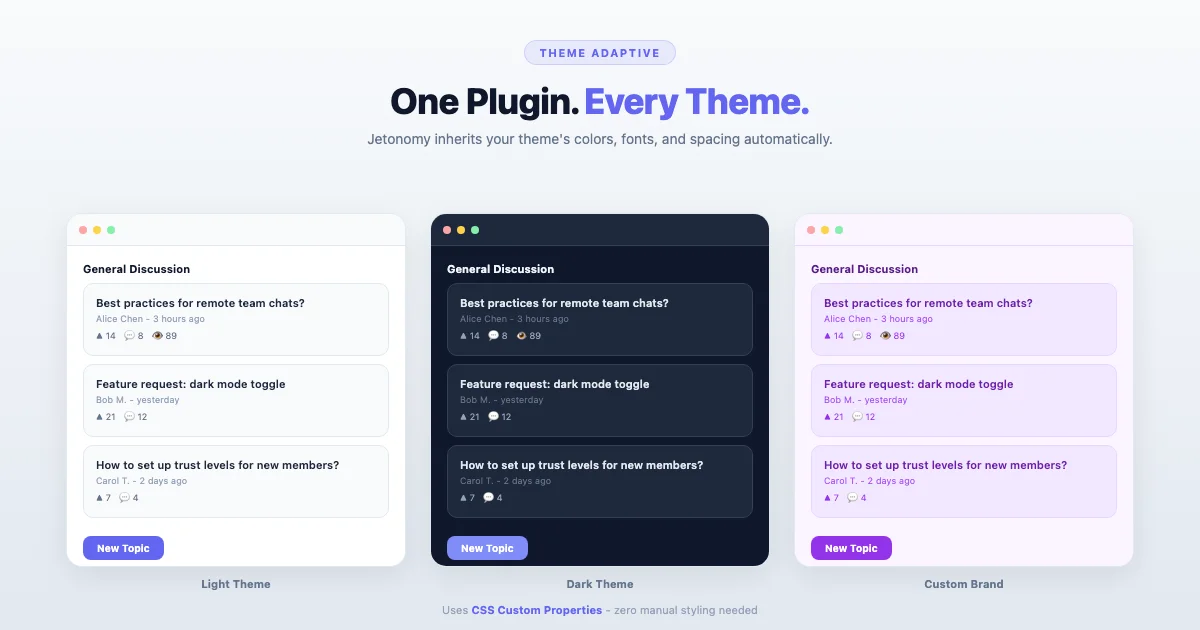
A web designer finished a beautiful custom WordPress theme for a client’s membership site. Clean typography, carefully chosen colors, generous whitespace. Then the client asked for forums. She installed a popular forum plugin and the result looked like two different websites stitched together - the forum had its own fonts, its own color scheme, and spacing that clashed with everything else on the site.
She spent 8 hours writing custom CSS to make the forum match the theme. When the forum plugin updated two months later, half her CSS overrides broke. She fixed them, but the cycle repeated every few months.
This is the single most common complaint about WordPress forum plugins: they don’t match your theme, and making them match is an ongoing maintenance headache.
Jetonomy solves this fundamentally. It doesn’t need custom CSS because it reads your theme’s design decisions and applies them automatically. Here is how it works, and why it matters more than most people realize.
The Problem: Forums That Look Bolted On
Most forum plugins ship with their own stylesheet that defines every visual property: font family, font sizes, colors, spacing, border radius, button styles. These styles are designed to look acceptable on a generic theme, but they clash with any theme that has its own design personality.
The result is a visual mismatch that affects user trust. When your forum looks different from the rest of your site, visitors notice - even if they can’t articulate what feels wrong. The inconsistency signals “this was cobbled together” rather than “this is a polished platform.”
For membership sites, course platforms, and professional communities, this matters directly. Members paying $49/month expect a cohesive experience. A forum that looks like a different website undermines the premium perception.
How Jetonomy Adapts to Your Theme
Jetonomy uses CSS custom properties (CSS variables) to inherit your theme’s design tokens. Instead of hardcoding font-family: Arial or color: #3366cc, Jetonomy references your theme’s variables. When your theme says the primary color is green, Jetonomy buttons are green. When your theme uses Inter for body text, Jetonomy uses Inter.
What Adapts Automatically
| Design Token | What Jetonomy Reads | Where It Applies |
|---|---|---|
| Primary color | Theme’s accent/brand color | Buttons, links, active states, badges |
| Background color | Theme’s surface/card background | Post cards, reply containers, sidebars |
| Text color | Theme’s body text color | Post content, member names, labels |
| Font family | Theme’s body and heading fonts | All forum text and headings |
| Font sizes | Theme’s type scale | Headings, body, meta text, badges |
| Border radius | Theme’s corner rounding preference | Cards, buttons, avatars, inputs |
| Spacing | Theme’s spacing scale | Padding, margins, gaps between elements |
| Border color | Theme’s divider/separator color | Card borders, separators, input borders |
Block Themes (theme.json)
WordPress block themes define their design in theme.json - a structured file that specifies colors, fonts, spacing, and layout. Jetonomy reads these values directly, which means the adaptation is pixel-perfect. If your theme.json says the primary color is #6366f1 and the body font is “DM Sans”, that is exactly what your Jetonomy community looks like.
This is the tightest possible integration because theme.json is a standard - it is not a hack or a compatibility layer. It is how WordPress itself communicates design intent.
Classic Themes
Classic themes don’t have theme.json, but they often define CSS custom properties in their stylesheets. Jetonomy reads these when available. When they are not available, it falls back to smart defaults that work with most classic theme designs.
In practice, Jetonomy looks good on classic themes without any customization. If you want it to look perfect, you can define a handful of CSS variables in your theme’s stylesheet and Jetonomy will pick them up.
Community Themes (BuddyX, Flavor)
Community-focused themes like BuddyX are designed specifically for community plugins. They define comprehensive CSS variable sets that Jetonomy reads fully. The result is the tightest visual integration - forums, Q&A spaces, and social feeds look like native features of the theme.
Page Builder Themes (Elementor, Divi)
Page builder themes set global colors and fonts through their own systems. Jetonomy reads the resulting CSS custom properties, so it adapts to whatever you configure in Elementor’s global settings or Divi’s Theme Customizer. The forum matches the rest of your page builder layouts.
Why This Saves You Real Money
Custom CSS for forum styling is not a one-time cost. It is ongoing maintenance:
| Scenario | With Custom CSS | With Jetonomy |
|---|---|---|
| Initial styling | 4-8 hours ($400-800 at agency rates) | 0 hours (automatic) |
| Plugin updates (4x/year) | 1-2 hours each ($400-800/year) | 0 hours |
| Theme change or redesign | 4-8 hours to redo all CSS | 0 hours (re-adapts automatically) |
| Dark mode addition | 3-4 hours of duplicate CSS | 0 hours (follows theme’s dark mode) |
| Year 1 total | $1,200-2,400 | $0 |
For agencies managing multiple client sites, this multiplies. If you maintain 10 community sites, that is $12,000-24,000/year in forum CSS maintenance that disappears with Jetonomy.
Dark Mode: Automatic
Dark mode has gone from a nice-to-have to an expectation. Many WordPress themes now include a dark mode toggle. When your theme switches to dark mode, Jetonomy follows automatically because it reads the same CSS variables that change when dark mode activates.
With other forum plugins, dark mode means writing an entirely separate set of CSS overrides - doubling your maintenance burden. With Jetonomy, it just works.
For Developers: Full Override Control
Automatic adaptation does not mean locked-in styling. Developers have full control when they want it:
- CSS custom properties: Override any Jetonomy variable in your theme’s stylesheet. Jetonomy defines its variables with fallbacks, so your overrides always win.
- Template overrides: Copy any Jetonomy template to your theme’s directory to customize the HTML structure. Standard WordPress template hierarchy.
- Clean CSS classes: Every Jetonomy element uses well-structured BEM-style classes. Target any component without fighting against overly specific selectors.
- No !important abuse: Jetonomy uses normal CSS specificity. Your theme’s styles and your custom CSS override Jetonomy’s defaults naturally.
Most sites never need any of this. But when you do, the customization paths are clean and standard.
Real Examples: Same Plugin, Different Themes
The same Jetonomy installation looks different on every theme because it inherits each theme’s personality:
- On a minimal blog theme: Clean, lots of whitespace, subtle borders, the forum feels editorial
- On a dark SaaS theme: Dark backgrounds, accent-colored buttons, the forum feels like a product dashboard
- On a colorful education theme: Rounded corners, playful colors, the forum feels approachable for students
- On BuddyX: Full community layout integration with member sidebar, activity indicators, and social styling
In each case, zero custom CSS was written. The plugin adapted entirely through CSS custom properties.
What About Theme Switching?
If you change themes (redesign, seasonal update, A/B testing), your Jetonomy community automatically adapts to the new theme. No CSS to rewrite. No broken layouts. The forum looks like it was always part of the new design.
This is particularly valuable for agencies that build client sites. You can use Jetonomy as your standard community plugin across all clients, regardless of the theme. One plugin to learn, one plugin to maintain, infinite design flexibility.
Try It Yourself
The fastest way to see this in action: install Jetonomy on any WordPress site and browse your community. Notice how the colors, fonts, and spacing match your existing theme without any configuration. Then try switching themes and watch it adapt instantly.