

Timing is one of the most underused growth levers in community management. With social interactions occurring at lightning speed, delivering content precisely when your audience is active makes the difference between high engagement and being completely ignored. If you’re using BuddyPress, you’ve likely seen the potential of its activity streams—but have you truly unlocked its power?
In this guide, we’ll explore exactly how to post an activity at the optimal time in BuddyPress—not just manually, but with the help of a powerful plugin that automates the process. You’ll learn what optimal timing means, why it matters, and how to set it up effectively using the BuddyPress Schedule Activity plugin.
Let’s take the guesswork out of your posting and replace it with a proven, data-driven strategy.

Quick Links
What Does It Mean to Post at the Optimal Time?
Understanding “Optimal Timing” in Digital Communities
To post an activity at the optimal time means strategically publishing content when your target audience is most likely to see and engage with it. This isn’t about simply posting during business hours—it’s about understanding user behavior on your platform. For example, a student community might peak in the evening, while professionals may check updates early in the morning or during lunch.
The key is to find the sweet spot when your audience is online, alert, and available to interact.
Why It’s Relevant for BuddyPress Activity Streams
BuddyPress centers around user interactions through its activity stream, a real-time feed where users can see updates, mentions, group interactions, and more. This stream is dynamic and fast-moving. If you post at the wrong time, your content can get buried quickly, even if it’s highly relevant.
That’s why finding the optimal time is not optional—it’s essential for visibility and ongoing engagement.
Why Timing Matters in BuddyPress
Engagement Starts with Visibility
Even the most compelling post can go unnoticed if it’s posted at the wrong time. By aligning your posts with peak user activity, you increase the chances of being seen, liked, commented on, or shared. When you post an activity at the optimal time in BuddyPress, you tap into your community when they’re already receptive.
Higher visibility translates directly into better interaction, stronger relationships, and greater platform retention.
Real-World Examples of Good vs. Poor Timing
Consider this scenario: you post an announcement at 2 AM, thinking it’ll be the first thing users see in the morning. But by 8 AM, the stream is flooded with updates, and your message is buried. In contrast, if you schedule the post for 7:55 AM—right before peak usage—it’ll be fresh and prominent when users log in.
Just a small shift in timing can result in drastically different outcomes. Consistently posting at the optimal time in BuddyPress helps ensure your content performs at its best.
How to Post an Activity at the Optimal Time in BuddyPress
Manual Posting Isn’t Enough
Manually trying to post at the perfect moment is inefficient and impractical, especially if your community spans multiple time zones. It also increases the likelihood of inconsistent activity, where you might post heavily some days and go silent on others.
And here’s the hard truth: inconsistency kills engagement.
Automation and Consistency Are Game Changers
That’s where scheduling comes in. Automating your activity posts allows you to plan, maintain a steady stream of content, and target optimal times without being glued to your screen. You can stay present in your community even when you’re offline.
Introducing the BuddyPress Schedule Activity Plugin
If you’re serious about improving your BuddyPress engagement, look no further than BuddyPress Schedule Activity by Wbcom Designs.
This plugin is specifically designed to help you post an activity at the optimal time in BuddyPress with minimal effort. It allows you to schedule activity posts for:
- Personal updates
- Group posts
- Mentions
- Notifications
Key Features:
- Easy scheduling interface
- Support for personal and group activities
- Time zone selection
- Edit and manage scheduled posts
- Seamless integration with BuddyPress
It’s a must-have for community managers, educators, marketers, and anyone looking to automate their content strategy in BuddyPress.
Step-by-Step Guide: Setting Up BuddyPress Schedule Activity
Step 1: Download and Install the Plugin
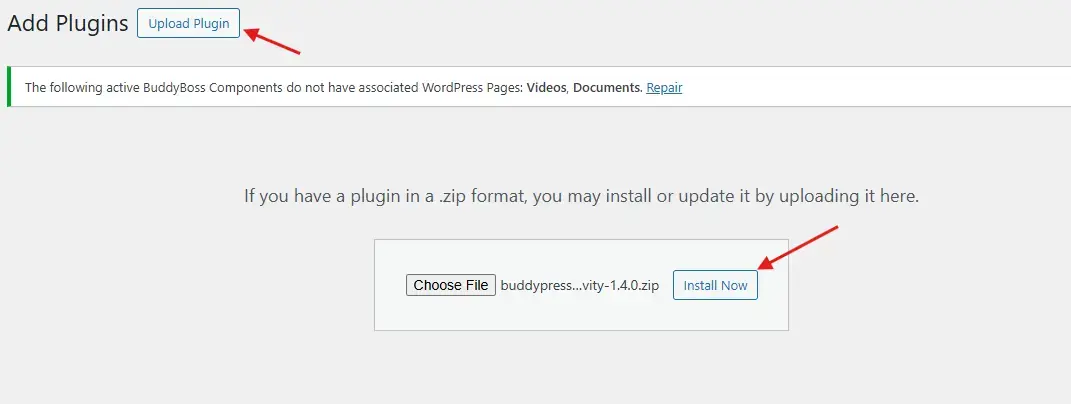
- Head to this link and purchase the plugin.
- After downloading the ZIP file, go to your WordPress Dashboard → Plugins → Add New.
- Click Upload Plugin, select the ZIP file, then hit Install Now.
- Once installed, click Activate.
You’re now ready to schedule your first activity.
Step 2: Access the Scheduling Interface
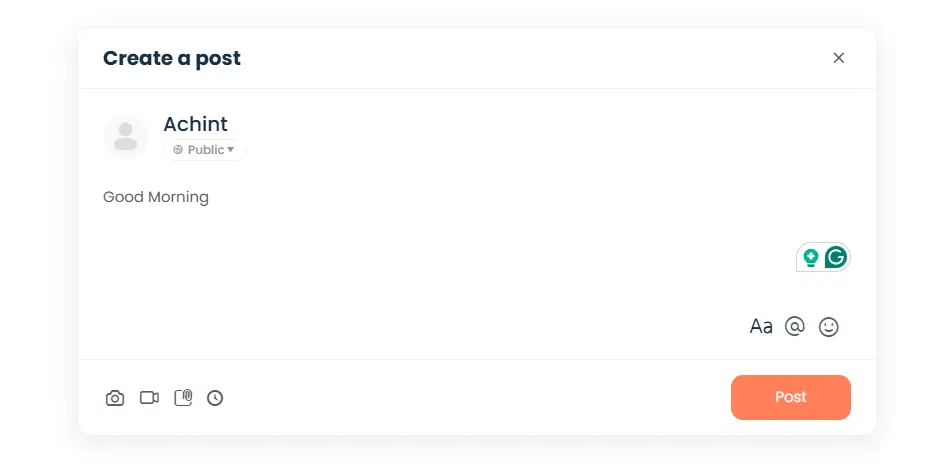
- From your WordPress admin menu, navigate to Users → Schedule Activity.
- The interface lets you:
- Choose the user who’s posting the activity
- Write the message
- Select the group (if needed)
- Set the date and time
- Define the activity type (personal or group)
This interface is intuitive and mirrors the feel of BuddyPress’ native post editor, making it familiar for users.
Step 3: Set the Time and Activity Type
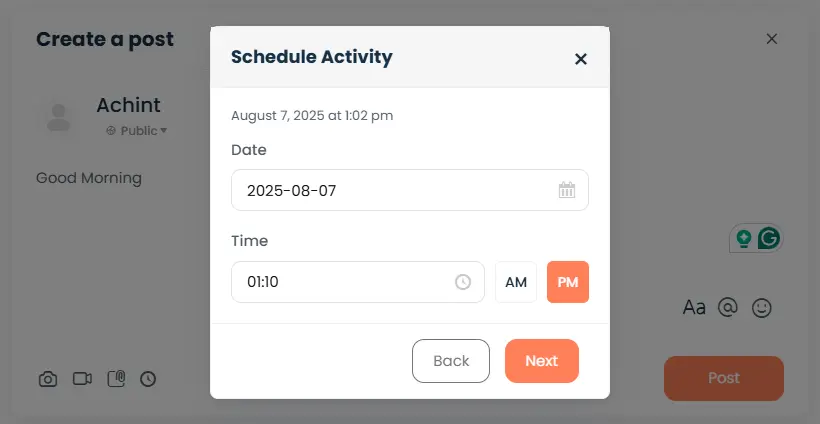
- Select your preferred timezone from the dropdown.
- Use the calendar and time picker to choose when the post should go live.
- Select the post destination:
- Main activity stream
- Specific BuddyPress group
You now have full control over where and when your activity will appear.
Step 4: Manage or Edit Scheduled Posts
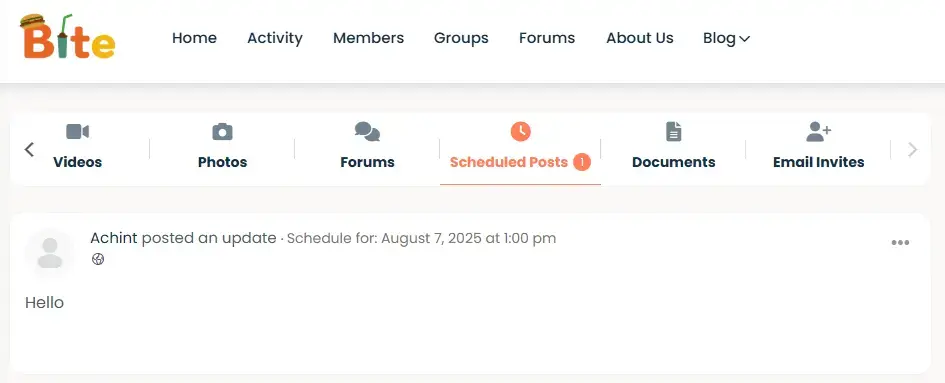
- All scheduled posts are listed in the Schedule Activity panel.
- You can:
- View upcoming posts
- Edit content or timing
- Cancel or delete posts
This flexibility is ideal for updating strategies on the fly or making last-minute content tweaks.
Best Times to Post Activities (Based on Behavior Trends)
While every community is different, here are some general time windows proven to boost engagement:
- 8 AM – 10 AM: Morning check-in period
- 12 PM – 2 PM: Lunchtime browsing
- 6 PM – 9 PM: Evening wind-down
- Weekends: Best for casual and community-based networks
These are excellent starting points. But to truly post an activity at the optimal time in BuddyPress, you should rely on your analytics.
How to Gather Timing Insights
- Use tools like Jetpack, Google Analytics, or Koko Analytics.
- Monitor:
- User logins
- Peak browsing hours
- Engagement timeframes (likes, comments, shares)
Apply this data to your scheduling strategy for maximum impact.
Use Cases for Scheduled Posting
Community Managers
Keep your activity stream alive and engaging around the clock. Pre-schedule weekly updates, new group invites, event reminders, or motivational content.
Educators
Schedule assignments, discussion prompts, or weekly class updates—ensuring students see them at the right time, even during school holidays.
Marketers & Brand Owners
Launch campaigns, publish offers, and release updates right when your audience is most likely to take action, boosting conversions and interactions.
Creating a Weekly Activity Schedule
A consistent posting routine keeps users engaged and gives them something to look forward to.
Example Weekly Schedule:
- Monday: Community goals or announcements
- Wednesday: Interactive post (poll, question, or challenge)
- Friday: Recap or user highlights
- Sunday: Inspirational quote or preview of the week ahead
Using BuddyPress Schedule Activity, you can pre-schedule all of these posts in under 30 minutes a week.
Consistency and timing = trust and growth.
Summary: Why Scheduling Works
By now, it should be clear: mastering how to post an activity at the optimal time in BuddyPress isn’t just a minor tweak—it’s a strategic shift. It allows you to:
- Save time through automation
- Maximize post visibility
- Improve user engagement
- Build a more consistent and lively community
Scheduling puts you in control, ensures your voice is heard, and gives your users a reason to come back.

Final Thoughts
Success in community building is often the result of small decisions executed consistently. Timing is one of those decisions. If you’re already creating great content and managing a vibrant BuddyPress network, you owe it to your users—and yourself—to post that content at the right time.
With tools like the BuddyPress Schedule Activity plugin, you don’t have to be online all the time to build a thriving, responsive, and active digital community. You just have to be strategic.
Remember: the right message at the right time creates the right results.
Call to Action
Ready to take your BuddyPress community to the next level?
👉 Download BuddyPress Schedule Activity now and start scheduling smarter, not harder.
Use the insights you’ve gained here to experiment with posting times, monitor performance, and find your own golden windows for engagement.
Interesting Reads:
17 Best WP Community Plugins in 2025

