

If you picked BuddyX as your theme, you already made one decision correctly: you wanted a theme built specifically for community sites rather than a generic multipurpose theme wearing a “works with BuddyPress” badge. What you have not necessarily decided yet is which engine actually powers the community underneath it, because BuddyX was built to pair with either BuddyPress, the plugin that defined WordPress community sites for over a decade, or BuddyNext, a standalone community platform built from scratch with a different architecture entirely.
This is not a “BuddyPress is dead, switch immediately” post, and anyone telling you that is selling something. It is a straightforward look at what actually differs between the two paths on a BuddyX site, so the decision gets made based on what your specific community needs rather than which option happened to come up first in a search result.
Both platforms are actively maintained and genuinely capable of running a real community well. The question this post is actually answering is not “which one is better,” it is “which one is better for the specific site you are running or about to build,” and those two questions have different answers depending on whether you are starting fresh or already carrying years of history.
What BuddyX gives you no matter which engine you choose
Start with what does not change, because it is easy to assume the theme decision and the engine decision are more entangled than they are. BuddyX handles layout, typography, color, and the general visual language of your site regardless of which community engine sits underneath it. Choosing BuddyPress or BuddyNext does not mean choosing a different theme, and it does not lock your visual design to whichever backend you pick. That separation matters because it means you can make the engine decision on its own technical and functional merits rather than worrying it will also force a design compromise.
When BuddyPress is still, honestly, the right call
BuddyPress has a decade and a half of accumulated ecosystem behind it, and that is not a small thing to walk away from. If your community depends on a specific niche BuddyPress add-on, a particular integration with a learning platform, a custom widget a developer built for you years ago, that plugin almost certainly does not have an equivalent on BuddyNext yet, because BuddyNext’s architecture does not run BuddyPress add-ons at all. Sticking with BuddyPress in that situation is not a compromise, it is the correct call given what you have already built.
Familiarity is a real cost saver too. If you have a developer or an agency who knows BuddyPress deeply, who can debug an issue by pattern-matching against fifteen years of Stack Overflow answers and forum threads, that institutional knowledge has value that a newer platform cannot match yet, purely because fewer people have spent a decade learning its edge cases. For an existing site with years of activity history, group structure, and member data already living in BuddyPress’s tables, staying put also avoids the entire migration question, the data mapping, the URL redirects, the member communication, that a platform switch would otherwise require.
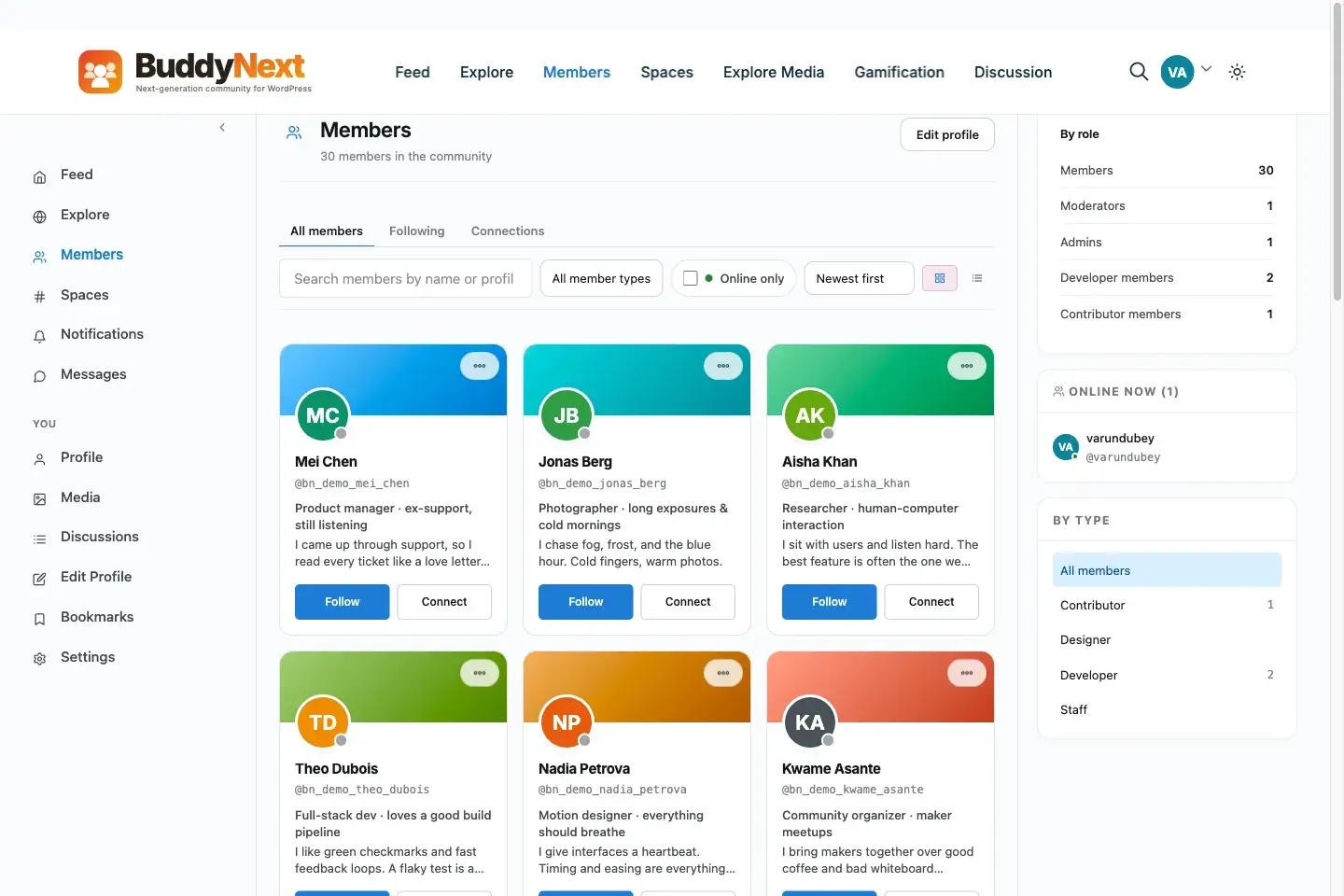
Both engines support a member directory experience, built on very different underlying architectures.
We looked at how BuddyPress stacks up against other established options in BuddyPress vs PeepSo vs BuddyBoss Community Plugins Comparison, and the underlying theme there applies here too: an established, mature ecosystem is a genuine asset, not just inertia.
When BuddyNext is the right call
The calculus flips for a site starting fresh, or one that has hit a specific technical or moderation ceiling BuddyPress’s architecture was never designed to clear. BuddyNext’s custom database tables, as opposed to BuddyPress storing activity as custom post types inside wp_posts, mean activity feeds, reactions, and threading stay performant as a community scales, without the query overhead that comes from treating every social interaction like a blog post competing for the same table space as your actual content.
Moderation depth is the other frequent trigger. If you are running a community that has genuinely outgrown “an admin manually reviewing reports,” BuddyNext’s free tier ships strikes, shadow-banning, appeals, banned word and domain lists, and space-scoped moderation as standard, where achieving equivalent depth on BuddyPress typically means stacking two or three separate moderation add-ons and hoping they do not conflict with each other. A brand-new community with no legacy BuddyPress plugin dependencies has nothing holding it back from starting on the newer architecture, and gets a meaningfully deeper moderation and Spaces model for free from day one.
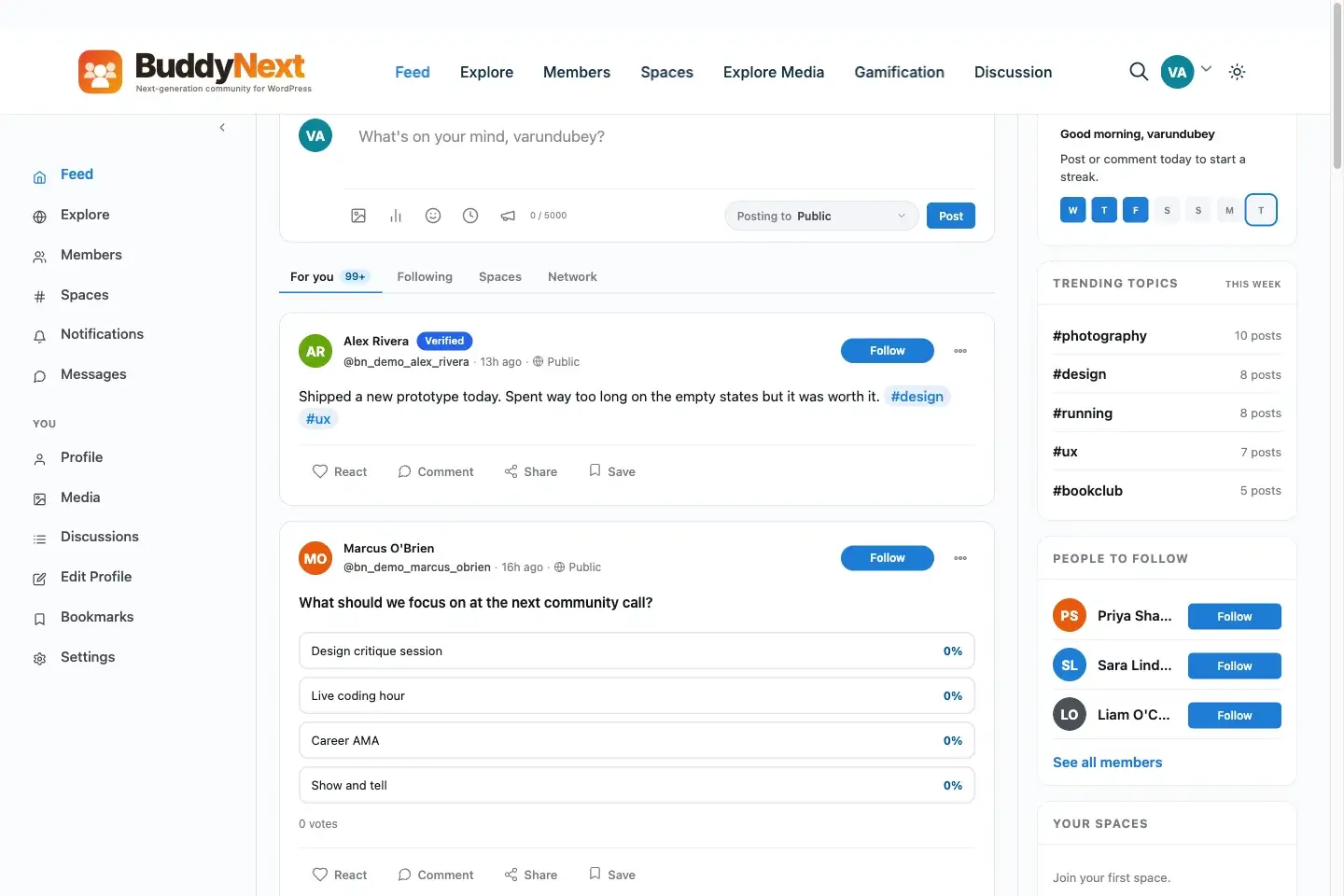
BuddyNext’s activity feed is one option BuddyX supports, built on a standalone architecture rather than BuddyPress.
Technical requirements are not identical, and that matters for older hosting
This is a practical detail that gets skipped in most comparisons but actually decides the question for some sites before any feature discussion even starts. BuddyPress runs comfortably on fairly old WordPress and PHP versions, which is part of why it still powers so many long-running sites on hosting plans that have not been touched in years. BuddyNext targets a considerably newer baseline, WordPress 6.9 and PHP 8.2 at minimum, reflecting its standalone architecture and the performance techniques it relies on.
For a site on modern, well-maintained hosting, that requirement is a non-issue, most reputable hosts default to current PHP versions already. For a site running on an older shared hosting plan that has not been upgraded in a while, checking PHP compatibility before committing to BuddyNext is a five-minute task that avoids a frustrating discovery mid-setup. This is not a knock against BuddyNext, targeting a modern baseline is exactly what lets it use custom tables and a complete REST API efficiently, but it is a real prerequisite worth confirming rather than assuming.
Cost comparison between the two paths
BuddyPress itself is free and always has been, and building a comparable feature set on top of it typically means adding paid add-ons for the specific gaps, deeper moderation, private messaging beyond the basics, advanced privacy controls, each with its own license cost. BuddyNext’s free tier bundles a considerable amount of that functionality, moderation depth, private and secret Spaces, per-field profile privacy, into the core install at no cost, with paid membership billing and AI features reserved for Pro at $149 to $399 a year depending on tier.
Neither path is inherently cheaper in every scenario. A BuddyPress site that only ever needed the free plugin and never added paid extensions costs nothing in platform licensing, same as BuddyNext’s free tier. Where the cost comparison actually matters is for a site that would otherwise need to stack several paid BuddyPress add-ons to reach the moderation and Spaces depth BuddyNext includes by default, in which case the total add-on spend on the BuddyPress side can exceed a single BuddyNext Pro license covering the same ground natively.
Performance at scale, made concrete
The architecture difference between the two platforms is not an abstract engineering detail, it shows up directly in how a community feels to use once it has real activity volume. BuddyPress storing activity as custom post types means every activity query competes with your blog content and pages in the same wp_posts table, and that table’s indexes were designed for blog-style content, not high-frequency social activity streams. A BuddyPress site with tens of thousands of activity items and a modest server can start to feel sluggish specifically on the activity feed and group pages, even when the rest of the site performs fine.
BuddyNext’s custom tables are purpose-built for this exact access pattern, indexed and structured around how a social feed actually gets queried, sorted by recency, filtered by Space, joined against reactions and comments. That design choice is precisely why the earlier point about custom-table performance matters more than it might sound: it is not a theoretical advantage, it is the specific thing that determines whether your activity feed still feels responsive once your community has years of history behind it rather than just the first few months.
Can you run both, or switch later?
Not simultaneously, in the sense of both engines managing the same activity feed and member data at once, that would create the exact sync problems that make stacked plugin setups painful. What you can do is start on one and move to the other later, though it is worth being precise about what that move actually involves rather than assuming it is a simple toggle. Moving from BuddyPress to BuddyNext is a genuine data migration project, activity history, group structure, and profile fields need a deliberate mapping process because the two platforms store that data in structurally different ways. It is a well-defined project, not an impossible one, but it is a project, not a settings change.
The practical implication is that this decision deserves real thought upfront rather than a “we’ll just switch later if it doesn’t work out” mentality. Both paths are legitimate. Neither is free to reverse once a community has real activity history built up on it.
Developer availability and the support ecosystem
This factor gets overlooked until the moment you actually need it, when something breaks and you are looking for help. BuddyPress’s fifteen-year history means a large pool of WordPress developers and agencies list it as a skill, community forums and Stack Overflow threads cover an enormous range of edge cases, and if your regular developer moves on, finding a replacement who already knows BuddyPress is realistic in most markets.
BuddyNext’s support surface is smaller simply because it is younger, which is a fair tradeoff to weigh rather than a disqualifying flaw. Its documentation and the vendor’s own support channel are the primary resources today rather than a broad, decentralized community knowledge base built up over a decade. For a site owner who values being able to hire from a large, established talent pool over getting deeper native features, that gap is worth factoring into the decision directly, not glossing over because the feature comparison favors the newer platform.
A decision scenario worth walking through
Picture two site owners, both running BuddyX, making this decision at the same moment. The first runs an existing 800-member professional association site, five years of BuddyPress activity history, a custom-built directory integration a contractor built three years ago that nobody currently on staff fully understands, and members who know the current interface well. For that owner, BuddyPress is very likely the right call, at least for now, because the switching cost is high and the actual pain points, if any exist, are probably solvable within BuddyPress rather than requiring a platform change.
The second owner is launching a brand-new paid coaching community from scratch, no legacy data, no inherited plugin dependencies, and a clear need for private and secret Spaces plus real moderation depth from week one because the community will scale fast. For that owner, starting directly on BuddyNext avoids ever having to make this decision again later under worse conditions, with real member data at stake instead of a blank slate.
Most real situations sit somewhere between those two poles, and the honest exercise is figuring out which pole your specific site sits closer to, not defaulting to whichever platform is more familiar or more recently written about.
Messaging and forums work differently on each path too
BuddyPress traditionally pairs with bbPress for forums and relies on third-party plugins or BuddyBoss-style bundling for anything beyond its basic private messaging. BuddyNext takes a companion-app approach instead: private messaging and media run through the free WPMediaVerse plugin, and forums integrate automatically through Jetonomy when both are active, sharing design tokens without manual configuration.
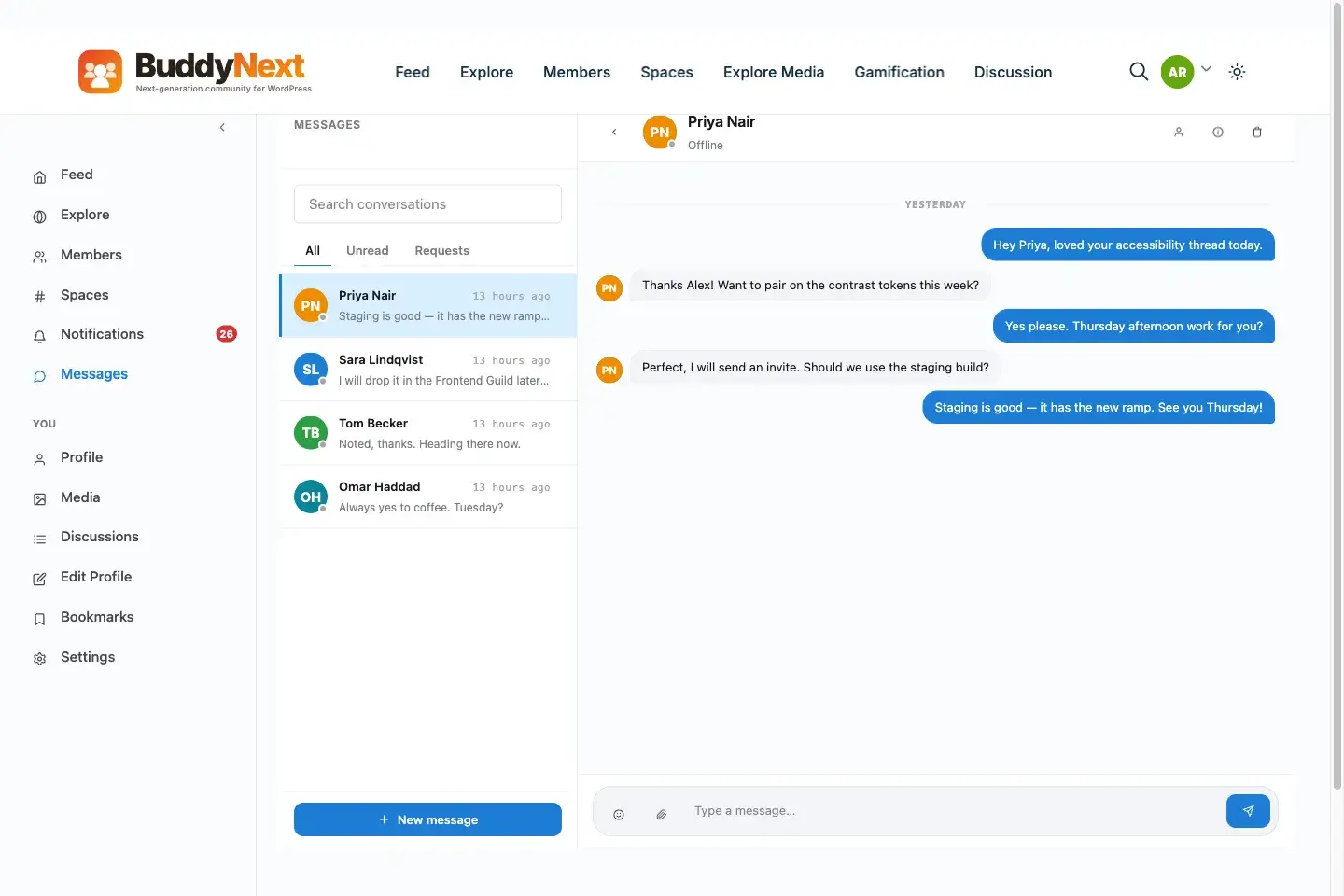
Messaging depth and integration behavior differ meaningfully between the two ecosystems.
Neither approach is objectively better, they reflect different philosophies about how a platform should extend. BuddyPress’s approach leans on a large, decentralized ecosystem of independently maintained plugins, which means more choice but less guaranteed consistency between them. BuddyNext’s companion-app approach means fewer choices but tighter integration, since the companion apps are built by the same team specifically to interoperate. Which philosophy you prefer is itself worth factoring into the engine decision, separate from any individual feature comparison.
What actually changes in the BuddyX experience itself
From a pure theme-rendering perspective, BuddyX adapts its templates to whichever engine is active, member profiles, directories, and activity displays render through the appropriate integration layer for BuddyPress or BuddyNext respectively. The design language, spacing, typography, color tokens, stays consistent either way, which is the entire point of choosing a purpose-built theme instead of a generic one that happens to have compatibility with both. What does shift is which specific features are available to surface in the theme’s layout options, since BuddyNext’s Spaces, reaction types, and moderation surfaces are simply different objects than BuddyPress’s groups and activity stream, and a template built for one is not automatically identical to a template built for the other.
We covered what a purpose-built theme actually needs to support for either engine in Best Theme for BuddyBoss Platform, and the underlying principle, that the theme should adapt to the engine rather than forcing the engine to conform to the theme, holds regardless of which specific platform you land on.
Frequently asked questions
Does BuddyX work equally well with BuddyPress and BuddyNext?
Yes. BuddyX is built to pair with either, handling layout, design, and typography consistently regardless of which community engine is active underneath it. The choice between the two engines is independent of your theme decision.
Can I switch from BuddyPress to BuddyNext later without starting over?
You can migrate, but it is a genuine data migration project rather than a simple toggle. Activity history, groups, and profile fields need a deliberate mapping process because the two platforms store data in structurally different ways. Plan for it as a project if you think you might switch eventually.
Is BuddyNext strictly better than BuddyPress?
No. BuddyNext offers deeper native moderation and better performance at scale for new communities, but BuddyPress carries fifteen years of accumulated add-ons, integrations, and developer familiarity that BuddyNext, as a newer standalone platform, has not yet built up. Which one is “better” depends entirely on what your specific community needs.
Will my existing BuddyPress plugins work if I add BuddyNext to the same site?
No. BuddyNext is a completely different architecture, not a BuddyPress extension, so BuddyPress add-ons do not run on it. The two are not designed to operate side by side managing the same community data.
Should a brand-new community site skip BuddyPress entirely and start on BuddyNext?
For a community with no legacy plugin dependencies and no existing data, starting on BuddyNext avoids ever needing to make this migration decision later, and gets deeper free-tier moderation and Spaces functionality from day one. It is a reasonable default for new builds, though not a universal rule.
Does choosing BuddyNext mean giving up BuddyX’s design flexibility?
No. BuddyX’s Gutenberg-based layout system and design tokens work the same way regardless of which engine renders the underlying community data, so switching engines does not mean switching or limiting your theme’s design capabilities.
Which platform is easier to find developer help for?
BuddyPress, currently, simply because it has fifteen years of accumulated community knowledge, forum threads, and developers who list it as an established skill. BuddyNext’s support surface is smaller and centered on official documentation and vendor support rather than a broad decentralized community, which is expected for a newer platform but worth factoring into a hiring or troubleshooting plan.
Does my hosting need to change if I choose BuddyNext over BuddyPress?
Possibly, if your current hosting runs an older PHP version. BuddyNext requires WordPress 6.9 and PHP 8.2 at minimum, while BuddyPress runs on considerably older baselines. Most modern, actively maintained hosting already meets BuddyNext’s requirement, but it is worth confirming before committing, particularly on older shared hosting plans.
A simple test to apply before deciding
If you are unsure which side of this decision you fall on, ask one question before anything else: does your community currently depend on a specific BuddyPress add-on, integration, or workflow that you could not easily live without for a few months while an equivalent gets built or found? If the honest answer is yes, that dependency should drive the decision more than any feature comparison in this post. If the honest answer is no, either because you are starting fresh or because your current BuddyPress setup is genuinely vanilla, the decision opens back up to the moderation, performance, and cost tradeoffs covered above, and there is no dependency forcing your hand either way.
The decision that actually deserves your attention
The question in this post’s title has a real answer, but it is not a universal one, and any post that gives you a universal answer without asking about your specific site’s history and needs is skipping the actual work. What matters is being honest about which category your site falls into, an established community with real switching costs, or a fresh build with a clean slate, and choosing accordingly rather than picking based on which platform happens to have more marketing content this month. BuddyX will look and feel like BuddyX either way. The engine underneath it is the decision that actually shapes what your community can do.
If you are still unsure after working through the scenarios above, the lower-risk move is usually to start wherever your current constraints point you, and revisit the decision deliberately at a natural milestone, a year in, a doubling of membership, a specific feature request you cannot fulfill, rather than treating the initial choice as permanent. Both BuddyPress and BuddyNext are actively developed, and neither commits you to standing still for the life of your community. What matters most is that the choice gets made on purpose, with the tradeoffs above actually weighed, rather than defaulted into simply because it was the first option that came up. That deliberate choice, more than either platform’s individual feature list, is what determines whether your community still feels well-supported five years from now.