

A travel blog is a section of a website updated regularly with posts, stories, photos, gear reviews, itineraries, whatever you’ve got. Most are written from the point of view of one person or a small group. A travel blogging community takes that a step further: it’s a blog with a place for readers to talk to each other, not just to you.
The distinction matters more than it sounds like it should. A blog with no comment activity and no way for readers to connect with each other stays a one-way broadcast no matter how good the writing is. A community, even a small one, turns readers into repeat visitors, and repeat visitors are what eventually make a travel site sustainable past the first few months of enthusiasm.
Why start one
A few reasons people go this route instead of just posting on social media.
You’ll push other people to actually go places
Sharing what you’ve seen, particularly if you travel with kids, tends to nudge readers toward destinations they hadn’t considered. Introducing your own kids to different cultures along the way is a bonus most bloggers don’t plan for but end up valuing more than the blog itself.
You get a record you’ll actually keep
A blog works like a travel diary, except it’s harder to lose and easier to search later. Photos, dates, the restaurant you can’t remember the name of, it’s all there.
It can eventually pay for itself
Not right away. Realistically, monetization takes consistent posting over months, not weeks. Text-link sales to advertisers chasing your page rank are usually the fastest path to any revenue; display ads like AdSense pay pennies per click but add up once you have traffic. Neither replaces a salary, but either can offset a plane ticket.
Why the community part matters
Bloggers tend to get each other in a way non-bloggers don’t. Someone who’s never run a blog won’t fully understand the high of a post going viral or the low of publishing into silence for a month. Other bloggers will. That’s worth something on its own, but there’s a practical side too: a blog hop, a joint social campaign, or a shared product launch reaches further than anything you’d pull off solo. Bloggers who collaborate consistently tend to outgrow bloggers who don’t.
There’s also a quieter benefit that takes longer to show up: accountability. A solo blog is easy to abandon in month four when the novelty wears off and traffic still looks thin. A community changes that math. Other members notice when you go quiet, ask what happened to the Peru trip recap you mentioned, and that small bit of social pressure keeps more people posting past the point where they’d otherwise have given up.
Building the community, step by step
If you just want to share trip photos with family, a plain blog is enough, skip the rest of this. If you want an actual audience and eventually a business, you need a niche and a problem you’re solving that other travel blogs aren’t.
Pick a niche narrow enough to actually own
“Travel blog” as a category is hopelessly crowded. “Budget rail travel across Eastern Europe” or “accessible travel for wheelchair users” is a category you can realistically rank for and become known in. The narrower niche also does something a broad one can’t: it tells a reader within the first ten seconds whether this site is for them, which is exactly the filter you want before they decide to join a community around it.
Add a social layer to your site
No website yet? Get a domain and hosting first. If you already have a WordPress site, add BuddyPress, it’s still the standard free plugin for turning a WordPress site into something with profiles, activity feeds, and groups, the pieces a real community runs on.
Give people a reason to stick around beyond your niche topic
Owning a niche gets you search traffic. It doesn’t get you a community. That takes a narrative readers actually want to follow, a reason to open your emails instead of just landing on one post from Google and leaving. Nobody searches for “story about the Bedouin in Jordan’s desert,” but if that story is sitting right after your packing-list post, some readers will stay for it anyway. A community forms around a point of view, not just a subject.
Learn the marketing side, even if you’d rather just write
Telling good stories gets you partway. Branding yourself and positioning your site inside a crowded travel-blog space is a separate skill, and skipping it is the most common reason good writing goes unread.
Start an email list on day one
It’s the one channel you actually control. Social platforms change their algorithms without asking you, and Google’s organic traffic can drop for reasons that have nothing to do with your content. Subscribers who opted in by email are the readers you can still reach when either of those things happens.
Give members a reason to post, not just read
A community with one voice and a silent comment section isn’t really a community, it’s a blog with a guestbook. Ask direct questions at the end of trip posts. Run a monthly thread where members share their own photos from a shared prompt, best sunrise, worst hostel, cheapest flight found. Small, low-effort prompts get more responses than an open-ended “what do you think?” ever will, because they remove the blank-page problem that keeps most readers from ever commenting.
Moderate before you need to, not after
Spam accounts, off-topic self-promotion, and the occasional bad-faith argument show up in any community that grows past a few hundred members. Decide your ground rules early, even if they’re just three sentences on a community guidelines page, and pick one trusted early member who can help flag problems before they need your personal attention. Communities that wait until a moderation crisis to write rules tend to write bad rules, made in a hurry and under frustration.
Photos and gear, without overspending early
New travel bloggers often assume they need a full camera kit before publishing anything worth reading. A recent smartphone handles most trip photography fine for a blog, and the honest truth is that composition and lighting matter more than sensor size for the vast majority of readers scrolling on their own phones. Save the gear upgrades for once you know which kind of travel content you actually enjoy producing, whether that’s landscape shots, food photography, or short video, since each pulls toward different equipment.
The same restraint applies to editing software and website plugins. It’s easy to spend the first month of a new blog installing tools instead of writing posts. A simple, working setup that gets content published beats an elaborate one still being configured six weeks in.
A theme built for this
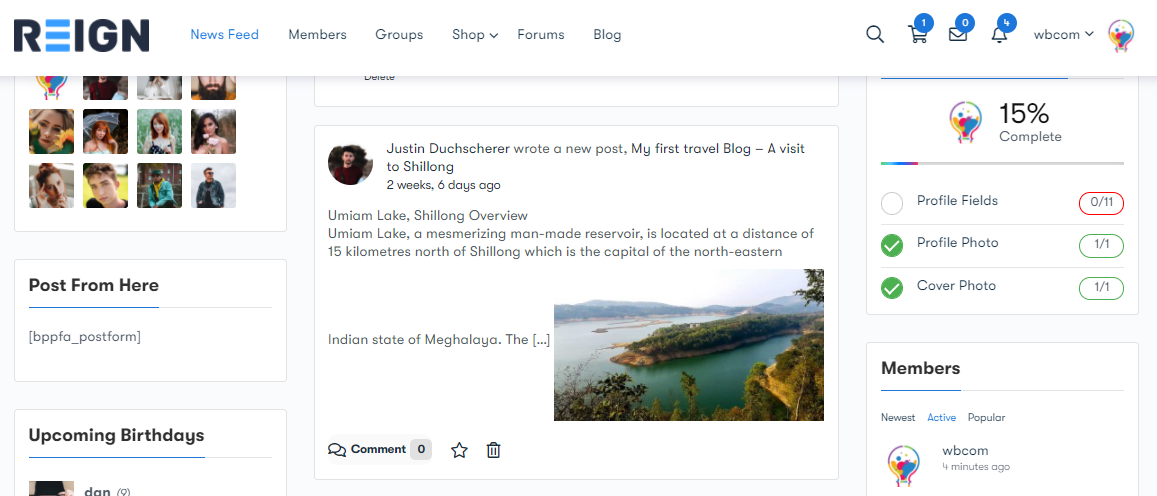
BuddyX pairs well with this setup, it’s built specifically for BuddyPress communities. Combined with a member-blog add-on, it lets contributors publish directly from the front end instead of needing dashboard access, which matters once you have more than one or two people posting.
BuddyPress Member Blog
BuddyPress Member Blog (now WB Member Blog) is a free plugin that lets members create and manage posts from their own profile page, with front-end publishing and moderation controls for what gets approved. The free version covers unlimited sites; the optional Pro tier adds things like paywalls and co-authoring if your community grows into needing them.
What to expect in the first few months
Growth is slower than most new bloggers expect, and slower than the plugin list above might suggest. The tools handle the mechanics; they don’t manufacture an audience. The first handful of community members are usually people you already know, friends from other trips, people you met traveling, a few readers from an existing social following if you have one. Ask them directly to join rather than waiting for organic discovery, since a community page with zero posts doesn’t convince a stranger to be the first one to comment.
Posting consistency matters more than posting volume early on. A predictable schedule, even once every two weeks, trains readers to come back on a rhythm. An unpredictable one, three posts in a week followed by six weeks of silence, trains them to forget you exist. Once you have a small, steady core of active members, growth tends to compound: they invite people, share posts in their own networks, and start generating discussion you didn’t have to prompt yourself.
Money, realistically
Revenue from a travel blogging community usually arrives in layers rather than all at once. Display ads are the easiest to set up and the slowest to add up to anything meaningful; most bloggers describe them as beer money until traffic climbs into the tens of thousands of monthly visitors. Sponsored posts and affiliate links tend to pay better per reader but require an audience a brand actually wants access to, which circles back to having a defined niche rather than a generic one. Some communities eventually monetize the community itself, a paid tier with extra content, direct messaging, or a members-only trip planning thread, once the free tier has proven there’s a real audience willing to engage.
None of this happens on a fixed timeline, and comparing your month-three numbers to someone else’s year-three numbers is a fast way to get discouraged for no good reason. Brands and tourism boards also increasingly look for engagement, not just traffic, when deciding who to work with. A blog with a small but genuinely active comment section can out-earn a much larger one with a silent, passive readership, because a comment section proves an audience actually trusts what you say enough to respond to it.
Mistakes that stall a new travel community
A handful of patterns show up again and again in travel blogs that never grow past the founder plus a couple of relatives.
Writing for everyone. A post trying to appeal to backpackers, luxury travelers, and family road-trippers at once usually satisfies none of them. Pick who you’re writing for and let the other readers pass by.
Treating photos as decoration instead of content. Travel is one of the most visual niches on the internet, and a post with three low-resolution phone photos competes badly against one with a dozen well-composed, properly sized images. It doesn’t need to be professional photography, but it needs to look intentional.
Publishing and disappearing. A community feature nobody logs in to check is worse than not having one, since an empty activity feed signals to new visitors that nothing is happening here. Check in on comments and discussion threads at least a few times a week, especially in the first months when a reply from the site owner still feels personal rather than automated.
Skipping basic SEO structure. Descriptive titles, a clear heading structure, and internal links between related trip posts do more for long-term discoverability than most bloggers expect. A post buried three clicks deep with a title like “Our Trip, Part 4” is invisible to search, no matter how good the writing is.
How big does a community need to be before it feels real
Smaller than most new bloggers assume. A recurring group of thirty or forty active commenters, people who show up post after post, respond to each other, and reference earlier discussions, reads as a real, functioning community to a new visitor even if the total subscriber count is in the low hundreds. A silent list of five thousand email addresses that never opens a message reads as nothing at all, because nobody browsing the site can see it.
This is worth internalizing early, because chasing a large passive number instead of a smaller active one is one of the more common ways new travel blogs burn out. Growth strategies built around vanity metrics, follower counts, subscriber totals, tend to reward exactly the wrong behavior: broad, generic content aimed at maximizing reach instead of narrow, specific content aimed at building trust with the people who actually stick around.
Content that keeps a community talking
Trip recaps are the backbone of a travel blog, but recaps alone tend to produce a lot of reading and not much talking. A few formats consistently generate more comments and shares than a standard itinerary post:
- Gear and packing breakdowns, especially ones that admit what didn’t work, tend to draw more comments than glowing recommendations.
- Budget breakdowns with real numbers. Readers trust a post that says “we spent $340 for four days” far more than one that vaguely calls a trip “affordable.”
- Mistake posts. A story about missing a flight, getting scammed, or picking the wrong season to visit somewhere invites readers to share their own version in the comments.
- Community-sourced roundups, where you ask members for their favorite under-the-radar spot in a region and compile the answers into a follow-up post. It rewards the people who contributed and gives you a post that took a fraction of the usual research time.
Choosing between BuddyPress and a lighter alternative
BuddyPress remains the default choice because it’s free, mature, and has the largest plugin ecosystem built around it. But it’s worth knowing it’s not the only option. Some newer standalone community plugins bundle activity feeds, groups, and messaging into a single lighter install without requiring the same level of configuration BuddyPress needs to feel polished out of the box. If you’re starting completely from scratch and don’t have existing BuddyPress content or plugins tying you to it, it’s worth spending an afternoon comparing both approaches before committing, since migrating a live community from one system to another later is far more disruptive than picking carefully at the start.
Keeping momentum once the novelty wears off
Most travel blogs die quietly around month six or seven, not from one bad decision but from the gradual erosion of enthusiasm once the initial excitement of launching wears off and the traffic numbers still look small. A few habits help a community survive that stretch.
Batch content ahead of travel rather than trying to write and post live from the road. Trips eat the time and energy that writing needs, and a blog that goes silent every time its author is actually traveling sends a confusing signal to a community expecting regular activity. Draft posts in advance, schedule them to publish while you’re away, and save the live updates for social media where lower-effort posting is expected.
Track something other than raw traffic. Early on, page views move slowly and can be discouraging on their own. Comment counts, repeat visitors, and email list growth often tell a more honest story about whether a community is actually forming, since those numbers reflect people choosing to come back rather than a single search click that may never happen again.
Recruit a co-moderator once the community is big enough to need one. Answering every comment and managing every discussion alone becomes unsustainable past a certain size, and burnout from doing it solo is one of the more common reasons an otherwise-successful community goes quiet. A trusted, active member is often willing to take on light moderation duties in exchange for early access to new features or simple recognition within the group.
Getting started
None of this is complicated. Pick your niche, install BuddyPress, give members a way to post their own content, and start an email list before you think you need one. The blogging part you already know how to do, the community part is just giving your readers somewhere to talk back.
Expect the first stretch to feel slower than the plugin setup suggests it should. Software solves the mechanics of hosting a community; it doesn’t manufacture the trust and habit that make people want to hang around one. Both take longer than a weekend to build, and both are the actual point of doing this instead of just posting trip photos to a personal Instagram account.
Interesting reads:
How to Implement WooCommerce Gamification