
Managing your organization’s IT assets effectively stopped being optional a while ago. Whether you’re overseeing hardware lifecycle, tracking software licenses, or responding to service tickets, having the right IT asset management system makes the difference between knowing where everything is and finding out during an audit that you don’t. For many teams, Snipe-IT has been a go-to open-source solution because it’s simple, flexible, and free to self-host.
But as infrastructure scales, some teams need deeper integrations, more advanced reporting, or a cloud-native platform that doesn’t require maintaining a server. This guide covers the strongest Snipe-IT alternatives in 2026, free and paid, for organizations ranging from small startups to enterprise data centers, along with two important status updates on tools that have changed since the last time lists like this one were written.
1. GLPI
Best for: teams that want a full-service open-source ITSM and ITAM suite in one platform.
Why it’s a strong alternative: GLPI is an open-source, web-based platform that goes beyond asset management. It integrates service desk tools, project management, and license management into one cohesive system, which makes it a natural fit for IT departments that outgrow a single-purpose asset tracker.
- IT asset discovery and inventory management
- Helpdesk ticketing with SLA and escalation workflows
- Native plugins for financials, contracts, and software compliance
- REST API and LDAP integration
- Available self-hosted or as SaaS through Teclib
2. Lansweeper
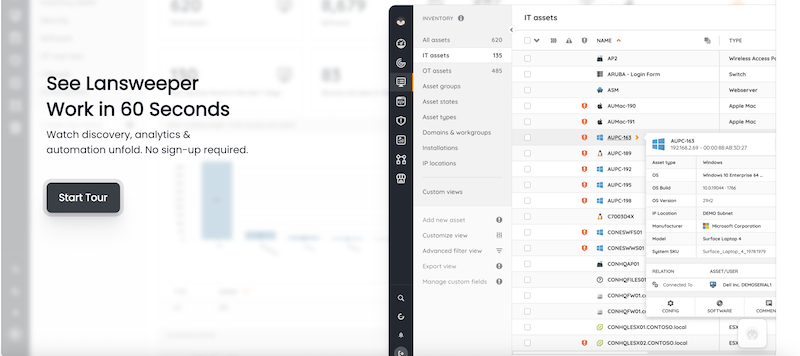
Best for: businesses that need automated device discovery and network inventory without manually cataloging every endpoint.
Why it’s a strong alternative: Lansweeper scans your entire network to identify every connected device, no agent installation required. It’s a hybrid of ITAM and network management that pays for itself the first time it finds a device nobody knew was on the network.
- Agentless network scanning
- Hardware and software inventory with change tracking
- Role-based dashboards and alerting
- Software license management and audit compliance
- Reporting engine with hundreds of built-in templates
3. IT Glue
Best for: MSPs and IT teams that need secure documentation alongside asset management, not instead of it.
Why it’s a strong alternative: IT Glue centralizes documentation about assets, software, credentials, and processes in one secure environment, which makes it particularly valuable for service providers managing multiple client environments at once.
- Structured asset documentation with relationships between items
- Password vault and access logs
- Integration with PSA and RMM tools
- SOP library and runbooks
- Version history and permission control
4. HomeBox (Community Continuation)
Best for: small setups looking for lightweight, self-hosted inventory tracking without enterprise overhead.
Why it’s a strong alternative, with a caveat: the original HomeBox project was archived by its creator in mid-2024 and is no longer receiving updates. If you’re evaluating it today, point yourself at the actively maintained community continuation rather than the original repository, since the original is now read-only and won’t receive security fixes.
- Clean web interface with a lightweight SQLite backend
- Add photos, tags, and notes to each item
- Self-hosted with Docker support
- Low resource requirements, runs comfortably on a small home server or low-cost VPS
5. Shelf.nu
Best for: makers, labs, or educators tracking physical items rather than IT hardware specifically.
Why it’s a strong alternative: Shelf.nu is an open-source, actively maintained tool for tracking physical inventory, well suited to environments managing tools, components, or lab equipment. It’s since grown to serve larger organizations too, with booking and custody features layered on top of basic tracking.
- Multiple users and permission levels
- Item categorization and custom fields
- Photo and attachment support
- Tag-based filtering and search
6. PartKeepr (Discontinued, Consider InvenTree Instead)
Status update: PartKeepr, once a solid pick for electronics component inventory, was archived by its maintainers in mid-2025 and its former project domain has since been taken over and repurposed for unrelated content. If PartKeepr shows up in an older comparison list, treat that recommendation as outdated.
Best for instead: hardware engineers and electronics inventory management, InvenTree has become the actively maintained open-source option for this exact use case.
- Stock levels, bin locations, and datasheet attachments
- Custom fields for specifications and suppliers
- REST API, barcode support, and a plugin system
- Active development with regular releases, unlike PartKeepr’s frozen codebase
7. Ralph
Best for: organizations managing server racks and physical IT infrastructure layouts.
Why it’s a strong alternative: Ralph combines asset lifecycle tracking with detailed rack layouts and physical location mapping. Its maintainer, Allegro, has moved it to a “source available” model rather than an actively supported product, publishing updates without guaranteeing responses to community issues, so budget for self-management if you adopt it.
- Asset model and serial number tracking
- Rack visualization and IP address assignment
- Support for depreciation and leasing schedules
- REST API and CLI tools
8. Zoho Inventory
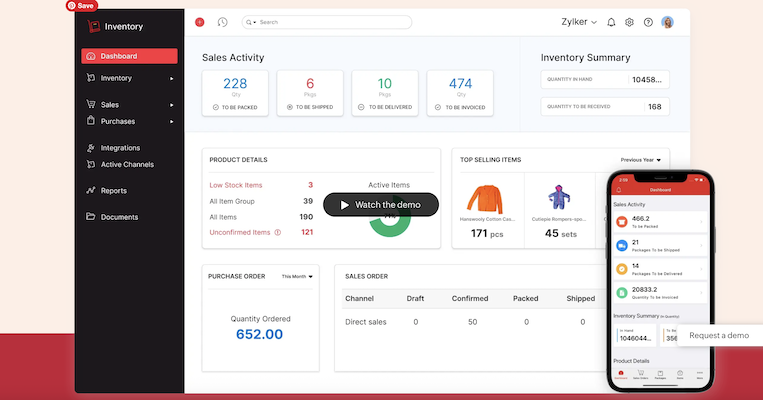
Best for: SMBs that need to manage inventory alongside actual sales channels, not just internal IT assets.
Why it’s a strong alternative: Zoho Inventory excels at managing stock levels, purchase orders, and multi-channel sales, which makes it a better fit for retail or logistics teams than for pure IT asset tracking.
- Inventory and warehouse tracking
- Barcode support and a mobile app
- Order management with shipping integration
- Integrates with Zoho Books, Shopify, and Amazon
9. Asset Panda
Best for: organizations that need mobile-first, customizable asset management for field equipment.
Why it’s a strong alternative: Asset Panda emphasizes mobile scanning and workflow automation, which suits teams managing equipment that isn’t sitting in a single office, like field service crews or remote teams.
- Mobile app with offline scanning
- Custom fields and configurable workflows
- Audit trails and maintenance history
- Calendar-based reminders
- GPS and geofencing capabilities
10. Freshservice
Best for: companies that want a complete ITSM and ITAM solution without stitching two products together.
Why it’s a strong alternative: Freshservice combines helpdesk ticketing with asset and contract management in a single, cloud-based SaaS tool that’s built to be intuitive from day one.
- Hardware and software asset tracking
- CMDB and change management
- Procurement and vendor tracking
- AI-assisted ticket resolution
- Incident, problem, and release management
11. Atera
Best for: managed service providers that need RMM and ITAM combined in one platform.
Why it’s a strong alternative: Atera blends remote monitoring and management, helpdesk, and asset tracking into one platform, priced per technician rather than per endpoint, which changes the math significantly for MSPs managing large device counts.
- Real-time network and device monitoring
- IT asset tracking tied directly to tickets and automation
- Scripted alerts, patch management, and reporting
- Unlimited endpoints per technician license
- Remote access and unattended support
Why Teams Still Reach for Snipe-IT First
It’s worth being clear about why Snipe-IT became the default starting point in the first place, since it explains why some of the alternatives above only make sense once you’ve genuinely outgrown it. Snipe-IT is free, open source, and focused specifically on IT asset tracking rather than trying to be a general-purpose ITSM platform. That narrow focus means a smaller learning curve and a lighter self-hosting footprint than GLPI or Freshservice, both of which bundle in ticketing, project management, and workflow automation you may not need yet.
For a five-to-fifty person IT team tracking laptops, monitors, and software licenses, Snipe-IT’s asset lifecycle tracking, checkout history, and depreciation reporting usually cover the job completely. The alternatives on this list earn their place specifically when one of those narrow assumptions breaks: you need network discovery instead of manual entry, you need ticketing folded into the same system, or you need mobile-first field tracking that a browser-based tool doesn’t handle well.
Open Source vs. Community-Maintained: A Distinction Worth Making
The PartKeepr and HomeBox situations above point to something worth building into how you evaluate any open-source tool, not just these two: “open source” describes a license, not a guarantee of ongoing maintenance. A project can be fully open source and still get abandoned by its original maintainer, and whether it survives that depends entirely on whether a community picks it up, the way HomeBox’s continuation project did, or whether it just goes quiet, the way PartKeepr’s original repository did.
Before adopting any self-hosted open-source ITAM tool, check three things: when the last commit landed, whether there’s more than one active maintainer, and whether the project has a public roadmap or is just coasting on inertia. A tool with five commits last week from three different contributors is a safer long-term bet than one with a beautiful feature list and no activity in the past year, regardless of how good the documentation looks today.
Choosing the Right Snipe-IT Alternative
Snipe-IT remains a solid choice for many teams, and nothing here suggests you need to migrate off it. But as infrastructure or use cases evolve, it’s worth knowing which alternatives align better with specific needs: full ITSM capabilities, automated discovery, or mobile-first inventory tracking.
| Use Case | Best Alternatives |
|---|---|
| Open-source and free | GLPI, Ralph, Shelf.nu, HomeBox (continuation) |
| Self-hosted and lightweight | InvenTree, HomeBox (continuation) |
| MSP-friendly | IT Glue, Atera, Asset Panda |
| Enterprise ITAM and helpdesk | Freshservice, GLPI |
| Inventory for sales and logistics | Zoho Inventory |
What Actually Changes When You Outgrow Snipe-IT
The teams that outgrow Snipe-IT usually hit one of three walls. The first is reporting: Snipe-IT covers the basics, but teams that need to slice data by department, cost center, or custom depreciation schedules eventually want something with a more flexible reporting engine, which is where GLPI and Lansweeper pull ahead. The second is discovery: Snipe-IT relies on manual entry or import, while Lansweeper’s agentless scanning finds devices nobody remembered to log. The third is scope creep: once IT starts fielding help desk tickets in a separate system, tools like GLPI and Freshservice that unify ITSM and ITAM save the overhead of keeping two systems in sync.
If none of those three problems describe your team, that’s a real signal to stay put rather than migrate for the sake of migrating. Migrating a working asset database for the sake of a longer feature list is one of the more common self-inflicted IT projects, and it rarely pays back the hours it costs unless a specific, named limitation is actually blocking your team.
How Big Does Your IT Environment Need to Be Before This Matters?
A lot of the advice above assumes a team large enough to feel the gaps in Snipe-IT, but plenty of smaller teams read a comparison list like this and wonder whether any of it applies to them yet. As a rough guideline, teams tracking under fifty devices with a stable, mostly-office-based workforce rarely need anything beyond what Snipe-IT already does well. The moment you cross into managing remote or field equipment, running more than one physical location, or fielding enough support tickets that a spreadsheet-adjacent workflow breaks down, that’s usually the signal to start seriously evaluating one of the alternatives above rather than working around Snipe-IT’s limits with manual processes.
Self-Hosted vs. SaaS: What You’re Actually Choosing Between
Self-hosted tools like GLPI, Ralph, Shelf.nu, and the HomeBox continuation give you full control over your data and no recurring per-seat fee, at the cost of owning patching, backups, and uptime yourself. That trade-off looks different depending on team size: a two-person IT department self-hosting GLPI is taking on real operational risk if nobody’s watching for security updates, while a dedicated infrastructure team treats it as a non-issue.
SaaS options like Freshservice, Atera, and Zoho Inventory remove that maintenance burden entirely, but tie you to a recurring subscription and put your asset data on someone else’s servers. For regulated industries or organizations with strict data residency requirements, confirm where a SaaS vendor actually stores data before signing a contract, since “cloud-based” doesn’t tell you which country your data lives in.
Budgeting for an ITAM Migration
Cost comparisons between these tools rarely stop at the sticker price. Self-hosted open-source options like GLPI, Ralph, and Shelf.nu carry no license fee, but factor in server hosting, someone’s time to configure and maintain the instance, and the operational risk of running security-sensitive software without a vendor support contract behind it. For a small IT team, that hidden labor cost can exceed what a modest SaaS subscription would have cost outright.
SaaS platforms like Freshservice, Atera, and IT Glue price per technician or per asset, which scales predictably as your team grows but can climb quickly for organizations with large device counts and lean IT staff. Run the actual math for your team size and asset count before assuming either direction is automatically cheaper. A hundred-person company self-hosting GLPI with a part-time administrator often comes out ahead of an equivalent SaaS subscription, while a five-person team without dedicated infrastructure staff usually loses money trying to self-host anything, even a free tool, once you count the hours spent patching and troubleshooting.
A Quick Migration Checklist
Moving off Snipe-IT, or onto any new ITAM platform, goes smoother with a short checklist:
- Export your full asset history, not just current status, since most tools support CSV import but historical audit trails don’t always transfer cleanly.
- Map custom fields before migrating. Snipe-IT’s custom field structure rarely maps one-to-one onto a new platform’s schema.
- Run the old and new systems in parallel for at least one full audit cycle before decommissioning the original.
- Re-train whoever does intake and check-in/check-out, since workflow differences between platforms are usually bigger than the feature comparison suggests.
Frequently Asked Questions
Is Snipe-IT still a good choice in 2026?
Yes, for teams whose core need is straightforward IT asset tracking without network discovery or built-in ticketing. It remains actively maintained, free to self-host, and well documented, and nothing in this list is a reason to migrate unless you’ve hit one of the specific gaps described above.
What’s the safest open-source pick if I don’t want to worry about a project going dark?
GLPI has the largest and most active contributor base among the open-source options here, backed by a company (Teclib) that also offers commercial SaaS hosting, which gives it more institutional staying power than smaller single-maintainer projects.
Can I run a free tool and upgrade to paid later without losing data?
Usually yes, if you choose a tool with a documented export format from the start. Confirm CSV or API export is available on the free tier before you build months of asset records into a platform, so you’re never trapped by a vendor that only lets you export on a paid plan.
Do MSPs need a different tool than internal IT teams?
Generally yes. MSPs need multi-tenant support so client data stays separated, along with billing and ticketing integration that internal IT teams don’t require. IT Glue, Atera, and Asset Panda are built with that multi-client structure in mind, while GLPI and Snipe-IT are built primarily for single-organization use.
Data Security Basics for Any ITAM Platform
Whatever you land on, an asset management system typically ends up holding more sensitive information than its name suggests, serial numbers, purchase costs, warranty details, and often login credentials for the devices themselves. Before rolling out any of the tools above, confirm role-based access control is actually configured (not just available), audit logs are enabled so you can see who changed what, and backups are running on a schedule you’ve actually tested by restoring from one, not just assumed are working.
For self-hosted tools especially, treat the ITAM platform itself as an asset that needs patching. An outdated self-hosted asset management server is an ironic but common gap: the tool tracking your security posture becomes the least-patched thing in your environment.
Match the Tool to the Actual Gap, Not the Longest Feature List
Evaluate based on your actual goals: better documentation, deeper integrations, mobility, or discovery automation. The right tool saves time and keeps you in control of both digital and physical assets, but only if it matches a problem you actually have rather than one a vendor’s sales page convinced you that you have.
Best Plugins to Convert a WordPress Site Into a Mobile App