

When running an online store, customer expectations are higher than ever. According to surveys, over 90% of online shoppers track their orders regularly once a purchase is made. Without a proper
tracking system, customers may feel anxious or frustrated, leading to more support requests and a weaker brand experience.
That’s where WooCommerce order tracking comes in. By giving customers a clear view of where their order is, you build transparency, reduce support inquiries, and foster long-term trust in your store.

Quick Links
The Problem Without Order Tracking
If your WooCommerce store doesn’t provide proper tracking updates, customers are left in the dark about their orders. This often leads to an overflow of “Where is my order?” emails can quickly become overwhelming for your support team. At the same time, buyers may begin to lose confidence in your
delivery reliability, questioning whether their package will arrive on time or at all.
This uncertainty creates unnecessary stress and frustration, which not only affects their current purchase but also makes them less likely to return for future orders. Ultimately, the lack of communication can damage customer satisfaction, no matter how high the quality of your products might be.
The Solution: WooCommerce Shipment Tracking Plugin
To solve this, WooCommerce offers an official solution: the Shipment Tracking plugin. This plugin makes it easy to add tracking details to your orders, ensuring customers stay informed at every step of the shipping process.
Key Features of the Shipment Tracking Plugin
- Seamless Integration: Works directly inside WooCommerce without complex setup.
- Multiple Carriers Supported: Add tracking information from popular carriers like UPS, FedEx, DHL, USPS, and more.
- Customer-Friendly Display: Tracking details appear in order confirmation emails and on the customer’s “My Account” page.
- Automated Updates: Keeps customers updated without manual follow-ups.
How to Add Order Tracking in WooCommerce (Step-by-Step)
Setting up WooCommerce order tracking with the Shipment Tracking extension is straightforward. Here’s how you can do it:
Step 1: Install and Activate the Plugin
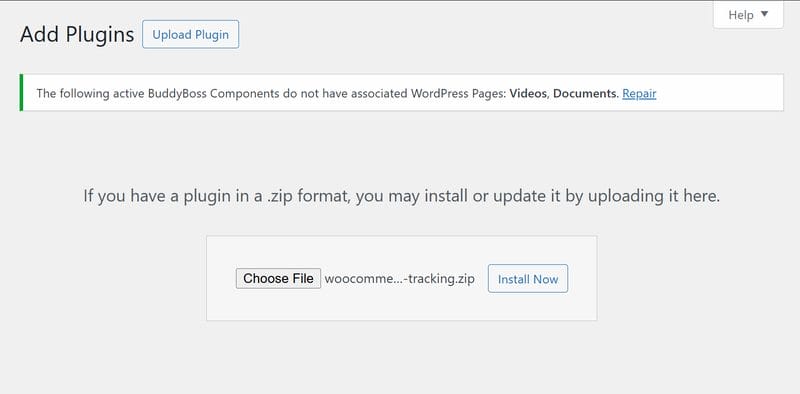
- Purchase the Shipment Tracking extension from WooCommerce.
- Upload it via Plugins → Add New → Upload Plugin in your WordPress dashboard.
- Activate the plugin to begin using tracking features.
Step 2: Access the Shipment Tracking Panel
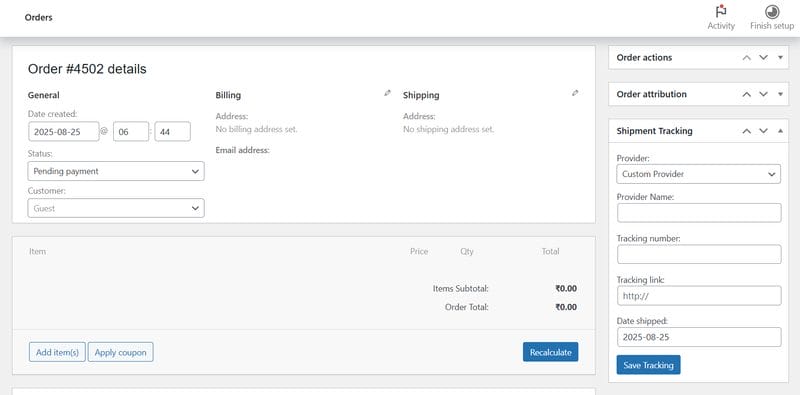
- Go to WooCommerce → Orders.
- Open any order you’d like to update.
- Scroll down to the new Shipment Tracking panel on the order edit screen.
Step 3: Add Tracking Information
- Choose a Provider: Select your shipping company from the dropdown. If it isn’t listed, choose Custom Provider and enter their tracking URL.
- Enter the Tracking Number: Paste the number provided by your carrier.
- Add Shipping Date (Optional): Include the date you shipped the order.
- Test the Link (Optional): Use the preview option to confirm the tracking link works.
Step 4: Save and Complete the Order
- Click Save Tracking.
- Update the order status to Completed.
- Once marked as completed, WooCommerce automatically sends the customer an email with tracking details included.
Step 5: Add Multiple Tracking Numbers (Optional)
If an order is split into multiple shipments, click Add Tracking Number to include additional tracking entries.
Customer View: Customers will see tracking information in their order emails and under My Account → Orders, ensuring they’re informed every step of the way.
Also Read: How to Add a Free Shipping Limit in WooCommerce the Right Way
Best Practices for WooCommerce Order Tracking
To maximize the benefits of WooCommerce order tracking, focus on consistency and customer trust. Always add tracking numbers as soon as possible to reduce uncertainty and reassure buyers that their order is on its way. Relying on trusted shipping carriers ensures accurate and timely updates, which further strengthens confidence in your store.
You can also customize email notifications with your branding to create a polished, professional impression that reflects your business identity. Finally, place a test order yourself so you can experience the process from a customer’s perspective and make any improvements before scaling.
Benefits of WooCommerce Order Tracking for Businesses
- Fewer Support Tickets: Save time by reducing “order status” inquiries.
- Boost Customer Loyalty: Happy, informed customers are more likely to return.
- Professional Image: Tracking makes your store look credible and trustworthy.
- Increased Sales: Shoppers are more likely to buy again when they feel confident about your shipping process.

Elevate Your Store with WooCommerce Order Tracking
Customer experience is the foundation of a successful online store, and order tracking plays a vital role in shaping it. By implementing WooCommerce order tracking with the official Shipment Tracking plugin, you give your customers the peace of mind they deserve. They can follow their purchases from checkout to delivery, which reduces support requests, builds trust, and makes them more likely to return for future orders.
Beyond customer satisfaction, order tracking also reflects professionalism and reliability, strengthening your store’s reputation in a highly competitive eCommerce landscape. Shoppers today expect transparency, and businesses that deliver on this expectation often see higher loyalty and repeat sales.
If you want to take things even further, consider tailoring the tracking experience with expert customization. At Wbcom Designs, we specialize in custom WooCommerce development services that help store owners enhance functionality, streamline operations, and deliver a seamless customer journey. Whether you need advanced shipping integrations or a fully branded tracking system, our team can build solutions that match your unique business goals.
Interesting Reads
10 Best Dropbox Alternatives You Should Consider in 2025

