

Polls give a community something concrete to react to, faster than a discussion thread, more measurable than a like button. WB Polls (formerly branded BuddyPress Polls, same developer, v5.0.1, $49-129/yr or $149-349 lifetime) brings that directly into activity feeds, profiles, and groups.
Most community managers reach for polls the same way they reach for a poster board at a meetup: put up a question, count the hands, move on. That works fine for a single event. It falls apart the moment you’re running an ongoing community with hundreds or thousands of members scattered across time zones, because a show-of-hands question needs everyone in the room at once. A poll embedded in the activity stream doesn’t have that problem. Someone scrolls past it at 7am with coffee, someone else votes at midnight after a shift, and the tally keeps building without anyone needing to be present for a live moment.
What It Actually Covers
One license now covers three distinct tools: BuddyPress activity polls, standalone polls placed anywhere via shortcode, and full surveys with response analytics. That’s a meaningfully bigger scope than a basic yes/no poll widget, and it’s worth separating the three because they solve different problems.
Activity polls live where your members already spend their time, inside the feed they’re scrolling anyway. Standalone polls via shortcode are for when you want a vote somewhere outside the social layer entirely, a landing page, a sidebar widget, a dedicated voting page for something like an annual awards program. Surveys are the heavyweight option: multi-question, sequential, built for gathering structured feedback rather than a single quick reaction. Treating these as one feature instead of three separate purchases is the actual value proposition here, not just the poll mechanic itself.
Poll Formats
Five media types per poll: text, image, video, audio, and HTML for fully custom layouts. A music or podcast community can run audio polls on which track to feature next; a design-focused group can run image polls on layout options, the format fits the community rather than forcing every vote into the same plain-text template.
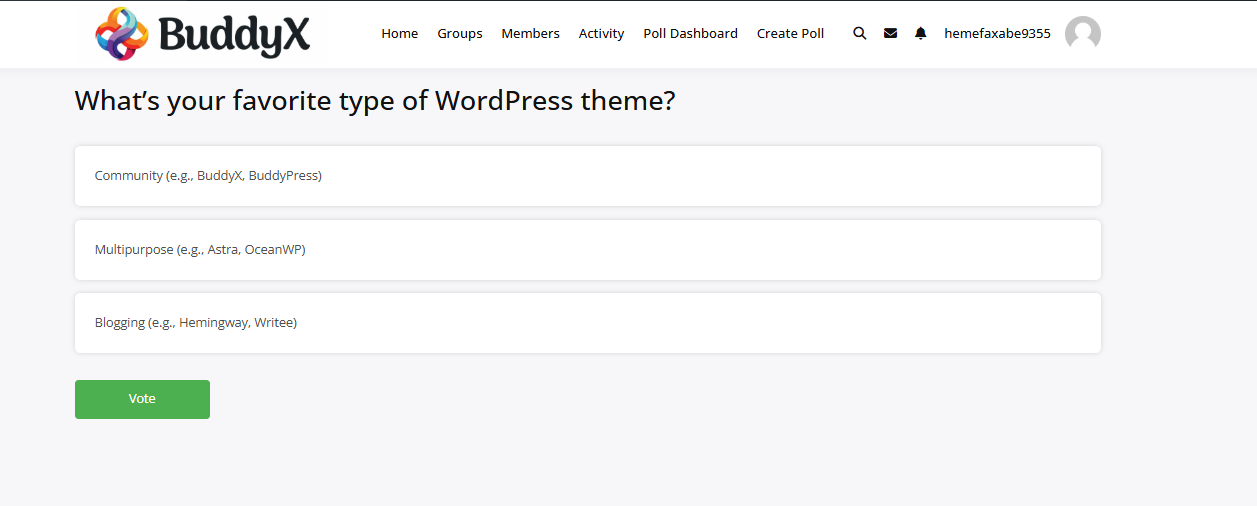

Image polls in particular tend to pull higher response rates than text ones, for a reason that has nothing to do with the plugin itself: a picture takes less cognitive effort to evaluate than a sentence. A member scrolling a feed decides in under a second whether to stop, and a thumbnail of two logo options is an easier stop-and-vote moment than a paragraph asking which one they prefer.
Practical Controls
- Single or multiple choice answers, depending on what the question needs.
- Scheduling. Set start and end dates instead of manually opening and closing polls.
- Results display. Live charts, or hidden until the poll closes if you want to avoid influencing later votes.
- Privacy controls. Public, group-restricted, or fully private polls.
- Custom CSS support for matching your site’s branding beyond the built-in color options.
The hide-results-until-close option deserves more attention than it usually gets. Anyone who has run an open poll knows the bandwagon effect is real, once a leading option pulls ahead by a visible margin, later voters tend to pile onto it rather than vote their actual preference. If you’re running something where you actually want the unbiased signal, a product name vote, a genuine satisfaction survey, keep the results hidden until the poll closes. If you’re running something meant to build momentum, an RSVP-style “who’s coming to the meetup” poll, showing live results is the better call because the visible tally itself becomes part of the engagement.
Where It’s Actually Useful
- Community feedback. Quick satisfaction checks or feature-priority votes instead of a full survey form.
- Event planning. Let members vote on dates or themes rather than guessing what works for the group.
- Education groups. Quizzes and comprehension checks using the survey engine, not just the basic poll.
- Marketing/brand communities. Fast, informal market research from people who are already engaged.
A few less obvious use cases are worth adding to that list. Onboarding sequences can use a short poll as a low-friction first interaction, asking a new member which topic interests them most does two things at once: it gives them something to click within their first five minutes on the site, and it gives you a data point for segmenting that member later. Support communities can run recurring “what’s your biggest blocker this week” polls to surface patterns across the group rather than relying on individual support tickets to reveal what’s actually going wrong. And moderation teams sometimes use private group polls internally, a quiet way to gauge consensus on a rule change before announcing it publicly.
Education and Training Communities Specifically
The survey engine is where this plugin earns its keep for course-based or membership communities. A basic poll answers one question. A survey can walk a learner through a five-question comprehension check at the end of a module, and because it’s built on the same underlying system as the activity polls, the results still show up in a format the admin can actually use rather than a wall of raw export data. For a cohort-based course, running the same short survey at the start and end of the program gives you a genuinely useful before/after comparison, not just a vanity metric.
Setting One Up
- Install and activate WB Polls.
- From an activity feed, profile, or group page, click Create Poll.
- Pick a format (text, image, video, audio, or HTML).
- Add options, set a duration if you want one, and publish.
Admins can edit or remove polls after the fact, track participation, and adjust visibility at any point, no need to get every setting right before publishing.
Getting Response Rates Up
A poll sitting quietly in a feed doesn’t guarantee anyone stops to vote. A handful of habits tend to move the needle more than any setting inside the plugin itself. Keep the question short enough to read in one glance, three to five words beats a full sentence almost every time. Cap the options at four or five unless the question genuinely needs more, a wall of eight choices reads as a chore rather than a quick tap. And post polls when your community is actually active rather than at 3am your time and 3pm nobody’s time, the plugin doesn’t control when people see the poll, your posting schedule does.
Reading the Results Honestly
A poll with 40 responses out of a 2,000-member community isn’t a mandate, it’s a sample, and a fairly self-selected one at that: the people who vote on polls tend to be your more engaged members, not a representative slice of the whole group. Treat poll results as a useful signal worth weighing alongside other feedback, not as a final verdict that overrides everything else you know about what the community wants. That’s a limitation of polling in general, not something specific to this plugin, but it’s easy to forget once you’re looking at a chart with a clear-looking majority.
Where It Fits Against BuddyPress-Native Alternatives
BuddyPress doesn’t ship with native polling, so the realistic comparison isn’t “built-in versus plugin,” it’s this plugin versus a generic external tool like a Google Form linked from an activity post, or versus a simpler free polling plugin with none of the media-format flexibility. The external-form route works, technically, but it breaks the thing that makes community engagement work in the first place: it takes the member off your site. Every redirect to an external form is a chance for someone to get distracted and never come back to finish voting. Keeping the interaction inside the activity stream, where WB Polls operates, removes that drop-off point entirely.
A Note on the Rebrand
If you’ve used BuddyPress Polls before and are wondering whether WB Polls is a different product, it isn’t, same developer, same underlying plugin, updated name and expanded scope to reflect that it now covers standalone polls and full surveys, not just BuddyPress activity polls. Existing licenses and setups carry over; nothing about the rebrand changes what you’re running if you installed it under the old name.
A Few Niche Examples Worth Walking Through
Abstract feature lists are easy to skim past without actually picturing how any of this plays out day to day, so here are a handful of specific scenarios rather than another bullet list.
A gaming guild site
A guild running weekly raid nights doesn’t need a survey, it needs a fast yes/no/maybe RSVP that resolves before Tuesday’s raid. A scheduled poll that auto-closes the night before does that without an officer manually chasing people down in Discord. Multiple-choice for “which boss are we farming this week” works the same way, and because it’s inside the activity stream, it shows up for members who already check the site daily rather than requiring a separate notification channel.
A nonprofit or advocacy community
Private, group-restricted polls matter more here than almost anywhere else. A board or core-volunteer group voting on a sensitive direction, whether to take a public stance on something, how to allocate a limited budget, needs the privacy control set correctly before the poll goes live, not as an afterthought. The hidden-results option matters too: a board vote where the running tally is visible mid-vote tends to produce herd behavior instead of independent judgment, which defeats the point of voting at all.
A fitness or coaching membership
The survey tool fits a check-in cadence better than the poll tool does. A weekly five-question survey, energy level, soreness, adherence to the program, one open text field, gives a coach running a group program actual structured data across the whole cohort instead of relying on whoever happens to post an update in the group feed that week. It’s not a replacement for a dedicated fitness-tracking app, but for a community-first coaching model it closes a real gap.
Mobile Behavior and Accessibility
Polls render inline with the rest of the activity feed on mobile, so there’s no separate mobile view to configure, whatever theme is handling your responsive layout carries the poll along with it. That matters in practice because most community platforms see the majority of activity-feed scrolling happen on a phone, and a poll that requires pinch-zooming to read the options is a poll nobody bothers with. Text and image polls read cleanly at typical phone widths; HTML polls are the one format worth testing manually on a phone before publishing, since custom markup can behave differently than the built-in formats depending on what you’ve put in it.
On the accessibility side, radio and checkbox inputs behave like standard form controls, keyboard-navigable and screen-reader-readable by default, which is the baseline you’d expect from any well-built form element. If you’re layering custom CSS on top for branding, it’s worth double-checking that color-only distinctions between selected and unselected options still have a secondary visual cue, an outline or icon, not just a color shift, since color alone isn’t a reliable signal for every visitor.
Common Setup Questions
Can members see who voted for what?
That depends on the privacy setting chosen for the specific poll, not a single sitewide switch. Some admins want anonymous voting for anything opinion-based and attributed voting for anything logistics-based, like an RSVP where you actually need to know who’s coming. Setting this per-poll rather than globally is the right level of control for that.
What happens to a poll if I deactivate the plugin?
Poll data is stored in the database rather than disappearing on deactivation, so reactivating restores access to existing polls and their results. That said, treat any plugin deactivation on a live site as something to test on staging first, not because this specific plugin is unusually risky, but because that’s the standard-practice rule for any plugin holding user-generated data.
Does a poll count toward activity stream engagement metrics?
A vote registers as an interaction the same way a comment or reaction does, so if you’re tracking engagement through BuddyPress activity data or a separate analytics layer, poll participation shows up in that same stream rather than living in a silo the rest of your reporting can’t see.
Troubleshooting the Usual Snags
Most of the setup problems that come up with any BuddyPress add-on plugin trace back to a handful of predictable causes, and this one is no exception.
- Poll not showing in the activity feed. Almost always a BuddyPress activity-stream caching issue rather than a plugin bug, if you’re running an object cache or a page cache plugin, clear it after publishing and check again before assuming something’s broken.
- Images not uploading for an image poll. Check your server’s upload size limit first, a surprising number of “the poll won’t accept my image” tickets turn out to be a PHP
upload_max_filesizesetting that’s smaller than the image being uploaded. - Results chart looks broken or unstyled. Usually a theme conflict where custom CSS elsewhere on the site is overriding the poll’s chart styles. Isolating it with the browser’s inspector to see which rule is winning is faster than guessing.
- License key not activating. Double-check the domain registered against the license matches exactly, http versus https and www versus non-www mismatches are the most common reason a valid key won’t activate.
Pairing Polls With Other Engagement Tools
Polls work best as one piece of a broader engagement rhythm rather than the whole strategy on their own. A community relying purely on polls tends to see participation flatten out after the novelty wears off, the same way any single engagement mechanic does when it’s the only tool in rotation. Pairing a weekly poll with an occasional longer-form discussion thread, a member spotlight, or an event gives people more than one way to show up, and it keeps the poll itself feeling like a quick, low-effort touchpoint rather than the sole measure of whether someone’s engaged that week. Think of it as a pulse check that sits alongside deeper interaction, not a replacement for it. A useful rhythm for a lot of the communities running WB Polls looks something like one quick poll per week, one longer discussion prompt every couple of weeks, and a survey reserved for the handful of moments a year that actually warrant structured feedback rather than a gut check.
Weighing the Cost Against a Free Alternative
There are free polling plugins on WordPress.org, and for a site that just wants an occasional single-question poll with no media formats and no BuddyPress-specific integration, one of those might genuinely be enough. Where the paid tier earns its price is the combination: native BuddyPress activity-stream integration (a generic poll plugin usually isn’t built for that context specifically), five media formats instead of text-only, the survey engine for anything beyond a single question, and scheduling that doesn’t require you to manually close a poll at the right moment. If your use case is “one poll, once, on a low-traffic site,” the free route is fine. If polls and surveys are going to be a recurring engagement tool across an active community, the gap between a generic free plugin and one built specifically for BuddyPress activity feeds shows up fast.
If You’re Migrating From the Old BuddyPress Polls Branding
Existing installs don’t need a fresh setup. Update the plugin through the normal WordPress update flow, confirm the license key is still active under your account on the Wbcom Designs site if prompted, and existing polls, results, and settings carry over as-is. The main thing worth checking post-update is whether you now have access to the standalone-poll and survey tools if your original purchase predates the scope expansion, since license tiers can determine which of the three tools (activity polls, standalone polls, surveys) are unlocked on your account.
Interesting Reads:
Why Profanity Filters are Essential for Online Communities
BuddyPress WooCommerce Integration: Start Selling on Your Community Site