

BuddyPress builds the community, WooCommerce builds the store. Neither talks to the other by default, which is where BuddyWoo (free, WBCOM Designs, v1.4.0) comes in: it connects the two so members can sell, buy, and track orders without leaving their community profile.
A concrete case: an NGO running a BuddyPress community for artisans could let each member sell their own goods directly from their profile, with proceeds going straight to them, no separate storefront needed. That’s the kind of scenario where the gap between “community plugin” and “store plugin” actually costs something real if you don’t close it, a maker with a following on your site but no easy way to convert that following into a sale is a missed opportunity built into the platform’s default state.
Why the Two Don’t Talk by Default
It’s worth understanding why this gap exists in the first place rather than treating it as an oversight. BuddyPress was built as a social layer, profiles, activity, groups, messaging, and it was never meant to know anything about commerce. WooCommerce was built as a store layer, products, cart, checkout, orders, and it was never meant to know anything about social profiles. Both plugins do their one job well precisely because they don’t try to do the other’s job. A connector plugin is the right architectural answer to that split, rather than either plugin trying to absorb the other’s entire feature set and becoming bloated in the process.
What Connecting Them Gets You
- Individual member profiles, activity streams, groups, and messaging stay intact, WooCommerce sits on top rather than replacing any of it.
- Members can publish, promote, and manage their own listings from their profile.
- New product activity (publishing a product, leaving a review) shows up automatically in the activity stream, giving the rest of the community visibility into what’s for sale.
- Order tracking and management happen from the same profile tab members already use, no separate WooCommerce dashboard login required for sellers.
Also read: Building an Online Community From Scratch.
Why BuddyWoo Specifically
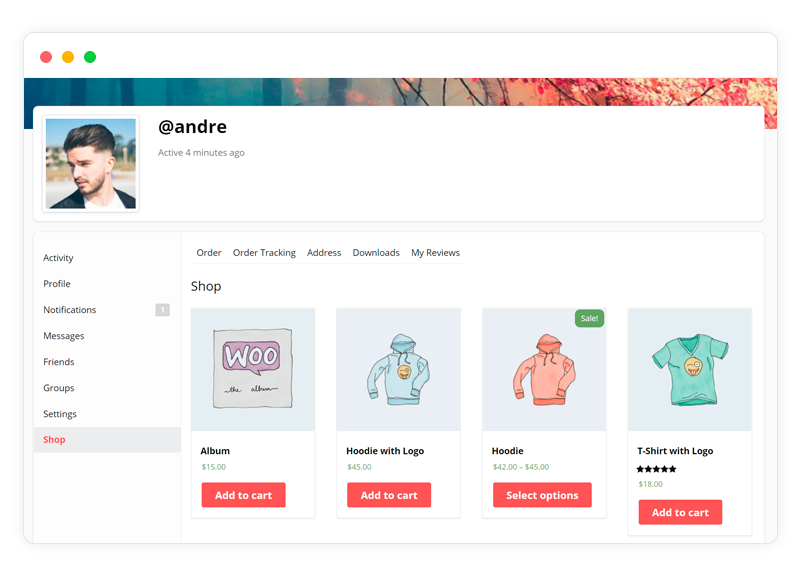
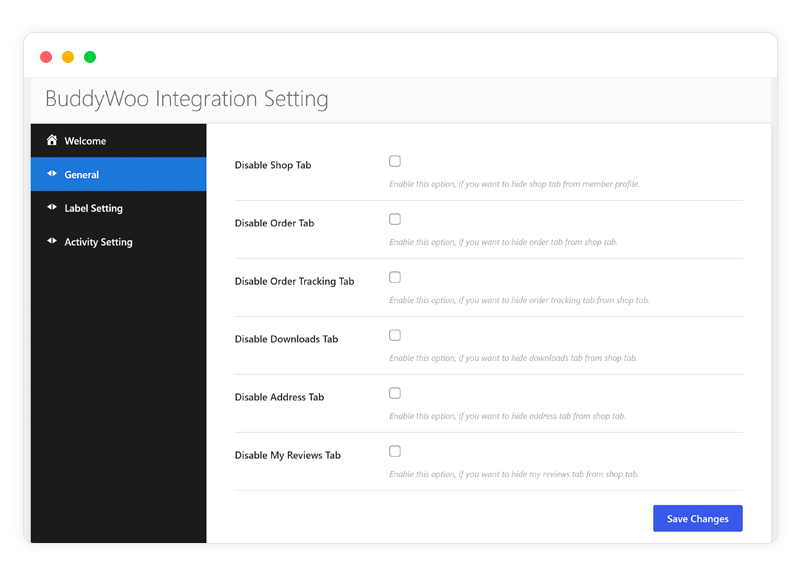
It’s free, and setup doesn’t require touching code: install, activate, and it adds a WooCommerce tab directly to member profiles, with admin control over what’s visible there.
Manage the Store From the Profile
Members see orders, products, and downloads from a centralized profile tab, not a separate dashboard, which is a real usability difference for non-technical sellers.
Sells Physical and Digital Products
Same as native WooCommerce, no restriction on product type once the profile-level access is set up.
Works With BuddyBoss Too
BuddyWoo isn’t locked to BuddyPress specifically, it supports BuddyBoss Platform as well, so switching community plugins later doesn’t mean losing this integration.
Also read: How to Build a Community for Online Courses.
The Version That Predates This Integration
Before a plugin like this existed, the workaround most community sites used was blunt: run BuddyPress and WooCommerce side by side with zero connection, and just link between a member’s forum signature or bio field and an external store page. It worked in the sense that a determined buyer could find their way from a profile to a purchase, but every extra click and every redirect off the community context is a place a sale can quietly die. Measuring that drop-off is hard after the fact because it’s invisible, a buyer who gives up two clicks before checkout doesn’t leave a support ticket explaining why. The value of an actual integration isn’t a single dramatic feature, it’s removing several small points of friction that were each individually easy to dismiss but collectively added up to real lost sales.
Where This Fits Compared to Full Vendor-Marketplace Plugins
BuddyWoo isn’t trying to be Dokan or WC Vendors, and it helps to be clear about that distinction upfront. A dedicated multi-vendor marketplace plugin gives every seller a genuinely independent storefront, commission splitting, vendor payout schedules, and a full vendor dashboard separate from their profile. That’s the right tool if you’re building something closer to an actual marketplace where sellers are running independent small businesses through your site. BuddyWoo solves a narrower, and for a lot of community sites, more common problem: letting members who are already part of a social community sell occasionally through the profile they already have, without standing up a full marketplace infrastructure. If your community’s commerce need is “some members sell things sometimes” rather than “I’m running a multi-vendor marketplace as the core business model,” BuddyWoo is the lighter, more appropriate tool.
Setting Up Permissions Correctly
The admin control over what’s visible on the WooCommerce profile tab matters more than it might seem at first glance. Not every community wants every member selling by default, some sites want a vetted-seller model where only approved members get the selling capability, while general membership stays purely social. Getting this permission structure right before opening it up to the whole community avoids the awkward position of having to walk back access from members who’ve already started listing products. Decide upfront: is this open to all members, or does someone need to request seller status first? That’s a policy decision the plugin supports either way, but it needs to be made deliberately rather than defaulting to whatever the plugin ships with out of the box.
A Few Practical Scenarios
A craft or maker community
Members who already post progress photos and get feedback in the activity stream can convert that engagement directly into a sale without redirecting anyone off-site to a separate Etsy shop or standalone store. The social proof already built up in the feed, comments, likes, repeat visitors, carries directly into the purchase decision because the buyer isn’t leaving the community context to complete it.
A local or regional interest group
A community built around a specific city or region, where members might be selling local goods, services, or event tickets to each other, benefits from keeping transactions inside a trusted, known space rather than pointing everyone to third-party classifieds. Trust is a real factor in a peer-to-peer sale, and a member’s existing community profile, activity history, and reputation within the group substitute for the trust signals a stranger-to-stranger marketplace has to build from scratch.
A course or coaching membership with supplementary products
A membership site built around courses often has instructors or advanced members with supplementary digital products, templates, worksheets, extended guides, worth selling alongside the core membership. Rather than standing up a separate storefront for that secondary product line, BuddyWoo lets it live inside the same profile structure members already navigate for everything else.
Notifications Sellers Actually Need
A seller who doesn’t find out about a new order until they happen to log in and check will lose buyers to slow response times, that’s true of any store but it’s especially true of a peer-to-peer setup where buyers are used to fast responses from someone they consider a community member rather than a formal business. Confirm order notification emails are actually reaching sellers, not just admins, and that they’re not landing in spam, a quick test order during setup is worth the five minutes it takes. If your community is active on a specific channel outside email, a lot are, it’s worth pairing WooCommerce’s native notifications with whatever your community already checks daily, rather than assuming email alone is enough to get a timely response from a member who might only open their inbox once a week.
What to Check Before Activating on a Live Site
A few things worth confirming on staging before flipping this on for an active community. First, confirm your BuddyPress or BuddyBoss version and your WooCommerce version are both reasonably current, integration plugins connecting two actively developed platforms are the ones most likely to hit a compatibility snag after either side ships an update. Second, test the actual checkout flow from a member profile end to end, not just that a product tab appears, since the visible integration working doesn’t guarantee the underlying purchase flow is fully wired up correctly for your specific theme and setup. Third, decide on your tax, shipping, and payment gateway configuration inside WooCommerce itself before members start listing products, those are standard WooCommerce settings that BuddyWoo doesn’t override or simplify, they still need to be configured properly for a functioning store regardless of how members access it.
Handling Disputes and Refunds in a Peer-Selling Model
One thing that doesn’t come bundled automatically with any profile-based selling setup is a dispute resolution process, and it’s worth thinking through before you need it rather than after the first complaint. If Member A buys from Member B and something goes wrong, wrong item, no delivery, quality dispute, who handles that? WooCommerce’s refund tools work the same as they always do, but the human process around who mediates a disagreement between two community members is something you need to define in your own policies. A short, clear statement in your community guidelines about how disputes get handled, and who the admin escalation path is, saves a lot of ambiguity the first time something actually goes sideways.
Getting Started
Install BuddyWoo alongside BuddyPress (or BuddyBoss) and WooCommerce, activate it, and configure which profile tabs and endpoints are visible. Each member effectively becomes a potential vendor from there, no separate account or plugin needed per seller. Pairing it with the BuddyX theme covers the front-end design side if you want a cohesive look across the community and store.
Security Considerations Specific to Peer-to-Peer Selling
Letting community members transact directly with each other, rather than the site owner running the only storefront, changes the risk profile somewhat compared to a standard single-vendor WooCommerce store. A few things worth building into your setup from the start rather than retrofitting later. Require email verification before granting selling capability, so a throwaway account can’t immediately start listing products. Keep an eye on new sellers’ first few listings manually for the first week or two after opening seller access broadly, most problem listings show a pattern early rather than appearing out of nowhere from an established, trusted member. And make sure your payment gateway’s own fraud protections are actually enabled, WooCommerce’s checkout is only as safe as the payment processor sitting behind it, and that configuration lives in the gateway settings, not in BuddyWoo itself.
SEO Implications of Member-Generated Product Listings
Every product a member publishes through their profile is still a real WooCommerce product page, which means it’s indexable the same way any product on a standard store would be. That’s a meaningful upside for community-driven commerce that doesn’t get mentioned often enough: an active member base publishing genuinely unique products generates fresh, original content at a volume a single site owner couldn’t produce alone. The flip side is quality control matters more here than on a single-admin store, since search engines and human visitors alike will judge the whole site’s credibility partly on the quality of member-submitted listings. A lightweight moderation or review step before a new seller’s first few products go live helps keep that quality bar reasonably consistent without adding meaningful friction for established sellers.
Mobile Behavior
The profile-based WooCommerce tab inherits whatever responsive behavior your active theme provides for BuddyPress or BuddyBoss profile tabs generally, there’s no separate mobile app or dedicated mobile view bundled with the integration itself. In practice this means testing the seller flow specifically on a phone before assuming it works, adding a product, uploading images, checking an order, since a desktop-first admin workflow that hasn’t been checked at a phone width is a common source of abandoned listings from sellers who gave up trying to complete a clunky mobile form. If your community skews toward mobile-primarily members, which most do at this point, this is worth prioritizing over almost any other configuration step.
Frequently Asked Questions
Do sellers need their own WooCommerce or PayPal account?
Payment routing depends on how you’ve configured WooCommerce’s payment gateways at the site level. For a straightforward peer-selling setup where the site owner processes all payments centrally and settles with sellers separately, no individual seller account is required. If you want payments to route directly to individual sellers, that requires a payment gateway built for split payments or payouts, which is a more advanced configuration than BuddyWoo handles on its own, and is closer to what a dedicated marketplace plugin like Dokan is built for.
Can a member sell without a public profile?
Since the WooCommerce tab lives on the member’s existing profile, a completely private profile with selling enabled creates a confusing experience, buyers generally want to see who they’re buying from. If privacy is a priority for some sellers, it’s worth deciding as a policy question, minimum profile information required to activate selling, rather than leaving it ambiguous and finding out later that anonymous listings are creating trust problems for buyers.
What happens to a seller’s listings if they leave the community?
This is worth thinking through in your terms of service before it comes up as a live situation. Decide in advance whether a departing or removed member’s products get automatically unpublished, transferred to admin control, or left live, and document that decision so it’s not a judgment call made under pressure the first time a seller account needs to be closed.
Combining Social Proof With Purchase Decisions
The single biggest advantage of profile-based selling over a generic storefront is something easy to overlook because it’s not a listed feature, it’s a side effect of the architecture. A buyer evaluating a product on a standard e-commerce site has almost nothing to go on beyond the listing itself and maybe a few reviews. A buyer evaluating the same product from a fellow community member has an entire activity history to draw on: how long that member has been active, what they’ve posted, how they’ve engaged with others, whether their previous listings got positive activity-stream reactions. None of that is formally structured as trust data, but it functions as trust data anyway, and it’s a genuine edge peer-to-peer community commerce has over an anonymous marketplace listing. Community managers running BuddyWoo setups well tend to lean into this rather than treating the store tab as a bolted-on feature disconnected from the rest of the profile, cross-linking a seller’s activity and their listings so buyers naturally encounter both.
Setting Expectations With New Sellers
A short onboarding note for any member enabling selling for the first time, expected response time to buyer messages, photo quality expectations, what counts as an acceptable listing, saves a lot of avoidable friction down the line. Members coming from a purely social role into a selling role often don’t intuitively know what a good product listing looks like, and a brief guideline document is a cheap way to raise the baseline quality across the whole community’s storefront rather than leaving every new seller to figure it out through trial and error, some of which plays out publicly in front of potential buyers.
Growing Beyond BuddyWoo Later
If member selling grows from an occasional feature into the primary purpose of the site, that’s a natural point to evaluate whether a dedicated multi-vendor marketplace plugin makes more sense than the lighter profile-based integration. That’s not a failure of BuddyWoo, it’s a sign the use case has outgrown what a connector plugin is meant to do. The transition isn’t instant, moving from profile-tab selling to a full vendor marketplace generally means restructuring how sellers manage inventory and payouts, so it’s worth planning that migration deliberately on staging rather than attempting it live if and when the community reaches that scale.