

WP-Polls has been the default answer to “how do I add a poll to WordPress” for well over a decade: completely free, no premium tier, and still the most-installed dedicated poll plugin at roughly 40,000 active sites. YOP Poll took a different path in 2025, rebuilding its admin from scratch into a fully real-time, React-powered interface with scheduling, multi-provider CAPTCHA, and vote-fraud blocking that WP-Polls has never added.
WB Polls approaches the category from a third angle entirely: three poll engines in one plugin, BuddyPress activity-feed polls, standalone polls with five media types, and a full survey engine with CSV export, built specifically for communities rather than retrofitted onto a generic poll plugin. We compared all three on what a real community or course site actually needs versus what each one ships.
Table of Contents
- Why WP-Polls and YOP Poll Get Compared
- How We Evaluated These Three
- WP-Polls: The Free, Simple Standard
- YOP Poll: Rebuilt for 2025, Still Free at Its Core
- WB Polls: Three Engines Built Around Your Community
- A Real-World Scenario: A Course Platform Wants Lesson-Page Polls
- What a Year (and Three Years) Actually Costs
- Setup Time and Ongoing Maintenance
- Who Each Plugin Is Actually Built For
- Side-by-Side Comparison Table
- How to Choose
- FAQs
WP-Polls remains the most widely installed dedicated WordPress poll plugin at roughly 40,000 active installs, while YOP Poll runs on 10,000+ sites. Both are dwarfed by general form builders like WPForms, used on 6 million+ sites, which suggests most WordPress site owners reach for a form tool rather than a dedicated poll plugin, until they specifically need the activity-feed or survey-style features a dedicated plugin provides.
Why WP-Polls and YOP Poll Get Compared
These two represent the before-and-after of the dedicated WordPress poll plugin category. WP-Polls has stayed essentially the same for years: create a question, add answer choices, embed via widget or shortcode, choose whether guests, registered users, or both can vote. It works, it’s free, and its simplicity is exactly why it still leads the category on install count despite offering no visual reports or conditional logic.
YOP Poll’s 2025 rebuild changed the conversation. Creating a poll, editing answers, and viewing results now all happen in real time without a page reload, a genuinely different admin experience from WP-Polls’ classic settings screens. It adds poll scheduling, custom voter fields, exportable vote logs, and blocks repeat votes by cookie, IP address, or username, plus built-in CAPTCHA with reCAPTCHA, hCaptcha, and Cloudflare Turnstile as options.
What neither one does natively is integrate with a BuddyPress or BuddyBoss activity feed, run a multi-page survey with response analytics, or give you more than one poll format. Both are general-purpose WordPress poll plugins, not community tools, which is the gap a dedicated BuddyPress-native plugin exists to close.
How We Evaluated These Three
We looked at what ships free versus what requires a paid tier, how modern and usable the admin experience actually is day to day, whether community or BuddyPress integration exists natively, and what a realistic cost looks like for a site that needs more than a single embedded poll, such as lesson-page polls across a course catalog or a proper survey with exportable results.
We also weighed vote-integrity features (fraud blocking, CAPTCHA) since a poll with no protection against repeat voting produces results nobody should trust, and checked whether guest (non-logged-in) voting is supported, since that matters a great deal for landing-page lead-capture polls versus internal community polls.
WP-Polls: The Free, Simple Standard
WP-Polls does exactly what its name suggests and nothing more: a question, a set of answers, a shortcode or widget to embed it, and a results display that appears immediately after voting. It supports multiple-choice answers, poll archives, and a voting-restriction system that covers guests, registered users, or both.
Key strengths:
- Completely free with no premium tier, no feature ever sits behind a paywall
- The most-installed dedicated poll plugin in the category, with a long production track record
- Simple enough that most site owners can configure a poll in minutes with no documentation
Where it falls short:
- No visual results charts, no conditional logic, no CRM integration of any kind
- No BuddyPress or community activity-feed integration
- Classic WordPress admin interface with no real-time editing, every change requires a page action
YOP Poll: Rebuilt for 2025, Still Free at Its Core
YOP Poll’s free WordPress.org version already includes unlimited simultaneous polls, scheduling with start and end dates, single and multiple-choice questions, custom voter fields, exportable vote logs, and an archive of past polls visible to visitors. The rebuilt admin interface is the plugin’s real differentiator: creating a poll, editing answers, and reviewing results all happen without a page reload.
Key strengths:
- Genuinely modern, real-time admin interface, a meaningful step up from WP-Polls’ classic screens
- Vote-fraud blocking by cookie, IP address, or username, plus multi-provider CAPTCHA support (reCAPTCHA, hCaptcha, Cloudflare Turnstile)
- Most major features, including scheduling and fraud blocking, are available in the free version, not gated behind Pro
Where it falls short:
- No native BuddyPress or BuddyBoss activity-feed integration
- No multi-page survey mode or response analytics dashboard, it’s built for single polls, not surveys
- Pro pricing isn’t published on the plugin’s own site, third-party listings show roughly $27-97/year depending on site count, but this needs confirming directly with the developer before budgeting
WB Polls: Three Engines Built Around Your Community
WB Polls ships three distinct poll engines in one plugin rather than one poll format stretched to cover every use case. BuddyPress Activity Polls post directly into the community feed with voter avatars and one-click voting. Standalone Polls support text, image, video (upload or YouTube), audio, and HTML answer options, embeddable anywhere via shortcode. The Survey Engine handles multi-page flows with response analytics, custom statuses, and CSV export, a format neither WP-Polls nor YOP Poll offers at all.
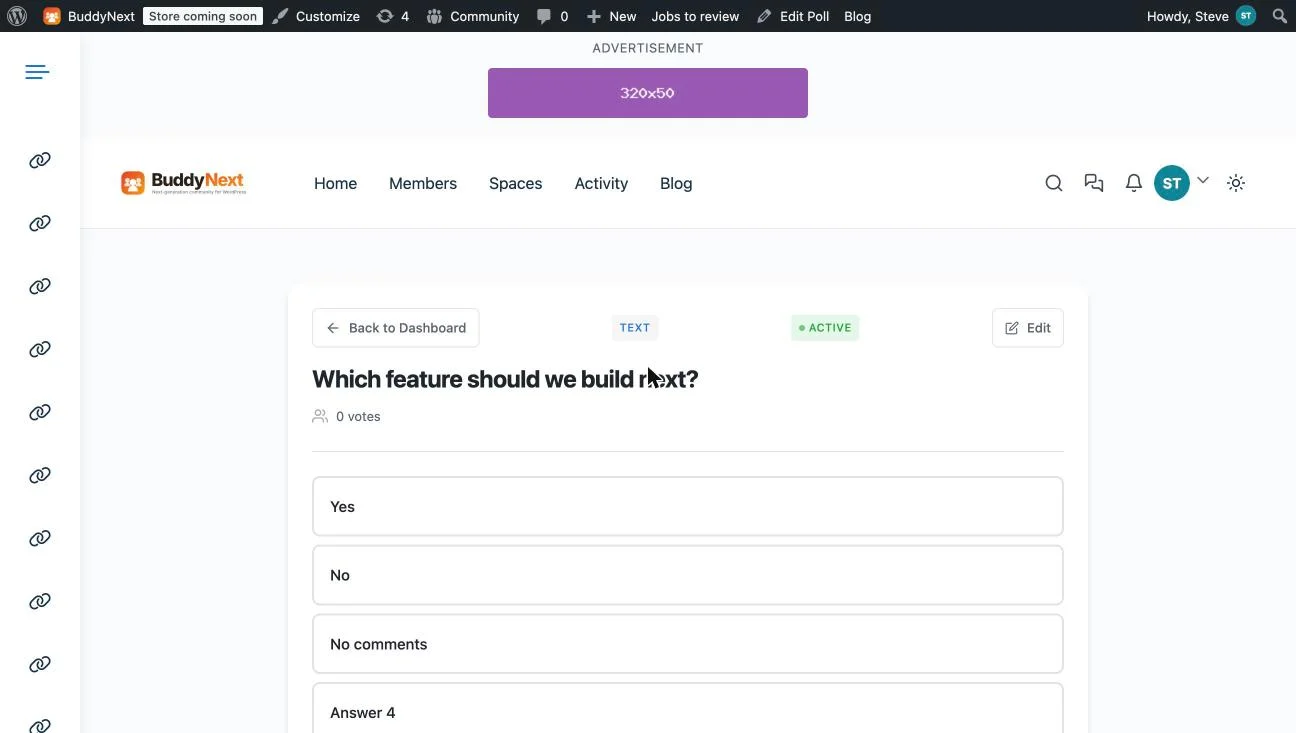
Version 5.0.1 (June 2026) added embed snippets that work outside WordPress entirely, on Webflow, Shopify, Notion, Ghost, and static HTML sites, alongside REST API access and 30+ action hooks for developers who want to build custom voting flows. GDPR consent fields and role-based permissions are built in rather than add-ons, and WP-CLI support means bulk poll management is scriptable.

Key strengths:
- Three poll engines (activity-feed, standalone, survey) in one plugin, a format range neither competitor matches
- Native BuddyPress and BuddyBoss activity-feed integration with voter avatars, the only one of the three built for this
- Survey engine with multi-page flows, response analytics, and CSV export, a format class the other two don’t offer
- Embed snippets that work on non-WordPress platforms (Webflow, Shopify, Notion, Ghost, static HTML)
Worth knowing:
- No free tier, the lowest entry point is the $49/year (or $149 lifetime) Personal plan
- No built-in CAPTCHA or third-party bot-verification the way YOP Poll offers
- Smaller install base than WP-Polls or YOP Poll, so fewer third-party tutorials exist for edge cases
A Real-World Scenario: A Course Platform Wants Lesson-Page Polls
Picture an online course platform that wants a quick comprehension-check poll at the end of each lesson, plus a running activity-feed poll asking the community what topic to cover next, plus an end-of-cohort survey with real analytics rather than a raw vote count.
WP-Polls can embed a simple poll on each lesson page via shortcode, but there’s no activity-feed format for the community-topic poll and no survey mode for the end-of-cohort feedback, those would need two more plugins entirely.
YOP Poll handles the lesson-page polls with a more modern admin and better vote-fraud protection than WP-Polls, but the same gap remains: no activity-feed format, no survey engine, so the community poll and the cohort survey still need separate tools.
WB Polls covers all three needs from one plugin: Standalone Polls for the lesson pages, BuddyPress Activity Polls for the community topic vote (assuming the course platform runs on BuddyPress, a common pairing for cohort-based courses), and the Survey Engine for the end-of-cohort feedback with CSV export for the instructor to analyze afterward.
Extend the scenario one semester further: the instructor now wants to compare completion-poll results across five different cohorts to see whether a curriculum change actually improved comprehension scores. With WP-Polls or YOP Poll, that comparison means manually tracking each cohort’s results separately, since neither plugin ties poll data to a broader reporting structure. WB Polls’ Survey Engine keeps custom statuses and CSV export per survey, so the instructor can export five cohorts’ worth of responses and build the comparison in a spreadsheet without re-entering anything by hand, a meaningful time saving once a course platform has been running long enough to accumulate multiple cohorts worth of comparable data.
The same course platform might also run a public-facing landing page encouraging prospective students to vote on which upcoming course topic they’re most interested in, a lead-capture mechanism as much as a poll. Here the comparison shifts: YOP Poll’s CAPTCHA and vote-fraud blocking genuinely matter more for a public, unauthenticated landing page than for an internal cohort poll, since anonymous public polls are exactly where repeat-voting and bot traffic show up. A course platform with both an internal community and a public marketing site might reasonably end up running YOP Poll for the public landing-page poll specifically, while using WB Polls for everything inside the actual course and community experience, two tools for two genuinely different trust contexts rather than a single tool trying to cover both well.
What a Year (and Three Years) Actually Costs
WP-Polls is $0, permanently, with no paid tier to compare. YOP Poll’s core is also free; third-party listings show Pro tiers around $27 (1 site) to $97 (7 sites), though this isn’t published directly by the developer and should be confirmed before budgeting. WB Polls runs $49/year or $149 lifetime (1 site), $99/year or $299 lifetime (5 sites), or $129/year or $349 lifetime (unlimited sites).
| 3-year total (single site) | Cost |
|---|---|
| WP-Polls | $0, no paid tier exists |
| YOP Poll (free tier) | $0; Pro ~$27+/year if needed, unconfirmed by vendor |
| WB Polls (Personal, lifetime) | $149 one-time, or ~$147 over 3 years on the annual plan |
Figures are approximate, based on publicly listed pricing as of October 2026. WB Polls’ lifetime options mean the 3-year annual total and the one-time lifetime price land close together, worth comparing against your own renewal horizon.
Setup Time and Ongoing Maintenance
All three install and activate in minutes, and getting a first simple poll live takes roughly the same five-to-ten minutes on any of them: pick a question, add answers, grab the shortcode. Where they diverge is what happens once a site needs more than one poll format running at once.
WP-Polls stays a single, flat configuration surface no matter how many polls you create, so maintenance overhead barely grows with usage. There’s no activity-feed layer to configure, no survey builder to learn, just the same settings screen for every poll. That simplicity is also its ceiling: there’s nothing to configure because there’s nothing more the plugin does.
YOP Poll’s real-time admin means less friction per poll created, since nothing requires a full page reload to save, but the underlying maintenance picture is similar to WP-Polls: one plugin, one poll format, a flat configuration surface. The added CAPTCHA and vote-fraud settings are a one-time setup per site rather than per poll, so they don’t add ongoing overhead once configured.
WB Polls asks for more setup thinking upfront specifically because it does more: deciding which of the three engines a given poll should use, configuring BuddyPress activity-feed permissions if that engine is active, and setting up the survey engine’s multi-page flow for anything beyond a single-question poll. None of this is complex individually, but a site using all three engines is maintaining three distinct poll experiences rather than one, the direct trade-off for the format range the other two don’t offer. For a site that only ever needs the Standalone Polls engine, the maintenance picture looks almost identical to WP-Polls or YOP Poll, the extra surface area only matters once you’re actually using the activity-feed or survey engines.
Across all three, the practical maintenance task worth doing periodically is checking old polls: WP-Polls and YOP Poll don’t auto-archive expired polls from prominent display unless you remove the shortcode manually, and WB Polls’ “Never Expire” setting means a poll can sit active indefinitely if nobody remembers to close it, worth a quarterly audit on any community site running more than a handful of polls, and worth building into a simple recurring calendar reminder rather than relying on memory alone.
Who Each Plugin Is Actually Built For
WP-Polls fits a site owner who wants a single free poll embedded somewhere and doesn’t need vote-fraud protection, scheduling, or anything beyond the basics. YOP Poll fits someone who wants that same simplicity with a genuinely modern admin experience and real vote-integrity features, still at no cost for most use cases.
WB Polls fits a BuddyPress or BuddyBoss community site, a course platform, or any site that needs more than one poll format, activity-feed engagement, standalone embeds, and real survey functionality, without stitching together three separate plugins to get there.
WP-Polls vs YOP Poll vs WB Polls: Side by Side
| WP-Polls | YOP Poll | WB Polls | |
|---|---|---|---|
| Free tier | Yes, no paid tier at all | Yes, most features free | No, from $49/year |
| BuddyPress activity-feed polls | No | No | Yes, native |
| Survey mode with analytics | No | No | Yes, built in |
| Vote-fraud blocking / CAPTCHA | Basic restriction only | Yes, multi-provider | Role-based permissions, no CAPTCHA |
| Real-time admin interface | No, classic admin | Yes, rebuilt 2025 | Modern, standard WP admin |
| Answer media types | Text only | Text only | Text, image, video, audio, HTML |
How to Choose
If you want the simplest possible free poll and don’t need vote-fraud protection or anything beyond basic embedding, WP-Polls’ long track record and zero cost are hard to argue with. If you want that same free simplicity with a modern, real-time admin and genuine vote-integrity features, YOP Poll’s 2025 rebuild makes it the stronger free option for most general-purpose polling.
If your site runs on BuddyPress or BuddyBoss, or you need more than one poll format, activity-feed engagement, rich-media standalone polls, and real surveys with analytics, WB Polls is built specifically for that range, worth the entry price over assembling three separate tools to match it.
FAQs
1. Can WB Polls run without BuddyPress installed?
Yes. Standalone Polls and the Survey Engine work independently of BuddyPress; the BuddyPress Activity Polls engine is simply unavailable until BuddyPress or BuddyBoss is active.
2. Does WP-Polls support guest (non-logged-in) voting?
Yes, its voting-restriction system supports guests, registered users, or both, configurable per poll.
3. Is YOP Poll’s Pro tier actually necessary for most sites?
For most general polling needs, no, scheduling, custom voter fields, and vote-fraud blocking are already in the free version. Pro tiers typically add extras like advanced styling or priority support rather than core functionality.
4. Can I export poll results from any of these three?
YOP Poll exports vote logs. WB Polls’ Survey Engine includes CSV export for survey responses specifically. WP-Polls does not include native export.
5. Do any of these three work on a non-WordPress site?
WB Polls is the only one of the three with embed snippets confirmed to work on non-WordPress platforms (Webflow, Shopify, Notion, Ghost, static HTML) as of its 5.0.1 release.
6. Which of these three is easiest for a non-technical site owner?
WP-Polls is the simplest to configure since it has the fewest settings. WB Polls’ basic standalone poll creation is comparably simple; the added complexity only shows up if you use the BuddyPress or Survey engines, which are opt-in.
7. Does WB Polls require a developer to use the REST API or action hooks?
No, the REST API and 30+ hooks are there for sites that want custom integrations, but the core plugin works entirely through the standard WordPress admin without touching any of that.
8. Can I migrate poll data between these three plugins later?
There’s no official migration tool between these specific plugins. Switching means recreating polls on the new plugin; historical vote counts generally don’t transfer, so budget for starting fresh rather than a clean data migration.
9. Is the WB Polls survey engine the same as a general-purpose form builder?
No. It’s purpose-built for multi-page poll-style surveys with response analytics and CSV export, not the broader conditional-logic form-building features a dedicated tool like WPForms or Gravity Forms offers for arbitrary data collection.
10. Do WP-Polls or YOP Poll show results as charts, or just numbers?
YOP Poll displays results in numbers and percentages. WP-Polls shows a simple bar-style percentage breakdown. Neither offers the kind of visual analytics dashboard WB Polls’ Survey Engine provides for survey responses specifically.
Summary
WP-Polls earns its install-count lead through sheer simplicity and a decade of reliability, but it hasn’t meaningfully evolved. YOP Poll’s 2025 rebuild makes it the stronger free, general-purpose poll plugin, with real vote-integrity features WP-Polls has never added. WB Polls isn’t trying to win the “simplest free poll” category at all, it’s built for sites that need activity-feed engagement, rich media answers, and real surveys in one plugin, worth its entry price for any BuddyPress community or course platform that would otherwise need three separate tools to cover the same ground.
Whichever of the three you pick, test the actual voting flow yourself before pointing real traffic at it: submit a vote as a logged-in user, as a guest if guest voting matters to your use case, and check that results display the way you expect. A poll plugin that looks complete in the admin screen but silently miscounts votes or fails to enforce one-vote-per-user is a worse outcome than spending twenty minutes confirming the full loop works before launch.