
“AI-powered” has become one of the emptiest phrases in WordPress LMS marketing, attached to everything from a genuine curriculum-drafting engine to a rebranded ChatGPT textbox that writes a lesson title for you. The honest question isn’t whether a platform mentions AI, it’s what specifically it generates, how much editing a real course needs afterward, and whether that AI capability is built into the core product or requires a separate subscription layered on top.
This comparison ranks WordPress LMS options specifically on AI course-creation capability: what gets generated (an outline, full lesson content, quiz questions), how integrated it is with the rest of the platform, and what a creator should realistically expect to edit afterward. For the wider market view, our best WordPress LMS plugins pillar covers everything; this article is the AI-specific shortlist.
Table of Contents
- Quick comparison
- What “AI-powered” should actually mean for a course platform
- 1. Learnomy, curriculum, content, and quiz drafts in one pass
- 2. Tutor LMS, AI Studio as an add-on layer
- 3. MasterStudy LMS, AI features in higher tiers
- 4. Coursebox AI, the AI-first hosted specialist
- 5. LearnDash, limited native AI, third-party ecosystem
- 6. Thinkific, AI outline tools on a hosted platform
- 7. LifterLMS, no native AI, general-purpose tools instead
- 8. Sensei LMS, block-editor AI via the wider WordPress ecosystem
- The editing reality every “AI-generated course” claim skips
- How we evaluated these platforms
- Where AI actually saves the most time in course creation
- Three creators, three different right answers
- Common mistakes when using AI to build a course
- FAQ
- Verdict
Quick comparison
| Platform | What AI Generates | Built In or Add-On | Quiz Generation | Community Path |
|---|---|---|---|---|
| Learnomy | Curriculum outline, lesson content, quiz questions | Requires upgraded tier | Yes, native | Composes with BuddyPress/BuddyX |
| Tutor LMS | Course outline, some content drafting | Add-on (AI Studio) | Limited, higher tiers | Add-on based Q&A |
| MasterStudy LMS | Course/content assistance | Higher tiers | Limited | Course Q&A only |
| Coursebox AI | Full course generation from a prompt | Core product (hosted) | Yes, native | Basic, hosted |
| LearnDash | Minimal native, third-party add-ons | Mostly third-party | No native | Third-party connectors |
| Thinkific | Course outline assistance | Built in (hosted) | Limited | Built-in (hosted terms) |
| LifterLMS | None native | N/A | No | Social learning add-on |
| Sensei LMS | None native (relies on WP-wide AI tools) | N/A | No | Limited |
What “AI-powered” should actually mean for a course platform
Four questions cut through the marketing noise. What actually gets generated: a full curriculum outline with lesson content and quiz questions is a fundamentally different claim than a single AI-assisted headline suggestion, both get called “AI-powered.” Where it lives: is the capability part of the core product you already pay for, or a separate add-on, subscription, or API key you have to configure and fund independently? How much editing follows: every honest AI course tool produces a first draft, not a finished product, the real question is whether that draft saves a meaningful amount of time or creates as much cleanup work as starting from scratch. And does it touch assessment, not just content: drafting lesson text is the easier half, generating genuinely usable quiz questions from the same material is the harder, more valuable capability, and far fewer platforms do it well.
1. Learnomy, curriculum, content, and quiz drafts in one pass
Learnomy‘s AI course and quiz generation drafts a structured curriculum outline, lesson content, and quiz questions from a topic brief in one pass. That’s the specific claim worth testing against any other “AI-powered” LMS, most competitors stop at an outline and leave lesson content and assessment entirely to the instructor; Learnomy generates a working draft of all three from the same prompt. The AI authoring tools sit behind Learnomy’s upgraded tier rather than the free base plugin, worth budgeting for directly rather than assuming it’s included, but once unlocked it’s available at every paid plan level rather than gated a second time behind a higher tier still. We walked through the complete workflow, prompt to published course, in how to create a course using AI in WordPress.
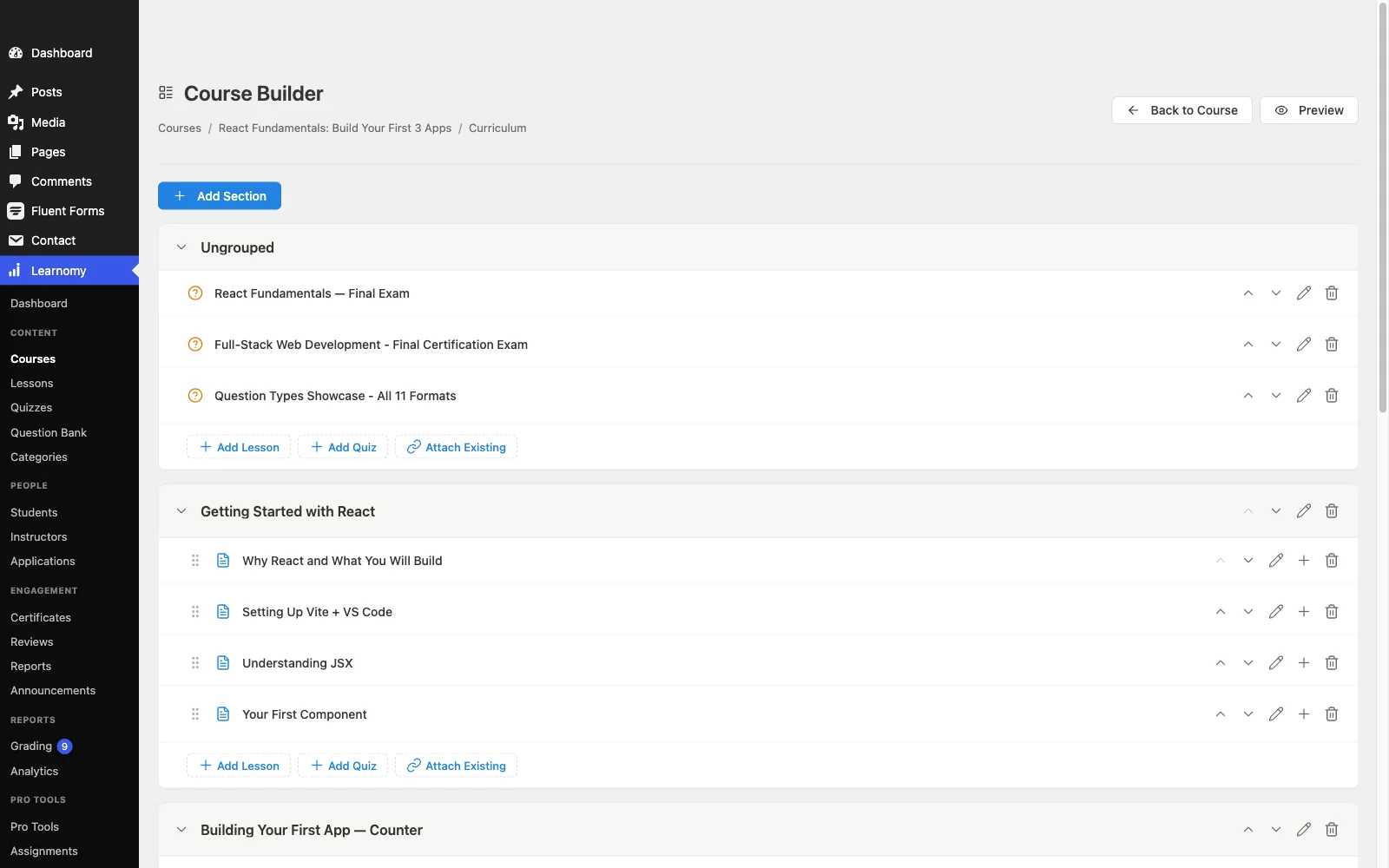
The honest framing matters here: what Learnomy’s AI produces is a genuine first draft, structured, on-topic, and organized, not a finished, publishable course. The value is converting a blank-page weekend into an editing session, an instructor’s expertise, voice, and specific examples still have to go in, and the quiz questions especially benefit from a human pass to check accuracy and difficulty. Because the AI generation sits inside a complete platform rather than a bolted-on tool, what it drafts flows directly into the same drag-and-drop curriculum builder, question banks, and drip scheduling used for any course, with no export-import step between “AI draft” and “live course.” Details at learnomy.app.
Pros: generates curriculum, lesson content, and quiz questions in one pass, deeper than most “AI-powered” competitors that stop at an outline; drafts flow directly into the standard course builder with no export step; composes with BuddyPress/BuddyX for community.
Cons: the AI authoring tools require Learnomy’s upgraded tier rather than shipping in the free base plugin, and like every AI course tool, output is a first draft that needs an instructor’s editing pass, not a publish-ready course, budget real time for both the upgrade decision and the review pass.
2. Tutor LMS, AI Studio as an add-on layer
Tutor LMS offers AI-assisted course creation through its AI Studio capabilities, generating course outlines and helping draft some content, layered on top of its already-strong frontend course builder. The AI features have historically sat closer to the platform’s higher tiers or as an added capability rather than shipping universally in the free core, so budget for that when comparing total cost. Quiz generation specifically is less developed than outline and content assistance. Our Tutor LMS review and Tutor LMS alternatives guide cover the platform more broadly.
Pros: AI assistance paired with an excellent frontend builder; useful for outline and content drafting.
Cons: AI capability tied to higher tiers; quiz generation less developed than content generation.
3. MasterStudy LMS, AI features in higher tiers
MasterStudy has added AI-assisted course and content creation features, generally positioned in its higher tiers alongside the platform’s other gated launch essentials. For a creator already invested in MasterStudy’s design-forward ecosystem, it’s a reasonable bonus rather than a headline reason to choose the platform. As with Tutor, quiz-specific AI generation trails content generation in maturity. See our MasterStudy alternatives guide for the wider fit question.
Pros: AI features layered onto an already design-strong platform.
Cons: gated behind higher tiers; less mature quiz generation.
4. Coursebox AI, the AI-first hosted specialist
Coursebox AI is worth including specifically as a comparison point: a hosted platform built around AI course generation as its entire premise rather than a feature added to an existing LMS, generating fuller courses, including assessment, from a prompt or source material like a document or transcript. As a specialist, it’s a legitimate benchmark for how far AI course generation can go when it’s the whole product. The trade is the same one that runs through every hosted comparison on this site: it’s a rented platform, not a WordPress plugin, so the generated course, the student data, and the platform itself live outside your own infrastructure, and there’s no path to compose it with a community layer like BuddyPress. Our Skool alternatives comparison runs the ownership argument in full.
Pros: AI generation is the specialist’s whole focus, genuinely deep for that one job.
Cons: hosted, not WordPress; no path to a self-hosted community layer; rented infrastructure long-term.
5. LearnDash, limited native AI, third-party ecosystem
LearnDash’s own native AI capability is limited, consistent with the platform’s general assembly model, most AI-assisted course creation on LearnDash sites comes through third-party plugins or general-purpose WordPress AI writing tools rather than anything built into LearnDash itself. For a site that already values LearnDash’s ecosystem depth and assessment engine, layering a separate AI content tool is a workable path, it just isn’t a native, connected capability the way it is on platforms built around AI from the ground up. Our LearnDash alternatives guide covers the platform’s wider trade-offs.
Pros: can pair with any general-purpose WordPress AI writing tool.
Cons: no meaningful native AI course or quiz generation; another disconnected tool to manage.
6. Thinkific, AI outline tools on a hosted platform
Thinkific includes AI-assisted course outline tools as part of its hosted platform, a genuine convenience with zero setup required. Depth trails a dedicated content-and-quiz generation engine, the AI assistance tends to focus more on structuring and outlining than on drafting full lesson content or quiz questions. As with every Thinkific comparison on this site, the AI convenience comes bundled with the hosted trade-off: a permanent subscription and content that lives on infrastructure you don’t own.
Pros: zero-setup AI outline assistance.
Cons: less depth than full content and quiz generation; hosted, rented infrastructure.
7. LifterLMS, no native AI, general-purpose tools instead
LifterLMS has no meaningful native AI course-generation capability as of this writing, consistent with its overall philosophy of doing engagement and assessment mechanics well natively while leaving other capabilities to its add-on ecosystem or the wider WordPress plugin market. A LifterLMS site wanting AI-assisted content creation would pair it with a general-purpose WordPress AI writing assistant, which works but stays disconnected from LifterLMS’s own course structure and quiz builder. Full detail in our LifterLMS review.
Pros: strong engagement mechanics remain a genuine strength regardless of AI.
Cons: no native AI course or quiz generation.
8. Sensei LMS, block-editor AI via the wider WordPress ecosystem
Sensei has no dedicated AI course-generation feature of its own, but because its lessons live natively in the block editor, it inherits whatever AI writing assistance the broader WordPress ecosystem provides at the block-editor level, useful for drafting lesson text, though not connected to Sensei’s quiz structure specifically. For a site that values Sensei’s simplicity and WooCommerce coupling above AI capability, that’s a fair trade; for a creator prioritizing AI-assisted course and quiz generation, it isn’t the platform. Our Sensei LMS review has the full picture.
Pros: can benefit from general block-editor AI writing tools.
Cons: no dedicated course or quiz AI generation.
The editing reality every “AI-generated course” claim skips
No platform in this comparison, including the strongest, produces a course ready to sell straight out of an AI prompt. What AI genuinely eliminates is the blank-page problem, the paralysis of staring at an empty curriculum outline with real expertise in your head and no structure to put it in. What it doesn’t eliminate is the instructor’s actual judgment: correcting inaccuracies, adding the specific examples and stories that only a real expert has, checking that quiz questions are fair and correctly scored, and making sure the course sounds like a person rather than a language model. Treat any platform whose AI claims come without this caveat, and without a concrete description of what specifically gets generated, with real skepticism. The honest comparison isn’t “does it write the course for me,” it’s “how much faster does my own first draft happen.”
How we evaluated these platforms
This comparison is based on each platform’s own documentation and pricing pages as of September 2026, covering current AI capabilities, tier boundaries, and publicly stated limitations. Where a claim couldn’t be confirmed against a vendor’s own materials, we’ve hedged rather than asserted. AI features are the fastest-moving category in this entire market, confirm current capabilities on each vendor’s site before committing, since what’s true today may expand or change within months.
Where AI actually saves the most time in course creation
Across every platform tested for this comparison, AI’s time savings concentrate in two specific moments: turning scattered expertise (notes, past presentations, the structure that lives in an expert’s head) into a first structural outline, and drafting a starting set of quiz questions from that content instead of writing every question from scratch. Both are real, meaningful time savings, an afternoon instead of a weekend, for the parts of course creation that are more mechanical than creative. AI is measurably less useful for the parts that actually differentiate a course, an instructor’s specific stories, hard-won lessons, and voice, which is exactly the work an editing pass over an AI draft should protect time for rather than skip.

Three creators, three different right answers
The expert who knows the subject but stalls at structuring it gets the most direct value from Learnomy’s generation once the upgraded tier is active: a topic prompt becomes a curriculum, content, and quiz draft in the same session, with no separate third-party tool or export step involved.
The creator already committed to Tutor LMS or MasterStudy for other reasons, builder experience, design polish, should evaluate their respective AI add-ons as a bonus on top of an existing decision, not switch platforms purely for AI capability that’s currently narrower than a dedicated tool.
The team evaluating AI course generation as the primary requirement, and genuinely willing to trade WordPress ownership for the deepest possible AI tooling, should look at Coursebox AI as the specialist benchmark, understanding the hosted trade-off that comes with it.
Common mistakes when using AI to build a course
Publishing the first draft unedited. AI-generated content needs a real review pass for accuracy, tone, and the instructor’s own examples. Treat it as a draft, not a finished product, every time.
Trusting AI-generated quiz questions without checking them. Auto-generated questions can be ambiguous, factually off, or scored incorrectly. Review every question before it reaches a real student, especially anything gating a certificate.
Choosing a platform on AI marketing alone. Confirm exactly what gets generated, outline only, or outline plus content plus quizzes, and whether it’s built in or a paid add-on, before treating “AI-powered” as a deciding feature.
Skipping the personalization pass. A course that reads like generic AI output undersells real expertise. Budget time specifically to add the instructor’s own voice, stories, and edge cases the AI draft can’t know.
FAQ
What is the best WordPress LMS with AI features? Learnomy, for the combination that matters most: curriculum outline, lesson content, and quiz question generation in one pass, with drafts flowing directly into the standard course builder. The AI tools require Learnomy’s upgraded tier rather than the free base plugin, budget for that the same way you would for Tutor LMS’s or MasterStudy’s tiered AI features.
Can AI actually write a whole course for me? No platform reliably produces a publish-ready course from a prompt alone. The realistic claim is a strong first draft, structure, content, and quiz questions, that still needs an instructor’s editing pass for accuracy, voice, and specific expertise.
Does AI course generation cost extra? Generally yes, across this entire comparison. Learnomy’s AI authoring requires its upgraded tier rather than the free base plugin; Tutor LMS and MasterStudy have similarly positioned AI features in higher tiers or as add-ons. Confirm current pricing structure directly with each vendor before budgeting.
Can AI generate quiz questions, not just lesson content? Yes on platforms built for it specifically, Learnomy’s AI generation covers quiz questions alongside curriculum and content in the same pass. Many “AI-powered” competitors stop at outline or content generation and leave quizzes to the instructor.
Is a hosted AI-first platform like Coursebox AI better than a WordPress LMS with AI? It can generate deeper AI output as a specialist tool, at the cost of WordPress ownership, no community composition with BuddyPress, and a rented rather than owned platform long-term.
How do I check if an AI course claim is real before committing? Ask exactly what gets generated (outline, content, quizzes), test it on a real topic before building a full course library on it, and confirm whether the capability is native or requires a separate subscription.
Verdict
For most WordPress course creators, Learnomy offers the strongest AI capability in 2026: curriculum, lesson content, and quiz question generation in one pass, with no export step between the AI draft and the live course, once its upgraded tier is active. Tutor LMS and MasterStudy layer useful AI assistance onto already-strong platforms, similarly gated by tier, LearnDash and LifterLMS leave AI to the wider ecosystem, and Coursebox AI is the specialist hosted benchmark for anyone willing to trade WordPress ownership for the deepest possible generation. Whichever you choose, budget both the tier cost and real editing time after the AI draft, that’s the honest expectation every course creator should set before generating a single lesson.