

Skool’s homepage makes you an offer in seven words: discover communities, or create your own. The first half is browsing. The second half is a business decision, and it is the one almost nobody thinks hard enough about before clicking.
Skool is genuinely good at what it does. A feed, a course area, a leaderboard, one price, no setup. If you are trying to find out whether anyone wants your community at all, that is close to the ideal starting point. The trouble starts later, when your members begin asking for things a simple community platform was never built to do.
This is a comparison of the seven platforms people actually move to, with real pricing pulled from each vendor’s page in August 2026, and an honest note about where each one wins. One of them is a WordPress stack you host yourself, and I will be upfront that it is the one we build. It is also the only entry here that answers all five of the questions below, so it earns its place.
Why people go looking for a Skool alternative
The requests are remarkably consistent. Within the first three months of a community finding its feet, the same five things get asked for:
- “Can we post jobs here?” Members want to hire each other. A pinned thread is not a job board.
- “Can I sell my services to the group?” Someone wants to take paid work from other members, with orders and reviews attached.
- “Is there a directory?” People want to find the three other members in their city or their niche.
- “Do I get a certificate?” Course completion that proves something, not just a progress bar.
- “Is there an app?” Not a mobile website. An icon on the home screen with your name on it.
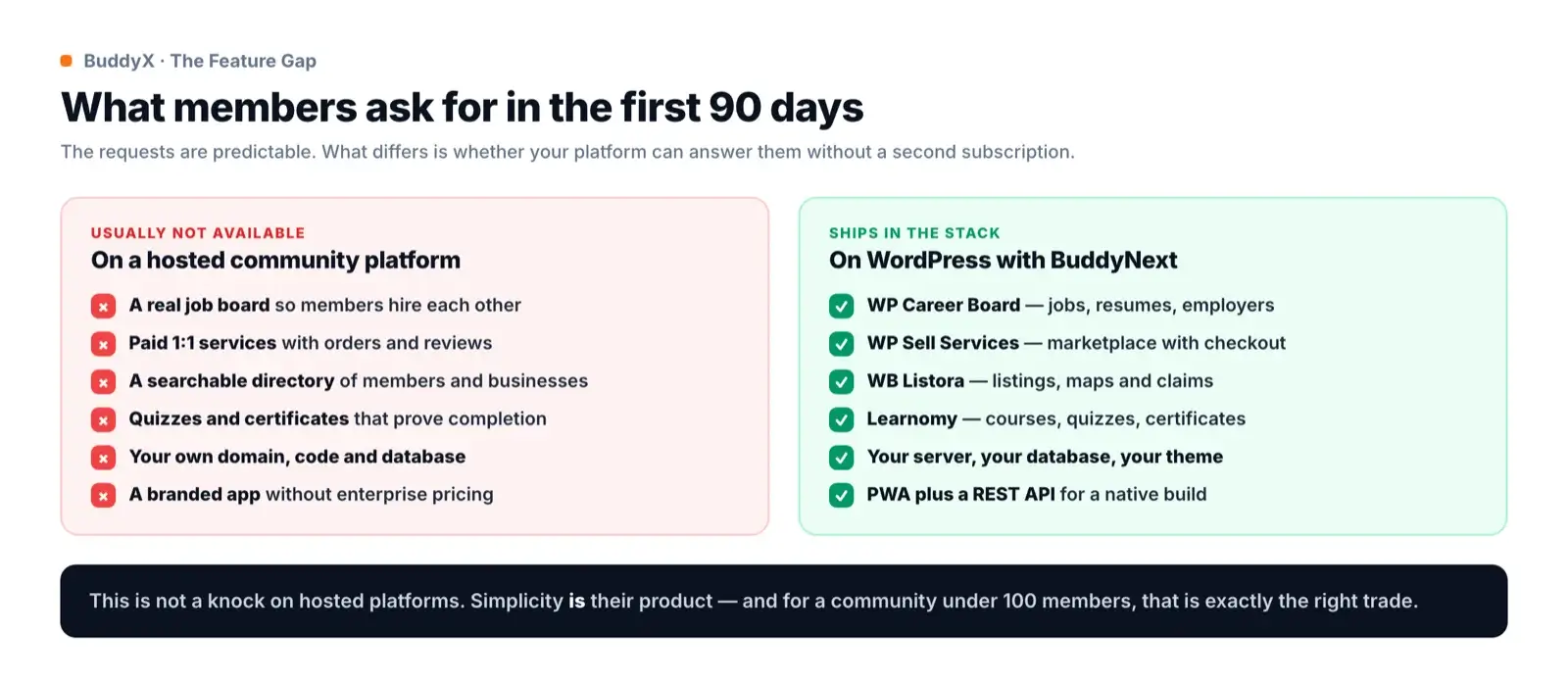
Hosted platforms do not ship these things, and that is a deliberate choice rather than an oversight. Simplicity is the product. Every feature they add is a setting someone has to understand, so they hold the line. For a community of forty people, holding that line is exactly right.
The second reason people leave has nothing to do with features. On any hosted platform your members, your content, your URLs and your billing relationship live inside someone else’s product. That is fine right up until the pricing changes, the roadmap goes somewhere you did not want, or you want a design that looks like you rather than like every other community on the same service.
The seven best Skool alternatives at a glance
| Platform | Entry price | Platform fee | Best for |
|---|---|---|---|
| Skool (baseline) | $9, or $99 Pro | 10%, or 2.9% on Pro | Launching fast with zero setup |
| BuddyNext | Free, plus hosting | None | Communities that need jobs, services and courses |
| Circle | $89/month | 2% | The most polished hosted experience |
| Mighty Networks | $79/month | 2% | Cohorts, events and live rooms |
| Heartbeat | $49/month | 5% | Chat-style energy under 350 members |
| Kajabi | $179/month | 2% on third-party gateways | Course revenue with full marketing tooling |
| Discourse | Free self-hosted | None | Long-form discussion that stays searchable |
| Discord | Free | None | Real-time chat with no paid tier |
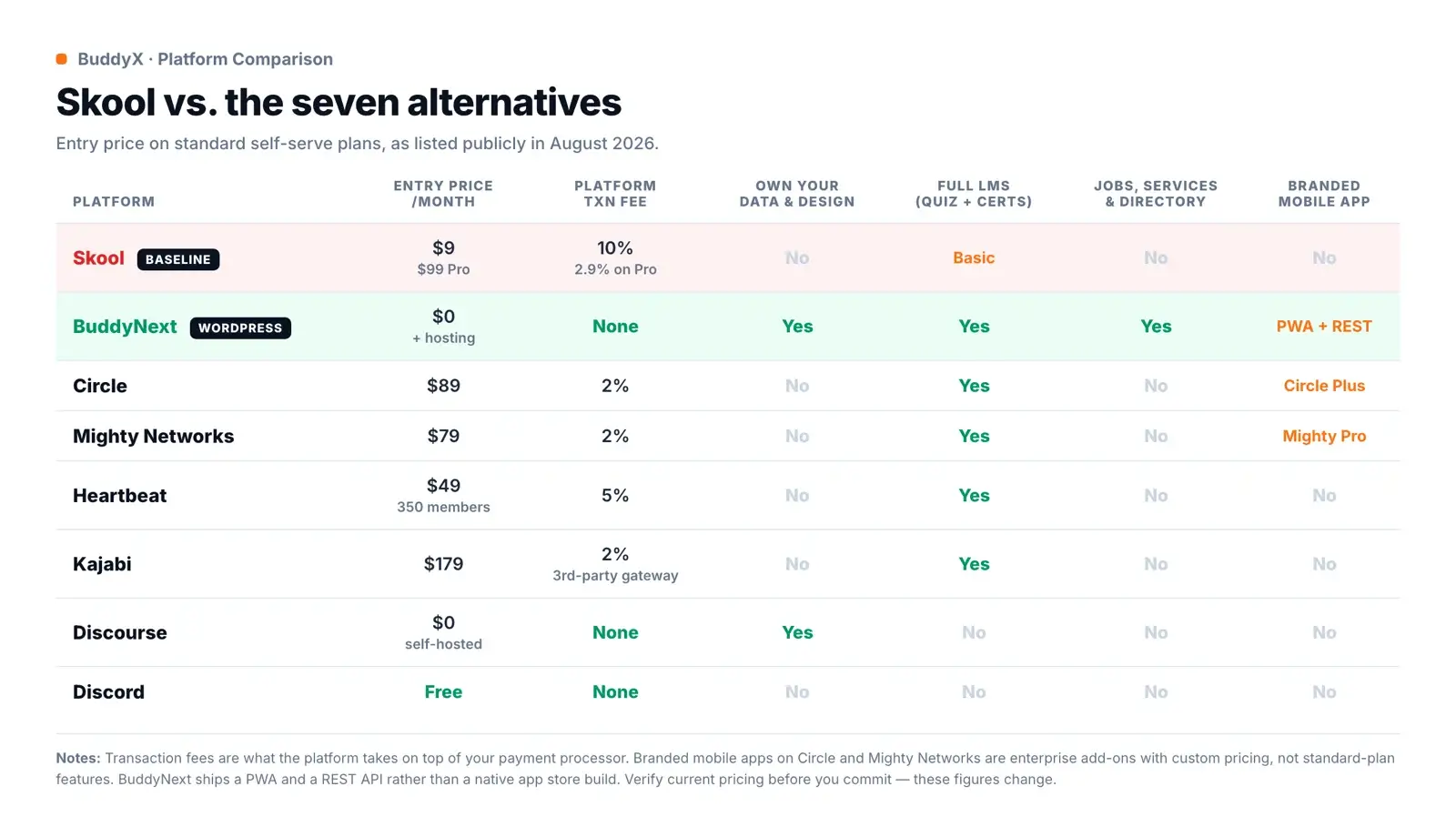
Two columns deserve more attention than they usually get. Transaction fees are what the platform takes on top of Stripe. Skool’s Hobby plan charges 10%, which quietly becomes the most expensive line item on the whole page once you are selling anything real. And branded mobile apps are consistently an enterprise add-on, not a plan feature, on every hosted platform here.
1. BuddyNext: best if your community is becoming a business
Price: Free, or $149/year (or $399 once) for Pro. Transaction fee: none. You keep your own Stripe relationship.
BuddyNext is a WordPress plugin rather than a service, which makes the comparison a little unfair in both directions. You have to run a WordPress site, and nobody is going to pretend that is zero work. In exchange, there is no per-member bill, no transaction cut, and no ceiling on what you are allowed to build.
The core is what you would expect: an activity feed, spaces, profiles, direct messages, notifications and moderation.

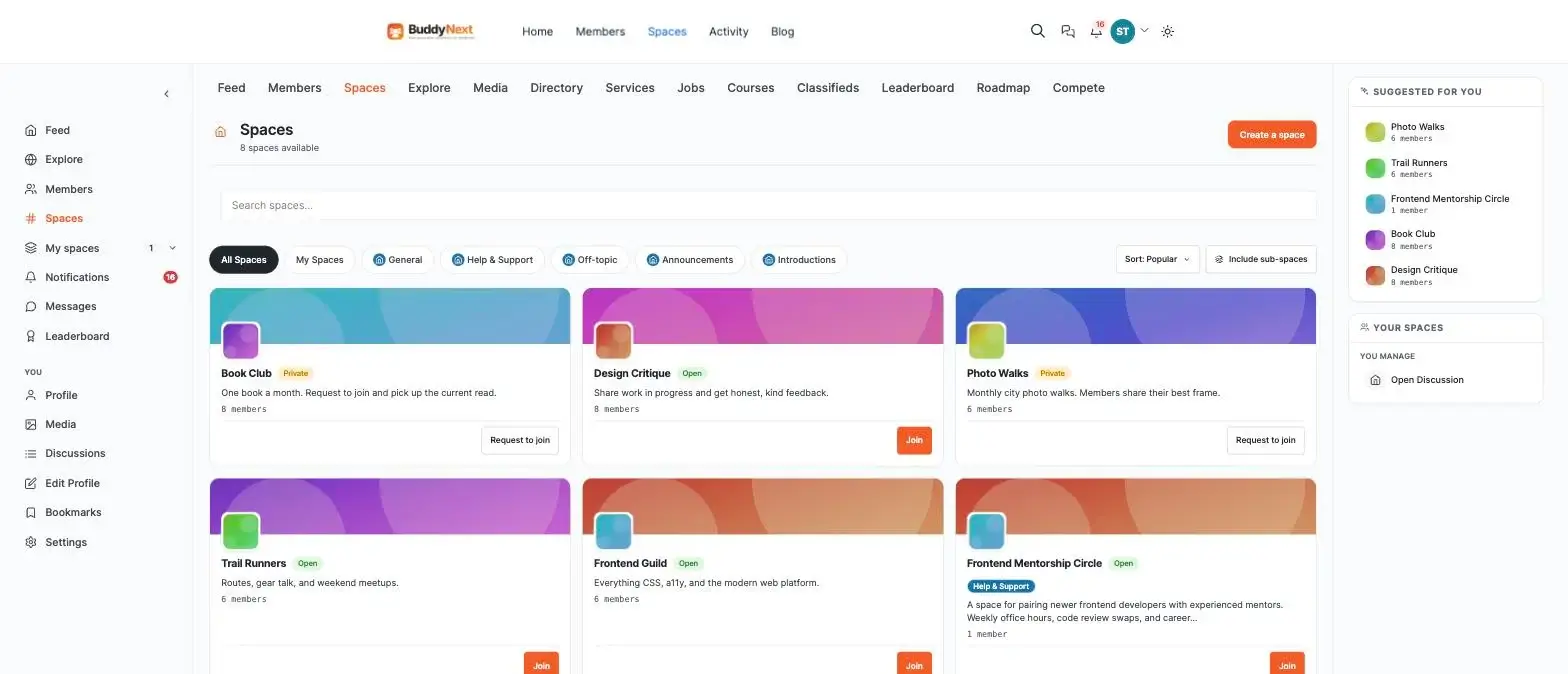
Spaces cover the same ground as Skool’s groups, with open, private and request-to-join options, sub-spaces and per-space moderation.
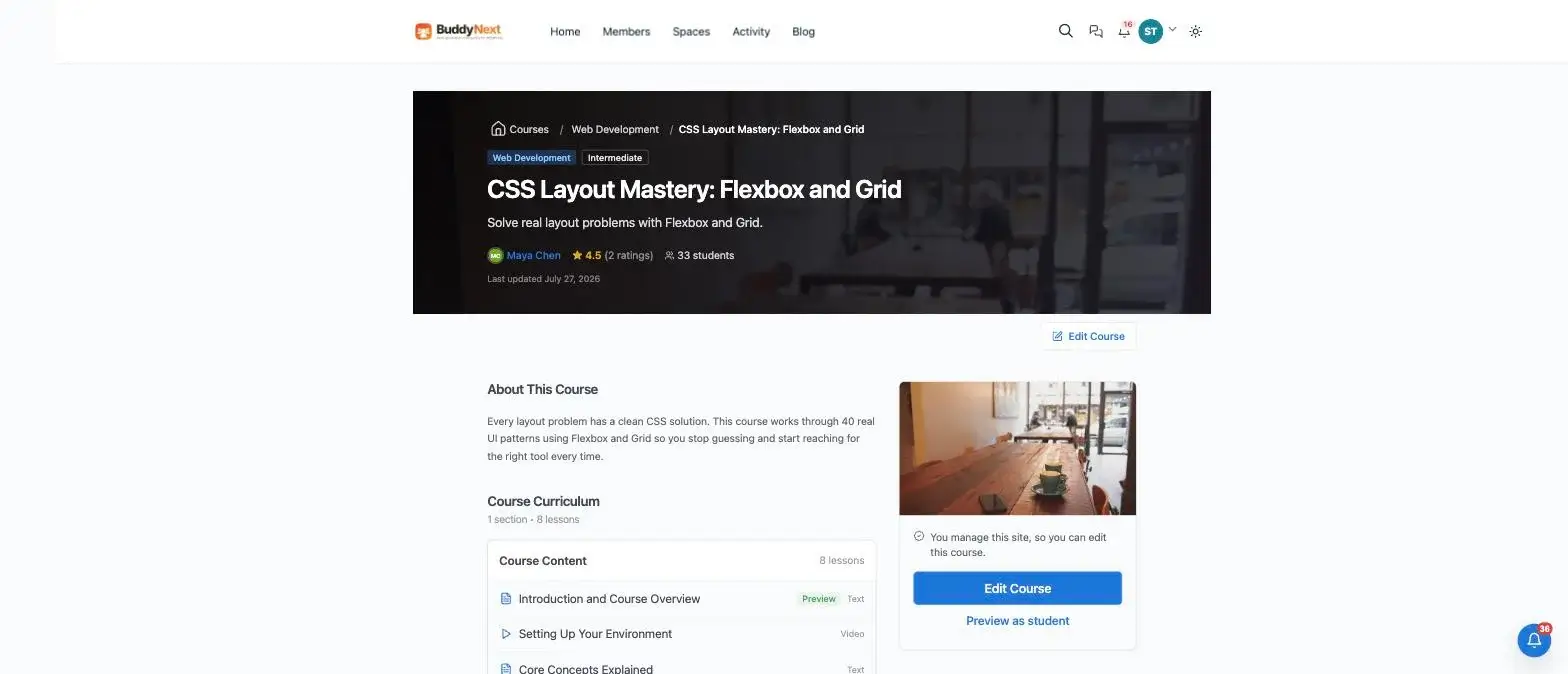
Where it separates from everything else on this list is the layer above that. Courses are a full LMS rather than a video list: sections, video and text lessons, quizzes with pass marks and attempt limits, certificates, drip scheduling, cohorts and instructor revenue splits.
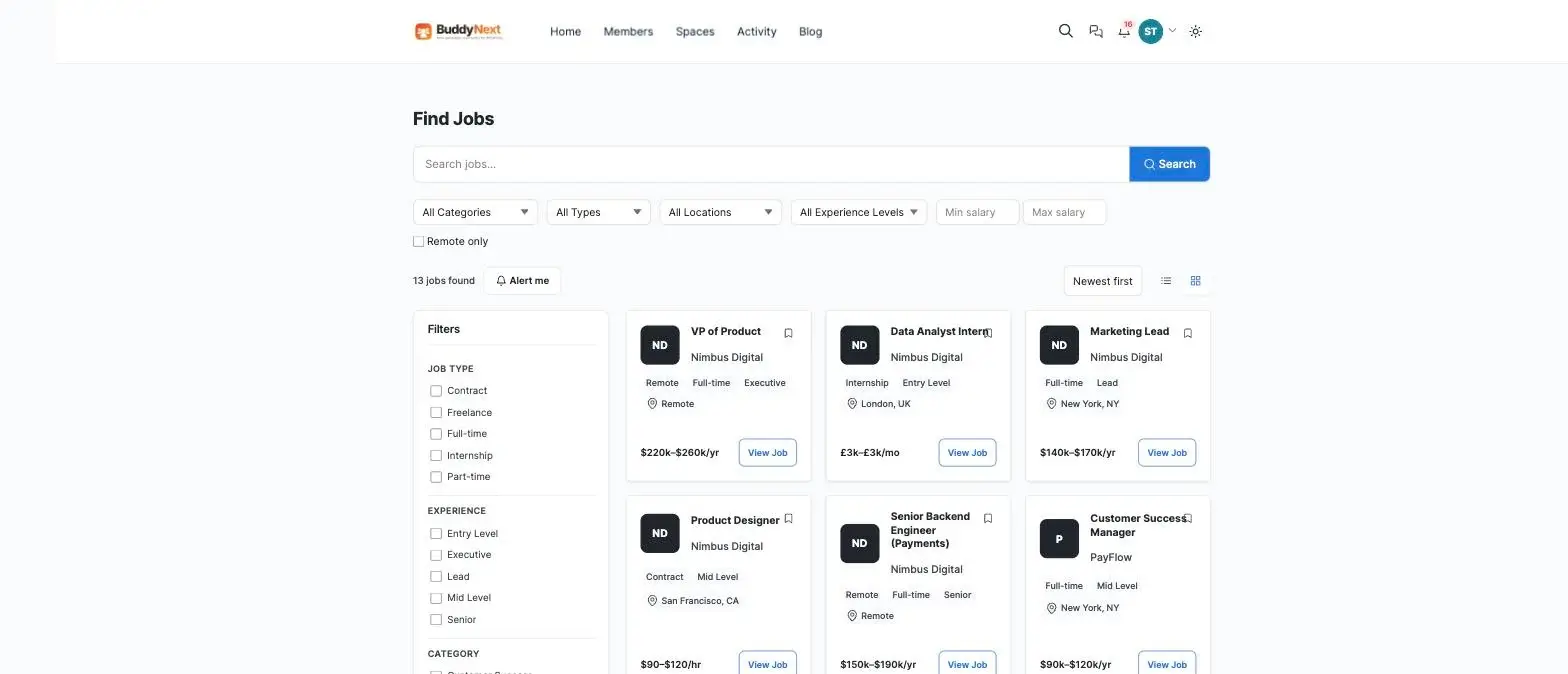
Then the three things that no hosted community platform on this list offers at any price. A job board, so members hire each other instead of leaving for LinkedIn:
A service marketplace, so a member can sell design work or coaching to the group with orders, messaging and reviews attached:

And a directory, which is usually the feature that turns a scattered membership into something local and useful:

Gamification is the one place Skool set the standard, and it is worth meeting head-on. You get points, levels, streaks and leaderboards filtered by week, month and all time. The detail that matters is that you control what earns points, so the leaderboard rewards the behaviour you actually want rather than raw posting volume.

The honest limits. You are responsible for hosting, backups and updates. There is no native app in the app stores. You get a PWA and a REST API, which is enough to have an app built but is not the same as one arriving for free. And if you have never run a WordPress site, budget a weekend rather than an afternoon. Our guide to building a complete community on WordPress walks through the order to add things in.
2. Circle: best polish on a hosted platform
Price: Professional $89/month, Business $199/month, Circle Plus custom. Transaction fee: 2%, 1% and 0.5% respectively.
Circle is the most refined product in this category and it is not particularly close. Spaces, courses, live streams, events and a genuinely good mobile experience, all with the kind of interface polish that makes members assume you spent more than you did.
Watch the limits rather than the headline price. Professional caps you at 3 admins, 10 moderators and 20 spaces. If you run a community with a real moderation team, you are on Business at $199 sooner than you expect. Branded apps live in Circle Plus at custom pricing.
Choose Circle if you want the best hosted experience available, you sell courses or memberships, and you would rather pay a subscription than think about infrastructure.
3. Mighty Networks: best for cohorts and events
Price: Launch $79/month ($950/year), Scale $179/month, Mighty Pro custom. Transaction fee: 2%, 1%, 0.5%.
Mighty has been at this longer than most and it shows in the parts that involve people meeting on a schedule: cohort-based courses, events, live rooms and a member matchmaking feature that is better than it sounds. Unlimited members, admins and spaces across the self-serve plans is a real advantage over Circle’s caps.
The branded app that Mighty is known for sits in Mighty Pro, a custom-priced tier with strategy services attached. It is a serious product, but it is not what you get for $79.
Choose Mighty Networks if your community runs on scheduled cohorts and live events rather than an always-on feed.
4. Heartbeat: best cheap start, worst scaling maths
Price: Build $49/month up to 350 members, Grow $149/month up to 5,000, Scale $849/month unlimited. Transaction fee: 5%, 2.5%, 1.25% on top of Stripe.
Heartbeat feels closer to Discord than to Circle: channels, threads, live video rooms, events and courses, with a lighter and more conversational feel. At $49 it is the cheapest genuine entry point on this list.
Read the member caps carefully, because they are where this gets expensive. Crossing 350 members takes you from $49 to $149. Crossing 5,000 takes you to $849. That is a steeper curve than anything else here, and the 5% transaction fee on the entry plan compounds it.
Choose Heartbeat if you want chat-style energy with course tooling attached and you expect to stay under a few hundred members.
5. Kajabi: best if the courses are the business
Price: Basic $179/month, Growth $249/month, Pro $499/month (cheaper annually). Transaction fee: 2%, 1% and 0.5% on third-party gateways; Kajabi Payments is 2.9% plus 30 cents.
Kajabi is not really a community platform that added courses. It is a course and marketing platform that added community. Funnels, email marketing, landing pages, checkout and analytics are all first-class here in a way they are not anywhere else on this list.
The community itself is the weakest part of the product, and the limits are strict: Basic allows one community and 2,500 contacts. It is also the most expensive option here by a wide margin.
Choose Kajabi if course revenue is the main event and the community is a retention feature rather than the point.
6. Discourse: best for discussion that has to last
Price: free and open source if you self-host; hosted plans from $100/month. Transaction fee: none.
Discourse is the best forum software that exists, and forums solve a problem feeds cannot: a feed forgets, a forum remembers. If your members ask good questions and get good answers, those answers should still be findable in three years. On Discourse they are, and they rank in Google.
What it is not is a social network or a course platform. There is no LMS, no directory, no marketplace. It does one thing at a very high standard. If you want that quality of threaded discussion alongside a feed, adding a forum and Q&A layer to a WordPress community covers similar ground.
Choose Discourse if long-form, searchable discussion is the whole value of your community.
7. Discord: best free option, worst long-term home
Price: free. Transaction fee: not applicable, because there is no native way to charge for access.
Discord is free, instant and already installed on your members’ phones. For a community that runs on real-time conversation, nothing beats it on speed to value.
The costs are structural. Nothing is searchable from outside, so the knowledge your members create never brings you a single new visitor. There is no native paid membership. You cannot export a member list in any meaningful way. And the culture skews heavily toward one demographic, which is worth weighing against what younger members actually expect before assuming it fits.
Choose Discord if the community is free, chat-first, and you are relaxed about never owning the audience.
What Skool genuinely does better than everyone here
Discovery is the big one, and it is easy to underrate. Skool runs a public directory of communities that people browse with intent to join. Every other option on this list, ours included, hands you an empty room and wishes you luck. If you have no audience yet, that directory is worth more than any feature comparison.
The second is restraint. Skool ships one price, one layout and a short list of settings, and it refuses to grow past that. Anyone who has watched a WordPress site collect fourteen plugins knows why that discipline has value. You cannot misconfigure Skool, which means you cannot break it at 11pm before a launch.
The third is the leaderboard. Skool did not invent gamification, but it made points feel central rather than decorative, and a generation of community tools copied it. If your members respond to competition, Skool gets that culture running on day one with no setup at all.
None of this disappears because you outgrow the platform. It just stops being the deciding factor once your community starts carrying real economic weight for the people inside it.
What this actually costs by year three
Monthly pricing hides the real number. Here is the same decision expressed as 36 months of platform fees, before transaction fees enter the picture.

Two caveats, because a chart like this is easy to abuse. First, it ignores your time, and self-hosting costs time that a subscription does not. Second, it ignores transaction fees, which for a community earning real money can dwarf the subscription entirely. Ten per cent of every payment on Skool’s Hobby plan is a much larger number than $9 a month.
A subscription is a permanent operating cost. Self-hosting is mostly a one-time setup cost. Those two shapes cross over somewhere, and for most communities that crossover arrives in year one.
The point is not that hosted platforms are overpriced. For what they do, most of them are fairly priced. The point is that you are renting, and rent does not build equity in anything you own.
How to choose without regretting it in a year
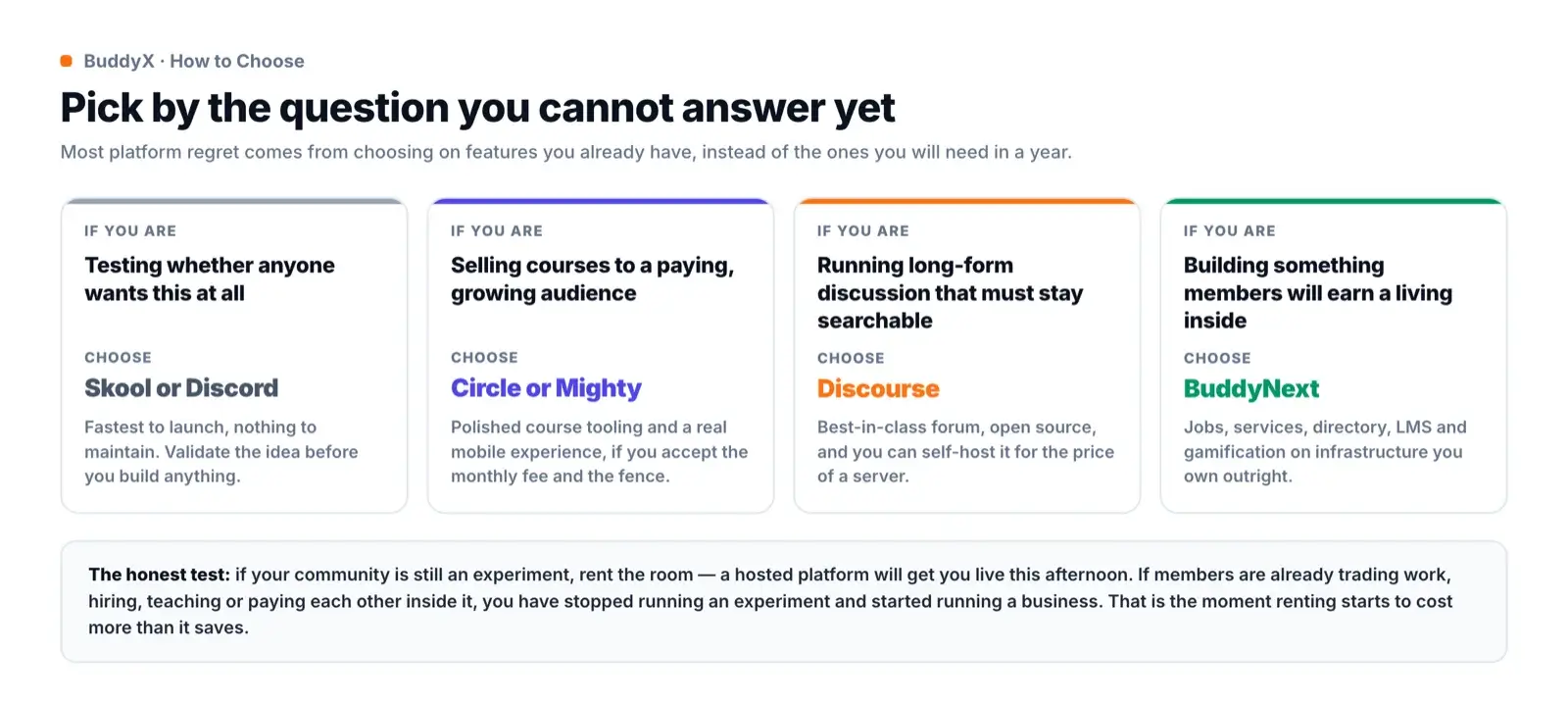
Most platform regret comes from picking on today’s requirements. The feed, the groups and the course area are table stakes now; every product here does them well enough. What separates them is what happens when a member asks for something in month nine.
When Skool is still the right answer
It would be dishonest to end a list like this without saying plainly where Skool wins, because it does win in specific cases:
- You are validating an idea and have no members yet. Nothing here launches faster.
- You are under 100 members and every hour spent on setup is an hour not spent on people.
- You have no technical help and no appetite for finding any.
- You run one simple offer (a course plus a group chat) and have no plans to widen it.
- You want the discovery side. Skool’s community browse genuinely sends people your way, and self-hosting gives you nothing equivalent.
That last one is a real trade-off and gets glossed over in most comparison posts. When you self-host, discovery becomes entirely your job: SEO, email and word of mouth, with no marketplace sending you traffic.
Moving off Skool without losing your members
If you do decide to move, the migration is more about sequencing than tooling.
- Export what you can. Member emails first. That is the asset. Then course content and any threads worth preserving.
- Build in parallel. Get the new home to a state where the first ten members would be happy there. Do not announce before that.
- Move the loudest people first. A dozen active members make a new community feel alive. An empty one kills the move on day one.
- Run both for a month. Overlap is cheaper than a botched cutover.
- Give people a reason, not a notice. “We moved” is not a reason. “We moved and now you can list your services and get hired here” is.
Onboarding matters more after a migration than at any other time, because your members are being asked to change a habit. Our first seven days onboarding sequence is written for exactly this moment.
Frequently asked questions
What is the cheapest Skool alternative?
Discord is free, but you cannot charge for access or own the audience. For a community you control, BuddyNext is free software; your only cost is WordPress hosting, roughly $20 a month. Among hosted platforms, Heartbeat’s $49 Build plan is the cheapest entry, though its 5% transaction fee and 350-member cap make it more expensive than it looks once you grow.
Which Skool alternative has a mobile app?
All of them have a mobile experience; almost none include a branded app on standard plans. Circle offers branded apps through Circle Plus and Mighty Networks through Mighty Pro, both custom-priced enterprise tiers. BuddyNext ships a PWA that installs to the home screen plus a REST API, so a native build is possible without waiting on a vendor.
Can I run courses and a community on the same platform?
Yes, on every option here except Discourse and Discord. The difference is depth. Skool’s courses are a straightforward video and text sequence. Circle, Mighty and Kajabi add proper course structure. A WordPress LMS goes furthest, with quizzes, pass marks, attempt limits, certificates, drip scheduling and cohorts.
Is self-hosting a community actually harder?
Setup is harder. Expect a weekend rather than an afternoon. Day-to-day running is roughly the same: you moderate, post and answer questions either way. The ongoing difference is that updates and backups become your responsibility, which managed WordPress hosting handles for most people.
Do I lose SEO by moving off Skool?
You gain it. Content inside a hosted community is usually behind a login and contributes nothing to your own domain. On your own site, public spaces, course pages, job listings and directory entries are all indexable and build authority for a domain you own, which is the one asset in this entire comparison that appreciates.
Can I move my Skool members without asking them to sign up again?
Not automatically. Every platform on this list requires members to create an account on the new home, because passwords are never exportable. What you can do is import their email addresses, send invitations that pre-fill their details, and keep the first sign-in to a single click. Expect to lose some of the quietest members and plan the launch content accordingly.
The short version
Discover communities or create your own is a genuine fork, and the second path splits again almost immediately: create one inside someone else’s product, or create one you own.
If you are still finding out whether the thing works, rent the room. Skool, Circle and Mighty Networks will all have you live today, and that speed is worth real money when the idea is unproven.
If members are already hiring each other, teaching each other and paying each other inside your community, it has stopped being an experiment. At that point the monthly fee is the smaller problem. The bigger one is that the most valuable thing you have built sits on a domain that is not yours. That is the moment worth moving.