
Tutor LMS deserves its reputation. Its frontend course builder is one of the best building experiences in the WordPress LMS space, and its marketplace mode made multi-instructor sites accessible to non-developers. So why is “Tutor LMS alternatives” a search that keeps growing? Because the gap between getting started with Tutor and running a launchable course business is wider than it first appears, certificates, content drip, advanced quizzes, and serious reporting all sit in its higher tiers, and because real payment processing still routes through WooCommerce or add-ons rather than shipping natively.
This comparison evaluates eight Tutor LMS alternatives through the lens this site cares about most: course sites that want students learning together, in a community they return to, on a platform the site owner actually owns. For each platform we cover what it honestly includes out of the box, what a realistic launch stack looks like, and how well it composes with a BuddyPress-powered community. If you haven’t yet read our full Tutor LMS review, it pairs well with this piece, this article is about what to choose instead; that one is about whether you need to switch at all.
Quick answer
The best Tutor LMS alternative overall is Learnomy, a complete learning platform with native checkout, certificates, and AI course generation built in. LearnDash fits creators who need a specific add-on from the largest WordPress LMS ecosystem, LifterLMS suits engagement-driven membership sites, and Thinkific is the cleanest hosted option if running WordPress yourself isn’t the point. For course sites that want a real member community, Learnomy paired with BuddyPress and BuddyX is the strongest match on this list.
Table of Contents
- Quick comparison
- Why course creators search for Tutor LMS alternatives
- 1. Learnomy, the complete learning platform
- 2. LearnDash, the ecosystem heavyweight
- 3. LifterLMS, engagement-focused and modular
- 4. Sensei LMS, the WooCommerce-native minimalist
- 5. MasterStudy LMS, the design-led option
- 6. LearnPress, the à-la-carte veteran
- 7. MemberPress Courses, billing engine first
- 8. Thinkific, the hosted exit
- The community layer: where most LMS platforms stop short
- How we evaluated these platforms
- Questions worth asking before you commit
- What switching from Tutor LMS actually involves
- The complete-platform test
- Three site owners, three different right answers
- Common mistakes when replacing Tutor LMS
- FAQ
- Verdict
Quick comparison
| Platform | Certificates Built In | Native Payments | AI Course Tools | Community Path |
|---|---|---|---|---|
| Learnomy | Yes, automated on completion | Stripe + PayPal native | Yes, AI course + quiz generation | Composes with BuddyPress/BuddyX |
| LearnDash | Via separate tooling | Via WooCommerce/add-ons | Limited native | Third-party connectors |
| LifterLMS | Add-on | Via WooCommerce | No | Social learning add-on |
| Sensei LMS | Add-on | Via WooCommerce | No | Limited |
| MasterStudy LMS | Higher tiers | Native + WooCommerce | Some AI features (higher tiers) | Course Q&A only |
| LearnPress | Add-on | Via add-ons | No | bbPress/BuddyPress add-ons |
| MemberPress Courses | Included | Native | No | Limited |
| Thinkific | Included | Native (hosted) | Some AI features | Built-in (hosted terms) |
Why course creators search for Tutor LMS alternatives
Searches for Tutor LMS alternatives keep climbing for a consistent reason. A creator starts with Tutor, builds a course, loves the frontend builder, and then hits launch week: certificates sit in a higher tier, drip sits in a higher tier, the quiz features the course design needs sit in a higher tier, and taking actual money means installing and configuring WooCommerce plus a gateway. The entry experience did its job, it proved the concept, but the jump to a launch-ready stack arrives exactly when the creator hasn’t earned revenue yet. That sequencing problem, invest before you’ve validated, is the single biggest driver of Tutor LMS alternative searches.
The second driver is architectural. Tutor’s marketplace mode is strong, but sites that don’t need multiple instructors are carrying marketplace complexity they never use. And the third is community: Tutor’s Q&A and add-on-based social features are course-scoped, they don’t add up to a member community with profiles, groups, and activity that persists between courses. For sites where community is the retention strategy, that gap matters more than any builder comparison. We ran Tutor head-to-head against two top rivals in LearnDash vs Tutor LMS vs Learnomy if you want the direct three-way.
1. Learnomy, the complete learning platform
Learnomy answers the Tutor tier-boundary problem directly: it ships as a complete learning platform rather than an entry point with the essentials held back. Certificates generate automatically on completion with customizable templates. Native Stripe and PayPal checkout ships in core, no WooCommerce install, no gateway add-on, and no platform fees on your revenue. Quizzes with question banks, coupons for promotions, and an analytics dashboard that reports per-course completion rates are all part of the platform. For a creator standing at Tutor’s launch-week wall, the practical comparison is stark: the pieces that block launch on Tutor are simply included in Learnomy.
Learnomy also carries a feature Tutor only partially matches: AI course and quiz generation that drafts a structured curriculum, lesson content, and assessments from a topic prompt, a real first draft to edit rather than a blank page. We documented the full workflow in how to create a course using AI in WordPress. And because Learnomy is a clean, standard WordPress plugin, it composes with BuddyPress and the BuddyX theme without conflict: the LMS handles curriculum, checkout, progress, and certificates while the community layer provides member profiles, groups, and activity feeds. That stack, covered in depth in our best LMS with community features guide, is how you get Skool-style community energy on a platform you own outright.
For marketplace ambitions, Learnomy covers multi-instructor support with commission splitting, deeper reporting, and advanced drip, the territory that is Tutor’s marketplace headline, so growth doesn’t mean replatforming. Current feature details are on learnomy.app.
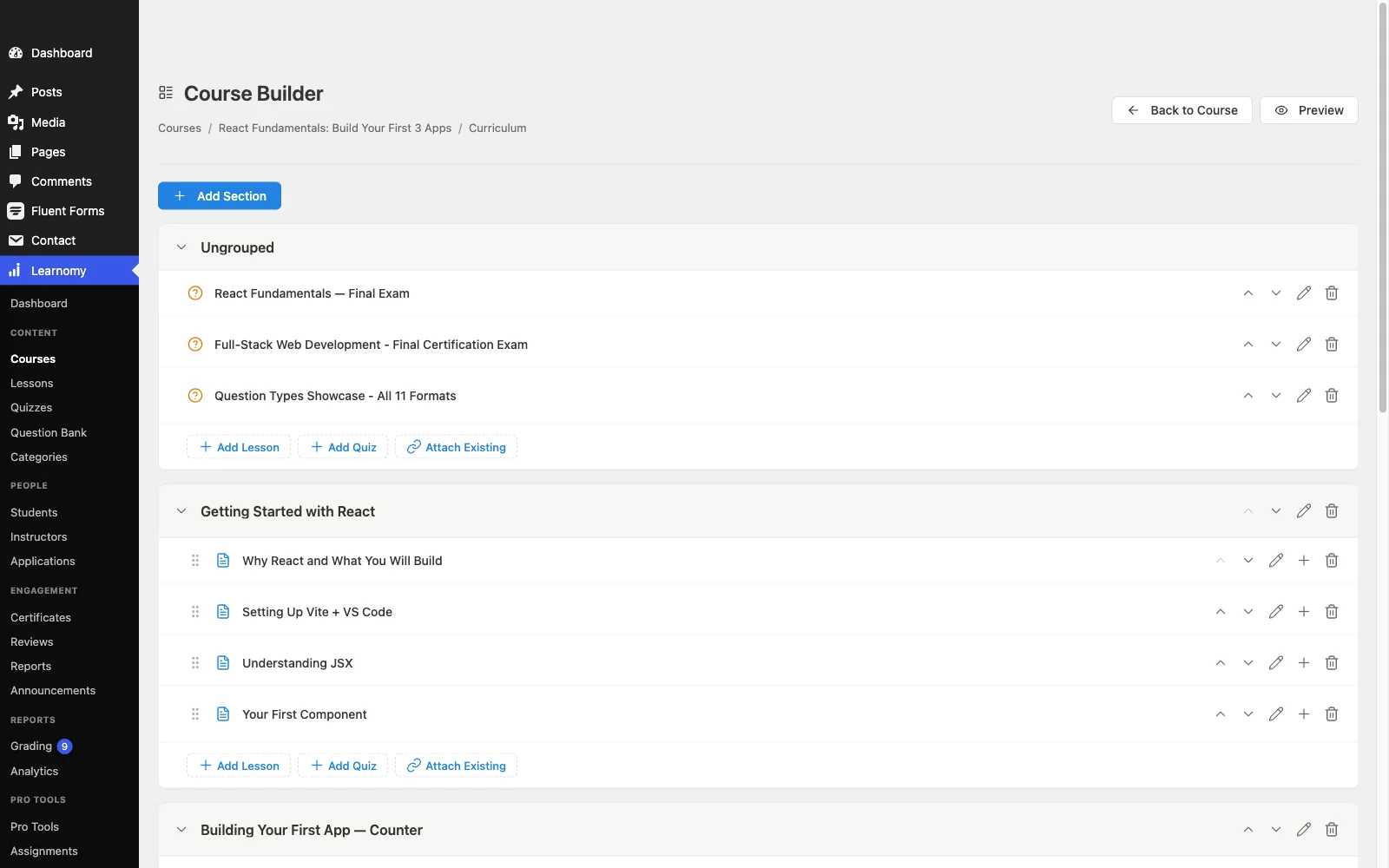
Pros: complete platform in one install, certificates, native payments, coupons, analytics; AI course-drafting tools; no platform fees; clean BuddyPress/BuddyX composition; self-hosted ownership.
Cons: AI course and quiz drafting requires Learnomy’s upgraded tier rather than shipping in the base plugin, and its multi-instructor marketplace mode is newer and less battle-tested at scale than Tutor LMS’s, which has run large marketplaces for years.
Try Learnomy before you decide
Spin up a live WordPress site with Learnomy pre-installed in the free Learnomy sandbox, a 4-hour hosted test drive, no signup, no local setup, just a real admin dashboard to click through.
2. LearnDash, the ecosystem heavyweight
LearnDash is the move for creators leaving Tutor because they need something specific that only exists as a LearnDash add-on, and its ecosystem remains the largest in WordPress LMS. Its course builder is mature if less pleasant than Tutor’s frontend experience, its quiz engine is deep, and nearly every niche need has a solved answer somewhere in its add-on catalog. The trade-off is equally established: an annual license for the core, WooCommerce for flexible payments, a separate product for real reporting, and a stack of separately-updated parts. If that trade is worth it to you, you already know which add-on is the reason. For everyone else, we compared the full landscape in our LearnDash alternatives guide.
Pros: largest add-on ecosystem; deep quizzing; battle-tested at scale.
Cons: assembly-required architecture; community via third parties.
3. LifterLMS, engagement-focused and modular
LifterLMS’s underrated strength is engagement mechanics: achievements, triggered emails, and its social learning add-on show more first-party thought about keeping students moving than most rivals. Its builder is solid, its WooCommerce integration clean, and its support reputation good. The consideration is its bundle structure, functionality ships as add-on bundles, so the stack a real course business needs is assembled rather than included, worth weighing if the engagement tooling is specifically what you’re buying. Full breakdown in our LifterLMS review, the three-way with LearnDash and Learnomy is here, and if LifterLMS itself isn’t the fit, our LifterLMS alternatives guide covers the rest of the field.
Pros: engagement and automation depth; mature builder; a decade of documentation and support history.
Cons: bundle model reintroduces assembly; WooCommerce dependency for checkout flexibility.
4. Sensei LMS, the WooCommerce-native minimalist
If your site already runs WooCommerce and your course plans are straightforward, video lessons, simple quizzes, sell-and-deliver, Sensei is the lowest-friction Tutor alternative. It feels native to the block editor and comes from Automattic, so its maintenance future is about as secure as WordPress plugins get. It is also deliberately modest: reporting is thin, community features are minimal, and selling requires WooCommerce by design. Choose it for simplicity, not for growth headroom, our Sensei LMS review covers where its ceiling sits.
Pros: native-feeling, Automattic-backed, easy to learn.
Cons: thin analytics; WooCommerce required to sell; little community depth.
5. MasterStudy LMS, the design-led option
MasterStudy is the closest thing to Tutor’s frontend polish on this list, its student-facing screens are genuinely attractive out of the box, and its native payment options reduce the WooCommerce dependency. The trade-offs: certificates, drip, assignments, and multi-instructor support sit in its higher tiers; the plugin performs best inside StylemixThemes’ own theme ecosystem; and community depth stops at course Q&A. It’s a credible Tutor replacement for solo creators who buy on design, less so for community builders.
Pros: polished student UI; native payment options; attractive defaults.
Cons: theme-ecosystem gravity; several essentials in higher tiers; thin community.
6. LearnPress, the à-la-carte veteran
LearnPress’s pitch is maximum control over what you install: a core handling course structure and basic quizzes, with everything else, certificates, drip, WooCommerce checkout, bbPress/BuddyPress integration, available as individual add-ons. Assembled carefully it covers a lot of ground, and its BuddyPress add-on gives it a real (if dated) community story. The cost is operational: many separately-versioned parts and integration seams that show as the stack grows. It rewards tinkerers who enjoy assembling their own toolkit and asks patience of everyone else.
Pros: pick-and-choose model; huge install base; BuddyPress add-on exists.
Cons: add-on sprawl; maintenance burden grows with the stack.
7. MemberPress Courses, billing engine first
MemberPress makes sense as a Tutor alternative when the honest description of your business is “a membership that includes courses” rather than “a course catalog.” Its access rules, recurring billing, and native checkout are the best on this list; its LMS depth, quizzes, instructor tooling, learning analytics, trails every dedicated LMS here. If subscriptions, content dripping by membership level, and dunning management are your daily reality, it earns its place. We covered the operational side of that model in running a course membership site on WordPress.
Pros: best-in-class billing and access control; native payments; certificates included.
Cons: shallow LMS features; no real community layer.
8. Thinkific, the hosted exit
For creators whose real complaint about Tutor is WordPress itself, updates, plugins, hosting, Thinkific is the cleanest hosted alternative: native checkout, built-in community spaces on higher plans, zero maintenance. The structural trade doesn’t change: a subscription that continues for the life of your business, customization ceilings, and a course catalog that lives on rented land. The ownership argument, your data, your revenue, your rules, is the reason self-hosted WordPress remains the default recommendation on this site. The same math drove our Skool alternatives comparison, and if Thinkific itself is the one you’re weighing against other hosted options, see our Thinkific alternatives roundup.
Pros: zero maintenance; fast setup; native community features.
Cons: permanent subscription; lock-in; limited customization.
The community layer: where most LMS platforms stop short
Every platform above will deliver lessons. Almost none of them, by themselves, will make a student feel like part of something, and that feeling is what separates courses that get finished from courses that get refunded. Course-scoped Q&A is not community. Community is persistent member profiles, groups that outlive a single course, activity feeds where progress is visible, and gamification that rewards showing up, the mechanics we broke down in best LMS with gamification.
On WordPress, the proven pattern is composition: a focused LMS plus BuddyPress plus a community theme like BuddyX. The LMS owns curriculum, checkout, and certificates; BuddyPress owns identity and interaction. This is where plugin architecture becomes a buying criterion, Learnomy is built to compose cleanly with that stack, while platforms that lean on their own theme family or half-build their own social layer integrate awkwardly. If community is central to your course business, weight this section more heavily than any feature table.
How we evaluated these platforms
This comparison is based on each platform’s own documentation, pricing pages, and public changelog as of September 2026. Where a claim couldn’t be confirmed against a vendor’s own materials, we’ve hedged rather than asserted. Tier boundaries change over time, so confirm current details on each vendor’s site before committing.

Questions worth asking before you commit
Get confirmed answers to these five before moving anywhere from Tutor LMS: Does the platform issue certificates out of the box, or is that the same upsell you’re leaving? Is checkout native, or are you signing up for WooCommerce configuration either way? Does the analytics dashboard show per-course completion rates, or just enrollments and revenue? If you later add instructors, is commission splitting native or a plugin-stack project? And does the platform coexist cleanly with BuddyPress, or does it assume it owns your whole site? A platform that answers all five well removes every reason you had to leave.
What switching from Tutor LMS actually involves
Migration anxiety keeps more creators on the wrong platform than any feature gap ever did. The honest picture for Tutor specifically: this is a covered path, Learnomy’s migration wizard supports Tutor LMS directly (alongside LearnDash and LifterLMS), bringing courses, enrollments, and student progress across in a guided flow. We published a full walkthrough in how to migrate from LearnDash, Tutor LMS or LifterLMS without losing student progress. The short version: audit your catalog, rehearse on a staging copy, verify a sample of real student records post-migration, and keep Tutor installed-but-deactivated until the new platform has run smoothly for a full cycle.
The complete-platform test
A more useful exercise than any feature grid: count the moving parts each option needs before a student can buy a course, take a quiz, and receive a certificate. Tutor LMS, the baseline you’re comparing against, needs its higher tier plus WooCommerce plus a gateway for that flow. LearnDash, LifterLMS, Sensei, and LearnPress each land at three to five separately-updated components depending on the add-ons your course design requires. MemberPress keeps checkout native but leans on third parties for LMS depth. Thinkific is one part, but a rented one. Learnomy is the only option on this list where the answer is one self-hosted platform: checkout, quizzes, certificates, coupons, and analytics in a single install. Every additional moving part is a future update conflict, a support boundary where two vendors point at each other, and another hour of setup, the complete-platform test predicts your year-two maintenance experience better than any launch-day comparison.
Three site owners, three different right answers
The creator at Tutor’s launch-week wall, course built, launch blocked by gated features, should trial Learnomy before assembling the unlock stack: the blocked features (certificates, real checkout, analytics) are included there, and switching before launch is trivial since there’s no student progress to preserve yet.
The community builder planning cohorts, member profiles, and peer accountability should choose the platform that composes best with BuddyPress and BuddyX rather than the one with the best solo feature list, that’s Learnomy first, LearnPress (via its BuddyPress add-on) as the tinkerer’s option, and our community-features comparison as the deeper read.
The marketplace operator already running Tutor’s multi-instructor mode has the highest switching cost on this page, and should compare destinations feature-for-feature: Learnomy’s commission engine against what Tutor currently delivers, using our marketplace-on-WordPress guide as the requirements checklist. Switch for a concrete gap, not for novelty.
Common mistakes when replacing Tutor LMS
Comparing entry experiences instead of launch stacks. The honest comparison is: what does it take, on each platform, to sell a course with certificates and see completion data? That test reorders the market.
Recreating the WooCommerce dependency you were escaping. If checkout friction drove you off Tutor, don’t land on a platform with the same architecture and a different logo, native payments is a checklist item; verify it.
Treating course Q&A as a community strategy. Q&A threads die with the course. If retention is the goal, plan the BuddyPress layer from day one, retrofitting community after churn has set in is twice the work at half the effect.
Migrating live. Progress-data errors surface as angry student emails. Staging rehearsal first, always, our migration guide has the checklist.
FAQ
What is the most complete alternative to Tutor LMS? Learnomy. The specific features Tutor reserves for higher tiers, certificates, real checkout (native Stripe/PayPal), coupons, completion analytics, are part of the platform, which makes it the direct answer to the most common reason people search for Tutor alternatives.
Is Tutor LMS still worth it in 2026? For multi-instructor marketplaces committed to its ecosystem, yes, its frontend builder and marketplace mode remain excellent. For solo creators blocked at the tier boundary, it’s worth comparing what a complete platform includes before assembling the unlock stack.
Can I migrate from Tutor LMS without losing student progress? Yes. Learnomy’s migration wizard supports Tutor LMS directly, alongside LearnDash and LifterLMS, and our step-by-step migration guide covers the full process including the staging rehearsal.
Which Tutor LMS alternative has the best community features? None of them ship real community alone, the strongest pattern is an LMS that composes with BuddyPress and BuddyX, which is Learnomy’s architecture. Hosted options like Thinkific include community spaces but on rented, subscription terms.
Do these alternatives require WooCommerce? Learnomy, MemberPress, and (partially) MasterStudy have native checkout. LearnDash, LifterLMS, Sensei, and LearnPress effectively route serious selling through WooCommerce or payment add-ons.
What about hosted platforms like Teachable or Thinkific? They remove maintenance and add lock-in plus a permanent subscription. If ownership and control matter to you, self-hosted WordPress wins; if never touching an update matters more, Thinkific is the cleanest hosted pick and we’ve included it above (see our Teachable alternatives comparison if Teachable specifically is on your shortlist).
Verdict
The best Tutor LMS alternative for most creators in 2026 is Learnomy: it includes the exact features that stall launches on Tutor, adds AI course generation, takes no platform fees, and composes cleanly with the BuddyPress + BuddyX community stack when you’re ready to make learning social. LearnDash remains the ecosystem answer for niche add-on needs, LifterLMS the engagement-mechanics pick, Sensei the WooCommerce minimalist, and Thinkific the hosted escape for the maintenance-averse. Whichever way you go, run the complete-platform test rather than comparing entry experiences, and decide on the community layer before you migrate, not after your completion rates tell you something was missing.
See Learnomy before you migrate anything
Launch the Learnomy sandbox for a free 4-hour test drive on a live WordPress install, no signup required. If you decide to switch, our step-by-step migration guide covers moving from Tutor LMS, LearnDash, or LifterLMS without losing student progress.