

Customer retention is a revenue powerhouse for online stores, and it’s backed by data. Bain & Company found that increasing customer retention by just 5% can boost profits anywhere from 25% to 95%. The key to achieving this lies in convenience — making it as easy as possible for shoppers to return and purchase again.
That’s where Product Reorders in WooCommerce shine. Instead of forcing customers to browse your entire catalog again, a one-click reorder feature allows them to instantly repurchase items they’ve bought before. This not only improves the shopping experience but also increases the frequency and value of repeat orders.
In this detailed guide, we’ll explore how to set up one-click reorders using the Buy Again for WooCommerce plugin, break down its benefits for different types of businesses, and share optimization strategies to maximize customer loyalty and revenue.

Quick Links
What Are Product Reorders in WooCommerce?
Product reorders in WooCommerce refer to the ability for customers to quickly repurchase items they have bought in the past without having to manually search, add products to their cart, and go through the entire checkout process again. This feature simplifies the buying journey by providing a convenient “Buy Again” or “Reorder” option directly from a customer’s account page, past orders list, or even email reminders. It is especially valuable for stores that sell consumable goods, seasonal items, or frequently purchased products like groceries, office supplies, pet food, and skincare products.
In WooCommerce, product reorders can be enabled through dedicated plugins such as Buy Again for WooCommerce, which adds one-click reorder functionality for both entire past orders and selected items. By offering this streamlined purchase path, businesses not only improve the customer experience but also encourage repeat sales. This small but powerful feature reduces friction in the buying process, strengthens customer loyalty, and ultimately drives consistent revenue growth.
Why Offering One-Click Reorders Improves Customer Retention
Customer retention is one of the most cost-effective ways to grow your WooCommerce store. Studies by Bain & Company show that increasing customer retention rates by just 5% can boost profits by 25% to 95%. One-click reorders make the buying process seamless for repeat customers by eliminating the need to search, filter, and add products to the cart manually. This convenience translates into more frequent purchases and stronger brand loyalty.
When customers know they can reorder a past purchase in seconds, they’re more likely to choose your store over competitors. This small but impactful feature shows that you value their time and shopping experience. In return, you gain consistent revenue streams, higher lifetime value per customer, and valuable data on purchasing patterns, which you can use to refine your marketing and inventory strategies.
The Best Way to Enable Product Reorders in WooCommerce
The most straightforward and effective way to let customers reorder products is by using the Buy Again for WooCommerce plugin. This official WooCommerce extension brings Amazon-style “Buy Again” functionality directly into your store, giving customers a familiar and effortless shopping experience.
Key Features of Buy Again for WooCommerce
- One-Click Reordering – Allow customers to instantly add items from previous purchases to their cart without browsing through the entire catalog again.
- Customizable Placement – Place the “Buy Again” button exactly where it makes the most sense—whether that’s the order history, account page, or even individual product pages.
- Partial Reorders – Give customers the flexibility to reorder only specific products from a past order rather than everything at once.
- Seamless Compatibility – Works flawlessly with most WooCommerce themes, extensions, and payment gateways, ensuring a smooth integration.
- Mobile-Friendly Experience – Optimized for mobile devices so customers can reorder on the go without friction.
Step-by-Step: How to Enable One-Click Product Reorders in WooCommerce
Setting up Product Reorders in WooCommerce is simple with the Buy Again for WooCommerce plugin. Follow these steps to get it running smoothly:
Step 1: Purchase and Install the Plugin
-
Visit the Buy Again for WooCommerce page.
-
Purchase the plugin and download the ZIP file.
-
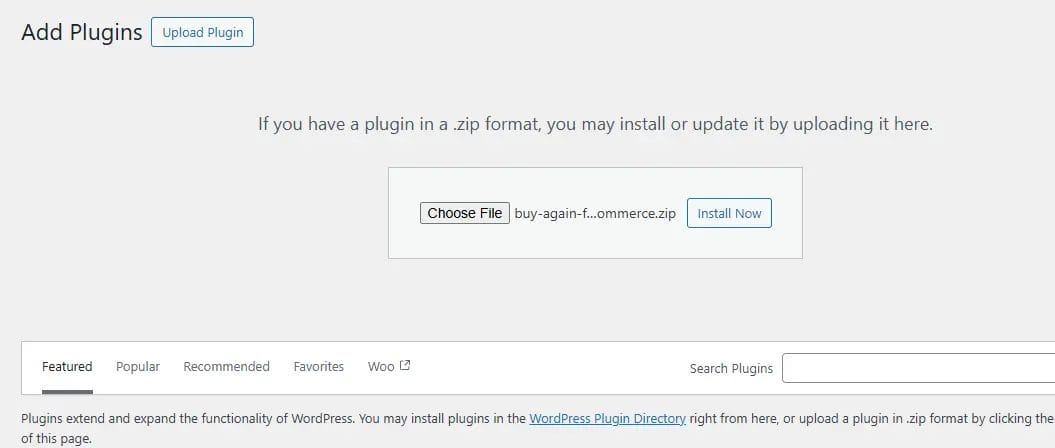
In your WordPress dashboard, navigate to Plugins → Add New → Upload Plugin.

-
Upload the ZIP file, click Install Now, and then Activate the plugin.
Step 2: Configure General Settings
-
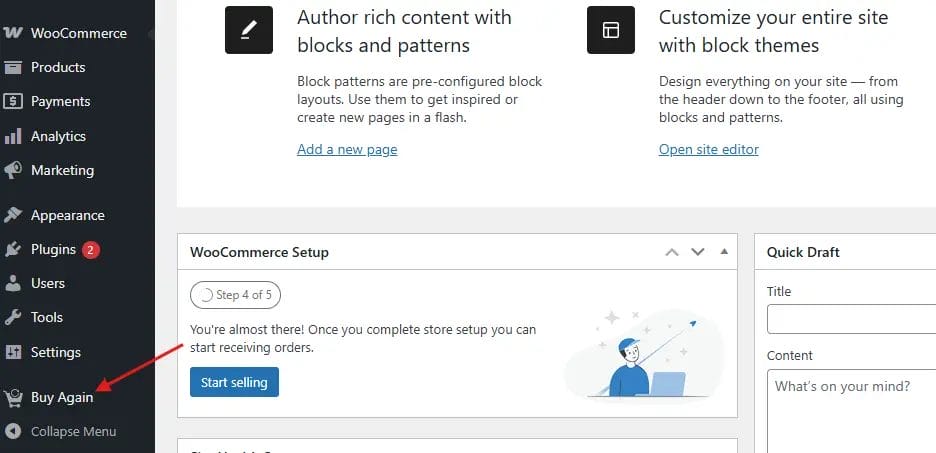
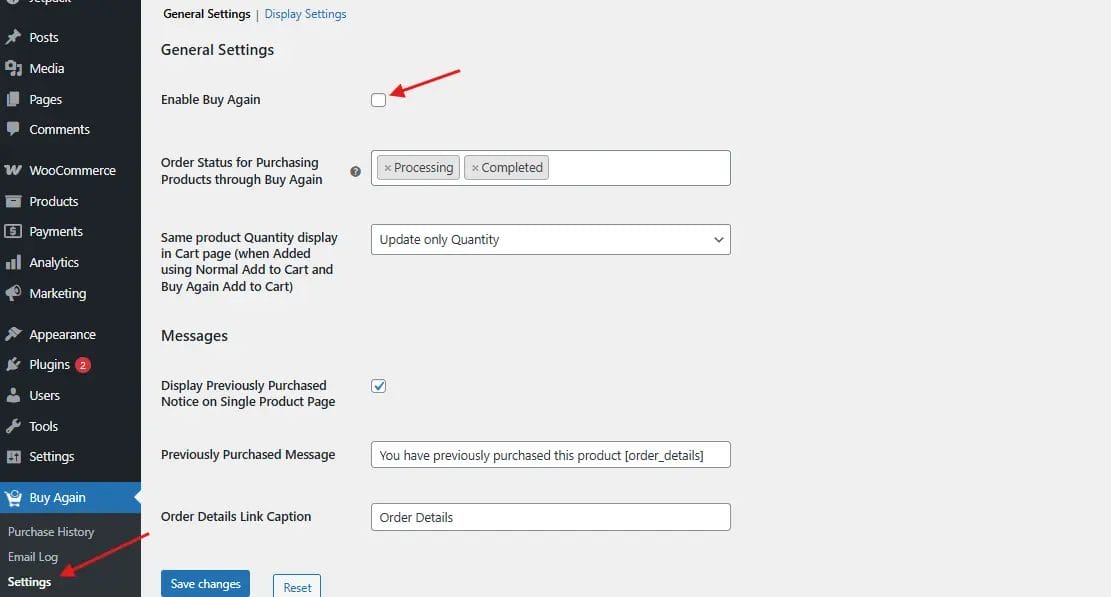
Go to WordPress Dashboard > Buy Again

-
Enable the plugin.

-
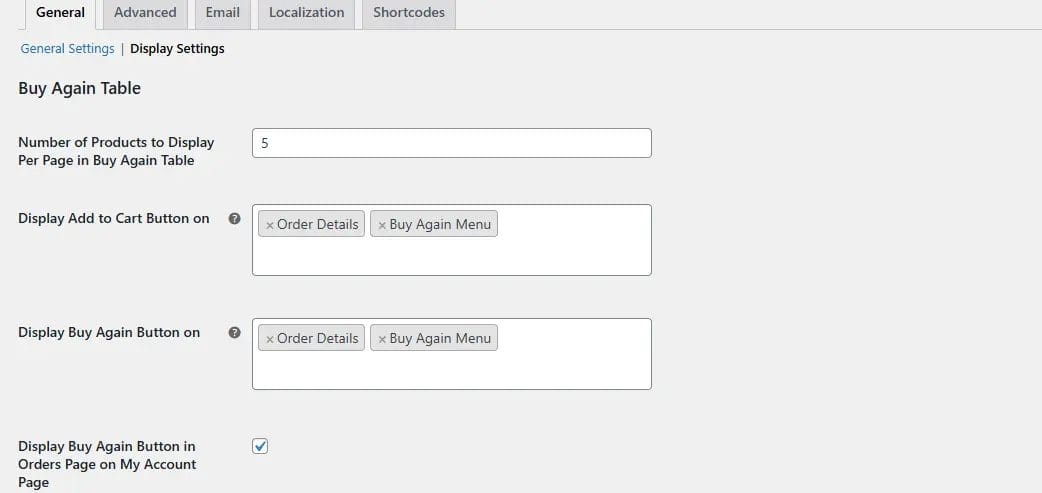
Choose where to display the Buy Again button, such as:

-
Order History Page
-
Single Order Details Page
-
Product Page
-
Step 3: Customize Button Text and Design
-
Change the button label to something more engaging, like “Reorder Now” or “Repeat Order.”
-
Adjust colors, font, and size to match your store’s branding for a consistent customer experience.
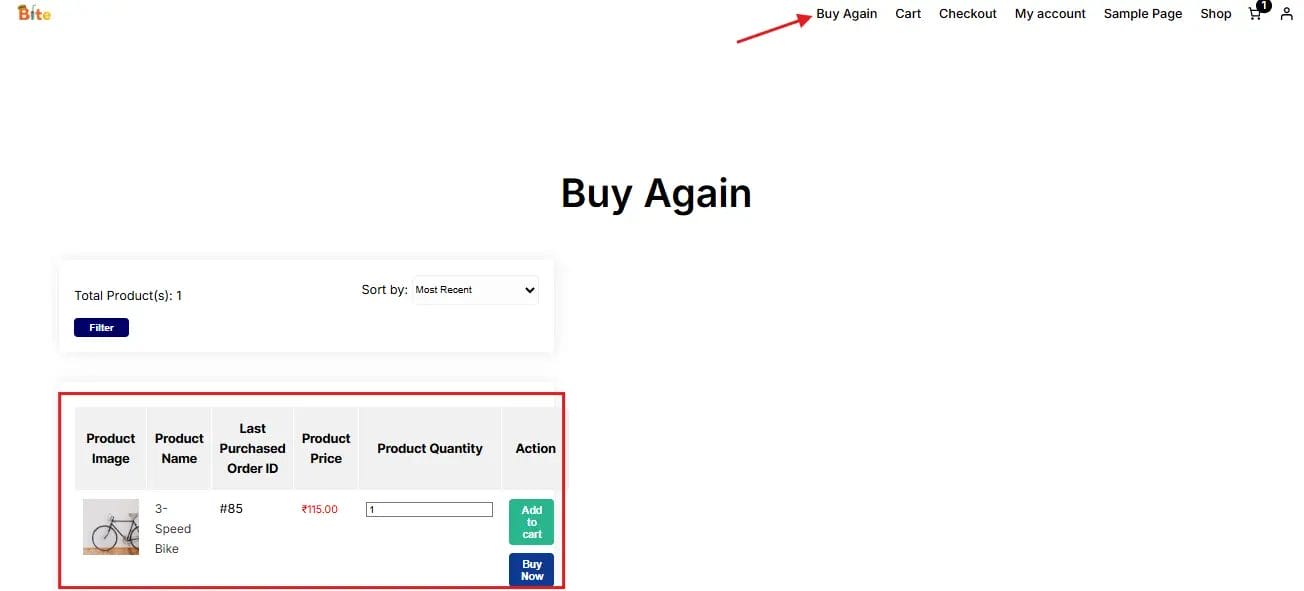
Step 4: Test the Feature
-
Place a test order as a customer.
-
Go to My Account → Orders.
-
Click Buy Again and confirm that the product is instantly added to your cart.
Benefits of Product Reorders in WooCommerce
Enabling product reorders isn’t just a nice-to-have feature—it’s a smart business move that benefits both you and your customers.
1. Saves Customers’ Time: With one-click reordering, returning customers can skip browsing and searching for products they’ve already purchased. They go straight to checkout, making their shopping experience faster and smoother.
2. Increases Average Order Value (AOV): When customers reorder, they often add extra items to their cart along the way. This upsell potential naturally boosts your Average Order Value, helping you maximize revenue without extra marketing costs.
3. Boosts Customer Retention: Convenience keeps customers loyal. By removing barriers to purchase, you encourage shoppers to return more often, strengthening long-term relationships with your brand.
4. Reduces Operational Costs: Without a reorder option, customers may contact your support team asking how to repurchase items. Automating this process means fewer support requests, saving your team time and resources.
Tips to Maximize the Impact of One-Click Reorders
Adding a one-click reorder button is powerful on its own, but pairing it with the right strategies can amplify its impact and revenue potential.
1. Pair with Email Reminders: Automated reorder reminder emails sent at the right time—based on each customer’s purchase history—can gently nudge them back to your store. For example, if a product typically lasts 30 days, send the reminder on day 25.
2. Use Personalized Recommendations: Enhance reorder pages with “Frequently Bought Together” or “You May Also Like” suggestions. These tailored recommendations increase cart value while improving the shopping experience.
3. Offer Discounts for Repeat Purchases: Encourage quicker reorders by offering incentives. For example: “Get 10% off when you reorder within 30 days.” Limited-time deals create urgency and drive faster conversions.
4. Track and Optimize: Use WooCommerce analytics to monitor reorder click-through rates, conversions, and timing. Test button placement, colors, and text to find the combination that drives the most engagement.
How This Benefits Different Types of Businesses
While one-click reorders are useful for almost any online store, the advantages are particularly strong in certain industries.
1. Grocery & Everyday Essentials Stores
Products like snacks, beverages, and cleaning supplies are purchased regularly. A quick reorder option saves customers the hassle of searching every time, which can lead to weekly or monthly repeat sales.
2. Health & Wellness Brands
Supplements, skincare, and fitness products are often bought on a cycle. One-click reorders make it easier for loyal customers to stay consistent with their routine—boosting retention and lifetime value.
3. Office & B2B Supply Stores
Business buyers often reorder the same bulk items—printer ink, paper, and packaging materials. A reorder button reduces procurement time, making your store their go-to supplier.
4. Specialty & Hobby Shops
From pet supplies to craft materials, hobby customers love convenience. Reordering their favorite items quickly increases satisfaction and repeat visits.
5. Subscription-Alternative Stores
For stores that don’t offer full subscription plans, one-click reorders act as a “subscription-lite” option. Customers can manually repeat orders when they’re ready—without committing to automatic billing—making it appealing to shoppers who value flexibility.

Turn Repeat Customers into Lifelong Buyers
Enabling Product Reorders in WooCommerce is one of the easiest, most cost-effective ways to strengthen customer loyalty and increase revenue—without making major changes to your store. With the Buy Again for WooCommerce plugin, you can offer a seamless, one-click reorder feature that keeps customers engaged and coming back for more.
Whether your business sells consumables, B2B supplies, fashion staples, or digital services, giving shoppers the ability to reorder effortlessly can have a measurable impact on your bottom line. When paired with smart marketing tactics—such as reorder reminders, personalized product suggestions, and exclusive discounts—you can transform occasional buyers into repeat customers and, ultimately, loyal brand advocates.
For tailored features and seamless functionality, explore our custom WooCommerce development services to make your store truly stand out.
Interesting Reads:
How to Choose the Right Web Hosting Services for Your Website Needs
How to Add a Free Shipping Limit in WooCommerce the Right Way

