
Multi-vendor marketplaces used to be something only Amazon and Etsy could pull off. That changed once WordPress plugins like WC Vendors, WCFM, and Dokan made it possible for anyone to spin up their own version on a self-hosted store. Instead of one shop selling one catalog, you get a single storefront where dozens or hundreds of independent sellers list their own products under one roof.
The appeal isn’t hard to understand. Shoppers get more variety in one place, sellers get access to an audience without building their own site from scratch, and the marketplace owner earns a commission on every sale without holding a single item of inventory. For anyone running WordPress and looking to build that kind of platform, WC Vendors is one of the more established options, and it’s worth understanding before committing to it.
WC Vendors ships in both free and premium versions. This piece focuses on what the free version actually gives you, since that’s the version most people evaluate before deciding whether to pay for anything at all.
What WC Vendors Actually Does
WC Vendors is a WordPress plugin built on top of WooCommerce that turns a standard store into a functioning multi-vendor marketplace. It doesn’t lock you into one type of product either. Physical goods, digital downloads, even bookable services like cooking classes can all run through the same setup, without the restrictions that some marketplace platforms impose on what you’re allowed to sell.
The plugin covers the fundamentals a marketplace actually needs to function day to day: vendor dashboards, product and order management, and a flexible commission system that doesn’t force every seller onto the same rate. On WordPress.org, WC Vendors currently holds a rating of roughly 4.5 out of 5 stars from more than 180 reviews, which is a solid track record for a plugin that’s been maintained and updated over multiple years rather than abandoned after launch.
With the basics out of the way, here’s what actually stands out once you start using it.
1. Installation and Setup
Getting WC Vendors running is straightforward if you already have WooCommerce installed, which is a requirement since the plugin builds directly on top of it. Once activated, it walks you through a setup process that doesn’t assume deep technical knowledge. You’re not left guessing what each setting does or digging through documentation just to get a functioning storefront live.
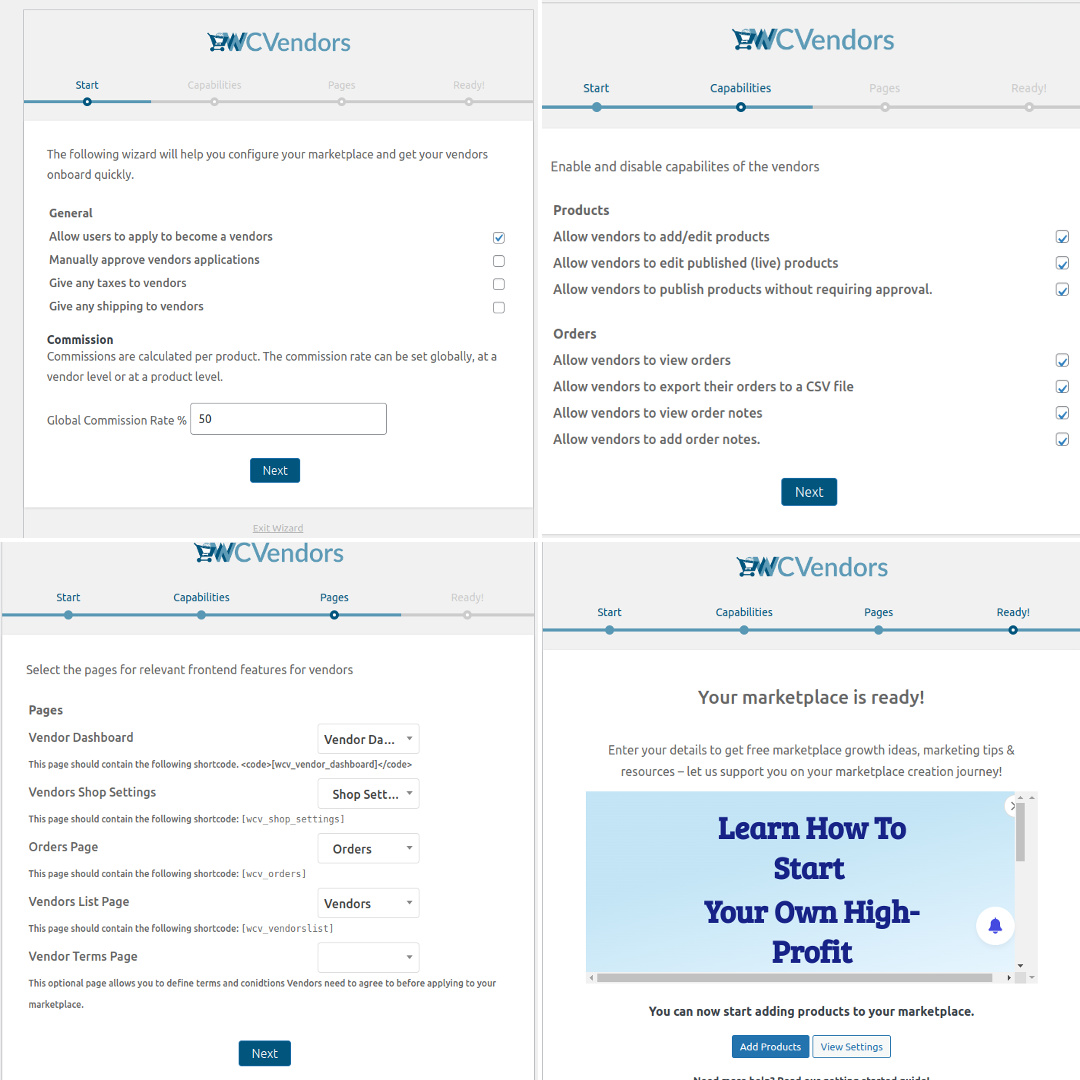
That said, plan for a bit of configuration time beyond the initial install. Commission structures, vendor registration rules, and payout settings all need decisions made upfront, and getting these right before vendors start onboarding saves you from awkward policy changes down the line once sellers are already active on the platform.
2. The Vendor Dashboard
The vendor dashboard is where WC Vendors earns most of its reputation. It’s the interface every seller on your marketplace lives in day to day, and a clunky dashboard makes vendors miserable regardless of how good the rest of the plugin is. This one holds up well. Vendors can manage products, track orders, and monitor earnings without needing to ask you, the site owner, for help every time something needs updating.
Breaking down what the dashboard actually covers gives a clearer sense of how complete it is:
Product Management: Sellers add new products, edit existing listings, and manage inventory directly from their own dashboard. They have full control over titles, descriptions, pricing, and images without needing admin access to the site itself.
Order Management: Sellers view and process their own orders, tracking pending orders, order status, and customer details. They can update fulfilment status and communicate with buyers entirely from within the dashboard, which keeps you out of the loop on routine transactions.
Commission Tracking: Sellers see their commission earnings and payout history without emailing you to ask. Visibility into commission rates, per-sale earnings, and running totals means fewer disputes and fewer support tickets landing in your inbox.
Product Reviews and Ratings: Sellers can monitor and respond to reviews left on their own products, which matters for maintaining reputation on a marketplace where trust between buyer and seller drives repeat business.
Vendor Profile Management: Sellers update their own storefront details, contact information, social links, and store policies, giving each vendor a way to build a distinct identity within the shared marketplace rather than blending into a generic template.
Notification System: Sellers get real-time alerts for new orders, customer questions, and reviews, so they’re not manually refreshing a dashboard hoping to catch new activity.
Communication Tools: Built-in messaging or comment tools let sellers talk directly with customers, handling inquiries and support without routing every conversation through the marketplace owner.
3. The Commission System
Commission handling is the part of any multi-vendor plugin that decides whether the business model actually works, and WC Vendors gives real flexibility here. Site owners can set a global commission rate that applies across the board, or define custom rates for individual vendors when a negotiated deal makes sense, say for a high-volume seller who’s earned better terms, or a new vendor being onboarded with an introductory rate to encourage sign-up.
That flexibility matters more than it sounds. A rigid, one-size-fits-all commission rate works fine for a small marketplace with a handful of similar vendors, but it starts causing friction the moment your platform grows and different sellers have genuinely different volume, margins, and negotiating leverage.
4. Product Management Tools
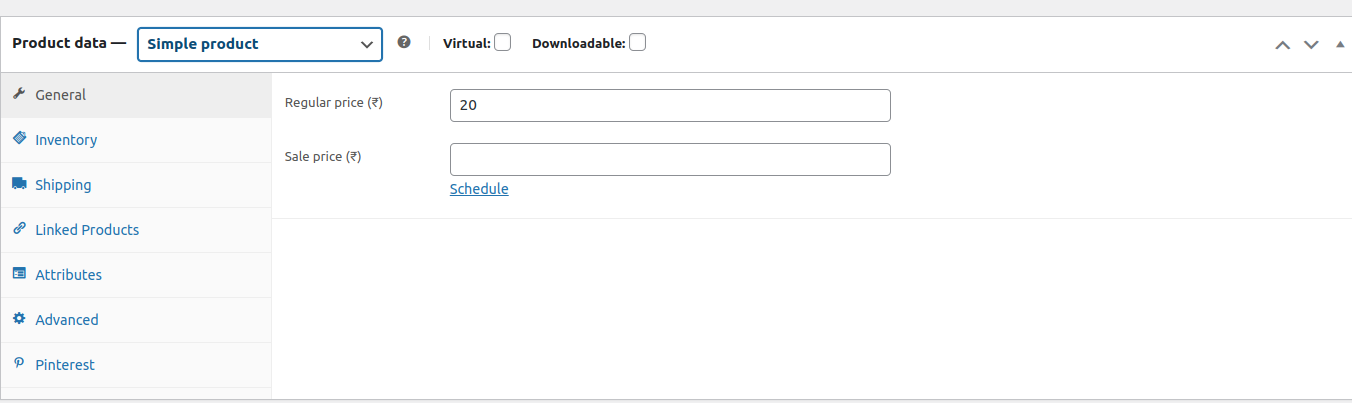
Beyond what vendors see on their own dashboard, WC Vendors provides a complete product management layer that covers inventory tracking, product descriptions, and image galleries for showcasing items properly. None of this is groundbreaking on its own, WooCommerce handles product management well already, but WC Vendors extends it cleanly to a multi-seller context without breaking the underlying WooCommerce experience that store owners already know.
5. Support and Documentation
WC Vendors backs the plugin with documentation that covers installation, configuration, and troubleshooting in enough depth to actually be useful rather than just checking a box. Step-by-step guides and FAQs mean most common questions get answered without needing to file a support ticket and wait. When you do need direct help, the support channel is there as a backup for anything the documentation doesn’t cover.
How It Compares to WCFM and Dokan
WC Vendors isn’t the only multi-vendor option in the WordPress ecosystem, and it’s worth understanding roughly where it sits relative to the other two names that come up constantly in the same conversation: WCFM Marketplace and Dokan.
Dokan tends to get recommended for marketplaces that want a heavier, more all-in-one feel out of the box, with a frontend dashboard that looks and behaves closer to a full storefront management panel from the moment you activate it. WCFM leans into deep customization and module-based extensibility, appealing to developers who want to bolt on very specific functionality piece by piece. WC Vendors sits somewhere in between, favoring a cleaner, more WooCommerce-native feel that doesn’t try to reinvent the admin experience you already know.
None of the three is objectively better across every use case. The right choice depends on how much customization you expect to need, how comfortable your team is with WooCommerce’s existing conventions, and how quickly you expect to scale past what any free tier offers. Reading through recent WordPress.org reviews for each plugin before committing is worth the twenty minutes it takes, since user experiences shift as each plugin gets updated over time.
Setting Up Your First Vendor Onboarding Flow
Getting the plugin installed is the easy part. Getting your first handful of vendors successfully onboarded is where most new marketplace owners hit friction they didn’t anticipate. A few decisions made early save a lot of cleanup later.
Decide upfront whether vendor registration will be open to anyone who applies or gated behind manual approval. Open registration gets you vendors faster but raises the risk of low-quality or spam listings diluting the marketplace. Manual approval slows growth but keeps quality higher, which matters more in the early days when a handful of bad listings can define a new visitor’s first impression of the entire platform.
Write a short onboarding guide for new vendors before you need one, covering how to set up their profile, upload their first product, and understand the commission structure. Vendors who understand the system from day one create fewer support tickets than vendors left to figure it out through trial and error, and a five-minute guide written once saves you from answering the same three questions over and over as new sellers join.
Test the entire flow yourself before inviting real vendors in. Register a test account, list a test product, process a test order, and issue a test payout. Problems that look fine in theory often surface only when you walk through the actual sequence a real vendor would follow, and it’s far better to catch a broken step during testing than to have your first paying vendor hit it during launch week.
Performance and SEO Considerations for Marketplace Sites
Multi-vendor marketplaces tend to grow product catalogs fast once vendors start actively listing, and WooCommerce sites with large catalogs need more attention to performance than a typical small business site. Caching, image optimization, and a hosting plan built for database-heavy WooCommerce queries all matter more here than on a five-page brochure site, since every additional vendor and product adds more database weight to every storefront page load.
SEO structure deserves early attention too. Decide how vendor storefronts, product categories, and individual listings are organized in your URL structure before the catalog grows large, since restructuring URLs after hundreds of products are indexed creates redirect management headaches that are far easier to avoid than to fix retroactively. Clear categorization also helps shoppers actually find what they’re looking for across a marketplace with many different sellers, which directly affects conversion rates regardless of how good your search engine rankings are.
Where the Free Version Falls Short
It’s worth being upfront about the limits of the free tier, since a lot of marketplace-plugin writeups gloss over this part entirely. The free version of WC Vendors covers the core marketplace mechanics well, but features like advanced shipping rules per vendor, front-end vendor registration customization, and some of the more granular commission options are reserved for the paid tier. Small marketplaces starting out often don’t hit these limits right away, but growing platforms usually do within the first year, and it’s better to know that going in than to discover it mid-migration.
Payment processing is another area worth checking closely before committing. How vendor payouts actually reach sellers, whether that’s PayPal, direct bank transfer, or another method, depends partly on which payment gateway integrations you have active, and not every option is available without additional configuration or a premium add-on.
Handling Disputes and Building Buyer Trust
A marketplace lives or dies on whether buyers trust the sellers on it, and that trust doesn’t happen automatically just because the plugin has a review system installed. Decide early how you’ll handle disputes between a buyer and a vendor when something goes wrong, whether that’s a damaged item, a late shipment, or a product that doesn’t match its description. Having a clear, written policy before the first dispute happens means you’re not improvising a decision under pressure while a frustrated customer waits for an answer.
Vendor vetting matters here too. Even with WC Vendors’ review and rating tools in place, a lightweight manual check on new vendors, verifying they’re a real business or a legitimate individual seller, catches problems before they become public disputes that damage the marketplace’s reputation. This matters more in the first few months, when a handful of bad actors can do outsized damage to a platform that hasn’t yet built a track record with shoppers.
Building visible trust signals helps too. Vendor ratings, verified badges for established sellers, and transparent policies around returns and refunds all give shoppers confidence to buy from a seller they’ve never heard of before. Marketplaces that skip this step often struggle with conversion even when the product selection itself is solid, simply because buyers hesitate to hand over payment information to an unfamiliar seller with no visible trust markers.
Payment Gateways and Payout Timing
How money actually moves from buyer to vendor is one of the most consequential decisions in setting up a marketplace, and it’s worth more thought than most first-time marketplace owners give it. Whether payouts happen through PayPal, direct bank transfer, or another supported gateway affects both vendor satisfaction and your own administrative workload, since some payout methods require more manual processing than others.
Payout timing needs a clear policy too. Some marketplaces pay vendors immediately after a sale completes, others batch payouts weekly or monthly to simplify accounting and reduce processing fees from frequent small transfers. Whichever you choose, communicate it clearly to vendors before they list their first product, since ambiguity around when they’ll actually get paid is one of the fastest ways to lose a vendor’s trust in the platform, even when the underlying plugin is working exactly as designed.
Who WC Vendors Actually Fits
WC Vendors makes the most sense for store owners already comfortable with WooCommerce who want to open their platform up to multiple sellers without switching to an entirely different system. If you’re already running a WooCommerce store and considering a marketplace pivot, the learning curve is far gentler than starting from scratch with unfamiliar software.
It’s a weaker fit for anyone wanting a marketplace built specifically around services rather than physical or digital products, since the plugin’s core strength is inventory-driven product sales rather than service bookings or gig-style listings. For that use case, a purpose-built service marketplace tool is usually a better starting point than adapting a product-focused plugin to fit.
The free version of WC Vendors is a genuinely capable tool for anyone looking to build a multi-vendor marketplace on WordPress without an upfront cost. Between the vendor dashboard, the commission system, and the documentation backing it up, it gives small and mid-size marketplace owners most of what they need to launch. Whether it stays the right fit long-term depends on how quickly your platform grows and how soon those free-tier limits start to matter for your specific business.
Before committing to any multi-vendor plugin, run a short pilot rather than jumping straight into a full launch. Set up the plugin on a staging site, onboard two or three test vendors, walk through a handful of orders end to end, and see how the workflow actually feels once real products and real payouts are involved rather than just reading through feature lists. A pilot surfaces friction points that no amount of documentation reading will reveal, and it’s a lot cheaper to discover a workflow problem on a staging site with fake vendors than after launch with real sellers whose money and reputation are on the line.
Keep an eye on plugin update history before committing long-term as well. A marketplace plugin sits at the center of your entire business, handling money, inventory, and customer relationships all at once, so you want confidence that it’s actively maintained rather than a project that’s quietly been abandoned. Regular updates, responsive support threads, and a changelog that shows ongoing development are all signs the plugin will keep pace with WooCommerce’s own updates rather than breaking silently after some future core update.
Migration is worth thinking about too, even before you need it. If your marketplace eventually outgrows the free tier or you decide a different plugin fits better down the line, understanding how vendor data, product listings, and order history would transfer, or wouldn’t, shapes how much lock-in risk you’re accepting today. Marketplaces that plan for this from the start tend to make calmer, better-informed decisions later, rather than feeling stuck with a tool that no longer fits simply because switching looks too painful to consider.
None of this is meant to talk anyone out of using WC Vendors. It’s a solid, well-supported plugin with a real track record, and the free version genuinely holds up for a first marketplace attempt. The point is that a marketplace is a business decision as much as a technical one. The plugin you pick matters less in the long run than the operational choices you make around it. Vet your vendors properly. Handle disputes fairly and quickly. Stay transparent about commissions and payout timing so nobody’s guessing where their money is. Get those fundamentals right and WC Vendors gives you a solid technical foundation to build on for years.