

Online communities function as real relationships now, not just marketing channels. The brands and products people follow closely often have a dedicated space where members gather, and a well-run one does more for loyalty and word-of-mouth than most paid campaigns. If you’re building that kind of site on WordPress, BuddyPress is the obvious plugin choice for the community layer itself. What’s less obvious is the theme underneath it, and that’s where a lot of otherwise solid BuddyPress sites fall apart visually.
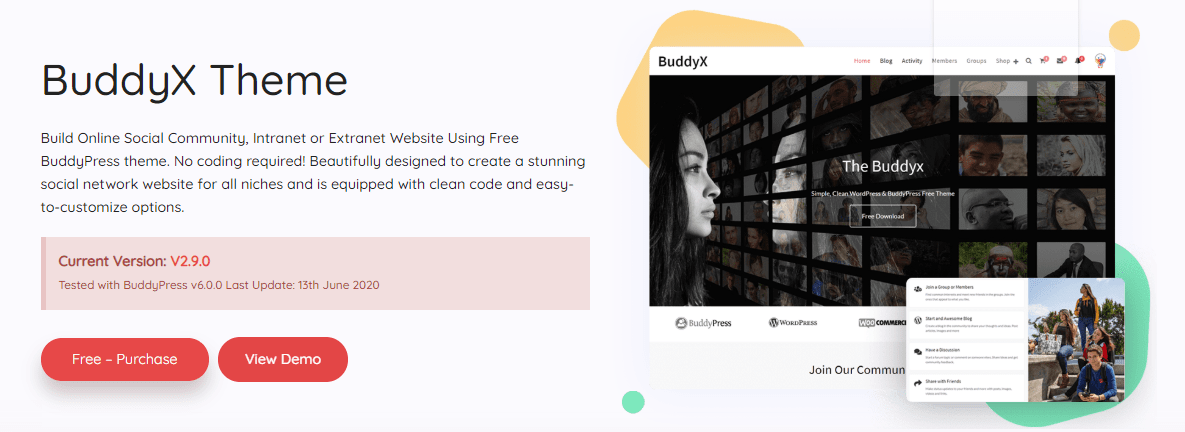
BuddyX is a free BuddyPress theme built to solve exactly that gap. It’s designed so someone without development experience can launch a genuinely usable community site quickly, not just a functional one.
What makes BuddyX worth considering
If you want more depth beyond the free version, a premium tier built by the same team extends the same foundation toward more specific use cases: job portals, social marketplaces, e-learning platforms, business directories, and similar community-adjacent sites.
Even staying entirely on the free version, BuddyX ships with a level of design polish and functional depth that’s uncommon for a no-cost theme. It’s built specifically to help visitors actually want to stick around and participate, not just land on the homepage and bounce. That distinction matters more than it sounds like. A lot of free WordPress themes handle the visual basics fine but fall apart the moment BuddyPress-specific templates come into play, leaving profile pages and group directories looking like an afterthought bolted onto a generic layout.
Past the visual layer, BuddyX makes the site easy for the people using it. Members browsing profiles or joining groups get an experience that feels close to the social platforms they already use daily, right down to how the activity feed behaves, rather than a stripped-down imitation.
Also Read: Best Free & Premium BuddyPress Addons
Why choose BuddyX specifically
As mentioned, this theme fits almost any brand trying to build a community around their audience. Beyond looking good, it stays genuinely simple to work with day to day.
BuddyX handles the social layer well: profiles, groups, activity streams, and the connections between members all come styled and functional out of the box. That combination lets a brand build a real relationship with its audience without hiring a developer to stitch the pieces together. WooCommerce integration is also included, so the same site can sell products and collect payments alongside the community features, if that’s part of the plan.
If the goal is a working community site fast, without waiting on a custom build, this free theme is a reasonable starting point.
Also Read: 10 Essential WordPress Plugins To Use On Your Website
A ready-made community demo
One of the more practical reasons to pick BuddyX is the pre-built demo content. It imports into a fresh WordPress install in a few clicks, which turns a blank site into something recognizable almost immediately, rather than starting from an empty page and guessing at layout.
A design that’s already thought through
The homepage demo includes the pages a community site actually needs: a blog, a groups directory, a members directory, an activity page, and a shop page, all wired together and styled consistently.
Customization stays approachable too. Once the demo is imported, swapping placeholder text and images for your own content is mostly a matter of replacing what’s there, not rebuilding the structure from scratch.
Also Read: Start Your Own Business Directory Website: Reign GeoDirectory Theme
Elementor compatibility
BuddyX integrates with Elementor, the popular drag-and-drop page builder. That gives you real-time visual editing for any page on the site, including custom headers and footers, without touching code. For anyone who’s used Elementor before, the workflow on BuddyX will feel immediately familiar.
Member and group layouts
Members and groups are the core of any community site, and BuddyX ships with several clean, flexible directory layouts for both. A well-organized member and group directory makes the difference between a site that feels like a real community and one that feels like a static list of names.
Also Read: Most Popular WordPress Facebook Plugins
Header options for profiles and groups
Site admins can choose from multiple header layouts for member profiles and group pages independently. That flexibility lets you style profiles one way and group pages another, which matters more than it sounds like once you’re actually looking at both side by side.
Built to stay light
BuddyX is built on a genuinely lightweight framework, which shows up directly in page load speed. A community site with a lot of images and constant member activity can get heavy fast if the underlying theme isn’t optimized, so this matters more here than on a typical brochure site.
WooCommerce ready
If selling products alongside the community makes sense for your site, BuddyX integrates with WooCommerce, the standard WordPress e-commerce plugin. That gives you the tools to sell online and collect payments directly. The free version supports WooCommerce at a basic level; deeper store customization is part of the premium tier.
bbPress ready
Adding a forum to a community site tends to pay off, since it gives members a dedicated space to discuss topics that don’t fit neatly into groups or the activity feed. BuddyX integrates directly with bbPress, so a forum can sit on the same site without a separate theme or a jarring style mismatch. As with WooCommerce, the free version’s bbPress support is more limited than the premium tier’s.
Fully responsive
BuddyX is fully responsive, mobile-optimized, cross-browser compatible, and retina-ready. Since a meaningful share of community traffic increasingly comes from phones, a theme that only looks right on desktop isn’t a realistic option anymore, and BuddyX doesn’t have that problem.
Gutenberg ready
BuddyX is compatible with recent WordPress releases and with Gutenberg, the block-based editor. That gives you a modern, visual way to build out blog posts and pages without fighting the editor.
Plugin support beyond the essentials
BuddyX supports a wide range of WordPress plugins beyond the core community stack: bbPress, BuddyPress, rtMedia, WooCommerce, and Elementor among them. That range means you can extend the site’s functionality as your community grows, rather than hitting a wall and needing to rebuild on a different theme later.
Multiple header styles
The header is usually the first thing a visitor actually looks at, so BuddyX ships with several distinct header styles to choose from. Testing a few against your own branding and content is worth the ten minutes it takes before settling on one.
LearnDash support
For sites building a social learning experience, BuddyX is compatible with LearnDash, a widely used WordPress LMS plugin. That combination lets you build a community for students where they can track progress and interact socially around their coursework, rather than learning in isolation. The free version’s LearnDash support is limited compared to the premium tier.
BuddyBoss Platform compatibility
BuddyX is also compatible with the BuddyBoss Platform, a more advanced WordPress social network plugin. The free version of BuddyX is fully compatible here, which gives sites already invested in BuddyBoss a theme option that doesn’t require starting over.
RTL ready
BuddyX supports right-to-left languages, so building an Arabic, Hebrew, or Persian community site is a matter of switching the stylesheet to RTL rather than a custom redesign.
One-click demo install
If the demo’s look and structure fit what you’re going for, BuddyX supports one-click demo installation. That gets a functioning, styled site running in minutes instead of hours of manual setup.
Who built BuddyX
BuddyX is developed by Wbcom Designs, a team with a broad catalog of WordPress themes spanning e-learning, online community, business, and job board niches, among others. Alongside BuddyX, the same team maintains a number of free BuddyPress plugins and premium add-ons that extend what a community or social network site built on WordPress can do.
Also Read: WordPress Security Plugins To Protect WordPress Blog
Deciding whether free is enough, or you need the premium tier
The free version of BuddyX is genuinely usable for launching a community, not a crippled trial. Where it starts to feel limited is at scale, or when a site needs something specific: deeper WooCommerce store customization, full LearnDash integration for a paid course platform, advanced member and group directory filtering, or additional layout options for profile headers.
A reasonable approach is starting entirely on the free version. Launch, get real members active, and see which limitations actually show up in practice rather than guessing in advance. Upgrading later is straightforward since the premium tier builds on the same foundation, so nothing about the free-tier setup gets thrown away in the process. Most sites don’t hit the free tier’s ceiling until they already have a real, active community, which is exactly the point at which paying for more depth starts to make financial sense anyway.
Getting started, practically speaking
If you’re setting up your first community site with BuddyX, a rough order of operations helps avoid backtracking later. Install WordPress and activate BuddyX first. Install BuddyPress next and turn on the components you actually need, since not every site needs every BuddyPress feature enabled from day one. Import the demo content if it’s close to what you’re picturing, then swap in your own branding and copy, image by image. Set up your member roles and any groups you want live at launch before inviting anyone. Only after that should you turn on public registration, since a community that opens to strangers before it has any actual content or activity tends to feel empty and struggles to recover from that first impression.
What a real BuddyX site looks like once it’s running
Picture a niche hobby community, say a site built around home coffee roasting. Members land on a homepage showing recent activity: a few new roast logs, a group discussion about bean sourcing, a member who just uploaded photos from their setup. Clicking into the members directory shows avatars and short bios, filterable by how active someone’s been recently. Groups split by roast style or region give members a reason to go deeper than the general feed.
None of that requires custom development with BuddyX and BuddyPress already doing the heavy lifting. What takes actual time is the part no theme can do for you: seeding the first round of content, inviting the first members personally, and replying to every post for the first few weeks until the community has enough of its own momentum to run without constant hand-holding. The theme gets you a finished-looking foundation on day one. Everything after that is community management, not design work.
Where BuddyX fits against the alternatives
Building a community site on WordPress usually comes down to a handful of paths. A fully custom build gives total control but costs real money and time before anything is live. A hosted, closed platform is fast to launch but locks your community’s data behind someone else’s pricing and rules. A generic WordPress theme paired with BuddyPress technically works, but usually looks unfinished, since most themes aren’t styled with BuddyPress’s templates in mind.
BuddyX sits in the middle of those options. It’s free, it’s built specifically for BuddyPress rather than adapted after the fact, and it gets a site looking finished without a developer. The tradeoff is that a fully custom build will always out-flex a theme on truly unique layout requirements. For the overwhelming majority of community sites, that flexibility isn’t the bottleneck. Content, moderation, and member engagement are.
Performance and SEO considerations worth knowing
A community site tends to accumulate a lot of pages fast: member profiles, group pages, activity permalinks, and blog posts all add up. A lightweight theme keeps that growth from tanking load times, but the theme is only one part of the equation. Image optimization matters more on a community site than on a typical blog, simply because members upload far more images than a single author ever would. A caching plugin and a sensible media library setup will do more for long-term performance than any theme choice alone.
On the SEO side, BuddyPress profile and group pages are indexable by default, which means an active community naturally generates a steady stream of fresh, unique content that search engines can crawl. A quiet community with no member activity doesn’t get that benefit, which is one more reason engagement matters beyond the obvious social value. It’s a rare case where the metric that matters for growth and the metric that matters for search visibility point in exactly the same direction.
Common questions
Is BuddyX really free, with no catch? Yes. The free version is available through the WordPress.org theme directory with no license key or time limit. A premium tier exists for teams that want deeper customization and support for job boards, marketplaces, or e-learning setups specifically.
Do I need BuddyPress installed for BuddyX to work? BuddyX functions as a regular WordPress theme on its own, but its community styling and layouts are built around BuddyPress. Without BuddyPress active, you’d be using a general-purpose theme rather than the social network experience BuddyX is designed for.
Can I switch from another theme to BuddyX without losing my BuddyPress data? Yes. BuddyPress stores member and group data, along with the activity stream, independently of the active theme, so switching themes doesn’t touch any of it. You’ll want to review your customizer settings and any theme-specific widgets after switching, since those don’t carry over automatically.
Will BuddyX slow down as my community grows? The theme itself stays lightweight regardless of member count, since it’s not the thing storing your data. What actually determines performance at scale is your hosting, your caching setup, and how well your media library is optimized. A community with a few thousand active members on decent hosting with proper caching runs fine on BuddyX; the same community on undersized shared hosting will struggle no matter which theme sits on top.
What happens if I outgrow the free version later? Nothing breaks. Upgrading to the premium tier adds features on top of what you already have rather than requiring a rebuild, so there’s no risk in starting free and deciding later whether the paid tier is worth it for your specific site.
Wrapping up
BuddyX covers what’s actually needed to launch a WordPress community website, and it does it without requiring you to be a developer or an expert to get there. Whether you’re setting up your first community or you’ve built sites before, the path from installation to a working, styled community stays straightforward.
From a small niche community to a site meant to connect a large, active audience, BuddyX’s range of compatibility options lets you shape the site around what your specific community actually needs, whether that’s an online store, a forum, or both running alongside the core social features.
If you’re looking to launch a real online social network without a large budget or a custom build, BuddyX is worth the hour it takes to try. Install it, import the demo, and see how close the default setup already gets you to what you had in mind.