

A photography website lives or dies on how well it gets out of the way of the images. Slow load times, cramped galleries, and templates built for generic business sites all work against the one thing a photographer’s site actually needs to do, which is let the work speak without visual clutter competing for attention. WordPress covers this territory well because of how many themes exist specifically for portfolios, but “specifically for portfolios” covers a wide range, from a bare-bones single-page gallery to a full community platform built around photographer memberships and events.
Picking wrong costs more than a wasted purchase price. A theme that doesn’t fit your actual workflow means fighting the template every time you upload a new shoot, working around missing proofing features with clunky third-party plugins, or discovering a year in that the site can’t scale past a solo portfolio when your business has since grown into something closer to a small studio or teaching practice. Better to spend an extra hour comparing options now than to migrate a live site with years of galleries and client history later.
In 2026, the best photography WordPress themes combine clean visual design with the functionality a working photographer actually needs: client proofing, print sales, event listings, sometimes a full community layer for photographers who teach or run local meetups. Below is a rundown of ten themes worth comparing, with BuddyX Pro leading the list for its particular strength in scaling from a solo portfolio into a real photography community.
1. BuddyX Pro

BuddyX Pro isn’t built as a photography theme first with community features bolted on. It’s a community platform that happens to handle photography portfolios exceptionally well, which matters for a very specific kind of photographer: one running workshops, managing a local photo club, or building a paid membership around exclusive tutorials and behind-the-scenes content rather than just selling prints one at a time.
Built on top of BuddyPress and bbPress, BuddyX Pro lets photographers create groups, forums, and networks directly on their own site instead of routing that community activity through a Facebook group they don’t own or control. Multiple gallery styles handle the actual photo display side of things, so you’re not sacrificing portfolio presentation for the community features. Membership support lets you gate premium content, whether that’s high-resolution downloads, tutorial video, or early access to a new shoot, behind a paid tier, and built-in event management makes organizing a meetup, workshop, or exhibition a native part of the site rather than something you bolt on with a separate events plugin. The theme is also built to scale, so whether you’re running a single-photographer portfolio today or a five-hundred-member photography community in two years, the underlying architecture doesn’t need to be replaced as you grow.
What sets BuddyX Pro apart from the more conventional portfolio themes on this list isn’t better galleries. Several other themes here match or beat it on pure gallery polish. It’s that BuddyX Pro treats your audience as a community you’re building relationships with over time rather than a stream of one-time visitors browsing a portfolio and leaving. For a photographer whose business model depends on repeat engagement, workshops, memberships, ongoing client relationships, that distinction matters more than an extra gallery transition effect.
2. Oshine
Oshine takes the opposite approach from BuddyX Pro: instead of specializing, it covers an enormous range of use cases through more than 50 demo layouts, several of which are built specifically for photography portfolios. The drag-and-drop page builder means you’re not locked into any single demo’s exact structure, and the design underneath is fully responsive and retina-ready, which matters more for photography than almost any other content type since low-resolution image rendering is the fastest way to undercut an otherwise strong portfolio.
Get Oshine
3. Uncode
Uncode built its reputation on handling high-resolution images with genuine elegance rather than treating them as an afterthought behind a generic grid template. It’s a creative multi-purpose theme rather than a photography specialist, but the image handling is strong enough that plenty of working photographers use it as their primary portfolio platform. WPBakery Page Builder integration gives you layout flexibility, the enhanced media library makes managing a large photo catalog less painful than WordPress’s default media screen, and multiple portfolio and gallery styles cover most of the common presentation formats a photographer would want.
4. Kalium
Kalium leans into minimalism, clean typography, and generous whitespace, which suits a photographer whose work benefits from a quiet frame rather than a busy template competing for attention. WooCommerce integration means selling prints directly through the site is straightforward rather than requiring a separate ecommerce plugin bolted on afterward, one-click demo import gets a new site running fast without a steep setup curve, and the portfolio layouts are customizable enough to avoid the generic look that a lot of minimal themes fall into when left at their defaults.
5. Photocrati
Photocrati has been a dedicated photography theme for long enough that it’s built specifically around the workflow problems photographers actually run into, rather than trying to serve a dozen other industries at once. Built-in ecommerce lets you sell photos directly without stitching together a separate WooCommerce setup, and with more than 60 gallery styles available, finding a presentation format that fits a specific shoot or client’s aesthetic rarely requires custom development. The design is fully responsive, and the theme continues to see regular updates, which is worth checking directly before committing to any older marketplace theme, since plenty of once-popular photography themes have gone quiet on updates over the years.
6. Novo Photography
Novo is built for professional photographers and photo studios running an active client-facing business rather than a purely personal portfolio. Password-protected galleries handle client proofing directly on the site, which saves the awkward workaround of emailing large batches of images or relying on a third-party gallery service just for a client to pick their favorites. An integrated WooCommerce store handles print and digital sales, and dark and light mode options let you match the site’s presentation to a specific shoot’s mood, useful if your body of work spans both bright, airy sessions and darker, moodier editorial work.
7. KALLYAS
KALLYAS is a multipurpose theme with pre-built demos aimed specifically at photography and creative portfolios, which gives it a head start over a fully generic multipurpose theme where you’d need to build a photography-appropriate layout from scratch. The visual page builder handles customization without requiring code, and the theme is genuinely optimized for speed and SEO rather than just claiming to be, which matters more than it sounds like once you’re running a heavy image-based portfolio that would otherwise be prone to slow load times. Extensive gallery options round out the photography-specific side of the feature set.
8. Grand Portfolio
Grand Portfolio keeps things deliberately clean and minimal, aimed at professional photographers who want the design to disappear behind the work rather than draw attention to itself. Full-screen sliders and galleries give images room to breathe, parallax scrolling adds a bit of visual dimension without turning into a gimmick that distracts from the photos, and WooCommerce compatibility covers print sales if that’s part of your business model.
9. Flox
Flox is built around bold, full-screen presentation, aimed at photographers and artists who want their portfolio to feel more like an immersive showcase than a scrollable list of thumbnails. Multiple gallery styles and layouts give you room to match the presentation to different bodies of work, the drag-and-drop page builder keeps customization accessible without needing development help, and built-in social media integration makes it easier to drive traffic between the portfolio site and wherever your audience actually follows you day to day.
10. Peak
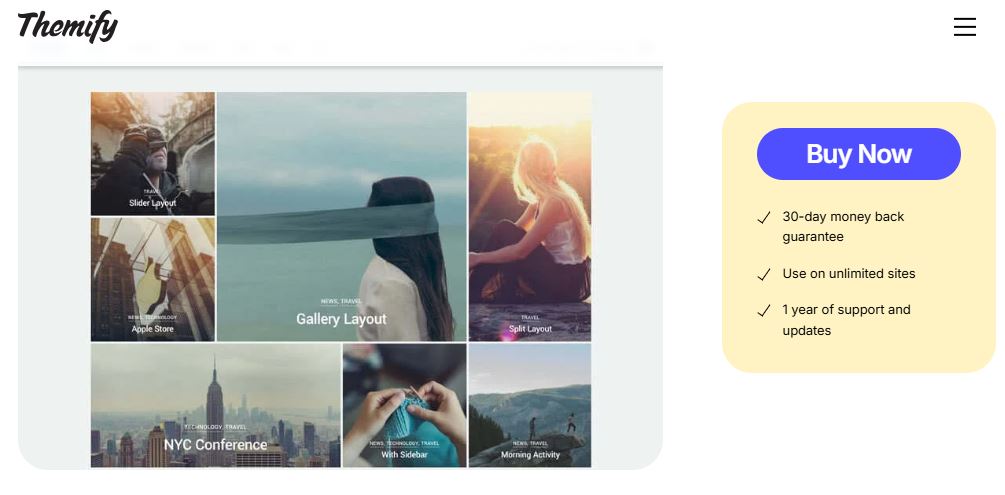
Peak takes a grid-based approach that reads as modern and sleek without leaning on heavy visual effects to make an impression. The auto-stacking layout adapts cleanly across different screen sizes, which matters given how much portfolio traffic arrives on mobile now rather than desktop, mega menu support helps organize a portfolio with a lot of distinct categories or shoot types, and WooCommerce integration covers sales if you’re selling prints or digital downloads alongside the portfolio itself.
What Different Photography Niches Actually Need
A wedding photographer’s site and a landscape photographer’s site solve genuinely different problems, even though both fall under “photography theme.” Wedding and portrait photographers need client proofing, gallery password protection, and a smooth path from browsing the portfolio to booking an inquiry call, since the site is doing real sales work rather than just displaying finished art. Novo Photography and Photocrati both lean into that workflow directly, with proofing and ecommerce built in rather than requiring a separate booking or gallery-sharing service layered on top.
Landscape, fine art, and editorial photographers usually care less about client-facing proofing tools and more about how large, high-resolution images render without slowing the page to a crawl, and about print sales for gallery-quality work rather than digital delivery of event photos. Uncode’s enhanced media library and Grand Portfolio’s full-screen gallery approach both suit that kind of work better than the more transaction-focused themes built around client sessions.
Photographers running workshops, teaching, or building any kind of paid community around their expertise are really running a different type of business than a photographer selling individual prints or sessions, even if the surface-level content looks similar. That’s the specific gap BuddyX Pro fills that none of the pure portfolio themes attempt to address, since forums, groups, and membership gating require an entirely different underlying architecture than a gallery-focused theme was ever built to support.
Pricing and Licensing Worth Knowing About
Most of the themes on this list follow the standard premium WordPress marketplace pricing model, a one-time purchase in the range of $50 to $70 through ThemeForest or the developer’s own store, sometimes with an optional extended license for larger commercial use. That’s a meaningfully different cost structure than a subscription-based theme, and it’s worth checking directly on the current sales page before assuming pricing, since marketplace themes do occasionally shift between one-time and subscription models as they mature.
Support duration is the detail that trips people up more than the sticker price itself. A theme purchase on most marketplaces includes six months of support by default, with an option to extend it for an additional fee, and letting that support window lapse before a major WordPress core update can leave you without help exactly when you need it most. Factor renewal cost into your actual decision rather than treating the initial purchase price as the full cost of ownership over the theme’s working life.
Migration Considerations If You’re Switching Themes
Moving an existing photography site to a new theme is rarely as simple as activating the new one and calling it done, especially if your current site has years of galleries, client proofing links, and print sale history built up. Export your media library structure and any custom gallery organization before switching, and test the new theme on a staging copy of the site rather than making the swap directly on your live domain where clients might be actively viewing proofs mid-migration.
Redirects matter more for a photography site than people usually expect, since individual gallery and portfolio URLs often get shared directly with clients or linked from social media, and a theme switch that changes URL structures without redirects in place breaks every one of those existing links. Map your old URLs to their new equivalents before going live with the new theme, not after clients start reporting broken links.
Matching a Theme to How You Actually Work
A solo photographer building a first portfolio site has different priorities than a studio running client proofing and print sales at volume, and the ten themes above split fairly cleanly along that line. If your work is mostly about capturing new clients through a strong visual first impression, Uncode, Kalium, and Grand Portfolio all lean toward clean, image-forward presentation without a lot of business-logic overhead built in. If client proofing and print sales are a real part of your workflow, Novo Photography and Photocrati both build those specific features in directly rather than requiring you to bolt them on with separate plugins.
If your ambitions go beyond a personal portfolio toward building an actual community, whether that’s a local photography club, a paid workshop series, or a membership site around your teaching content, BuddyX Pro is built specifically for that use case in a way none of the pure portfolio themes on this list attempt to match. None of the others offer native forums, groups, or membership gating, because that’s simply not the problem they’re trying to solve.
What to Check Before You Commit to Any Theme Here
Test the demo with your own images before making a final decision, not the theme’s stock placeholder photos. A gallery layout that looks stunning with the developer’s carefully chosen sample images can behave differently with your actual mix of portrait and landscape orientations, different aspect ratios, and varying resolution quality. Import a real sample of your work into the demo if the theme allows it, and judge the layout on that rather than on marketing screenshots.
Check the update history and support activity directly on the marketplace listing or the developer’s own site before buying, especially for any theme that’s been around for several years. Photography themes in particular tend to accumulate outdated ones that looked great in a given year but have gone quiet on updates since, and an unmaintained theme is a real security and compatibility risk once WordPress core or PHP moves past what the theme was built to support.
Page speed deserves real attention for a photography site specifically, since large images are the single biggest cause of slow load times, and a slow-loading portfolio drives away exactly the visitors you’re trying to impress. Look for themes that handle lazy loading and responsive image sizing natively rather than leaving that entirely to a separate performance plugin, and test the demo’s load time on a throttled mobile connection rather than judging speed from a fast office wifi connection alone.
Top Photography WordPress Themes
Selecting the right WordPress theme for your photography website depends on your actual goals, whether that’s a simple portfolio site or a full-fledged community for photographers. BuddyX Pro stands out as the strongest choice for anyone looking to scale a photography business into a real community over time. For sleek portfolios and elegant, image-forward design without the community layer, Oshine and Uncode are both excellent choices worth demoing side by side.
Test a few of these directly with your own work before committing. A theme that photographs well in a developer’s demo doesn’t always match how your specific body of work reads once it’s actually loaded in, and the only way to know for sure is to try it with your own images rather than trusting the preview screenshots alone.
Give yourself a real trial window before locking in a final choice, ideally building out one full gallery page and one full portfolio landing page in each of your top two or three contenders rather than judging from the demo alone. The extra hour or two spent building a real test page in each shortlisted theme almost always surfaces a dealbreaker or a clear winner that the polished marketplace demo never would have revealed on its own.