

Are you trying to build a social networking or community site and don’t know where to start? Whether it’s a membership site, an e-learning platform, a social network, or something that doesn’t fit a neat category yet, BuddyX Pro can be the theme that gets it built. It’s a responsive theme designed specifically for community-focused websites, and it ships with a set of pre-designed demos that make it easier to find a starting layout instead of building from a blank canvas.
The demo package includes a homepage layout plus templates for the internal pages your community needs. BuddyX Pro is highly customizable, which means adjusting the layout to fit your brand doesn’t require touching code.
Key Features of BuddyX Pro
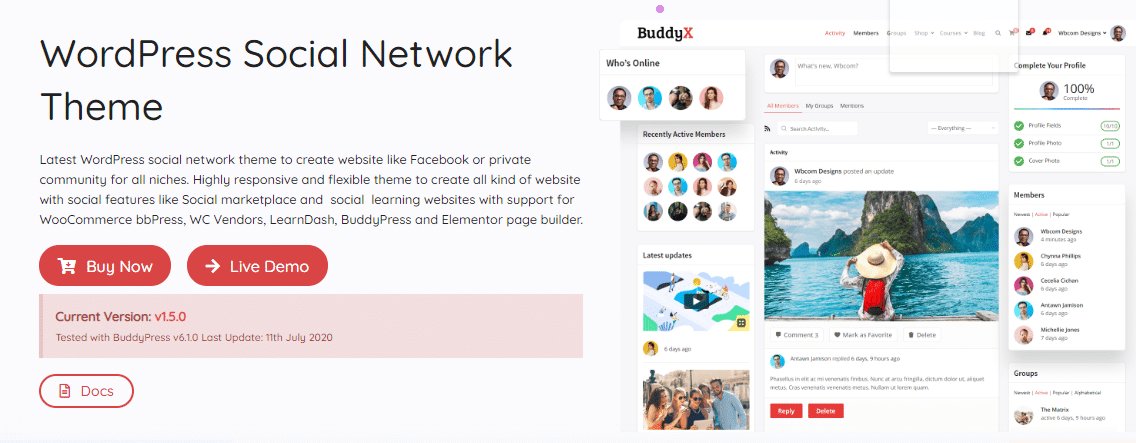
BuddyX Pro packs in the features a social network or professional community actually needs. It has earned its place among the better-known community WordPress themes largely because it’s built around the BuddyPress plugin rather than bolted onto it as an afterthought.
Here’s what the theme covers, and why each piece matters.
Multiple Header Layouts
The header is the first thing a visitor sees, and BuddyX Pro treats it accordingly. There’s a top bar in addition to a sticky header that stays visible as the page scrolls. Sticky headers speed up navigation and, in most usability studies, correlate with higher conversion rates because users don’t lose their place. Menu animation effects are also part of the package, and these header options are exclusive to the Pro version.
Try a few of the header variations before settling on one. The right choice depends more on your content density than on personal taste.
Also Read: Best Free & Premium BuddyPress Addons
Building a Facebook-Style Social Network
Social community sites split into a few broad categories: public and private, social versus professional networking, membership-gated, and open forum. BuddyX Pro handles all of them because it’s built on WordPress and compatible with BuddyPress, which covers most of the ground those categories require.
A community needs a theme that matches the brand while staying easy for members to navigate day to day. BuddyX Pro also works as an intranet or extranet theme, restricting content to registered users when needed, or opening things up entirely if that fits the project better.
It integrates with both BuddyPress and bbPress, the two plugins most central to building an online community on WordPress.
Community Sites for Nonprofits
Employees, volunteers, fundraisers, and stakeholders all benefit from having one place to coordinate. A well-built community site strengthens a nonprofit’s reputation in ways a static brochure site can’t.
Also Read: How Online Community Marketplace help in Promoting Brands?
Members and Groups Layouts
BuddyX ships with clean, flexible directory layouts for members and groups, which is one of the faster ways to make a community site feel put-together rather than default. Layouts matter more than people expect when it comes to first impressions of a community.
You can toggle card hovers, avatar borders, action buttons, how many members or groups display per page, the card avatar format, statistics visibility, and the styling of action buttons, among other settings.
Gutenberg Ready
BuddyX Pro works cleanly with the block-based editor introduced in WordPress 5.0. That means building pages and posts with the same kind of drag-and-drop flexibility you’d expect from a dedicated page builder, without adding one.
Full Ecommerce Support
If monetizing the community is part of the plan, BuddyX Pro has that covered through WooCommerce. You can collect payments as one-time purchases or recurring subscriptions, and WooCommerce’s compatibility with major payment gateways means Stripe, PayPal, and similar options work without extra configuration. Running ads on the site is another monetization path worth considering alongside subscriptions.
Also Read: 10 Essential WordPress Plugins To Use On Your Website
Multiple Header Variations for Groups and Members
Four-plus header variations exist specifically for BuddyPress groups and members pages, switchable with a single click.
Multiple Member and Group Directory Layouts
Members and groups sit at the center of any community site. BuddyX gives you several directory layout options for both, so you can pick a presentation that fits your content instead of settling for a generic default.
Multiple Member and Group Header Layouts
Beyond directory layouts, BuddyX Pro includes several header layouts for individual member and group pages, importable in one click. Site members can even choose how they want their own profile header to appear, which is a small touch that goes a long way toward making a community feel personal.
Also Read: PeepSo vs BuddyPress : Which One is better?
Pre-Built Website Demos
Multiple demos are available for import with a few clicks. Once imported, you get a working copy of the BuddyX Pro demo to customize from there. Even a non-coder can get a blogging or community site running this way. Pick a layout, import the content, done. Demos span corporate, entertainment, educational, and eLearning use cases.
Multiple Blog Layouts
BuddyX Pro offers a range of blog display settings. Pick your preferred layout from the available options: small, medium, or large image sizes, masonry, or grid.
Posts-per-row is a Pro-exclusive setting not available in the free version. If your default 3-post row feels cramped, BuddyX Pro lets you expand to 4 or adjust the column count to match your content volume.
Also Read: Free WordPress Social Network Themes
Breadcrumbs
Breadcrumbs are another Pro-only feature. They’re the trail of navigational links showing exactly where a visitor has moved through your site, distinct from a regular nav menu because they build dynamically as someone browses. The breadcrumb trail runs from the first page visited through to the current one.
Breadcrumbs help users navigate and can improve SEO in the process. They also tend to lower bounce rates by giving visitors an obvious way back to where they came from.
Also Read: WordPress Security Plugins To Protect WordPress Blog
Optimized Mobile Menu
Responsive design combines a fluid layout with media queries to adapt the site to different screen sizes. Image handling gets the same treatment, so images shrink to fit a small screen and the files themselves stay small enough not to slow down a mobile connection.
Mobile design isn’t only about speed and layout. Navigation behavior changes across devices and screen widths too, and BuddyX Pro handles that through a combination of CSS and PHP rather than forcing a single rigid menu across every screen size.
Deep BuddyPress Support
BuddyX Pro’s compatibility with BuddyPress unlocks functionality the free version only partially supports, including the Group Multiple Header Layout and Group Primary Navigation Style. These aren’t cosmetic extras. They change how members actually experience group pages day to day.
Free vs Pro: What Actually Changes
The free version of BuddyX is genuinely usable on its own, and plenty of live community sites run on it without ever upgrading. What Pro adds is depth in the places that matter once a community grows past its first few hundred members: more header and directory layout options, breadcrumbs, posts-per-row control, deeper BuddyPress group compatibility, and the header animation effects.
If you’re testing an idea or running a small community, start on the free version. Upgrade when the layout limitations start actually costing you, not before.
Setting Up BuddyX Pro: What to Expect
Installation follows the same pattern as any WordPress theme: upload, activate, then import a demo if you want a head start. Budget an afternoon for initial setup and another hour or two for tweaking colors, header choices, and directory layouts to match your brand. Most of the configuration happens through the WordPress Customizer, so no code editor is required unless you’re doing something genuinely custom.
Who Actually Uses a Theme Like This
A coding bootcamp running an alumni network needs member profiles, private groups for each cohort, and a directory that doesn’t feel like a spreadsheet. That’s close to a default BuddyX Pro setup with almost no custom work.
A regional professional association replacing an aging membership database wants something closer to a private directory with dues collection built in. WooCommerce subscriptions plus the members directory layout covers that without a custom plugin.
A niche hobby community, say collectors of vintage cameras, cares less about monetization and more about discussion depth and photo sharing. The activity stream and group layouts handle that reasonably well, though a dedicated forum plugin like bbPress fills in the threaded discussion piece BuddyPress doesn’t cover natively.
A course creator adding a community layer to an existing LearnDash or LifterLMS site is another common case. They usually want the activity stream to feel secondary to the course content, not competing for attention, so header and layout restraint matters more here than in a pure social network build.
None of these are hypothetical. They’re the shape of projects that show up in support tickets and demo requests on a regular basis, and the theme’s flexibility is largely a response to that variety rather than a marketing claim.
A Practical Setup Checklist
Before touching the Customizer, decide three things: whether the site is public or gated, whether monetization happens on day one or gets added later, and which existing plugins (an LMS, a forum, an events calendar) need to sit alongside BuddyPress. Answering those first saves a lot of layout rework later, because the header and navigation choices that work for a public social feed often don’t work for a gated professional network.
Import the closest demo to your answer, then strip out what doesn’t apply rather than building up from a blank install. Deleting unused sections is almost always faster than assembling a layout piece by piece, and it keeps the site closer to a configuration a lot of other BuddyX Pro users have already tested in production.
Performance and SEO Considerations
A community theme carries more moving parts than a static brochure site: activity feeds, profile queries, group directories. Poorly built themes turn that into a performance problem once member counts climb into the thousands. BuddyX Pro was built with caching compatibility in mind, and it plays reasonably well with the major WordPress caching plugins rather than fighting them.
Breadcrumbs, clean URL structures, and the theme’s semantic markup all help on the SEO side too, though no theme alone will rank a site. Content and backlinks still do most of that work. What the theme controls is whether search engines can crawl and understand your member and group pages cleanly, and BuddyX Pro doesn’t get in the way there.
Support and Updates
Pro license holders get access to direct support rather than relying solely on the WordPress.org forums, which matters more than it sounds like once you hit a compatibility question specific to your plugin stack. Updates ship regularly, tracking new BuddyPress and WordPress core releases so the theme doesn’t lag behind and break on a routine update.
Frequently Asked Questions
Does BuddyX Pro require BuddyPress to work?
The community features (profiles, groups, activity streams) depend on BuddyPress being installed. BuddyX Pro works as a general-purpose theme without it too, but you’d be leaving most of its value unused.
Can I switch from the free version to Pro without losing my content?
Yes. Pro layers additional options on top of the same foundation, so your existing pages, posts, and BuddyPress data carry over without needing to be rebuilt.
Is BuddyX Pro suitable for a non-BuddyPress site, like a standard blog or business site?
It works fine for that too, since the general layout, blog, and Gutenberg features aren’t tied to BuddyPress. You’d just be using a fraction of what the theme is built for.
Does the theme support RTL languages and translation?
Yes. BuddyX Pro is translation-ready and supports right-to-left languages, which matters for any community expecting Arabic, Hebrew, or Urdu-speaking members among others.
How many demos come with the Pro version?
The demo library covers corporate networks, educational platforms, entertainment communities, and general-purpose social sites, and it grows with each release. Check the current demo library on the BuddyX site before committing to a specific one, since new demos get added between major versions.
What happens if I deactivate BuddyX Pro after using it for a while?
Your content and BuddyPress data stay in the database regardless of theme. Switching to a different theme won’t delete anything, though you’ll likely lose the specific layout options and header variations unique to BuddyX Pro until you reactivate it.
Design Customization Beyond the Defaults
The Customizer covers colors, typography, header styles, and layout widths without touching a stylesheet. For anything past that, the theme exposes hooks and filters that a developer can use to adjust specific templates without hacking core files, which keeps updates from wiping out custom work.
Color schemes deserve more attention than most site owners give them. A community site that visually matches its brand, down to button hover states and notification badges, reads as more trustworthy to new members deciding whether to sign up. Small, unfinished-looking details erode that trust fast, even when the underlying functionality works fine.
How BuddyX Pro Compares to Building Custom
Some agencies still build community sites from scratch on a barebones framework. That approach gives total control but costs considerably more in development hours and ongoing maintenance, since every BuddyPress update needs custom code to be re-tested against it.
BuddyX Pro trades a slice of that control for a theme that’s already been tested against current BuddyPress and WordPress releases. For most projects, that trade is worth making. Reserve the fully custom build for cases where the community’s requirements genuinely don’t fit any existing theme, which is rarer than it sounds.
What to Watch Out For Before You Buy
Test the theme against your actual plugin stack before committing a live site to it. Most conflicts show up between page builders and BuddyPress templates, not within BuddyX Pro itself, so a staging install with your real plugins active is worth the extra hour it takes to set up. It’s the same advice that applies to any theme purchase, but it matters more here because community sites tend to run more plugins than a typical brochure site.
Check the changelog before upgrading a live site to a new major version too. BuddyPress and WordPress core both move fast enough that a theme update occasionally shifts a template structure, and it’s better to catch that on staging than to find out from a support ticket after members start reporting a broken layout.
Summary
A community website gives people a reason to gather around a shared topic, exchange ideas, and stay engaged in a way that beats what most social apps can offer on their own turf. If you’re a WordPress user planning an online community, BuddyX Pro covers the ground from header design to monetization without requiring a developer on staff. Start with a demo close to your vision, then adjust from there. Most of the work after that point is content, not configuration, and that’s exactly where the time should go.