

Most WordPress learning sites are a generic theme bolted on top of an LMS plugin, with the two fighting each other over layout and page structure. The themes on this list are built differently: they treat the course experience as the primary thing, not a feature added after the fact.
This guide covers the best free WordPress LMS themes available, what each one is good for, and which pairing gives you the most working out of the box.

Our Recommended Stack
If you want a community-driven learning site where students interact, share progress, and build habits together, the BuddyX + Learnomy combination is the one we keep coming back to.
BuddyX 5.1.3 now runs on the BuddyNext community engine, which replaces BuddyPress as the community layer. That means faster member feeds, cleaner group spaces, and native activity streams without the plugin weight. Pair it with Learnomy, our in-house WordPress LMS built to work inside that same community layer, and students move from a course module into a live group discussion without leaving the site.
Both are built by the same team. The integration is intentional, not coincidental. Compare BuddyX Free vs Pro or browse the demos to see it running.
Why Use a WordPress LMS Theme?
Generic WordPress themes are designed for blogs and business pages. They are not built for the things an LMS actually needs: structured course archives, lesson navigation, progress indicators, student dashboards, and quiz layouts that hold up on mobile. An LMS-specific theme handles those surfaces cleanly from the start.
These themes are also tested against LearnDash, LifterLMS, Tutor LMS, and LearnPress so course pages look like they belong to the site rather than something imported from a different design system. You spend less time fixing layout issues and more time building course content.
How to Choose the Right WordPress LMS Theme
The list below spans a range of use cases. Here is what to check before you pick one:
LMS plugin compatibility, Confirm the theme works with your chosen plugin. Some themes support multiple plugins; others are built around one specific LMS.
Page builder support, If your team uses Elementor or the block editor, the theme needs to work cleanly with both, especially on course and lesson templates.
Mobile layout, Course content is often consumed on phones. Check the lesson view at small viewports before committing to any theme.
E-commerce and membership, Selling courses requires WooCommerce or Easy Digital Downloads support. If you gate content by membership tier, check that the theme is tested with those plugins as well.
Community layer, If students need to discuss, collaborate, or track each other’s progress, the theme should connect to a community engine without extensive custom work. Most themes on this list rely on add-ons for this. BuddyX is the exception.
Best Free WordPress LMS Themes
1. BuddyX

BuddyX 5.1.3 is the only theme on this list built around a dedicated community engine. The current version runs on BuddyNext, which handles member feeds, group activity, and social interactions natively without requiring BuddyPress. That makes it a different category of LMS theme: one where the social layer is part of the architecture, not something you add later.
It works with LearnDash, Tutor LMS, and LifterLMS, and pairs directly with Learnomy for a setup where the LMS and community share the same data layer. WooCommerce handles course sales. The theme is fast, mobile-first, and SEO-structured.
For community-driven learning sites, online academies, and membership education hubs, BuddyX is the practical starting point. See what the Pro version adds or try a live demo.
Best for: Community + LMS sites, online academies, membership education
LMS plugin compatibility: LearnDash, Tutor LMS, LifterLMS, Learnomy
2. Astra
Astra is a lightweight and highly adaptable WordPress LMS theme that works with LearnDash, LifterLMS, and Tutor LMS. Pre-built starter templates mean you can get a course site structure in place without starting from a blank page. It pairs cleanly with Elementor and the block editor. Speed is a genuine advantage: Astra loads fast even on shared hosting, which matters for students on slower connections. Deep LMS customization tends to need Astra Pro or a dedicated starter site kit, but the free version is a solid base.
Best for: Educators who want a fast, minimal foundation with Elementor flexibility
LMS plugin compatibility: LearnDash, LifterLMS, Tutor LMS
3. Zakra
Zakra is a well-structured theme with LearnPress and Tutor LMS support. Its responsive layout handles course archive pages cleanly, and multiple demo templates reduce setup time for educators who do not want to build from scratch. WooCommerce support is included for paid courses. The free version covers the basics; most advanced LMS configurations will want premium add-ons for more control over course-specific layouts.
Best for: Online schools and tutors working with LearnPress
LMS plugin compatibility: Tutor LMS, LearnPress
4. Education Hub
Education Hub is purpose-built for schools, universities, and individual tutors. It keeps the visual design out of the way of the content, which suits structured course material well. LearnPress and Tutor LMS support are included. The theme is mobile-friendly and loads quickly. The free version is a usable standalone starting point, though extra plugins fill the gaps for anything beyond standard course pages.
Best for: Academic institutions and tutors wanting a clean, low-friction design
LMS plugin compatibility: LearnPress, Tutor LMS
5. OceanWP
OceanWP pairs well with LearnDash and LifterLMS and offers more layout flexibility than most free themes. WooCommerce support is strong, which helps when course sales and subscriptions are a priority. The extension library is large, so you can add functionality without replacing the theme. The flip side: the sheer number of options makes initial setup slower than leaner alternatives, and some useful features are locked behind premium extensions.
Best for: Flexible course marketplaces and WooCommerce-focused setups
LMS plugin compatibility: LearnDash, LifterLMS
6. eLearning WP

eLearning WP is built specifically for LearnPress and includes a drag-and-drop course builder, multi-instructor support, and a student dashboard. WooCommerce handles course monetization. If your entire stack runs on LearnPress, this is one of the most pre-integrated options in the free tier. The main constraint: the theme is tightly coupled to LearnPress, so switching LMS plugins later means reworking the course-side templates.
Also Read: How to create an LMS website in WordPress?
Best for: LearnPress-first sites that want a purpose-built design
LMS plugin compatibility: LearnPress
7. TutorStarter
TutorStarter is designed for Tutor LMS and the layouts show it: they are optimized for Tutor’s course architecture, instructor profiles, and quiz flow. Clean mobile experience and WooCommerce course sales are included. This is a strong choice if Tutor LMS is your plugin. It is not a good fit for LearnDash or LifterLMS sites, where you would be working against the theme’s assumptions rather than with them.
Best for: Tutor LMS users wanting a theme built around their plugin
LMS plugin compatibility: Tutor LMS
8. Neve
Neve is a fast, lightweight theme with solid LearnDash and Tutor LMS compatibility. Its SEO-structured code and clean HTML make it a sensible choice for sites where search traffic is the main growth lever. Pre-built LMS starter templates cut setup time. Neve Pro adds the features the free version leaves out, but the base theme is genuinely usable on its own for straightforward course sites.
Best for: Performance-focused and SEO-driven course sites
LMS plugin compatibility: LearnDash, Tutor LMS
9. Eduma Lite
Eduma Lite is the free version of the well-known premium Eduma theme. It runs on LearnPress and delivers a polished, structured course layout that looks more considered than most free options. WooCommerce support is included for paid courses. Deep customization requires the paid Eduma license, but the free version is enough for a clean, professional course site for educators who want a solid start without upfront cost.
Best for: Educators wanting a professional LearnPress-based site at no cost
LMS plugin compatibility: LearnPress
10. Rara Academic
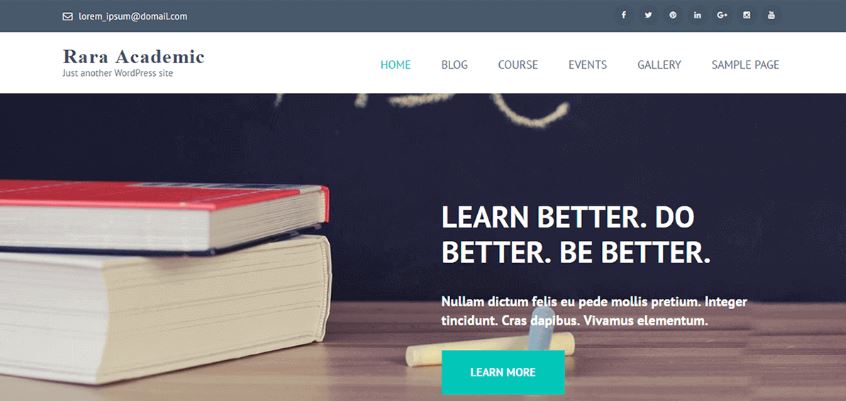
Rara Academic is built for academic institutions: schools, universities, and tutors running structured programs. LearnPress and Tutor LMS support, an elegant design, and WooCommerce course sales are all covered. The layout is clean and readable, which suits academic content well. It is not the most flexible theme on this list, but it delivers a reliable, professional result for its target audience without requiring significant configuration.
Best for: Schools, universities, and structured academic programs
LMS plugin compatibility: LearnPress, Tutor LMS
Quick Comparison
| Theme | Best For | LMS Plugins | Community |
|---|---|---|---|
| BuddyX | Community + LMS | LearnDash, LifterLMS, Learnomy | BuddyNext (built-in) |
| Astra | Fast and flexible | LearnDash, LifterLMS, Tutor LMS | Via add-ons |
| Zakra | LearnPress sites | Tutor LMS, LearnPress | Limited |
| Education Hub | Academic and tutors | LearnPress, Tutor LMS | None |
| OceanWP | Course marketplaces | LearnDash, LifterLMS | Via add-ons |
| eLearning WP | LearnPress-first sites | LearnPress | None |
| TutorStarter | Tutor LMS users | Tutor LMS | None |
| Neve | SEO and performance | LearnDash, Tutor LMS | None |
| Eduma Lite | Pro look, no cost | LearnPress | None |
| Rara Academic | Schools and universities | LearnPress, Tutor LMS | None |
Frequently Asked Questions
What makes a WordPress theme good for LMS?
The core requirements are: verified compatibility with your LMS plugin, clean layouts for course archives and lesson pages, mobile responsiveness on those templates, and fast loading. A theme that covers all four removes most of the friction from launching a course site.
Do I need to pay for an LMS theme?
Not necessarily. The free themes on this list are functional starting points. You will likely want more customization control at some point, but starting free lets you validate the course concept before investing in a paid license.
Can BuddyX work as an LMS theme?
Yes. BuddyX is compatible with LearnDash, Tutor LMS, and LifterLMS, and it pairs with Learnomy for a full LMS-plus-community setup. It is the only theme on this list with a native community engine (BuddyNext), which is what separates it from a standard LMS theme. See the Free vs Pro comparison for the full feature breakdown.
What is Learnomy?
Learnomy is a WordPress LMS plugin built by the Wbcom Designs team. It is designed to work inside BuddyX’s community layer, so course activity, student progress, and group discussions all live in the same space. Details at wbcomdesigns.com/downloads/learnomy/.
What is the BuddyNext engine?
BuddyNext is the community engine that powers BuddyX 5.1.3. It handles member profiles, group activity feeds, and social interactions as a native part of the theme, replacing the older BuddyPress dependency. The result is a lighter, faster community layer that is purpose-built for WordPress learning and membership sites.
Final Thoughts: Free WordPress LMS Themes
The right WordPress LMS theme depends on your course setup and how much community you want around it. Most themes on this list are reliable starting points for straightforward e-learning sites. If community is part of the product, students interacting, sharing progress, building habits, then BuddyX with the BuddyNext engine is the one worth looking at first.
Start with the free version of BuddyX, run through a live demo, and compare Free vs Pro to see what the Pro tier adds for your use case.
Interesting Reads:
10 Best Free WordPress Marketplace Themes
9 Best WordPress Translation Plugins for Multilingual Websites