

Instagram made “stories” the default way people share quick updates, a photo or clip that disappears after a set window instead of sitting permanently on a profile. Online communities have started borrowing the same format, and for community owners specifically, it solves a real problem: getting members to post something is easier when the bar is “one quick photo” instead of “a full activity update.” A blank activity feed is one of the fastest ways to lose a new member’s interest, and stories are, in a lot of cases, the lowest-friction way to fill that feed with something that actually looks alive.
This post covers what web stories add to a WordPress community site, where a plugin like WP Stories fits in, and what to think through before turning the feature on.
It’s worth noting that the concept didn’t originate with Instagram, Snapchat launched the disappearing-story format first, but Instagram’s version is what most people now recognize and instinctively know how to use, which is exactly why the format translates so cleanly to a WordPress community: members don’t need an explanation of what a story is or how to interact with one, they already know from apps they use every day. That familiarity is a meaningful part of why the format tends to get adopted faster than a brand-new, unfamiliar community feature would.
What web stories actually are on WordPress
Functionally, they’re short, visual posts, photo or video, that show up in a story-style format rather than a standard feed post, usually with an expiration timer. On a community site, that means members can share something in the moment without it becoming permanent content on their profile. Technically, most WordPress story plugins render as a horizontally-scrollable row of circular avatars near the top of the activity feed, tapping one opens a full-screen, tap-to-advance viewer, the same interaction pattern Instagram, Snapchat, and WhatsApp all popularized, which means most members already know how to use it without any onboarding.
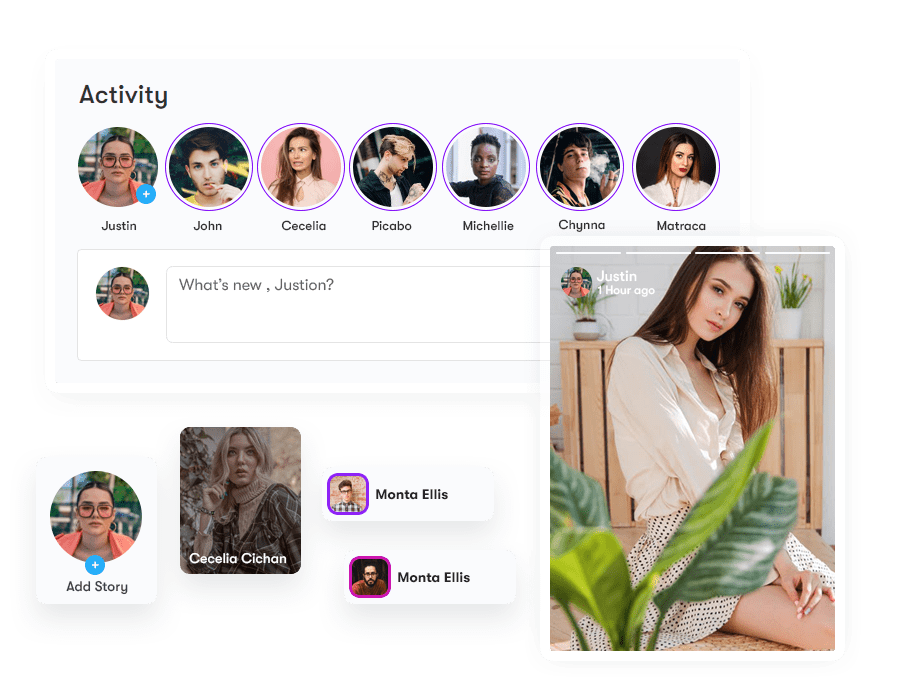
What stories add to a community website
A lower-effort way to post
Most community owners struggle to get consistent engagement out of members. A full activity post with text and formatting is a bigger ask than a member snapping a photo behind the scenes of an event or product launch. Stories lower that bar, which usually means more people actually post. This matters more than it sounds like it should, because posting frequency is one of the strongest predictors of whether a member sticks around past their first month. A member who has posted even once, even a low-effort story, is meaningfully more invested in the community than one who has only ever consumed content.
Content that disappears on its own
Not every update needs to live on a profile forever. A story timer lets members set how long a post stays visible, so quick updates don’t clutter a profile the way a permanent activity post would. This also removes a psychological barrier for some members: a permanent post feels like a commitment, something that will be visible to anyone who visits their profile for as long as the community exists. A story that quietly disappears in 24 hours feels lower-stakes, and for members who are hesitant to post at all, that lower stakes framing is often the difference between posting and not. Community managers who have watched engagement patterns closely tend to notice this shows up disproportionately among quieter, lurker-leaning members, exactly the segment a community owner most wants to activate.
Visibility controls per story
Depending on the plugin, members can restrict who sees a given story rather than defaulting to the same audience as their regular posts, useful when someone wants to share something with a smaller group inside the community, a specific group, a set of close connections, rather than the whole membership base. This granularity matters more in larger communities where members genuinely have different circles within the same platform, a professional network community, for instance, where someone might want to share something with colleagues from their specific industry group without broadcasting it to the entire membership.
Interactive formats beyond a static photo
Polls, Q&A prompts, quick surveys, these work better as stories than as standalone posts because they’re meant to be answered once and moved past, not archived. A poll asking “What should we cover in next week’s event?” gets a far higher response rate as a tap-to-answer story than as a comment thread on a regular post, because the interaction cost for the person answering is a single tap rather than typing out a reply.
Approval before publishing
For moderated communities, this matters more than it sounds like it should. Requiring admin approval before a story goes live gives you a way to catch spam or inappropriate content before it’s visible to members, rather than after. This is particularly relevant for stories specifically because the format’s low friction cuts both ways, it’s easier for a genuine member to post something quick and low-effort, but it’s also easier for a bad actor to spam low-quality or inappropriate content if there’s no review step. A pre-publish queue, even a lightweight one that most posts clear through quickly, closes that gap without meaningfully slowing down legitimate members.
WP Stories, specifically

WP Stories is built specifically for community platforms rather than as a generic stories plugin, with native support for BuddyPress, BuddyBoss Platform, and PeepSo. It’s currently on version 2.3.3, priced from $49/year for a single site up to $129/year for unlimited sites, with a 30-day money-back guarantee.
What it includes
- Three story rendering styles
- Custom ordering, seen stories can be pushed to the back of the queue
- Separate timers for public and private stories
- Video story support
- Styling controls for how stories look on your site
- RTL compatibility
Compatibility Considerations
Because WP Stories is purpose-built for BuddyPress, BuddyBoss Platform, and PeepSo rather than being a generic WordPress stories plugin adapted after the fact, it avoids a category of conflict that shows up with theme-agnostic alternatives: mismatched styling that clashes with your community theme’s existing activity feed design, or duplicate/competing hook usage where two plugins both try to modify the same activity stream output. Community sites in particular tend to run a fuller plugin stack than a typical blog, membership plugins, forum add-ons, gamification layers, so choosing a stories plugin that was actually designed against the BuddyPress ecosystem rather than bolted onto a generic WordPress stories framework reduces the odds of a subtle conflict showing up weeks after launch.
If you’re running BuddyX or Reign as your theme, both are built with BuddyPress compatibility as a first-class concern, so a BuddyPress-native stories plugin should integrate without requiring custom CSS overrides just to look correct in the feed. That’s not guaranteed with a generic, non-community-focused stories plugin, which may render its own UI conventions that don’t match your theme’s activity stream styling.
It’s also worth testing on a staging copy of your site before rolling stories out to a live, active community, the same advice that applies to any feature touching the activity feed. Confirm the story row renders correctly across your theme’s mobile breakpoints specifically, since a horizontally-scrolling row of avatars is one of the more common places a plugin-theme mismatch shows up first on smaller screens, before anything else in the layout visibly breaks.
Setting Expectations Before You Turn It On
A stories feature doesn’t drive engagement on its own just by being installed. Community owners who see the biggest lift after adding stories are usually the ones who seed the feature in the first week or two, posting a handful of stories themselves, prompting a few active members directly to try it, and referencing it in a welcome email or onboarding sequence. A feature that sits quietly in the interface without any nudge toward it will get discovered slowly, if at all, by members who don’t already expect stories from other apps they use.
It’s also worth thinking through moderation workload honestly before enabling stories on a larger community. Even with an approval queue, a community with a few hundred active members posting stories regularly generates a meaningfully higher review volume than the same community’s regular activity feed, simply because the format is faster to produce than a full post. Communities without dedicated moderation staff should weigh whether to launch with approval required from day one, versus launching open and adding moderation later once actual volume and any problem patterns become clear.
A middle-ground option worth considering for communities unsure which way to go: enable approval only for new or unverified members for the first week or two after they join, while established, trusted members post without a review step. This keeps the moderation queue focused on the accounts most likely to cause a problem, spam signups, brand-new accounts testing boundaries, without slowing down your genuinely active, known members who have already built up trust in the community.
Where This Fits Alongside Other Engagement Features
Stories work best as one layer in a broader engagement strategy rather than a standalone fix for a quiet community. If members aren’t posting regular activity updates either, the root problem is usually deeper than format, unclear community purpose, too few reasons to return, or a feed that feels empty because there simply aren’t enough active members yet. Stories lower the barrier to that first post, but they don’t manufacture a reason to show up if one doesn’t already exist. Pairing stories with a reason to return regularly, scheduled events, a weekly discussion prompt, member spotlights, tends to produce a better result than adding stories in isolation and hoping engagement follows.
Comparing Stories to a Standard Activity Feed
It’s worth being clear-eyed about what stories replace and what they don’t. A standard BuddyPress or BuddyBoss activity post is searchable, permanent, and can be commented on indefinitely, which makes it the right format for anything with lasting value: an announcement, a resource share, a discussion someone wants to return to later. A story is the opposite on every one of those dimensions, ephemeral, generally not searchable once it expires, and built for a single quick reaction rather than an ongoing thread. Treating stories as a replacement for the activity feed rather than a companion to it is a common early mistake; the two formats serve genuinely different purposes and a healthy community feed usually has both.
A useful mental model: activity posts are for things members want to find again later. Stories are for things members want to share in the moment and don’t need to find again. Event announcements, community rules, pinned resources, these belong in the permanent feed. A quick photo from a meetup happening right now, a same-day poll, a behind-the-scenes glimpse, these are naturally story content. When onboarding new members or writing internal community guidelines, spelling out this distinction explicitly, in plain terms, saves a lot of confusion down the line about which format to reach for.
Getting Members to Actually Use It
Beyond seeding the feature yourself in the first couple of weeks, a few tactics consistently move the needle on adoption. Highlighting a “story of the week” in a newsletter or pinned post gives members a visible example of what a good story looks like on your specific community, rather than leaving them to guess from a blank slate. Running a small recurring prompt, “share a photo from your workspace this week,” “what are you working on today,” gives members who want to participate but don’t know what to post a concrete starting point.
Timing the initial push matters too. Launching stories quietly alongside a dozen other small updates in a routine changelog buries the announcement. Launching it as its own moment, a short email or pinned post specifically introducing the feature with a screenshot and a one-line explanation of how it works, gets meaningfully more first-week trial than a feature that simply appears in the interface unannounced.
It also helps to make sure the feature is visually prominent without being intrusive. Stories that render as a thin, easy-to-miss row at the very top of a busy feed get skipped by members who don’t already know to look for them. Most story plugins, WP Stories included, give you styling control over size and placement specifically because this visibility question matters as much as the feature itself; a well-built feature nobody notices doesn’t move engagement numbers.
Is it worth adding?
If your community already struggles with getting members to post regularly, stories are one of the more direct fixes, they ask less of the person posting. If engagement isn’t the problem you’re solving, it’s a nice-to-have rather than a priority. Either way, WP Stories is the plugin to check first if you’re running BuddyPress, BuddyBoss, or PeepSo, since it’s built for those platforms instead of bolted on afterward, and the approval workflow and per-story visibility controls give moderated communities the guardrails a generic stories plugin usually skips.
The honest caveat is that stories are an accelerant, not a fix, for a community that’s already struggling with a deeper engagement problem. Turn it on with realistic expectations, seed it actively for the first couple of weeks, and pair it with a reason for members to keep coming back, and it earns its place in the toolkit. Install it and hope, and it will likely sit as quietly underused as whatever engagement feature came before it.
Frequently Asked Questions
Does adding stories slow down my site?
A well-built stories plugin shouldn’t add meaningful overhead as long as video uploads are reasonably sized and your media library is already optimized. The bigger performance factor is usually video file size rather than the plugin logic itself, since story videos are typically short but can still be large if uploaded at full camera resolution without any compression. Setting a sensible max file size or duration limit in the plugin settings, most story plugins support this, avoids the problem before it starts rather than needing to troubleshoot slow load times after members start uploading.
Can stories work on a community with only a handful of active members?
They can help, but the effect is smaller on very small communities simply because there’s less overall activity to distribute across formats. Stories are more valuable as a community grows past the point where a handful of founding members are personally carrying all the activity, since that’s when a lower-friction posting option starts meaningfully expanding who actually contributes rather than just changing the format of what a small core group was already posting.
Do stories need to be public, or can they work for private/paid communities too?
They work well in both, and arguably matter more in paid or private communities, where members have a stronger existing relationship with the group and are more likely to want to share something without it becoming permanent, publicly-associated content. A paid mastermind or professional community, for instance, often sees strong story adoption for exactly this reason: members are comfortable sharing more candidly when they know it won’t sit on their profile indefinitely.
What happens to a story after it expires, is it gone permanently?
This depends on the specific plugin’s data handling, but most, WP Stories included, remove the story from the public-facing feed once its timer expires rather than deleting the underlying media file immediately, which gives site owners a window to recover something if needed for moderation reasons. It’s worth checking your specific plugin’s retention behavior if this matters for your community’s data policies, since it varies plugin to plugin.
Interesting Reads:
Social Networks Vs Communities: What’s the Difference?