

Picking a platform for your online community feels a lot like picking a house before you’ve decided how many people will live in it. Every option looks reasonable in a demo video. The differences only show up six months in, once real members are posting daily, moderators are dealing with their first spam wave, and someone in finance is asking why the monthly bill keeps climbing.
This guide skips the marketing language and gets into what actually separates a platform that holds up from one you’ll be migrating away from within a year.
Start With What You’re Actually Trying to Build

Before comparing features, get specific about what your community is for. A support community where customers help each other troubleshoot needs strong search and threading so answers don’t get buried. A professional networking group needs rich profiles and direct messaging more than it needs forum-style threads. A fan community built around a shared interest needs activity feeds and low-friction posting so casual members don’t feel like they’re filling out a form every time they want to say something.
Once you know the shape of what you’re building, the feature checklist below becomes a filter instead of a wishlist.
It helps to write this down before you look at a single platform. Two sentences describing your ideal member and what they’re trying to get out of joining is usually enough to rule out half the options on the market, because a platform built for enterprise knowledge bases behaves very differently from one built for a hobbyist fan community, even when both call themselves “community software” on their homepage.
Moderation Tools That Scale Past Ten Members
Every public community eventually attracts spam, trolling, or someone testing the rules. What works when you have twenty members personally invited by you stops working the moment strangers can sign up on their own. The right platform gives you role-based permissions so trusted members can help moderate without needing full admin access, flagging tools so any member can report a problem post without hunting for a contact form, and an activity log so you can see who did what and when a dispute comes up.
BuddyPress handles this reasonably well out of the box, and pairing it with a dedicated moderation plugin closes most of the gaps. What you don’t want is a platform where the only moderation option is deleting a post entirely, with no warning system, no temporary mute, and no record of why the action was taken. That’s how you end up defending a decision six months later with nothing to point to.
Real Connection Features, Not Just a Comment Box
A community isn’t a blog with replies turned on. People join because they want to build relationships, not just consume content, so the platform needs to make connecting easy in more than one way. Commenting and mentions handle the basics. Direct messaging lets conversations go private when that’s more appropriate. A “who’s online” or recent activity view gives members a reason to check back throughout the day rather than once a week.
Watch for platforms that treat connection as an afterthought bolted onto a content management system. If messaging feels clunky or mentions don’t trigger a real notification, members will drift to a group chat app instead, and your carefully built community becomes a ghost town with all the real conversation happening somewhere you can’t see it.
A Signup Flow That Doesn’t Scare People Off
Every extra field on a signup form costs you a percentage of people who would have joined. Nobody enjoys handing over a phone number, a job title, and three security questions just to see what a community looks like. Ask for a name, an email, and a password. Anything beyond that belongs in an optional profile step members can fill out after they’ve already seen value, not before.
Social login helps too. Letting someone join with an existing Google or Facebook account removes one more reason to abandon the form halfway through. If your platform makes this a native option rather than something you need a third-party plugin to bolt on, that’s worth factoring into your decision.
Privacy and Security You Can Actually Explain to Members
Spam and abuse aren’t limited to public groups. Private communities deal with the same problems when moderation and spam filtering are weak, just with a smaller audience noticing. Look for a platform that supports genuinely private groups, not just “hidden from the homepage” groups that are still technically accessible by URL. Content gating, where certain posts or entire sections are visible only to logged-in members or a specific membership tier, matters if you’re planning to monetize any part of the community.
On the security side, confirm the platform handles password hashing properly, supports two-factor authentication for admin accounts at minimum, and gives you a straightforward way to export or delete a member’s data if they ask. That last one isn’t optional in most jurisdictions once your community has more than a handful of members.
Performance Metrics That Tell You Something Useful
You can’t improve what you can’t see. A community platform that only shows you total member count is giving you a vanity number, not a management tool. Look for metrics on active members over time, not just cumulative signups, since a community that gained a thousand members two years ago and hasn’t seen half of them post since is not actually a thousand-member community.
Combining BuddyX with BuddyPress gives you a reasonable baseline of activity data out of the box, and it’s worth adding Google Analytics or a similar tool on top for a fuller picture of where members are dropping off before they ever post. The combination of platform-level engagement data and site-level traffic data is what actually tells you whether a change you made helped or hurt.
Personalization That Doesn’t Feel Creepy
Members expect some degree of personalization now, but there’s a line between useful and unsettling. A tech community that lets new members flag their specific interests, say gadgets versus software versus gaming hardware, and then routes them toward relevant sub-groups is being genuinely helpful. A platform that tracks every click and uses it to manipulate what a member sees without ever asking is the kind of thing that erodes trust once people notice.
Sub-communities or topic-based groups are the most member-friendly version of personalization. Someone joins a broad community, gets asked what they care about, and ends up in conversations relevant to them instead of scrolling past everything that isn’t. It protects newer members from feeling lost in noise and keeps engaged members from tuning out content that doesn’t apply to them.
Integrations You’ll Actually Need
Almost no community lives in total isolation from the rest of your business. Email marketing tools need to sync with your member list so you’re not manually exporting CSVs every month. If you’re running events, a calendar or RSVP integration saves you from managing signups in a spreadsheet. If part of your community model includes paid tiers, a working connection to a payment processor is non-negotiable, and it needs to handle failed payments and cancellations gracefully rather than silently locking someone out with no explanation.
WordPress-based platforms tend to have an edge here simply because of the size of the plugin ecosystem. Whatever integration you need probably already exists as a plugin, built by someone who ran into the same problem you’re about to run into.
What This Costs, Realistically
Free and open-source options like BuddyPress remove the platform licensing cost entirely, but “free” doesn’t mean zero spend. You’ll still pay for hosting capable of handling community-level traffic, and possibly for premium versions of moderation or membership plugins as your needs grow. Hosted, all-in-one community platforms charge a recurring fee that scales with member count or feature tier, which can be simpler to budget for early on but gets expensive fast once a community grows past a few thousand active members.
A rough rule of thumb: self-hosted WordPress setups have a higher time cost upfront and a lower recurring cost long-term. Hosted platforms flip that trade, low setup effort, higher ongoing bill. Neither is universally right. It depends on whether you have someone comfortable managing WordPress or would rather pay monthly for someone else to handle it.
Mobile Experience Isn’t a Nice-to-Have
Most community members will check in from a phone more often than a desktop, especially outside of working hours when engagement tends to peak. A platform that renders a cramped, hard-to-tap version of the desktop experience on mobile will lose those check-ins, even if the desktop version is polished. Test the signup flow, the posting experience, and notifications specifically on a phone before committing to a platform, not just the homepage.
Accessibility matters here too, and it’s easy to overlook until someone can’t use your community at all. Screen reader compatibility, keyboard navigation, and reasonable color contrast aren’t edge cases. They determine whether a meaningful slice of your potential members can participate. A theme built with semantic markup and proper labeling handles most of this without extra work on your part; a theme thrown together purely for visual appeal often doesn’t.
Red Flags Worth Watching For
A few warning signs tend to predict trouble down the line. A platform that can’t export your member data in a usable format is a platform that’s holding your community hostage; if the vendor changes pricing or shuts down, you want a clean way out. A demo that only shows a handful of seeded users rather than a community under real load doesn’t tell you how the platform behaves once activity feeds have thousands of items and search actually needs to work. And a pricing page with no visible ceiling, where every useful feature sits behind a higher tier, usually means the advertised price isn’t what you’ll actually pay once your community is worth running.
None of these are dealbreakers on their own, but two or more together are worth a longer conversation before you commit.
Keeping the Community Active After Launch
The platform you choose matters less over time than what you do with it. A feature-rich platform sitting quietly with no fresh content becomes just as dead as a bare-bones one. Post something yourself daily during the first few months. Ask questions that are easy to answer in one sentence, since those get more replies than open-ended prompts. Highlight active members publicly, whether that’s a simple shoutout in a weekly update or a badge system built into the platform, because recognition is one of the cheapest and most effective retention tools available.
Seasonal or recurring events, a monthly AMA, a weekly discussion thread, a quarterly member spotlight, give people a reason to check back on a schedule instead of only when they happen to think of it. This matters more for long-term retention than almost any individual feature on the platform comparison list above.
Building the Best Version With BuddyX
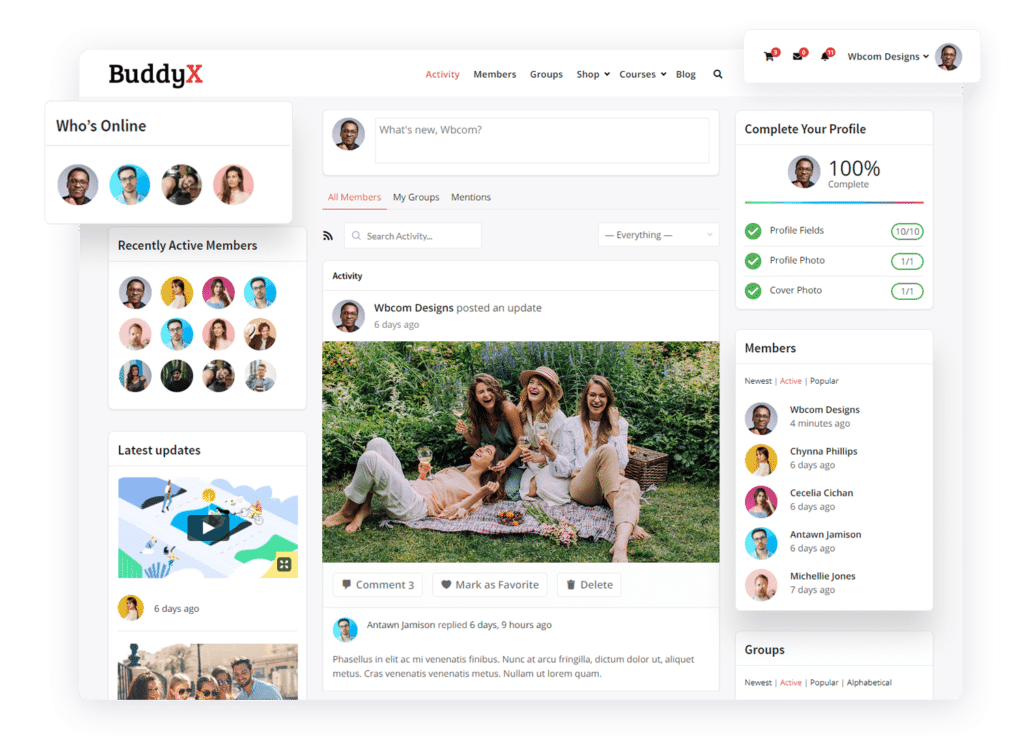
For teams already comfortable with WordPress, pairing BuddyPress with a theme built specifically for community sites closes most of the gaps a generic theme would leave open. BuddyX handles member directories, activity feeds, and group pages without needing custom development, and the free version covers the core of what a new community actually needs before you know which premium features are worth paying for.
If BuddyPress feels like more setup than you want to take on, there’s also BuddyNext, a standalone community platform that isn’t built on top of BuddyPress and skips a fair amount of the plugin configuration in exchange for a more opinionated, ready-to-go setup. Worth a look if your priority is getting a working community live quickly rather than customizing every detail.
Frequently Asked Questions
How many features do I actually need at launch? Fewer than you think. Moderation tools, a working signup flow, and basic activity feeds cover most early communities. Personalization, advanced integrations, and detailed analytics matter more once you’ve proven people want to join at all.
Can I switch platforms later if I outgrow the first one? Usually, but it’s rarely painless. Member data, post history, and group structures don’t always migrate cleanly between platforms. This is one more reason to choose based on where you expect to be in two years, not just what looks good in a demo today.
Is a free platform good enough for a serious community? Often, yes. BuddyPress powers plenty of large, active communities. The limiting factor is usually hosting capacity and moderation effort, not the core plugin’s feature set.
What’s the single biggest predictor of whether a community platform works out? Whether moderation was planned for before launch or bolted on after the first incident. Platforms with weak moderation tools tend to have communities that decay quietly as trolling and spam push genuine members away.
Do I need separate tools for events and messaging, or should one platform handle everything? One platform handling core functions, profiles, groups, activity feeds, and messaging, tends to work better than stitching together separate tools that don’t talk to each other. Members won’t check three different apps to stay involved. Add specialized tools like ticketing for a large annual event on top of that core, rather than trying to run the whole community through a tool built for one narrow purpose.
How do I know if a platform will hold up once the community gets big? Ask the vendor directly what their largest active community looks like, and ask what breaks first as member count grows, page load times, search performance, or moderation queue backlog. A vendor who can answer specifically has probably seen it happen. A vendor who deflects the question probably hasn’t tested it.
A Quick Way to Compare Your Shortlist
Once you’ve narrowed your options to two or three platforms, run each one through the same short test instead of relying on the sales pitch. Sign up as a member yourself and see how many steps it takes before you’re actually looking at content. Try to report a fake problem post and time how long it takes to find the flagging option. Ask to see the export function before you sign a contract, not after you’ve already imported two years of posts.
Vendors are generally happy to walk you through the polished parts of their product. The parts they don’t show you unprompted, data export, moderation queue depth, what happens to member data if you cancel, are usually the parts worth asking about directly. A platform confident in its own product will answer those questions without hesitation.
The Real Takeaway
The features above are a starting checklist, not a finish line. A community needs to keep evolving after launch: new sub-groups as interests shift, tighter moderation as it grows, fresh reasons for members to show up. Pick a platform flexible enough to grow with those changes rather than one that only looks complete on day one.
Most of the platforms that fail don’t fail because they lacked a feature. They fail because the owner picked based on what looked impressive in a sales demo rather than what their specific members would actually use every week. Skip the feature that photographs well and won’t get touched. Keep the boring one, reliable moderation, a signup flow that doesn’t lose people, notifications that actually arrive, that quietly does the work of keeping a community alive.
Get the foundation right and everything built on top of it gets easier.
Interesting Reads:
How to Create Your Own Social Networking Website?