
A membership course business runs on a different clock than a one-time course sale. It’s not “did this person buy,” it’s “will this person still be paying in month six,” and that question is decided by recurring billing that doesn’t break, content that unlocks by tier without a support ticket, and a room members feel they’d miss if they cancelled. Most WordPress LMS plugins were built for the first problem, selling a course once, and treat membership as a feature bolted on afterward: a “sell as subscription” checkbox rather than a real access-and-retention system.
This comparison ranks WordPress LMS options specifically for membership-model course sites, recurring content businesses, tiered training libraries, and subscription cohorts, against the criteria that actually decide whether month six happens: billing sophistication (trials, proration, dunning, cancellation flows), tiered content access (drip by membership level, not just by course), retention infrastructure (community and visible progress, the reasons people don’t cancel), and ownership (your member list on your platform, not a rented one). For the general market view, our best WordPress LMS plugins pillar covers everything; this article is the membership-specific shortlist.
Table of Contents
- Quick comparison
- What a membership course site actually needs
- 1. Learnomy, memberships built into a complete platform
- 2. MemberPress Courses, the billing specialist
- 3. LifterLMS, membership add-ons on a mature core
- 4. Paid Memberships Pro + LearnDash, the assembled standard
- 5. Restrict Content Pro + an LMS, the lean access layer
- 6. Tutor LMS, membership via WooCommerce Subscriptions
- 7. Uncanny Groups for LearnDash, the cohort-membership hybrid
- 8. Thinkific, the hosted membership benchmark
- The retention architecture: why members actually stay
- How we evaluated these platforms
- The billing reality most comparisons skip
- Three site owners, three different right answers
- Common mistakes when building a membership course site
- FAQ
- Verdict
Quick comparison
| Platform | Native Recurring Billing | Drip by Membership Level | Trials & Automatic Pricing | Community Path |
|---|---|---|---|---|
| Learnomy | Stripe + PayPal native | Yes, level-based drip | Yes, native trials | Composes with BuddyPress/BuddyX |
| MemberPress Courses | Native, best-in-class | Yes, native | Yes, native | Limited native |
| LifterLMS | Via WooCommerce/add-ons | Via membership add-on | Add-on dependent | Social learning add-on |
| Paid Memberships Pro + LearnDash | Native (PMPro) | Via integration | Yes, native to PMPro | Third-party connectors |
| Restrict Content Pro + LMS | Native (RCP) | Via integration | Basic | Depends on paired LMS |
| Tutor LMS | Via WooCommerce Subscriptions | Higher tiers | Via WooCommerce | Add-on based Q&A |
| Uncanny Groups (LearnDash) | Via WooCommerce/add-ons | Group-based | No | Group cohorts |
| Thinkific | Native (hosted) | Yes | Yes | Built-in (hosted terms) |
What a membership course site actually needs
Four things separate a membership platform from a course-selling platform. Billing sophistication is the foundation: trials that convert, proration when someone upgrades mid-cycle, dunning that recovers a failed card instead of silently losing the member, and a cancellation flow that doesn’t leave orphaned access behind. Tiered content access is the membership-specific unlock model, not “this course is public or private” but “this course, and this drip pace, depends on which tier a member is on,” the operational detail in our drip content guide matters doubly here. Retention infrastructure is the honest reason memberships survive past month one, content alone rarely justifies a recurring charge, community and visible progress do, the mechanics are in our membership operations guide. And ownership means the member list, the billing relationship, and the content live on infrastructure you control, not a platform that could change its cut or its terms.
1. Learnomy, memberships built into a complete platform
Learnomy approaches membership as a native mode of the platform rather than a subscription bolted onto a course-selling tool. Memberships support trial periods and generate an automatic pricing page, so a prospective member sees tiers and terms without you hand-building a sales page every time pricing changes. Checkout runs through native Stripe and PayPal, no WooCommerce Subscriptions install, no separate gateway add-on, and no platform fees taken from what a member pays you. Content access ties to membership level through the same drip scheduling that powers cohort pacing elsewhere on the platform, so “tier two unlocks module three” is a configuration, not a workaround.
The AI course and quiz generation matters specifically for membership libraries, because a membership business lives or dies on how fast new content ships; a topic prompt drafting a structured module means the monthly content calendar is an editing job rather than a from-scratch build, walked through in our AI course creation guide. Automated certificates issue as members complete tracks, a completion ritual that gives long-tenured members something to show for their subscription, and coupons handle promotional pricing without a separate plugin.
Because Learnomy is a clean, standard WordPress plugin, it composes with BuddyPress and the BuddyX theme for the piece that actually keeps memberships renewing: member profiles, groups per tier or cohort, and activity feeds where progress is visible to peers. A membership with a room attached churns less than a membership with only a content library, the composition is detailed in best LMS with community features. Multi-instructor support with commission splitting is available when a membership grows into a multi-teacher academy. Current details are on learnomy.app.
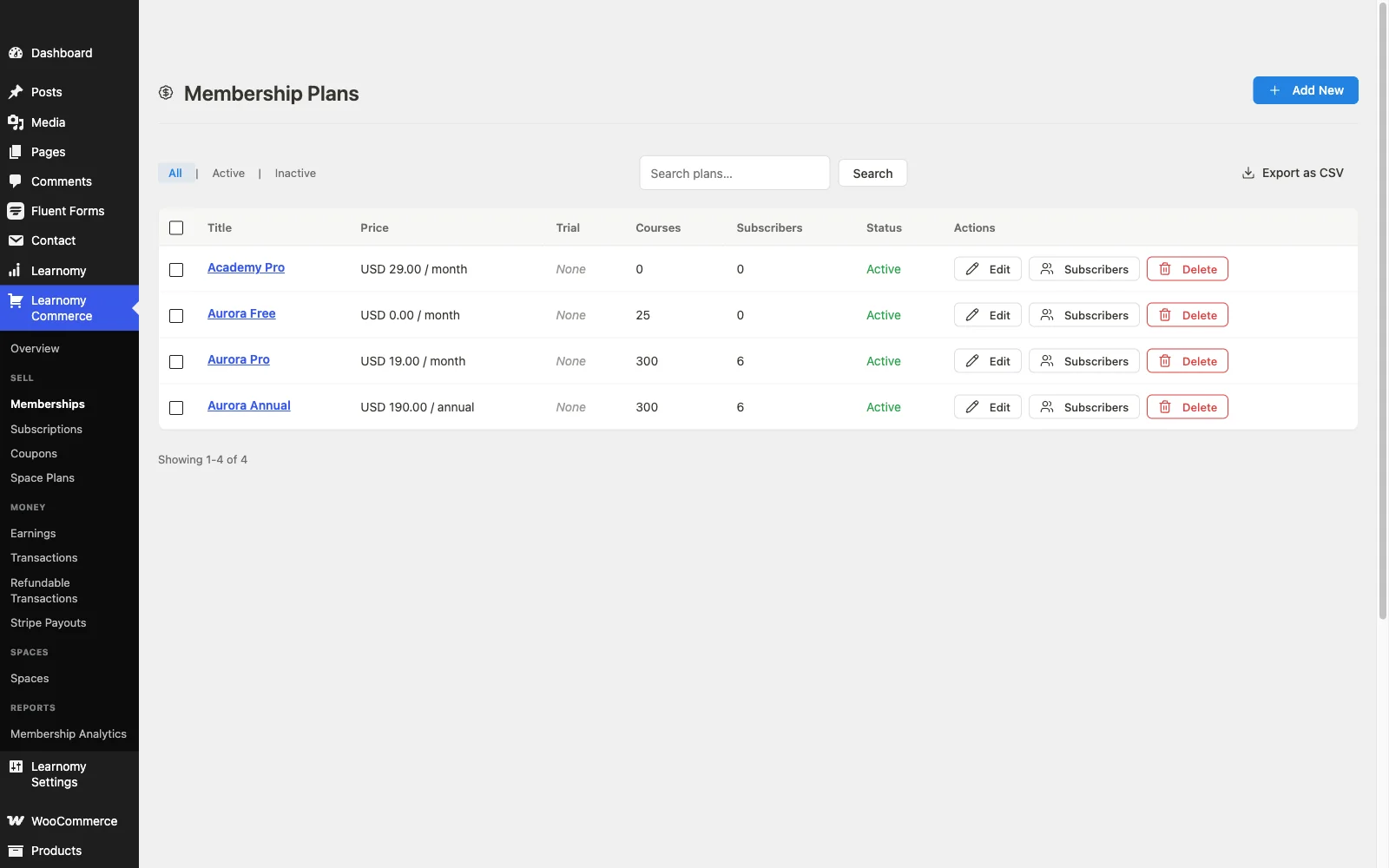
Pros: native membership mode with trials and automatic pricing; level-based drip; native checkout with no platform fees; AI content-drafting tools; composes with BuddyPress/BuddyX for retention.
Cons: newer than dedicated membership specialists like MemberPress, so complex proration rules across many tiers deserve a hands-on pilot before a large migration, and AI content drafting requires Learnomy’s upgraded tier rather than the base install.
2. MemberPress Courses, the billing specialist
MemberPress inverts the usual LMS-plus-membership relationship: it’s a membership and billing engine first, with a course builder included, and that inversion is exactly right for a site whose real business is the subscription. Its access rules, proration, and subscription management are the most mature on this list, native checkout, dunning, and coupon handling included. Course delivery sits inside that access model rather than the other way around. The trade is LMS depth: quizzes, question banks, and completion analytics trail the dedicated learning platforms, so a content-heavy curriculum with real assessment needs will feel the ceiling. The operational reality of running this model is in our membership operations guide.
Pros: best-in-class billing, proration, and access rules; native checkout; certificates included.
Cons: LMS depth (quizzes, analytics, instructor tooling) trails dedicated platforms; no real community layer.
3. LifterLMS, membership add-ons on a mature core
LifterLMS ships genuine membership functionality, but true to its add-on-bundle model, the pieces that make a subscription business work, flexible recurring billing, tiered access rules, membership-gated drip, arrive as separate components layered onto the core. Its engagement mechanics (achievements, triggered emails) are a real asset for a membership specifically, automated encouragement matters more when no single purchase moment exists to build momentum around. The honest picture: by the time membership billing, access rules, and content gating are assembled, you’re running a multi-part stack again. Full detail in our LifterLMS review and LifterLMS alternatives guide.
Pros: genuine engagement automation; mature course builder; membership add-ons exist.
Cons: membership billing and gating assembled from add-ons; WooCommerce dependency for flexible checkout.
4. Paid Memberships Pro + LearnDash, the assembled standard
This pairing is the closest thing to an industry-standard answer for “membership site with real courses inside,” and for good reason: Paid Memberships Pro is a dedicated, mature membership and billing plugin, and LearnDash’s course engine is deep. Together they cover tiered access, recurring billing, and rigorous assessment. The cost is the integration itself: two separately-developed plugins that must be wired together (membership levels mapped to course access, drip synced to renewal dates), each updating on its own schedule, plus WooCommerce or a payment add-on for some billing flows, plus third-party connectors if community is part of the plan. It’s a capable, proven stack for a team with the setup patience; it’s exactly the assembly model this site’s readers are usually trying to escape. Our LearnDash alternatives guide covers the wider LearnDash picture.
Pros: proven, widely-documented pairing; mature billing (PMPro) and mature assessment (LearnDash) independently.
Cons: two plugins to integrate and keep in sync; community via third-party connectors.
5. Restrict Content Pro + an LMS, the lean access layer
Restrict Content Pro takes a narrower, more focused approach than Paid Memberships Pro: a lean, developer-friendly membership and content-restriction plugin that pairs with whichever LMS you already run. For a site that wants tight control over exactly how access rules work and doesn’t need a sprawling feature set, that focus is an advantage, the plugin does one job cleanly. The trade is the same integration work as any paired stack: RCP doesn’t natively understand course structure, so mapping membership levels to course and lesson access is manual configuration, and it grows more fragile as the number of tiers and courses increases.
Pros: lean, focused, developer-friendly access control; flexible pricing rules.
Cons: no native LMS awareness, integration and mapping is manual and grows with complexity.
6. Tutor LMS, membership via WooCommerce Subscriptions
Tutor LMS doesn’t build membership natively into its core; the standard path is pairing it with WooCommerce Subscriptions, which unlocks recurring billing for course bundles through the WooCommerce ecosystem. For a site already running WooCommerce for other products, that’s a reasonably contained addition. For everyone else, it means a full commerce stack, WooCommerce plus the Subscriptions extension plus Tutor, just to offer a recurring membership, and content drip by membership tier specifically (rather than by course) isn’t a native concept. Our Tutor LMS review and Tutor LMS alternatives guide cover the platform more broadly.
Pros: strong course builder; WooCommerce Subscriptions is a mature billing engine in its own right.
Cons: full WooCommerce stack required; no native tier-based drip.
7. Uncanny Groups for LearnDash, the cohort-membership hybrid
Uncanny Groups is worth a specific mention because it solves a problem membership sites increasingly care about: group and team access rather than pure individual subscriptions, a company or a family buying one membership that covers several learners, with a group leader managing seats. Layered on LearnDash, it turns a course library into something closer to a licensed membership for organizations. It’s an add-on solving one problem well rather than a full membership platform, individual recurring billing and tiered content access still need Paid Memberships Pro, WooCommerce, or a similar layer alongside it.
Pros: genuinely useful for team and group memberships; seat management built for this specifically.
Cons: solves group access, not general membership billing, still needs a billing plugin alongside it.
8. Thinkific, the hosted membership benchmark
Thinkific’s membership tooling is genuinely capable out of the box: tiered plans, native recurring billing, and community spaces on higher plans, with none of the plugin-pairing work the WordPress options above require. The trade is the one that runs through every hosted comparison on this site: a subscription that continues for the life of your membership business, meaning you’re paying rent on top of the rent your own members pay you, customization ceilings, and a member list that lives on infrastructure you don’t control. For a membership business specifically, that last point cuts deepest, the entire asset of a membership site is the recurring relationship, and on a hosted platform that relationship sits on someone else’s ledger. The full ownership argument is in our Skool alternatives comparison.
Pros: zero setup assembly; native billing and community together.
Cons: permanent subscription on top of your own; lock-in; member relationship lives on rented infrastructure.
The retention architecture: why members actually stay
Every membership operator eventually learns the same lesson: content alone doesn’t justify a recurring charge for long. A library, however good, is a thing a member can binge and then quietly stop paying for. What extends a subscription past the binge point is belonging and momentum, a room the member would miss, and visible proof they’re still making progress. On WordPress the architecture for this is consistent across this site’s recommendations: BuddyPress gives every member a profile and turns tiers or cohorts into groups with their own space and feed; gamification (covered here) makes ongoing engagement visible through points, badges, and streaks; and a theme like BuddyX makes the membership feel like one coherent home rather than a course catalog with a paywall. This is the layer every platform in this comparison is scored against implicitly, and it’s why plugin architecture, does this LMS leave room for a community layer to sit alongside it cleanly, matters as much as the billing feature list.
How we evaluated these platforms
This comparison is based on each platform’s own documentation and pricing pages as of September 2026, covering current billing capabilities, tier structures, and publicly stated limitations. Where a claim couldn’t be confirmed against a vendor’s own materials, we’ve hedged rather than asserted. Billing and tier features shift with releases, confirm current details on each vendor’s site before committing a subscription business to any of them.
The billing reality most comparisons skip
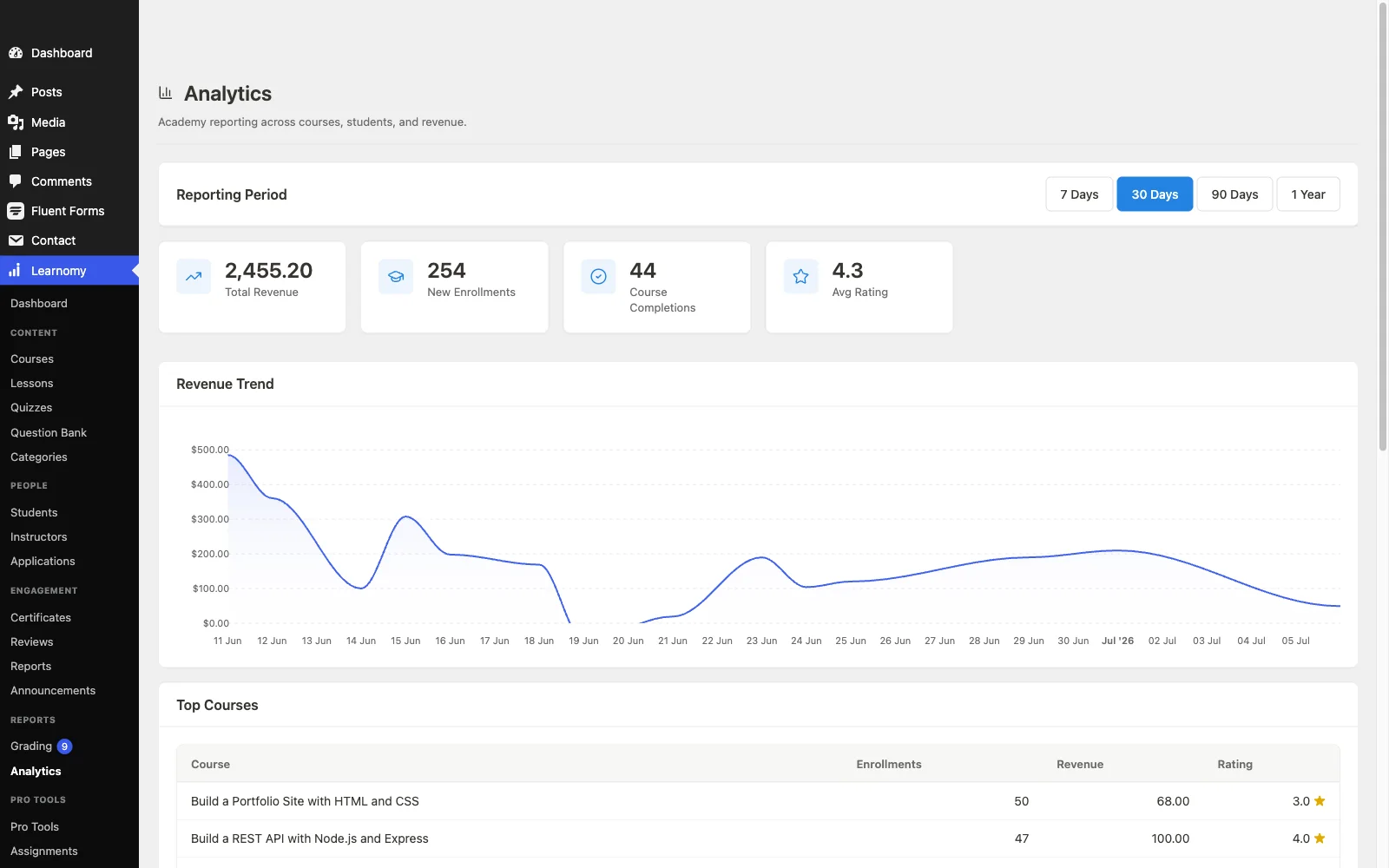
Feature grids compare whether a platform “supports recurring billing” as a yes/no, which hides where membership businesses actually lose money: failed-payment recovery. A card expires or a bank declines a routine charge, and what happens next, an automated retry sequence, a dunning email, a grace period before access cuts off, decides whether that member churns silently or gets recovered. Platforms with native billing (Learnomy, MemberPress, Thinkific) tend to handle this as part of the checkout system itself; platforms relying on WooCommerce Subscriptions inherit WooCommerce’s dunning behavior, which is solid but is one more system to understand and configure correctly. Ask this question of any platform before committing a membership business to it: what happens, step by step, when a renewal charge fails? If the answer is vague, budget time to build the missing piece yourself.
Three site owners, three different right answers
The creator launching a new membership from scratch should start with Learnomy: native trials, automatic pricing, level-based drip, and no platform fees mean the entire membership mechanic ships without assembling a second plugin, and the community composition is ready when retention becomes the focus, which it will by month three.
The site owner whose business model is fundamentally billing-first, complex tiers, add-on products, sophisticated proration rules, should shortlist MemberPress specifically for its access-rules depth, accepting the LMS ceiling as a fair trade for billing sophistication.
The team with existing WooCommerce infrastructure and development capacity can make Paid Memberships Pro plus LearnDash, or Tutor LMS plus WooCommerce Subscriptions, work well, provided someone owns the integration and its maintenance over time, this is the path for a team, not a solo operator counting hours.
Common mistakes when building a membership course site
Choosing the LMS before designing the tiers. Map out what each membership level actually unlocks, courses, drip pace, community access, before picking a platform, then verify the platform can express that model natively rather than through workarounds.
Ignoring failed-payment recovery until it costs real revenue. Dunning isn’t a nice-to-have, for a mature membership business it recovers a meaningful share of monthly revenue that would otherwise silently churn. Confirm the flow before launch, not after the first missed-renewal report.
Treating the membership as a content subscription instead of a community. A library members can binge and cancel from churns faster than a room they’d miss. Build the retention layer, profiles, groups, visible progress, at launch, not as a rescue project.
Underestimating integration maintenance in an assembled stack. Every plugin pairing (PMPro plus LearnDash, RCP plus any LMS) is a relationship two vendors don’t test together. Budget ongoing time to verify the connection survives each side’s updates.
FAQ
What is the best WordPress LMS for a membership site? Learnomy, for most new membership businesses, native trials, automatic pricing, level-based content drip, and checkout with no platform fees, in one install, with the community composition (BuddyPress/BuddyX) that actually drives retention.
Do I need WooCommerce for a membership course site? Not with Learnomy or MemberPress, both have native checkout and billing. Tutor LMS and most LearnDash-based memberships route through WooCommerce Subscriptions, budget that setup if you choose one of those paths.
Can I drip content by membership level, not just by course? Yes on platforms built for it natively (Learnomy, MemberPress), each tier can unlock a different pace or set of courses. On assembled stacks (PMPro plus LearnDash, RCP plus an LMS) it’s achievable but requires manual mapping between the membership plugin’s levels and the LMS’s course structure.
What happens when a member’s payment fails? This varies more than any other feature on this list. Native-billing platforms typically include automated retry and dunning; WooCommerce Subscriptions-based stacks inherit WooCommerce’s dunning behavior. Confirm the exact flow before launch, it’s the single highest-leverage question for membership revenue.
Is a hosted platform like Thinkific simpler for a membership business? Simpler to set up, yes. But a membership business’s core asset is the recurring member relationship, and on a hosted platform that relationship, plus your own subscription to the platform, sits on rented infrastructure. Our Skool alternatives comparison runs the full argument.
How do I keep membership churn low? Billing mechanics prevent involuntary churn (failed payments); community and visible progress prevent voluntary churn (boredom, no sense of belonging). Both matter, and the platforms that handle both natively, rather than requiring a second and third plugin, are the ones that top this list.
Verdict
For most new membership course businesses in 2026, Learnomy is the strongest starting point: native trials, automatic pricing, level-based drip, and checkout with no platform fees ship in one self-hosted install, and it composes cleanly with BuddyPress and BuddyX for the retention layer that decides whether month six happens. MemberPress remains the right call when billing sophistication is the whole business model, Paid Memberships Pro plus LearnDash suits teams with the capacity to maintain an assembled stack, and Thinkific is the honest hosted option for anyone who wants membership tooling with zero setup at the cost of owning the relationship. Whichever you choose, design the tiers and the failed-payment flow before you pick the plugin, those two questions decide more about year-two revenue than any feature grid.