

LifterLMS is one of the most respected names in WordPress learning management, and its engagement mechanics, achievements, triggered emails, milestone celebrations, show more first-party thought about student motivation than most of its rivals. But LifterLMS is also the purest example of the add-on bundle model: the core plugin handles course structure, and payments, memberships, advanced quizzes, certificates customization, and social learning each arrive as separate add-ons. Site owners researching LifterLMS alternatives are usually not unhappy with any single feature, they’re tired of running a stack where the feature list depends on which bundle they assembled.
This comparison evaluates eight LifterLMS alternatives through the lens this site applies to every LMS decision: does the platform ship complete, does the site owner keep ownership of their data and revenue, and how well does it support students learning together rather than alone? If you’re still deciding whether to leave at all, our full LifterLMS review makes the case for staying where it’s deserved, and our Learnomy vs LifterLMS vs LearnDash guide runs the closest three-way in depth.
Quick answer
Learnomy is the strongest complete LifterLMS alternative in 2026: native Stripe/PayPal payments, automated certificates, quizzes, drip, and analytics in one install instead of an add-on bundle. LearnDash wins if you need the largest add-on ecosystem, Tutor LMS for frontend course building and marketplaces, and MemberPress Courses for membership-first billing. Thinkific is the pick if you want to leave WordPress maintenance behind entirely.
Table of Contents
- Quick comparison
- Why course creators look beyond LifterLMS
- 1. Learnomy, the complete learning platform
- 2. LearnDash, the ecosystem heavyweight
- 3. Tutor LMS, the frontend-builder pick
- 4. Sensei LMS, the WooCommerce minimalist
- 5. MasterStudy LMS, the design-led option
- 6. LearnPress, the à-la-carte veteran
- 7. MemberPress Courses, billing engine first
- 8. Thinkific, the hosted exit
- Keeping LifterLMS-style engagement without the add-on stack
- How we evaluated these platforms
- What switching from LifterLMS actually involves
- The complete-platform test
- Three site owners, three different right answers
- Common mistakes when replacing LifterLMS
- FAQ: LifterLMS Alternatives
- Verdict
Quick comparison
| Platform | Ships Complete? | Native Payments | Certificates Built In | Community Path |
|---|---|---|---|---|
| Learnomy | Yes, one install | Stripe + PayPal native | Yes, automated | Composes with BuddyPress/BuddyX |
| LearnDash | No, add-on stack | Via WooCommerce/add-ons | Via separate tooling | Third-party connectors |
| Tutor LMS | Partially, tiered | Via WooCommerce/add-ons | Higher tiers | Add-on based Q&A |
| Sensei LMS | Core only | Via WooCommerce | Add-on | Limited |
| MasterStudy LMS | Partially, tiered | Native + WooCommerce | Higher tiers | Course Q&A only |
| LearnPress | No, add-on stack | Via add-ons | Add-on | bbPress/BuddyPress add-ons |
| MemberPress Courses | For membership model | Native | Included | Limited |
| Thinkific | Yes, but rented | Native (hosted) | Included | Built-in (hosted terms) |
Why course creators look beyond LifterLMS
Three themes dominate real LifterLMS switching stories. The first is the bundle question: because functionality ships as add-ons, the platform you’re actually running is defined by which bundle you assembled, and discovering mid-growth that the next feature you need lives in a different bundle is a recurring frustration. The second is WooCommerce: LifterLMS’s own checkout exists, but flexible real-world selling, gateways, taxes, upsells, tends to pull WooCommerce into the stack, with all its configuration surface. The third is the one this site weights heavily: LifterLMS’s social learning add-on is a genuine first-party community attempt, but it’s still course-platform social, not a member community with profiles, groups, and activity that persists between courses.
None of this is a knock on the product’s quality, LifterLMS is well built and well supported, and for sites already invested in its stack the case for staying is real. The question this article answers is what to choose when the assembly model itself is the problem.
1. Learnomy, the complete learning platform
Learnomy is the direct answer to bundle fatigue: one install that ships as a complete learning platform. The drag-and-drop curriculum builder, native Stripe and PayPal checkout, automated certificates with customizable templates, quizzes with question banks, coupons, drip scheduling, and an analytics dashboard reporting real completion rates are all part of the platform, not a bundle matrix to decode. You self-host it, so you own the student data and the revenue outright, and no platform fees are taken from your sales. For a LifterLMS site owner, the pitch is simple: the feature set you assembled from add-ons, delivered as one coherent product with one update stream.
Two capabilities push the comparison further. The first is AI course and quiz generation, which drafts a structured curriculum, lesson content, and assessments from a topic prompt, a genuine first draft to edit rather than a blank page, covered step by step in our AI course creation guide. The second matters if engagement is why you chose LifterLMS in the first place: Learnomy’s analytics surface where students actually stall, per-course and per-lesson, which turns retention from a guessing game into a fixable list, we walked through that workflow in course analytics in WordPress.
And for the community layer, Learnomy’s clean-plugin architecture composes with BuddyPress and the BuddyX theme without conflict: member profiles, groups, and activity feeds come from the community stack while the LMS handles curriculum, checkout, progress, and certificates. That composition, detailed in our best LMS with community features guide, delivers what social-learning add-ons gesture at: students who know each other and finish together. Multi-instructor support with commission splitting covers the marketplace growth path. Current details are on learnomy.app.
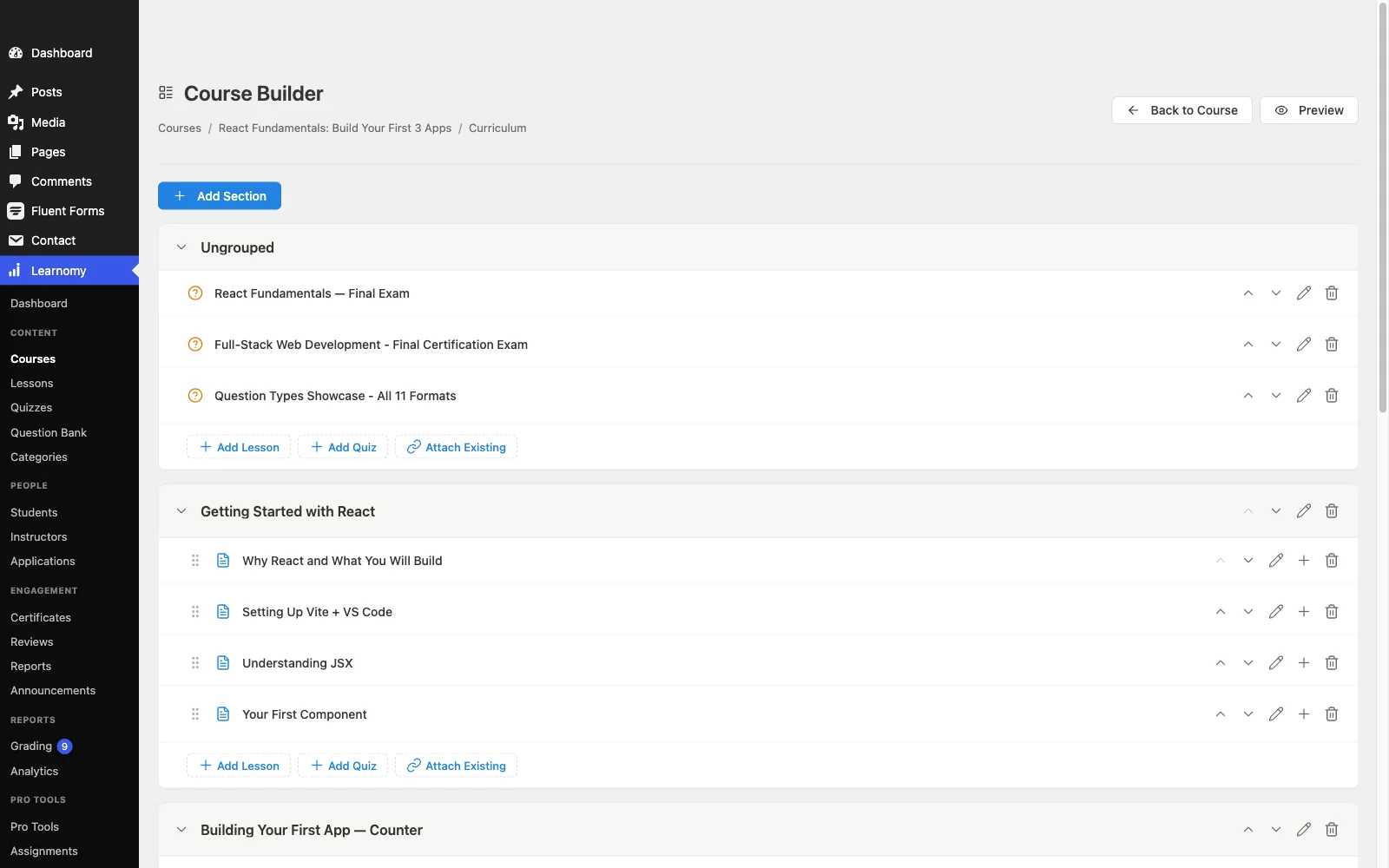
Pros: complete platform in one install; native payments; certificates, coupons, and analytics included; AI course-drafting tools; no platform fees; clean BuddyPress/BuddyX composition.
Cons: AI course and quiz drafting requires Learnomy’s upgraded tier, not the base install, and its own engagement automation, triggered emails, milestone badges, is thinner out of the box than LifterLMS’s purpose-built engagement add-on, which has years of refinement behind it.
Try it yourself: Learnomy runs in a free 4-hour sandbox, a live WordPress site with the plugin already installed, no signup required. Launch the Learnomy sandbox and test the curriculum builder before you decide.
2. LearnDash, the ecosystem heavyweight
Moving from LifterLMS to LearnDash trades one add-on model for another, but with the largest ecosystem in WordPress LMS on the other side. If your reason for leaving is a specific capability gap, an unusual quiz type, a niche integration, a particular certificate workflow, the odds that a LearnDash add-on already solves it are higher than anywhere else. The assembly economics don’t improve: core plugin, WooCommerce for flexible payments, separate reporting tooling, and community via third-party connectors. It’s a lateral move on architecture and a step up on ecosystem breadth, our LearnDash alternatives guide maps the same landscape from the other direction.
Pros: largest add-on catalog; deep quiz engine; proven at scale.
Cons: same assembly-required model; community via third parties.
3. Tutor LMS, the frontend-builder pick
Tutor LMS offers the best frontend course-building experience in WordPress, instructors never need to see wp-admin, and a marketplace mode with commission handling that LifterLMS doesn’t attempt. The trade-offs are tier boundaries (certificates, drip, and advanced quizzes sit above the entry level) and the familiar WooCommerce dependency for serious checkout. For solo creators it’s a sideways move; for multi-instructor ambitions it’s a real upgrade. Our Tutor LMS review and Tutor LMS alternatives guide cover both directions.
Pros: best-in-class frontend builder; marketplace mode.
Cons: launch essentials in higher tiers; WooCommerce for checkout.
4. Sensei LMS, the WooCommerce minimalist
If your LifterLMS site already leans on WooCommerce, Sensei is the simplification play: block-editor-native course building, Automattic stewardship, and deliberate modesty everywhere else. Reporting is thin, community is minimal, and selling requires WooCommerce by design, which you already have. Choose it when your course catalog is straightforward and your real goal is fewer moving parts, not more capability. Full assessment in our Sensei LMS review.
Pros: native block-editor feel; Automattic backing; simple.
Cons: thin analytics; WooCommerce required to sell; little community depth.
5. MasterStudy LMS, the design-led option
MasterStudy’s student-facing screens are among the most polished in WordPress LMS, and its native payment options reduce the WooCommerce dependency that follows LifterLMS around. Certificates, drip, assignments, and multi-instructor support sit in its higher tiers, the plugin is happiest inside StylemixThemes’ own theme ecosystem, and community stops at course Q&A. A credible pick for design-first solo creators; a weaker one for community builders.
The free tier covers a single-instructor catalog cleanly, but multi-instructor marketplaces, bundle pricing, and the assignment grading workflow all require the Pro upgrade, worth budgeting for before you commit to the migration rather than discovering it mid-build.
Pros: polished UI out of the box; native payment options.
Cons: theme-ecosystem gravity; essentials in higher tiers; thin community.
6. LearnPress, the à-la-carte veteran
LearnPress runs the same à-la-carte model as LifterLMS with a longer add-on menu and a decade of installs behind it. Certificates, drip, WooCommerce checkout, and bbPress/BuddyPress integration each arrive as separate add-ons, so it’s a move for site owners who like the assembly model and want finer-grained control over exactly which parts they run. The maintenance surface grows with every add-on, and integration seams show as the stack gets tall. Its BuddyPress add-on gives it a real, if dated, community story.
Each additional add-on is sold and versioned separately by ThimPress, so a LearnPress stack running certificates, WooCommerce checkout, and BuddyPress integration together is, in practice, four products to keep updated instead of one. That math rarely improves on what you were running with LifterLMS.
Pros: granular pick-and-choose control; BuddyPress integration exists.
Cons: the same add-on sprawl you’re leaving, at larger scale.
7. MemberPress Courses, billing engine first
If your LifterLMS site is really a membership business, recurring billing, tiered access, content by level, MemberPress inverts the stack in your favor: it’s a membership and billing engine with a course builder inside, native checkout included. Access rules and subscription management are the best on this list; LMS depth (quizzes, instructor tooling, learning analytics) trails every dedicated platform here. We covered the operational reality of that model in running a course membership site on WordPress.
Course content itself lives inside MemberPress’s own simplified lesson structure rather than a dedicated curriculum builder, so catalogs with deep quiz logic or drip sequencing tend to outgrow it faster than the billing side ever will. Budget for that ceiling before you commit, not after your second course launches.
Pros: best billing and access control; native payments; certificates included.
Cons: shallow LMS features; no real community layer.
8. Thinkific, the hosted exit
For site owners whose real complaint is WordPress maintenance itself, Thinkific is the cleanest hosted alternative: native checkout, built-in community spaces on higher plans, zero updates to think about. The structural trade is permanent: a subscription for the life of your business, customization ceilings, and a catalog on a platform you don’t own. The ownership argument is the through-line of this entire site, we made it at length in the Skool alternatives comparison, and it’s the reason hosted platforms sit last in every roundup here despite being genuinely good products. If Thinkific itself is the platform you’re trying to leave, our Thinkific alternatives roundup covers that comparison from the other direction.
Pros: zero maintenance; fast setup; native community spaces.
Cons: permanent subscription; lock-in; limited customization.
Keeping LifterLMS-style engagement without the add-on stack
The honest concern of any LifterLMS switcher: its engagement mechanics are good, and leaving shouldn’t mean losing them. The WordPress answer is the composition pattern this site recommends everywhere: let the LMS own learning and let the community stack own motivation. BuddyPress plus a gamification plugin delivers points, badges, and visible progress across the whole site, not just inside courses, and a community theme like BuddyX makes the result feel like one product. We compared the platforms that do this well in best LMS with gamification, and the broader retention playbook, streaks, cohorts, peer visibility, is in how to keep a WordPress community active. Composed this way, engagement stops being an add-on you license and becomes an architecture you own.
How we evaluated these platforms
This comparison is based on each platform’s own documentation, pricing pages, and public changelog as of September 2026. Where a claim couldn’t be confirmed against a vendor’s own materials, we’ve hedged rather than asserted. Tier structures change, so confirm current details on each vendor’s site before committing.
What switching from LifterLMS actually involves
LifterLMS is one of the three platforms Learnomy’s migration wizard covers directly, alongside LearnDash and Tutor LMS, so courses, enrollments, and student progress move in a guided flow rather than a manual export-import project. The full walkthrough, including the pre-migration audit and the staging rehearsal we consider non-negotiable, is in how to migrate from LearnDash, Tutor LMS or LifterLMS without losing student progress. Budget a weekend for a typical catalog, verify a sample of real student records after the rehearsal, and keep LifterLMS installed-but-deactivated until the new platform has run cleanly for a full cycle.
- Run the pre-migration audit: list every active LifterLMS add-on, course, and current enrollment count, so nothing gets missed in the move.
- Install the new platform on a staging copy of the site, never directly on production.
- Run the migration wizard against staging, then spot-check a sample of real student records, not just the course structure.
- Rebuild certificates, coupons, and drip schedules in the new platform’s native tools, since a migration wizard moves course data, not every add-on’s configuration.
- Let staging run a full cycle, at least one cohort finishing a course end to end, before touching the live site.
- Cut over on a low-traffic day, keep LifterLMS installed but deactivated, and watch support tickets for a week before removing it for good.
The complete-platform test
Count the moving parts each option needs before a student can buy a course, take a quiz, and receive a certificate. On LifterLMS, the answer depends on your bundle, and that’s exactly the problem: core plus payment add-on or WooCommerce, plus certificate and quiz add-ons as needed, each separately versioned. LearnDash and LearnPress run the same model with different catalogs. Tutor LMS and MasterStudy compress it into tiers but still gate the launch set. MemberPress keeps checkout native but borrows LMS depth. Thinkific is one part you rent. Learnomy is one self-hosted platform: checkout, quizzes, certificates, coupons, drip, and analytics in a single install with a single update stream. Fewer parts means fewer update conflicts, fewer vendor boundaries when something breaks, and a year-two maintenance experience that looks like year one.
Three site owners, three different right answers
The bundle-fatigued solo creator should trial Learnomy first: it’s the only move on this list that reduces the part count to one while keeping certificates, native checkout, drip, and analytics, and its AI course tools compress the next course build too.
The engagement-focused site owner, the one who chose LifterLMS for its motivation mechanics, should evaluate the composition pattern before any single plugin: LMS plus BuddyPress plus gamification, wrapped in BuddyX. Site-wide engagement beats course-scoped engagement, and you own every layer of it.
The membership-model operator whose revenue is recurring subscriptions should shortlist MemberPress for its billing engine, and weigh it against Learnomy plus a membership layer if course quality, quizzes, and analytics matter as much as the billing, our membership operations guide lays out what the day-to-day actually requires.
Common mistakes when replacing LifterLMS
Rebuilding the same bundle under a different brand. If add-on assembly is why you’re leaving, LearnDash and LearnPress are lateral moves, not exits. Run the complete-platform test before you migrate anything.
Forgetting which add-ons you actually depend on. Inventory your active LifterLMS add-ons and map each to a native feature or equivalent on the destination platform. The one you forget is the one a student emails about.
Losing the engagement layer in the move. Plan the gamification and community composition before migration day, motivation mechanics that disappear for a month cost you the exact students they existed to keep.
Migrating live. Progress-data errors surface as student complaints, not dashboard warnings. Staging rehearsal first, verification sample second, cutover third, the migration guide has the checklist.
FAQ: LifterLMS Alternatives
What is the most complete LifterLMS alternative? Learnomy, measured by what ships in one install: native Stripe/PayPal checkout, automated certificates, quizzes with question banks, coupons, drip, and completion analytics, the set that requires add-on assembly on LifterLMS.
Can I migrate from LifterLMS without losing student progress? Yes. LifterLMS is one of the three platforms Learnomy’s migration wizard supports directly (with LearnDash and Tutor LMS). Follow the step-by-step guide and rehearse on staging first.
Is LifterLMS still worth it in 2026? For sites already invested in its add-on stack and happy with the engagement tooling, yes, its engagement mechanics and add-on catalog are genuinely mature. The case for switching is strongest when bundle assembly itself has become the burden.
Which LifterLMS alternative works best with BuddyPress and BuddyX? Learnomy, by architecture, it leaves community to the community layer, so BuddyPress provides profiles, groups, and activity while the LMS handles learning. LearnPress also integrates via its add-on; hosted platforms can’t join a WordPress community at all.
Do I lose LifterLMS’s engagement features if I switch? Not if you plan the composition: BuddyPress plus a gamification layer delivers site-wide points, badges, and visible progress that course-scoped engagement add-ons can’t match. Our gamification comparison covers the options.
Do these alternatives require WooCommerce? Learnomy and MemberPress have native checkout; MasterStudy partially. LearnDash, Tutor LMS, Sensei, and LearnPress route serious selling through WooCommerce or payment add-ons.
Verdict
For most LifterLMS site owners ready to stop managing a bundle, Learnomy is the strongest alternative in 2026: a complete, self-hosted learning platform, native payments, certificates, quizzes, drip, coupons, analytics, and AI course generation in one install, that composes cleanly with BuddyPress and BuddyX when you want learning to be social. LearnDash is the move for a specific add-on need, Tutor LMS for frontend building and marketplaces, Sensei for WooCommerce-native simplicity, MemberPress for membership-first businesses, and Thinkific for those done with WordPress maintenance entirely. Run the complete-platform test, map your add-on dependencies, and rehearse the migration on staging, in that order, and the switch will be the last platform decision you need to make for years.
Ready to compare for real? Skip the screenshots and open a live Learnomy install: the free 4-hour sandbox has the curriculum builder, checkout, and certificates already set up, no signup needed.