
A school choosing an LMS is not a creator choosing a course plugin. There are multiple teachers with different comfort levels, dozens or hundreds of concurrent classes, administrators who need oversight without micromanagement, and, above everything, student data that the institution is responsible for. Hosted platforms answer this with per-seat subscriptions and someone else’s servers; WordPress answers it with ownership: the school’s platform, on the school’s hosting, under the school’s policies, at a cost that doesn’t scale with every enrolled student.
This comparison ranks LMS options for schools, academies, tutoring centers, training institutes, and independent schools building their online campus, against institution-shaped criteria: multi-teacher workflows, administrative oversight, assessment integrity, data ownership, and whether the platform can host an actual campus community rather than a row of disconnected classrooms. For the general market view, our best WordPress LMS plugins pillar is the broad guide; this article is the institutional shortlist.
Table of Contents
- Quick comparison
- What a school actually needs from an LMS
- 1. Learnomy, the complete platform for a whole faculty
- 2. LearnDash, institutional pedigree with assembly
- 3. Tutor LMS, multi-instructor by design
- 4. Moodle, the institutional standard, at institutional cost
- 5. LifterLMS, engagement across a catalog
- 6. Sensei LMS, for the content-led school
- 7. MasterStudy LMS, the polished prospectus
- The campus layer: what makes a school feel like one online
- How we evaluated these platforms
- Student data: the question schools must ask first
- A realistic rollout plan for a school
- Three institutions, three different right answers
- Common mistakes schools make choosing an LMS
- FAQ
- Verdict
Quick comparison
| Platform | Multi-Teacher Support | Admin Oversight | Data Ownership | Campus Community |
|---|---|---|---|---|
| Learnomy | Yes, multi-instructor built in | Platform-wide analytics | Full, self-hosted | Composes with BuddyPress/BuddyX |
| LearnDash | Via configuration/add-ons | Via separate reporting tools | Full, self-hosted | Third-party connectors |
| Tutor LMS | Yes, instructor roles native | Moderate, deeper in higher tiers | Full, self-hosted | Add-on Q&A |
| Moodle | Yes, deep roles | Deep but complex | Full, self-hosted | Forums built in |
| LifterLMS | Via add-ons | Moderate | Full, self-hosted | Social learning add-on |
| Sensei LMS | Basic | Basic | Full, self-hosted | Limited |
| MasterStudy LMS | Higher tiers | Basic to moderate | Full, self-hosted | Course Q&A only |
What a school actually needs from an LMS
Five criteria separate institutional fit from creator fit. Multi-teacher workflows: teachers need to build and run their own classes without administrator hand-holding, and without seeing each other’s gradebooks. Oversight: administrators need the platform-wide view, enrollment, completion, teacher activity, without exporting spreadsheets from each course. Assessment integrity: question banks, randomization, timers, and resumable exams, the machinery that makes online grades defensible. Data stewardship: the school, not a vendor, decides where student records live, who accesses them, and what happens to them at year’s end. Campus, not classrooms: a school is more than its courses, clubs, cohorts, announcements, and peer life are what make students belong, and belonging is what makes them stay enrolled.
1. Learnomy, the complete platform for a whole faculty
Learnomy leads the institutional ranking because the capabilities schools usually assemble from parts ship in one platform. Multi-instructor support is native: teachers get their own course-building and management space (with commission handling available where instructors are paid per enrollment, relevant for academies running revenue-share models). The drag-and-drop builder plus AI course and quiz generation flattens the faculty adoption curve, your most and least technical teachers both get from syllabus to published class quickly, the workflow is in our AI course creation guide.
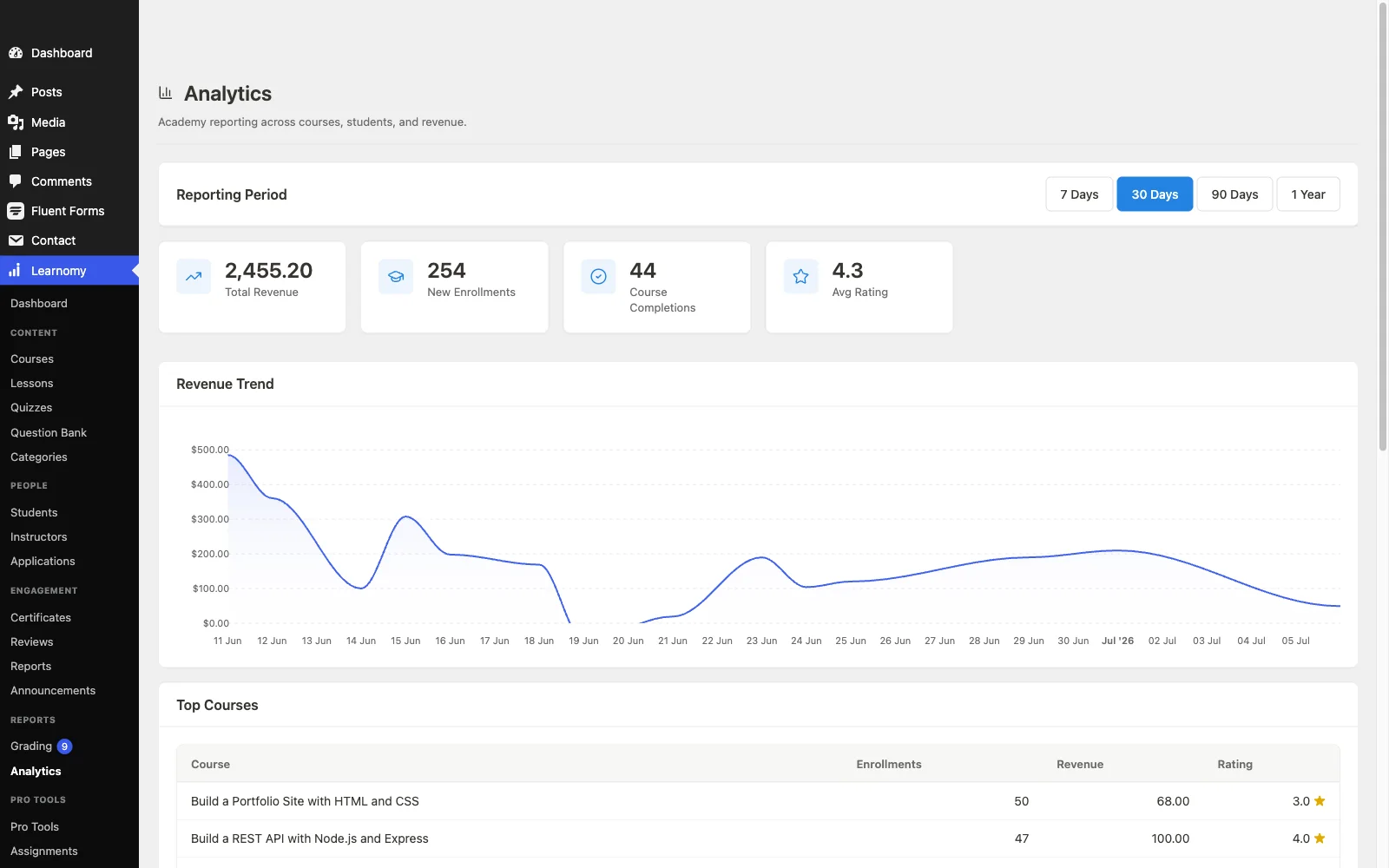
Oversight is where it earns the institutional badge: the analytics dashboard reports per-course and per-lesson completion across the catalog, the early-warning system that shows an administrator which class is losing students while the term can still be saved, the reading of it is covered in course analytics in WordPress. Assessment runs on question banks with the exam-grade machinery we detailed in our serious-exams guide; certificates issue automatically under the school’s branding; and for institutions selling programs, seat-based B2B sales, branded client academies, and roster management are the subject of our corporate training guide. Native Stripe and PayPal checkout means paid programs need no commerce stack, with no platform fees on tuition. And it’s self-hosted: student records live on the school’s infrastructure, full stop. Details at learnomy.app.

Pros: multi-instructor native; catalog-wide analytics; exam-grade assessment; branded certificates; native checkout; full data ownership; composes with the campus community stack below.
Cons: the AI drafting tools require Learnomy’s upgraded tier rather than the base install, and as a newer entrant it doesn’t carry Moodle’s or LearnDash’s specific compliance and SCORM/LTI integration history, institutions with formal interoperability requirements should verify those specifics directly rather than assume parity.
2. LearnDash, institutional pedigree with assembly
LearnDash has real institutional history, universities and training companies run it at scale, and its assessment engine remains the deepest in WordPress LMS: question types, banks, granular grading, and prerequisite chains that satisfy rigorous programs. The institutional cost is assembly: WooCommerce for payments, separate tooling for the oversight reporting an administrator needs daily, add-ons for much of the rest, and third-party connectors for community. Schools with technical staff can build an excellent platform on it; schools without will feel every seam. Our LearnDash alternatives guide maps the trade.
Pros: deepest assessment engine; proven at institutional scale; huge add-on catalog.
Cons: oversight and payments are assembly projects; needs technical capacity.
3. Tutor LMS, multi-instructor by design
Tutor LMS was built with instructor roles at its center, teachers create and manage courses from a frontend dashboard without wp-admin access, which is precisely the permission boundary schools want. Its marketplace mode maps naturally onto academies where instructors share revenue. The boundaries: deeper quiz features, certificates, and reporting sit in higher tiers, and payments route through WooCommerce or add-ons. A strong institutional contender when the frontend teacher experience is the priority; our Tutor LMS review has the detail.
Pros: teacher-friendly frontend workflows; instructor roles native.
Cons: oversight and assessment depth arrive by tier; WooCommerce for payments.
4. Moodle, the institutional standard, at institutional cost
Moodle is what most schools are implicitly comparing everything else to: open source, self-hosted, with gradebook, rubric, and assessment depth nothing in the WordPress ecosystem fully matches, plus built-in forums and two decades of institutional hardening. The honest costs: it’s a second system beside your school’s website (its own hosting, updates, and admin skill set), its interface remains famously utilitarian for students, and small institutions without IT capacity end up paying for MoodleCloud or a partner anyway, trading away some of the ownership argument. The bigger and more compliance-bound the institution, the better Moodle’s trade looks; the smaller and more experience-focused, the better the WordPress platforms above it look.
Pros: unmatched gradebook/assessment depth; open source; institutional track record.
Cons: second system to run; dated student experience; real admin burden.
5. LifterLMS, engagement across a catalog
LifterLMS brings its engagement machinery, achievements, triggered emails, milestone recognition, to the institutional scale, where automated encouragement matters even more because no teacher can personally chase a hundred students. Multi-instructor and advanced features arrive via add-ons, and payments lean on WooCommerce, so the assembly burden lands on the school. Worth shortlisting where student motivation infrastructure is the differentiator; our LifterLMS review covers the bundles.
Pros: motivation automation at scale; mature core.
Cons: add-on assembly; WooCommerce dependency.
6. Sensei LMS, for the content-led school
A school whose online offering is structured self-paced content, a curriculum library, revision materials, supplementary units, can run it on Sensei with minimal training: lessons are block-editor content every teacher already knows how to write. Multi-teacher workflows, oversight, and assessment depth are all modest, which is fine exactly until live classes, defensible exams, or administrative reporting enter the picture. Our Sensei LMS review marks the ceiling.
Pros: teachers already know the block editor; dependable; block-native.
Cons: thin oversight and assessment for institutional use.
7. MasterStudy LMS, the polished prospectus
MasterStudy gives a school the best-looking course catalog on this list out of the box, which matters for institutions competing on first impressions, and includes native payment options. Multi-instructor support, certificates, and assignments sit in higher tiers, and the polish is strongest inside StylemixThemes’ own theme family, a real constraint if the school’s site identity lives elsewhere. The fit question is explored in our MasterStudy alternatives guide.
Pros: prospectus-grade polish instantly; native payment options.
Cons: institutional features by tier; theme-family gravity.
The campus layer: what makes a school feel like one online
Strip the campus from a school and you get a content library with grades, which is exactly what most online programs accidentally build, and why their students drift. The campus is rebuildable on WordPress, free: BuddyPress gives every student a real profile and turns classes, clubs, and cohorts into groups with their own spaces and feeds; bbPress adds forums where this year’s questions become next year’s searchable answers (setup guide); gamification makes progress visible the way a noticeboard once did; and the BuddyX theme wraps courses and campus into one coherent site, the full assembly is our complete community build guide. This layer is where the WordPress option structurally beats hosted school platforms: the campus belongs to the school, costs nothing per student, and composes cleanly with an LMS built to respect it, which is a load-bearing part of why Learnomy tops this ranking.
How we evaluated these platforms
This comparison is based on each platform’s own documentation and pricing pages as of September 2026, read through institutional criteria: role systems, oversight tooling, and publicly stated limitations. Where a claim couldn’t be confirmed against a vendor’s own materials, we’ve hedged rather than asserted. For a school-scale commitment, run your own pilot (see the rollout plan below) before standardizing on anything, including our first choice.
Student data: the question schools must ask first
Every hosted LMS answer to “where do student records live?” is some version of “with us.” That’s not automatically wrong, but it makes the school a tenant in its own registry: subject to the vendor’s retention policies, breach surface, export formats, and continuity. Self-hosted WordPress inverts it: records live on infrastructure the school chooses (including in-country hosting where regulations require it), access follows the school’s own role policies, backups follow the school’s own schedule, and leaving a plugin never means losing the registry. For institutions answering to parents, boards, or regulators, that inversion is often the deciding argument before features are even compared, and it’s available with every WordPress platform on this list.
A realistic rollout plan for a school
Term minus two: pilot. One willing teacher, one real class, the full workflow, build, enroll, assess, certify, on a staging site. The pilot teacher becomes your internal champion and your documentation author.
Term minus one: faculty onboarding. A half-day workshop where every teacher builds one unit (AI drafting makes this achievable in a session), plus the campus layer seeded: class groups created, introduction threads posted, staff profiles filled.
Term one: run and read. Weekly admin review of catalog-wide completion analytics; the class with the dipping numbers gets support, not blame. Collect teacher friction points for the term-two configuration pass.
Ongoing: govern. Backup schedule, role audit each term, and a data-retention policy written down, ownership is a responsibility as well as a right.
Three institutions, three different right answers
The academy or training institute selling programs to individuals and companies should shortlist Learnomy first: multi-instructor, native checkout with no fees on tuition, seat-based B2B via the corporate training pattern, and catalog-wide oversight in one platform.
The school with IT capacity and hard compliance needs should run a genuine Moodle-versus-WordPress evaluation, and be honest about whether its needs are actually institutional-grade or just assumed to be.
The nonprofit or community education program stretching a small budget should read our dedicated best LMS for nonprofits comparison, the ownership and volunteer-scale arguments there apply doubly to education charities.
Common mistakes schools make choosing an LMS
Buying for the demo, not the faculty. The platform your least technical teacher can run is the platform you actually have. Pilot with real teachers before standardizing.
Confusing per-seat pricing with simplicity. Hosted per-student costs scale with your success; self-hosted costs don’t. Model both at your five-year enrollment target before deciding.
Building classrooms without a campus. Disconnected course pages produce disconnected students. Stand up the community layer at launch, not as a phase two that never comes.
Skipping the oversight test. Before committing, have an administrator answer “which class lost the most students last month?” on the candidate platform. If it takes spreadsheet exports, keep looking.
FAQ
What is the best WordPress LMS for a school? Learnomy, multi-instructor support, catalog-wide analytics, exam-grade assessment, branded certificates, and native checkout ship in one self-hosted platform, and it composes with BuddyPress/BuddyX to give the school an actual campus online.
Should a school use Moodle or a WordPress LMS? Moodle where needs are genuinely institutional (deep gradebooks, SCORM, dedicated IT). WordPress where the school wants one system, a modern student experience, and the website and learning platform under the same roof.
Can WordPress handle hundreds of students? Yes, WordPress at scale is a hosting and configuration question, not a platform ceiling, and schools routinely run larger communities than their course rosters on it. Pilot at real scale during evaluation.
Who owns student data on a WordPress LMS? The school, records live in the school’s own database on hosting it chooses, governed by its own policies. That’s the structural difference from every hosted platform, and for many boards it’s the deciding one.
Can teachers who aren’t technical really build courses? On the right platform, yes: Tutor’s frontend builder and Learnomy’s drag-and-drop plus AI drafting are both designed for exactly that teacher. The pilot term is where you verify it with your own faculty.
How do schools sell programs to companies? Seat licensing: a company buys a block of seats, manages its roster, and gets progress reporting. The WordPress implementation is covered in our corporate training guide.
Verdict
For schools and academies building an online campus they own, Learnomy is the strongest WordPress LMS in 2026: faculty-friendly building with AI drafting, native multi-instructor workflows, catalog-wide oversight, defensible assessment, branded certificates, and tuition checkout with no platform fees, one platform, self-hosted, with student data under the school’s roof. LearnDash rewards schools with technical capacity and assessment-heavy programs, Tutor LMS leads on the frontend teacher experience, and Moodle remains the honest benchmark for genuinely institutional requirements. Whichever you choose, pilot with real teachers, stand up the campus layer with BuddyPress and BuddyX on day one, and put the oversight test, “which class is losing students?”, to every candidate before you sign the faculty up.